1
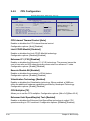
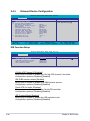
2.4.5 Onboard Device Configuration
Phoenix-Award BIOS CMOS Setup Utility
Advanced
Onboard Device Configuration
x
IDE Function Setup
Serial-ATA configuration
HD Audio Controller
Front Panel Support Type
HDMI Audio
Intergade HDA Codec
Onboard nVidia LAN
Onboard LAN Boot ROM
Serial Port1 Address
Parallel Port Address
Parallel Port Mode
EPP Mode Select
ECP Mode Use DMA
F1:Help
ESC: Exit
↑↓ : Select Item
→←: Select Menu
Select Menu
Item Specific Help
[Auto]
[HD Audio]
[Auto]
[SPDIF]
[Enabled]
[Disabled]
[3F8/IRQ4]
[378/IRQ7]
[ECP]
EPP1.7
[3]
-/+: Change Value F5: Setup Defaults
Enter: Select SubMenu F10: Save and Exit
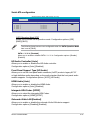
IDE Function Setup
Advanced
Phoenix-Award BIOS CMOS Setup Utility
IDE Function Setup
OnChip IDE Channel0
IDE DMA transfer access
Serial-ATA Controller
IDE Prefetch Mode
[Enabled]
[Enabled]
[Enabled]
[Enabled]
Select Menu
Item Specific Help
OnChip IDE Channel 0 [Enabled]
Allows you to enable or disable the OnChip IDE channel 0 controller.
Configuration options: [Disabled] [Enabled]
IDE DAM transfer access [Enabled]
Allows you to enable or disable IDE DMA transfer access .
Configuration options: [Disabled] [Enabled]
Serial-ATA Controller [Enabled]
Allows you to enable or disable the Serial-ATA controller.
Configuration options: [Disabled] [Enabled]
IDE Prefetch Mode [Enabled]
Allows you to enable or disable the IDE prefetch mode.
Configuration options: [Disabled] [Enabled]
2-26
Chapter 2: BIOS setup