1
User Guide
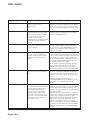
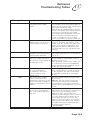
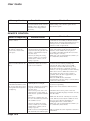
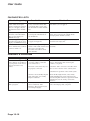
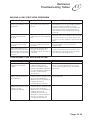
TROUBLESHOOTING TABLES
Use these tables if you have problems using the system. Look in this section for a
description of the problem before calling the Customer Service Center. Many problems
arise from basic misunderstandings of how the system works, especially when you are
just becoming familiar with it. These tables cover many problems, usually with a simple
solution for each one. To solve a particular problem, do the following:
1. Review the section in this Guide that relates to the problem.
2. If you cannot find a solution, then find the section in the following tables that relates
to the problem.
• Read the What’s Happening column until you find the problem.
• Read the information in the Possible Reason column.
• Try each of the suggested solutions in the What to Do column.
3. Sometimes resetting the receiver can fix a minor problem. See Resetting Your
Receiver on 13-2.
4. Make sure your TV is tuned to the correct channel or input. Use RECOVER as
described on 10-15.
5. Make sure your remote control has fresh batteries. If you see the Remote Battery Low
warning on your TV screen, it’s time to change the batteries. Follow the instructions
on page 2-7.
6. Make sure your receiver is connected to an active telephone line. See the instructions
on page 12-10.
7. Check for anything that might be blocking the satellite signal (for example, tree
branches, snow, etc.).
8. For more information, call the Customer Service Center at 1-888-SKY-DISH, or see
www.bell.ca.
Note: Before calling the Customer Service Center, have ready the date of purchase
and either your customer account number, the receiver conditional access number, or
the receiver model number. Display the System Information screen to find these
numbers (See Ordering your Programming). Also, write down any error messages that
the receiver displays on the television screen.
Page 13-2