1
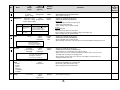
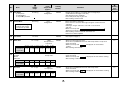
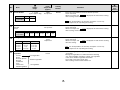
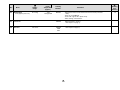
®
TM
J
CONVECTION MICROWAVE OVEN
MODEL R-995E
OPERATION MANUAL
CONTENTS
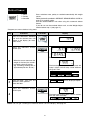
Info Display
1
Page
Warranty
1
Introduction
2
Warning
3
Special Notes
4
Installation Instruction
5
Oven Diagram
5
Operation of Touch Control Panel
6
Control Panel Display
6
Touch Control Panel Layout
6
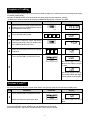
Before Operating
7
Getting Started
7
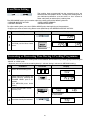
Clock Setting
7
Stop/Clear
7
To Cancel Program
7
Microwave Cooking
8
Microwave Time Cooking
8
Sequence Cooking
9
Instant Cook
9
Heating without Food
10
Convection Cooking
10
To Cook by Convection
10
To Preheat and Cook by Convection
11
Mix Cooking
12
To Use Automatic Mix Setting
12
To Preheat and Cook
with Automatic Mix Setting
13
Convection and Microwave Cooking
14
Grilling
15
Preheating
16
Automatic Operations
17
Notes for Automatic Operations
17
Weight Adjust
17
Sensor Instant Action
18
Reheat Sensor
19
Intelligent Sensor
20
Defrost Sensor
21
Other Convenient Features
22
Help
22
Less/More Setting
25
Increasing/Decreasing Time
25
Memory
26
Alarm
26
Care and Cleaning
27
Service Call Check
27
Specifications
27
Cooking Guides
1-H
WARRANTY
Consumer Electronic Products
Congratulations on Your Purchase!
This Sharp product is warranted against faults in materials and manufacture for a period of twelve (12) months
from the date of original purchase.
If service is required during the warranty period, please contact your nearest Sharp Approved Service Centre. These repairs would be carried out at no charge to the owner, subject to the conditions specified herein.
The owner is responsible for any transportation and insurance costs if the product has to be returned for
repair.
This warranty does not extend to accessories or defects or injuries caused by or resulting from causes not
attributable to faulty parts or the manufacture of the product, including but not limited to, defect or injury
caused by or resulting from misuse, abuse, neglect, accidental damage, improper voltage, liquid spillage,
vermin infestation, software, or any alterations made to the product which are not authorised by Sharp.
Please retain your sales documentation, as this should be produced to validate a warranty claim.
This warranty is in addition to and in no way limits, varies or excludes any express and implied rights and
remedies under any relevant legislation in the country of sale.
IMPORTANT
DO NOT RETURN THIS PAGE TO SHARP
For your reference, please enter the particulars of your purchase below and retain, with your purchase
documentation.
Model No.
Serial No.
Date of Purchase
Retailer
FOR LOCATION ENQUIRIES WITHIN
FOR PRODUCTS PURCHASED IN
AUSTRALIA
NEW ZEALAND
REGARDING YOUR
LOCAL
SHARP APPROVED SERVICE CENTRE
CALL THE
SHARP SERVICE REFERRAL CENTRE
TOLL FREE 1 300 135 022
CONTACT YOUR SELLING DEALER/RETAILER
OR CALL
SHARP CUSTOMER SERVICES
telephone: 09 573 0111
DURING NORMAL BUSINESS HOURS
(Eastern Standard Time)
www.sharpnz.co.nz
FACSIMILE: 09 573 0113
or contact our web site
or contact our web site
www.sharp.net.au
SHARP CORPORATION OF AUSTRALIA PTY. LIMITED
ABN 40 003 039 405
1 Huntingwood Drive Blacktown NSW 2148
SHARP CORPORATION OF NEW ZEALAND LIMITED
59 Hugo Johnson Drive
Penrose, Auckland
IMPORTANT NOTICE: This warranty applies only to products sold in Australia & New Zealand.
1
INTRODUCTION
®
INFO DISPLAY COOKING SYSTEM
Thank you for buying a Sharp Microwave Oven.
Your new oven has an "Information Display System" which offers you step-by-step instructions to easily
guide you through each feature.
Your oven also has a HELP key for instructions on using Auto Start, Information Guide On / Off,
Demonstration Mode, Child Lock, Info on pads and Help.
After gaining experience and confidence using your oven, the information display can be turned off.
We strongly recommend however that you read this operation manual thoroughly before operating your
oven, paying particular attention to the safety warnings and special notes.
The manual is divided into two sections:
1. OPERATION (P3~P27)
This section describes your oven and teaches you how to use all the features.
2. COOKING GUIDE
This section is at the back of the manual, it contains the more commonly used information such as
how to prepare food, which cooking utensil to use, standing time.
It also contains recipes for automatic cooking.
Please take some time to read your operation manual carefully, the automatic cooking menus programmed into
your new oven have been carefully developed to give optimum results when the step-by-step instructions are
followed.
When selecting another home appliance, please again consider our full range of Sharp products.
2
WARNING
Read all instructions before using the appliance.
To reduce the risk of fire in the oven cavity:
a. Do not overcook food.
b. Remove wire twist-ties from paper or plastic bags before placing bag in the oven.
c. Do not heat oil or fat for deep frying. The temperature of the oil cannot be controlled.
d. Look at the oven from time to time when food is heated in disposable containers made of plastic,
paper or other combustible materials for signs of smoke or burning.
e. If materials inside the oven should ignite, or smoke is observed, keep oven door closed, turn oven
off, and disconnect the power cord, or shut off power at the fuse or circuit breaker panel.
To reduce the risk of explosion and sudden boiling:
a, Do not place sealed containers in the oven. Babies bottles fitted with a screw cap or teat are
considered to be sealed containers.
b, When boiling liquids in the oven, use a wide-mouthed container and stand about 20 seconds at the
end of cooking to avoid delayed eruptive boiling of liquids.
This oven is for home food preparation only and should only be used for heating, cooking and defrosting food
and beverage.
It is not suitable for commercial, laboratory use, or heating therapeutic devices eg. Wheat bags.
Never operate the oven whilst any object is caught or jammed between the door and the oven.
Do not try to adjust or repair the oven yourself because of hazard. The oven must be adjusted or repaired
by a qualified service technician trained by SHARP.
Do not operate the oven if it is not working correctly or damaged until it has been repaired by a qualified service
technician trained by SHARP. It is particularly important that the oven door closes properly and that there
is no damage to:
(1) Door (warped), (2) Hinges and Latches (broken or loosened), (3) Door Seals, Sealing Surfaces and oven
cavity (buckled or deformed), (4) Burn marks on the door seal faces.
Do not bump, or catch utensils, loose clothes and your accessories on the door safety latches when removing
food from the oven.
Never poke an object, particularly a metal object, through a grille or between the door and the oven while the
oven operating.
Never tamper with or deactivate the door safety latches.
Always use oven gloves to prevent burns when handling utensils that are in contact with hot food. Enough
heat from the food can transfer through utensils to cause skin burns.
Should the power supply cord become damaged, it must be replaced with a special cord supplied by a
SERVICE CENTRE APPROVED BY SHARP. And it must be replaced by a qualified service technician
trained by SHARP.
If the oven lamp fails please consult your dealer or a qualified service technician trained by SHARP.
Avoid steam burns by directing steam away from the face and hands.
Slowly lift the furthest edge of a dish's cover and microwave plastic wrap and carefully open popcorn and oven
cooking bags away from the face.
Make sure that the power supply cord is undamaged, and that it does not run under the oven or over any hot
surfaces or sharp edges.
When using the CONVECTION, GRILL, MIX COOKING, SENSOR INSTANT ACTION or INTELLIGENT
SENSOR mode, the turntable, racks, oven door, outer cabinet and oven cavity will become hot. Use oven
mittens to prevent burns.
Before cleaning, make sure the oven door, outer cabinet, oven cavity, air vent openings, turntable, roller stay
and racks are not hot.
Do not place anything on the outer cabinet.
This appliance must be earthed.
Do not store food or any other items inside the oven.
Make sure the utensil does not touch the interior walls during cooking.
Only allow children to use the oven without supervision when adequate instructions have been given so that
the child is able to use the oven in a safe way and understands the hazards of improper use.
This appliance is not intended for use by young children or infirm persons without supervision.
Young children should be supervised to ensure that they do not play with the appliance.
3
SPECIAL NOTES
DO
DON’T
Eggs, fruits,
nuts, seeds
vegetables,
sausages and
oysters
* Puncture egg yolks and whites and
oysters before cooking to prevent
"explosion".
* Pierce skins of potatoes, apples,
squash, hot dogs, sausages and
oysters so that steam escapes.
* Cook eggs in shells. This prevents
"explosion", which may damage the
oven or injure yourself.
* Reheat whole eggs.
* Overcook oysters.
* Dry nuts or seeds in shells.
Popcorn
* Use specially bagged popcorn for the
microwave oven.
* Listen while popping corn for the
popping to slow to 1-2 seconds.
* Pop popcorn in regular brown bags or
glass bowls.
* Exceed maximum time on popcorn
package.
Baby food
* Transfer baby food to small dish and
heat carefully, stirring often. Check for
suitable temperature to prevent burns.
* Remove the screw cap and teat
before warming baby bottles. After
warming shake thoroughly. Check for
suitable temperature.
* Heat disposable bottles.
* Overheat baby bottles.
Only heat until warm.
* Heat bottles with nipples on.
* Food with filling should be cut after
heating, to release steam and avoid
burns.
* Stir liquids briskly before and after
cooking for even heating.
* Use a deep bowl when cooking liquids
or cereals to prevent boiling over.
* For boiling or cooking liquids see
WARNING on page 3.
* Heat or cook in closed glass jars or air
tight containers.
Canned foods
* Remove food from can.
* Heat or cook food while in cans.
Sausage rolls,
Pies, Christmas
pudding
* These foods have high sugar and/or
fat contents.
* Cook for the recommended time.
* Overcook as they may catch fire.
Meats
* Use a microwave proof roasting rack
to collect drained juices.
* Place meat directly on the turntable for
cooking.
Utensils
* Check the utensils are suitable for
MICROWAVE cooking before you use
them.
* Use metal utensils for MICROWAVE
cooking. Metal reflects microwave
energy and may cause an electrical
discharge known as arcing.
Aluminium foil
* Use to shield food to prevent over
cooking.
* Watch for sparking. Reduce foil or
keep clear of cavity walls.
* Use too much.
* Shield food close to cavity walls.
Sparking can damage the cavity.
Browning dish
* Place a suitable insulator such as
microwave and heat proof dinner plate
between the turntable and the
browning dish.
* Exceed the preheating time recommended by the manufacturer. Excessive preheating can cause the glass
turntable to shatter and/or damage
internal parts of the oven.
General
4
* Heat baby food in original jars.
* Deep fat fry.
* Heat or dry wood, herbs, wet papers,
clothes or flowers.
* Operate the oven without a load (i.e. an
absorbing material such as food or water) in the oven cavity except the directed
case in the operation manual.
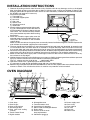
INSTALLATION INSTRUCTIONS
1. Remove all packing materials from the oven cavity. Check the unit for any damage, such as a misaligned
door, damaged gaskets around the door or dents inside the oven cavity or on the door. If there is any
damage, please do not operate the oven until it has been checked by a SERVICE CENTRE APPROVED
BY SHARP and repaired, if necessary.
2. Accessories provided
1) Turntable tray
2) Turntable support plate
3) Low rack
4) High rack
5) Defrost rack
6) Operation manual
7) Cook book
3. Since the door may become hot during cooking, you should place or mount the oven so
that the bottom of the oven is 80 cm or more
above floor. You should also keep children
away from the door to prevent them burning
Turntable
themselves.
4. Place the turntable support plate over the
turntable motor shaft on the floor of the cavity.
Turntable
Then place the turntable on the turntable
support plate
support plate.
Make sure the turntable and support plate are centrally located and locked together. NEVER operate the
oven without the turntable support plate and turntable.
5. The oven should not be installed in any area where excessive heat and steam are generated, for example, next
to a conventional oven unit. When the oven is mounted on a kitchen benchtop, allow at least 40 cm on the top,
5 cm on both sides and at the rear of the oven for free air space. The ventilation openings should not be blocked.
6. Please consult your Sharp retailer for availability of built in kit. Before preparing kitchen cabinets for wall mounting,
please refer to the Sharp built in kit installation instructions for clearances and ventilation requirements.
7. Make sure that the power supply cord is undamaged, and that it does not run under the oven or over any
hot surfaces or sharp edges.
8. Neither the manufacturer nor the distributors can accept any liability for damage to the machine or personal
injury for failure to observe the correct electrical connecting procedure.
The A.C. voltage must be single phase
• 230V-240V, 50Hz
9. Operate the oven from a general purpose domestic outlet.
If a generator is used, do not operate the oven with non-sinusoidal outputs.
10. Before using CONVECTION HEATER ELEMENTS for the first time, operate the oven without food for 20
minutes at 250°C. This will allow the oil that is used for rust protection to be burned off.
OVEN DIAGRAM
F
9
81
A
D
C
G
7
0
B
3
3
6
5
E
2
H
;;;;;;;;
;;;;; J
I ;;;;;;;;
;;;;;
;;;;;;;;
;;;;;;;;
4
1. Oven lamp
2. Door hinges
3. Door safety latches
4. See through door
5. Door seals and sealing
surfaces
6. Touch Control Panel
7. Digital readout
8. Waveguide cover
9. Turntable motor shaft
10. Convection air openings
11. Menu Label for Intelligent Sensor
12. Rating label
13. Access cover for oven
lamp replacement
14. Ventilation openings
5
15. Power supply cord
16. Oven cavity
17. Outer cabinet
18. Low rack
19. High rack
20. Defrost rack
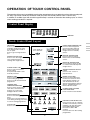
OPERATION OF TOUCH CONTROL PANEL
The operation of the oven is controlled by pressing the appropriate pads arranged on the surface of the control panel.
An entry signal tone should be heard each time you press the control panel to make a correct entry.
In addition an audible signal will sound for approximately 2 seconds at the end of the cooking cycle, or 4 times
when cooking procedure is required.
Control Panel Display
MIX CONV
DEFROST
SENSOR
COOK
KG HELP
Indicator
Touch Control Panel Layout
HELP PAD
Press to select auto start, information guide on/off, child
lock, demonstration mode or
info on pads.
Press to get cooking information.
INTELLIGENT SENSOR PAD
Press to select 24 popular
Convection, Mix, Grill and
Micro cooking menus with
weight sensor or humidity
sensor.
REHEAT SENSOR PAD
Press to select 5 popular
Reheat menus with humidity
sensor.
WEIGHT ADJUST PAD
Press to zero the weight of
your own dishes before
cooking with weight sensor.
DEFROST SENSOR PAD
Press to defrost meat, poultry
or seafood automatically with
weight sensor.
POWER LEVEL PAD
Press to select microwave
power setting.
If not pressed, HIGH is automatically selected.
SENSOR INSTANT ACTION
PADS
Press to cook 1 of the 8
popular menus.
MORE, LESS PADS
Press to increase/decrease
the time in one minute increments during cooking or to
alter the doneness for the
Sensor Instant Action, Reheat
Sensor, Intelligent Sensor or
Defrost Sensor modes.
MEMORY PAD
Press to enter the frequently
used cooking programme.
Press to recall the memorized
programme.
NUMBER AND
TEMPERATURE PADS
Press to enter cooking times,
clock time, convection temperature or to select the
Intelligent Sensor menus.
CONVECTION COOKING
FUNCTION PADS
Press to cook for each function.
STOP/CLEAR PAD
Press to clear during programming.
Press once to stop operation of
oven during cooking; press twice
to cancel cooking programme.
INSTANT COOK/START PAD
Press once to cook for 1 minute
at HIGH or increase by 1 minute
multiples each time this pad is
pressed during Microwave,
Convection, Grill or Mix
cooking.
Press to start oven after setting
programmes.
CLOCK PAD
Press to set clock time.
6
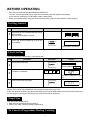
BEFORE OPERATING
* This oven is preset with the INFORMATION GUIDE ON.
To assist you in programming your oven, the information guide will appear in the display.
In this manual, the display of information guide is abbreviated.
* When you become familiar with your oven, the information guide can be turned off. Check page 23.
Getting Started
Step
Procedure
1
Plug the oven into a power point and switch
on the power.
Ensure the oven door is closed.
2
Pad Order
Display
Press the STOP/CLEAR pad so that the
oven beeps.
Only the dots will remain.
Clock Setting
* To enter the present time of day 11:34 (AM or PM).
Step
Pad Order
Procedure
Display
Press the CLOCK pad.
1
2
(operation guide off:
Enter the correct time of day by pressing the
numbers in sequence.
1
1
3
)
4
The dots (:) will flash on and
off.
Press the CLOCK pad again.
3
This is a 12 hour clock. If you attempt to enter an incorrect clock time (eg. 13:45) ERROR will appear in the
display. Press the STOP/CLEAR pad and re-enter the time of day (eg. 1:45).
If you wish to know the time of day during the cooking, auto start or timer mode, press the CLOCK pad. As long
as your finger is pressing the CLOCK pad, the time of day will be displayed.
Stop/Clear
Use the STOP/CLEAR pad to:
1. Stop the oven temporarily during cooking.
2. Clear if you make a mistake during programming.
To Cancel a Programme During Cooking
Press the STOP/CLEAR pad twice.
7
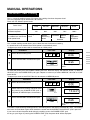
MANUAL OPERATIONS
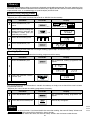
Microwave Time Cooking
This is a manual cooking feature. First enter the cooking time then the power level.
You can programme up to 99 minutes, 99 seconds.
There are five different power levels.
–
–
–
–
–
Power level
Approximate percentage of
microwave power
Examples of foods typically cooked on microwave
oven power level
LOW
–
–
–
–
–
10%
Keeping food
warm
M•LOW
–
–
MEDIUM
–
–
–
30%
–
–
–
–
–
M•HIGH
50%
–
–
–
–
–
HIGH
70%
–
–
– Cakes
–
–
Defrost
–
Muffins
Casseroles –
–
–
–
–
–
Softening –
Slices
–
–
–
–
–
butter
–
–
–
Seafood
–
–
–
–
–
–
–
–
–
100%
–
–
Fruit
–
–
Vegetables
–
–
Rice/Pasta
–
–
–
This variable cooking control allows you to select the rate of microwave cooking.
If a power level is not selected, then HIGH power is automatically used.
* Suppose you want to time cook for 10 minutes on HIGH power.
Step
1
Procedure
Display
Pad Order
Enter desired cooking time.
1
0
0
0
Press the INSTANT COOK/START pad.
2
COOK
The timer begins to count
down.
To lower the power press the POWER LEVEL pad once. Note the display will indicate “HIGH”. To lower to
“M•HIGH” press the POWER LEVEL pad again. Repeat as necessary to select “MEDIUM”, “M•LOW” or “LOW”
power levels.
* Suppose you want to cook Fish Fillets for 10 minutes on MEDIUM power.
Step
1
2
Procedure
Display
Pad Order
Enter desired cooking time.
1
Select microwave cooking and power level
by pressing the POWER LEVEL pad as
required (for MEDIUM press three times).
0
0
0
x3
Press the INSTANT COOK/START pad.
3
COOK
The timer begins to count
down.
If the door is opened during cooking process, the cooking time in the display automatically stops. The cooking
time starts to count down again when the door is closed and the INSTANT COOK/START pad is pressed.
If you want to check the power level during the cooking, press the POWER LEVEL pad.
As long as your finger is pressing the POWER LEVEL pad, the power level will be displayed.
8
Sequence Cooking
Your oven can be programmed up to 4 automatic cooking sequences, switching from one variable power setting
to another automatically.
Note that POWER LEVEL must be entered first when programming sequence cooking.
* Suppose you want to cook for 10 minutes on MEDIUM followed by 5 minutes on HIGH.
Step
Procedure
1
Select microwave cooking and desired power
level by pressing the POWER LEVEL pad (for
MEDIUM press three times).
2
Enter desired cooking time.
3
For second sequence, select microwave
cooking and power level (for HIGH press
the POWER LEVEL pad once)
4
Enter desired cooking time for the second
sequence.
Pad Order
Display
x3
1
0
5
0
0
0
0
Press the INSTANT COOK/START pad.
COOK
The timer begins to count
down to zero. When it reaches zero,
5
COOK
the second sequence will appear and the timer will begin
counting down to zero again.
Instant Cook™
For your convenience Sharp’s Instant Cook allows you to easily cook for one minute on HIGH power.
Step
Procedure
Pad Order
Display
Press the INSTANT COOK/START pad.
1
COOK
The timer begins to count
down.
Within one minute of closing the door.
Press the INSTANT COOK/ START pad until desired time is displayed.
Each time the pad is pressed, the cooking time is increased by 1 minute.
9
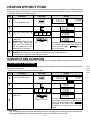
HEATING WITHOUT FOOD
Before the first use and after cleaning the convection heater must be conditioned. The procedure involves
heating for a period of 20 minutes. You may notice some smoke and odour during this process, the oven is not
out of order. Follow the procedure below.
Step
Procedure
1
Ensure that no food is in the
oven.
Press the CONVEC pad.
Display
Pad Order
CONV
CONV
)
(Operation guide off :
2
Enter the temperature (250°C).
CONV
3
Enter the heating time (20
min.).
4
Press the INSTANT COOK/
START pad.
IMPORTANT: During this operation, some smoke and
odour will occur. Therefore
open the windows or run the
ventillation fan in the room.
5
Open the door to cool the oven cavity. The cooling fan will remain on until the oven cavity has cooled.
WARNING: The oven door, outer cabinet, turntable and oven cavity will be hot.
Pay attention to avoid burns when cooling the oven.
2
0
0
CONV
0
CONV
COOK
The timer begins to count down to zero. When
timer reaches zero, all indicators will go out
and the oven will "beep".
will appear on the display.
CONVECTION COOKING
Please consult your Convection Microwave Cookbook for more specific cooking instructions and procedures.
To Cook by Convection
Your Convection Microwave Oven can be programmed for ten different convection cooking temperatures up to
99 minutes, 99 seconds.
* Suppose you want to cook for 20 minutes at 180°C.
Step
1
Procedure
Pad Order
Display
Place turntable in the oven.
Press the CONVEC pad.
CONV
CONV
(Operation guide off :
2
3
Enter desired temperature.
Enter desired cooking time.
)
CONV
2
0
0
Press the INSTANT COOK/
START pad.
0
CONV
CONV
COOK
The timer begins to count down to zero.
When timer reaches zero, all indicators will
go out and the oven will "beep".
will appear on the display. The cooling fan
will remain on until the oven cavity has
cooled.
4
Helpful Hints:
If you are cooking and wish to check the temperature you have programmed, simply press the CONVEC pad.
The programmed temperature will be displayed as long as CONVEC pad is pressed.
10
To Preheat and Cook by Convection
* Suppose you want to preheat the oven to 200°C then cook for 20 minutes at 200°C.
Step
Pad Order
Procedure
Display
Press the PREHEAT pad.
CONV
CONV
CONV
(Operation guide off :
2
Press desired preheat temperature
pad.
)
CONV
Press the CONVEC pad.
CONV
3
CONV
5
Press desired cooking temperature
pad.
Enter desired cooking time.
CONV
2
0
Press the INSTANT COOK/START
pad.
0
0
CONV
MIX CONV
DEFROST
SENSOR
COOK
6
When "ADD FOOD" is displayed,
the oven is preheated. If the oven
door is not opened, the oven will
automatically hold at the preheat
temperature for 30 minutes.
7
Open the door. Place food in oven.
Close the door.
8
)
KG HELP
will be displayed repeatedly.
When preheat is over, the oven will
"beep" 4 times and
will be displayed.
will be
displayed.
Press the INSTANT COOK/START
pad.
CONV
COOK
The timer begins to count down to
zero.
11
COOKING
(Operation guide off :
4
PREHEAT
1
MIX COOKING
Your Convection Microwave Oven has two preprogrammed settings that make it easy to cook with both
convection heat and microwaves automatically.
The LOW MIX pad is preprogrammed for 180°C with 10% microwave power, while the HIGH MIX pad is
preprogrammed for 200°C with 30% microwave power.
To Use Automatic Mix Settings
* Suppose you want to bake a cake for 20 minutes on LOW MIX.
Step
Procedure
Pad Order
Display
Press the LOW MIX pad.
MIX
MIX
1
MIX
2
Enter desired cooking time.
2
Press the INSTANT COOK/START pad.
0
0
0
MIX
MIX
COOK
The timer begins to count
down to zero.
When timer reaches zero, all
indicators will go out and the
oven will "beep".
will appear on the
display.
The cooling fan will remain on
until the oven cavity has
cooled.
3
NOTE
1. To cook on HIGH MIX setting, use the above procedure, pressing the HIGH MIX pad in Step 1.
2. If you want to change convection temperature of Automatic Mix Settings, using the above procedure, press the
desired Mix setting pad again after step 1 and then press the desired temperature pad. And continue Step 2.
Helpful Hints:
If you are cooking and wish to check the temperature you have programmed, simply press the CONVEC pad.
The programmed temperature will be displayed as long as CONVEC pad is pressed.
12
To Preheat and Cook with Automatic Mix Settings
* Suppose you want to preheat the oven to 200°C and roast a chicken for 20 minutes on HIGH MIX.
Step
Procedure
Pad Order
Display
Press the PREHEAT pad.
CONV
CONV
CONV
(Operation guide off :
2
Press desired preheat temperature
pad.
)
PREHEAT
1
CONV
Press the HIGH MIX pad.
MIX
MIX
COOKING
3
MIX
4
Enter desired cooking time.
2
0
Press the INSTANT COOK/START
pad.
0
0
MIX
MIXCONV
DEFROST
SENSOR
COOK
5
When "ADD FOOD" is displayed, the
oven is preheated. If the oven door is
not opened, the oven will automatically hold at the preheat temperature
for 30 minutes.
6
Open the door. Place food in oven.
Close the door.
7
KG HELP
will be displayed repeatedly.
When preheat is over, the oven will
"beep" 4 times and
will be displayed.
will be
displayed.
Press the INSTANT COOK/START
pad.
MIX
COOK
The timer begins to count down to
zero.
If you wish to change convection temperature of Automatic Mix settings, using the above procedure, press the
desired Mix setting pad again after Step 3 and then press the desired temperature pad. And continue Step 4.
13
Convection and Microwave Cooking
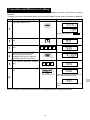
Your Convection Microwave Oven can be programmed to combine convection and microwave cooking
operations.
* Suppose you want to roast chicken pieces for 15 minutes at 180°C and then cook at 8 minutes on MEDIUM.
Step
Procedure
Pad Order
Display
Press the CONVEC pad.
CONV
CONV
1
(Operation guide off:
2
3
4
5
Enter desired convection temperature.
Enter desired convection cooking
time.
CONV
1
5
0
Select microwave cooking and
power level by pressing the
POWER LEVEL pad as required
(for MEDIUM press three times.)
Enter desired microwave cooking
time.
)
0
CONV
x3
8
Press the INSTANT COOK/START
pad.
0
0
CONV
COOK
The timer begins to count down to
zero. When it reaches zero,
6
COOK
The timer begins to count down to
zero.
Do not use plastic (non-heat proof) cookware if combining Convection and Microwave mode.
14
GRILLING
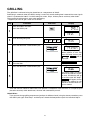
The grill effect is achieved using fan forced heat at a temperature of 250°C.
Preheating is automatic when the GRILL setting is used. Only actual cooking time is entered; the oven signals
when it is preheated to 250°C. Use Grill setting for steaks, chops, chicken pieces and many other foods.
The turntable should remain in oven when preheating.
* Suppose you want to grill a steak for 15 minutes.
Step
Procedure
Pad Order
Display
Place turntable in the oven.
Press the GRILL pad.
CONV
1
CONV
Enter desired grilling time.
2
1
Press the INSTANT COOK/START pad.
5
0
0
CONV
MIXCONV
DEFROST
SENSOR
COOK
3
4
KG HELP
will be displayed repeatedly.
When preheat is over, the
oven will "beep" 4 times and
will be
displayed.
Open the door and place food in oven.
Close the door.
will be
displayed.
Press the INSTANT COOK/START pad.
CONV
COOK
The timer begins to count
down to zero. When it reaches zero, all indicators will go
off and the oven will "beep".
will appear on the
display. The cooling fan will
remain on until the oven cavity has cooled.
5
*
Oven will maintain 250°C for 30 minutes after preheat is completed. If the oven door is not opened (food
placed in the oven) within 30 minutes, the oven will automatically turn off.
Helpful Hints:
If you want to change grilling temperature (perhaps for different foods) using the above procedure, press
the GRILL pad again after Step 1 and then press the desired temperature pad. And continue Step 2.
15
PREHEATING
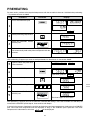
For best results, preheat to the required temperature with the turntable in the oven. Add food after preheating.
* To preheat the oven to 200°C
Step
Procedure
Pad Order
Display
Press the PREHEAT pad.
CONV
1
CONV
CONV
(Operation guide off:
Select preheating temperature.
CONV
2
3
4
)
Press the INSTANT COOK/
START pad.
MIXCONV
DEFROST
SENSOR
COOK
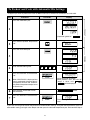
Preheat is over. If the oven door is not opened, the oven
will automatically hold at the preheat temperature for 30
minutes.
MIXCONV
DEFROST
SENSOR
KG HELP
MIXCONV
DEFROST
SENSOR
COOK
KG HELP
COOK
KG HELP
After preheating, Suppose you want to cook profiteroles for 20 minutes on convection 200°C.
5
Open the door and place food.
Close the door.
Press the CONVEC pad.
CONV
CONV
6
(Operation guide off:
Enter desired temperature.
CONV
7
Enter desired cooking time.
2
8
9
)
0
0
Press the INSTANT COOK/
START pad.
0
CONV
CONV
COOK
The timer begins to count down.
After preheating, suppose you want to cook with automatic Mix settings. Press the HIGH MIX or LOW MIX pad
instead of the CONVEC pad in Step 6 , then continue with Step 8.
If you are in the process of preheating and wish to check the actual oven temperature, simply press the CONVEC
pad. The actual oven temperature will be displayed as long as the CONVEC pad is pressed. If the oven
will be displayed.
temperature is below 40°C at this time,
16
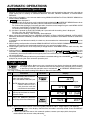
AUTOMATIC OPERATIONS
Notes for Automatic Operations
1. Wipe off any moisture from the outside of cooking containers and the interior of the oven with a dry cloth or
paper towel prior to cooking on SENSOR INSTANT ACTION, REHEAT SENSOR, or INTELLIGENT
SENSOR.
2. After oven is plugged in, wait 2 minutes before using SENSOR INSTANT ACTION, REHEAT SENSOR or
INTELLIGENT SENSOR.
will be displayed if:
3.
or DEFROST SENSOR menu when
(a) you try to cook too large or too small a weight of food marked with
you press each automatic operation pad or the INSTANT COOK/START pad.
To continue the cooking by automatic operation, check the correct weight range in each MENU GUIDE
and press the INSTANT COOK/START pad again.
To continue the cooking manually, see cookbook.
(b) the door is opened or the STOP/CLEAR pad is pressed until the cooking time is displayed.
To clear, press the STOP/CLEAR pad.
To continue the cooking, cook manually. See cookbook.
4. When using the automatic features (SENSOR INSTANT ACTION, REHEAT SENSOR, INTELLIGENT
SENSOR, DEFROST SENSOR), carefully follow the details provided in each MENU GUIDE to achieve the
best result.
may be
If the details are not followed carefully, the food may be overcooked or undercooked or
displayed.
5. When cooking small quantities of food on SENSOR INSTANT ACTION, REHEAT SENSOR or INTELLIGENT
SENSOR, the food may be cooked without displaying any remaining cooking time.
6. Food weighing more or less than the quantity or weight listed in each MENU GUIDE, cook manually. See
cookbook.
appears in the display, remove turntable and press the
7. During preheat, if
appears
INSTANT COOK/START pad again, the oven will start preheating. If
in the display, place the turntable onto the support plate. Press the INSTANT COOK/START pad, and the oven
will start preheating.
8. To change the final cooking or defrosting result from the standard setting, press the MORE( ) or LESS( )
pad prior to pressing the each automatic operation pad.
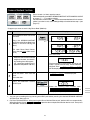
Weight Adjust
The weight adjust allows you to use a container of your choice, but the oven needs to check
the weight of your dish. This function measures the weight of the container prior to cooking
or DEFROST SENSOR menus.
or defrosting automatic operation menus marked with
* To weigh a baking dish before cooking Roast Beef on Sensor Instant Action.
Step
Procedure
Pad Order
Display
Place your empty dish on the turntable and close the door.
Press the WEIGHT ADJUST pad.
1
2
3
Turntable rotates, the dish is being weighed.
NOTE: When the menu guide procedures advise to use a
rack, place the rack with
your dish on the turntable.
Open the door.
* Place prepared food on the dish.
Close the door.
Press the SENSOR INSTANT
ACTION pad for Roast Beef once.
x1
MIX
MIX
SENSOR
SENSOR
After 3 sec, the oven starts cooking.
NOTE:1. When you use the utensils in the menu guide procedures ONLY, weight adjust is not required.
appears in the display, check that the turntable is correctly seated. Press the WEIGHT
2. If
ADJUST pad again.
3. * When you select the menus with automatic preheat, remove your empty dish, then place
food and dish into the oven after preheating.
17
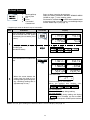
Sensor Instant Action
Press to cook 1 of the 8 popular menus.
Follow the details provided in SENSOR INSTANT ACTION MENU GUIDE
on pages 5 ~ 6 in cooking guides.
For the menus marked with , use the recommended utensil in the menu
guide. If you don't use it, use the Weight Adjust function before step 1 (see
page 17).
* Suppose you want to cook 1.5kg Roast Beef (Medium).
Step
Procedure
Place food on the low rack on the
turntable.
1
Press the SENSOR INSTANT
ACTION pad for Roast Beef once
(Within 1 minute of closing the
door).
Display
Pad Order
x1
MIX
MIX
SENSOR
SENSOR
After about 3 sec.
MIX
MIX
SENSOR
SENSOR
COOK
(To cook Roast Beef Dinner,
press the pad twice within 3 seconds.)
COOK
MIX
MIX
SENSOR
SENSOR
COOK
COOK
The oven starts.
2
* When the sensor measures the
weight of the food , the remaining cooking time will appear.
(eg. remaining cooking time is
approximately 56 min. 30 sec.)
3
Open the door. Turn over the
meat.
Close the door.
MIX
SENSOR
COOK
The timer begins to count down. The oven will
"beep" 4 times and will stop. COOK indicator
will go off. Then
will be displayed repeatedly.
will be displayed.
Press the INSTANT COOK/
START pad.
MIX
SENSOR
COOK
4
When the cooking time reaches zero,
will
be displayed repeatedly.
NOTE:
1. You can get a cooking hint by pressing the HELP pad before pressing the desired SENSOR INSTANT
ACTION pad. See page 24.
2. For Roast Chicken/Dinner : After pressing the Roast Chicken/Dinner pad, preheat will start automatically.
When the display shows
, open the door and place the food on the low rack. Then press
the INSTANT COOK/START pad.
18
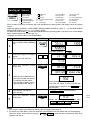
Reheat Sensor
1.
2.
3.
4.
5.
Press to select 5 popular reheat menus.
Follow the details provided in REHEAT SENSOR MENU
GUIDE on page 7 in the cooking guides.
For the menus marked with ,use the recommended utensil
in the menu guide. If you don't use it, use the Weight Adjust
function before step 1 (see page 17).
Beverage/Soup
Dinner plate
Pie
Pizza
Casseroles/
Canned food
* Suppose you want to reheat 2 cups of casseroles.
Step
Procedure
Press the REHEAT SENSOR pad
until the desired menu will appear
in the display (for casseroles, press
5 times).
Pad Order
Display
MIXCONV
DEFROST
SENSOR
MIXCONV
DEFROST
SENSOR
COOK
x5
KG HELP
COOK
KG HELP
COOK
KG HELP
COOK
HELP
COOK
HELP
COOK
HELP
MIXCONV
DEFROST
SENSOR
MIXCONV
DEFROST
SENSOR
COOK
KG HELP
COOK
HELP
COOK
HELP
COOK
HELP
1
If you require a cooking hint, press
the HELP pad.
(See NOTE below)
Press the INSTANT COOK/START
pad.
SENSOR
SENSOR
SENSOR
SENSOR
SENSOR
SENSOR
The oven starts.
2
MIXCONV
DEFROST
SENSOR
* When the sensor detects the
vapour from the food, the remaining cooking time will appear.
(eg. remaining cooking time is
approximately 37 sec.)
COOK
KG HELP
The timer begins to count down.
When the cooking time reaches zero,
will be displayed .
For small quantity
The oven will not stop during cooking.
For large quantity
The oven will stop during cooking and display
once. Therefore stir the casserole.
Cover with lid and press START pad to continue
cooking.
NOTE: You can get a cooking hint whenever HELP is lit in the display. See page 24.
19
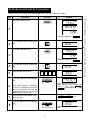
Intelligent Sensor
1.
2.
3.
4.
5.
6.
Seasoned Roast
Roast Turkey
Roast Pork
Roast Vegetables
Grilled Steak/Chops
Grilled Kebabs
7.
8.
9.
10.
11.
12.
Grilled Fish
Cake
Biscuits
Fresh Vegetables Hard
Soup
Fish Fillets
13. Corned Meat
14. Casseroles
15. White Rice
16. Fresh Pasta
17. Dry Pasta
18. Instant Noodles
19.
20.
21.
22.
23.
24.
Frozen Pasta
Porridge
Frozen Vegetables
Stewed Fruit
Preserves
Desserts
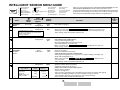
Press to select 24 popular Convection, Mix, Grill and Microwave cooking menus with weight sensor or humidity
sensor.
Follow the details provided in INTELLIGENT SENSOR MENU GUIDE on pages 8 - B and INTELLIGENT
SENSOR RECIPES on pages C - G in cooking guides.
For the menus marked with , use the recommended utensil in the menu guide. If you don't use it, use the Weight
Adjust function before step 1 (see page 17).
* Suppose you want to cook 2 cups of White Rice.
Step
Procedure
Display
Pad Order
Press the INTELLIGENT SENSOR
pad.
SENSOR
SENSOR
1
SENSOR
(Operation guide off :
2
Select food category for Intelligent
Sensor.
Press 15 to cook white rice.
1
5
)
SENSOR
SENSOR
HELP
HELP
SENSOR
HELP
Press the INSTANT COOK/
START pad.
SENSOR
SENSOR
COOK
HELP
COOK
HELP
SENSOR
3
4
HELP
COOK
HELP
SENSOR
The oven starts.
* When the sensor detects the vapour from the food, the remaining cooking time will appear.
(eg. remaining cooking time is
approximately 8 min. 50 sec.)
SENSOR
COOK
HELP
The timer begins to count down.
The oven will "beep" 4 times and will stop.
will
COOK indicator will go off, and
be displayed.
Open the door. Stir the rice.
Close the door.
Press the INSTANT COOK/
START pad.
5
COOK
will be displayed.
SENSOR
COOK
HELP
When the cooking time reaches zero,
will be
displayed repeatedly.
NOTE:
1. You can get a cooking hint whenever HELP is lit in the display. See page 24.
2. For menus 3-9: After Step 2, press the INSTANT COOK/START pad and preheat will start automatically.
When the display shows the message (eg.
), open the door and place the food. Then
continue with step 3.
20
Defrost Sensor
1. Meat
2. Poultry
3. Seafood
Press to defrost meat, poultry or seafood automatically with weight
sensor.
Follow the details provided in DEFROST SENSOR MENU GUIDE on
page H in cooking guides.
Use the attached defrost rack when using this automatic defrost
feature.
If you do not use the attached defrost rack, use the Weight Adjust
function before step 1 (see page 17).
* Suppose you want to defrost 1.0 kg meat.
Step
1
Procedure
Press the DEFROST SENSOR
pad until the desired menu will
appear in the display (for meat,
press once).
Pad Order
Display
DEFROST
SENSOR
HELP
x1
Press the INSTANT COOK/
START pad.
DEFROST
SENSOR
DEFROST
SENSOR
COOK
HELP
COOK
HELP
COOK
HELP
DEFROST
SENSOR
The oven starts.
2
* When the sensor measures the
weight of the food, the remaining cooking time will appear.
(eg. remaining cooking time is
approximately18 min. 40 sec.)
DEFROST
SENSOR
COOK
HELP
The timer begins to count down. The oven will
"beep" 4 times and will stop. COOK indicator
will go off. Then
will be displayed repeatedly.
3
Open the door. Turn over and
shield any warm portions.
Close the door.
will be displayed repeatedly.
Press the INSTANT COOK/
START pad.
DEFROST
SENSOR
COOK
4
HELP
The timer begin counting down, when it reaches
zero, the oven will "beep".
will be displayed repeatedly.
NOTE: You can get a cooking hint whenever HELP is lit in the display. See page 24.
21
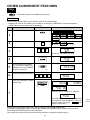
OTHER CONVENIENT FEATURES
Help
The HELP feature has 6 different programmes.
Auto Start
The Auto Start feature allows you to set your oven to start automatically.
* Suppose you want to start cooking a casserole for 20 minutes on MEDIUM at 4:30 in the afternoon.
(Check that the correct time of day is displayed.)
Step
Pad Order
Procedure
Display
Press the HELP pad.
1
2
Press the number 1 pad.
1
Enter the desired start time.
4
3
3
0
The dots (:) will flash on and off.
Press the CLOCK pad.
4
5
Set the desired cooking mode.
(for microwave cooking on
MEDIUM, press the POWER
LEVEL pad 3 times)
x3
Enter the desired cooking time.
2
6
0
0
0
Press the INSTANT COOK/
START pad.
The oven will start cooking at 4:30 P.M.
7
COOK
The timer begins to count down. When the
timer reaches zero, all indicators will go off
will
and the oven will "beep".
appear in the display.
To check the current time, simply press the CLOCK pad, the time will be displayed.
If the door is opened after step 7, close the door and press the START pad to continue with Auto Start.
Press the STOP/CLEAR pad to cancel Auto Start.
The correct time of day must be set before using Auto Start, see clock setting on page 7.
22
Information Guide On/Off
This oven is preset with the Information Guide On.
As you get more familiar with your oven, the Information Guide can be turned off.
* To turn off the Information Guide. After step 1 for Auto Start.
Step
Procedure
Press the number 2 pad.
Pad Order
Display
2
2
Press the STOP/CLEAR pad.
3
The time of day will appear in the display.
* To restore the Information Guide. After step 2 above.
Step
3
Procedure
Pad Order
Display
Press the INSTANT COOK/
START pad.
The time of day will appear in the display.
Child Lock
If the oven is accidentally started with no food or liquid in the cavity, the life of the oven can be reduced.
To prevent accidents like this, your oven has a "Child Lock" feature that you can set when the oven is not in use.
* To set the Child Lock. After step 1 for Auto Start.
Step
Procedure
Press the number 3 pad.
2
3
Pad Order
Display
3
Press the INSTANT COOK/
START pad.
The time of day will appear in the display.
The control panel is now locked, each time a pad is pressed, the display will show "LOCK".
* To unlock the control panel. After step 2 above.
Step
Procedure
Pad Order
Display
Press the STOP/CLEAR pad.
3
The time of day will appear in the display.
The oven is ready to use.
23
Demonstration Mode
This feature is mainly for use by retail outlets, and also allows you to practice key operations.
* To demonstrate. After step 1 for Auto Start.
Step
Procedure
Pad Order
Press the number 4 pad.
Display
4
2
Press the INSTANT COOK/
START pad.
3
Then
will appear repeatedly.
Cooking operations can now be demonstrated with no power in the oven.
* Suppose you demonstrate Instant Cook.
Step
Procedure
1
Press the INSTANT COOK/
START pad.
(Within one minute of closing
the door.)
Pad Order
Display
COOK
The timer begins to count down to zero at ten
times the speed. When the timer reaches
will appear in the display.
zero,
* To cancel the Demonstration Mode. After step 2 above.
Step
Procedure
Pad Order
Display
Press the STOP/CLEAR pad.
3
The time of day will appear in the display.
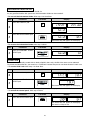
Info on Pads
Each pad displays a useful operation guide.
* To get the guide for INTELLIGENT SENSOR pad. After step 1 for Auto Start.
Step
2
Procedure
Pad Order
Display
Press the INTELLIGENT SENSOR pad.
The guide message will be repeated twice, and then the display will show the time of day.
If you want to cancel the guide, press the STOP/CLEAR pad.
Help
Each setting of Automatic Operations has a cooking hint.
If you wish to check, press the HELP pad whenever HELP is lit in the display.
NOTE: For SENSOR INSTANT ACTION, HELP is not lit in the display, so press the HELP pad before pressing
the desired SENSOR INSTANT ACTION pad.
24
Multi
Less/More
CookSetting
The cooking times programmed into the automatic menus are
tailored to the most popular tastes. To adjust the cooking time to
your individual preference –use the “more” or “less” feature to
either add (more) or reduce (less) cooking time.
The LESS/MORE pads can be used to adjust the cooking time of the following features
– SENSOR INSTANT ACTION
– INTELLIGENT SENSOR
– REHEAT SENSOR
– SENSOR DEFROST
To adjust cooking time, press the LESS or MORE pad at the beginning of the procedure.
* Suppose you want to cook 1.0 kg Roast Lamb (Well Done) with SENSOR INSTANT ACTION.
Step
Procedure
Pad Order
Display
Press the MORE pad.
1
2
Press the SENSOR INSTANT
ACTION pad for Roast Lamb
once.
MIX
MIX
HELP
HELP
x1
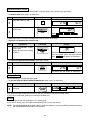
Increasing or Decreasing Time During A Cooking Programme
Microwave, Convection, Mix or Grilling time can be added or decreased during a cooking programme using the
“MORE” or “LESS” pads.
* Suppose you want to increase cooking time by 2 minutes during 5 minutes on MEDIUM cooking.
Step
1
2
3
4
Procedure
Enter desired cooking time.
Pad Order
5
0
Display
0
Select microwave cooking and
power level by pressing the
POWER LEVEL pad as required.
(for MEDIUM press three
times)
x3
Press the INSTANT COOK/
START pad.
COOK
COOK
The timer begins
to count down.
Press the MORE pad twice to
increase time by two minutes.
x2
25
COOK
Memory
Your oven has a memory to allow you to preset a frequently used cooking programme. The oven "memorises" the
instruction and can recall this information when the time of day is displayed. This feature can be used for frequently
prepared foods such as scrambled eggs, or special recipes you like to cook.
Memory Entry/Reprogramme
(Up to four stages can be memorized.)
*Suppose you want to enter 2 minutes 20 seconds on M•HIGH into the memory.
Step
Procedure
1
Press the MEMORY pad
twice.
2
Select microwave cooking and
power level by pressing the
POWER LEVEL pad (for
M•HIGH press twice).
3
4
Enter desired cooking time.
Pad Order
Display
x2
(Operation guide off:
)
x2
2
2
0
Press the MEMORY pad.
NOTE : If you wish to enter more than two stages cooking, repeat step 2 and 3 after step 3.
Cooking By Memory
*Suppose you want to use the memorized cooking programme with memory.
Step
Procedure
Pad Order
Display
The memorized cooking programme will
appear.
Press the MEMORY pad.
1
2
Press the INSTANT COOK /
START pad.
COOK
To Check Memory
You may forget exactly what information is stored in the memory or simply want to check if the oven has been
programmed correctly:
*Suppose you want to check the cooking programme of memory.
Step
Procedure
Pad Order
Display
1
Press the MEMORY pad.
The memorized cooking programme will
appear.
2
Press the STOP/CLEAR pad.
Time of day will appear.
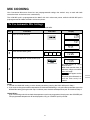
Alarm
Your oven has an alarm function. If you leave food in the oven after cooking, the oven will "beep" 3 times and
will be appeared in the display after 2 minutes.
If you do not remove the food at that time, the oven will "beep" 3 times after 4 minutes and 6 minutes.
26
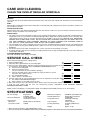
CARE AND CLEANING
CLEAN THE OVEN AT REGULAR INTERVALS.
Disconnect the power supply cord before cleaning. And if possible leave the door open to inactivate the oven.
Exterior:
The outside may be cleaned with mild soap and warm water, wipe clean with a damp cloth. Avoid the use of harsh abrasive
cleaners.
Door:
Wipe the door and window on both sides and the door seals frequently with a damp cloth to remove any spills or spatters. Do
not use abrasive cleaner.
Touch Control Panel:
Wipe the panel with a cloth dampened slightly with water only. Do not scrub or use any sort of chemical cleaners. Do not use
abrasive cleaner. Avoid the use of excess water.
Interior walls:
1. The walls of the oven are coated with ceramic for easy cleaning. Please wipe any spatters or spills with a soft damp cloth or
sponge after each use. For heavier soil, add a little detergent to the damp cloth or sponge whilst the oven is still warm. Any
small spots that remain will in no way effect the performance, reliability or life of the oven. REMOVE ANY DETERGENT
RESIDUE WITH CLEAN DAMP CLOTH. DO NOT SCRUB WITH SCOURING PAD SUCH AS STEEL WOOL. DO
NOT USE COMMERCIAL OVEN CLEANERS, ABRASIVE OR HARSH CLEANERS AND SCOURING PADS ON
ANY PART OF YOUR MICROWAVE OVEN. DO NOT USE A STEAM CLEANER.
2. The waveguide cover, which is situated on the roof of the oven, should be cleaned at regular intervals. Use mild soap and
water to remove excess grease build-up before it bakes on. The cover must be kept clean to avoid uneven microwave
distribution.
3. Avoid using excess water. After cleaning the oven, ensure any water is removed with a soft cloth.
4. At regular intervals, heat the oven referring to "Heating without Food" on page 10. Splashed food, on the oven walls may
cause smoke and odour.
Turntable/Support Plate/Racks:
Wash with mild soapy water and dry thoroughly.
SERVICE CALL CHECK
Please check the following before calling service:
1. Does the display light?
Yes
No
2. When the door is opened, does the oven lamp light?
Yes
No
3. Place one cup of water (approx. 250 ml) in a glass measuring cup in the oven and close the door securely. Oven lamp should
go off if door is closed properly. Press the INSTANT COOK/START pad once.
A. Does the oven lamp light?
Yes
No
B. Does the cooling fan work?
Yes
No
(Put your hand over the rear ventilation openings.)
C. Does the turntable rotate? (The turntable can rotate clockwise or counter
clockwise. This is quite normal.)
Yes
No
D. Do COOK indicator light?
Yes
No
E. After 1 minute, is the water hot?
Yes
No
4. Remove water from the oven and programme the oven for 5 minutes at convection 180°C.
A. Do CONV and COOK indicators light?
Yes
No
B. After 5 minutes, is the inside of the oven hot?
Yes
No
If "NO" is the answer to any of the above questions, please check your wall socket and the fuse in your meter box.
If both the wall socket and the fuse are functioning properly, CONTACT YOUR NEAREST SERVICE
CENTRE APPROVED BY SHARP.
NOTE: If time in the display is counting down rapidly, check Demonstration Mode. (Please see P. 24 for detail.)
SPECIFICATIONS
AC Line Voltage:
AC Power Required:
Output Power:
Microwave
Convection Heater
Single phase
230-240V, 50Hz
1.6 kW (Microwave)
1.6 kW (Convection)
Microwave Frequency:
Outside Dimensions:
900 W* (IEC test procedure)
1500 W
Oven Capacity:
Cooking Uniformity:
Cavity Dimensions:
2450 MHz**(ClassB/Group2)
627mm(W) x 381mm(H)
x 528mm(D)
410mm(W) x 246mm(H)
x 410mm(D)
41 litre (1.5cu.ft)
Turntable (390mm tray)
system
Approx. 31 kg
Weight:
* When tested in accordance with AS/NZS 2895.1.1995
** This is the classification of ISM(Industrial, Scientific and Medical) equipment described in the International Standard CISPR11.
27
MEMO
28
SHARP
COOKING GUIDES
CONTENTS COOKING GUIDE
QUICK
REFERENCE
GUIDE
1
COOKWARE
&
UTENSIL GUIDE
HELPFUL
HINTS
2
®
SHARP CORPORATION OSAKA, JAPAN
3
SENSOR
INSTANT ACTION
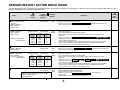
MENU GUIDE 5
REHEAT SENSOR
MENU GUIDE
7
INTELLIGENT
SENSOR MENU
GUIDE
8
INTELLIGENT
SENSOR RECIPES
13
DEFROST
SENSOR MENU
GUIDE
18
TINSEA 895 WRRZ-J22 Printed in Thailand
FEATURE
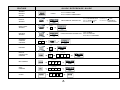
QUICK REFERENCE GUIDE
SENSOR
INSTANT
ACTION
once for ROAST LAMB
twice for ROAST LAMB DINNER
PRESS
SELECT MENU
REHEAT
SENSOR
PRESS REHEAT SENSOR PAD
once for BEVERAGE/SOUP
twice for DINNER PLATE
three times for
PIE
PRESS DEFROST SENSOR PAD
once for MEAT
twice for POULTRY
three times for SEAFOOD
MENU
NUMBER
INTELLIGENT
SENSOR
1
eg. No.1
SELECT MENU
DEFROST
SENSOR
VARIABLE
COOKING
CONTROL
To soften Cream Cheese or Butter for 40 seconds on M•LOW.
Cooking Time
4
0
x4
To preheat the oven to 160˚C.
Temp
PREHEAT
MANUAL
CONVECTION
COOKING
To cook for 15 minutes at 180˚C.
Temp
Cooking Time
1
5
0
To cook for 15 minutes on HIGH MIX.
Cooking Time
MIX COOKING
1
5
0
0
To grill for 15 minutes.
GRILL
COOKING
CLOCK
Cooking Time
1
5
1
0
1
0
4
5
eg. 11:45 am or pm
1
0
four times for
PIZZA
five times for CASSEROLES/
CANNED FOOD
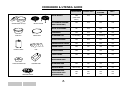
COOKWARE & UTENSIL GUIDE
MICROWAVE
CONVECTION
MIX
COOKING
YES
(LOW RACK
ONLY)
YES
YES
YES
GLASSWARE/CERAMIC
(HEAT RESISTANT)
YES
YES
YES
YES
METAL COOKWARE
NO
YES
YES
YES
OVEN BAGS
YES
YES
YES
NO
For Shielding
YES
For Shielding
YES
NON-STICK PAPER
YES
YES
YES
NO
GREASE-PROOF PAPER
YES
YES
YES
NO
WAXED PAPER
YES
NO
NO
NO
PLASTIC WRAP
YES
NO
NO
NO
PAPER TOWEL
YES
NO
NO
NO
PLASTIC COOKWARE
MICROWAVE SAFE
YES
NO
NO
NO
BROWNING DISH
YES
NO
NO
NO
DEFROST RACK
Defrost Only
NO
NO
NO
YES
NO
NO
YES
NO
NO
NO
NO
METAL RACKS
METAL RACKS
OVENPROOF GLASS
CAKE TIN
PIZZA TRAY
PAPER TOWEL
RING CENTRE DISH
FOIL
SQUARE DISH
;;;;;;;;
;;;;;;
;;;;;;;;
;;;;;;
;;;;;;;;
;;;;;;
DEFROST RACK
ALUMINIUM FOIL
THERMOMETERS
MICROWAVE SAFE
CONVENTIONAL
2
GRILL
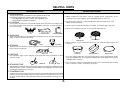
HELPFUL HINTS
MICROWAVE COOKING
CONVECTION COOKING
1. ARRANGEMENT
1. Can be used the same a conventional oven.
Arrange foods carefully. Place thickest areas toward outside of dish.
Eg. Arrange vegetables in a shallow dish in the following way:
Hard Vegetables around the outside, Soft Vegetables in the
centre, Medium Vegetables in-between.
2. When cooking your own recipes; cook for a slightly shorter cooking time, at the
temperature the recipe suggests. Then add additional time if necessary.
3. For best results, preheat to required temperature with the turnable in the oven.
Add food after preheating.
2. COVERING
Cover foods in the microwave if you would normally cover the food in your ordinary oven,
or to retain moisture. Cover foods such as Vegetables, Casseroles, or when Reheating.
Use to cover foods:
4. Foods may be cooked either directly on turntable, or using the high or low racks.
5. Do not cover turntable, high rack, or low rack with aluminium foil.
LID
PLASTIC WRAP
PAPER TOWEL
3. SHIELDING
Shield using small pieces of aluminium foil to shield thin areas of meat, fish and poultry or
edges of cakes to prevent overcooking.
LOW RACK
4. STIRRING
FISH
HIGH RACK
6. Metal cookware can be used. Round pizza trays are excellent cooking utensils for
cooking.
CHICKEN
Stir foods from the outside to the centre of the dish, once or twice during cooking if possible.
Eg. Casseroles and Sauces.
STIR
CAKE TIN
5. PIERCING
Pierce potatoes, eggs, oysters, tomatoes or any foods with a skin or membrane to allow
steam to escape.
TOMATO
SQUARE DISH
PIZZA TRAY
7. If you are cooking and wish to check the temperature you have programmed, simply
press the CONVEC pad. The programmed temperature will be displayed as long as
CONVEC pad is pressed.
8. Use convection cooking for baking delicate foods or those which have short cooking
times. ie. biscuits, scones, choux pastry or pavlova.
EGG
6. STANDING TIME
Standing time is important. After cooking or defrosting ensure adequate standing time. This
allows the food to continue cooking or heating. Refer to cooking guides for each menu or
according to manufacturers instructions.
7. CONDENSATION
Condensation is a normal part of microwave cooking. The humidity and moisture in food will
influence the amount of condensation in the oven. Generally, covered foods will not cause
as much condensation as uncovered foods. Ensure that the ventilation openings are not
blocked.
3
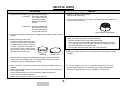
HELPFUL HINTS
MIX COOKING
GRILLING
1. There are two automatic, pre-programmed mix settings.
a) Low Mix -
1. Preheat is automatic for this menu.
Add food after pre-heating.
Convection 180°C with
10% microwave power.
Use for baking cakes,
slices, bread, quiches,
pastries.
2. Place food on the high rack in the oven after preheating. (Round pizza trays
may be used if necessary).
b) High Mix - Convection 200°C with
30% microwave power.
Use for roasting meats,
lasagne and meat loaf.
HIGH RACK & TURNTABLE
2. The convection temperature can be changed to accommodate all your favourite
recipes.
When grilling food that cause excessive fat splatter and smoke (eg. steak,
chops) the following principles should be followed:
* Remove turntable from the oven before preheating.
* Fit the high rack on the turntable, place the food on the rack and pour
1/2 cup of tap water on the turntable. (Otherwise the dripping fat drops
onto the hot turntable causing the smoke).
* The turntable should be fitted in the oven after preheating.
3. Metal cookware can be used.
During mix cooking some metal utensils may cause arcing when they come
in contact with oven walls or accessory racks. To prevent arcing when using a metal tin, place a heat resistant
dish (Pyrex ® pie plate, dinner plate)
between the tin and the rack.
CAKE TIN
3. The oven is preset at 250°C, this can be reduced to accommodate a variety
of foods.
PIZZA TRAY
4. If you are cooking and wish to check the temperature you have programmed
simply press the CONVEC pad. The programmed temperature will be
displayed as long as CONVEC pad is pressed.
4. If you are cooking and wish to check the temperature you have
programmed, simply press the CONVEC pad. The programmed temperature will be displayed as long as CONVEC pad is pressed.
5. When converting conventional recipes the following principles should be
followed:
* When using High Mix cut the time by two-thirds: use half the normal cooking time
when using Low Mix.
* Cut the temperature by 10% from conventional recipe temperatures.
* Use the low rack whenever possible.
* When baking, preheat the oven as you would normally.
4
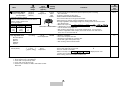
SENSOR INSTANT ACTION MENU GUIDE
The final temperature will vary according to initial temperature. Check foods for doneness after cooking. If necessary you can continue cooking with extra time and
the recommended cooking method in the guide below.
Menu
Initial
Temperature
(approx.)
Weight
Range
+ 3 °C
Refrigerated
Roast Beef
* You can select desired
doneness.
MORE - Well done
STD - Medium
LESS - Rare
0.8-3.0 kg
Roast Beef Dinner
MORE -Well done
STD - Medium
LESS - Rare
0.8-2.5 kg
(weight of meat)
Variety of vegetables potato/pumpkin
Roast Lamb
MORE - Well done
STD - Medium
0.8-2.5 kg
(weight of meat)
Meat
Weight
2.5 kg
2.0 kg
1.5 kg
1.0 kg
0.8 kg
1.0-2.5 kg
HIGH
MIX
Standing
Time
(minutes)
Procedure
* Tie meat with string.
* Place fat side down on the low rack.
* When oven stops and
* After cooking, stand covered with aluminium foil.
10-15
is displayed, turn beef over.
HIGH
MIX
CONV.
* For best results we recommend to par-boil potatoes prior to cooking.
See note on page 6.
* Place meat directly on the greased turntable.
* While meat is cooking, prepare vegetables, brush with oil and place on a flat
pizza tray.
* When oven stops and
is displayed,if necessary drain off the fat, turn beef over and add vegetables
over the beef using high rack.
* After cooking, stand meat covered with aluminium foil. If you prefer the vegetables
a little crisper, while the meat is standing, place the vegetables back into the
oven and cook for 12-15 min. on convection 250 °C.
10-15
+ 3 °C
Refrigerated
HIGH
MIX
* Place fat side down on the low rack and season.
* When the oven stops and
* After cooking, stand covered with aluminium foil.
10-15
+ 3 °C
Refrigerated
HIGH
MIX
CONV.
* For best results we recommend to par-boil potatoes prior to cooking.
See note on page 6.
* Place meat directly on the greased turntable.
* While meat is cooking, prepare vegetables, brush with oil and place on a flat
pizza tray.
* When oven stops and
is displayed,if necessary drain off the fat, turn lamb over and add vegetables
over the lamb using high rack.
* After cooking, stand meat covered with aluminium foil. If you prefer the vegetables
a little crisper, while the meat is standing, place the vegetables back into the
oven and cook for 12-15 min. on convection 250 °C
10-15
* Preheat is automatic for this menu.
* ADD CHICKEN AFTER PREHEATING.
* Place breast side down on the low rack.
* When oven stops and
chicken over.
* After cooking, stand covered with aluminium foil.
10-15
Vegetable
Weight
1.5 kg
1.25 kg
1.0 kg
0.75 kg
0.6 kg
0.8-3.0 kg
Roast Lamb Dinner
MORE - Well done
STD - Medium
Variety of vegetables potato/pumpkin
Roast Chicken
Meat
Weight
2.5 kg
2.0 kg
1.5 kg
1.0 kg
0.8 kg
+ 3 °C
Refrigerated
Cooking
Method
Vegetable
Weight
1.5 kg
1.25 kg
1.0 kg
0.75 kg
0.6 kg
Serves
6-8
4-6
4
2-3
2
Serves
6-8
4-6
4
2-3
2
+ 3 °C
Refrigerated
Preparation before cooking
* Remove neck and excess fat from chicken.
* Wash and dry chicken.
* Tie legs together.
Preheat
HIGH
MIX
5
is displayed, turn lamb over.
is displayed, turn
Menu
Initial
Temperature
(approx.)
Weight
Range
Roast Chicken Dinner
Variety of vegetables potato/pumpkin
+ 3 °C
Refrigerated
1.0-2.0 kg
(weight of
chicken)
Preparation before cooking
* Remove neck and excess fat from chicken.
* Wash and dry chicken well.
* Tie legs together.
Chicken
Weight
2.0kg
1.5kg
1.0kg
Vegetable
Weight
1.25kg
1.0kg
0.75kg
Serves
4-5
4
2-3
Fresh Vegetables Soft
(
1-10 pieces
1 piece,
approx, 150g
)
Standing
Time
(minutes)
Procedure
Preheat
HIGH
MIX
CONV.
*For best results we recommend to par-boil potatoes prior to cooking.
See note below.
*Preheat is automatic for this menu.
*ADD CHICKEN AFTER PREHEATING.
*Place chicken directly on the greased turntable.
*While chicken is cooking, prepare vegetables, brush lightly with oil.
*Arrange vegetables around edge of high rack, leaving centre of rack uncovered
(See diagram left).
* When oven stops and
HIGH RACK & VEGETABLES is displayed, if necessary drain off the fat, turn chicken over and add vegetables
over the chicken using high rack.
* After cooking, stand chicken covered with aluminium foil. If you prefer the
chicken or vegetables a little crisper, place back into the oven and cook for
12-15 min. on convection 250 °C
+ 20 °C
MICRO
Room temperature
0.1-1.0 kg
Brussels Sprouts
Zucchini
Spinach
Cabbage
Squash
Jacket Potato
Potato (whole)
Cooking
Method
+ 20 °C
Room
temperature
MICRO
10-15
* Wash the vegetables.
* Pierce skin of squash with folk.
* Arrange the vegetables in a shallow dish.
* Cover with a glass lid or plastic wrap.
* After cooking, stand covered and stir.
1-5
*Use washed new potatoes.
*Pierce twice with fork on each side.
*Place on outside of turntable.
*When oven stops and
potatoes and continue cooking.
*After cooking, stand covered with aluminium foil.
3-10
NOTE: To par-boil potatoes prior to roasting
1. Place potatoes into a Pyrex® bowl.
2. Cover with 2-3 cups hot tap water.
3. Cover with a lid or plastic wrap.
4. Cook for 8-12 minutes on HIGH, until tender but firm.
Drain well.
6
is displayed, turn over
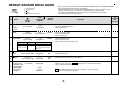
REHEAT SENSOR MENU GUIDE
1.
2.
3.
4.
5.
No.
1
Menu
Weight
Range
Cooking
Method
Procedure
+ 20 °C
Room
temperature
MICRO
* No cover.
* Place on outside of turntable.
* After reheating, stir.
Soup
1-4 cups
(1 cup, 250 ml)
+ 20 °C
Room temperature
MICRO
* Place in a Pyrex® bowl.
* Cover with plastic wrap.
* After reheating, stir.
Dinner Plate
1 serve
(approx. 400g)
+ 3 °C
Refrigerated
MICRO
* Cover with plastic wrap.
* Place on the low rack.
* After cooking, allow to stand covered.
MEAT
POTATO
175-180g
125g
Beef, Lamb
Chicken, T-Bone
sliced
VEGETABLES
100g
1-6 pieces
(1 piece, approx. 180g)
+ 3 °C
Refrigerated
HIGH
MIX
* Place pie on the low rack on the turntable.
* After cooking, stand.
Pizza
1-6 pieces
(1 piece, approx. 90g)
+ 3 ˚C
Refrigerated
HIGH
MIX
* Place pizza on the low rack on the turntable.
+ 3 °C
Refrigerated
MICRO
1-4 cups
(1 cup, 250 ml)
2
2 varieties
eg. sliced Carrot,Zucchini
Broccoli
Pie
Casseroles
Beef Stroganoff
Springtime Lamb
Apricot Chicken
Canned Food
Baked Beans
Spaghetti
Standing
Time
(minutes)
1-4 cups
(1 cup, 250 ml)
3 (Meat)
5
Initial
Temperature
(approx.)
When you reheat the following menus with REHEAT SENSOR, press the REHEAT SENSOR
pad until the desired menu appears in the display.
The final temperature will vary according to initial temperature. Check for doneness after
cooking. If necessary you can continue cooking with time and variable power.
This feature is designed to give best results for the foods listed in the chart below.
To reheat other foods, see Cook Book.
Beverage
Tea,
Coffee,
Water
2
4
Beverage/Soup
Dinner plate
Pie
Pizza
Casseroles/Canned food
+ 20 °C
Room
temperature
* Place into a casserole dish, and cover with lid.
* When the oven stops and
is displayed, stir and continue cooking.
* After cooking, stir and stand.
N.B. For small quantities, the food may not require a stir or may require
one stir only during the cooking.
7
1-3
1-5
INTELLIGENT SENSOR MENU GUIDE
1.
2.
3.
4.
5.
6.
No.
Seasoned Roast
Roast Turkey
Roast Pork
Roast Vegetables
Grilled Steak/Chops
Grilled Kebabs
7.
8.
9.
10.
11.
12.
Initial
Temperature
(approx.)
Weight
Range
Menu
Grilled Fish
Cake
Biscuits
Fresh Vegetables Hard
Soup
Fish Fillets
13.
14.
15.
16.
17.
18.
Corned Meat
Casseroles
White Rice
Fresh Pasta
Dry Pasta
Instant Noodles
19. Frozen Pasta
20. Porridge
21. Frozen Vegetables
22. Stewed Fruit
23. Preserves
24. Desserts
Cooking
Method
When you cook the following menus with INTELLIGENT SENSOR, press the
INTELLIGENT SENSOR pad and the number pad of the menu.
The final temperature will vary according to initial temperature. Check foods
for doneness after cooking. If necessary you can continue cooking with extra
time and the recommended cooking method in the guide below.
Standing
Time
(minutes)
Procedure
1
Seasoned
Roast
0.6-3.0 kg
+ 3 °C
Refrigerated
HIGH
MIX
*See recipes on page C.
2
Roast Turkey
3.0-7.0 kg
+ 3 °C
Refrigerated
HIGH
MIX
* Place breast side down on the low rack.
* When oven stops and
is displayed, turn turkey over.
* Shield legs and wings with aluminium foil to protect from over cooking if necessary.
* After cooking, stand covered with aluminium foil.
15-25
* Preheat is automatic for this menu.
*ADD PORK AFTER PREHEATING.
* Tie meat with string (loins only).
* Brush rind lightly with oil and season with salt.
* Place rind side down on the low rack.
*When oven stops and
* After cooking, stand covered with aluminium foil.
10-25
Preparation before cooking
* Remove neck and excess fat from turkey.
* Wash and dry turkey.
* Tie legs together.
3
Roast Pork
+ 3 °C
Refrigerated
0.8-7.0 kg
4
Roast
Vegetables
Pumpkin
Potato
5
Grilled Steak/Chops
+ 20 °C
Room
temperature
0.7-2.0 kg
0.1-1.5 kg
Type of Meat
T-bone steak
Rump steak
Pork chops
(MORE setting only)
Lamb loin chops
+ 3 °C
Refrigerated
Approx.
Weight
240-380 g
250 g
245 g
Approx,
thickness
1.5 cm
2-2.5 cm
1.5 cm
110-140 g
1.5 cm
Preheat
HIGH
MIX
Preheat
LOW
MIX
Preheat
CONV.
is displayed, turn pork over.
* For best results we recommend to par-boil potatoes prior to cooking.
See note on page 6.
*Preheat is automatic for this menu.
* ADD VEGETABLES AFTER PREHEATING.
* Place prepared vegetables on a large pizza tray (approx. 330g) on the high rack.
* Brush with melted butter or oil.
is displayed, turn
* When oven stops and
over and baste.
* After cooking, stand covered with aluminium foil.
3-5
* See recipes on page C.
* Remove turntable before preheating.
* Preheat is automatic for this menu.
* ADD STEAK CHOPS AFTER PREHEATING.
* Season meat as desired.
* Place on the high rack.
* Place 1/2 cup of cold water on the turntable to prevent excessive smoke when grilling
(otherwise the dripping fat drops on the hot turntable causing the smoke).
Place turntable with meat on the high rack in oven after preheating.
* After cooking, stand covered with aluminium foil.
2-3
8
No.
Initial
Temperature
(approx.)
Weight
Range
Menu
Preheat
CONV.
* Preheat is automatic for this menu.
* ADD KEBABS AFTER PREHEATING.
* See recipes on page D.
whole: 0.2~1.5 kg
+ 3 °C
cutlets: 0.2~1.0 kg Refrigerated
(1 piece, approx. 200g)
Preheat
CONV.
* Preheat is automatic for this menu.
* ADD FISH AFTER PREHEATING.
Whole Fish
* Spray the high rack with non-stick spray.
* Place fish on the high rack.
* After cooking, allow to stand covered.
Cutlets
*Use LESS pad.
*Spray pizza tray with non-stick spray.
*Place cutlets on a pizza tray (approx. 185g) on the high rack.
*After cooking, allow to stand covered.
Preheat
LOW
MIX
* Preheat is automatic for this menu.
* ADD CAKE AFTER PREHEATING.
* Place prepared cake on the low rack.
* After cooking, remove the cake from the oven and stand before turning out to cool.
Preheat
CONV.
* Preheat is automatic for this menu.
* ADD BISCUITS AFTER PREHEATING.
* Place biscuits on a small pizza tray (approx. 185g).
* Bake on the low rack. If cooking more than one layer, place one tray on the
turntable and second tray on the high rack.
* After cooking, remove from oven, allow to cool slightly, remove from trays
and place on the wire rack.
Grilled Kebabs
7
Grilled Fish
2-8 skewers
(1 skewer,
approx. 125g)
Types
Preparation
Whole
Fish
Schnapper
Silver Bream
Trout
Cutlets
Blue-Eye cod
Jew Fish
Cake
* Wash and dry fish.
* Score fish 2-3 times with
a knife on both sides.
* Brush with lemon juice.
* Brush with lemon juice.
1 layer
+ 20 °C
Room
temperature
Recommended cakes; carrot,
apple and sultana,
zucchini and hazelnut
See recipes on page D.
9
Biscuits
Procedure
+ 3 °C
Refrigerated
6
8
Cooking
Method
1-2 layers
(1 layer,approx.
200-250g)
+ 20 °C
Room
temperature
Recommended biscuits; anzac,
chocolate chip and apricot
wheatgerm crunchies
See recipes on page E.
10
Fresh Vegetables 0.1-1.0 kg
Hard
Carrots
Potato
Beans
Broccoli
Cauliflower
Pumpkin
+ 20 °C
Room
temperature
MICRO
*Wash the vegetables.
*Arrange the vegetables in a shallow dish.
*Cover with a glass lid or plastic wrap.
*After cooking, stand covered and stir.
11
Soup
+ 20 °C
Room
temperature
MICRO
* See recipes on page E.
2-12 serves
9
Standing
Time
(minutes)
2-3
5
1-5
No.
Menu
Weight
Range
Initial
Temperature
(approx.)
Cooking
Method
Procedure
Standing
Time
(minutes)
12
Fish Fillets
eg. Sea perch
1 tsp butter/fillet
1/2 tsp lemon juice/fillet
0.1-0.6 kg
+ 3 °C
Refrigerated
MICRO
* Arrange in a flan dish or a casserole dish in a single layer.
( Fold under the thin edges of the fish.)
* Top with lemon juice and butter.
* Cover with plastic wrap or glass lid.
* After cooking, stand covered.
1-3
13
Corned Meat
0.5-2.0 kg
+3 °C
Refrigerated
MICRO
* Rinse meat well in cold water.
* Place meat in a casserole dish large enough to contain the meat
and liquid.
* Add sugar, vinegar and water, cover with a casserole lid
and cook.
is
* When oven stops and
displayed, turn meat over, and continue cooking.
* After cooking, stand covered with aluminium foil.
* Serve hot or cold as required.
5-10
MICRO
* See recipes on page F.
MICRO
* Wash rice until water runs clear.
* Place into a Pyrex® bowl and cover with hot tap water or soup stock.
* Cook uncovered.
is displayed, stir and continue
* When oven stops and
cooking.
* After cooking stand and stir.
1-5
MICRO
* Place into a Pyrex® bowl and cover with hot tap water.
* Cook uncovered.
* When oven stops and
is displayed, stir and continue cooking.
* After cooking, stand and stir.
1-5
MICRO
* Place into a Pyrex® bowl and cover with hot tap water.
* Cook uncovered.
* When oven stops and
is displayed, stir and continue cooking.
* After cooking, stand and stir.
1-5
1-2 tbsp. brown sugar
1-2 tbsp. malt vinegar
2-4 cups hot tap water
14
Casseroles
1-4 serves
15
White Rice
1/2 - 4 cups
Rice
Hot tap water
or soup stock
(1 cup=250ml)
16
1 cup
Fresh Pasta
Tortellini
Ravioli
Fettuccine
Pasta
Hot tap water
(1 cup=250ml)
17
1/2 cup
1 1/2 cups 2 cups
1 1/2 cups 2 cups
1/2 cup
1 cup
2 cups
2 cups
4 cups
1/2 - 4 cups
1/2 cup
1 cup
2 cups
2 cups
3 cups
4 cups
5 cups
6 cups
+60°C
hot tap water
1 1/2 cups 2 cups
3 cups
4 cups
+60°C
hot tap water
1 1/2 cups 2 cups
3 cups
3 cups
4 cups 4 1/2 cups 6 cups
1/2 - 4 cups
Dry Pasta
Pasta
Hot tap water
(1 cup=250ml)
1 cup
+60°C
hot tap water or
soup stock
4 cups
3 cups
4 cups
5 cups
6 cups
10
No.
18
Menu
Instant Noodles
Noodles
Hot tap water
(1 cup=250ml)
Weight
Range
Initial
Temperature
(approx.)
Cooking
Method
1 - 2 pkts
(1 pkt = approx. 85g)
+60°C
hot tap water
MICRO
1 pkt
2 pkts
2 cups
4 cups
Procedure
* Place into a Pyrex® bowl and cover with hot tap water.
* Cook uncovered.
is displayed, stir and continue cooking.
* When oven stops and
* After cooking, stand and stir.
Standing
Time
(minutes)
1-2
N.B. For small quantities, the food may not require a stir or may
require one stir only during the cooking.
19
1/2 - 4 cups
Frozen Pasta
Tortellini
Ravioli
Pasta
Hot tap water
(1 cup=250ml)
20
1 cup
2 cups
2 cups
Porridge
1serve
2serves
3serves
4serves
21
1/2 cup
+60°C
hot tap water
1 1/2 cups 2 cups
3 cups
4 cups
4 cups
5 cups
6 cups
3 cups
1 - 4 serves
Porridge
Water
1/3 cup
2/3 cup
1 cup
1 1/3 cups
3/4 cup
1 1/2 cups
2 1/4 cups
3 cups
Frozen
Vegetables
Carrots
Beans
Brussels Sprouts
Broccoli
Cauliflower
Corn
Green Peas
Mixed Vegetables
0.1-1.0 kg
+20°C
Room
temperature
MICRO
* Place into a Pyrex® bowl and cover with hot tap water.
* Cook uncovered.
is displayed, stir and continue cooking.
* When oven stops and
* After cooking, stand and stir.
MICRO
* Place into a deep Pyrex® bowl and add water.
* Cook uncovered.
is displayed, stir and continue cooking.
* When oven stops and
* Stir after cooking.
1-5
N.B. For small quantities, the food may not require a stir or may
require one stir only during the cooking.
- 18 °C
Frozen
MICRO
* Before cooking, separate vegetables eg. broccoli as much
as possible.
*Arrange the vegetables in a shallow dish in the following
way: hard vegetables around the outside, soft vegetables
in the centre, medium vegetables in-between.
* Cover with a glass lid or plastic wrap.
* After cooking, stand covered and then stir.
hard vegetables
medium vegetables
soft vegetables
11
1-5
No.
Menu
22
Stewed Fruit
Fruit (apples, pears etc.)
23
Preserves
24
Desserts
Weight
Range
0.1-1.0 kg
2-8 serves
Initial
Temperature
(approx.)
Cooking
Method
+3°C
Refrigerated
MICRO
*Wash, peel and core fruit. Remove stone if necessary and slice
thinly.
*Place in a Pyrex® bowl.
*Cover with a glass lid or plastic wrap.
*After cooking, stand and stir.
MICRO
Follow quantity in recipes.
* See recipes on page G.
MICRO
LOW
MIX
* See recipes on page G.
Procedure
12
Standing
Time
(minutes)
1–5
INTELLIGENT SENSOR RECIPES
SEASONED ROAST
Apricot Lamb
Apple and Sage Pork
1.
2.
3.
4.
5.
6.
boned loin pork (with rind on)
Seasoning
1-2 cups sage and onion stuffing mix
1/2 cup dried apples, chopped
8-10 prunes, pitted and chopped
125g toasted silvered almonds
Following instructions on the packet prepare stuffing.
Add apples, prunes and almonds. Mix well.
Pack loosely down the centre of meat. Roll up tightly and secure with string.
Sprinkle rind with salt.
Place on the low rack and cook on Intelligent Sensor 1 (Seasoned Roast). When oven stops
and
is displayed, turn meat over.
After cooking, stand covered with aluminium foil 10-15 mins. before carving.
1.
2.
3.
4.
5.
6.
Fruity Beef
loin of forequarter lamb (deboned)
1 packet dried apricots
250ml apricot nectar
1 tablespoon cornflour
Unroll meat. Place dried apricots down the centre 2 rows deep.
Roll up tightly and secure with string.
Mix apricot nectar with cornflour and heat for 3-4 mins. on HIGH or until boil. Allow to cool
slightly.
Pour apricot juice over the meat and marinade 1-2 hours.
Remove meat from the marinade, place on the low rack and cook on Intelligent Sensor 1
(Seasoned Roast). When oven stops and
is displayed, turn
meat over.
After cooking, stand covered with aluminium foil 10-15 mins. before carving.
GRILLED STEAK/CHOPS
topside beef
Sauce
125ml fruit chutney
1 tablespoon oil
1 tablespoon Worcestershire Sauce
1 tablespoon curry powder
2 teaspoons mustard powder
1 tablespoon sweet sherry
Seasoning
1 1/2 cups stuffing mix
water to mix
1. Prepare beef to be seasoned by cutting a pocket in the centre.
2. Mix sauce ingredients together and put to one side.
3. Prepare enough seasoning by following instructions on the packet. Place loosely into
prepared packet. Tie meat with string.
4. Brush sauce over meat. Place meat on the low rack and cook on Intelligent Sensor 1
(Seasoned Roast). When oven stops and
is displayed, turn
meat over.
5. After cooking, stand covered with aluminium foil 10-15 mins. before carving.
NOTE: Baste meat 2-3 times during cooking with prepared sauce.
MARINADE FOR LAMB CHOPS/PORK CHOPS
Spicy Plum Marinade
(for 8 chops)
2 tablespoons tomato sauce
2 tablespoons honey
2 tablespoons soy sauce
2 tablespoons plum sauce
1 tablespoon mustard powder
2 teaspoons Worcestershire sauce
Mix all ingredients together. Pour over meat and marinade 1 hour.
Indian Marinade
125ml dry white wine
1 tablespoon lemon juice
3 tablespoons fruit chutney
garlic to taste
2 teaspoons mixed herbs
freshly ground black pepper
Mix all ingredients together. Pour over meat and marinade 1 hour.
13
GRILLED KEBABS
CAKE
Chicken Satay
Apple and Sultana Cake
1.
2.
3.
4.
5.
1kg chicken thigh fillets, skin removed
1/2 cup natural yoghurt
1 tablespoon lemon juice
1 tablespoon coriander
1 tablespoon cumin
1 teaspoon turmeric
1/2 teaspoon chilli powder
1 teaspoon ground-onion powder
1 tablespoon sugar
1 tablespoon salt
Cut chicken into cubes.
Combine all ingredients together. Marinade chicken for 1 hour. Thread onto skewers.
Cook on Intelligent Sensor 6 (Grilled Kebabs).
After preheating place chicken on the high rack and continue to cook.
After cooking, stand covered with aluminium foil 2-3 mins.
1.
2.
3.
4.
5.
6.
7.
Moist Carrot Cake
Devilled Beef Kebabs
1.
2.
3.
4.
1 cup oil
2 large carrots, grated
1 cup brown sugar
3/4 cup chopped walnuts
Cream Cheese Icing
3 eggs
1 1/2 cups self-raising flour
250 g cream cheese
1 teaspoon bicarbonate of soda
2 cups icing sugar
2 teaspoons cinnamon
2 teaspoons lemon juice
salt
1. Beat oil, sugar and eggs until well combined.
2. Add sifted flour, bicarbonate of soda, cinnamon and salt.
3. Fold in carrots and walnuts.
4. Pour into greased 20 cm round cake tin, and cook on Intelligent Sensor 8 (Cake).
5. After preheating place on the low rack, and continue to cook.
6. After cooking, stand 5 mins. before turning out.
7. Cool. Serve dusted with icing.
Icing
1. Beat cream cheese until smooth.
2. Add icing sugar and lemon juice and beat until smooth.
1kg rump steak, cubed
6 tablespoons fruit chutney
2 teaspoons oil
2 teaspoons Worcestershire Sauce
2 teaspoons curry powder
2 teaspoons dry mustard
2 teaspoons paprika
Combine all ingredients in a bowl. Marinade for 1 hour. Thread beef onto skewers.
Cook on Intelligent Sensor 6 (Grilled Kebabs).
After preheating place skewers onto the high rack and continue to cook.
After cooking, stand covered with aluminium foil 2-3 mins.
Plum Spiced Pork
1.
2.
3.
4.
5.
1 cup oil
2 teaspoons cinnamon
1 cup brown sugar
2 large apples, peeled, cored and grated
3 eggs
1/2 cup sultana’s
1 1/2 cups self-raising flour
1 teaspoon bicarbonate of soda
Beat oil, sugar and eggs until well combined.
Add sifted flour, bicarbonate of soda and cinnamon.
Fold in apple and sultana’s.
Pour into a greased 20 cm round cake tin, and cook on Intelligent Sensor 8 (Cake).
After preheating place on the low rack, and continue to cook.
After cooking, stand 5 minutes before turning out.
Cool. Serve dusted with icing sugar and whipped cream.
1kg pork fillet
2 tablespoons tomato sauce
2 tablespoons honey
2 tablespoons soy sauce
2 tablespoons plum sauce
1 tablespoon mustard powder
2 teaspoons Worcestershire Sauce
1 tablespoon sesame seeds
Cut pork into cubes.
Mix all ingredients except sesame seeds together in a bowl. Marinade for 1 hour. Thread
pork onto skewers.
Cook on Intelligent Sensor 6 (Grilled Kebabs).
After preheating place pork on the high rack and sprinkle with sesame seeds and continue
to cook.
After cooking, stand covered with aluminium foil 2-3 mins.
Zucchini Hazelnut Cake
1.
2.
3.
4.
5.
6.
7.
14
1 cup oil
1 teaspoon bicarbonate of soda
1 cup brown sugar
2 teaspoons cinnamon
3 eggs
250g zucchinis, grated
1 1/2 cups self-raising flour
100g roasted hazelnuts, chopped
Beat oil, brown sugar and eggs until well combined.
Add flour, bicarbonate of soda and cinnamon.
Fold in zucchini and hazelnuts.
Pour into 20 cm round cake tin, and cook on Intelligent Sensor 8 (Cake).
After preheating place on the low rack, and continue to cook.
After cooking, stand 5 mins. before turning out.
Dust with icing sugar before serving.
BISCUITS
SOUP
Chocolate Chip Cookies
Pumpkin Soup
1.
2.
3.
4.
5.
125g butter
1 3/4 cups self-raising flour, sifted
1/2 cup caster sugar
1/2 teaspoon salt
1/2 cup brown sugar, lightly packed
125g choc bits
1/2 teaspoon vanilla
60g walnut pieces
1 egg
Cream butter, sugar and vanilla until light and fluffy. Beat in egg.
Mix in flour, salt, choc bits and walnut pieces.
Shape tablespoonfuls of mixture into balls. Place on a lightly greased pizza tray; press
down slightly, allowing room for spreading.
Cook on Intelligent Sensor 9 (Biscuits). See page 9.
After cooking, remove biscuits from the oven immediately and cool.
Anzac Biscuits
1.
2.
3.
4.
5.
6.
125g butter
1 cup rolled oats
2 tablespoons golden syrup
1 cup plain flour
1/2 teaspoon bicarbonate of soda
1 cup sugar
2 tablespoons boiling water
3/4 cup coconut
Combine butter and golden syrup in a small bowl. Cook for 2 minutes on HIGH.
Mix soda with boiling water; add to melted butter mixture.
Combine all dry ingredients; mix into butter.
Place teaspoonfuls of mixture on a lightly greased pizza tray.
Cook on Intelligent Sensor 9 (Biscuits). See page 9.
After cooking, remove biscuits from the oven immediately and cool.
Ingredients;
1.
2.
3.
4.
5.
6.
pumpkin
small onion
chicken stock
cream
nutmeg, salt, pepper
4-6 serves 6-8 serves
500 g
1
1/2 cup
1/2 cup
to taste
1000 g
2
1 cup
1 cup
to taste
1500 g
3
1 1/2 cups
1 1/2 cups
to taste
8-12 serves
2000 g
4
2 cups
2 cups
to taste
1. Combine all ingredients in a casserole dish except cream and nutmeg and cover with plastic
wrap or glass lid.
2. Cook on Intelligent Sensor 11 (Soup).
When oven stops and
is displayed, stir mixture. Continue cooking covered.
. Stir mixture and continue cooking covered.
3. The oven will stop again and display
4. After cooking, stir and place in a blender or processor and blend until smooth.
5. Transfer to a serving bowl and stir in cream and nutmeg. Season to taste.
Potato and Leek Soup
Serves
Ingredients; butter
leeks (sliced and washed)
potatoes, peeled and cubed
chicken stock
worcestershire sauce
cream
salt and pepper
Apricot Wheatgerm Crunchies
125g butter
3/4 cup wheatgerm
3/4 cup brown sugar, lightly packed
1/3 cup coconut
1/2 teaspoon vanilla essence
1/3 cup rolled oats
1 egg
125g dried apricots, chopped
1/2 cup self-raising flour, sifted
1 1/2 cups cornflakes
Cream butter and sugar together until light and fluffy. Add vanilla and egg. Beat well.
Mix in flour, wheatgerm, coconut, rolled oats, apricots and cornflakes.
Shape tablespoonfuls of mixture into balls.
Place on a greased pizza tray; flatten slightly with a fork.
Cook on Intelligent Sensor 9 (Biscuits). See page 9.
After cooking, remove biscuits from the oven immediately and cool.
2-4 serves
Serves
2-4 serves
4-6 serves
6-8 serves
8-12 serves
50 g
1
2
1 cup
1/2 teaspoon
1/2 cup
to taste
75 g
2
3
2 cups
1 teaspoon
1 cup
to taste
100 g
3
4
3 cups
1 1/2 teaspoons
1 1/2 cups
to taste
125 g
4
5
4 cups
2 teaspoons
2 cups
to taste
1. Combine butter, leeks, potatoes and stock in a casserole dish. Cover with plastic wrap or a lid.
2. Cook on Intelligent Sensor 11 (Soup).
When oven stops and
is displayed, stir mixture. Continue cooking covered.
. Stir mixture and continue cooking covered.
3. The oven will stop again and display
4. After cooking, stir and place in a blender or processor and blend until smooth.
5. Transfer to a serving bowl and stir in worcestershire sauce and cream.
Season to taste.
15
CASSEROLES
Apricot Chicken
Serves
Ingredients;
chicken breast fillets,
cubed
flour
French onion soup mix
apricot nectar
dried apricot, halved
1 serve
2 serves
3 serves
4 serves
250 g
500 g
750 g
1000 g
1 tbs
2 tbs
125 ml
100 g
11/2 tbs
3 tbs
250 ml
200 g
2 tbs
1 pkt
375 ml
300 g
2 tbs
2 pkts
500 ml
400 g
For large quantity
The oven will stop and display
. At this stage stir the casserole. Cover with lid
and press START pad to continue cooking.
The oven will stop again and display
, at this stage stir the
casserole and add mushrooms. Cover with lid. Press START pad to continue cooking.
5. After cooking stir in sour cream and stand, covered 2–5 minutes. Serve hot with boiled rice
or pasta.
1.
2.
3.
4.
Toss chicken in combined French onion soup mix and plain flour.
Place into a casserole dish and cover with a glass lid.
Cook on Intelligent Sensor 14 (Casseroles).
For small quantity
The oven will stop and display
at this stage stir the casserole and add apricot
nectar and apricots.
Cover with lid. Press START pad to continue cooking.
For large quantity
The oven will stop and display
, at this stage stir the casserole. Cover with lid. Press
START pad to continue cooking.
The oven will stop again and display
, at this stage add apricot nectar and
apricots. Cover with lid. Press START pad to continue cooking.
5. After cooking, stir and stand, covered 2–5 minutes before serving.
Beef Stroganoff
Serves
Ingredients;
1.
2.
3.
4.
rump steak, cubed
plain flour
salt and pepper
onion, chopped
tomato puree
beef stock
red wine
mushroom, thinly sliced
sour cream
1 serve
2 serves
3 serves
250 g
2 tbs
to taste
1
/2 (small)
2 ts
125 ml
60 ml
25 g
75 ml
500 g
1
/4 cup
to taste
1 (small)
1 tbs
200 ml
60 ml
50 g
150 ml
750 g
1
/3 cup
to taste
1
11/2 tbs
250 ml
60 ml
75 g
200 ml
4 serves
1 kg
/2 cup
to taste
1
2 tbs
375 ml
60 ml
100 g
300 ml
1
Toss steak with flour, salt and pepper in a freezer bag until evenly coated.
Place steak, left over flour, onion, tomato puree, beef stock and wine into a casserole dish.
Cover with a glass lid and Cook on Intelligent Sensor 14 (Casseroles).
For small quantity
The oven will stop and display
at this stage stir the casserole and add
mushrooms. Cover with lid. Press START pad to continue cooking.
16
Springtime Lamb Casserole
Serves
Ingredients;
lamb, cubed
French onion soup mix
plain flour
spring onion, chopped
small carrot, sliced
chicken stock
corn kernels
celery
sour cream
1 serve
2 serves
3 serves
4 serves
250 g
2 tbs
2 tbs
1
1
1
/2 cup
60 g
1 stick
75 ml
500 g
4 tbs
4 tbs
2
2
1
/2 cup
125 g
1 stick
150 ml
750 g
1 pkt
1
/4 cup
3
2
3
/4 cup
310 g
2 sticks
200 ml
1 kg
1 pkt
1
/4 cup
4
2
1 cup
310 g
2 sticks
300 ml
1. Toss lamb in combined French onion soup mix and flour in a freezer bag until evenly
coated.
2. Place lamb left over flour, onion, carrot and chicken stock in a casserole dish.
3. Cover with a glass lid and cook on Intelligent Sensor 14 (Casseroles).
4. For small quantity
The oven will stop and display
at this stage stir the casserole, add the
corn and celery. Cover with lid. Press START pad to continue cooking.
For large quantity
The oven will stop and display
. At this stage stir the casserole. Cover with lid and
press START pad to continue cooking.
The oven will stop again and display
at this stage stir the
casserole, add the corn and celey. Cover with lid. Press START pad to continue cooking.
5. After cooking, stir in sour cream and stand, covered 2–5 minutes before serving.
PRESERVES
DESSERTS
Mango and Apple Chutney
Apple Crunch
2 x 425g cans of mango slices,
2 cups firmly packed brown sugar
drained and chopped
100ml malt vinegar
2 large apples, peeled,
1 teaspoon ground ginger
cored and chopped
1 teaspoon chilli powder
(approx. 185g per apple)
4 shallots, finely chopped (approx. 50g)
1. Place mango, apples and shallots in a Pyrex® bowl.
2. Cover with plastic wrap and cook on Intelligent Sensor 23(Preserves.)
3. When oven stops and
is displayed, remove wrap, stir
in sugar and remaining ingredients. Continue cooking, uncovered.
4. When oven stops again and
is displayed. Stir mixture. Continue cooking.
5. When oven stops again and
is displayed. Stir mixture. Continue cooking.
6. After cooking, stir again. Test that chutney sets. Pour into sterilised jars,seal and label.
Serve
Ingredients;
1. Place pie apple in a shallow dish.
2. Sprinkle evenly with dry cake mix.
3. Layer sliced butter over cake mix.
Raspberry and Apple Jam
600g frozen raspberries
2 large apples, peeled and grated
1/2 cup apple juice
2 cups suger
1. Place raspberries, apple and juice in a Pyrex® bowl.
2. Cover with plastic wrap and cook on Intelligent Sensor 23 (Preserves).
3. When oven stops and
is displayed, remove wrap, stir
in sugar. Continue cooking, uncovered.
4. When oven stops again and
is displayed. Stir mixture. Continue cooking.
5. When oven stops again and
is displayed. Stir mixture. Continue cooking.
6. After cooking, stir again. Test that jam sets. Pour into sterilised jars,seal and label.
2-4 serves
4-6 serves
6-8 serves
400 g
1/2 cup
50 g
1 tbs
1 tbs
1 tbs
1/2 ts
600 g
3/4 cup
75 g
2 tbs
2 tbs
2 tbs
1 ts
800 g
1 1/2 cups
150 g
3 tbs
3 tbs
3 tbs
1 ts
4. Combine brown sugar, coconut, nuts and cinnamon.
5. Cook on Intelligent Sensor 24 (Desserts).
6. After cooking, stand 3-5 mins.
Chocolate Self-Saucing Pudding
Serve
Strawberry Jam
2 punnets strawberries (approx. 250g per punnet)
1/4 cup lemon juice
2 cups sugar
1. Wash, hull, and cut strawberries in half.
2. Place strawberries and lemon juice in a Pyrex® bowl.
3. Cover with plastic wrap and cook on Intelligent Sensor 23 (Preserves).
4. When oven stops and
is displayed, remove wrap, stir
in sugar. Continue cooking, uncovered.
5. When oven stops again and
is displayed. Stir mixture. Continue cooking.
6. When oven stops again and
is displayed. Stir mixture. Continue cooking.
7. After cooking, stir again. Test that jam sets. Pour into sterilised jars,seal and label.
can pie apples
White Wings butter cake mix
butter, cut into thin slices
brown sugar
coconut
crushed nuts
cinnamon
Ingredients;
Self-Raising Flour
cocoa powder
caster sugar
milk
dark cooking chocolate, melted
butter,melted
brown sugar
cocoa, extra
boiling water
2-4 serves
4-6 serves
6-8 serves
1/2 cup
1 tbs
1/4 cup
1/4 cup
50 g
30 g
1/2 cup
1 tbs
1 cup
3/4 cup
2 tbs
1/3 cup
1/2 cup
100 g
60 g
3/4 cup
2 tbs
1 1/2 cups
1 1/4 cups
3 tbs
1/2 cup
3/4 cup
150 g
90 g
1 1/4 cups
3 tbs
2 1/2 cups
1. Combine flour, cocoa, caster sugar in a pudding bowl. Stir in milk, chocolate and butter. Mix
until smooth.
2. Mix brown sugar and extra cocoa powder together. Sprinkle over pudding mixture. Pour over
boiling water.
3. Cook on Intelligent Sensor 24 (Desserts).
4. After cooking, stand 3-5 mins.
Muesli Custard Delight
Serve
Ingredients;
1.
2.
3.
4.
5.
17
sour cream
can sliced peaches, drained
White Wings butter cake mix
toasted muesli
coconut
butter, melted
2-4 serves
4-6 serves
6-8 serves
3/4 x 300 g carton
425 g can
1/2 cup
3/4 cup
2 tbs
75 g
300 g carton
825 g can
1 cup
1 1/2 cups
1/4 cup
125 g
300 g carton
3 x 425 g can
1 cup
2 cups
1/2 cup
175 g
Spread sour cream evenly over base of pie plate. Sprinkle with drained peaches.
Combine butter cake mix, muesli, coconut and butter. Mix well.
Spread muesli over peaches.
Cook on Intelligent Sensor 24 (Desserts).
After cooking, stand 3-5 mins.
When you defrost the following menus with DEFROST SENSOR, press the
DEFROST SENSOR pad until the desired menu appears in the display.
DEFROST SENSOR MENU GUIDE
Menu
1. Meat
Quantity
min-max
(kg's)
Procedure
Standing
time
(minutes)
Steak
Chops
0.5 -3.0
0.5 -3.0
* Shield thin end of chops or steaks with foil.
* Position the food with thinner parts in the centre in a single layer on the defrost rack.
If pieces are stuck together, try to separate as soon as possible.
* When the oven has stopped, remove defrosted pieces, turn over and shield the warm
portions of remaining pieces.
* After defrost time, stand covered with aluminium foil.
* See NOTE below.
10-15
Roast Beef/Lamb
Pork
0.5-3.0
0.5-7.0
*
*
*
*
10-50
Minced Beef
0.3-3.0
10-15
Poultry
1.0-7.0
* Place frozen minced beef on the defrost rack.
* When the oven has stopped, remove defrosted portions of mince, turn over and
shield edges with foil strips.
* After defrost time, stand covered with aluminium foil.
* See NOTE below.
* Remove from original wrapper. Shield wing and leg tips with foil.
* Place breast side down on the defrost rack.
* When the oven has stopped, turn over and shield the warm portions.
* After defrost time, stand covered with aluminium foil.
N.B. After standing run under cold water to remove giblets if necessary.
Chicken Pieces
0.1-3.0
* Shield the exposed bone with foil.
* Place chicken pieces on the defrost rack.
* When the oven has stopped, remove any defrosted pieces, turn over and
shield the warm portions of remaining pieces.
* After defrost time, stand covered with aluminium foil.
* See NOTE below.
5-15
0.2-1.0
* Place frozen seafood on the defrost rack. If defrosting Whole Fish, press the LESS pad
before pressing the DEFROST SENSOR pad.
* When the oven has stopped, remove defrosted portions of seafood, turn over and
shield head and tail of whole fish with foil.
* After defrost time, stand covered with aluminium foil.
2-10
Shield the bone and the edge with foil strips about 2.5cm wide.
Place joint with lean side face upwards (if possible) on the defrost rack.
When the oven has stopped, turn over and shield the warm portions.
After defrost time, stand covered with aluminium foil.
15-50
2. Poultry
Fish Fillets
Raw Prawns
Whole Fish
3. Seafood Bream
Flat Head
Trout
Mullet
Foods not listed in the Guide can be defrosted using M•LOW setting.
NOTE: When freezing minced beef, shape it into flat even sizes.
For chicken pieces, steaks, chops, fish fillets and whole fish freeze separately in single flat layers and if necessary interleave with freezer plastic to separate layers.
This will ensure even defrosting.
18