1
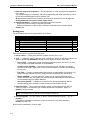
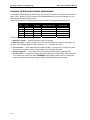
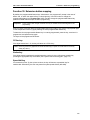
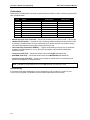
Installation Manual
0450-0511
Rev. C
About ESI
ESI (Estech Systems, Inc.) is a privately held corporation based in Plano, Texas. Founded in 1987, ESI
designs and builds innovative telecommunications products for businesses like yours. Because of their
powerful combination of value and features, ESI products are consistently recognized by industry
publications and leaders.
Copyright © 2005 ESI (Estech Systems, Inc.).
IVX is a registered trademark, and Esi-Dex, Integrated Answering Machine, and Verbal User’s Guide are trademarks, of ESI.
CompactFlash is a registered trademark of SanDisk Corporation. Motorola and ColdFire are registered trademarks of Motorola, Inc.
Texas Instruments is a registered trademark of Texas Instruments Corporation. Rayovac is a registered trademark of Rayovac
Corporation. Velcro is a registered trademark of Velcro Industries B.V. Panasonic and DBS are registered trademarks of
Matsushita Electric Corporation of America. Smart Jack is a trademark of Westell Technologies, Inc.
Information contained herein is subject to change without notice.
ESI products are protected by various U.S. Patents, granted and pending.
ESI is an ISO 9001:2000-certified company. Visit ESI on the Web at www.esi-estech.com.
Table of contents
General description..................................................................................................................................................A.1
Telephone system features.........................................................................................................................................................................A.1
Hardware overview/installation ..............................................................................................................................B.1
System programming: An introduction.................................................................................................................C.1
Programming keys.......................................................................................................................................................................................C.1
Entering alphanumeric characters..............................................................................................................................................................C.2
System fixed numbering plan......................................................................................................................................................................C.2
System programming overview ..................................................................................................................................................................C.3
Access programming...................................................................................................................................................................................C.3
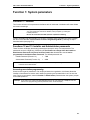
Function 1: System parameters .............................................................................................................................D.1
Function 11: Initialize....................................................................................................................................................................................D.1
Functions 12 and 13: Installer and Administrator passwords................................................................................................................D.1
Function 14: System clock ..........................................................................................................................................................................D.2
Function 15: System timing parameters ....................................................................................................................................................D.3
Function 16: System feature parameters...................................................................................................................................................D.3
Function 17: System speed-dial..................................................................................................................................................................D.4
Function 18: SMDR serial port baud rate...................................................................................................................................................D.4
Function 2: CO lines ................................................................................................................................................E.1
Function 21: CO line programming.............................................................................................................................................................E.1
Function 22: Translation table programming .............................................................................................................................................E.3
Function 23: CO line parameters................................................................................................................................................................E.4
Function 24: Caller ID ..................................................................................................................................................................................E.4
Function 3: Extension programming ..................................................................................................................... F.1
Function 31: Extension definition and routing............................................................................................................................................ F.1
Function 32: Extension feature authorization............................................................................................................................................. F.4
Function 35: Extension button mapping..................................................................................................................................................... F.5
Function 6: Recording ............................................................................................................................................ G.1
Function 63: Message-on-hold (MOH) programming.............................................................................................................................. G.1
SMDR .........................................................................................................................................................................H.1
Tabular SMDR format..................................................................................................................................................................................H.1
CSV SMDR format.......................................................................................................................................................................................H.1
Reporting conventions and rules ................................................................................................................................................................H.2
Index
(This page included for pagination purposes only.)
IVX C-Class Installation Manual
General description
General description
1
Welcome to IVX® C-Class Generation II (IVX stands for Integrated Voice Exchange) — a high-quality
phone system for small business.
The system itself is housed in a surprisingly small case that is wall-mounted in the telephone equipment
room. An external, wall-mounted power transformer powers the system.
Telephone system features
The IVX C-Class system has a three-line, six-station, two-analog-port configuration.
• Expansion capacity — Handles up to six CO lines, up to 12 stations, and two analog ports.
• ESI Feature Phones — Compact and stylish, yet rugged, the 24-Key Digital Feature Phone includes
a high-quality speakerphone, an informative multi-functional display, and a specially designed key
layout with several dedicated keys to minimize or eliminate the need to memorize codes. ESI also
offers the 12-Key Digital Feature Phone with similar design and basic functions. At least one 24-Key
Digital Feature Phone must be purchased with each C-Class system to allow for system
programming.
™
• Extensive help — Easily accessible with one press of the HELP key, ESI’s Verbal User Guide
uses spoken and displayed help prompts to help everyone from the Installer through the
Administrator down to the least experienced end user. You may also go to www.esiusers.com for
up-to-date online help.
2
• Intelligent Caller ID — Makes it easy to store names for Esi-Dex (see next item).
™
• Esi-Dex speed-dialing — Calls any number using three separate lists (personal, station, and
system); uses Caller ID information or direct keypad entries.
• Call waiting — Includes helpful display, showing both calls’ Caller ID information, and easy one-key
toggling between calls.
• Conference calling — Includes two conference bridges, and a conference may contain up to four
parties, so IVX C-Class can support two conferences of four parties each. Analog phones on the
system also may be members of conferences.
• Dedicated overhead paging interface — Allows for external paging through overhead speakers or
multi-zone paging units (amplification required).
• 911 alert — Provides immediate line access if any station with line access dials 9 1 1 to report an
emergency; sends a message via the serial port indicating the start date, time, station number and
end-time of the 911; also sounds a warning tone at the operator station and displays, for example:
911 CALL FROM
X102 JOHN JAMES
3
• Status indicator lamp — Indicates when the 24-Key Digital Feature Phone is off-hook or ringing.
1
2
3
Also known as the IVX 20c.
This and all other references to Caller ID service within this manual assume the end-user organization subscribes to Caller ID
service from its telephone service provider.
If the system is upgraded to IVX C-Class Generation II with either Integrated Answering Machine or voice mail, the status
indicator lamp also indicates the presence of a new voice message.
A.1
General description
IVX C-Class Installation Manual
(This page included for pagination purposes only.)
A.2
IVX C-Class Installation Manual
Hardware overview/installation
Hardware overview/installation
IVX C-Class starts out as a three-line, six-station, two-analog-port system, but can expand to handle as
many as six lines and 12 digital stations (and two analog ports).
Base Cabinet I
The wall-mounted Base Cabinet I measures 81/2″ W 11″ H 3″ D, and is designed for easy
installation and easy component access. It houses the Memory Module and Main Board (3x6x2), one
multi-purpose serial port, a MOH connector and another port card slot — which accepts an additional
360 port card.
Main board
The main board combines leading-edge hardware components — including a Motorola♦ ColdFire♦
processor and Texas Instruments♦ DSP structure — along with proprietary operating system software.
1
The board provides: system control of the Memory Module and port cards ; a standard RS-232C DB9
serial port; a built-in 33.6 Kbps modem for remote access; an external paging-device interface; and
MOH interface. The C-Class main board has a three-line, six-digital station, two-analog port configuration.
The CO line ports support standard CO and Centrex loop-start lines; ground-start CO lines are not
supported. The analog ports provide a standard 24-volt, two-wire connection to fax machines, analog
phones, and modems. Only one analog device can be connected to each analog station port.
Port card
1
There is only one port card type, 360, available for IVX C-Class. The 360 port card is equipped with a
standard female Amphenol connector for easy wiring to a standard 66 or 110 block. This C-Class port
card cannot be used on any other ESI phone system. The 360 port card provides circuits to connect up
to three loop-start CO lines and six Digital Feature Phones.
Note: The system must contain a 360 port card to access both conference bridges.
Wall-mount transformer
The System Cabinet requires a 1.25-amp transformer (supplied).
Memory Module
2
The Memory Module consists of a CompactFlash® card. The memory module on IVX C-Class
contains all system programming and configuration data, including pre-loaded voice prompts.
1
2
Generation II only. IVX C-Class Generation I systems are configured 6x12x2 and don’t support additional port cards.
Memory Modules are packaged separately and are mounted in the cabinet during installation.
B.1
Hardware overview/installation
IVX C-Class Installation Manual
Digital Feature Phone models
IVX C-Class supports two different models of ESI Digital Feature Phones:
• 24-Key Digital Feature Phone — Two-line, 32-character display; speakerphone; 12 programmable
feature keys.
• 12-Key Feature Phone — One-line, 16-character display; nine programmable feature keys.
Each model connects to the cabinet via standard two-wire twisted pair.
Note: Use the wall hook located under the handset when the phone is in the most upright position to keep the
handset in place.
Feature Phone overlays
Each ESI Phone comes with one overlay for the programmable feature keys. To order additional
overlays, visit the DESI™ website at www.desi.com. You can also download the free Windows-based
software, DESI Lite, which allows you to print on the overlays. For assistance with DESI products,
please consult the DESI website.
B.2
IVX C-Class Installation Manual
Hardware overview/installation
Cautions
Important:
This information complies with the requirements of Underwriters’ Laboratories (UL) and UL
Standard 60950.
When using this telephone equipment, always exercise basic safety precautions in order to minimize the
risk of fire, electric shock or injury to persons. Before proceeding, please read the following:
• The airflow vents on the IVX case must be free of obstruction for proper cooling. Similarly, do not
install the cabinet in areas of extreme heat or improper ventilation. Never insert objects of any kind
through the ventilation slots on the system cabinet; doing so may result in contact with dangerous
voltages — or cause an electrical short capable of producing fire or shock.
• Do not use liquids or aerosols to clean any IVX equipment; rather, use a cloth that is only
slightly damp.
• The IVX system contains no components that are serviceable by either non-Resellers or
non-manufacturer technicians. All service must be referred to the Reseller for further handling.
• To reduce the risk of fire, use only 26 AWG or better telecom wire.
Power supply
Always disconnect the power supply and telephone lines from the system cabinet before opening the
case for service or component disassembly or replacement.
Heed all warnings and instructions in documentation or marked on the cabinet or peripheral equipment.
Note: If necessary, review “Wall-mount transformer” (page B.1) for information on the type of power supply for
the IVX C-Class system.
Fuse
Contact the factory before attempting to replace the fuse. The fuse is marked with “F1” and is located in
the upper right-hand corner (when the system is installed on the wall) of the main board.
Battery
“Caution: There is a danger of explosion if the onboard lithium battery is incorrectly replaced. Replace only
with Ray-O-Vac BR1225 (or equivalent). Dispose of used batteries according to the battery
manufacturer’s instructions.”
B.3
Hardware overview/installation
IVX C-Class Installation Manual
Regulatory information
United States of America
Registration
The CO line telephone numbers, FCC registration number, and ringer equivalence number (REN) of this equipment
must be provided to the telephone company before installation. (See below for FCC registration number and ringer
equivalence number.)
FCC Part 15
This equipment has been tested and found to comply with the limits for a Class A digital device, pursuant to Part 15
of the FCC Rules. These limits are designed to provide reasonable protection against harmful interference when the
equipment is operated in a commercial environment. This equipment generates, uses and can radiate radio
frequency energy and — if not installed and used in accordance with the instruction manual — may cause harmful
interference to radio communications (in which case, the user will be required to correct the interference at his/her
own expense).
FCC Part 68
This equipment complies with Part 68 of the FCC Rules. On the side of this equipment is a label that contains,
among other information, the FCC Registration Number and Ringer Equivalence Number (REN) for this equipment.
You must, upon request, provide this information to your telephone company.
The REN is helpful to determine the quantity of devices you may connect to your telephone line and still have all of
those devices ring when your telephone number is called. In most, but not all, areas, the sum of the RENs of all
devices connected to one line should not exceed five (5.0). To be certain of the number of devices you may connect to
your line, as determined by the REN, you should contact your local telephone company to determine the maximum
REN for your calling area.
If your telephone equipment causes harm to the telephone network, the telephone company may discontinue your
service temporarily. If possible, the telephone company will notify you in advance but, if advance notice is not
practical, you will be notified as soon as possible. You will be informed of your right to file a complaint with the FCC.
Your telephone company may make changes to its facilities, equipment, operations or procedures that could affect
the proper functioning of your equipment. If so, you will be notified in advance, to give you an opportunity to
maintain uninterrupted telephone service.
If you experience trouble with this telephone equipment, the telephone company may ask that you disconnect this
equipment from the network until the problem has been corrected or until you are sure that the equipment is not
malfunctioning.
This equipment may not be used on coin service provided by the telephone company. Connection to party lines is
subject to state tariffs.
Installation: The device is equipped with a USOC connector.
Registration Number: 1T1MF08B33727.
Ringer equivalence number (REN): 0.8
B.4
IVX C-Class Installation Manual
Hardware overview/installation
Hardware installation
Site location
As with most electronic equipment, the environmental considerations for this site need to observe good
common sense. Provide a dry, clean, and accessible area.
Locate space in the telephone equipment room, which will provide easy connection to the 66 blocks and
110VAC power. The location should be no further than 1,000 feet (cable length) from the
farthest station.
0
0
Ambient room temperature must be 40 –80 (F.), and relative humidity no higher than 90%.
Notes: Do not place the equipment or run station cabling near high voltage electrical equipment or electrical
lines susceptible to high voltage surges from air conditioner compressors, etc.
Do not mount the equipment in a place that receives direct sunlight.
The system and supporting components should be mounted to a half-inch (or thicker) plywood backboard.
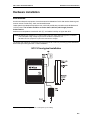
1
Here is the layout of a typical IVX C-Class installation :
IVX C-Class typical installation
1
Lid label shown may differ slightly from that of actual system you’re installing.
B.5
Hardware overview/installation
IVX C-Class Installation Manual
Opening the cabinet
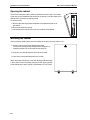
The lid on all cabinets is held in place by two tabs that rest in slots in the bottom
of the case, and a release tab that snaps into an opening in the top-center of the
cabinet and is secured by a retaining screw.
To remove the lid:
1. Remove the retaining screw and depress the release tab at the top of
the cabinet.
2. Rock the lid back from the top.
3. Lift and pull the lid free from the slots in the bottom of the cabinet.
Mounting the cabinet
Use three #8 hex-head screws. Note the position of the three mounting holes in IVX.
1. Screw in the top screw to the backboard (at least
one-half-inch thick plywood) leaving about one-eighth-inch
clearance between the screw head and the plywood.
2. Hang the unit using the keyhole at the top of the case.
3. Level the unit and install the bottom two screws.
Attach the power transformer to the wall, allowing sufficient length
in both cords to reach the power connector on the upper right side
of the cabinet and to reach a UPS or a dedicated 110 VAC outlet.
B.6
IVX C-Class Installation Manual
Hardware overview/installation
Port card installation
Adding or replacing the port card will require the system to be taken out of
service. Wear a grounding strap and avoid unnecessary movement while
handling the circuit boards.
1. Unplug the power supply to IVX.
2. There are two card slots on the cabinet. The 360 expansion card is
ribbon-cabled to the main board.
Note: The first Amphenol connector (Port Card 1 slot) is provided by
the main board, which comes in a three-line, six-digital station,
two-analog port configuration.
3. Connect the port card (J1) in the base cabinet to the main board (J2)
via the ribbon cable that shipped with the port card.
4. Secure the port card to the standoffs with the screws that shipped with
the port card.
5. To remove the port card, reverse steps 1-4.
Memory Module
Note: The Memory Module has a proprietary formatting scheme — do not attempt to install a non-ESI
CompactFlash®. Contact ESI for a replacement Memory Module, if needed.
Adding or replacing the Memory Module will require that the system be powered down.
Replacing the Memory Module erases all its configuration data and custom recordings.
(Prompts stay intact, however.)
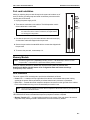
LED functions
The unit's various LEDs are designed to provide visual feedback as follows:
• Power LED — Located on the top-right side of the cabinet. Is illuminated when power is being
applied to the system. Blinks periodically to indicate that the main processor is operational.
• Port LEDs — Located above their respective amphenol connectors on the right side of the cabinet.
Each is illuminated when any port on its associated port card is in use.
Note: Disconnecting an amphenol connector when its respective LED is lit will cause any of its ports that
are in use to be disconnected.
Upon power-up, approximately one minute is required for the system to configure. The Power and Port
LEDs will blink three times to indicate that the power-up sequence has been completed.
• Memory Transfer LED — Located inside the cabinet in the center of the main board. Serves as a
diagnostic aid by flashing as data is transferred to and from the Memory Module.
B.7
Hardware overview/installation
IVX C-Class Installation Manual
Grounding instructions
System grounding (supplemental ground) is as follows:
• The conductor wires can be no smaller than the ungrounded branch-circuit supply conductors
(usually 16-gauge or larger).
• Acceptable wire: bare or covered with green (or green-and-yellow-striped) jacket.
• Conductors (and power receptacles) shall connect to earth ground at the service equipment (usually
a cold water pipe or copper ground rod).
• The supplemental ground must: be used regardless of power cord ground, be connected to the
ground lug on the bottom of the IVX cabinet, and retain ground connection when the IVX power
supply module is unplugged.
Note: IVX C-Class system lines are protected against a 10 KV surge only if the earth ground procedures
described above are followed.
Power
The system cabinet requires a 120 VAC outlet (if possible, a dedicated outlet). Use only the Class-2
power supply module provided. A clean, isolated power source in conjunction with a UPS (see “UPS,”
below) is STRONGLY recommended. The system draws a maximum of 25 watts.
If AC power is interrupted, the system will drop all connections. When power is restored, the system
will resume normal operation in approximately one minute, having retained its full programming and
clock setting.
UPS
For system protection and to maintain uninterrupted operation, an uninterruptible power supply (UPS, or
“battery back-up”) is STRONGLY recommended. A UPS rated for 200 VA will provide approximately
two hours of uninterrupted service for an IVX C-Class system.
Note: The remaining information under “UPS” comes from Technical Update #216.
Most people have heard about UPSs, but seem to think that there is just one kind of device that goes by
that name. In fact, there are several different major designs in use by today’s major UPS manufacturers.
These makers share much of the blame for confusing UPSs’ end users by, far too often, lumping
different designs under the “UPS” name.
UPSs can first be broken down into system types:
• Stand-by — A very simple design that affects power only when either a lag/brownout occurs below,
or a spike/surge occurs above, a certain threshold. When either occurs, the unit trips — i.e., goes into
battery mode. This "cleans" the voltage and helps to keep any load safe. Industry average "trip" times
are 2–8 ms. No other filtration of AC power is performed.
• Line interactive — Constantly monitors inbound voltages, and uses special circuitry to boost low
voltages and clamp high voltages without having to use the batteries. Indeed, the batteries are used
only if the input voltage drops below acceptable levels (typically about 12% below normal), goes out
completely or rises to dangerous levels (typically about 14% above normal) at which components will
be damaged if line voltage is not removed. Industry average transfer time is 1–3 ms. (If voltage stays
within its normal window, this unit continues to pass voltage, unaltered, from the wall.)
• On-line (or full on-line) — Constantly filters the power and performs a function known as double
conversion (AC to DC to AC). This assures that the load — in this case, phone equipment — will
receive not only uninterrupted, true sine wave output but also the cleanest, steadiest power possible
throughout any foreseeable power disruptions or voltage irregularities. According to industry specs, it
B.8
IVX C-Class Installation Manual
Hardware overview/installation
is not unusual for these types of units to be able to regulate utility power, even when it drops to 27%
below or rises to 33% above normal, all without using their batteries.
From this point, UPSs can be further broken down by inverter types, which determine output. These are:
• Square wave.
• Modified sine wave (or quasi sine wave).
• Sine wave.
Most devices with wall-mounted chargers, such as cordless drills or screwdrivers, can behave erratically
— sometimes not allowing the charge circuit to engage at all — when operating with modified sine or
square wave inverters. Small wall-based transformer-style power supplies, similar to those ESI phone
systems use, can experience overheating problems with modified sine or square wave outputs, which
occur while some UPSs are operating in battery mode. This overheating could eventually cause
damage to the power supplies; and, in time, the damage could cause a spike through the phone system
— seriously damaging some of the static-sensitive components inside the casing.
While the true sine wave UPS output power curve smoothly increases to its peak, then smoothly
decreases (allowing connected loads and equipment to operate the same as they would from utility
supplied wall power), the modified sine wave and square wave UPS output power curve will shoot
straight up, level off at peak voltage and then drop straight down. Additionally troublesome is that the
modified sine wave sits at zero voltage for a short period during the transition to or from batteries —
which is the main difference between it and the square wave output of some UPS. Please note that this
short interval during which the modified sine wave UPS sits at zero voltage can directly affect the
transfer time of the UPS and could, theoretically, be enough to cause the phone equipment to reset or
even “freeze.”
Though it is hard to predict exactly when different ESI systems will have problems with modified sine
wave or square waveform UPSs (meaning during a power failure event or the recovery from one), it’s
fair to assume that a problem will eventually arise from the use of such UPSs. Therefore, ESI
recommends that only true sine wave output UPSs provide backup power to our phone systems
and equipment.
MOH port
The MOH (messages-on-hold or music-on-hold) connector on the upper right side of the cabinet is a
1
standard /8″ monophonic mini-jack for playing live music-on-hold from an external source such as a
radio or CD player.
B.9
Hardware overview/installation
IVX C-Class Installation Manual
SMDR serial port
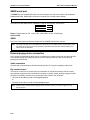
The SMDR port is a standard DB9 serial connector located on the side of the cabinet. Use a standard
shielded serial cable, DB9-to-DB9, for printer-to-computer (this is usually male-to-female).
Note: The maximum distance from the cabinet is 100 ft.
The output from the SMDR port is, 8 data bits, 1 stop bit, and no parity. The pinout is:
Data Transmit
Receive
Ground
Pin 2
Pin 3
Pin 5
Range: Programmable for 300, 1,200, 2,400, 4,800, 9,600, 19,200, or 38,400 bps.
Default: 38.4K.
SMDR
The IVX C-Class system continuously outputs real-time SMDR call records to the port.
Note: The system will buffer up to 1000 SMDR records (80 KB) in non-volatile memory (CompactFlash) when
the maintenance port is in use for programming or uploading. When the buffer reaches capacity, the
oldest records are discarded.
External paging device connection
A dry contact overhead-paging device can be connected to the system through the port card's 66 block.
The overhead paging port is fixed (located on the main board) as extension 199 for programming
purposes and user access.
Audio connection
The audio pair is connected to the 66 block at terminal 33 and 34. The pair’s impedance is 600 ohms.
Dry contact control
The manner in which the dry contact pair is punched down on the 66 block sets the pair as normally
open (sending a page to the port will close the contacts) or normally closed (sending a page to the port
will open the contacts). Connect the dry contact pair of the device to IVX as follows:
• Terminals 35 and 36 to provide normally open operation
or
• Terminals 35 and 37 to provide normally closed operation.
Note: The port doesn’t support talk-back paging (which requires a CO port), nor does it support CO ring
through the port.
B.10
IVX C-Class Installation Manual
Hardware overview/installation
Amphenol cable connections
Connect a standard 66 Block using a male 50-pin Amphenol cable to the port card’s female connector
located on the bottom-right side of the cabinet. The connector closest to the wall is the first port card
(which is the main board on the C-Class).
CO line connection
Local loop
The IVX C-Class system's advanced CO line circuitry provides for open loop detection and the system’s
built-in Caller ID interface.
Note: Observe correct order of connection to preserve proper rotary hunting of the CO lines.
Station connection
The first six pairs on the Amphenol are station ports.
All stations are connected using a single pair. Each port position is pre-numbered and fixed as indicated
in the 66 block wiring diagram (“Worksheet,” page B.14).
Note: The station runs can be up to 1,000 ft.
Digital stations
The digital station wiring is not polarity-sensitive. Only one phone can be connected per digital port.
Analog ports
The analog ports do not require that tip-and-ring polarity be observed. The analog ports can be used for
2500 type sets or for devices such as fax machines, cordless phones, etc., that can be connected via a
normal tip-and-ring pair. Each analog port will support only a single analog device.
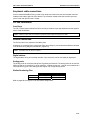
Station Numbering Plan
Main board
Port card 1
Digital stations
100 through 105
108 through 112
Analog stations
112 through 113
n/a
Refer to pages B.12 through B.14 for punchdown assignments.
B.11
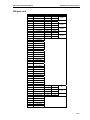
Hardware overview/installation
IVX C-Class Installation Manual
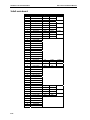
3x6x2 main board
B.12
Term
Wire color
Signal
RJ11
Port
1
White-Blue
Data+
Green
Digital
2
3
Blue-White
White-Orange
DataData+
Red
Green
Digital
4
Orange-White
Data-
Red
5
White-Green
Data+
Green
6
Green-White
Data-
Red
7
8
White-Brown
Brown-White
Data+
Data-
Green
Red
Digital
9
White-Slate
Data+
Green
Digital
10
Slate-White
Data-
Red
11
Red-Blue
Data+
Green
12
13
Blue-Red
Red-Orange
Data-
Red
14
Orange-Red
15
Red-Green
16
17
Green-Red
Red-Brown
18
Brown-Red
19
Red-Slate
20
Slate-Red
21
22
Black-Blue
Blue-Black
23
Black-Orange
24
Orange-Black
25
Black-Green
Tip
Green
26
Green-Black
Ring
Red
27
Black-Brown
Tip
Green
28
Brown-Black
Ring
Red
29
Black-Slate
Digital
Digital
Analog
Analog
30
Slate-Black
31
32
Yellow-Blue
Blue-Yellow
33
Yellow-Orange
34
Orange-Yellow
35
36
Yellow-Green
Green-Yellow
37
Yellow-Brown
38
Brown-Yellow
39
Yellow-Slate
Tip
Green
CO
40
41
Slate-Yellow
Violet-Blue
Ring
Tip
Red
Green
CO
42
Blue-Violet
Ring
Red
43
Violet-Orange
Tip
Green
44
Orange-Violet
Ring
Red
45
46
Violet-Green
Green-Violet
47
Violet-Brown
48
Brown-Violet
49
Violet-Slate
50
Slate-Violet
CO
IVX C-Class Installation Manual
Hardware overview/installation
360 port card
Term
Wire color
Signal
RJ11
1
White-Blue
Data+
Green
2
3
Blue-White
White-Orange
DataData+
Red
Green
4
Orange-White
Data-
Red
5
White-Green
Data+
Green
6
Green-White
Data-
Red
7
8
White-Brown
Brown-White
Data+
Data-
Green
Red
9
White-Slate
Data+
Green
10
Slate-White
Data-
Red
11
Red-Blue
Data+
Green
12
13
Blue-Red
Red-Orange
Data-
Red
14
Orange-Red
15
Red-Green
16
17
Green-Red
Red-Brown
18
Brown-Red
19
Red-Slate
20
Slate-Red
21
22
Black-Blue
Blue-Black
23
Black-Orange
24
Orange-Black
25
Black-Green
26
Green-Black
27
Black-Brown
28
Brown-Black
29
Black-Slate
30
Slate-Black
31
32
Yellow-Blue
Blue-Yellow
33
Yellow-Orange
34
Orange-Yellow
35
36
Yellow-Green
Green-Yellow
37
Yellow-Brown
38
Brown-Yellow
39
Yellow-Slate
Tip
Green
40
41
Slate-Yellow
Violet-Blue
Ring
Tip
Red
Green
42
Blue-Violet
Ring
Red
43
Violet-Orange
Tip
Green
44
Orange-Violet
Ring
Red
45
46
Violet-Green
Green-Violet
47
Violet-Brown
48
Brown-Violet
49
50
Violet-Slate
Slate-Violet
Port
Digital
Digital
Digital
Digital
Digital
Digital
CO
CO
CO
B.13
Hardware overview/installation
IVX C-Class Installation Manual
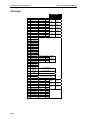
Worksheet
IVX C-Class
Cabinet
Term.
1
2
3
4
5
6
7
8
9
10
11
12
13
14
15
16
17
18
19
20
21
22
23
24
25
26
27
28
29
30
31
32
33
34
35
36
37
38
39
40
41
42
43
44
45
46
47
48
49
50
B.14
Wire color
Signal
RJ11
Pt. Crd. 1
White-Blue
Data+
Green Digital
100
Blue-White
DataRed
White-Orange
Data+
Green Digital
101
Orange-White
DataRed
White-Green
Data+
Green Digital
102
Green-White
DataRed
White-Brown
Data+
Green Digital
103
Brown-White
DataRed
White-Slate
Data+
Green Digital
104
Slate-White
DataRed
Red-Blue
Data+
Green Digital
105
Blue-Red
DataRed
Red-Orange
Orange-Red
Red-Green
Green-Red
Red-Brown
Brown-Red
Red-Slate
Slate-Red
Black-Blue
Blue-Black
Black-Orange
Orange-Black
Black-Green Data+/Tip Green Analog
112
Green-Black Data-/Ring
Red
Black-Brown Data+/Tip Green Analog
113
Brown-Black Data-/Ring
Red
Black-Slate
Slate-Black
Yellow-Blue
Blue-Yellow
YellowOH Page Audio A
Orange
OrangeOH Page Audio B
Yellow
Yellow-Green
OH Page Relay Common
Green-Yellow
Relay Normally Open or
Yellow-Brown
Relay Normally Closed
Brown-Yellow
Yellow-Slate
Tip
Green
CO
Slate-Yellow
Ring
Red
Violet-Blue
Tip
Green
CO
Blue-Violet
Ring
Red
Violet-Orange
Tip
Green
CO
Orange-Violet
Ring
Red
Violet-Green
Tip
Green
Green-Violet
Ring
Red
Violet-Brown
Tip
Green
Brown-Violet
Ring
Red
Violet-Slate
Tip
Green
Slate-Violet
Ring
Red
Pt. Crd. 2
Digital
106
Digital
107
Digital
108
Digital
109
Digital
110
Digital
111
CO
CO
CO
IVX C-Class Installation Manual
System programming: An introduction
System programming: An introduction
Program an IVX C-Class system from a 24-Key Digital Feature Phone in the system (while the system
is operating)
Read the User’s Guide first. Programming features require a clear understanding of user interface
and application.
Once you’ve accessed programming mode on a 24-Key Digital Feature Phone, the system will prompt
for — and confirm — each keystroke action via voice commands and the display. You program both
configuration data and recordings in the same manner.
Programming keys
During programming, the first line of the display will show the current item being programmed, and the
second line will be the entry line. You can enter values as directed by the combination of the voice
prompts and display. To enter multiple values, such as a list of extension numbers, separate each value
by # (to exit the list, enter # #).
To...
Press ...
Enter
#
Back up (i.e.,
reverse direction)
Delete
Exit
Help
Select/scroll
HOLD
[Hang up]
HELP
(left-side
scroll key)
(right-side
scroll key)
What this does
Confirms new or existing entry and advances to next
programming step.
Backs up to previous prompt without changing its value.
Deletes data or recording.
Exits programming mode and removes extension from DND.
Provides more detailed instructions during programming.
• During entry of a value, backs up.
• If a list is present (“>” is displayed), scrolls to left.
• Selects from options presented.
• If a list is present (“>” is displayed), scrolls to right.
• Inserts a space during entry of a name.
Note: Either < or > in the display indicates that additional choices or values are available by pressing a
corresponding scroll key ( or ).
C.1
System programming: An introduction
IVX C-Class Installation Manual
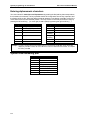
Entering alphanumeric characters
You enter names for extensions and departments by pressing the dial pad key that corresponds to
the character to be entered. The key’s possible entries will change each time the key is pressed, and
the display will show this. When the desired character appears on the display, press # to confirm; the
cursor will move to the next character position. You may move the cursor left (to correct an entry) by
pressing the left scroll key ( ) or move right (to add a space) by pressing the right scroll key ( ).
Key
0
1
2
3
Options
0, - (hyphen), _ (underline)
Q, Z, 1, “_” (space)
A, B, C, 2
D, E, F, 3
4
G, H, I, 4
5
6
J, K, L, 5
M, N, O, 6
Key
7
8
9
(left
scroll key)
(right
scroll key)
#
##
Options
P, R, S, 7
T, U, V, 8
W, X,Y, 9
Backs up and erases
Adds a space
[Enter]
Ends the name
Example: To enter a B, press 2 twice (the possible options to scroll through are A, B, C and 2). When B is
displayed, press # to confirm; the cursor will move to the next character to be entered. To complete
the name, press # #.
System fixed numbering plan
Numbers
0
1–6
100-111
112-113
199
560–580
590–591
600–699
C.2
Function
Operator
CO lines
Digital extensions
Analog extensions
Overhead paging port
Feature codes
MOH recordings
System speed dial
IVX C-Class Installation Manual
System programming: An introduction
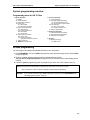
System programming overview
Programming menu for IVX C-Class
1 System parameters
11 Initialize
12 Installer password
13 Administrator password
14 System clock
141 Set time/date
142 Automatic time setting
15 System timing parameters
151 Flash duration
152 Transfer forward timer
153 Recall timers
157 Ring timeout
16 System feature parameters
162 Connect tone
163 Feature set activation
(group listen and privacy release)
17 System speed dial
18 SMDR serial port baud rate
2 CO line programming
21 Line programming
22 Translation table programming
221 Centrex/PBX access code
222 Toll restriction exception tables
23 Line parameters
231 Line receive volume
232 Analog line disconnect
24 Caller ID programming
3 Extension programming
31 Extension definition and routing
32 Extension feature authorization
35 Extension button mapping
6 Recording
63 MOH programming
631 MOH source
Access programming
You may program from any 24-Key Digital Feature Phone in the system:
1. Press PROGRAM. The normal station programming menu prompt will begin to play. Press HOLD
to stop the prompt.
2. Enter the Installer password followed by # (the default password is 789).
You are now in programming mode (during this time, the extension will be automatically placed
in DND).
3. Follow the system programming menu to program as you wish; and, when finished, hang up.
Notes: The system will automatically exit programming mode after 10 minutes of inactivity.
Only one person at a time can perform Installer or Administrator programming.
Example: If your Installer password is 864, enter programming mode by pressing PROGRAM 8 6 4 #.
(To exit programming mode, hang up.)
C.3
System programming: An introduction
(This page included for pagination purposes only.)
C.4
IVX C-Class Installation Manual
IVX C-Class Installation Manual
Function 1: System parameters
Function 1: System parameters
Function 11: Initialize
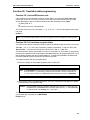
This function will return all components and software to their initial state. Initialization will erase all data
and custom recordings.
Important notes:
Always initialize the system before initial programming for a new installation.
You must confirm the command to initialize, when prompted, by entering the
Installer password.
Be sure to set the time and date (Function 14) before initializing.
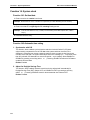
System initialization will approximately one minute to complete. When completed, the phone’s display
will return to the idle state. You must then re-access Programming Mode by following the steps
described earlier (see page C.3).
Functions 12 and 13: Installer and Administrator passwords
These functions will display the existing password and prompt for entry of a new password. The
passwords can be 2–8 digits long, followed by #. The Installer can change either the Installer or
Administrator Password. Only those functions listed in the Administrator manual can be
programmed via the Administrator Password. The default passwords are:
Installer Password (Function 12)
=
789
Administrator Password (Function 13)
=
456
Notes: Be sure to write down the new passwords, store them in a safe place and give the new Administrator’s
Password to the Administrator.
Accessing user station programming
Should a user forget his password or if an employee leaves the organization, this feature allows the
Installer or Administrator to enter a user's station programming and operate within it as if he were the
user. From the user’s station, enter the Installer or Administrator password when the system prompts
for the user password.
Example: From station 105, entering 7 8 9 # or 4 5 6 # instead of the user password (1 0 5 #) will enter the
station’s user programming. (Default passwords shown for this example).
D.1
Function 1: System parameters
IVX C-Class Installation Manual
Function 14: System clock
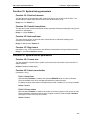
Function 141: Set time/date
1. Enter a new time in a twelve-hour format.
Example: Enter 1 2 3 3 for 12:33, or 3 1 5 for 3:15 (note that you need no leading zero for the time).
2. Select AM or PM by pressing a scroll key (either or ).
3. Enter a new date in an eight-digit format, including leading zeroes.
Example: Enter 0 7 0 4 2 0 0 3 for July 4, 2003 (note that leading zeroes are required here, unlike in
Step 1).
4. Press # to finish the entry.
Note: A built-in battery maintains the correct time and date, even in the event of a power loss.
Function 142: Automatic time setting
1. Synchronize with CID
This function, when enabled, synchronizes the real-time clock with Caller ID (CID) data:
call processing compares the time of CID data to the system real-time clock and, if the
difference is more than two minutes, resets the real-time clock to match the time (hours and
minutes) of the CID data. The system will analyze each such message (or — if it receives more
than four calls with CID data within a one-minute period — as is needed). Select ENABLE or
DISABLE by pressing a scroll key (either or ). Choosing ENABLE will allow the CID data to
update the time and date.
Default: Enabled.
2. Adjust for Daylight Savings Time
This function, when enabled, causes the real-time clock to adjust itself automatically for
Daylight Savings Time (DST). Select AUTO or DISABLE for DST by pressing a scroll key
(either or ). Choosing DISABLE is best for those areas that don’t observe DST.
Default: Disabled.
D.2
IVX C-Class Installation Manual
Function 1: System parameters
Function 15: System timing parameters
Function 151: Flash hook duration
This sets the time (in seconds) that a flash hook will be sent on the current line to the Telco. The
default setting of 1.5 will cause disconnect and fresh dial tone from the CO.
Range: 0.2–2.0. Default: 1.5.
Function 152: Transfer forward timer
This sets the number of times a transferred call will ring before following the day/night routing for the
extension or department.
Range: 1–9 rings. Default: 3.
Function 153: Hold recall timer
This is the amount of time, in seconds, that a call will remain on hold before recalling to the
extension that initiated the hold.
Range: 5–960 seconds. Default: 60.
Function 157: Ring timeout
(Generation II only.) This is the amount of time before an unanswered incoming call is disconnected.
Range: 1–10 minutes. Default: 4 minutes.
Function 16: System feature parameters
Function 162: Connect tone
This sets whether the system plays a system connect tone (two short beeps a user hears when a
station answers).
Default: Enabled (the beep plays).
Function 163: Feature set activation
(Generation II only.)
Field 1: Group listen
With this feature disabled: if a station user presses SPEAKER while on a call, the Feature
Phone immediately turns off the handset and switches to hands-free mode.
If enabled, the group listen feature is available system-wide. If disabled, it is no longer available.
Default: Disabled.
Field 2: Privacy release
With this feature enabled: if a station user presses a CO line key that is in use (lit red), the user
will be immediately conferenced with the call in progress on that line. With this feature disabled,
pressing an in-use CO line key has no effect.
Default: Disabled.
D.3
Function 1: System parameters
IVX C-Class Installation Manual
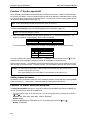
Function 17: System speed-dial
Up to 100 system speed dial names and associated numbers can be stored, in location numbers 600–699,
for access by any station. A user can initiate a system speed-dial by dialing the speed dial location number
or by accessing the name through the Esi-Dex feature. In Function 32, access to system speed-dial can
be denied to individual stations (see page F.4).
Note: System speed-dialing overrides toll restrictions (Function 32, page F.4).
1. Enter the 3-digit location number to program.
2. Enter a ten-character name (see “Entering alphanumeric characters,” page C.2).
Note: You must enter a name to continue.
3. Enter the number to be dialed (including the line group 9, 8, or 7). Press the left scroll key ( ) to
delete any character or digit entered in error. Here’s an example:
1.
Speed Dial #
601
2.
Name
AUTO RENTL
3.
Number
915552221212
The number dialed in Step 3 can be up to 30 digits long including the following special codes:
Code
#
F
P
What it produces
# DTMF tone
DTMF tone
Flash hook
2-second pause
To insert a special code, press the right scroll key ( ) to select the desired special code: # , , F or P.
Press # to confirm the inserted character and continue. Press # # to complete the entry.
Use the down arrow key ( ) to backspace. Once the number is saved you can use the scroll keys to move
back and forth to view the number. To edit the number, you must delete it and enter the correct number.
Example: To create a System Speed Dial number that dials 9, then 972-555-5644, then pauses for four
seconds and finally dials #104, enter:
9 9 7 2 5 5 5 5 6 4 4 (then scroll to) P # (then scroll to) P # (then scroll to) # # 1 0 4 #
Deleting a speed dial number
To delete an entire speed dial number and name, delete the location number (6 X X) by pressing HOLD
or the left scroll key ( ) during Step 1 in the speed-dialing procedure described above.
Function 18: SMDR serial port baud rate
The Maintenance/SMDR serial port on the system cabinet provides SMDR data. Real-time SMDR call
records are continuously output to the SMDR port.
1. The system will prompt you for the baud rate. You can change this rate by pressing the scroll keys
( and ).
Options: 300, 1200, 2400, 4800, 9600, 19200 or 38400 bps.
Default: 38400.
2. Select the SMDR format, STANDARD or CSV, by pressing the scroll keys ( and ).
Default: STANDARD.
D.4
IVX C-Class Installation Manual
Function 2: CO lines
Function 2: CO lines
The IVX C-Class system can operate on a station-by-station basis as a PBX or as a combined key/PBX
using standard loop start lines. If a station has line keys programmed, the user accesses the lines by
pressing one of these keys or by dialing 9 (or 8 or 7). If a station does not have line keys programmed,
the user always accesses CO lines by dialing 9 (or 8 or 7).
Note: To provide additional visual indication of CO line usage, the 24-Key Digital Feature Phone’s idle display
will show on/off-hook line status.
Since the system handles call transfer functions efficiently, operating in the PBX mode provides more
programmable feature keys for other uses and the opportunity for glare is greatly reduced.
Note: All phone programmable keys default to being un-programmed (except on extension 100, where the
first key defaults as a day/night key). Use extension button mapping (Function 35; see page F.5) to
assign line keys system-wide. An individual station’s keys can be reassigned using PROGRAM 2 at
that station.
Important:
Where any gray shading (■) appears in an example, it represents values either unavailable to
the function or unused in the particular example.
Function 21: CO line programming
• The CO lines are numbered 1–6.
• All CO lines are programmed to route callers during the day mode and then can be programmed to
route callers differently during the night mode. The display will indicate D (for day) or N (for night) to
show which mode is currently being programmed. Lines that are to be programmed alike can be
grouped to simplify programming.
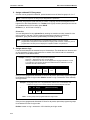
Example: Here is a completed programming worksheet for incoming calls on line 1 to ring live to
extensions 100 and 101 at first, but be disconnected after four minutes without an answer.
(The step numbers correspond to the explanation that begins following this example.)
1.
CO
2.
Out
1
9
3.
Ring 1
X100
X101
[After four minutes]
Disconnected
Do the following to program the CO lines.
1. Choose CO lines to program
During this step, you use the first six programmable feature keys to represent CO lines. Select
lines to be programmed by pressing one or more of the programmable feature keys.
The first six programmable feature keys’ LEDs glow red. Select the COs to program alike and
press the # key to confirm. The LEDs will now glow green.
(Continued)
E.1
Function 2: CO lines
IVX C-Class Installation Manual
2. Assign outbound CO line groups
CO lines can be grouped for outbound, pooled access into one of three line groups: 9, 8, or 7.
Note: A line can only be in one line group or designated as a private line.
Select the line group and press the # key to confirm. Outgoing calls will be assigned from the
highest CO to the lowest available. Or, to delete the line group number (whereupon the line can
only receive inbound CO line calls), press HOLD.
Default: 9 (i.e., all CO lines in Group 9).
Private line
You can designate a line as a private line by entering an extension number, instead of a line
group number, in this step. The line is then programmed as outlined in the following
explanation, giving the private line great flexibility for handling call routing.
Note: A private line can be assigned only to a Digital Feature Phone. A line key must be
programmed on the phone to access the line for outgoing calls. However, a status key can be
programmed on another phone to display the busy/idle condition of a private line.
3. Assign answer rings
Lines can be directed to be answered at up to 10 extensions. The destination can be set to add
or drop extensions if ringing continues due to no answer. If an inbound call isn’t answered in
four minutes, it will be disconnected.
Example: First ring — Line 1 rings at the operator's extension.
Third ring — Extensions 101 and 113 are added.
Fifth ring — Extensions 100 and 101 are dropped from ringing. Extensions 112 and
113 continue to ring until four minutes have passed since the call began to ring, at
which time the call is disconnected..
Day mode
CO
1
Out
9
Ring 1
100
101
Ring 3
100
101
113
Ring 5
112
113
[After four minutes]
Disconnected
Once you have programmed all desired CO lines for day mode, repeat the programming steps
for all desired CO lines for night mode. Default: Answer on ring 1 at extension 100 in both day
and night modes.
Example: During night mode, Line 1 rings Extensions 100 and 101. If unanswered, calls
continue to ring up to four minutes and then are automatically disconnected.
Night mode
CO
Out
Ring 1
[After four minutes]
1
9
X100
X101
Disconnected
Ring
5
Ring 9
Note: CO line groups aren’t programmable from night mode.
Once you have programmed all desired CO lines for day mode, repeat the programming steps
for all desired CO lines for night mode.
Default: Answer on ring 1 at extension 100 in both day and night modes.
E.2
IVX C-Class Installation Manual
Function 2: CO lines
Function 22: Translation table programming
Function 221: Centrex/PBX access code
If the system is to be used behind Centrex or another PBX, you must list the dial access code
used to gain access to a CO line from Centrex or the PBX, so that toll restriction can ignore the
access code digit(s). Users must dial the access code after accessing a line by either:
(a.) Dialing 9, 8, or 7
or
(b.) Pressing a line key (if programmed)
The access code can be one or two digits — e. g., 9, 81, etc. — and must be programmed for each
line group.
Default: 0.
Note: You must set the flash duration in Function 151 (page D.3) for the requirements of the host switch.
Function 222: Toll restriction exception tables
The system’s toll restriction is based on outbound calls being defined as either toll calls or non-toll calls.
Toll calls — All “1+” or “1010” calls, information, operator, international, “1-900” and “976” calls.
Non-toll calls — All seven and 10-digit local calls, and all “1-800” or “1-888” calls.
As part of extension feature authorization (Function 32; see page F.4), each station is programmed
to be allowed or denied toll calls by following the fixed tables when they are programmed with an “N,” as
well as following the allow and deny exception tables (i.e., overriding the fixed tables). All stations that
have been assigned access to a line group can make non-toll calls.
To program the allow and deny exception tables:
1. Enter the numbers for either table, separating each number by #.
Example: For “1-900,” enter 1 9 0 0 #.
Note: Press MUTE/DND to insert a “wild card” digit. A “wild card” digit is needed only when followed
by more numbers; e.g., to allow/deny 1-555, enter just 1 5 5 5 # — however, to allow/deny all
“1+” area codes and 555, enter 1 X X X 5 5 5 # (where X indicates a pressing of MUTE/DND).
Warning:
Do not include IVX line access codes (9, 8, or 7) in any of the toll restriction entries.
2. After the last number, enter # # to end the list. The IVX C-Class system will apply the numbers
you enter to their most significant digit.
Example: Entering 1 5 0 5 into the deny exception table tells IVX to deny all “1+” calls to area code
505. But entering 1 5 0 5 5 5 5 8 7 8 7 into the table tells IVX to deny “1+” calls specifically
to (505) 555-8787 while allowing other “1+505” calls.
To allow information calls, enter into the allow table: 411, 1411, 5551212, 1XXX5551212 (where X
is a wild card digit, entered by using MUTE/DND).
Default: None.
E.3
Function 2: CO lines
IVX C-Class Installation Manual
Function 23: CO line parameters
Function 231: System CO line receive volume
Many variables can affect the volume of the CO lines. Weak lines can reduce the system’s ability to
properly detect DTMF dialed by an outside caller. Conversely, “hot” lines can cause DTMF distortion
and/or increase the opportunity for message talk-off (i. e., messages being cut off before completion).
This function can be used to adjust the gain of the receive volume of the CO lines system-wide.
Range: 0–12 (lowest to highest gain, respectively). Default: 10.
Function 232: Line disconnect / open loop interval
You can set the lines to detect the open loop interval (if available from the CO) and disconnect more
quickly. This will also allow the system to drop abandoned calls from hold.
Since open loop intervals generated by the CO may vary in duration, use this function to program
IVX C-Class to less than or equal to the CO open loop interval.
If this programmed value is set unnecessarily low, IVX C-Class may falsely interpret static or a
momentary loop break as an open loop and disconnect a caller on hold. If this value is set too high,
the system may not detect a valid open loop signal for fastest call processing.
Range: 1–255 (10–2,550 ms) (or 0 to turn off open loop detect). Default: 6 (60ms).
Function 24: Caller ID
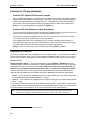
This function activates the Caller ID capability in the IVX C-Class system — if the customer has ordered
Caller ID service from the Telco. The IVX C-Class system will display the caller’s name (or “OUT-OF-AREA,”
etc.) for incoming calls or messages (or show the Caller ID number if the CO only provides a number).
Default: Disabled.
1
Esi-Dex and auto callback — This is accomplished by pressing REDIAL or ESI-DEX either during
message playback or after an Esi-Dex search. Caller ID numbers received from the CO are 10 digits long
(and include the area codes for local calls). In auto callback, the IVX C-Class system assumes all
calls are to be long distance and will automatically add a “1” prefix to the 10 digits to be dialed.
A table of local area codes can be programmed to indicate that calls to those area codes are to be
dialed as local calls. Select one of the following two types of local dialing for each area code entered:
• Local 7 — Local calls that can be dialed only as seven-digit numbers (the IVX C-Class system strips
the area code before dialing and will not add a “1” prefix).
• Local 10 — Local calls that can be dialed only as 10-digit numbers (the IVX C-Class system will not
add a “1” prefix).
For an area code that can be called as a long distance number (with a “1” prefix) and as a local number
(10 digits without a prefix), decide which case is the more prevalent and then add to or exclude from the
area codes exception list accordingly. Thus, some of these calls must be made manually.
Note: Since the Caller ID information is transmitted from the CO during the silence between the first and
second rings, enabling this feature will delay the answer of inbound calls until the second ring.
1
Esi-Dex isn’t available on the 12-Key Digital Feature Phone.
E.4
IVX C-Class Installation Manual
Function 3: Extension programming
Function 3: Extension programming
This section provides programming for extensions and department groups.
Important:
Where any gray shading (■) appears in an example, it represents values either unavailable to
the function or unused in the particular example.
Function 31: Extension definition and routing
Extensions can be either:
• Digital Feature Phone extensions (DIGITAL in the chart below and succeeding charts)
• Analog ports (PHONE, FAX, MODEM, RINGER or DOOR in the same charts)
Digital extensions may be 100–111; analog extensions are 112 or 113.
Digital Feature Phones
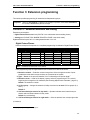
Here’s an example of the portion of a completed programming worksheet for Digital Feature Phones.
1.
Ext.
0
100
101
102
112
113
2.
Type
DIGITAL
DIGITAL
DIGITAL
EXT
FAX
3.
Name
Operator
Jane
Roger
Sally
Roger 2
FAX
4.
CO
5.
CF day
X100, X101
9
9
9,8
9
6.
CF night
X100, X101
7.
Page zone
8.
Ext.
X100
0
0
0
0
Note: 100 defaults as OPR (when a user dials 0).
Each programming step for Digital Feature Phone extensions is defined as follows:
1. Extension number — Extension numbers range from 100 to the highest number of ports
installed and must match the port numbers as connected to the system.
1
2. Type — Based on the port card installed, IVX C-Class assigns the port as digital.
3. Extension name — Used for the display, reports, and as a programming aid. The name’s
length can be no longer than 10 characters (See “Entering alphanumeric characters,” page C.2).
Default: The extension number.
4. CO line group — Assigns the extension’s ability to access one or more CO line groups (9, 8,
and 7).
Default: 9.
5. Call forward busy/no answer for day mode — Operator calls are set to forward busy/noanswer calls to another extension for day mode.
Default: 0 (no forwarding).
6. Call forward busy/no answer for night mode — Same as previous item, except night mode.
(Continued)
1
For programming of analog ports, see page F.2.
F.1
Function 3: Extension programming
IVX C-Class Installation Manual
7. Extension page zone assignment — The all-page zone, 0, is the only page zone available on
IVX C-Class.
The overhead paging port (extension 199) can be paged along with other extensions in a zone
by including the desired page zone for extension 199.
All digital phone extensions are included in (and cannot be removed from) the all-page zone.
Analog extensions cannot be included in page zones.
8. Operator translation — Extension 0 (Operator) programming requires:
• Programming call forwarding for day and night mode
• Entering the extension number to which calls are to be directed when someone dials 0.
Default: 100.
Analog ports
The last 2 station ports can be programmed only as follows:
1.
Ext.
2.
Type
0
3.
Name
4.
CO
Operator
100
DIGITAL
Jane
101
DIGITAL
Roger
9
9
102
112
DIGITAL
PHONE / FAX / MODEM / RINGER / DOOR
Sally
PHONE / FAX / MODEM / RINGER / DOOR
9,8
9
113
PHONE / FAX / MODEM / RINGER / DOOR
PHONE / FAX / MODEM / RINGER / DOOR
9
Here are the steps for programming analog ports:
1. Phone number — Analog port extension numbers must be x112 or x113.
2. Type — If ANALOG PORT is selected, then the ports can further be defined as follows; the
words in parentheses (EXAMPLE) indicate what the display will show in each case:
• Phone (EXT) — Designed to provide for standard 2500 type phones. See the IVX C-Class
User’s Guide for complete description of the capabilities.
• Common ringer (RINGER) — Connected via a tip and ring pair; will apply ring voltage
whenever a line rings in night mode or when a call is directed to it (transfer, call forwarding,
CO ring, etc.).
• Fax (FAX) — Program a programmable feature key to an analog station (for example, 112).
When receiving a call that is fax tone, simply press the programmed key and hang up.
• Modem (MODEM) — Incoming calls for a modem can be manually transferred to the
modem extension; also, the modem can automatically generate outbound calls. Maximum
connect speed through the PBX is 9600 bps.
• Door phone (DOOR) — A telephone connected to this port will automatically dial the
programmed ring down extension number whenever the set is taken off-hook.
3. Extension name — This is used for the display, reports, and as a programming aid. The
maximum length is 10 characters (See “Entering alphanumeric characters,” page C.2).
Default: The type selected.
Note: The name for the ringer and door must be changed in Function 32.
4. CO line/ring down — For fax, modem, or phone, select the desired line group — 9, 8, or 7.
Default: 9.
If door phone is selected, an extension number is entered as a ring down destination.
Default: Extension 100.
No dial tone is presented for common ringer.
F.2
IVX C-Class Installation Manual
Function 3: Extension programming
Overhead paging interface
You can connect a dry-contact overhead paging device to the system through the first port card’s 66
block. The overhead paging port’s access is fixed as extension 199 for programming purposes. The
user can access it by:
(a.) Dialing 1 9 9
or
(b.) Programming 199 as a programmable key and/or including 199 in the page zone.
Note: DTMF can be transmitted to the overhead paging port after access, allowing for zone overhead paging,
if the paging unit supports zone paging.
1.
Ext.
Type
199
Name
CO
2.
Page Zone
0
Dry contact control
The manner in which the dry contact pair is punched down on the 66 block sets the pair as either
normally open (sending a page to the port will close the contacts) or normally closed (sending a page
to the port will open the contacts). See the “Hardware installation” section (beginning on page B.5).
F.3
Function 3: Extension programming
IVX C-Class Installation Manual
Function 32: Extension feature authorization
The Installer or Administrator can allow or deny many extension features on an extension-by-extension
basis. A user, however, can only program and use allowed features (by using a combination of voice
and display prompts) from his/her phone.
Below is an example of a completed programming worksheet. The programming sequence is:
1.
Ext.
2.
Name
3.
Toll allow
4.
System speed- dial
5.
Trunk-to-trunk
XXX
100
101
102
124
Default
Jane
Roger
Sally
Bill
Y
Y
Y
Y
Y
Y
Y
Y
Y
Y
N
N
N
N
N
The programming steps are:
1. Extension number — Enter the extension number to program.
2. Extension name — Name the extension (if not previously named in Function 31 [see page F.1]).
For each of the following features, press a scroll key ( or ) to select YES or NO.
3. Toll restriction — “YES” allows the user to place toll calls. If you select “NO,” the user can make
only either non-toll calls or calls to numbers listed in the allow exception table.
4. System speed dial — “YES” allows the user to access and place system speed dial calls.
5. Trunk-to-trunk — If enabled, this feature allows manual trunk-to-trunk transfers. While connected
to an outside call, the user can press TRANSFER, dial an offsite number and then complete the
trunk-to-trunk transfer by simply hanging up. Both outside parties are then connected.
F.4
IVX C-Class Installation Manual
Function 3: Extension programming
Function 35: Extension button mapping
By default, the programmable feature keys’ initial state is “not programmed” (except in the case of
station 100, on which the upper left key is a day/night key). Use this function to change the
programmable feature keys system-wide. Users can later change the programmable feature key
positions for their stations as part of station programming.
Important:
Future, system-wide changes made later here by the Installer will overwrite any station user
programming.
When prompted, press the desired programmable feature key location, then enter the appropriate digits
on the dial pad and confirm by again pressing the same programmable feature key.
To determine how a programmable feature key is currently programmed, press the key, note how it is
programmed, and press the key again.
The keys can be programmed as follows:
CO line key
If the digits entered are 1–12, the key will serve as a CO line key.
Note: Removing the line key appearances will set the station(s) to operate as a PBX with line access by
dialing 9 (or 8 or 7).
Station key
If the digits entered constitute a three-digit extension number, the key will become a station key
providing the appropriate lamp information (See “System fixed numbering plan,” page C.2).
Speed-dial key
If one enters 9 (or 8 or 7) plus a phone number, the key will become a speed-dial key for
outside calls. Alternatively, the user may enter the system speed-dial bin (600–699).
F.5
Function 3: Extension programming
IVX C-Class Installation Manual
Feature keys
Feature keys, as listed below, cannot be programmed system-wide but, rather, must be programmed for
each individual station.
Code
199
560
564
565
565YYY
570
578
580
Feature
Overhead page
Day/night mode
Headset
Call forward
Call forward to an extension
Conference
Mute/DND
Override ring
Available on
12-Key Phone
X
X
X
X
X
X
Available on
24-Key Phone
X
X
X
X
X
N/A
N/A
X
• Manual day/night mode (Code 560) — Allows manual setting of the system’s mode — day or night.
• Headset key (Code 564) — Provides for easy connecting to/disconnecting from calls when the user
is operating in headset mode. The user presses the key to receive dial tone or to answer a ringing
call; he/she then presses the key again to disconnect from the call.
• Call forward key (Code 565 or 565XXX) — Toggles call forwarding on and off. If the user always
forwards to the same extension, you (or the user) can program a key with both 5 6 5 and the
extension number.
• Conference (Code 570) — Serves the same function as the CONF fixed-feature key.
• Mute/DND (Code 578) — Serves the same function as the MUTE/DND fixed-feature key.
• Override ring key (Code 580) — Allows a user to place an outside call (CO or extension) while
another call is ringing in on the same station.
Note: To delete a programmable feature key, press HOLD instead of programming a value.
Private line key
If a private line has been established in CO line programming (see “Private line,” page E.2), that
CO line key must appear on that station’s phone to allow outbound access to the line.
F.6
IVX C-Class Installation Manual
Function 6: Recording
Function 6: Recording
Function 63: Message-on-hold (MOH) programming
MOH can be:
• A live feed from an external music source connected to the MOH connector located on the side of
the cabinet.
• One of three default, generic MOHs pre-recorded by the factory.
Function 631: MOH source
This selects the source that will be played to callers on hold.
Code
590
591
Source
Live external source*
Pre-recorded music
* Dialing off-hold doesn’t work.
Default: 591 (pre-recorded music).
Notes: If an external audio source such as a radio is used for MOH, adjust the volume at the source.
To turn live MOH volume completely off, turn off volume at the source.
G.1
Function 6: Recording
IVX C-Class Installation Manual
(This page included for pagination purposes only.)
G.2
IVX C-Class Installation Manual
SMDR
SMDR
SMDR (station message detail reporting) call records are output in real time via an ESI phone
system’s Maintenance/SMDR serial port. Connect a standard serial printer or call accounting system to
the serial port. SMDR data will be stored temporarily if a laptop is connected for programming (five
minutes after you exit programming mode, the buffered SMDR will resume output to the serial port).
The output from the serial port is: 8 data bits, 1 stop bit, and no parity, 1200 baud.
SMDR may be output in one of two formats, selected in system programming: tabular or CSV. The
tabular format is the default.
Tabular SMDR format
The tabular IVX SMDR output format, which is compatible with the standard Panasonic® DBS® format,
is as shown below:
1
2
3
4
5
6
7
123456789012345678901234567890123456789012345678901234567890123456789012345678
T MM/DD HH:MM:SS HH:MM:SS NNN XXXXXXXXXXXXXXXXXXXXXXXXXXXX
LL
The columns are:
• Call type — Outbound (“O”), inbound (“I”) or transferred (“T”) at column 1.
• Date (“MM/DD”) — Begins at column 3.
• Start time (“HH:MM:SS”) — Begins at column 9.
• Duration (“HH:MM:SS”) — Begins at column 18.
• Extension number (“NNN”) — Begins at column 27.
• Digits dialed (right-justified)/Caller ID (left-justified) — Begins at column 31 (28 characters).
• CO line number (“LL”) — Begins at column 77.
Each record is terminated with a line feed and carriage return character.
CSV SMDR format
The comma-separated value (CSV) format is compatible with Microsoft® Excel® and other spreadsheet
applications. A CSV record will be output for each completed call, and will be represented as follows
(word-wrapped):
Format:
"T","MMDDYYYY","HHMMSS","HHMMSS","NNN","XXXXXXXXXX. . .XXX","CCCCCCCCCC. . .CCC","LL"
Example A:
"I","07042002","000852","000059","101","9724229700","ESTECH SYS INC. ","54"
Example B:
"O","10312003","221502","020512","190","12125551212","","11"
(Continued)
H.1
SMDR
IVX C-Class Installation Manual
The fields are:
• Call type (“T”) — Outbound (“O”), inbound (“I”) or transferred (“T”).
• Start date (“MMDDYYYY”) — Six characters, zero-filled.
• Start time (“HHMMSS”) — Six characters, zero-filled; 24 hour clock.
• Duration (“HHMMSS”) — Six characters, zero-filled.
• Extension number (“NNN”) — Three characters, space-filled, right-justified.
• Digits dialed/Caller ID (“XXXXXXXX . . . XXX”) — Up to 28 characters, null-filled.
• Caller ID name (“CCCCCCCCC . . . CCC”) — Up to 24 characters, null-filled.
• Line number (“LL”) — Two characters, null-filled, right-justified.
Each field is delimited with double quote marks and separated with a single comma. Null fields are still
included as place holders (see Example B, p. H.1). Each record is terminated with a line feed and
carriage return character.
Reporting conventions and rules
• Inbound and outbound call records are generated only for calls between a station and a CO line.
• The duration of each call record represents the period of time that that station controlled its portion of
a call. A record is generated each time a station does any of the following:
– Disconnects.
– Places a call on hold.
– Transfers a call.
A single CO call could be included in multiple records if it is transferred from station to station.
• Periods when calls are placed on hold or attempts at supervised transfers are unsuccessful are
included in the station's record.
• Periods when calls are on hold, in the auto attendant, leaving/retrieving voice mail or in an ACD
queue are not included in call records.
• A new record begins when a station answers a call or a hold recall.
• Records will be generated independently for all stations in a conference. If more than one CO line is
involved in a conference, each call record generated by that conference will be associated with only
the last line disconnected.
• Dialed digits don’t include the line group or location number.
• Outbound calls begin a call record 10 seconds after the call has cleared toll restriction.
PC interface
Use an RS-232C cable to connect a PC’s serial port to the IVX system’s SMDR port.
Note: SMDR data will be stored temporarily if a laptop is connected for programming (five minutes after you
exit programming mode, the buffered SMDR data will resume output to the serial port).
H.2
Index
Alphanumeric characters, entering, C.2
Amphenol connections, B.11
Answer ring assignment, E.2
Base Cabinet I, B.1
Battery. See Cautions
Cabinets
Base Cabinet I, B.1
Call forward key, F.6
Caller ID, E.4
Cautions, B.3
Battery, B.3
Fuse, B.3
Power supply, B.3
CO lines, E.1–E.4
Access codes and toll restriction, E.3
Answer ring assignment, E.2
Connecting, B.11
Line disconnect, E.4
Line receive volume, E.4
Outbound line groups, E.2
Parameters, E.4
Day/night modes, E.2
Digital Feature Phones. See Phones
Esi-Dex, D.4, E.4
System speed dial, F.4
Extension button mapping
CO line key, F.5
Private line key, F.6
Speed dial key, F.5
Station key, F.5
Extension definition and routing, F.1–F.3
Digital Feature Phones, F.1
Functions
Function 2 — CO lines, E.1–E.4
Function 3 — Extension programming, F.1–F.6
Function 6 — Recording, G.1
Fuse. See Cautions
Grounding, B.8
Headset key, F.6
Initializing (Function 11), D.1
LED functions, B.7
Line disconnect, E.4
Line receive volume, E.4
Maintenance port, D.4, H.1
Memory Module, B.1, B.7
MOH, B.9
Mounting, B.6
Outbound CO line groups, E.2
Overhead paging, F.2–F.3
Overlays, B.2
Paging, B.10
Passwords, Installer and Administrator, D.1
Phones
Digital Feature, B.2
Port card
Installation, B.7
Power, B.8
Power supply. See Cautions
Private line, F.6
Programming
Accessing user station programming, D.1
Keys, C.1
System, C.3
System fixed numbering plan, C.2
Recording
Tone, D.3
Regulatory information (U.S. and Canada), B.4
Ringer equivalence number (REN), B.4
Serial port, D.4, H.1
Serial ports, B.10
Site location, B.5
SMDR, D.4
Speed-dialing. See Esi-Dex
Status indicator lamp, A.1
System cabinet, B.6
System timing parameters, D.3
Time/date, setting, D.2
Toll restriction, E.3, F.4
Tone, recording, D.3
Transformers, wall-mount, B.1
Translation table programming, E.3
UL (Underwriters’ Laboratories), B.3
www.esi-estech.com