1
13. Handover
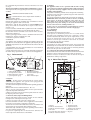
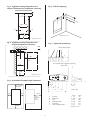
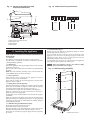
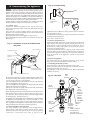
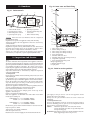
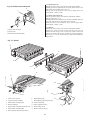
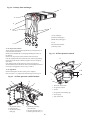
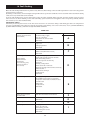
Fig. 42. Inner case and facia fixing
3
1
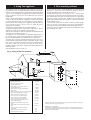
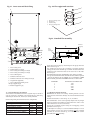
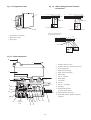
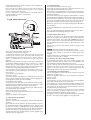
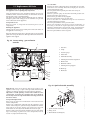
Fig. 41. Facia controls
7
6
5
12
1
1.
2.
3.
4.
2
Mains On/Off control
CH temperature control
DHW temperature control
System pressure gauge
3
4
4
5. Optional programmer
6. Lockout indicator lamp and
reset button
7. Burner indicator lamp
5
7
2
6
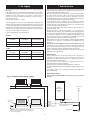
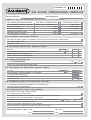
Hand over the User Booklet and the completed
Benchmark Checklist.
Explain how to operate the appliance safely and efficiently.
Tell the user what to do if the appliance is not to be used in very
cold conditions.
Tell the user what to do if the system pressure falls.
Explain that regular servicing will maintain the safe and efficient
operation and extend the life of the appliance. WHS or their
agent can offer a comprehensive maintenance contract.
Tell the user that any work on the appliance must only be
carried-out by a competent, registered, person (CORGI in GB).
10
9
8
2
7
11
1. Inner casing cover
2. Cabinet fixing screws (4)
3. Inner casing cover fixing screws (2)
4. Inner casing cover fixing screws (2)
5. Facia control panel
6. Controls connector cover
7. Controls connector cover fixing screws (2)
8. Programmer (optional)
9. Facia control panel fixing screw
10. Top support lug (2)
11. Bottom support lug (2)
12. Sight glass
14. Inspection And Service
14.1
To ensure continued efficient operation of the appliance it must be
checked at regular intervals. The frequency of servicing will depend
upon the particular installation conditions and usage, but once per
year should generally be adequate. The extent of the service
required by the appliance is determined by the operating condition
of the appliance when tested by fully qualified engineers.
Any service work must be carried out by competent registered
engineers (CORGI in GB).
14.2 Inspection
Check that the terminal and the terminal guard, if fitted, are clear
and undamaged.
If the appliance is in a compartment or cupboard check that the
specified service space around the appliance is clear. Refer to Table 8.
Check all the joints and connections in the system and remake
any that show signs of leakage. Refill and re-pressurise as
described in Section 12-Commissioning.
Operate the appliance and take note of any irregularities. Refer to
Section 18-Fault Finding for rectification procedures.
If the combustion performance is to be checked:
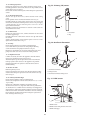
Remove the cap from the sample point on the top of the
appliance. Refer to Fig 37.
Connect an approved sampling meter.
With the appliance at maximum rate and stable in the DHW
mode expect readings of:
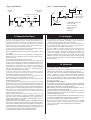
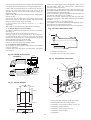
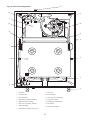
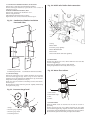
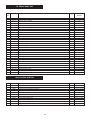
Fig. 43. Facia in service position
gas supply at the gas service cock on the appliance before
starting any service procedures.
Always test for gas soundness after the service has been
completed.
14.3 Component Access
To service the appliance it may be necessary to remove some or
all of the following parts to gain access to components which
may need to be checked or replaced.
Cabinet
Pull off the clip-on facia cover. Unscrew the two
screws and release the sides. Lift up and away from
the top locating pegs.
Facia Panel Unscrew the single screw, lift off and lower onto the
lower support lugs. Refer to Fig 42 & 43.
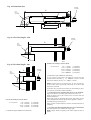
24kW NG CO2 5.3—6.2% CO 0.002—0.010%
LPG CO2 6.4—7.4% CO 0.004—0.010%
28kW NG CO2 5.6—6.4% CO 0.006—0.010%
LPG CO2 6.3—7.3% CO 0.003—0.010%
NB For flues greater than 725mm without a restrictor the CO2
may be up to 0.5% lower.
These figures cover all flue conditions.
Refit the cap after the test.
Disconnect the electrical supply at the mains and turn off the
21