1
ˆ Installation
MOUNTING THE PHONE
Notes:
You can place the phone’s base on a desk or
table, or mount it on a standard wall plate or
directly on a wall. Choose a location that is:
• near an AC outlet
• near a modular telephone line jack
• out of the way of normal activities
• away from electrical machinery, electrical appliances, metal walls or filing cabinets, wireless intercoms, alarms, and
room monitors
• away from other cordless phones
The base’s location affects the handset’s
range. If you have a choice of several locations, try each to see which provides the best
performance.
Connecting to the Phone Lines
• Your telephone connects directly to a
modular telephone line jack. If your telephone wiring does not have a modular
jack, you can update the wiring yourself
using jacks and adapters (available at
your local RadioShack store), or have
the telephone company update the wiring for you. You must use compatible
modular jacks that are compliant with
Part 68 of FCC Rules.
• The line that connects a two-line phone
jack to the phone company wiring must
be twisted-pair cable. Otherwise, you
might hear interference (crosstalk)
between the two lines.
• The USOC number of the two-line jack
to be installed is RJ14C (RJ14W for a
wall plate). The USOC number of a single-line jack is RJ11C.
Cautions:
To take full advantage of the phone’s capabilities, you must have two phone lines with
separate phone numbers. If you have only
one line, you can order a second from your
phone company.
You must use a Class 2 power
source that supplies 9V DC
and delivers at least 400 mA.
Its center tip must be set to positive and
its plug must fit the phone's DC IN 9V
jack. The supplied adapter meets these
specifications. Using an adapter that
does not meet these specifications
could damage the phone or the adapter.
!
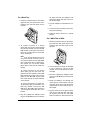
You can connect the phone to the lines in
one of three ways:
• connect two lines through a two-line
modular phone jack
• connect two lines through two one-line
modular phone jack
• connect one line through a one-line
modular phone jack.
10
• Always connect the AC adapter to the
phone before you connect it to AC
power. When you finish, disconnect the
adapter from AC power before you disconnect it from the phone.
• The supplied RadioShack adapter was
designed specifically for your phone.
Use only the supplied adapter.
Installation