1
5
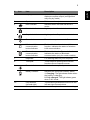
Icon
Item
Description
2
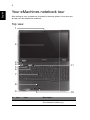
Display screen
Also called Liquid-Crystal Display (LCD),
displays computer output (configuration
may vary by model).
3
Speaker
Delivers audio output.
4
HDD indicator
Indicates when the hard disk drive is
active.
Num lock indicator
Lights up when Num Lock is activated.
Caps lock indicator
Lights up when Caps lock is activated.
5
Power button
Turns the computer on and off.
6
Wireless LAN
communication
button/indicator
Enables/disables the wireless LAN
function. Indicates the status of wireless
LAN communication.
Bluetooth
communication
button/indicator
Enables/disables the Bluetooth function.
Indicates the status of Bluetooth
communication (only for certain models).
7
Keyboard
For entering data into your computer.
8
Touchpad
Touch-sensitive pointing device which
functions like a computer mouse.
9
Power indicator
Indicates the computer's power status.
Battery indicator
Indicates the computer's battery status.
1. Charging: The light shows amber when
the battery is charging.
2. Fully charged: The light shows green
when in AC mode.
10
Click buttons
(left and right)
The left and right buttons function like the
left and right mouse buttons.
11
Microphone
Internal microphone for sound recording.
English
#