1
Software
Upgrade Points
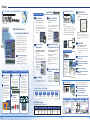
EASY SCREEN CREATION & LOGIC PROGRAM DEVELOPMENT
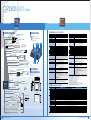
EASY SCREEN CREATION
Screen Editor and Logic Program Development Software
GPPRO-CNT01W-P**
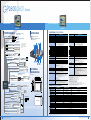
High Visibility Menu Screen.
Easy Programming for Beginners.
The Parts Palette and Editor Screen now
appear in the same screen, so you can
place parts quickly and easily by simply
dragging them from the palette and
dropping them on the screen. Positioning
the cursor over a tag icon also brings up
an explanation of that tag's operation, to
help you create and edit screens.
Flexible screen design using tags
Time Scheduling
Security Level Function
This function makes it easier to set up
devices and handle routine tasks.
Restrict user access depending by
operator level.
Bit On/Off and word setting can be
scheduled by day of the week or for a specific
time. The weekly and time setting can also
be changed on the
display device.
Use the 15-level password protection function to
restrict access to specific screens, such as
management and maintenance screens.
This protection function
helps to improve screen
security, which also
means greater safety for
machines that are
unattended or installed
off-site.
Improved Keypad
Display Function
Expanded Alarm Summary
Display Function Using Q Tags
We expanded the setting parameter
display function for more efficient onscreen input.
We expanded and improved the Q tag
function for alarm display.
Display the alarm history (Q tag).
Designation of the change
notification bit for individual
setting parameter displays.
Windows fonts can be
displayed as bitmap data on
the GP screen just as you
want them.
Integral-multiple fonts
Now you can enlarge fonts in
the usual scaling factors of 1,
2, 4 and 8, and in any
magnification rate between 1
and 8. This lets you precisely
adjust character size to
match your layout.
Touch panel language
switching
Create screens quickly and
easily by simply arranging
parts and marks selected
from 1,200 available types.
By simply presetting a
multiple language table on
the touch panel, you can
switch the text display with a
single touch during
operation. The import/export
function for multiple language
tables lets you easily input
and translate CSV files.
Create and use your
own BMP parts
Create your own parts or use
parts created in the past.
START
始
スタート
STOP
停止
ストップ
21
Software
Photos
Logos
Trigger 2
PSW-ED01-V**
GP 2000
PLC
AutoCAD*
(Autodesk)
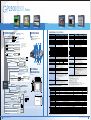
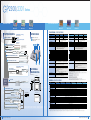
Immediately send out orders from your
office to the factory.
PSW-GV01-V**
GP screen at the
production site can
be monitored directly
on Pro-Server.
Use the data playback
feature to check
previously recorded
production data and
visually trace the
source of hard-to-find
problems.
The text screen now
supports multiple
languages. A and X tags
can be used to display
different languages.
Alert control staff to important alarms.
Just slide the timer
bar and view past
production data.
Re-use Collected Data in Other Software
Applications.
*Pro-Server with
Pro-Studio Ver. 4.0 or
higher required.
(Excel, SCADA, OPC, SQL, DDE, API)
The GP screen can be remotely monitored on
a Web browser, saving both time and costs.
Access a wide variety of vital production
data from remote locations.
CSV
BMP/JPG
RTF
WAV
Excel
(Microsoft)
Photoshop
(Adobe)
Word
(Microsoft)
Media Player
(Microsoft)
GPPRO-CNT01W-P03
Screen
Resolution
Hard Disk Space
Memory
Drive Type
SVGA
(800 x 600 pixels)
or higher
Minimum: 85 MB
Recommended: 215 MB
or more
Minimum: 32MB
Recommended: 64MB
or more
CD-ROM
Drive
OS
Windows® 95/98/2000/Me/XP
Windows NT® (4.0 or later)
(Windows NT® 4.0: Service Pack 3 or later)
Just connect GP-PRO/PBIII data —
without special programming.
GW-CJ01-V**
Monitor production conditions anytime, anywhere.
GP-PRO/PBIII C-Package03
Software Environment Specifications
Windows® compatible
PC with Intel PentiumII
266MHz or faster.
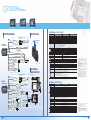
Share Device/PLC Data - Regardless of
the Manufacturer.
Remote Screen Image Capturing.
REMOTE MONITORING
* Can be used for a Release 12 program.
PC
Automatically records and collects production data,
for immediate playback of either past or present line
operating conditions.
Pro-Server Add-on Software
Share General-Purpose Data for Editing
Notepad,
Wordpad
DEVICE VIEWER
PC
Web Operation Software
DXF
Update data with the Excel window open.
Paste not only device values but also text strings and
JPEG images from logging, trend and other stored data.
Use delivery triggers to switch or print worksheets
and books.
View past or present production data as
easily as you would view a video.
Text Screen's Multi-language
Function
We made about 30 improvements to further
enhance usability and convenience.
TXT
Trigger 3
Data from the production sites can be
collected by Pro-Server and sent to various PC
applications in real-time. Automatic collection
of production data makes great support for
improving both productivity and quality.
Different colors for different level messages.
Improved Editing
Product No.
Illustrations
with Pro-Studio
The number of blocks were increased from the
previous 3 to 8.
Worldwide Compatibility
Select from 1,200 image
parts
Trigger 1
Alarm sorting function (by date, generation count, etc.).
A more flexible
arrangement for the
popup keyboard.
Windows font display
Use multiple provider triggers to collect data on
a single sheet
Generation count, cumulative time and level
information added.
Touch input for input mode activation.
A sequence designation function for inputting
multiple items (with the group function).
Beautiful Graphics
NEW EXCEL REPORT
Data Collection Software
Simultaneously display up to three windows.
( Two U tag windows, three windows in total)
Easy, panel-touch operation setting (T tag).
Attractive Fonts
REAL-TIME DATA COLLECTION
Network
Protocol
Create documents anywhere!
Using GP-Web, data from distant
production sites can show actual
conditions in real-time.
GP-Web can
retrieve required
data in CSV or
JPEG format to
analyze error
histories or write up
daily reports,
anywhere, anytime.
Office Terminal
TCP/IP
(Set from the
control panel)
Software
Check the conditions in real-time!
Factory
GP Series
Troubleshoot from a distance!
With complete grasp of the system status
at your fingertips, you can save time going
to the site for troubleshooting.
PC
PC
Factory
GP Series
Printer
GP Series
Factory
22
Software
23




![特集 - JAあまるめ [余目町農業協同組合]](http://vs1.manualzilla.com/store/data/006585311_3-f45e24dbdf4032496a7ab6e9c6eb5765-150x150.png)