1
(Continued)
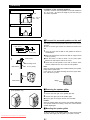
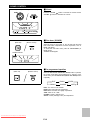
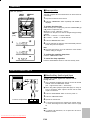
■ Headphones
● Before plugging in or unplugging the headphones, make sure
the volume level is reduced.
● Be sure your headphones have a 3.5 mm (1/8") diameter plug
and are between 16 ohms and 50 ohms impedance. The recommended impedance is 32 ohms.
● When headphones are connected, the speakers are disconnected automatically. Adjust the VOLUME control for the
desired volume.
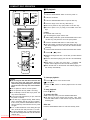
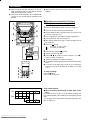
RESETTING THE MICROCOMPUTER
X-BASS/
DEMO
ON/
STAND-BY
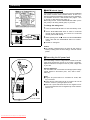
Reset the microcomputer under the following conditions:
● To erase all of the stored memory contents (clock and timer
settings, and tuner and CD presets).
● If the display is not correct.
● If the operation is not correct.
1
2
Press the ON/STAND-BY button to enter the stand-by mode.
0
Whilst pressing down the
button and the X-BASS/DEMO
button, hold down the ON/STAND-BY button for at least 1
second.
● "CLEAR AL" will appear.
Caution:
● The operation explained above will erase all data stored in
memory including clock and timer settings, and tuner and CD
presets.
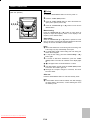
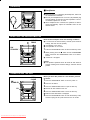
TRANSPORTING THE UNIT
OPEN/
CLOSE
ON/
STAND-BY
CD
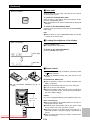
Before you move this product to a new location, proceed
as follows:
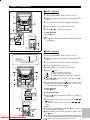
1
2
3
Press the ON/STAND-BY button to turn the power on.
Press the CD button.
Press the OPEN/CLOSE button to open the disc tray.
● Remove all CDs inserted in the unit.
4
Press the OPEN/CLOSE button to close the disc tray.
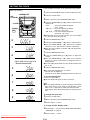
● Make sure that "NO DISC" is displayed.
5
Downloaded From Disc-Player.com Sharp Manuals
Press the ON/STAND-BY button to enter the stand-by mode,
and then unplug the AC power lead from the AC socket.