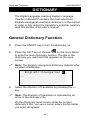
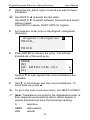
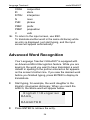
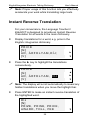
1
Language Teacher model EHu600T Document Conventions Whenever the keys' captions are referenced in text, it will be shown using UPPERCASE, e.g. ENTER. Whenever a section's name or information displayed on screen is referenced in text, it will be shown using italics, e.g. Currency Exchange. Boldface is used for emphasis. Symbols ◄ ►▲▼ refer to four cursor control keys located at far right on the key panel. Following icons mark paragraphs dealing with: • step by step directions within a section control keys talking function important notes. Key Panel The character section of the key panel emulates the American QWERTY keyboard layout, upgraded with additional Hungarian characters marked on the keys. The English and Hungarian character sets, as well as a numeric layout, are each linked to their input modes, indicated in the screen’s upper right-hand corner (whenever editing is available) by symbols E, H or N, respectively. Input modes can be switched consecutively in the above sequence by pressing the ↔ key. In the main dictionary, however, the input mode selection is handled 4