1
MX-3610N / MX-3110N / MX-2610N Sales Guide
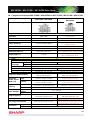
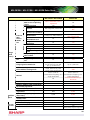
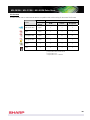
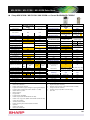
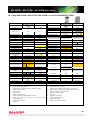
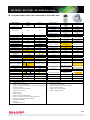
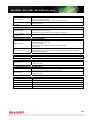
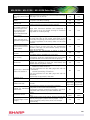
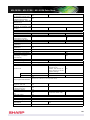
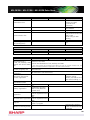
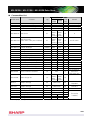
A0 & A1 fit page
Page interleave
Use driver to render
JPEGs
Print position
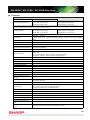
Print number of page
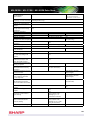
when N-up printing
Expansion of N-up
printing
N-up support when
pamphlet print
Repeat printing of
indeterminate size.
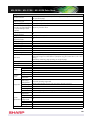
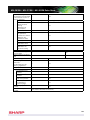
Print policy
Always use user
authentication
Always use
retention
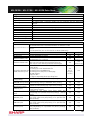
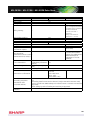
Toner save mode
RET support
Trapping
Sharpness
Custom image
registration
Function flow lite
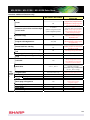
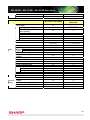
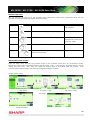
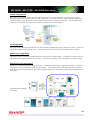
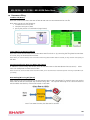
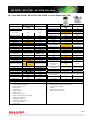
Print A0&A1 data into A4 or Letter size.
This function is used to interleave each printed page
with an identical insert page. To use this function, it’s
necessary to use the “Overlay” function to prepare an
insert page file.
In case of having JPEG image in the original document,
user can select whether printer driver or MFP to render
JPEG image.
This function is to adjust print position of odd and even
page of document separately.
(adjust per 1 mm)
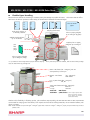
Print number of page on not only each original but also
each output.
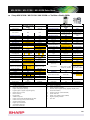
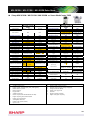
For example, in the case of 5 page documents, normal
print only 1st page, and remaining pages are N-up
printing. (can be 2-sided.)
For example, print presentation documents by 2-up and
pamphlet layout.
Repeat indeterminate size original with automatically
reduction.
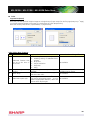
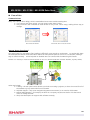
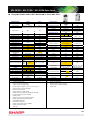
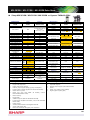
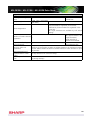
To limit operation by user level, function to turn on
some items mandatory.
Refer below about item which is limited.
And design consideration of can support additional
demand.
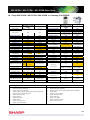
This function enforces print users to execute user
authentication.
This function enforces print users to use retention
function.
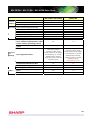
Toner save mode (1 step)
(3 steps: separately supported by driver)
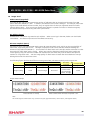
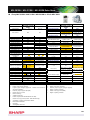
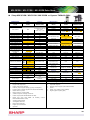
Support RET (resolution enhancement techniques)
To smooth the edges of image and reduce jagged lines
to obtain virtually high resolution.
Function to prevent outline of character from dropping
out black colour.
This is used to sharpen an image or make it softer.
5 steps (Sharp: 2 steps, Soft: 2 steps)
Custom image can be registered and stored into MFP
through printer driver.
Print + Send feature. “Send” can be specified by printer
driver.
Yes
No
Yes
No
Yes
Yes
Yes
No
No
No
Yes
No
Yes
No
Yes
No
Yes
No
Yes
No
Yes
No
Yes
Yes
Yes
Yes
Yes
Yes
Yes
Yes
Yes
Yes
Yes
No
89