1
Mini LCD RF Wireless Handheld Remote
Crestron ML-500
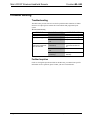
Problem Solving
Troubleshooting
The table below provides corrective action for possible trouble situations. If further
assistance is required, please contact the Crestron dealer that programmed your
system.
ML-500 Troubleshooting
TROUBLE
POSSIBLE CAUSE(S)
CORRECTIVE ACTION
Display is too dark.
Contrast is set wrong.
Adjust contrast setting.
Display is too light.
Contrast is set wrong.
Adjust contrast setting.
Batteries are running
low.
Replace batteries.
Devices are not
powered up.
Check power to devices.
Check that devices are
on.
Batteries are running
low.
Replace batteries.
RF Gateway not
functioning.
Check power to RF
Gateway.
System does not
respond to commands
from the ML-500.
Further Inquiries
If after reviewing this Operations Guide for the ML-500, you cannot locate specific
information or have questions, please contact your local Crestron dealer.
10 • Mini LCD RF Wireless Handheld Remote
Operations Guide – DOC. 6246