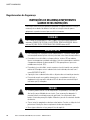
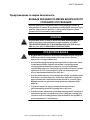
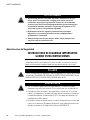
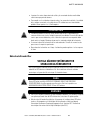
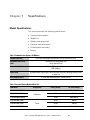
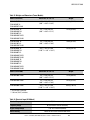
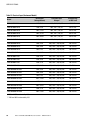
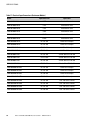
1
Eaton ® 9130 UPS 700–3000 VA User's Guide Class A EMC Statements (Low Voltage Models over 1500 VA) FCC Part 15 NOTE This equipment has been tested and found to comply with the limits for a Class A digital device, pursuant to part 15 of the FCC Rules. These limits are designed to provide reasonable protection against harmful interference when the equipment is operated in a commercial environment. This equipment generates, uses, and can radiate radio frequency energy and, if not installed and used in accordance with the instruction manual, may cause harmful interference to radio communications. Operation of this equipment in a residential area is likely to cause harmful interference in which case the user will be required to correct the interference at his own expense. ICES-003 This Class A Interference Causing Equipment meets all requirements of the Canadian Interference Causing Equipment Regulations ICES‐003. Cet appareil numérique de la classe A respecte toutes les exigences du Reglement sur le matériel brouilleur du Canada. EN 62040-2 Some configurations are classified under EN 62040-2 as “Class‐A UPS for Unrestricted Sales Distribution.” For these configurations, the following applies: WARNING This is a Class A‐UPS Product. In a domestic environment, this product may cause radio interference, in which case, the user may be required to take additional measures. VCCI Notice Eaton, Powerware, ABM, FERRUPS, and LanSafe are registered trademarks and ConnectUPS is a trademark of Eaton Corporation or its subsidiaries and affiliates. National Electrical Code and NEC are registered trademarks of National Fire Protection Association, Inc. Phillips is a registered trademark of Phillips Screw Company. All other trademarks are property of their respective companies. ECopyright 2008 Eaton Corporation, Raleigh, NC, USA. All rights reserved. No part of this document may be reproduced in any way without the express written approval of Eaton Corporation. Class B EMC Statements (Low Voltage Models up to 1500 VA and High Voltage Models up to 3000 VA) FCC Part 15 NOTE This equipment has been tested and found to comply with the limits for a Class B digital device, pursuant to part 15 of the FCC Rules. These limits are designed to provide reasonable protection against harmful interference in a residential installation. This equipment generates, uses and can radiate radio frequency energy and, if not installed and used in accordance with the instructions, may cause harmful interference to radio communications. However, there is no guarantee that interference will not occur in a particular installation. If this equipment does cause harmful interference to radio or television reception, which can be determined by turning the equipment off and on, the user is encouraged to try to correct the interference by one or more of the following measures: S Reorient or relocate the receiving antenna. S Increase the separation between the equipment and the receiver. S Connect the equipment into an outlet on a circuit different from that to which the receiver is connected. S Consult the dealer or an experienced radio/TV technician for help. ICES-003 This Class B Interference Causing Equipment meets all requirements of the Canadian Interference Causing Equipment Regulations ICES‐003. Cet appareil numérique de la classe B respecte toutes les exigences du Reglement sur le matériel brouilleur du Canada. VCCI Notice Requesting a Declaration of Conformity Units that are labeled with a CE mark comply with the following harmonized standards and EU directives: S Harmonized Standards: IEC 61000-3-12 S EU Directives: 73/23/EEC, Council Directive on equipment designed for use within certain voltage limits 93/68/EEC, Amending Directive 73/23/EEC 89/336/EEC, Council Directive relating to electromagnetic compatibility 92/31/EEC, Amending Directive 89/336/EEC relating to EMC The EC Declaration of Conformity is available upon request for products with a CE mark. For copies of the EC Declaration of Conformity, contact: Eaton Power Quality Oy Koskelontie 13 FIN-02920 Espoo Finland Phone: +358-9-452 661 Fax: +358-9-452 665 68 Special Symbols The following are examples of symbols used on the UPS or accessories to alert you to important information: RISK OF ELECTRIC SHOCK - Observe the warning associated with the risk of electric shock symbol. CAUTION: REFER TO OPERATOR'S MANUAL - Refer to your operator's manual for additional information, such as important operating and maintenance instructions. This symbol indicates that you should not discard the UPS or the UPS batteries in the trash. This product contains sealed, lead‐acid batteries and must be disposed of properly. For more information, contact your local recycling/reuse or hazardous waste center. This symbol indicates that you should not discard waste electrical or electronic equipment (WEEE) in the trash. For proper disposal, contact your local recycling/reuse or hazardous waste center. Table of Contents 1 Introduction . . . . . . . . . . . . . . . . . . . . . . . . . . . . . . . . . . . . . . . . . . . . . . . . . . . . . . . . . 1 2 Safety Warnings . . . . . . . . . . . . . . . . . . . . . . . . . . . . . . . . . . . . . . . . . . . . . . . . . . . . . 3 3 Installation . . . . . . . . . . . . . . . . . . . . . . . . . . . . . . . . . . . . . . . . . . . . . . . . . . . . . . . . . 17 Inspecting the Equipment . . . . . . . . . . . . . . . . . . . . . . . . . . . . . . . . . . . . . . . . . . . . . . . . . . . . . . . . . . . . . . . Unpacking the Cabinet . . . . . . . . . . . . . . . . . . . . . . . . . . . . . . . . . . . . . . . . . . . . . . . . . . . . . . . . . . . . . . . . . Checking the Accessory Kit . . . . . . . . . . . . . . . . . . . . . . . . . . . . . . . . . . . . . . . . . . . . . . . . . . . . . . . . . . . . . . Rackmount Installation . . . . . . . . . . . . . . . . . . . . . . . . . . . . . . . . . . . . . . . . . . . . . . . . . . . . . . . . . . . . . . . . . Checking the Rail Kit Accessories . . . . . . . . . . . . . . . . . . . . . . . . . . . . . . . . . . . . . . . . . . . . . . . . . . . . . . . Tools Required . . . . . . . . . . . . . . . . . . . . . . . . . . . . . . . . . . . . . . . . . . . . . . . . . . . . . . . . . . . . . . . . . . . . Rackmount Setup . . . . . . . . . . . . . . . . . . . . . . . . . . . . . . . . . . . . . . . . . . . . . . . . . . . . . . . . . . . . . . . . . . Rackmount Wiring Installation . . . . . . . . . . . . . . . . . . . . . . . . . . . . . . . . . . . . . . . . . . . . . . . . . . . . . . . . . . . . Installing the UPS . . . . . . . . . . . . . . . . . . . . . . . . . . . . . . . . . . . . . . . . . . . . . . . . . . . . . . . . . . . . . . . . . . Connecting the EBM(s) . . . . . . . . . . . . . . . . . . . . . . . . . . . . . . . . . . . . . . . . . . . . . . . . . . . . . . . . . . . . . . Tower Installation . . . . . . . . . . . . . . . . . . . . . . . . . . . . . . . . . . . . . . . . . . . . . . . . . . . . . . . . . . . . . . . . . . . . Tower Wiring Installation . . . . . . . . . . . . . . . . . . . . . . . . . . . . . . . . . . . . . . . . . . . . . . . . . . . . . . . . . . . . . . . Installing the UPS . . . . . . . . . . . . . . . . . . . . . . . . . . . . . . . . . . . . . . . . . . . . . . . . . . . . . . . . . . . . . . . . . . Connecting the EBM(s) . . . . . . . . . . . . . . . . . . . . . . . . . . . . . . . . . . . . . . . . . . . . . . . . . . . . . . . . . . . . . . UPS Initial Startup . . . . . . . . . . . . . . . . . . . . . . . . . . . . . . . . . . . . . . . . . . . . . . . . . . . . . . . . . . . . . . . . . . . . 17 18 18 19 19 19 20 23 23 26 29 30 30 32 34 Operation . . . . . . . . . . . . . . . . . . . . . . . . . . . . . . . . . . . . . . . . . . . . . . . . . . . . . . . . . . . 37 Control Panel Functions . . . . . . . . . . . . . . . . . . . . . . . . . . . . . . . . . . . . . . . . . . . . . . . . . . . . . . . . . . . . . . . . Changing the Language . . . . . . . . . . . . . . . . . . . . . . . . . . . . . . . . . . . . . . . . . . . . . . . . . . . . . . . . . . . . . . Display Functions . . . . . . . . . . . . . . . . . . . . . . . . . . . . . . . . . . . . . . . . . . . . . . . . . . . . . . . . . . . . . . . . . . User Settings . . . . . . . . . . . . . . . . . . . . . . . . . . . . . . . . . . . . . . . . . . . . . . . . . . . . . . . . . . . . . . . . . . . . . Operating Modes . . . . . . . . . . . . . . . . . . . . . . . . . . . . . . . . . . . . . . . . . . . . . . . . . . . . . . . . . . . . . . . . . . . . . Normal Mode . . . . . . . . . . . . . . . . . . . . . . . . . . . . . . . . . . . . . . . . . . . . . . . . . . . . . . . . . . . . . . . . . . . . . Battery Mode . . . . . . . . . . . . . . . . . . . . . . . . . . . . . . . . . . . . . . . . . . . . . . . . . . . . . . . . . . . . . . . . . . . . . Bypass Mode . . . . . . . . . . . . . . . . . . . . . . . . . . . . . . . . . . . . . . . . . . . . . . . . . . . . . . . . . . . . . . . . . . . . . Standby Mode . . . . . . . . . . . . . . . . . . . . . . . . . . . . . . . . . . . . . . . . . . . . . . . . . . . . . . . . . . . . . . . . . . . . UPS Startup and Shutdown . . . . . . . . . . . . . . . . . . . . . . . . . . . . . . . . . . . . . . . . . . . . . . . . . . . . . . . . . . . . . . Starting the UPS . . . . . . . . . . . . . . . . . . . . . . . . . . . . . . . . . . . . . . . . . . . . . . . . . . . . . . . . . . . . . . . . . . . Starting the UPS on Battery . . . . . . . . . . . . . . . . . . . . . . . . . . . . . . . . . . . . . . . . . . . . . . . . . . . . . . . . . . . UPS Shutdown . . . . . . . . . . . . . . . . . . . . . . . . . . . . . . . . . . . . . . . . . . . . . . . . . . . . . . . . . . . . . . . . . . . . Transferring the UPS Between Modes . . . . . . . . . . . . . . . . . . . . . . . . . . . . . . . . . . . . . . . . . . . . . . . . . . . . . . 37 38 38 40 43 43 43 44 45 45 45 46 47 47 4 Eaton® 9130 UPS (700–3000 VA) User's Guide S 164201718 Rev 2i TABLE OF CONTENTS 5 6 7 8 Retrieving the Event Log . . . . . . . . . . . . . . . . . . . . . . . . . . . . . . . . . . . . . . . . . . . . . . . . . . . . . . . . . . . . . . . . Setting Power Strategy . . . . . . . . . . . . . . . . . . . . . . . . . . . . . . . . . . . . . . . . . . . . . . . . . . . . . . . . . . . . . . . . . Configuring Bypass Settings . . . . . . . . . . . . . . . . . . . . . . . . . . . . . . . . . . . . . . . . . . . . . . . . . . . . . . . . . . . . . Configuring Load Segments . . . . . . . . . . . . . . . . . . . . . . . . . . . . . . . . . . . . . . . . . . . . . . . . . . . . . . . . . . . . . . Configuring Battery Settings . . . . . . . . . . . . . . . . . . . . . . . . . . . . . . . . . . . . . . . . . . . . . . . . . . . . . . . . . . . . . Configuring the UPS for EBMs . . . . . . . . . . . . . . . . . . . . . . . . . . . . . . . . . . . . . . . . . . . . . . . . . . . . . . . . . Running Automatic Battery Tests . . . . . . . . . . . . . . . . . . . . . . . . . . . . . . . . . . . . . . . . . . . . . . . . . . . . . . . Configuring Automatic Restart . . . . . . . . . . . . . . . . . . . . . . . . . . . . . . . . . . . . . . . . . . . . . . . . . . . . . . . . . 47 48 48 49 51 51 52 52 Communication . . . . . . . . . . . . . . . . . . . . . . . . . . . . . . . . . . . . . . . . . . . . . . . . . . . . . . 53 Installing Communication Options and Control Terminals . . . . . . . . . . . . . . . . . . . . . . . . . . . . . . . . . . . . . . . . . Communication Options . . . . . . . . . . . . . . . . . . . . . . . . . . . . . . . . . . . . . . . . . . . . . . . . . . . . . . . . . . . . . . . . RS-232 and USB Communication Ports . . . . . . . . . . . . . . . . . . . . . . . . . . . . . . . . . . . . . . . . . . . . . . . . . . . Connectivity Cards . . . . . . . . . . . . . . . . . . . . . . . . . . . . . . . . . . . . . . . . . . . . . . . . . . . . . . . . . . . . . . . . . Remote Emergency Power-off . . . . . . . . . . . . . . . . . . . . . . . . . . . . . . . . . . . . . . . . . . . . . . . . . . . . . . . . . Relay Output Contacts . . . . . . . . . . . . . . . . . . . . . . . . . . . . . . . . . . . . . . . . . . . . . . . . . . . . . . . . . . . . . . . Programmable Signal Inputs . . . . . . . . . . . . . . . . . . . . . . . . . . . . . . . . . . . . . . . . . . . . . . . . . . . . . . . . . . Modem Operation . . . . . . . . . . . . . . . . . . . . . . . . . . . . . . . . . . . . . . . . . . . . . . . . . . . . . . . . . . . . . . . . . . . . Powerware LanSafe Power Management Software . . . . . . . . . . . . . . . . . . . . . . . . . . . . . . . . . . . . . . . . . . . . . 54 54 54 56 56 58 59 60 60 UPS Maintenance . . . . . . . . . . . . . . . . . . . . . . . . . . . . . . . . . . . . . . . . . . . . . . . . . . . . 61 UPS and Battery Care . . . . . . . . . . . . . . . . . . . . . . . . . . . . . . . . . . . . . . . . . . . . . . . . . . . . . . . . . . . . . . . . . . Storing the UPS and Batteries . . . . . . . . . . . . . . . . . . . . . . . . . . . . . . . . . . . . . . . . . . . . . . . . . . . . . . . . . . . . When to Replace Batteries . . . . . . . . . . . . . . . . . . . . . . . . . . . . . . . . . . . . . . . . . . . . . . . . . . . . . . . . . . . . . . Replacing Batteries . . . . . . . . . . . . . . . . . . . . . . . . . . . . . . . . . . . . . . . . . . . . . . . . . . . . . . . . . . . . . . . . . . . Replacing Rackmount UPS Internal Batteries . . . . . . . . . . . . . . . . . . . . . . . . . . . . . . . . . . . . . . . . . . . . . . . Replacing Tower UPS Internal Batteries . . . . . . . . . . . . . . . . . . . . . . . . . . . . . . . . . . . . . . . . . . . . . . . . . . Replacing Rackmount EBMs . . . . . . . . . . . . . . . . . . . . . . . . . . . . . . . . . . . . . . . . . . . . . . . . . . . . . . . . . . . Replacing Tower EBMs . . . . . . . . . . . . . . . . . . . . . . . . . . . . . . . . . . . . . . . . . . . . . . . . . . . . . . . . . . . . . . Testing New Batteries . . . . . . . . . . . . . . . . . . . . . . . . . . . . . . . . . . . . . . . . . . . . . . . . . . . . . . . . . . . . . . . . . Recycling the Used Battery or UPS . . . . . . . . . . . . . . . . . . . . . . . . . . . . . . . . . . . . . . . . . . . . . . . . . . . . . . . . . Updating the UPS Firmware . . . . . . . . . . . . . . . . . . . . . . . . . . . . . . . . . . . . . . . . . . . . . . . . . . . . . . . . . . . . . 61 62 62 62 63 66 69 71 72 73 73 Specifications . . . . . . . . . . . . . . . . . . . . . . . . . . . . . . . . . . . . . . . . . . . . . . . . . . . . . . . 75 Model Specifications . . . . . . . . . . . . . . . . . . . . . . . . . . . . . . . . . . . . . . . . . . . . . . . . . . . . . . . . . . . . . . . . . . Rear Panels . . . . . . . . . . . . . . . . . . . . . . . . . . . . . . . . . . . . . . . . . . . . . . . . . . . . . . . . . . . . . . . . . . . . . . . . . 75 91 Troubleshooting . . . . . . . . . . . . . . . . . . . . . . . . . . . . . . . . . . . . . . . . . . . . . . . . . . . . . . 101 Typical Alarms and Conditions . . . . . . . . . . . . . . . . . . . . . . . . . . . . . . . . . . . . . . . . . . . . . . . . . . . . . . . . . . . . Silencing the Alarm . . . . . . . . . . . . . . . . . . . . . . . . . . . . . . . . . . . . . . . . . . . . . . . . . . . . . . . . . . . . . . . . . . . Service and Support . . . . . . . . . . . . . . . . . . . . . . . . . . . . . . . . . . . . . . . . . . . . . . . . . . . . . . . . . . . . . . . . . . . ii Eaton® 9130 UPS (700–3000 VA) User's Guide S 164201718 Rev 2 101 105 105 TABLE OF CONTENTS 9 Warranty . . . . . . . . . . . . . . . . . . . . . . . . . . . . . . . . . . . . . . . . . . . . . . . . . . . . . . . . . . . 107 Two-Year Limited Warranty (US and Canada) . . . . . . . . . . . . . . . . . . . . . . . . . . . . . . . . . . . . . . . . . . . . . . . . . Ten-Year Pro-Rated Limited Warranty (US and Canada) . . . . . . . . . . . . . . . . . . . . . . . . . . . . . . . . . . . . . . . . . . Load Protection Guarantee (US and Canada) . . . . . . . . . . . . . . . . . . . . . . . . . . . . . . . . . . . . . . . . . . . . . . . . . . Eaton® 9130 UPS (700–3000 VA) User's Guide S 164201718 Rev 2iii 107 109 111 TABLE OF CONTENTS iv Eaton® 9130 UPS (700–3000 VA) User's Guide S 164201718 Rev 2 Chapter 1 Introduction The Eaton® 9130 uninterruptible power system (UPS), part of the Powerware® series, protects your sensitive electronic equipment from the most common power problems, including power failures, power sags, power surges, brownouts, line noise, high voltage spikes, frequency variations, switching transients, and harmonic distortion. Power outages can occur when you least expect it and power quality can be erratic. These power problems have the potential to corrupt critical data, destroy unsaved work sessions, and damage hardware — causing hours of lost productivity and expensive repairs. With the Eaton 9130, you can safely eliminate the effects of power disturbances and guard the integrity of your equipment. Providing outstanding performance and reliability, the Eaton 9130's unique benefits include: S True online double-conversion technology with high power density, utility frequency independence, and generator compatibility. S ABM® technology that uses advanced battery management to increase battery service life, optimize recharge time, and provide a warning before the end of useful battery life. S Selectable High Efficiency mode of operation. S Rackmount models in a space-optimizing 2U size that fits any standard 48 cm (19”) rack. S Standard communication options: one RS-232 communication port, one USB communication port, and relay output contacts. S Optional connectivity cards with enhanced communication capabilities. S Optional modem capability for remote monitoring and service. S Extended runtime with up to four Extended Battery Modules (EBMs) per UPS. S Firmware that is easily upgradable without a service call. S Emergency shutdown control through the Remote Emergency Power-off (REPO) port. S Backed by worldwide agency approvals. Eaton® 9130 UPS (700–3000 VA) User's Guide S 164201718 Rev 2 1 INTRODUCTION Figure 1 shows the Eaton 9130 rackmount UPS, and Figure 2 shows the optional rackmount EBM. Figure 1. The Eaton 9130 Rackmount UPS Figure 2. The Eaton 9130 Rackmount EBM Figure 3 shows the Eaton 9130 tower UPS and optional EBM. Figure 3. The Eaton 9130 Tower UPS and EBM (2000–3000 VA Models Shown) 2 Eaton® 9130 UPS (700–3000 VA) User's Guide S 164201718 Rev 2 Chapter 2 Safety Warnings IMPORTANT SAFETY INSTRUCTIONS SAVE THESE INSTRUCTIONS This manual contains important instructions that you should follow during installation and maintenance of the UPS and batteries. Please read all instructions before operating the equipment and save this manual for future reference. DANGER This UPS contains LETHAL VOLTAGES. All repairs and service should be performed by AUTHORIZED SERVICE PERSONNEL ONLY. There are NO USER SERVICEABLE PARTS inside the UPS. WARNING S This UPS contains its own energy source (batteries). The UPS output may carry live voltage even when the UPS is not connected to an AC supply. S To reduce the risk of fire or electric shock, install this UPS in a temperature and humidity controlled, indoor environment, free of conductive contaminants. Ambient temperature must not exceed 40°C (104°F). Do not operate near water or excessive humidity (90% maximum). S To reduce the risk of fire, connect only to a circuit provided with branch circuit overcurrent protection in accordance with the National Electrical Code® (NEC®), ANSI/NFPA 70. S Output overcurrent protection and disconnect switch must be provided by others. S To comply with international standards and wiring regulations, the sum of the leakage current of the UPS and the total equipment connected to the output of this UPS must not have an earth leakage current greater than 3.5 milliamperes. S If installing optional rackmount EBM(s), install the EBM(s) directly below the UPS so that all wiring between the cabinets is installed behind the front covers and is inaccessible to users. The maximum number of EBM(s) per UPS is four. S If the UPS requires any type of transportation, verify that the UPS is unplugged and turned off and then disconnect the UPS internal battery connector (see Figure 24 on page 64 for rackmount models or Figure 26 on page 67 for tower models). Eaton® 9130 UPS (700–3000 VA) User's Guide S 164201718 Rev 2 3 SAFETY WARNINGS CAUTION S Batteries can present a risk of electrical shock or burn from high short-circuit current. Observe proper precautions. Servicing should be performed by qualified service personnel knowledgeable of batteries and required precautions. Keep unauthorized personnel away from batteries. S Proper disposal of batteries is required. Refer to your local codes for disposal requirements. S Never dispose of batteries in a fire. Batteries may explode when exposed to flame. Sikkerhedsanvisninger VIGTIGE SIKKERHEDSANVISNINGER GEM DISSE ANVISNINGER Denne manual indeholder vigtige instruktioner, som skal følges under installation og vedligeholdelse af UPS'en og batterierne. Læs venligst alle instruktioner inden betjening af udstyret og gem denne manual mhp. fremtidige opslag. FARE Denne UPS indeholder LIVSFARLIG HØJSPÆNDING. Alle reparationer og vedligeholdelse bør kun udføres af en AUTORISERET SERVICETEKNIKER. Ingen af UPS'ens indvendige dele kan repareres af brugeren. ADVARSEL! S Denne UPS indeholder sin egen energikilde (batterier). Udgangsstikket på UPS'en kan endog være strømførende, når UPS'en ikke er koblet til en vekselstrømsforsyning. S Installér denne UPS i et temperatur- og fugtighedskontrolleret indendørsmiljø, frit for ledende forureningsstoffer for at formindske risikoen for brand og elektrisk stød. Rumtemperaturen må ikke overstige 40°C. UPS'en bør ikke betjenes nær vand eller høj fugtighed (maksimalt 90%). S For at reducere risikoen for brand må tilkobling kun ske til et kredsløb forsynet med 100 ampere maks. linieforgrenings overbelastningsbeskyttelse i overensstemmelse med NEC, ANSI/NFPA 70. S Udgangsoverbelastningsbeskyttelsen og afbryderkontakten skal leveres af andre. S I overensstemmelse med internationale normer og bestemmelser for el-installation må det udstyr, der er forbundet til udgangen af denne UPS, tilsammen ikke overskride en jordafdelingsspænding på mere end 3,5 milliampere. 4 Eaton® 9130 UPS (700–3000 VA) User's Guide S 164201718 Rev 2 SAFETY WARNINGS ADVARSEL S Batterierne kan give risiko for elektrisk stød eller brandsår forårsaget af høj kortslutningsstrøm. Overhold gældende forsigtighedsregler. Servicering skal udføres af kvalificeret servicepersonale med kendskab til batterier og gældende forsigtighedsregler. Hold uautoriseret personale væk fra batterierne. S Korrekt bortskaffelse af batterier er påkrævet. Overhold gældende lokale regler for bortskaffelsesprocedurer. S Skaf dig aldrig af med batterierne ved at brænde dem. Batterierne kan eksplodere ved åben ild. Belangrijke Veiligheidsinstructies BELANGRIJKE VEILIGHEIDSINSTRUCTIES BEWAAR DEZE INSTRUCTIES Deze handleiding bevat belangrijke instructies die u dient te volgen tijdens de installatie en het onderhoud van de UPS en de accu's. Lees alle instructies voordat u de apparatuur in bedrijf neemt en bewaar deze handleiding als naslagwerk. GEVAAR Deze UPS bevat LEVENSGEVAARLIJKE ELEKTRISCHE SPANNING. Alle reparaties en onderhoud dienen UITSLUITEND DOOR ERKEND SERVICEPERSONEEL te worden uitgevoerd. Er bevinden zich GEEN ONDERDELEN in de UPS die DOOR DE GEBRUIKER kunnen worden GEREPAREERD. WAARSCHUWING S Deze UPS bevat een eigen energiebron (accu's). De UPS-uitgang kan onder spanning staan, zelfs wanneer de UPS niet is aangesloten op de netspanning. S Teneinde de kans op brand of elektrische schok te verminderen dient deze UPS in een gebouw met temperatuur‐ en vochtigheidregeling te worden geïnstalleerd, waar geen geleidende verontreinigingen aanwezig zijn. De omgevingstemperatuur mag 40°C niet overschrijden. Niet gebruiken in de buurt van water of bij zeer hoge vochtigheid (max. 90%). S Sluit om brandgevaar te voorkomen de apparatuur uitsluitend aan op een circuit voorzien van een overstroombeveiliging voor vertakte circuits van maximaal 100 A in overeenstemming met de NEC (Nationale Elektriciteitsvoorschriften), ANSI/NFPA 70. Eaton® 9130 UPS (700–3000 VA) User's Guide S 164201718 Rev 2 5 SAFETY WARNINGS S De uitgangsoverstroombeveiliging en de stroomonderbreker moeten door derden worden geleverd. S Om aan de internationale normen en bedradingsvoorschriften te voldoen mag de gehele apparatuur die op de uitgang van deze UPS is aangesloten, geen aardlekstroom van meer dan 3,5 milliampère hebben. OPGELET S Batterijen leveren gevaar op voor elektrische schokken en kunnen brandwonden veroorzaken door een grote kortsluitstroom. Neem de juiste voorzorgsmaatregelen in acht. Het onderhoud moet worden uitgevoerd door bevoegde onderhoudsmonteurs die verstand hebben van accu's en op de hoogte zijn van de vereiste voorzorgsmaatregelen. Houd onbevoegden uit de buurt van de accu's. S De batterijen moeten op de juiste wijze worden opgeruimd. Raadpleeg hiervoor uw plaatselijke voorschriften. S Nooit batterijen in het vuur gooien. De batterijen kunnen ontploffen. Tarkeita Turvaohjeita TÄRKEITÄ TURVAOHJEITA - SUOMI SÄILYTÄ NÄMÄ OHJEET Tämä käyttöohje sisältää tärkeitä ohjeita, joita on noudatettava UPS-virtalähteen ja akkujen asennuksen ja huollon yhteydessä. Lue kaikki ohjeet ennen laitteiston käyttöä ja säilytä ohje myöhempää tarvetta varten. VAARA Tämä UPS sisältää HENGENVAARALLISIA JÄNNITTEITÄ. Kaikki korjaukset ja huollot on jätettävä VAIN VALTUUTETUN HUOLTOHENKILÖN TOIMEKSI. UPS ei sisällä MITÄÄN KÄYTTÄJÄN HUOLLETTAVIA OSIA. VAROITUS S Tässä UPS-virtalähteessä on oma energianlähde (akut). UPS-virtalähteen lähdössä voi olla jännite, vaikka UPS-virtalähdettä ei ole kytketty verkkovirtaan. S Vähentääksesi tulipalon ja sähköiskun vaaraa asenna tämä UPS sisätiloihin, joissa lämpötila ja kosteus on säädettävissä ja joissa ei ole virtaa johtavia epäpuhtauksia. Ympäristön lämpötila ei saa ylittää 40 °C. Älä käytä lähellä vettä ja vältä kosteita tiloja (95 % maksimi). 6 Eaton® 9130 UPS (700–3000 VA) User's Guide S 164201718 Rev 2 SAFETY WARNINGS S Pienennä tulipalon vaaraa kytkemällä vain piiriin, jossa on 100 ampeerin maksimihaarapiirin ylivirtasuoja kansallisen sähkölainsäädännön (ANSI/NFPA 70) mukaan. S Muiden on toimitettava lähdön ylivirtasuoja ja irtikytkentäkytkin. S Kansainväliset normit ja johdotusmääräykset vaativat, että kaikkien tämän UPS-laitteen ulostulokytkentöjen yhteinen maavuotovirta ei ylitä 3,5 milliampeeria (mA). VARO S Akut voivat aiheuttaa sähköiskun tai palovammojen vaaran johtuen suuresta oikosulkuvirrasta. Noudata kaikkia asianmukaisia varotoimia. Laitteen saa huoltaa vain ammattitaitoinen huoltohenkilökunta, joka tuntee akut ja niihin liittyvät varotoimet. Älä päästä valtuuttamatonta henkilöstöä lähelle akkuja. S Akusto täytyy hävittää säädösten mukaisella tavalla. Noudata paikallisia määräyksiä. S Älä koskaan heitä akkuja tuleen. Ne voivat räjähtää. Consignes de sécurité CONSIGNES DE SÉCURITÉ IMPORTANTES CONSERVER CES INSTRUCTIONS Ce manuel comporte des instructions importantes que vous êtes invité à suivre lors de toute procédure d'installation et de maintenance des batteries et de l'onduleur. Veuillez consulter entièrement ces instructions avant de faire fonctionner l'équipement et conserver ce manuel afin de pouvoir vous y reporter ultérieurement. DANGER! Cet onduleur contient des TENSIONS MORTELLES. Toute opération d'entretien et de réparation doit être EXCLUSIVEMENT CONFIÉE A UN PERSONNEL QUALIFIÉ AGRÉÉ. AUCUNE PIÈCE RÉPARABLE PAR L'UTILISATEUR ne se trouve dans l'onduleur. AVERTISSEMENT! S Cette onduleur possède sa propre source d'alimentation (batteries). Il est possible que la sortie de l'onduleur soit sous tension même lorsque l'onduleur n'est pas connectée à une alimentation CA. S Pour réduire les risques d'incendie et de décharge électrique, installer l'onduleur uniquement à l'intérieur, dans un lieu dépourvu de matériaux conducteurs, où la température et l'humidité ambiantes sont contrôlées. La température ambiante ne doit pas dépasser 40 °C. Ne pas utiliser à proximité d'eau ou dans une atmosphère excessivement humide (95 % maximum). Eaton® 9130 UPS (700–3000 VA) User's Guide S 164201718 Rev 2 7 SAFETY WARNINGS S Afin de réduire les risques d'incendie, ne raccordez qu'à un circuit muni d'une protection de surintensité du circuit de dérivation maximum de 100 ampères conformément au NEC (Code Électrique National) des États-Unis, ANSI/NFPA 70. S La protection de surintensité de sortie ainsi que le sectionneur doivent être fournis par des tiers. S Afin d'être conforme aux normes et règlements internationaux de câblage, le courant de fuite à la terre de la totalité du matériel branché sur la sortie de l'onduleur ne doit pas dépasser 3,5 mA. ATTENTION! S Les batteries peuvent présenter un risque de choc électrique ou de brûlure provenant d'un courant de court-circuit haute intensité. Observez les précautions appropriées. L'entretien doit être réalisé par du personnel qualifié connaissant bien les batteries et les précautions nécessaires. N'autorisez aucun personnel non qualifié à manipuler les batteries. S Une mise au rebut réglementaire des batteries est obligatoire. Consulter les règlements en vigueur dans votre localité. S Ne jamais jeter les batteries au feu. L'exposition aux flammes risque de les faire exploser. Sicherheitswarnungen WICHTIGE SICHERHEITSANWEISUNGEN AUFBEWAREN Dieses Handbuch enthält wichtige Anweisungen, die Sie während der Installation und Wartung des USV (Unterbrechungsfreies Stromversorgungssystem) und der Batterien befolgen müssen. Bitte lesen Sie alle Anweisungen des Handbuches bevor sie mit dem Gerät arbeiten. Bewaren Sie das Handbuch zum Nachlesen auf. WARNUNG Die USV führt lebensgefährliche Spannungen. Alle Reparatur- und Wartungsarbeiten sollten nur von Kundendienstfachleuten durchgeführt werden. Die USV enthält keine vom Benutzer zu wartenden Komponenten. 8 Eaton® 9130 UPS (700–3000 VA) User's Guide S 164201718 Rev 2 SAFETY WARNINGS ACHTUNG S Dieses USV (Unterbrechungsfreies Stromversorgungssystem) enthält eine eigene Energiequelle (Batterien). Der USV-Ausgang kann Spannung führen, auch wenn das USV nicht an eine Wechselstromquelle angeschlossen ist. S Um die Brand‐ oder Elektroschockgefahr zu verringern, diese USV nur in Gebäuden mit kontrollierter Temperatur und Luftfeuchtigkeit installieren, in denen keine leitenden Schmutzstoffen vorhanden sind. Die Umgebungstemperatur darf 40°C nicht übersteigen. Die USV nicht in der Nähe von Wasser oder in extrem hoher Luftfeuchtigkeit (max. 95 %) betreiben. S Um die Brandgefahr zu verringern, nur an eine Leitung anschließen, die mit einem Überlaststromschutz von maximal 100 Ampere in Übereinstimmung mit dem NEC, ANSI/NFPA 70 ausgestattet ist. S Der Ausgangs-Überlaststromschutz und der Trennschalter müssen von anderen Herstellern geliefert werden. S Um internationale Normen und Verdrahtungsvorschriften zu erfüllen, dürfen die an den Ausgang dieser USV angeschlossenen Geräte zusammen einen Erdableitstrom von insgesamt 3,5 Milliampere nicht überschreiten. VORSICHT! S Batterien können das Risiko eines elektrischen Schlags bergen oder durch hohen Kurzschlussstrom in Brand geraten. Die richtigen Vorsichtsmaßnahmen beachten. Die Wartung muss von qualifiziertem Wartungspersonal durchgeführt werden, das im Umgang mit Batterien geübt ist und über gute Kenntnisse der erforderlichen Vorsichtsmaßnahmen verfügt. Nicht autorisiertes Personal von Batterien fern halten. S Die Batterien müssen ordnungsgemäß entsorgt werden. Hierbei sind die örtlichen Bestimmungen zu beachten. S Batterien niemals verbrennen, da sie explodieren können. Avvisi di sicurezza IMPORTANTI ISTRUZIONI DI SICUREZZA CONSERVARE QUESTE ISTRUZIONI Il presente manuale contiene importanti istruzioni da seguire durante l'installazione e la manutenzione dell'UPS e delle batterie. Leggere integralmente le istruzioni prima di utilizzare l'apparecchiatura e conservare il presente manuale per futuro riferimento. Eaton® 9130 UPS (700–3000 VA) User's Guide S 164201718 Rev 2 9 SAFETY WARNINGS PERICOLO La TENSIONE contenuta in questo gruppo statico di continuità è LETALE. Tutte le operazioni di riparazione e di manutenzione devono essere effettuate ESCLUSIVAMENTE DA PERSONALE TECNICO AUTORIZZATO. All'interno del gruppo statico di continuità NON vi sono PARTI RIPARABILI DALL'UTENTE. AVVERTENZA S L'UPS contiene la propria fonte di energia (batterie). Le prese d'uscita dell'UPS possono essere sotto tensione anche quando l'UPS non è collegato all'alimentazione elettrica CA. S Per ridurre il rischio di incendio o di scossa elettrica, installare il gruppo statico di continuità in un ambiente interno a temperatura ed umidità controllata, privo di agenti contaminanti conduttivi. La temperatura ambiente non deve superare i 40°C. Non utilizzare l'unità in prossimità di acqua o in presenza di umidità eccessiva (90% max). S Per ridurre il rischio di incendio, effettuare il collegamento soltanto a un circuito dotato di una protezione da sovraccarico per il circuito derivato di max. 100 ampere come stabilito dalle norme statunitensi sugli impianti elettrici (NEC, ANSI/NFPA 70). S La protezione da sovraccarico per le uscite e l'interruttore di scollegamento devono essere forniti da altri produttori. S Per conformità con gli standard internazionali e con le norme in merito al cablaggio, tutta l'apparecchiatura collegata con l'uscita del gruppo statico di continuità non deve avere una corrente di dispersione di terra superiore a 3,5 milliampere. ATTENZIONE S Le batterie possono comportare un rischio di scossa elettrica o di ustione in seguito a un'elevata corrente di corto circuito. Osservare le dovute precauzioni. L'assistenza deve essere eseguita da personale qualificato esperto di batterie e delle necessarie precauzioni. Tenere il personale non autorizzato lontano dalle batterie. S Le batterie devono essere smaltite in modo corretto. Per i requisiti di smaltimento fare riferimento alle disposizioni locali. S Non gettare mai le batterie nel fuoco poichè potrebbero esplodere se esposte alle fiamme. 10 Eaton® 9130 UPS (700–3000 VA) User's Guide S 164201718 Rev 2 SAFETY WARNINGS Viktig Sikkerhetsinformasion VIKTIGE SIKKERHETSINSTRUKSJONER GJEM DISSE INSTRUKSJONENE Denne håndboken inneholder viktige instruksjoner som du bør overholde ved montering og vedlikehold av UPS-enheten og batteriene. Les alle instruksjoner før utstyret tas i bruk, og gjem håndboken til fremtidig referanse. FARLIG Denne UPS'en inneholder LIVSFARLIGE SPENNINGER. All reparasjon og service må kun utføres av AUTORISERT SERVICEPERSONALE. BRUKERE KAN IKKE UTFØRE SERVICE PÅ NOEN AV DELENE i UPS'en. FARLIG S UPS-enheten inneholder sin egen energikilde (batterier). UPS-utgangen kan være strømførende selv når UPS-enheten ikke er koblet til et strømuttak. S For å redusere fare for brann eller elektriske støt, bør denne UPS'en installeres i et innendørs miljø med kontrollert temperatur og luftfuktighet som er fritt for ledende, forurensende stoffer. Romtemperaturen må ikke overskride 40°C. Den må ikke brukes i nærheten av vann eller ved meget høy luftfuktighet (90% maks.). S For å redusere brannfaren skal det bare kobles til et kretsløp med 100 A maksimum linjeforgrenings overbelastningsbeskyttelse i henhold til NEC, ANSI/NFPA 70. S Overbelastningsbeskyttelse for strømutgang og bryterkontakt skal leveres av andre. S Alt utstyr som er forbundet med utgangen av denne UPS'en må ikke ha en sterkere total lekkasjestrøm enn 3,5 milliampere for å være i overensstemmelse med internasjonale standarder og forkablingsbestemmelser. FORSIKTIG S Batterier kan utgjøre en fare for elektrisk støt eller brannsår pga. høy kortsluttingsstrøm. Treff passende forholdsregler. Service bør utføres av kvalifisert servicepersonale med kjennskap til batterier og nødvendige forholdsregler. Hold uautorisert personale borte fra batteriene. S Batterier må fjernes på korrekt måte. Se lokale forskrifter vedrørende krav om fjerning av batterier. S Kast aldri batterier i flammer, da de kan eksplodere, hvis de utsettes for åpen ild. Eaton® 9130 UPS (700–3000 VA) User's Guide S 164201718 Rev 2 11 SAFETY WARNINGS Regulamentos de Segurança INSTRUÇÕES DE SEGURANÇA IMPORTANTES GUARDE ESTAS INSTRUÇÕES Este manual contém instruções importantes que devem ser seguidas durante a instalação e manutenção do no-break e das baterias. Leia todas as instruções antes de operar o equipamento e guarde este manual para consultá-lo futuramente. CUIDADO A UPS contém VOLTAGEM MORTAL. Todos os reparos e assistência técnica devem ser executados SOMENTE POR PESSOAL DA ASSISTÊNCIA TÉCNICA AUTORIZADO. Não há nenhuma PEÇA QUE POSSA SER REPARADA PELO USUÁRIO dentro da UPS. ADVERTÊNCIA S Este no-break possui sua própria fonte de energia (baterias). A saída do no-break pode estar energizada mesmo que este não esteja conectado a uma fonte de energia elétrica. S Para reduzir o risco de incêndios ou choques elétricos, instale a UPS em ambiente interno com temperatura e umidade controladas e livres de contaminadores condutíveis. A temperatura ambiente não deve exceder 40°C. Não opere próximo a água ou em umidade excessiva (máx: 90%). S Para reduzir o risco de incêndio, conecte somente ao circuito fornecido com a proteção máxima de 100 ampères contra a sobretensão do circuito derivado, de acordo com a norma ANSI/NFPA 70 do NEC. S A proteção contra a sobretensão de saída e o disjuntor deve ser fornecida por terceiros. S Para estar de acordo com os padrões internacionais e os regulamentos de fiação, o equipamento total conectado à saída desta UPS não deve ter uma corrente de fuga à terra maior que 3,5 miliampères. PERIGO S As baterias podem oferecer risco de choque elétrico ou queimadura, ocasionados por alta tensão com possibilidade de curto-circuito. Tome as precauções adequadas. A manutenção deve ser realizada por pessoal qualificado, com conhecimento sobre baterias e ciente das precauções exigidas. Mantenha o pessoal não autorizado afastado das baterias. S Siga as instruções apropriadas ao desfazer‐se das baterias. Consulte os códigos do local para maiores informações sobre os regulamentos de descarte de produtos. S Nunca jogue as baterias no fogo, porque há risco de explosão. 12 Eaton® 9130 UPS (700–3000 VA) User's Guide S 164201718 Rev 2 SAFETY WARNINGS Ïðåäóïðåæäåíèÿ ïî ìåðàì áåçîïàñíîñòè ÂÀÆÍÛÅ ÓÊÀÇÀÍÈß ÏÎ ÌÅÐÀÌ ÁÅÇÎÏÀÑÍÎÑÒÈ ÑÎÕÐÀÍÈÒÅ ÝÒÈ ÓÊÀÇÀÍÈß Â äàííîì ðóêîâîäñòâå ñîäåðæàòñÿ âàæíûå èíñòðóêöèè ïî óñòàíîâêå è îáñëóæèâàíèþ èñòî÷íèêà áåñïåðåáîéíîãî ïèòàíèÿ (ÈÁÏ) è áàòàðåé. Ïåðåä ðàáîòîé ñ îáîðóäîâàíèåì ïðî÷òèòå âñå èíñòðóêöèè. Ñîõðàíèòå äàííîå ðóêîâîäñòâî äëÿ äàëüíåéøåãî èñïîëüçîâàíèÿ. ÎÏÀÑÍÎ Â äàííîì ÈÁÏ èìåþòñÿ ÑÌÅÐÒÅËÜÍÎ ÎÏÀÑÍÛÅ ÍÀÏÐßÆÅÍÈß. Âñå ðàáîòû ïî ðåìîíòó è îáñëóæèâàíèþ äîëæíû âûïîëíÿòüñÿ ÒÎËÜÊÎ ÓÏÎËÍÎÌÎ×ÅÍÍÛÌ ÎÁÑËÓÆÈÂÀÞÙÈÌ ÏÅÐÑÎÍÀËÎÌ. Âíóòðè ÈÁÏ íåò óçëîâ, ÎÁÑËÓÆÈÂÀÅÌÛÕ ÏÎËÜÇÎÂÀÒÅËÅÌ. ÏÐÅÄÓÏÐÅÆÄÅÍÈÅ S  äàííîì ÈÁÏ óñòàíîâëåíû ñîáñòâåííûå èñòî÷íèêè ýíåðãèè (áàòàðåè).  ÈÁÏ ìîæåò èìåòüñÿ íàïðÿæåíèå äàæå â òîì ñëó÷àå, åñëè îí íå ïîäêëþ÷åí ê ñåòè ïåðåìåííîãî òîêà. S Äëÿ ñíèæåíèÿ îïàñíîñòè ïîæàðà èëè ïîðàæåíèÿ ýëåêòðè÷åñêèì òîêîì óñòàíàâëèâàéòå ÈÁÏ â çàêðûòîì ïîìåùåíèè ñ êîíòðîëèðóåìûìè òåìïåðàòóðîé è âëàæíîñòüþ, â êîòîðîì îòñóòñòâóþò ïðîâîäÿùèå çàãðÿçíÿþùèå âåùåñòâà. Òåìïåðàòóðà îêðóæàþùåãî âîçäóõà íå äîëæíà ïðåâûøàòü 40°Ñ. Íå ýêñïëóàòèðóéòå óñòðîéñòâî îêîëî âîäû èëè â ìåñòàõ ñ ïîâûøåííîé âëàæíîñòüþ (ìàêñ. 90%). S Äëÿ òîãî ÷òîáû ñíèçèòü ðèñê âîçíèêíîâåíèÿ ïîæàðà, ïðè ïîäêëþ÷åíèè èñïîëüçóéòå ýëåêòðè÷åñêóþ öåïü, ñíàáæåííóþ çàùèòîé îò ïåðåãðóçêè ïàðàëëåëüíîé öåïè ñ ìàêñèìàëüíîé ñèëîé òîêà 100 À (â ñîîòâåòñòâèè ñ Íàöèîíàëüíûìè ýëåêòðîòåõíè÷åñêèìè ïðàâèëàìè è íîðìàìè ANSI / NFPA 70). S Óñòðîéñòâî çàùèòû îò ïåðåãðóçêè âûõîäíîãî íàïðÿæåíèÿ è ðàçìûêàþùèé ïåðåêëþ÷àòåëü ïðèîáðåòàþòñÿ îòäåëüíî. S Äëÿ îáåñïå÷åíèÿ ñîáëþäåíèÿ òðåáîâàíèé ìåæäóíàðîäíûõ ñòàíäàðòîâ è òðåáîâàíèé ê ðàçâîäêå ýëåêòðè÷åñêèõ öåïåé, ñóììàðíàÿ âåëè÷èíà òîêà óòå÷êè íà çåìëþ âñåãî îáîðóäîâàíèÿ, ïîäêëþ÷åííîãî ê âûõîäó ÈÁÏ, íå äîëæíà ïðåâûøàòü 3,5 ìèëëèàìïåðà. Eaton® 9130 UPS (700–3000 VA) User's Guide S 164201718 Rev 213 SAFETY WARNINGS ÎÑÒÎÐÎÆÍÎ S Âûñîêîå íàïðÿæåíèå, âûçâàííîå êîðîòêèì çàìûêàíèåì â áàòàðåå, ìîæåò ïðèâåñòè ê ïîðàæåíèþ ýëåêòðè÷åñêèì òîêîì èëè îæîãó. Ñîáëþäàéòå ìåðû ïðåäîñòîðîæíîñòè. Òåõíè÷åñêîå îáñëóæèâàíèå äîëæíî îñóùåñòâëÿòüñÿ êâàëèôèöèðîâàííûì ïåðñîíàëîì ïî ðàáîòå ñ èñòî÷íèêàìè ïèòàíèÿ, çíàêîìûì ñ ìåðàìè ïðåäîñòîðîæíîñòè. Íå äîïóñêàéòå ê ðàáîòå ñ áàòàðåÿìè ïîñòîðîííèõ. S Íåîáõîäèìî ñîáëþäàòü ïðàâèëà óòèëèçàöèè àêêóìóëÿòîðîâ. Îáðàòèòåñü ê ìåñòíûì íîðìàòèâíûì àêòàì çà èíôîðìàöèåé î òðåáîâàíèÿõ ê óòèëèçàöèè. S Íèêîãäà íå áðîñàéòå àêêóìóëÿòîðû â îãîíü. Àêêóìóëÿòîðû ìîãóò âçîðâàòüñÿ ïîä âîçäåéñòâèåì îãíÿ. Advertencias de Seguridad INSTRUCCIONES DE SEGURIDAD IMPORTANTES GUARDE ESTAS INSTRUCCIONES Este manual contiene instrucciones importantes que debe seguir durante la instalación y el mantenimiento del SIE y de las baterías. Por favor, lea todas las instrucciones antes de poner en funcionamiento el equipo y guarde este manual para referencia en el futuro. PELIGRO Este SIE contiene VOLTAJES MORTALES. Todas las reparaciones y el servicio técnico deben ser efectuados SOLAMENTE POR PERSONAL DE SERVICIO TÉCNICO AUTORIZADO. No hay NINGUNA PARTE QUE EL USUARIO PUEDA REPARAR dentro del SIE. ADVERTENCIA S Este SIE contiene su propia fuente de energía (baterías). La salida del SIE puede transportar voltaje activo aun cuando el SIE no esté conectado con una fuente de CA. S Para reducir el riesgo de incendio o de choque eléctrico, instale este SIE en un lugar cubierto, con temperatura y humedad controladas, libre de contaminantes conductores. La temperatura ambiente no debe exceder los 40°C. No trabaje cerca del agua o con humedad excesiva (90% máximo). S Para reducir el riesgo de incendio, realice la conexión únicamente hacia un circuito que cuente con un máximo de 100 amperios de protección contra sobrecorriente de circuito derivado, de acuerdo con el Código Eléctrico Nacional, ANSI/NFPA 70. 14 Eaton® 9130 UPS (700–3000 VA) User's Guide S 164201718 Rev 2 SAFETY WARNINGS S La protección contra sobrecorriente de salida y el conmutador de desconexión debe suministrarse por parte de terceros. S Para cumplir con los estándares internacionales y las normas de instalación, la totalidad de los equipos conectados a la salida de este SIE no debe tener una intensidad de pérdida a tierra superior a los 3,5 miliamperios. PRECAUCIÓN S Las baterías pueden constituir un riesgo de descarga eléctrica o quemaduras por corriente alta de corto circuito. Adopte las precauciones debidas. Personal calificado de servicio que conozca de baterías y esté al tanto de las precauciones requeridas debe darle servicio al equipo. Mantenga al personal no autorizado alejado de las baterías. S Es necesario desechar las baterías de un modo adecuado. Consulte las normas locales para conocer los requisitos pertinentes. S Nunca deseche las baterías en el fuego. Las baterías pueden explotar si se las expone a la llama. Säkerhetsföreskrifter VIKTIGA SÄKERHETSFÖRESKRIFTER SPARA DESSA FÖRESKRIFTER Den här anvisningen innehåller viktiga instruktioner som du ska följa under installation och underhåll av UPS-enheten och batterierna. Läs alla instruktioner innan du använder utrustningen och spara den här anvisningen för framtida referens. FARA Denna UPS-enhet innehåller LIVSFARLIG SPÄNNING. ENDAST AUKTORISERAD SERVICEPERSONAL får utföra reparationer eller service. Det finns inga delar som ANVÄNDAREN KAN UTFÖRA SERVICE PÅ inuti UPS-enheten. VARNING S Den här UPS-enheten innehåller sin egen energikälla (batterier). UPS-enhetens uttag kan vara spänningsförande även då UPS-enheten inte är ansluten till spänningsnätet. S Minska risken för brand eller elektriska stötar genom att installera denna UPS-enhet inomhus, där temperatur och luftfuktighet är kontrollerade och där inga ledande föroreningar förekommer. Omgivande temperatur får ej överstiga 40°C. Använd inte utrustningen nära vatten eller vid hög luftfuktighet (max 95 %). Eaton® 9130 UPS (700–3000 VA) User's Guide S 164201718 Rev 2 15 SAFETY WARNINGS S För att reducera faran för brand får anslutning endast utföras till en krets som skyddas med överbelastningsskydd på maximalt 100 ampere i enlighet med NEC, ANSI/NFPA 70. S Utgående överbelastningssydd och kretsbrytare måste levereras av annan leverantör. S För att överensstämma med internationell standard och installationsföreskrifter får inte den totala utrustning som anslutits till uttagen på denna UPS-enhet ha läcksström som överstiger 3,5 milliampere. VIKTIGT S Batterierna kan innebära en risk för elektrisk stöt eller brännskada från kortsluten starkström. Iakttag lämpliga försiktighetsåtgärder. Service ska utföras av utbildad servicepersonal med kunskap om batterierna och nödvändiga försiktighetsåtgärder. Håll ej behörig personal borta från batterierna. S Batterierna måste avyttras enligt anvisningarna i lokal lagstiftning. S Använda batterier får aldrig brännas upp. De kan explodera. 16 Eaton® 9130 UPS (700–3000 VA) User's Guide S 164201718 Rev 2 Chapter 3 Installation This section explains: S Equipment inspection S Unpacking the cabinet S Checking the accessory kit S Cabinet installation (rackmount and tower) S Wiring installation S Initial startup Inspecting the Equipment If any equipment has been damaged during shipment, keep the shipping cartons and packing materials for the carrier or place of purchase and file a claim for shipping damage. If you discover damage after acceptance, file a claim for concealed damage. To file a claim for shipping damage or concealed damage: 1) File with the carrier within 15 days of receipt of the equipment; 2) Send a copy of the damage claim within 15 days to your service representative. NOTE Check the battery recharge date on the shipping carton label. If the date has passed and the batteries were never recharged, do not use the UPS. Contact your service representative. Eaton® 9130 UPS (700–3000 VA) User's Guide S 164201718 Rev 2 17 INSTALLATION Unpacking the Cabinet CAUTION S Unpacking the cabinet in a low-temperature environment may cause condensation to occur in and on the cabinet. Do not install the cabinet until the inside and outside of the cabinet are absolutely dry (hazard of electric shock). S The cabinet is heavy (see page 78). Use caution to unpack and move the cabinet. Use care when moving and opening the carton. Leave the components packaged until ready to install. To unpack the cabinet and accessories: 1. Open the outer carton and remove the accessories packaged with the cabinet. 2. Carefully lift the cabinet out of the outer carton. 3. Discard or recycle the packaging in a responsible manner, or store it for future use. Place the cabinet in a protected area that has adequate airflow and is free of humidity, flammable gas, and corrosion. Checking the Accessory Kit Verify that the following additional items are included with the UPS: S UPS user's guide S Quick start instructions S Software Suite CD S USB cable S Power cord (for models without an attached power cord) If you ordered an optional Extended Battery Module (EBM), verify that the following additional item is included with the EBM: S EBM user's guide NOTE Discard the EBM user's guide if you are installing the EBM with a new UPS at the same time. Use the UPS user's guide to install both the UPS and the EBM. 18 Eaton® 9130 UPS (700–3000 VA) User's Guide S 164201718 Rev 2 INSTALLATION Rackmount Installation The Eaton 9130 rackmount cabinet comes with all of the hardware required for installation in a standard EIA or JIS seismic rackmount configuration with square and round mounting holes. The rail assemblies adjust to mount in 48-cm (19-inch) racks with front to rear rail distances from 61 to 76 cm (24 to 30 inches) deep. Checking the Rail Kit Accessories Verify that the following rail kit items are included for each cabinet: S Left rail assembly: - Left rail - Rear rail - (3) M4 8 pan-head screws S Right rail assembly: - Right rail - Rear rail - (3) M4 8 pan-head screws S Rail hardware kit: - (10) M6 16 pan-head screws - (10) M6 cage nuts - (2) rear stop brackets - (2) M3 8 pan-head screws S Mounting bracket kit: - (2) mounting brackets - (8) M4 8 flat-head screws Tools Required To assemble the components, the following tools may be needed: S Medium flat-bladed screwdriver S Phillips® #2 screwdriver S 7 and 8 mm wrench or socket Eaton® 9130 UPS (700–3000 VA) User's Guide S 164201718 Rev 2 19 INSTALLATION Rackmount Setup CAUTION S The cabinet is heavy (see page 78). Removing the cabinet from its carton requires a minimum of two people. S If installing optional EBM(s), install the EBM(s) directly below the UPS so that all wiring between the cabinets is installed behind the front covers and is inaccessible to users. NOTE Mounting rails are required for each individual cabinet. To install the rail kit: 1. Assemble the left and right rails to the rear rails as shown in Figure 4. Do not tighten the screws. Adjust each rail size for the depth of your rack. Rear Rails M4 8 Pan-Head Screws (6 places) Left Rail Figure 4. Assembling the Rails 20 Eaton® 9130 UPS (700–3000 VA) User's Guide S 164201718 Rev 2 Right Rail INSTALLATION 2. Select the proper holes in the rack for positioning the UPS in the rack (see Figure 5). The rails occupy four positions on the front and rear of the rack. 3. Secure one rail assembly to the front of the rack with one M6 16 pan-head screw and one M6 cage nut. 4. Using two M6 cage nuts and two M6 16 pan-head screws, attach the rail assembly to the rear of the rack. Position 4 Position 1 M6 Cage Nuts (6 places) Tighten adjustment screws after rail attachment (3 places each rail). M6 16 Pan-Head Screws (6 places) Front of Rack Figure 5. Securing the Rails 5. Repeat Steps 3 and 4 for the other rail assembly. 6. Tighten the three adjustment screws in the middle of each rail assembly. 7. If installing optional cabinets, repeat Step 1 through Step 6 for each rail kit. 8. Place the UPS on a flat, stable surface with the front of the cabinet facing you. 9. Align the mounting brackets with the screw holes on each side of the UPS and secure with the supplied M4 8 flat-head screws (see Figure 6). Eaton® 9130 UPS (700–3000 VA) User's Guide S 164201718 Rev 2 21 INSTALLATION NOTE There are two sets of four mounting holes on each side of the UPS: a forward position and a middle position. Choose the position that meets your configuration needs. Mounting Bracket M4 8 Flat-Head Screws (4 places) Figure 6. Installing the Mounting Brackets (Forward Position Shown) 10. If installing optional cabinets, repeat Steps 8 and 9 for each cabinet. 11. Slide the UPS and any optional cabinets into the rack. 12. Secure the front of the UPS to the rack using two M6 16 pan-head screws and two M6 cage nuts on each side (see Figure 7). Install the bottom screw on each side through the bottom hole of the mounting bracket and the bottom hole of the rail. Repeat for any optional cabinets. M6 Cage Nuts (4 places) M6 16 Pan-Head Screws (4 places) Figure 7. Securing the Front of the Cabinet 22 Eaton® 9130 UPS (700–3000 VA) User's Guide S 164201718 Rev 2 INSTALLATION 13. Optional. Insert a rear stop bracket through the inside of each rail behind the UPS. Rotate each bracket and slide the bracket until it fits tightly against the UPS's rear panel. Secure each bracket to the UPS with one M3 8 pan-head screw. See Figure 8. Repeat for any optional cabinets. 14. Continue to the following section, “Rackmount Wiring Installation.” Rear Stop Bracket M3 8 Pan-Head Screw Figure 8. Securing the Back of the Cabinet (Optional) Rackmount Wiring Installation This section explains: S Installing the UPS, including connecting the UPS internal batteries S Connecting any optional EBMs Installing the UPS NOTE Do not make unauthorized changes to the UPS; otherwise, damage may occur to your equipment and void your warranty. NOTE Do not connect the UPS power cord to utility until after installation is completed. To install the UPS: 1. Remove the UPS right front cover (behind the LCD control panel). See Figure 9. To remove the cover, remove and retain the two screws on the right side of the cover. Grasp the top and bottom of the cover and slide the cover to the right. Eaton® 9130 UPS (700–3000 VA) User's Guide S 164201718 Rev 2 23 INSTALLATION NOTE A ribbon cable connects the LCD control panel to the UPS. Do not pull on the cable or disconnect it. NOTE Leave ribbon cable connected. Figure 9. Removing the UPS Right Front Cover CAUTION A small amount of arcing may occur when connecting the internal batteries. This is normal and will not harm personnel. Connect the cables quickly and firmly. 2. Connect the internal battery connector (see Figure 10). Up to 1500 VA models. Unclip the top rightmost white connector from the battery panel and move it to the left to connect to the white connector at the top left. Connect red to red, and black to black. Press the two parts tightly together to ensure a proper connection. Clip the wires of the rightmost connector to the battery panel in its new position. 2000–3000 VA models. Connect red to red, and black to black. Press the two parts tightly together to ensure a proper connection. 24 Eaton® 9130 UPS (700–3000 VA) User's Guide S 164201718 Rev 2 INSTALLATION Up to 1500 VA Models 2000–3000 VA Models Figure 10. Connecting the UPS Internal Batteries 3. If you are installing EBMs, see the following section, “Connecting the EBM(s),” before continuing with the UPS installation. 4. Replace the UPS right front cover. To replace the cover, verify that the ribbon cable is protected and (if EBMs are installed) the EBM cable is routed through the knockout on the bottom of the cover. Slide the cover to the left until it aligns with the left front cover. Reinstall the two screws on the right side of the right front cover. 5. If you are installing power management software, connect your computer to one of the communication ports or optional connectivity card (see page 53). For the communication ports, use an appropriate cable (not supplied). 6. If your rack has conductors for grounding or bonding of ungrounded metal parts, connect the ground cable (not supplied) to the ground bonding screw. See “Rear Panels” on page 91 for the location of the ground bonding screw for each model. 7. If an emergency power-off (disconnect) switch is required by local codes, see “Remote Emergency Power-off” (REPO) on page 56 to install the REPO switch before powering on the UPS. 8. Continue to “UPS Initial Startup” on page 34. Eaton® 9130 UPS (700–3000 VA) User's Guide S 164201718 Rev 225 INSTALLATION Connecting the EBM(s) To install the optional EBM(s) for a UPS: 1. On the bottom of the UPS right front cover, remove the EBM cable knockout (see Figure 11). NOTE Use care to protect the LCD control panel and the connected ribbon cable from damage. esc Knockout for EBM Cable Figure 11. Removing the EBM Cable Knockout 2. Remove the front cover of each EBM (see Figure 12). To remove the cover, remove and retain the two screws on the right side of the cover. Grasp the sides of the cover and slide the cover to the left and then away from the cabinet. 26 Eaton® 9130 UPS (700–3000 VA) User's Guide S 164201718 Rev 2 INSTALLATION Top EBM Cable Knockout EBM Cover Hook Bottom EBM Cable Knockout (underneath cover) Figure 12. Removing the EBM Front Cover 3. For the bottom (or only) EBM, remove the EBM cable knockout on the top of the EBM front cover. See Figure 12 for the location of the top EBM cable knockout. 4. If you are installing more than one EBM, for each additional EBM remove the EBM cable knockout on the top and bottom of the EBM front cover. See Figure 12 for the location of the EBM cable knockouts. Eaton® 9130 UPS (700–3000 VA) User's Guide S 164201718 Rev 2 27 INSTALLATION CAUTION A small amount of arcing may occur when connecting an EBM to the UPS. This is normal and will not harm personnel. Insert the EBM cable into the UPS battery connector quickly and firmly. 5. Plug the EBM cable(s) into the battery connector(s) as shown in Figure 13. Up to four EBMs may be connected to the UPS. Up to 1500 VA models. Unclip the EBM connector on the UPS battery panel and connect it to the EBM connector on the EBM. Press the two parts tightly together to ensure a proper connection. 2000–3000 VA models. Connect red to red, black to black, and green to green. Press the two parts tightly together to ensure a proper connection. All models. To connect a second EBM, unclip the EBM connector on the first EBM and pull gently to extend the wiring to the EBM connector on the second EBM. Repeat for any additional EBMs. 6. Up to 1500 VA Models Verify that the EBM connections are tight and that adequate bend radius and strain relief exist for each cable. 2000–3000 VA Models Figure 13. Typical EBM Installation 28 Eaton® 9130 UPS (700–3000 VA) User's Guide S 164201718 Rev 2 INSTALLATION 7. Replace the EBM front cover. To replace the cover, verify that the EBM cables are routed through the EBM cover knockouts, then slide the cover from the left to the right until it connects with the cover hook near the left side of the EBM cabinet. Reinstall the two screws on the right side of the front cover. For reference, see Figure 12 on page 27. Repeat for each additional EBM. 8. Verify that all wiring connecting the UPS and EBM(s) is installed behind the front covers and is inaccessible to users. 9. Return to Step 4 on page 25 to continue the UPS installation. Tower Installation The Eaton 9130 tower cabinet comes fully assembled and ready to connect. CAUTION The cabinet is heavy (see page 78). Removing the cabinet from its carton requires a minimum of two people. To install the cabinet: 1. Place the UPS on a flat, stable surface in its final location. 2. If installing additional cabinets, place them next to the UPS in their final location. 3. Continue to the following section, “Tower Wiring Installation.” Eaton® 9130 UPS (700–3000 VA) User's Guide S 164201718 Rev 2 29 INSTALLATION Tower Wiring Installation This section explains: S Installing the UPS, including connecting the UPS internal batteries S Connecting any optional EBMs Installing the UPS NOTE Do not make unauthorized changes to the UPS; otherwise, damage may occur to your equipment and void your warranty. NOTE Do not connect the UPS power cord to utility until after installation is completed. To install the UPS: 1. Remove the UPS front cover (see Figure 14). To remove the cover, push down on the top of the cover and pull the cover toward you to unclip it from the cabinet. NOTE A ribbon cable connects the LCD control panel to the UPS. Do not pull on the cable or disconnect it. NOTE Leave ribbon cable connected. Figure 14. Removing the UPS Front Cover 30 Eaton® 9130 UPS (700–3000 VA) User's Guide S 164201718 Rev 2 INSTALLATION CAUTION A small amount of arcing may occur when connecting the internal batteries. This is normal and will not harm personnel. Connect the cables quickly and firmly. 2. Connect the internal battery connector (see Figure 15). Connect the white connectors together, connecting red to red, and black to black. Press the two parts tightly together to ensure a proper connection. Figure 15. Connecting the UPS Internal Batteries 3. Remove the two screws from the screw mounts and retain (see Figure 15). 4. Place the battery connector between the screw mounts. Reinstall the two screws to hold the connector in place. 5. Replace the UPS front cover. To replace the cover, verify that the ribbon cable is protected, then insert the clips on the back of the cover into the cabinet and push firmly to snap the cover into place. Eaton® 9130 UPS (700–3000 VA) User's Guide S 164201718 Rev 2 31 INSTALLATION 6. If you are installing power management software, connect your computer to one of the communication ports or optional connectivity card (see page 53). For the communication ports, use an appropriate cable (not supplied). 7. If an emergency power-off (disconnect) switch is required by local codes, see “Remote Emergency Power-off” (REPO) on page 56 to install the REPO switch before powering on the UPS. 8. If you are installing EBM(s), continue to the following section, “Connecting the EBM(s).” Otherwise, continue to “UPS Initial Startup” on page 34. Connecting the EBM(s) To install the optional EBM(s) for a UPS: 1. On the rear of the UPS, remove the cable retention clip covering the battery connector. Retain the clip and screws. See Figure 16. 2. Installations with one EBM only. Remove the cable retention clip covering the right (for 1000–1500 VA models) or upper (for 2000–3000 VA models) battery connector. Retain the clip and screws. 3. Installations with more than one EBM. For all EBMs except the last EBM, remove the cable retention clips covering both battery connectors. Do not remove the clip from the second battery connector on the last EBM. Retain the clips and screws. CAUTION A small amount of arcing may occur when connecting an EBM to the UPS. This is normal and will not harm personnel. Insert the EBM cable into the UPS battery connector quickly and firmly. 32 4. Plug the EBM cable(s) into the battery connector(s) as shown in Figure 16. Up to four EBMs may be connected to the UPS. 5. For each cable retention clip removed, rotate the clip and install it under each EBM cable connection using the retained screws. 6. Verify that the EBM connections are tight and that adequate bend radius and strain relief exist for each cable. 7. Continue to “UPS Initial Startup” on page 34. Eaton® 9130 UPS (700–3000 VA) User's Guide S 164201718 Rev 2 INSTALLATION Remove cable retention clip. Plug in EBM cable. Rotate clip. Reinstall cable retention clip. 1000–1500 VA Models 2000–3000 VA Models Figure 16. Connecting the EBMs Eaton® 9130 UPS (700–3000 VA) User's Guide S 164201718 Rev 2 33 INSTALLATION UPS Initial Startup To start up the UPS: NOTE Verify that the total equipment ratings do not exceed the UPS capacity to prevent an overload alarm. 1. Verify that the internal batteries are connected. Rack models. See “Installing the UPS” on page 23. Tower models. See “Installing the UPS” on page 30. 2. If optional EBMs are installed, verify that the EBMs are connected to the UPS. Rack models. See “Connecting the EBM(s)” on page 26. Tower models. See “Connecting the EBM(s)” on page 32. 3. Plug the equipment to be protected into the UPS, but do not turn on the protected equipment. 4. Make any necessary provisions for cord retention and strain relief. 5. Models without an attached power cord. Plug the detachable UPS power cord into the input connector on the UPS rear panel. 6. Plug the UPS power cord into a power outlet. The UPS front panel display illuminates and shows a status of “UPS initializing...” 7. Verify that the UPS transfers to Standby mode (”UPS on standby”). 8. Press the button on the UPS front panel for at least one second. The UPS front panel display changes status to “UPS starting...” 9. Check the UPS front panel display for active alarms or notices. Resolve any active alarms before continuing. See “Troubleshooting” on page 101. indicator is on, do not proceed until all alarms are clear. If the Check the UPS status from the front panel to view the active alarms. Correct the alarms and restart if necessary. 34 Eaton® 9130 UPS (700–3000 VA) User's Guide S 164201718 Rev 2 INSTALLATION 10. Verify that the indicator illuminates solid, indicating that the UPS is operating normally and any loads are powered. The UPS should be in Normal mode. 11. Press the ESC button until the start screen appears. 12. If optional EBMs are installed, see “Configuring the UPS for EBMs” on page 51 to set the number of installed EBMs. 13. To change any other factory-set defaults, see “Operation” on page 37. NOTE Eaton recommends setting the date and time. NOTE At initial startup, the UPS sets system frequency according to input line frequency (input frequency auto-sensing is enabled by default). After initial startup, auto-sensing is disabled until manually re-enabled by output frequency setting. NOTE At initial startup, input voltage auto-sensing is disabled by default. When manually enabled by output voltage setting, at the next AC startup the UPS sets output voltage according to input line voltage. After the subsequent startup, auto-sensing is disabled until manually re-enabled by output voltage setting. 14. If you installed an optional REPO, test the REPO function: Activate the external REPO switch. Verify the status change on the UPS display. Deactivate the external REPO switch and restart the UPS. NOTE The internal batteries charge to 90% capacity in less than 3 hours. However, Eaton recommends that the batteries charge for 48 hours after installation or long-term storage. If optional EBMs are installed, see the recharge times listed in Table 25 on page 90. 15. Keep your UPS firmware updated. See “Updating the UPS Firmware” on page 73. Eaton® 9130 UPS (700–3000 VA) User's Guide S 164201718 Rev 2 35 INSTALLATION 36 Eaton® 9130 UPS (700–3000 VA) User's Guide S 164201718 Rev 2 Chapter 4 Operation This chapter contains information on how to use the Eaton 9130, including front panel operation, operating modes, UPS startup and shutdown, transferring the UPS between modes, retrieving the Event Log, setting the power strategy, and configuring bypass settings, load segments, and battery settings. Control Panel Functions The UPS has a four-button graphical LCD with backlight. It provides useful information about the UPS itself, load status, events, measurements, and settings (see Figure 17). Power On Indicator (green) On Battery Indicator (yellow) Bypass Indicator (yellow) Alarm Indicator (red) esc Escape Up Down Enter On/Off Button Figure 17. Eaton 9130 Control Panel button controls only the UPS output. The NOTE The equipment connected to the UPS. Eaton® 9130 UPS (700–3000 VA) User's Guide S 164201718 Rev 2 button has no effect on 37 OPERATION Table 1 shows the indicator status and description. Table 1. Indicator Descriptions Indicator Green Yellow Status Description On The UPS is operating normally. Flashing A new information message is active. On The UPS is in Battery mode. Flashing The battery voltage is below the warning level. On The UPS is in Bypass mode. The UPS is operating normally on bypass during High Efficiency operation. On The UPS has an active alarm or fault. See “Troubleshooting” on page 101 for additional information. Yellow Red Changing the Language Press and hold the first button on the left for approximately three seconds to select the language menu. This action is possible from any LCD menu screen. Display Functions As the default or after 15 minutes of inactivity, the LCD displays the start screen. The backlit LCD automatically dims after 15 minutes of inactivity. Press any button to restore the screen. Press any button to activate the menu options. Use the two middle buttons ( and ) to scroll through the menu structure. Press the Enter ( ) button to select an option. Press the ESC button to cancel or return to the previous menu. 38 Eaton® 9130 UPS (700–3000 VA) User's Guide S 164201718 Rev 2 OPERATION Table 2 shows the basic menu structure. Table 2. Menu Map for Display Functions Main Menu Submenu Display Information or Menu Function UPS Status Main status (mode and load) / Notice or Alarm status (if any) / Battery status (state and charge level) Event Log Displays up to 127 events and alarms The Event Log is also available through the serial port. See “Retrieving the Event Log” on page 47. Measurements Load W VA / Load A pf / Output V Hz / Input V Hz / Bypass V Hz / Input Line Events / Battery V min Control Go to Bypass Transfers the UPS system to internal Bypass mode When this command is active, the option changes to “Go to Normal.” Start Battery Test Starts a manual battery test See “Testing New Batteries” on page 72. Reset Error State Clears a “Battery Test Failed” alarm Load Segments Load segment 1: ON | OFF Load segment 2: ON | OFF These commands overrule user settings for load segments. See “Configuring Load Segments” on page 49. Restore Factory Settings Returns all settings to original values Identification Settings UPS Type / Part Number / Serial Number / Firmware User Settings See Table 3 for details. Service Settings This menu is password-protected. Eaton® 9130 UPS (700–3000 VA) User's Guide S 164201718 Rev 29 OPERATION User Settings The following table displays the options that can be changed by the user. Table 3. User Settings Description Available Settings Default Setting Change Language [English] [French] [Spanish] [German] [Russian] Menus, status, notices, and alarms are in all supported languages. UPS faults, Event Log data, and settings are in English only. English User Password [Enabled] [Disabled] If Enabled is selected, the password is USER. Disabled Audible Alarms [Enabled] [Disabled] Enabled Set Date and Time Set Year, Month, Day, Hours, Minutes Date: yyyy/mm/dd Time: hh:mm 2008/01/01 12:00 NOTE Time is a 24-hour clock. Signal Inputs Setup: [Not Used] [Force Bypass] [Remote Shutdown] [Delayed Shutdown] [On Generator] [Building Alarm 1] Active: [High] [Low] See “Programmable Signal Inputs” on page 59. RS232-3: Not Used, High cXSlot Serial: Delayed Shutdown, High cXSlot Signal: Remote Shutdown, Low Relay Configuration [UPS ok] [On Bypass] [On Battery] [Battery Low] [Ext. Charger On] See “Relay Output Contacts” on page 58. Standard: UPS ok RS232-1: Battery Low RS232-8: On Battery cXSlot-K1: On Battery cXSlot-K2: Battery Low cXSlot-K3: UPS ok cXSlot-K4: On Bypass Serial Port Configuration [1200 bps] [2400 bps] [9600 bps] NOTE USB communication requires 9600 bps. RS232: 9600 bps cXSlot: 9600 bps Control Commands from Serial Port [Enabled] [Disabled] RS232: Enabled cXSlot: Enabled Output Voltage [100V] [110V] [120V] [127V] [Autosensing] [200V] [208V] [220V] [230V] [240V] [Autosensing] 120V (low voltage models) 230V (high voltage models) Output Frequency [50Hz] [60Hz] [Autosensing] Autosensing * See “Configuring Bypass Settings” on page 48. 40 Eaton® 9130 UPS (700–3000 VA) User's Guide S 164201718 Rev 2 OPERATION Table 3. User Settings (continued) Description Available Settings Default Setting Frequency Converter [Enabled] [Disabled] If Enabled, the UPS operates as a frequency converter, with bypass operation and all bypass-related alarms disabled. Disabled Overload Alarm Level [10%] [20%] [30%] ... [100%] These values affect alarm level only, not UPS operation such as transfers or shutdown. 100% Generates the Output Overload alarm at the set level. Transfer to Bypass When Overload* [Immediate] [After Delay] If Immediate, transfer occurs at load >102%. If After Delay, transfer occurs according to Table 19 on page 84. Immediate Power Strategy [Normal] [High Efficiency] See “Setting Power Strategy” on page 48. Normal Automatic Start Delay [Disabled] [No Delay] [1s] [2s]...[32767s] If Disabled, automatic restart is not allowed. See “Configuring Load Segments” on page 49. Load Segment 1: No Delay Load Segment 2: No Delay Automatic on Battery Shutdown [Disabled] [No Delay] [1s] [2s]...[32767s] Shutdown cancels if utility returns before the delay expires. See “Configuring Load Segments” on page 49. Load Segment 1: Disabled Load Segment 2: Disabled Start on Battery [Enabled] [Disabled] After initial startup, battery voltage must exceed 2.10 volts per cell to start on battery. Enabled Energy Saving Mode [Disabled] [50W] [100W] ... [1000W] UPS output is turned off if the UPS is on battery and output power is below the selected level. Disabled Remote Shutdown Delay [No Delay] [1s] [2s]...[10800s] No Delay Delayed Shutdown Delay [No Delay] [1s] [2s]...[10800s] 120s Behavior on Rectifier Input Loss [Prefer Battery] [Prefer Bypass] If Prefer Bypass, upon loss the UPS will transfer to bypass in 3 seconds and remain as long as bypass is available. Prefer Battery [0] [1s] [2s]...[99s] 5s NOTE Utility must be present and output enabled at initial UPS startup. NOTE Available only in >3000 VA UPSs with separate supply sources for the rectifier and bypass inputs. On Battery Notice Delay * See “Configuring Bypass Settings” on page 48. Eaton® 9130 UPS (700–3000 VA) User's Guide S 164201718 Rev 2 41 OPERATION Table 3. User Settings (continued) Description Available Settings Default Setting Site Wiring Fault Alarm [Enabled] [Disabled] An active site wiring fault alarm prevents startup or, if operating, forces operation to Battery mode and disables bypass. Enabled Bypass Voltage Low Limit* [-4%] [-5%] ... [-20%] of nominal -15% of nominal Bypass Voltage High Limit* [+4%] [+5%] ... [+20%] of nominal +10% of nominal Qualify Bypass* [Never] [When in Spec] [Always on UPS Fault] [Always] When in Spec Synchronization Window* [Sync Disabled] [±0.5 Hz] [±1.0 Hz] [±2.0 Hz] [±3.0 Hz] ±2.0 Hz Unsynchronized Transfers* [Enabled] [Disabled] Enabled Number of Battery Strings [0] [1] [2] ... [10] See “Configuring the UPS for EBMs” on page 51. 1 Battery Charge Mode [ABM Cycling] [Constant] ABM Cycling Temperature Compensated Charging [Enabled] [Disabled] If Disabled, the default charger voltages for 25°C (77°F) are assumed. Enabled Battery Charge % to Restart [Not Checked] [10] [20] ... [100] If a percentage is selected, automatic restart (if enabled) occurs when the battery's charge reaches the selected level. Not Checked Battery Low Alarm [Immediate] [2 min] [3 min] [5 min] The “Battery Low” alarm triggers when the set amount of backup time (approximately) remains in the batteries. If set to Immediate, the alarm activates at the same time as the “UPS on Battery” notice. 3 min Automatic Battery Support Tests [Enabled] [Disabled] See “Running Automatic Battery Tests” on page 52. Enabled Ambient Temperature Warning [Enabled] [Disabled] Enabled * See “Configuring Bypass Settings” on page 48. 42 Eaton® 9130 UPS (700–3000 VA) User's Guide S 164201718 Rev 2 OPERATION Table 3. User Settings (continued) Description Available Settings Default Setting Predictive Maintenance Notices [Enabled] [Disabled] Enabled Remote Emergency Power-off (REPO) Input Polarity [Open] [Closed] Open * See “Configuring Bypass Settings” on page 48. Operating Modes The Eaton 9130 front panel indicates the UPS status through the UPS indicators (see Figure 17 on page 37). Normal Mode During Normal mode, the indicator illuminates solid and the UPS is powered from the utility. The UPS monitors and charges the batteries as needed and provides filtered power protection to your equipment. The UPS may at times silently implement a High Alert mode, usually when incoming utility conditions are unfavorable. In High Alert mode, the UPS disables the battery support test to ensure maximum capacity from the batteries if needed. The UPS will remain in High Alert for 24 hours or until changed by a Power Strategy command before returning to its previous mode. Optional High Efficiency and Energy Saving settings minimize heat contribution to the rack environment. See “User Settings” on page 40. Battery Mode When the UPS is operating during a power outage, the alarm beeps indicator illuminates solid. once every five seconds and the When the utility power returns, the UPS transfers to Normal mode operation while the battery recharges. Eaton® 9130 UPS (700–3000 VA) User's Guide S 164201718 Rev 2 43 OPERATION If battery capacity becomes low while in Battery mode, the indicator flashes slowly and the audible alarm beeps once every second. If the “Battery Low” alarm is set, the indicator also illuminates solid. This warning is approximate, and the actual time to shutdown may vary significantly. NOTE Depending on the UPS load and the number of Extended Battery Modules (EBMs) connected, the “Battery Low” warning may occur before the batteries reach 25% capacity. See Table 23 on page 88 for estimated runtimes. When utility power is restored after the UPS shuts down, the UPS automatically restarts. Bypass Mode In the event of a UPS overload or internal failure, the UPS transfers your equipment to utility power. Battery mode is not available and your equipment is not protected; however, the utility power continues to be passively filtered by the UPS. The indicator illuminates. The UPS remains in Bypass mode for at least 5 seconds (if the bypass source remains acceptable). If three transfers to Bypass occur within 10 minutes for any reason other than user command, the UPS locks in Bypass for 1 hour or until any control button is pressed. The UPS transfers to Bypass mode when: S The user activates Bypass mode through the front panel. S The UPS detects an internal failure. S The UPS has an overtemperature condition. S The UPS has an overload condition listed in Table 19 on page 84. NOTE The UPS shuts down after a specified delay for overload conditions listed in Table 19 on page 84. The UPS remains on to alarm the fault. 44 Eaton® 9130 UPS (700–3000 VA) User's Guide S 164201718 Rev 2 OPERATION Standby Mode When the UPS is turned off and remains plugged into a power outlet, the UPS is in Standby mode. The indicator is off, indicating that power is not available to your equipment. The battery recharges when necessary, and the communication bay is powered. If utility fails and output turns off due to drained batteries or UPS internal failure, the UPS alarms in Standby mode and powers the communication bay for 1 hour 30 minutes or until battery voltage drops below 1.75 volts per cell (whichever occurs first). If utility fails while the UPS is in Standby mode, the logic power supply turns off in approximately 10 seconds. If the UPS is waiting on commands and utility fails, unit and logic power turn off in approximately 30 seconds. UPS Startup and Shutdown To start up or shut down the UPS, see: S “Starting the UPS” on page 45 S “Starting the UPS on Battery” on page 46 S “UPS Shutdown” on page 47 Starting the UPS To start the UPS: 1. Verify that the UPS power cord is plugged in. 2. Switch on utility power where the UPS is connected. The UPS front panel display illuminates and shows a status of “UPS initializing...”. 3. Verify that the UPS transfers to Standby mode (”UPS on standby”). 4. Press the button on the UPS front panel for at least one second. The UPS front panel display changes status to “UPS starting...”. Eaton® 9130 UPS (700–3000 VA) User's Guide S 164201718 Rev 2 45 OPERATION 5. Check the UPS front panel display for active alarms or notices. Resolve any active alarms before continuing. See “Troubleshooting” on page 101. indicator is on, do not proceed until all alarms are clear. If the Check the UPS status from the front panel to view the active alarms. Correct the alarms and restart if necessary. 6. Verify that the indicator illuminates solid, indicating that the UPS is operating normally and any loads are powered. The UPS should be in Normal mode. 7. Press the ESC button until the start screen appears. Starting the UPS on Battery NOTE Before using this feature, the UPS must have been powered by utility power with output enabled at least once. NOTE Battery start can be disabled. See the “Start on Battery” setting in “User Settings” on page 40. To start the UPS on battery: 1. button on the UPS front panel until the UPS front panel Press the display illuminates and shows a status of “UPS starting...”. The UPS cycles through Standby mode to Battery mode. The indicator illuminates solid. The UPS supplies power to your equipment. 2. Check the UPS front panel display for active alarms or notices besides the “UPS on Battery” notice and notices that indicate missing utility power. Resolve any active alarms before continuing. See “Troubleshooting” on page 101. Check the UPS status from the front panel to view the active alarms. Correct the alarms and restart if necessary. 3. 46 Press the ESC button until the start screen appears. Eaton® 9130 UPS (700–3000 VA) User's Guide S 164201718 Rev 2 OPERATION UPS Shutdown To shut down the UPS: 1. Press the button on the front panel for three seconds. The UPS starts to beep and shows a status of “UPS off pending...”. indicator The UPS then transfers to Standby mode, and the turns off. NOTE Releasing the operating mode. 2. button before three seconds returns the UPS to its original Switch off utility power where the UPS is connected. Transferring the UPS Between Modes From Normal to Bypass Mode. Press any button to activate the menu options, then select CONTROL and GO TO BYPASS. From Bypass to Normal Mode. Press any button to activate the menu options, then select CONTROL and GO TO NORMAL. Retrieving the Event Log To retrieve the Event Log through the display: 1. Press any button to activate the menu options, then select EVENT LOG. 2. Scroll through the listed events. To retrieve the Event Log through the serial port: 1. From the communication device connected to the serial port, send one of the following command sequences: ESC-L (ASCII characters 27 and 76) or ESC-I (ASCII characters 27 and 108). The UPS returns a header containing the UPS identification (UPS type, part number, and serial number), firmware version, and the current date and time, followed by the event history. 2. Use the connected communication device to view or print the information. The report is delivered in ASCII format. Eaton® 9130 UPS (700–3000 VA) User's Guide S 164201718 Rev 2 47 OPERATION Setting Power Strategy On the High Efficiency setting, the UPS operates normally on Bypass, transfers to inverter in less than 10 ms when utility fails, and transfers back to Bypass in 1 minute after utility returns. The indicator illuminates when the UPS transfers to Bypass. NOTE High Efficiency operation is available after one minute of stable power. To set the power strategy: 1. Press any button to activate the menu options, then select SETTINGS, USER SETTINGS, and POWER STRATEGY. 2. Select HIGH EFFICIENCY or NORMAL, and ENTER to confirm. Configuring Bypass Settings The following settings are available for configuring Bypass operation. Transfer to Bypass When Overload. The default forces a transfer to Bypass when any overload condition occurs. You can configure the setting for a delayed transfer, with the amount of delay determined by the amount of overload, as shown in Table 19 on page 84. Bypass Voltage Low Limit. The default disables a transfer to Bypass if the measured bypass voltage level is below the nominal output voltage minus 15%. You can configure the setting for another percentage of nominal. This setting can be overruled by the “Qualify Bypass” setting. Bypass Voltage High Limit. The default disables a transfer to Bypass if the measured bypass voltage level is above the nominal output voltage plus 10%. You can configure the setting for another percentage of nominal. This setting can be overruled by the “Qualify Bypass” setting. Qualify Bypass. The default allows a transfer to Bypass only when Bypass is within the following specifications: S Bypass voltage is between the “Bypass Voltage Low Limit” and “Bypass Voltage High Limit” settings. S Bypass frequency is within nominal frequency ±5 Hz. S The inverter is synchronized with Bypass when the “Unsynchronized Transfers” setting is disabled. 48 Eaton® 9130 UPS (700–3000 VA) User's Guide S 164201718 Rev 2 OPERATION You can prohibit Bypass (”Never”) or always allow Bypass with no specification checking (”Always”). For “Always on UPS Fault,” transfer to Bypass is always made on UPS fault; otherwise, operation proceeds as with the default setting. Synchronization Window. The UPS tries to synchronize with Bypass when the Bypass frequency is less than the value set for the “Synchronization Window” setting. When the Bypass frequency is more than the set value, the UPS goes to nominal frequency. On Bypass the synchronization window is ±5 Hz. If synchronization is disabled (”Sync Disabled”), the UPS will synchronize only when operating on Bypass. Unsynchronized Transfers. The default allows an unsynchronized transfer to Bypass. You can configure the setting to not allow such transfers. This setting can be overruled by the “Qualify Bypass” setting. Configuring Load Segments Load segments are sets of receptacles that can be controlled by power management software or through the display, providing an orderly shutdown and startup of your equipment. For example, during a power outage, you can keep key pieces of equipment running while you turn off other equipment. This feature allows you to save battery power. Each UPS has two configurable load segments: S Load Segment 1: Upper outlets and higher rated outlets if available. S Load Segment 2: Lower outlets See “Rear Panels” on page 91 for load segments for each UPS model. To control the load segments with power management software, see your power management software manual for details (refer to the Software Suite CD ). To control the load segments through the display: 1. Press any button to activate the menu options, then select CONTROL and LOAD SEGMENTS. 2. Set the desired load segment ON or OFF, and ENTER to confirm. 3. Set the other load segment if applicable. Eaton® 9130 UPS (700–3000 VA) User's Guide S 164201718 Rev 2 49 OPERATION To set the restart and shutdown delay times for each load segment: 1. Press any button to activate the menu options, then select SETTINGS, USER SETTINGS and AUTOMATIC START DELAY. 2. Set the restart delay for one load segment, and ENTER to confirm. 3. Set the other load segment if applicable. 4. Select AUTOMATIC ON BATTERY SHUTDOWN. 5. Set the shutdown delay for one load segment, and ENTER to confirm. 6. Set the other load segment if applicable. NOTE Load segment On/Off commands issued through the Control menu overrule the user settings for load segments. 50 Eaton® 9130 UPS (700–3000 VA) User's Guide S 164201718 Rev 2 OPERATION Configuring Battery Settings Set the UPS for the number of EBMs installed, whether to run automatic battery tests, and automatic restart configuration. Configuring the UPS for EBMs To ensure maximum battery runtime, configure the UPS for the correct number of EBMs: 1. Press any button on the front panel display to activate the menu options, then select SETTINGS, USER SETTINGS, and NUMBER OF BATTERY STRINGS. 2. Use the or buttons to select the number of battery strings according to your UPS configuration: All UPS and EBM Cabinets Number of Battery Strings UPS only (internal batteries) 1 (default) UPS + 1 EBM 3 UPS + 2 EBMs 5 UPS + 3 EBMs 7 UPS + 4 EBMs 9 NOTE If 0 is selected, no batteries are connected and all battery-related alarms are disabled. NOTE The UPS contains one battery string; each EBM contains two battery strings. 3. Press the 4. Press the button to save the setting. ESC button until the start screen appears. Eaton® 9130 UPS (700–3000 VA) User's Guide S 164201718 Rev 2 51 OPERATION Running Automatic Battery Tests Automatic battery tests run approximately every 30 days, unless disabled. During the test, the UPS transfers to Battery mode and discharges the batteries for 25 seconds under the existing load. NOTE The “UPS on Battery” notice and the “Battery Low” alarm do not activate during a battery test. For automatic battery tests to run: S The “Automatic Battery Support Tests” setting must be enabled. S The UPS must be in Normal mode, with no active alarms. S The batteries must be fully charged. S The bypass voltage must be acceptable. S No manual battery test was initiated previously in the same charging cycle. To pass the battery test, the battery voltage must remain above the threshold value during discharge. Configuring Automatic Restart The UPS automatically restarts if utility returns after the output was shut off due to exhausted batteries, a shutdown input signal, or automatic shutdown command. You can set the load segment for the amount of time to delay the restart once utility returns, using the “Automatic Start Delay” setting. You can also configure UPS restart to depend on the battery charge level, using the “Battery Charge % to Restart” setting. 52 Eaton® 9130 UPS (700–3000 VA) User's Guide S 164201718 Rev 2 Chapter 5 Communication This section describes the: S Communication ports (RS-232 and USB) S Connectivity cards S Remote Emergency Power-off (REPO) S Relay output contacts S Programmable signal inputs S Modem operation S Powerware LanSafe® Power Management Software Figure 18 shows the location of the communication options and control terminals on a typical UPS. See “Rear Panels” on page 91 for rear panel diagrams for each model. Communication Bay USB REPO Output Input RS-232 Standard Relay Output Contact Figure 18. Communication Options and Control Terminals (PW9130L1000R-XL2U Model Shown) Eaton® 9130 UPS (700–3000 VA) User's Guide S 164201718 Rev 2 53 COMMUNICATION Installing Communication Options and Control Terminals To install the communication options and control terminals: 1. Install the appropriate connectivity card and/or necessary cable(s) and connect the cables to the appropriate location. See Figure 18 and the following section, “Communication Options,” for detailed information. 2. Route and tie the cable(s) out of the way. 3. Continue to “Operation” on page 37 to start up the UPS. Communication Options The Eaton 9130 has serial communication capabilities through the USB and RS-232 communication ports or through a connectivity card in the available communication bay. The UPS supports two serial communication devices according to the following table: Independent Multiplexed Communication Bay USB RS-232 Any connectivity card Available Not in use Any connectivity card Not in use Available NOTE You can configure relays, signal inputs, and the serial port baud rate through the front panel menus (see Table 3 on page 40). NOTE The communication speed of the USB port is fixed at 9600 bps. RS-232 and USB Communication Ports To establish communication between the UPS and a computer, connect your computer to one of the UPS communication ports using an appropriate communication cable (not supplied). See Figure 18 for the communication port locations. 54 Eaton® 9130 UPS (700–3000 VA) User's Guide S 164201718 Rev 2 COMMUNICATION When the communication cable is installed, power management software can exchange data with the UPS. The software polls the UPS for detailed information on the status of the power environment. If a power emergency occurs, the software initiates the saving of all data and an orderly shutdown of the equipment. The cable pins for the RS-232 communication port are identified in Figure 19, and the pin functions are described in Table 4. 9 8 7 6 5 4 3 2 1 Figure 19. RS-232 Communication Port (DB-9 Connector) Table 4. RS-232 Communication Port Pin Assignment Pin Number Signal Name Function Direction from the UPS 1 DCD Battery Low signal1,3 Out 2 RxD Transmit to external device Out 3 TxD Receive from external device2 In 4 DTR PnP from external device (tied to Pin 6) In 5 GND Signal common (tied to chassis) — 6 DSR To external device (tied to Pin 4) Out 7 RTS No connection In 8 CTS On Battery signal1,3 Out 9 RI +8-12 Vdc power Out 1 Configurable; see the “Relay Configuration” setting in “User Settings” on page 40. 2 If Pin 3 receives a Low (+V) signal for >5 seconds, the UPS executes the command selected by the “Signal Inputs” setting in “User Settings” on page 40. 3 When the selected condition is active, output signals on Pins 1 and 8 shift from Low (positive voltage) to High (negative voltage). When the condition no longer exists, the output signal returns to Low. Eaton® 9130 UPS (700–3000 VA) User's Guide S 164201718 Rev 2 55 COMMUNICATION Connectivity Cards Connectivity cards allow the UPS to communicate in a variety of networking environments and with different types of devices. The Eaton 9130 has one available communication bay for the following connectivity cards: S ConnectUPSt-BD Web/SNMP Card - has SNMP and HTTP capabilities as well as monitoring through a Web browser interface; connects to a twisted-pair Ethernet (10/100BaseT) network. In addition, a Powerware Environmental Monitoring Probe can be attached to obtain humidity, temperature, smoke alarm, and security information. S Relay Interface Card - has isolated dry contact (Form-C) relay outputs for UPS status: Utility failure, Low battery, UPS alarm/OK, or On bypass. See Figure 18 on page 53 for the location of the communication bay. ConnectUPS-BD Web/SNMP Card Relay Interface Card Figure 20. Optional Connectivity Cards Remote Emergency Power-off REPO is used to shut down the UPS from a distance. This feature can be used for shutting down the load and the UPS by thermal relay, for instance in the event of room overtemperature. When REPO is activated, the UPS shuts down the output and all its power converters immediately. The UPS remains on to alarm the fault. WARNING The REPO circuit is an IEC 60950 safety extra low voltage (SELV) circuit. This circuit must be separated from any hazardous voltage circuits by reinforced insulation. CAUTION S The REPO must not be connected to any utility connected circuits. Reinforced insulation to the utility is required. The REPO switch must have a minimum rating of 24 Vdc and 20 mA and be a dedicated latching-type switch not tied into any other circuit. The REPO signal must remain active for at least 250 ms for proper operation. S To ensure the UPS stops supplying power to the load during any mode of operation, the input power must be disconnected from the UPS when the emergency power-off function is activated. 56 Eaton® 9130 UPS (700–3000 VA) User's Guide S 164201718 Rev 2 COMMUNICATION NOTE For Europe, the emergency switch requirements are detailed in Harmonized document HD-384-48 S1, “Electrical Installation of the Buildings, Part 4: Protection for Safety, Chapter 46: Isolation and Switching.” REPO Connections Wire Function REPO Terminal Wire Size Rating Suggested Wire Size 4–0.32 mm2 (12–22 AWG) 0.82 mm2 (18 AWG) L1 L2 NOTE Leave the REPO connector installed in the REPO port on the UPS even if the REPO function is not needed. See Figure 18 on page 53 for REPO location. Figure 21 shows a schematic of the REPO connector contacts. 1 + Polarity 2 – Polarity REPO Figure 21. REPO Connections You can set the REPO polarity. See the “REPO Input Polarity” setting in “User Settings” on page 40. NOTE Depending on user configuration, the pins must be shorted or open to keep the UPS running. To restart the UPS, reconnect (re-open) the REPO connector pins and turn on the UPS manually. Maximum resistance in the shorted loop is 10 ohm. NOTE The following models have the REPO port configured for “Force to Bypass” function: rack models PW9130G1000R-XL2UAU, PW9130G1500R-XL2UAU, PW9130G2000R-XL2UAU, PW9130G3000R-XL2UAU and tower models PW9130G700T-XLAU, PW9130G1000T-XLAU, PW9130G1500T-XLAU, PW9130G2000T-XLAU, PW9130G3000T-XLAU. In the “Force to Bypass” state, the UPS transfers to Bypass model in every condition except frequency converter and generator mode. NOTE Always test the REPO function before applying your critical load to avoid accidental load loss. Eaton® 9130 UPS (700–3000 VA) User's Guide S 164201718 Rev 2 57 COMMUNICATION Relay Output Contacts The UPS incorporates three programmable relay outputs with potential free contacts for remote alarm indications: a standard relay port and two outputs in the RS-232 communication port. See Figure 18 on page 53 for the locations of the ports. An additional four relay outputs can be obtained with the compatible Relay Interface Card. Configure the relay outputs with the “Relay Configuration” setting in “User Settings” on page 40. WARNING The relay output contacts must not be connected to any utility connected circuits. Reinforced insulation to the utility is required. The relay output contacts have a maximum rating of 30 Vac/1A and 60 Vdc/2A nominal values. Table 5 shows the options for the relay output contacts. Table 5. Relay Output Configuration Options Signal Description UPS ok Activated when the UPS is feeding the load on inverter or on bypass and no alarms are active On Bypass Activated when the UPS is NOT on bypass operation On Battery Activated when the UPS operates on battery and the “On Battery Notice Delay” time has expired Battery Low Activated with the “Battery Low” alarm according to the “Battery Low Alarm” setting Ext. Charger On Controls an optional external battery charger on and off Figure 22 shows a schematic of the relay output contacts. 1 Normally Open 2 Normally Closed 3 Common Relay Output Figure 22. Standard Relay Port Connections 58 Eaton® 9130 UPS (700–3000 VA) User's Guide S 164201718 Rev 2 COMMUNICATION Programmable Signal Inputs The UPS incorporates four programmable signal inputs: one RS-232 input, two connectivity card inputs, and one REPO terminal input. See Figure 18 on page 53 for the locations of the ports. Configure the inputs with the “Signal Inputs” setting in “User Settings” on page 40. Table 6 shows the programmable settings for the signal inputs. Table 7 shows the operation logic for the signal inputs. Table 6. Programmable Signal Inputs Signal Description Not Used The input operates only as a serial input (RxD) or has no function. Force Bypass If active, the UPS is forced to static bypass operation regardless of the bypass status. Remote Shutdown If active, the UPS output turns off after a user-defined remote shutdown delay. The batteries continue charging. Inactive input does not abort the shutdown countdown and does not cause the UPS to start up automatically. Delayed Shutdown (and restart) If active, the UPS output turns off after a user-defined delayed shutdown delay. The batteries continue charging. Inactive input does not abort the shutdown countdown but will cause the UPS to start up automatically if the input voltage exists. On Generator If active, synchronization is disabled and the UPS transfers to bypass. Building Alarm 1 If active, the UPS generates the “Building Alarm 1” alarm. Table 7. Polarity Options Input Description High Active state on high voltage (+Udc) level Low Active state on low voltage (GND or -Udc) level Eaton® 9130 UPS (700–3000 VA) User's Guide S 164201718 Rev 2 59 COMMUNICATION Modem Operation To configure the UPS and modem handling features for remote monitoring and service, contact your service representative. Powerware LanSafe Power Management Software Each Eaton 9130 UPS ships with Powerware LanSafe Power Management Software. To begin installing Powerware LanSafe software, see the instructions accompanying the Software Suite CD. NOTE When installing Powerware LanSafe software, select serial port installation. For the UPS manufacturer and model, select Powerware and Powerware 9130. If the Powerware brand options are not available in your version of the software, select Generic UPSs for the manufacturer and Generic XCP for the model. Powerware LanSafe software provides up-to-date graphics of UPS power and system data and power flow. It also gives you a complete record of critical power events, and it notifies you of important UPS or power information. If there is a power outage and the Eaton 9130 UPS battery power becomes low, Powerware LanSafe software can automatically shut down your computer system to protect your data before the UPS shutdown occurs. 60 Eaton® 9130 UPS (700–3000 VA) User's Guide S 164201718 Rev 2 Chapter 6 UPS Maintenance This section explains how to: S Care for the UPS and batteries S Replace the UPS internal batteries and Extended Battery Modules (EBMs) S Test new batteries S Recycle used batteries or UPS S Update the UPS firmware UPS and Battery Care For the best preventive maintenance, keep the area around the UPS clean and dust‐free. If the atmosphere is very dusty, clean the outside of the system with a vacuum cleaner. For full battery life, keep the UPS at an ambient temperature of 25°C (77°F). NOTE If the UPS requires any type of transportation, verify that the UPS is unplugged and turned off and then disconnect the UPS internal battery connector (see Figure 24 on page 64 for rackmount models or Figure 26 on page 67 for tower models). NOTE The batteries in the UPS are rated for a 3–5 year service life. The length of service life varies, depending on the frequency of usage and ambient temperature. Batteries used beyond expected service life will often have severely reduced runtimes. Replace batteries at least every 5 years to keep units running at peak efficiency. Eaton® 9130 UPS (700–3000 VA) User's Guide S 164201718 Rev 2 61 UPS MAINTENANCE Storing the UPS and Batteries If you store the UPS for a long period, recharge the battery every 6 months by connecting the UPS to utility power. The internal batteries charge to 90% capacity in less than 3 hours. However, Eaton recommends that the batteries charge for 48 hours after long-term storage. If optional EBMs are installed, see the recharge times listed in Table 25 on page 90. Check the battery recharge date on the shipping carton label. If the date has passed and the batteries were never recharged, do not use the UPS. Contact your service representative. When to Replace Batteries When the indicator illuminates, the audible alarm beeps, and the “Battery Needs Service” alarm displays, the batteries may need replacing. Contact your service representative to order new batteries. Replacing Batteries NOTE DO NOT DISCONNECT the batteries while the UPS is in Battery mode. Batteries can be replaced easily without turning the UPS off or disconnecting the load. If you prefer to remove input power to change the batteries, see “UPS Shutdown” on page 47. Consider all warnings, cautions, and notes before replacing batteries. WARNING S Servicing should be performed by qualified service personnel knowledgeable of batteries and required precautions. Keep unauthorized personnel away from batteries. S Batteries can present a risk of electrical shock or burn from high short circuit current. Observe the following precautions: 1) Remove watches, rings, or other metal objects; 2) Use tools with insulated handles; 3) Do not lay tools or metal parts on top of batteries, 4) Wear rubber gloves and boots. S When replacing batteries, replace with the same type and number of batteries or battery packs. Contact your service representative to order new batteries. S Proper disposal of batteries is required. Refer to your local codes for disposal requirements. S Never dispose of batteries in a fire. Batteries may explode when exposed to flame. 62 Eaton® 9130 UPS (700–3000 VA) User's Guide S 164201718 Rev 2 UPS MAINTENANCE S Do not open or mutilate the battery or batteries. Released electrolyte is harmful to the skin and eyes and may be extremely toxic. S Determine if the battery is inadvertently grounded. If inadvertently grounded, remove source from ground. Contact with any part of a grounded battery can result in electrical shock. The likelihood of such shock can be reduced if such grounds are removed during installation and maintenance (applicable to equipment and remote battery supplies not having a grounded supply circuit). S ELECTRIC ENERGY HAZARD. Do not attempt to alter any battery wiring or connectors. Attempting to alter wiring can cause injury. S Disconnect charging source prior to connecting or disconnecting battery terminals. Replacing Rackmount UPS Internal Batteries CAUTION The UPS internal batteries are heavy (see page 78). Use caution when handling the heavy batteries. The internal batteries are located behind the UPS right front cover (behind the LCD control panel). The internal batteries are packaged together as one unit for easier handling. To replace the batteries in the UPS: 1. Remove the UPS right front cover (see Figure 23). To remove the cover, remove and retain the two screws on the right side of the cover. Grasp the top and bottom of the cover and slide the cover to the right. NOTE A ribbon cable connects the LCD control panel to the UPS. Do not pull on the cable or disconnect it. Eaton® 9130 UPS (700–3000 VA) User's Guide S 164201718 Rev 2 63 UPS MAINTENANCE NOTE Leave ribbon cable connected. Figure 23. Removing the UPS Right Front Cover 2. Disconnect the internal battery connector (see Figure 24). 3. Up to 1500 VA models only. If the EBM cable is not connected to an EBM, unclip the EBM cable and move it to the left out of the way. See Figure 24. Battery Cover Plate Battery Cover Plate Internal Battery Connector Internal Battery Connector EBM Cable Up to 1500 VA Models 2000–3000 VA Models Figure 24. Disconnecting the UPS Internal Batteries (Shown without EBMs) 4. 64 Grasp an edge of the battery cover plate and pull it forward gently. Remove and retain the battery cover plate. See Figure 24 for the location of the battery cover plate. Eaton® 9130 UPS (700–3000 VA) User's Guide S 164201718 Rev 2 UPS MAINTENANCE 5. Carefully pull the handle on the battery tray and slide the battery package slowly out onto a flat, stable surface; use two hands to support the battery package. See “Recycling the Used Battery or UPS” on page 73 for proper disposal. NOTE Verify that the replacement batteries have the same rating as the batteries being replaced. 6. Slide the new battery package into the cabinet. Push the battery package in firmly. 7. Replace the battery cover plate onto the screw mounts, threading the battery connector through the access slot. CAUTION A small amount of arcing may occur when connecting the internal batteries. This is normal and will not harm personnel. Connect the cables quickly and firmly. 8. Reconnect the internal battery connector. Connect red to red, and black to black. Press the two parts tightly together to ensure a proper connection. 9. Up to 1500 VA models only. If the EBM cable is not connected to an EBM, clip the EBM cable back into its holder on the battery cover plate. See Figure 24. 10. Replace the UPS right front cover. To replace the cover, verify that the ribbon cable is protected and (if EBMs are installed) the EBM cable is routed through the knockout on the bottom of the cover. Slide the cover to the left until it aligns with the left front cover. Reinstall the two screws on the right side of the right front cover. 11. Continue to “Testing New Batteries” on page 72. Eaton® 9130 UPS (700–3000 VA) User's Guide S 164201718 Rev 2 65 UPS MAINTENANCE Replacing Tower UPS Internal Batteries CAUTION The UPS internal batteries are heavy (see page 78). Use caution when handling the heavy batteries. The internal batteries are located behind the UPS front cover. The internal batteries are packaged together as one unit for easier handling. To replace the batteries in the UPS: 1. Remove the UPS front cover (see Figure 25). To remove the cover, push down on the top of the cover and pull the cover toward you to unclip it from the cabinet. NOTE A ribbon cable connects the LCD control panel to the UPS. Do not pull on the cable or disconnect it. NOTE Leave ribbon cable connected. Figure 25. Removing the UPS Front Cover 66 Eaton® 9130 UPS (700–3000 VA) User's Guide S 164201718 Rev 2 UPS MAINTENANCE 2. Remove and retain the two screws holding the internal battery connector. Disconnect the internal battery connector. See Figure 26. Battery Cover Plate Internal Battery Connector Battery Tray Handle Figure 26. Replacing the UPS Internal Batteries 3. Remove and retain the two screws holding the battery cover plate. Grasp an edge of the battery cover plate and pull it forward gently. Remove and retain the battery cover plate. 4. Carefully pull the handle on the battery tray and slide the battery package slowly out onto a flat, stable surface; use two hands to support the battery package. See “Recycling the Used Battery or UPS” on page 73 for proper disposal. NOTE Verify that the replacement batteries have the same rating as the batteries being replaced. 5. Slide the new battery package into the cabinet. Push the battery package in firmly. Eaton® 9130 UPS (700–3000 VA) User's Guide S 164201718 Rev 2 67 UPS MAINTENANCE 6. Replace the battery cover plate into the slots at left, threading the battery connector through the access slot. Reinstall the retained screws. CAUTION A small amount of arcing may occur when connecting the internal batteries. This is normal and will not harm personnel. Connect the cables quickly and firmly. 7. Reconnect the internal battery connector. Connect red to red, and black to black. Press the two parts tightly together to ensure a proper connection. 8. Place the connector between the screw mounts and reinstall the retained screws. 9. Replace the UPS front cover. To replace the cover, verify that the ribbon cable is protected, then insert the clips on the back of the cover into the cabinet and push firmly to snap the cover into place. 10. Continue to “Testing New Batteries” on page 72. 68 Eaton® 9130 UPS (700–3000 VA) User's Guide S 164201718 Rev 2 UPS MAINTENANCE Replacing Rackmount EBMs CAUTION The EBM is heavy (see page 78). Lifting the cabinet into the rack requires a minimum of two people. To replace the EBMs: 1. Remove the front cover of each EBM. See Figure 27. To remove the cover, remove and retain the two screws on the right side of the cover. Grasp the sides of the cover and slide the cover to the left and then away from the cabinet. Top EBM Cable Knockout EBM Cover Hook Bottom EBM Cable Knockout (underneath cover) Figure 27. Removing the EBM Front Cover Eaton® 9130 UPS (700–3000 VA) User's Guide S 164201718 Rev 2 69 UPS MAINTENANCE 2. Unplug the EBM cable from the UPS. If additional EBMs are installed, unplug the EBM cable from the battery connector on each EBM. 3. If not already installed, install the supplied mounting brackets on the new EBM(s). 4. Replace the EBM(s). See “Recycling the Used Battery or UPS” on page 73 for proper disposal. 5. Remove the front cover of each new EBM. See Figure 27. To remove the cover, remove and retain the two screws on the right side of the cover. Grasp the sides of the cover and slide the cover to the left and then away from the cabinet. 6. For the bottom (or only) EBM, remove the EBM cable knockout on the top of the cover. See Figure 27 for the location of the top EBM cable knockout. 7. If you are installing more than one new EBM, for each additional EBM remove the EBM cable knockout on the top and bottom of the EBM front cover. See Figure 27 for the location of the EBM cable knockouts. 8. Plug the new EBM(s) into the UPS. For reference, see Figure 13 on page 28. Up to 1500 VA models. Connect the EBM connector from the UPS to the EBM connector on the EBM. Press the two parts tightly together to ensure a proper connection. 2000–3000 VA models. Connect the EBM connector from the UPS to the EBM connector on the EBM. Connect red to red, black to black, and green to green. Press the two parts tightly together to ensure a proper connection. All models. To connect a second EBM, unclip the EBM connector on the first EBM and pull gently to extend the wiring to the EBM connector on the second EBM. Repeat for any additional EBMs. 9. 70 Verify that the EBM connections are tight and that adequate bend radius and strain relief exist for each cable. Eaton® 9130 UPS (700–3000 VA) User's Guide S 164201718 Rev 2 UPS MAINTENANCE 10. Replace the EBM front cover. To replace the cover, verify that the EBM cables are routed through the EBM cover knockouts, then slide the cover from the left to the right until it connects with the cover hook near the left side of the EBM cabinet. Reinstall the two screws on the right side of the front cover. For reference, see Figure 27 on page 69. Repeat for each additional EBM. 11. Verify that all wiring connecting the UPS and EBM(s) is installed behind the front covers and is inaccessible to users. Replacing Tower EBMs CAUTION The EBM is heavy (see page 78). Lifting the cabinet requires a minimum of two people. To replace the EBMs: 1. Unplug the EBM cable from the UPS. If additional EBMs are installed, unplug the EBM cable from the battery connector on each EBM. 2. Replace the EBM(s). See “Recycling the Used Battery or UPS” on page 73 for proper disposal. 3. For each replaced EBM, remove the cable retention clip covering the battery connector(s), as shown in Figure 16 on page 33. Retain the clips and screws. CAUTION A small amount of arcing may occur when connecting an EBM to the UPS. This is normal and will not harm personnel. Insert the EBM cable into the UPS battery connector quickly and firmly. 4. Plug the EBM cable(s) into the battery connector(s) as shown in Figure 16 on page 33. Up to four EBMs may be connected to the UPS. Eaton® 9130 UPS (700–3000 VA) User's Guide S 164201718 Rev 2 71 UPS MAINTENANCE 5. For each cable retention clip removed, rotate the clip and install it under each EBM cable connection using the retained screws. 6. Verify that the EBM connections are tight and that adequate bend radius and strain relief exist for each cable. Testing New Batteries To test new batteries: 1. Plug the UPS into a power outlet for 48 hours to charge the batteries. 2. Press any button to activate the menu options. 3. Select CONTROL then START BATTERY TEST. The UPS starts a battery test if the batteries are fully charged, the UPS is in Normal mode with no active alarms, and the bypass voltage is acceptable. During the battery test, the UPS transfers to Battery mode and discharges the batteries for 25 seconds. The front panel displays “Battery test running” and the percentage of the test completed. 72 Eaton® 9130 UPS (700–3000 VA) User's Guide S 164201718 Rev 2 UPS MAINTENANCE Recycling the Used Battery or UPS Contact your local recycling or hazardous waste center for information on proper disposal of the used battery or UPS. WARNING S Do not dispose of the battery or batteries in a fire. Batteries may explode. Proper disposal of batteries is required. Refer to your local codes for disposal requirements. S Do not open or mutilate the battery or batteries. Released electrolyte is harmful to the skin and eyes. It may be toxic. CAUTION Do not discard the UPS or the UPS batteries in the trash. This product contains sealed, lead‐acid batteries and must be disposed of properly. For more information, contact your local recycling/reuse or hazardous waste center. CAUTION Do not discard waste electrical or electronic equipment (WEEE) in the trash. For proper disposal, contact your local recycling/reuse or hazardous waste center. Updating the UPS Firmware To keep the UPS firmware updated with the latest improvements and benefits, visit www.powerware.com often for updates. You can download the latest firmware version and the instructions for installing it. Eaton® 9130 UPS (700–3000 VA) User's Guide S 164201718 Rev 2 73 UPS MAINTENANCE 74 Eaton® 9130 UPS (700–3000 VA) User's Guide S 164201718 Rev 2 Chapter 7 Specifications Model Specifications This section provides the following specifications: S Communication options S Model lists S Weights and dimensions S Electrical input and output S Environmental and safety S Battery Table 8. Communication Options (All Models) Communication Bay (1) available independent communication bay for connectivity cards Compatible Connectivity Cards ConnectUPS-BD Web/SNMP Card Relay Interface Card Communication Ports Signal Inputs RS-232 (DB-9): 1200–9600 bps USB: 9600 bps (4) programmable signal inputs (signal and signal return) for indicating building alarms or other use Relay Output Contacts (1) three-pole connector with (1) contact closure Table 9. Extended Battery Module Model List EBM Model Configuration Battery Voltage For Power Ratings 36 Vdc 700–1000 VA 48 Vdc 1500 VA PW9130N3000R-EBM2U 72 Vdc 2000–3000 VA PW9130N1000T-EBM 36 Vdc 1000 VA 48 Vdc 1500 VA 96 Vdc 2000–3000 VA PW9130N1000R-EBM2U PW9130N1500R-EBM2U PW9130N1500T-EBM PW9130N3000T-EBM Rackmount Tower Eaton® 9130 UPS (700–3000 VA) User's Guide S 164201718 Rev 2 75 SPECIFICATIONS Table 10. UPS Model List (Rackmount Models) Model Power Level Rear Panel Diagram PW9130L700R-XL2U 700 VA / 630W Figure 28 on page 91 PW9130L1000R-XL2U 1000 VA / 900W Figure 28 on page 91 PW9130L1500R-XL2U 1500 VA / 1350W Figure 33 on page 92 PW9130L2000R-XL2U 2000 VA / 1800W Figure 35 on page 93 PW9130L2500R-XL2U 2500 VA / 2250W Figure 39 on page 94 PW9130L3000R-XL2U 3000 VA / 2700W Figure 39 on page 94 PW9130G1000R-XL2U 1000 VA / 900W Figure 29 on page 91 PW9130G2000R-XL2U 2000 VA / 1800W Figure 36 on page 93 PW9130G2500R-XL2U 2500 VA / 2250W Figure 40 on page 94 PW9130G3000R-XL2U 3000 VA / 2700W Figure 40 on page 94 PW9130i1000R-XL2U 1000 VA / 900W Figure 30 on page 91 PW9130i1500R-XL2U 1500 VA / 1350W Figure 34 on page 92 PW9130i2000R-XL2U 2000 VA / 1800W Figure 37 on page 93 PW9130i3000R-XL2U 3000 VA / 2700W Figure 41 on page 94 PW9130G1000R-XL2UEU 1000 VA / 900W Figure 30 on page 91 PW9130G2000R-XL2UEU 2000 VA / 1800W Figure 37 on page 93 PW9130G2500R-XL2UEU 2500 VA / 2250W Figure 41 on page 94 PW9130G3000R-XL2UEU 3000 VA / 2700W Figure 41 on page 94 PW9130G1000R-XL2UAU 1000 VA / 900W Figure 31 on page 92 PW9130G1500R-XL2UAU 1500 VA / 1350W Figure 32 on page 92 PW9130G2000R-XL2UAU 2000 VA / 1800W Figure 38 on page 93 PW9130G3000R-XL2UAU 3000 VA / 2700W Figure 42 on page 94 76 Eaton® 9130 UPS (700–3000 VA) User's Guide S 164201718 Rev 2 SPECIFICATIONS Table 11. UPS Model List (Tower Models) Model Power Level Rear Panel Diagram PW9130L700T-XL 700 VA / 630W Figure 43 on page 95 PW9130L1000T-XL 1000 VA / 900W Figure 44 on page 95 PW9130L1500T-XL 1500 VA / 1350W Figure 45 on page 95 PW9130L2000T-XL 2000 VA / 1800W Figure 46 on page 95 PW9130L3000T-XL 3000 VA / 2700W Figure 47 on page 96 PW9130G1000T-XL 1000 VA / 900W Figure 48 on page 96 PW9130G2000T-XL 2000 VA / 1800W Figure 49 on page 96 PW9130G3000T-XL 3000 VA / 2700W Figure 50 on page 96 PW9130i700T-XL 700 VA / 630W Figure 51 on page 97 PW9130i1000T-XL 1000 VA / 900W Figure 52 on page 97 PW9130i1500T-XL 1500 VA / 1350W Figure 53 on page 97 PW9130i2000T-XL 2000 VA / 1800W Figure 54 on page 97 PW9130i3000T-XL 3000 VA / 2700W Figure 55 on page 98 PW9130G1000T-XLEU 1000 VA / 900W Figure 52 on page 97 PW9130G2000T-XLEU 2000 VA / 1800W Figure 54 on page 97 PW9130G3000T-XLEU 3000 VA / 2700W Figure 55 on page 98 PW9130G700T-XLAU 700 VA / 630W Figure 56 on page 98 PW9130G1000T-XLAU 1000 VA / 900W Figure 57 on page 98 PW9130G1500T-XLAU 1500 VA / 1350W Figure 58 on page 98 PW9130G2000T-XLAU 2000 VA / 1800W Figure 59 on page 99 PW9130G3000T-XLAU 3000 VA / 2700W Figure 60 on page 99 Eaton® 9130 UPS (700–3000 VA) User's Guide S 164201718 Rev 2 77 SPECIFICATIONS Table 12. Weights and Dimensions (Rackmount Models) Model (Rackmount UPS) Dimensions (H W D) Weight PW9130L700R-XL2U PW9130L1000R-XL2U PW9130G1000R-XL2U PW9130i1000R-XL2U PW9130G1000R-XL2UEU PW9130G1000R-XL2UAU 86.5 438 430 mm (3.4” 17.2” 16.9”) 16.0 kg (35.3 lb) PW9130L1500R-XL2U PW9130i1500R-XL2U PW9130G1500R-XL2UAU 86.5 438 430 mm (3.4” 17.2” 16.9”) 19.5 kg (43.0 lb) PW9130L2000R-XL2U PW9130G2000R-XL2U PW9130i2000R-XL2U PW9130G2000R-XL2UEU PW9130G2000R-XL2UAU 86.5 438 600 mm (3.4” 17.2” 23.6”) 29.0 kg (63.9 lb) PW9130L2500R-XL2U PW9130G2500R-XL2U PW9130G2500R-XL2UEU PW9130L3000R-XL2U PW9130G3000R-XL2U PW9130i3000R-XL2U PW9130G3000R-XL2UEU PW9130G3000R-XL2UAU 86.5 438 600 mm (3.4” 17.2” 23.6”) 29.5 kg (65.0 lb) Model (Rackmount EBM) Dimensions (H W D) Weight PW9130N1000R-EBM2U 86.5 438 430 mm (3.4” 17.2” 16.9”) 22.1 kg (48.7 lb) PW9130N1500R-EBM2U 86.5 438 430 mm (3.4” 17.2” 16.9”) 28.1 kg (62.0 lb) PW9130N3000R-EBM2U 86.5 438 600 mm (3.4” 17.2” 23.6”) 41.0 kg (90.6 lb) 78 Eaton® 9130 UPS (700–3000 VA) User's Guide S 164201718 Rev 2 SPECIFICATIONS Table 13. Weights and Dimensions (Tower Models) Model (Tower UPS) Dimensions (H W PW9130L700T-XL PW9130i700T-XL PW9130G700T-XLAU 231* 160 354 mm (9.09”* 6.30” 13.94”) 12.2 kg (26.9 lb) PW9130L1000T-XL PW9130G1000T-XL PW9130i1000T-XL PW9130G1000T-XLEU PW9130G1000T-XLAU 231* 160 384 mm (9.09”* 6.30” 15.12”) 14.5 kg (32.0 lb) PW9130L1500T-XL PW9130i1500T-XL PW9130G1500T-XLAU 231* 160 434 mm (9.09”* 6.30” 17.09”) 19.0 kg (41.9 lb) PW9130L2000T-XL PW9130G2000T-XL PW9130i2000T-XL PW9130G2000T-XLEU PW9130G2000T-XLAU PW9130L3000T-XL PW9130G3000T-XL PW9130i3000T-XL PW9130G3000T-XLEU PW9130G3000T-XLAU 325** 214 412 mm (12.80”** 8.43” 16.22”) 34.5 kg (76.1 lb) Model (Tower EBM) Dimensions (H PW9130N1000T-EBM 231* 160 384 mm (9.09”* 6.30” 15.12”) 18.5 kg (40.8 lb) PW9130N1500T-EBM 231* 160 434 mm (9.09”* 6.30” 17.09”) 24.3 kg (53.6 lb) PW9130N3000T-EBM 325** 214 412 mm (12.80”** 8.43” 16.22”) 50.0 kg (110.3 lb) W D) Weight D) Weight * 252 mm (9.92”) with feet ** 346 mm (13.62”) with feet Table 14. Electrical Input (All Models) Nominal Frequency Frequency Range Bypass Voltage Range Noise Filtering 50/60 Hz auto-sensing 40–70 Hz before transfer to battery +10/-15% of nominal (default) MOVs for normal and common mode noise Eaton® 9130 UPS (700–3000 VA) User's Guide S 164201718 Rev 2 79 SPECIFICATIONS Table 15. Electrical Input (Rackmount Models) Default Input (Voltage/Current) Selectable Input Voltages Voltage Range at 100% Load PW9130L700R-XL2U 120V / 5.8A 100*, 110**, 120, 127 80–138 Vac PW9130L1000R-XL2U 120V / 8.3A 100*, 110**, 120, 127 80–138 Vac PW9130L1500R-XL2U 120V / 12.5A 100*, 110**, 120, 127 80–138 Vac PW9130L2000R-XL2U 120V / 16.7A 100*, 110**, 120, 127 90–138 Vac PW9130L2500R-XL2U 120V / 20.8A 100*, 110**, 120, 127 90–138 Vac PW9130L3000R-XL2U 120V / 25A 100*, 110**, 120, 127 90–138 Vac PW9130G1000R-XL2U 208V / 4.8A 200*, 208**, 220, 230, 240 160–276 Vac PW9130G2000R-XL2U 208V / 9.6A 200*, 208**, 220, 230, 240 180–276 Vac PW9130G2500R-XL2U 208V / 12A 200*, 208**, 220, 230, 240 180–276 Vac PW9130G3000R-XL2U 208V / 14.4A 200*, 208**, 220, 230, 240 180–276 Vac PW9130i1000R-XL2U 230V / 4.3A 200*, 208**, 220, 230, 240 160–276 Vac PW9130i1500R-XL2U 230V / 6.5A 200*, 208**, 220, 230, 240 160–276 Vac PW9130i2000R-XL2U 230V / 8.7A 200*, 208**, 220, 230, 240 180–276 Vac PW9130i3000R-XL2U 230V / 13.0A 200*, 208**, 220, 230, 240 180–276 Vac PW9130G1000R-XL2UEU 208V / 4.8A 200*, 208**, 220, 230, 240 180–276 Vac PW9130G2000R-XL2UEU 208V / 9.6A 200*, 208**, 220, 230, 240 180–276 Vac PW9130G2500R-XL2UEU 208V / 12A 200*, 208**, 220, 230, 240 180–276 Vac PW9130G3000R-XL2UEU 208V / 14.4A 200*, 208**, 220, 230, 240 180–276 Vac PW9130G1000R-XL2UAU 240V / 4.4A 200*, 208**, 220, 230, 240 160–276 Vac PW9130G1500R-XL2UAU 240V / 6.25A 200*, 208**, 220, 230, 240 160–276 Vac PW9130G2000R-XL2UAU 240V / 8.7A 200*, 208**, 220, 230, 240 180–276 Vac PW9130G3000R-XL2UAU 240V / 13.0A 200*, 208**, 220, 230, 240 180–276 Vac Model * 100V and 200V are derated by 20%. ** 110V and 208V are derated by 10%. 80 Eaton® 9130 UPS (700–3000 VA) User's Guide S 164201718 Rev 2 SPECIFICATIONS Table 16. Electrical Input (Tower Models) Default Input (Voltage/Current) Selectable Input Voltages Voltage Range at 100% Load PW9130L700T-XL 120V / 5.8A 100*, 110**, 120, 127 80–138 Vac PW9130L1000T-XL 120V / 8.3A 100*, 110**, 120, 127 80–138 Vac PW9130L1500T-XL 120V / 12.5A 100*, 110**, 120, 127 80–138 Vac PW9130L2000T-XL 120V / 16.7A 100*, 110**, 120, 127 90–138 Vac PW9130L3000T-XL 120V / 25.0A 100*, 110**, 120, 127 90–138 Vac PW9130G1000T-XL 208V / 4.4A 200*, 208**, 220, 230, 240 160–276 Vac PW9130G2000T-XL 208V / 8.7A 200*, 208**, 220, 230, 240 180–276 Vac PW9130G3000T-XL 208V / 13.0A 200*, 208**, 220, 230, 240 180–276 Vac PW9130i700T-XL 230V / 3.0A 200*, 208**, 220, 230, 240 160–276 Vac PW9130i1000T-XL 230V / 4.3A 200*, 208**, 220, 230, 240 160–276 Vac PW9130i1500T-XL 230V / 6.5A 200*, 208**, 220, 230, 240 160–276 Vac PW9130i2000T-XL 230V / 8.7A 200*, 208**, 220, 230, 240 180–276 Vac PW9130i3000T-XL 230V / 13.0A 200*, 208**, 220, 230, 240 180–276 Vac PW9130G1000T-XLEU 208V / 4.4A 200*, 208**, 220, 230, 240 180–276 Vac PW9130G2000T-XLEU 208V / 8.7A 200*, 208**, 220, 230, 240 180–276 Vac PW9130G3000T-XLEU 208V / 13.0A 200*, 208**, 220, 230, 240 180–276 Vac PW9130G700T-XLAU 240V / 4.2A 200*, 208**, 220, 230, 240 160–276 Vac PW9130G1000T-XLAU 240V / 4.2A 200*, 208**, 220, 230, 240 160–276 Vac PW9130G1500T-XLAU 240V / 6.25A 200*, 208**, 220, 230, 240 160–276 Vac PW9130G2000T-XLAU 240V / 8.3A 200*, 208**, 220, 230, 240 180–276 Vac PW9130G3000T-XLAU 240V / 12.5A 200*, 208**, 220, 230, 240 180–276 Vac Model * 100V and 200V are derated by 20%. ** 110V and 208V are derated by 10%. Eaton® 9130 UPS (700–3000 VA) User's Guide S 164201718 Rev 2 81 SPECIFICATIONS Table 17. Electrical Input Connections (Rackmount Models) Model Input Connection Input Cable PW9130L700R-XL2U 5-15P Attached line cord PW9130L1000R-XL2U 5-15P Attached line cord PW9130L1500R-XL2U 5-15P Attached line cord PW9130L2000R-XL2U 5-20P Attached line cord PW9130L2500R-XL2U L5-30P Attached line cord PW9130L3000R-XL2U L5-30P Attached line cord PW9130G1000R-XL2U IEC C14-10A L6-20P to C14 coupler PW9130G2000R-XL2U IEC C14-10A L6-20P to C14 coupler PW9130G2500R-XL2U IEC C20-16A L6-20P to C20 coupler PW9130G3000R-XL2U IEC C20-16A L6-20P to C20 coupler PW9130i1000R-XL2U IEC C14-10A Schuko 10A to IEC 320-10A PW9130i1500R-XL2U IEC C14-10A Schuko 10A to IEC 320-10A PW9130i2000R-XL2U IEC C14-10A Schuko 10A to IEC 320-10A PW9130i3000R-XL2U IEC C20-16A Schuko 16A to IEC 320-16A PW9130G1000R-XL2UEU IEC C14-10A L6-20P to C14 coupler PW9130G2000R-XL2UEU IEC C14-10A L6-20P to C14 coupler PW9130G2500R-XL2UEU IEC C20-16A L6-20P to C20 coupler PW9130G3000R-XL2UEU IEC C20-16A L6-20P to C20 coupler PW9130G1000R-XL2UAU IEC C14-10A Aust. 10A to IEC 320-10A PW9130G1500R-XL2UAU IEC C14-10A Aust. 10A to IEC 320-10A PW9130G2000R-XL2UAU IEC C14-10A Aust. 10A to IEC 320-10A PW9130G3000R-XL2UAU IEC C20-16A Aust. 15A to IEC 320-16A 82 Eaton® 9130 UPS (700–3000 VA) User's Guide S 164201718 Rev 2 SPECIFICATIONS Table 18. Electrical Input Connections (Tower Models) Model Input Connection Input Cable PW9130L700T-XL 5-15P Attached line cord PW9130L1000T-XL 5-15P Attached line cord PW9130L1500T-XL 5-15P Attached line cord PW9130L2000T-XL 5-20P Attached line cord PW9130L3000T-XL L5-30P Attached line cord PW9130G1000T-XL IEC C14-10A L6-20P to C14 coupler PW9130G2000T-XL IEC C14-10A L6-20P to C14 coupler PW9130G3000T-XL IEC C20-16A L6-20P to C20 coupler PW9130i700T-XL IEC C14-10A Schuko 10A to IEC 320-10A PW9130i1000T-XL IEC C14-10A Schuko 10A to IEC 320-10A PW9130i1500T-XL IEC C14-10A Schuko 10A to IEC 320-10A PW9130i2000T-XL IEC C14-10A Schuko 10A to IEC 320-10A PW9130i3000T-XL IEC C20-16A Schuko 16A to IEC 320-16A PW9130G1000T-XLEU IEC C14-10A L6-20P to C14 coupler PW9130G2000T-XLEU IEC C14-10A L6-20P to C14 coupler PW9130G3000T-XLEU IEC C20-16A L6-20P to C20 coupler PW9130G700T-XLAU IEC C14-10A Aust. 10A to IEC 320-10A PW9130G1000T-XLAU IEC C14-10A Aust. 10A to IEC 320-10A PW9130G1500T-XLAU IEC C14-10A Aust. 10A to IEC 320-10A PW9130G2000T-XLAU IEC C14-10A Aust. 10A to IEC 320-10A PW9130G3000T-XLAU IEC C20-16A Aust. 15A to IEC 320-16A Eaton® 9130 UPS (700–3000 VA) User's Guide S 164201718 Rev 2 83 SPECIFICATIONS Table 19. Electrical Output (All Models) All Models Normal Mode Battery Mode ±2% Nominal output voltage ±3% Efficiency >95% (High Efficiency mode), >88% >79.5% (700 VA), >82% (1000–1500 VA), >84% (2000–3000 VA) Frequency Regulation Sync with line ±3 Hz of nominal line frequency (outside this range: ±0.1 Hz of auto-selected nominal frequency) ±0.1 Hz of auto-selected nominal frequency Low Voltage Models High Voltage Models 100/110/120/127V (voltage configurable or auto-sensing) 1000/1500/2000/3000 VA 0.9/1.35/1.8/2.7 kW 200/208/220/230/240V (voltage configurable or auto-sensing) 1000/1500/2000/3000 VA 0.9/1.35/1.8/2.7 kW Voltage Regulation Nominal Outputs Frequency 50 or 60 Hz, autosensing or configurable as a frequency converter Output Overload (Normal Mode) 100–102%: Activates Overload alarm. (Level 1) 102–129%: Load transfers to Bypass mode after 12 seconds. (Level 2) 130–149%: Load transfers to Bypass mode after 2 seconds. (Level 3) >150%: Load transfers to Bypass mode after 100 ms. (Level 4) NOTE Default configuration transfers immediately to Bypass at >102%. Output Overload (Bypass Mode) 100–109%: Activates Overload alarm. (Level 1) 110–129%: UPS shuts down after 5 minutes. (Level 2) 130–149%: UPS shuts down after 15 seconds. (Level 3) >150%: UPS shuts down after 300 ms. (Level 4) Output Overload (Battery Mode) 100–102%: Activates Overload alarm. (Level 1) 102–129%: UPS shuts down after 12 seconds. (Level 2) 130–149%: UPS shuts down after 2 seconds. (Level 3) >150%: UPS shuts down after 100 ms. (Level 4) Voltage Waveform Harmonic Distortion Sine wave <3% THD on linear load; <5% THD on non-linear load Transfer Time Online mode: 0 ms (no break) High Efficiency mode: 5 ms maximum (due to loss of utility) Power Factor 0.9 Load Crest Factor 84 Eaton® 9130 UPS (700–3000 VA) User's Guide S 164201718 Rev 2 3 to 1 SPECIFICATIONS Table 20. Electrical Output Connections (Rackmount Models) Model Output Connections Output Cables PW9130L700R-XL2U (6) 5-15R None PW9130L1000R-XL2U (6) 5-15R None PW9130L1500R-XL2U (6) 5-15R None PW9130L2000R-XL2U (1) L5-20R, (6) 5-20T None PW9130L2500R-XL2U (1) L5-30R, (6) 5-20T, (2) 20A AC breakers None PW9130L3000R-XL2U (1) L5-30R, (6) 5-20T, (2) 20A AC breakers None PW9130G1000R-XL2U (1) L6-20, (2) 6-20R None PW9130G2000R-XL2U (1) L6-20, (3) 6-20R None PW9130G2500R-XL2U (1) L6-30R, (1) L6-20R, (1) 6-20R None PW9130G3000R-XL2U (1) L6-30R, (1) L6-20R, (1) 6-20R None PW9130i1000R-XL2U (6) IEC 320-10A (2) IEC-IEC 10A, (1) IEC 320-10A to Schuko 3-strip PW9130i1500R-XL2U (6) IEC 320-10A (2) IEC-IEC 10A, (1) IEC 320-10A to Schuko 3-strip PW9130i2000R-XL2U (8) IEC 320-10A, (1) IEC 320-16A (2) IEC-IEC 10A, (1) IEC 320-16A to Schuko 3-strip PW9130i3000R-XL2U (8) IEC 320-10A, (1) IEC 320-16A (2) IEC-IEC 10A, (1) IEC 320-16A to Schuko 3-strip PW9130G1000R-XL2UEU (6) IEC 320-10A None PW9130G2000R-XL2UEU (8) IEC 320-10A, (1) IEC 320-16A None PW9130G2500R-XL2UEU (8) IEC 320-10A, (1) IEC 320-16A None PW9130G3000R-XL2UEU (8) IEC 320-10A, (1) IEC 320-16A None PW9130G1000R-XL2UAU (4) C13, (2) Aust 10A (2) IEC-IEC 10A PW9130G1500R-XL2UAU (4) C13, (2) Aust 10A (2) IEC-IEC 10A PW9130G2000R-XL2UAU (4) C13, (4) Aust 10A (2) IEC-IEC 10A PW9130G3000R-XL2UAU (4) C13, (1) C19, (3) Aust 10A (2) IEC-IEC 10A, (1) IEC-IEC 15A Eaton® 9130 UPS (700–3000 VA) User's Guide S 164201718 Rev 2 85 SPECIFICATIONS Table 21. Electrical Output Connections (Tower Models) Model Output Connections Output Cables PW9130L700T-XL (6) 5-15R None PW9130L1000T-XL (6) 5-15R None PW9130L1500T-XL (6) 5-15R None PW9130L2000T-XL (1) L5-20R, (4) 5-20T None PW9130L3000T-XL (1) L5-30R, (4) 5-20T, (2) 20A AC breakers None PW9130G1000T-XL (1) L6-20, (2) 6-20R None PW9130G2000T-XL (1) L6-20, (4) 6-20R None PW9130G3000T-XL (1) L6-30R, (1) L6-20R, (2) 6-20R None PW9130i700T-XL (6) IEC 320-10A (2) IEC-IEC 10A, (1) IEC 320-10A to Schuko 3-strip PW9130i1000T-XL (6) IEC 320-10A (2) IEC-IEC 10A, (1) IEC 320-10A to Schuko 3-strip PW9130i1500T-XL (6) IEC 320-10A (2) IEC-IEC 10A, (1) IEC 320-10A to Schuko 3-strip PW9130i2000T-XL (8) IEC 320-10A, (1) IEC 320-16A (2) IEC-IEC 10A, (1) IEC 320-16A to Schuko 3-strip PW9130i3000T-XL (8) IEC 320-10A, (1) IEC 320-16A (2) IEC-IEC 10A, (1) IEC 320-16A to Schuko 3-strip PW9130G1000T-XLEU (6) IEC 320-10A None PW9130G2000T-XLEU (8) IEC 320-10A, (1) IEC 320-16A None PW9130G3000T-XLEU (8) IEC 320-10A, (1) IEC 320-16A None PW9130G700T-XLAU (4) Aust 10A None PW9130G1000T-XLAU (4) Aust 10A None PW9130G1500T-XLAU (4) Aust 10A None PW9130G2000T-XLAU (1) C13, (5) Aust 10A None PW9130G3000T-XLAU (1) C19, (5) Aust 15A None 86 Eaton® 9130 UPS (700–3000 VA) User's Guide S 164201718 Rev 2 SPECIFICATIONS Table 22. Environmental and Safety (All Models) 120 Vac Models 208/230/240 Vac Models Surge Suppression ANSI C62.41 Category B3 (6 KV Ring and Combination) EN 61000-2-2 EN 61000-4-2, Level 3 EN 61000-4-3, Level 2 EN 61000-4-4, Level 2 (also on signal ports) EN 6100-4-5, Level 3 Criteria A EN 61000-4-6, Level 2 EN 61000-4-8, Level 2 EN 6100-4-11 EMC Certifications <1500 VA: FCC Class B, VCCI Class B, EN 55022 Class B >2000 VA: FCC Class A, VCCI Class A, EN 55022 Class A CE per IEC/EN 62040-2, Emissions: Category C1, Immunity: Category C2 EMC (Emissions) Safety Conformance Agency Markings Operating Temperature IEC 62040-2:ed2:2005 / EN 62040-2:2006 UL 1778, IEC 62040-1-1, IEC 60950-1 CE, UL, CUL, NOM 0°C to 40°C (32°F to 104°F) in Online mode, with linear derating for altitude NOTE Thermal protection switches load to Bypass in case of overheating. Storage Temperature -20°C to 40°C (-4°F to 104°F) with batteries -25°C to 55°C (-13°F to 131°F) without batteries Transit Temperature -25°C to 55°C (-13°F to 131°F) Relative Humidity 5–90% noncondensing Operating Altitude Up to 3,000 meters (9,843 ft) above sea level Transit Altitude Up to 10,000 meters (32,808 ft) above sea level Audible Noise <50 dBA at 1 meter typical Leakage Current <1.5 mA Eaton® 9130 UPS (700–3000 VA) User's Guide S 164201718 Rev 2 87 SPECIFICATIONS Table 23. Battery Runtimes (in Minutes) at 100% Load (Rack Models) Model Internal Batteries + 1 EBM + 2 EBMs + 3 EBMs + 4 EBMs PW9130L700R-XL2U 9 41 72 105 130 PW9130L1000R-XL2U 5 30 55 83 108 PW9130G1000R-XL2U PW9130i1000R-XL2U PW9130G1000R-XL2UEU PW9130G1000R-XL2UAU 7 29 51 81 98 PW9130L1500R-XL2U 5 23 48 67 91 PW9130i1500R-XL2U PW9130G1500R-XL2UAU 5 24 44 72 89 PW9130L2000R-XL2U 6 33 59 88 112 PW9130G2000R-XL2U PW9130i2000R-XL2U PW9130G2000R-XL2UEU PW9130G2000R-XL2UAU 6 33 59 88 119 PW9130L2500R-XL2U PW9130G2500R-XL2U PW9130G2500R-XL2UEU 4 26 47 71 95 PW9130L3000R-XL2U 3 20 36 53 71 PW9130G3000R-XL2U PW9130i3000R-XL2U PW9130G3000R-XL2UEU PW9130G3000R-XL2UAU 3 18 34 53 69 NOTE Battery times are approximate and vary depending on the load configuration and battery charge. 88 Eaton® 9130 UPS (700–3000 VA) User's Guide S 164201718 Rev 2 SPECIFICATIONS Table 24. Battery Runtimes (in Minutes) at 100% Load (Tower Models) Model Internal Batteries + 1 EBM + 2 EBMs + 3 EBMs + 4 EBMs PW9130L700T-XL PW9130i700T-XL PW9130G700T-XLAU 6 N/A N/A N/A N/A PW9130L1000T-XL 5 30 55 83 108 PW9130G1000T-XL PW9130i1000T-XL PW9130G1000T-XLEU PW9130G1000T-XLAU 7 29 51 81 98 PW9130L1500T-XL 5 23 48 67 91 PW9130i1500T-XL PW9130G1500T-XLAU 5 24 44 72 89 PW9130L2000T-XL 9 43 81 114 155 PW9130G2000T-XL PW9130i2000T-XL PW9130G2000T-XLEU PW9130G2000T-XLAU 12 48 93 137 161 PW9130L3000T-XL 6 24 50 71 94 PW9130G3000T-XL PW9130i3000T-XL PW9130G3000T-XLEU PW9130G3000T-XLAU 7 32 51 87 104 NOTE Battery times are approximate and vary depending on the load configuration and battery charge. Eaton® 9130 UPS (700–3000 VA) User's Guide S 164201718 Rev 2 89 SPECIFICATIONS Table 25. Battery Internal Batteries EBMs Rackmount Configuration 700–1000 VA models: 36 Vdc (3 12V, 9 Ah) 1500 VA models: 48 Vdc (4 12V, 9 Ah) 2000–3000 VA models: 72 Vdc (6 12V, 9 Ah) PW9130N1000R-EBM2U: 36 Vdc (2x3 12V, 9 Ah) PW9130N1500R-EBM2U: 48 Vdc (2x4 12V, 9 Ah) PW9130N3000R-EBM2U: 72 Vdc (2x6 12V, 9 Ah) Tower Configuration 700 VA models: 24 Vdc (2 12V, 9 Ah) 1000 VA models: 36 Vdc (3 12V, 9 Ah) 1500 VA models: 48 Vdc (4 12V, 9 Ah) 2000–3000 VA models: 96 Vdc (8 12V, 9 Ah) PW9130N1000T-EBM: 36 Vdc (2x3 12V, 9 Ah) PW9130N1500T-EBM: 48 Vdc (2x4 12V, 9 Ah) PW9130N3000T-EBM: 96 Vdc (2x8 12V, 9 Ah) Not applicable (4) 30A/125 Vdc fuses per EBM Fuses Type Sealed, maintenance-free, valve-regulated, lead-acid, with minimum 3-year float service life at 25°C (77°F) Monitoring Advanced monitoring for earlier failure detection and warning Recharge Time (to 90%) Internal batteries: 3 hours 1 EBM: 9 hours; 2 EBMs: 15 hours; 3 EBMs: 21 hours; 4 EBMs: 27 hours Battery Port External three-pole Anderson connector on UPS for connection to EBM 90 Eaton® 9130 UPS (700–3000 VA) User's Guide S 164201718 Rev 2 SPECIFICATIONS Rear Panels This section shows each model's rear panel. Receptacles in Load Segment 1 are shaded. Table 10 on page 76 lists the rackmount models. Table 11 on page 77 lists the tower models. Input and output components for each model are listed in Table 15 through Table 21 (pages 80 through 86). For a description of communication features, see Figure 18 on page 53. Figure 28. Models PW9130L700R-XL2U, PW9130L1000R-XL2U Figure 29. Model PW9130G1000R-XL2U Figure 30. Models PW9130i1000R-XL2U, PW9130G1000R-XL2UEU Eaton® 9130 UPS (700–3000 VA) User's Guide S 164201718 Rev 2 91 SPECIFICATIONS Figure 31. Model PW9130G1000R-XL2UAU Figure 32. Model PW9130G1500R-XL2UAU Figure 33. Model PW9130L1500R-XL2U Figure 34. Model PW9130i1500R-XL2U 92 Eaton® 9130 UPS (700–3000 VA) User's Guide S 164201718 Rev 2 SPECIFICATIONS Figure 35. Model PW9130L2000R-XL2U Figure 36. Model PW9130G2000R-XL2U Figure 37. Models PW9130i2000R-XL2U, PW9130G2000R-XL2UEU Figure 38. Model PW9130G2000R-XL2UAU Eaton® 9130 UPS (700–3000 VA) User's Guide S 164201718 Rev 2 93 SPECIFICATIONS Figure 39. Models PW9130L2500R-XL2U, PW9130L3000R-XL2U Figure 40. Models PW9130G2500R-XL2U, PW9130G3000R-XL2U Figure 41. Models PW9130G2500R-XL2UEU, PW9130i3000R-XL2U, PW9130G3000R-XL2UEU Figure 42. Model PW9130G3000R-XL2UAU 94 Eaton® 9130 UPS (700–3000 VA) User's Guide S 164201718 Rev 2 SPECIFICATIONS Figure 43. Model PW9130L700T-XL Figure 44. Model PW9130L1000T-XL Figure 45. Model PW9130L1500T-XL Figure 46. Model PW9130L2000T-XL Eaton® 9130 UPS (700–3000 VA) User's Guide S 164201718 Rev 2 95 SPECIFICATIONS 96 Figure 47. Model PW9130L3000T-XL Figure 48. Model PW9130G1000T-XL Figure 49. Model PW9130G2000T-XL Figure 50. Model PW9130G3000T-XL Eaton® 9130 UPS (700–3000 VA) User's Guide S 164201718 Rev 2 SPECIFICATIONS Figure 51. Model PW9130i700T-XL Figure 52. Model PW9130G1000T-XLEU and PW9130i1000T-XL Figure 53. Model PW9130i1500T-XL Figure 54. Models PW9130G2000T-XLEU and PW9130i2000T-XL Eaton® 9130 UPS (700–3000 VA) User's Guide S 164201718 Rev 2 97 SPECIFICATIONS 98 Figure 55. Models PW9130G3000T-XLEU and PW9130i3000T-XL Figure 56. Model PW9130G700T-XLAU Figure 57. Model PW9130G1000T-XLAU Figure 58. Model PW9130G1500T-XLAU Eaton® 9130 UPS (700–3000 VA) User's Guide S 164201718 Rev 2 SPECIFICATIONS Figure 59. Model PW9130G2000T-XLAU Figure 60. Model PW9130G3000T-XLAU Eaton® 9130 UPS (700–3000 VA) User's Guide S 164201718 Rev 2 99 SPECIFICATIONS 100 Eaton® 9130 UPS (700–3000 VA) User's Guide S 164201718 Rev 2 Chapter 8 Troubleshooting The Eaton 9130 is designed for durable, automatic operation and also alerts you whenever potential operating problems may occur. Usually the alarms shown by the control panel do not mean that the output power is affected. Instead, they are preventive alarms intended to alert the user. In general: S Events are silent conditions that are recorded in the Event Log as status information, such as “Clock Set Done.” S Notices are announced by a beep every 5 seconds, recorded in the Event Log, and displayed on the LCD. Examples are “UPS on Battery” and “UPS on Bypass.” S Alarms are announced by a beep every second, recorded in the Event Log, displayed on the LCD, and the Alarm indicator illuminates. Examples are “Output Overload” and “Heatsink Overtemperature.” Use the following troubleshooting chart to determine the UPS alarm condition. Typical Alarms and Conditions To check the UPS Status menu for a list of active alarms: 1. Press any button on the front panel display to activate the menu options. 2. Press the button until UPS STATUS displays. 3. Press the Enter button to display the list of active alarms. Eaton® 9130 UPS (700–3000 VA) User's Guide S 164201718 Rev 2 101 TROUBLESHOOTING To check the Event Log for a history of conditions: 1. Press any button on the front panel display to activate the menu options. 2. Press the button until EVENT LOG displays. 3. Press the Enter button to display the list of conditions. You can also retrieve the entire Event Log in ASCII format. See “Retrieving the Event Log” on page 47. The following table describes typical alarms and conditions. Alarm or Condition Possible Cause Action On Battery A utility failure has occurred and the UPS is in Battery mode. The UPS is powering the equipment with battery power. Prepare your equipment for shutdown. The UPS is in Battery mode and the battery is running low. This warning is approximate, and the actual time to shutdown may vary significantly. Depending on the UPS load and number of Extended Battery Modules (EBMs), the “Battery Low” warning may occur before the batteries reach 25% capacity. See Table 23 on page 88 for estimated runtimes. The UPS is in Bypass mode. The equipment transferred to bypass utility power. Battery mode is not available and your equipment is not protected; however, the utility power continues to be passively filtered by the UPS. Check for one of the following alarms: overtemperature, overload, or UPS failure. The UPS is on bypass while operating on the High Efficiency setting. The equipment transferred to bypass utility power as a normal function of High Efficiency operation. Battery mode is available and your equipment is protected. The UPS does not recognize the internal batteries. If the condition persists, contact your service representative. The batteries are disconnected. Verify that all batteries are properly connected. If the condition persists, contact your service representative. LED is on. 1 beep every 5 seconds. Battery Low LED is flashing slowly. 1 beep every second. On Bypass LED is on. 1 beep every 5 seconds. On Bypass LED is on. No beeping. Batteries Disconnected LED is on. 1 beep every second. 102 Eaton® 9130 UPS (700–3000 VA) User's Guide S 164201718 Rev 2 TROUBLESHOOTING Alarm or Condition Possible Cause Action Overload Power requirements exceed the UPS capacity (greater than 100% of nominal; see page 84 for specific output overload ranges). Remove some of the equipment from the UPS. The UPS continues to operate, but may switch to Bypass mode or shut down if the load increases. The alarm resets when the condition becomes inactive. The UPS internal temperature is too high or a fan has failed. At the warning level, the UPS generates the alarm but remains in the current operating state. If the temperature rises another 10°C, the UPS transfers to Bypass mode or shuts down if bypass is unusable. If the UPS transferred to Bypass mode, the UPS will return to normal operation when the temperature drops 5°C below the warning level. If the condition persists, shut down the UPS. Clear vents and remove any heat sources. Allow the UPS to cool. Ensure the airflow around the UPS is not restricted. Restart the UPS. If the condition continues to persist, contact your service representative. The UPS battery voltage is too high. The UPS turns off the charger until the next power recycle. Contact your service representative. “L” Models Only. Ground wire connection does not exist, or the line and neutral wires are reversed in the wall outlet. Have a qualified electrician correct the wiring. “G” Models Only. Input is phase to phase (neutral is not bonded to ground). Disable the Site Wiring Fault Alarm setting (see “User Settings” on page 40). “i” and “G (AU)” Models Only. The polarity of the UPS input power cord connector is incorrect. Rotate the Schuko input connector. “i” and “G (AU)” Models Only. The ground wire connection does not exist. Have a qualified electrician correct the wiring. If the UPS is installed to input supply without ground, disable the “Site Wiring Fault Alarm” setting (see “User Settings” on page 40). The UPS does not provide the expected backup time. The batteries need charging or service. Apply utility power for 48 hours to charge the batteries. If the condition persists, contact your service representative. Power is not available at the UPS output receptacles. The UPS is in Standby mode. Supply power to the connected equipment: Press the On/Off button for at least 1 second, until the front panel displays “UPS starting...”. LED is on. 1 beep every second. Overtemperature LED is on. 1 beep every second. Battery Overvoltage LED is on. 1 beep every second. Site Wiring Fault LED is on. 1 beep every second. Eaton® 9130 UPS (700–3000 VA) User's Guide S 164201718 Rev 2 103 TROUBLESHOOTING Alarm or Condition Possible Cause Action The UPS does not start. The power cord is not connected correctly. Check the power cord connections. The Remote Emergency Power-off (REPO) switch is active or the REPO connector is missing. If the UPS Status menu displays the “Remote Emergency Power Off” notice, inactivate the REPO input. The UPS operates normally, but some or all of the protected equipment is not on. The equipment is not connected correctly to the UPS. Verify that the equipment is plugged into the UPS receptacles. Battery test did not run or was interrupted. One of the conditions listed in “Running Automatic Battery Tests” on page 52 was not present. Resolve the condition, then restart the test. The UPS does not transfer to Bypass mode. The bypass utility does not qualify. Check the bypass utility. The UPS is receiving bypass utility power that may be unstable or in brownout conditions. Bypass mode is disabled. Check that the Bypass settings are configured correctly. See “Configuring Bypass Settings” on page 48. The serial port communication speed is set incorrectly for USB. USB requires 9600 bps. Check that the “Serial Port Configuration” setting is set to 9600 bps. See “User Settings” on page 40. USB communication does not work. 104 Eaton® 9130 UPS (700–3000 VA) User's Guide S 164201718 Rev 2 TROUBLESHOOTING 106 Eaton® 9130 UPS (700–3000 VA) User's Guide S 164201718 Rev 2 Chapter 9 Warranty Two-Year Limited Warranty (US and Canada) Powerware UPS Models: 3105, 9120, 9125, 9130, 9140, and FERRUPS® up to 3.1 kVA WARRANTOR: The warrantor for the limited warranties set forth herein is Eaton Electrical Inc., a Delaware Corporation company (“Company”). LIMITED WARRANTY: This limited warranty (this “Warranty”) applies only to the original End-User (the “End-User”) of any Powerware 3105, 9120, 9125, 9130, 9140, and FERRUPS up to 3.1 kVA Products (individually and collectively, the “Product”) purchased on or after June 1, 2004 and cannot be transferred. This Warranty applies even in the event that the Product is initially sold by Company for resale to an End-User. LIMITED WARRANTY PERIOD: The period covered by this Warranty for Product installed [and currently located] in the fifty (50) United States, the District of Columbia, and Canada is twenty-four (24) months from the date of purchase. WHAT THIS LIMITED WARRANTY COVERS: The warrantor warrants that the Product and battery (individually and collectively, the ”Warranted Items”) are free from defects in material and workmanship. If, in the opinion of Company, a Warranted Item is defective and the defect is within the terms of this Warranty, Company's sole obligation will be to repair or replace such defective Warranted Item (including by providing service, parts and labor, as applicable), at the option of Company. PROCEDURES FOR REPAIR OR REPLACEMENT OF WARRANTED ITEMS: The Warranted Item will be repaired or replaced at a Company site or such other location as determined by Company. If the Warranted Item is to be replaced by Company, and the End-User supplies a credit card number or purchase order for the value of the replacement Product, Company will use commercially reasonable business efforts to ship (via standard ground shipment and at no cost to the End-User) the replacement Warranted Item to the End-User within one (1) business day after Company receives notice of the warranty claim. In such case, the End-User must return (at Company's expense) the defective Warranted Item to Company in the same packaging as the replacement Warranted Item received by the End-User or as otherwise instructed by Company. If Company does not receive the defective Warranted Item, Company will either charge the End-User's credit card, or send the End-User an invoice (which the End-User agrees to pay), for the value of the replacement Product. If the Warranted Item is to be replaced by Company, but the End-User is unwilling or unable to supply a credit card number or purchase order for the value of the replacement Product, Company will use commercially reasonable business efforts to ship (via standard ground shipment and at no cost to the End-User) the replacement Warranted Item to the End-User within one (1) business day after Company receives the defective Product from the End-User. In any case, Company will provide shipping instructions and will pay its designated carrier for all shipping charges for return of defective equipment and replacement of Warranted Items. Any returned Warranted Item or parts that are replaced may be new or reconditioned. All Warranted Items returned to Company and all parts replaced by Company shall become the property of Company. Eaton® 9130 UPS (700–3000 VA) User's Guide S 164201718 Rev 2 107 WARRANTY WHAT THIS LIMITED WARRANTY DOES NOT COVER: This Warranty does not cover any defects or damages caused by: (a) failure to properly store the Product before installation, including the charge of batteries no later than the date indicated on the packaging; (b) shipping and delivery of the Product if shipping is FOB Factory; (c) neglect, accident, abuse, misuse, misapplication, or incorrect installation; (d) repair or alteration not authorized in writing by Company personnel or performed by an authorized Company Customer Service Engineer or Agent; (e) improper testing, operation, maintenance, adjustment, or modification of any kind not authorized in writing by Company personnel or performed by an authorized Company Customer Service Engineer or Agent; or (f) use of the Product under other than normal operating conditions or in a manner inconsistent with the Product's labels or instructions. This Warranty is not valid if the Product's serial numbers have been removed or are illegible. Any Warranted Items repaired or replaced pursuant to this Warranty will be warranted for the remaining portion of the original Warranty subject to all the terms thereof. Company shall not be responsible for any charges for testing, checking, removal or installation of Warranted Items. COMPANY DOES NOT WARRANT EQUIPMENT NOT MANUFACTURED BY COMPANY. IF PERMITTED BY THE APPLICABLE MANUFACTURER, COMPANY SHALL PASS THROUGH SUCH MANUFACTURER'S WARRANTIES TO END-USER. COMPANY DOES NOT WARRANT SOFTWARE, INCLUDING SOFTWARE EMBEDDED IN PRODUCTS, THAT IS NOT CREATED BY COMPANY. WITHOUT LIMITING THE FOREGOING, COMPANY SPECIFICALLY DOES NOT WARRANT SOFTWARE (SUCH AS LINUX) THAT WAS CREATED USING AN “OPEN SOURCE” MODEL OR IS DISTRIBUTED PURSUANT TO AN OPEN SOURCE LICENSE. THIS WARRANTY IS THE SOLE AND EXCLUSIVE WARRANTY OFFERED BY COMPANY WITH RESPECT TO THE PRODUCTS AND SERVICES AND, EXCEPT FOR SUCH FOREGOING WARRANTY COMPANY DISCLAIMS ALL OTHER WARRANTIES INCLUDING BUT NOT LIMITED TO ANY IMPLIED WARRANTIES OF MERCHANTABILITY, TITLE, NON-INFRINGEMENT, AND FITNESS FOR A PARTICULAR PURPOSE. CORRECTION OF NON-CONFORMITIES IN THE MANNER AND FOR THE PERIOD OF TIME PROVIDED ABOVE SHALL CONSTITUTE COMPANY'S SOLE LIABILITY AND END-USER'S EXCLUSIVE REMEDY FOR FAILURE OF COMPANY TO MEET ITS WARRANTY OBLIGATIONS, WHETHER CLAIMS OF THE END-USER ARE BASED IN CONTRACT, IN TORT (INCLUDING NEGLIGENCE OR STRICT LIABILITY), OR OTHERWISE. LIMITATION OF LIABILITY: The remedies of the End-User set forth herein are exclusive and are the sole remedies for any failure of Company to comply with its obligations hereunder. In no event shall Company be liable in contract, in tort (including negligence or strict liability) or otherwise for damage to property or equipment other than the Products, including loss of profits or revenue, loss of use of Products, loss of data, cost of capital, claims of customers of the End-User or any special, indirect, incidental or consequential damages whatsoever. The total cumulative liability of Company hereunder whether the claims are based in contract (including indemnity), in tort (including negligence or strict liability) or otherwise, shall not exceed the price of the Product on which such liability is based. Company shall not be responsible for failure to provide service or parts due to causes beyond Company's reasonable control. END-USER'S OBLIGATIONS: In order to receive the benefits of this Warranty, the End-User must use the Product in a normal way; follow the Product's user's guide; and protect against further damage to the Product if there is a covered defect. OTHER LIMITATIONS: Company's obligations under this Warranty are expressly conditioned upon receipt by Company of all payments due to it (including interest charges, if any). During such time as Company has not received payment of any amount due to it for the Product, in accordance with the contract terms under which the Product is sold, Company shall have no obligation under this Warranty. Also during such time, the period of this Warranty shall continue to run and the expiration of this Warranty shall not be extended upon payment of any overdue or unpaid amounts. 108 Eaton® 9130 UPS (700–3000 VA) User's Guide S 164201718 Rev 2 WARRANTY COSTS NOT RELATED TO WARRANTY: The End-User shall be invoiced for, and shall pay for, all services not expressly provided for by the terms of this Warranty, including without limitation, site calls involving an inspection that determines no corrective maintenance is required. Any costs for replacement equipment, installation, materials, freight charges, travel expenses or labor of Company representatives outside the terms of this Warranty will be borne by the End-User. OBTAINING WARRANTY SERVICE: In the USA, call the Customer Reliability Center 7x24 at 800-356-5737. Outside of the USA, call your local Powerware product sales or service representative, or call the Customer Reliability Center in the USA at 919-870-3149. For comments or questions about this Warranty, write to the Customer Quality Representative, 3301 Spring Forest Road, Raleigh, North Carolina 27616 USA. Ten-Year Pro-Rated Limited Warranty (US and Canada) Powerware UPS Models: 5115, 5125, 5140, 9120, 9125, 9130, 9140, 9155, 9170+, and FERRUPS WARRANTOR: The warrantor for the limited warranties set forth herein is Eaton Electrical Inc., a Delaware Corporation company (“Company”). LIMITED WARRANTY: This pro-rated limited warranty (this “Warranty”) applies only to the original End-User (the “End-User”) of any Powerware 5115, 5125, 5140, 9120, 9125, 9130, 9140, 9155, 9170+, and FERRUPS Products (individually and collectively, the “Product”) and cannot be transferred. This Warranty applies even in the event that the Product is initially sold by Company for resale to an End-User. WHAT THIS WARRANTY COVERS: In addition to the standard Two-Year Limited Warranty covering the applicable Product, the warrantor warrants that the Product will have a service life (defined below) of ten years from the date of purchase (the “Ten-Year Service Life”) when used in accordance with the storage, handling, installation, operation and maintenance procedures prescribed in the Product's user's guide. “Service life” means the Product's ability to deliver at least 80% of its original rated backup time. If Company finds, in its sole discretion, that any Product has not provided the Ten-Year Service Life, Company will, as its sole obligation and the End-User's sole remedy for Company's breach of this warranty, repair or replace the Product, at its option, F.O.B. Company's factory, for a charge, payable by the End-User to Company pro-rated on the following basis: The End-User will be allowed a credit against Company's list price of equivalent equipment at the time of return of the Product to Company, in proportion to the percentage of Ten-Year Service Life remaining at the time of return of the Product to Company. In calculating the available credit, the remaining portion of the Ten-Year Service Life will be rounded up or down to the nearest whole year. The End-User will assume responsibility to pay the balance of the list price; and Company reserves the right to require payment prior to delivery of the repaired or replacement equipment. For the avoidance of doubt, Company's responsibilities under this Warranty are as follows: Years 1-2 - Product repaired or replaced pursuant to terms of Limited Warranty Years 3-10 - Unit Credit ($) = Current List Price × Years of Unexpired Life 10 Years of Warranted Life Eaton® 9130 UPS (700–3000 VA) User's Guide S 164201718 Rev 2 109 WARRANTY WHAT THIS LIMITED WARRANTY DOES NOT COVER: This Warranty does not cover any defects or damages caused by: (a) failure to properly store the Product before installation, including the charge of batteries no later than the date indicated on the packaging; (b) shipping and delivery of the Product if shipping is FOB Factory; (c) neglect, accident, abuse, misuse, misapplication, or incorrect installation; (d) repair or alteration not authorized in writing by Company personnel or performed by an authorized Company Customer Service Engineer or Agent; (e) improper testing, operation, maintenance, adjustment, or modification of any kind not authorized in writing by Company personnel or performed by an authorized Company Customer Service Engineer or Agent; or (f) use of the Product under other than normal operating conditions or in a manner inconsistent with the Product's labels or instructions. This Warranty is not valid: (a) unless the End-User returns to Company the Warranty Registration Card within thirty (30) days of purchase; or (b) if the Product's serial numbers have been removed or are illegible. Any Warranted Items repaired or replaced pursuant to this Warranty will be warranted for the remaining portion of the original Warranty subject to all the terms thereof. Company shall not be responsible for any charges for testing, checking, removal or installation of Warranted Items. COMPANY DOES NOT WARRANT EQUIPMENT NOT MANUFACTURED BY COMPANY. IF PERMITTED BY THE APPLICABLE MANUFACTURER, COMPANY SHALL PASS THROUGH SUCH MANUFACTURER'S WARRANTIES TO END-USER. COMPANY DOES NOT WARRANT SOFTWARE, INCLUDING SOFTWARE EMBEDDED IN PRODUCTS, THAT IS NOT CREATED BY COMPANY. WITHOUT LIMITING THE FOREGOING, COMPANY SPECIFICALLY DOES NOT WARRANT SOFTWARE (SUCH AS LINUX) THAT WAS CREATED USING AN “OPEN SOURCE” MODEL OR IS DISTRIBUTED PURSUANT TO AN OPEN SOURCE LICENSE. THIS WARRANTY IS THE SOLE AND EXCLUSIVE WARRANTY OFFERED BY COMPANY WITH RESPECT TO THE PRODUCTS AND SERVICES AND, EXCEPT FOR SUCH FOREGOING WARRANTY COMPANY DISCLAIMS ALL OTHER WARRANTIES INCLUDING BUT NOT LIMITED TO ANY IMPLIED WARRANTIES OF MERCHANTABILITY, TITLE, NON-INFRINGEMENT, AND FITNESS FOR A PARTICULAR PURPOSE. CORRECTION OF NON-CONFORMITIES IN THE MANNER AND FOR THE PERIOD OF TIME PROVIDED ABOVE SHALL CONSTITUTE COMPANY'S SOLE LIABILITY AND END-USER'S EXCLUSIVE REMEDY FOR FAILURE OF COMPANY TO MEET ITS WARRANTY OBLIGATIONS, WHETHER CLAIMS OF THE END-USER ARE BASED IN CONTRACT, IN TORT (INCLUDING NEGLIGENCE OR STRICT LIABILITY), OR OTHERWISE. LIMITATION OF LIABILITY: The remedies of the End-User set forth herein are exclusive and are the sole remedies for any failure of Company to comply with its obligations hereunder. In no event shall Company be liable in contract, in tort (including negligence or strict liability) or otherwise for damage to property or equipment other than the Products, including loss of profits or revenue, loss of use of Products, loss of data, cost of capital, claims of customers of the End-User or any special, indirect, incidental or consequential damages whatsoever. The total cumulative liability of Company hereunder whether the claims are based in contract (including indemnity), in tort (including negligence or strict liability) or otherwise, shall not exceed the price of the Product on which such liability is based. Company shall not be responsible for failure to provide service or parts due to causes beyond Company's reasonable control. END-USER'S OBLIGATIONS: In order to receive the benefits of this Warranty, the End-User must use the Product in a normal way; follow the Product's operation and maintenance manual; and protect against further damage to the Product if there is a covered defect. 110 Eaton® 9130 UPS (700–3000 VA) User's Guide S 164201718 Rev 2 WARRANTY OTHER LIMITATIONS: Company's obligations under this Warranty are expressly conditioned upon receipt by Company of all payments due to it (including interest charges, if any). During such time as Company has not received payment of any amount due to it for the Product, in accordance with the contract terms under which the Product is sold, Company shall have no obligation under this Warranty. Also during such time, the period of this Warranty shall continue to run and the expiration of this Warranty shall not be extended upon payment of any overdue or unpaid amounts. COSTS NOT RELATED TO WARRANTY: The End-User shall be invoiced for, and shall pay for, all services not expressly provided for by the terms of this Warranty, including without limitation, site calls involving an inspection that determines no corrective maintenance is required. Any costs for replacement equipment, installation, materials, freight charges, travel expenses or labor of Company representatives outside the terms of this Warranty will be borne by the End-User. OBTAINING WARRANTY SERVICE: In the USA, call the Customer Reliability Center 7x24 at 800-356-5737. Outside of the USA, contact your local Powerware product sales or service representative, or call the Customer Reliability Center in the USA at 919-870-3149. Company will not accept any Product for return, credit or exchange unless expressly authorized by Company in writing and delivered FOB Company factory. For comments or questions about this Warranty, write to the Customer Quality Representative, 3301 Spring Forest Road, Raleigh, North Carolina 27616 USA. Load Protection Guarantee (US and Canada) Powerware UPS Models 3105, 5110, 5115, 5125, 9120, 9125, 9130, 9140, 9150, 9155, 9170+, and FERRUPS GUARANTOR: The Guarantor for the load protection guaranty set forth herein is Eaton Electrical Inc., a Delaware Corporation company (“Company”). LIMITED GUARANTY: This load protection guaranty (this “Guaranty”) applies only to the original End-User (the “End-User”) of any Powerware 3105, 5110, 5115, 5125, 9120, 9125, 9130, 9140, 9150, 9155, 9170+, and FERRUPS Products (individually and collectively, the “Product”) and cannot be transferred. This Guaranty applies even in the event that the Product is initially sold by Company for resale to an End-User. WHAT THIS GUARANTY COVERS: For the lifetime of the Product, Guarantor promises to repair or replace, at Guarantor's option, the equipment (valued up to the limits shown below*) that is damaged by an AC power line surge, spike, or other transient when properly connected to Guarantor's uninterruptible power system (“UPS”). Reimbursement for or restoration of data loss excluded. This Guaranty applies only if all of the following circumstances arise: 1. The UPS is plugged into properly grounded and wired outlets, using no extension cords, adapters, other ground wires or other electrical connectors; 2. The installation of the UPS complies with all applicable electrical and safety codes described by the National Electrical Code (NEC); 3. The UPS was used under normal operating conditions and in accordance with all labels and instructions; and 4. The UPS was not damaged by accident (other than AC power line transient), misuse, or abuse. *Cumulative Limits to be paid by Guarantor under this Load Protection Guaranty: S $25,000 for Powerware UPS Model 3105 S $150,000 for Powerware UPS Models 5110, 5115, and 5125 S $250,000 for Powerware UPS Models 9120, 9125, 9130, 9140, 9150, 9155, 9170+, and FERRUPS products Eaton® 9130 UPS (700–3000 VA) User's Guide S 164201718 Rev 2 111 WARRANTY WHAT THIS GUARANTY DOES NOT COVER: Any reimbursement or repair to End-User's equipment does not include reimbursement for or restoration of any data loss. This Guaranty does not cover any defects or damages caused by: (a) failure to properly store the Product before installation, including the charge of batteries no later than the date indicated on the packaging; (b) shipping and delivery of the Product if shipping is FOB Factory; (c) neglect, accident, abuse, misuse, misapplication, or incorrect installation of Product; (d) repair or alteration of Product not authorized in writing by Company personnel or performed by an authorized Company Customer Service Engineer or Agent; (e) improper testing, operation, maintenance, adjustment, or modification of any kind to the Product not authorized in writing by Company personnel or performed by an authorized Company Customer Service Engineer or Agent; or (f) use of the Product under other than normal operating conditions or in a manner inconsistent with the Product's labels or instructions. This Guaranty is not valid: (a) unless the End-User returns to Company the Warranty Registration Card within thirty (30) days of purchase; or (b) if the Product's serial numbers have been removed or are illegible. Company shall not be responsible for any charges for testing, checking, removal or installation of any items. LIMITATION OF LIABILITY: THE REMEDIES OF THE END-USER SET FORTH HEREIN ARE EXCLUSIVE AND ARE THE SOLE REMEDIES FOR ANY FAILURE OF COMPANY TO COMPLY WITH ITS OBLIGATIONS HEREUNDER. EXCEPT AS OTHERWISE PROVIDED FOR IN THIS GUARANTY, IN NO EVENT SHALL COMPANY BE LIABLE IN CONTRACT, IN TORT (INCLUDING NEGLIGENCE OR STRICT LIABILITY) OR OTHERWISE FOR DAMAGE TO PROPERTY OR EQUIPMENT OTHER THAN THE PRODUCTS, INCLUDING LOSS OF PROFITS OR REVENUE, LOSS OF USE OF PRODUCTS, LOSS OF DATA, COST OF CAPITAL, CLAIMS OF CUSTOMERS OF THE END-USER OR ANY SPECIAL, INDIRECT, INCIDENTAL OR CONSEQUENTIAL DAMAGES WHATSOEVER. THE TOTAL CUMULATIVE LIABILITY OF COMPANY HEREUNDER WHETHER THE CLAIMS ARE BASED IN CONTRACT (INCLUDING INDEMNITY), IN TORT (INCLUDING NEGLIGENCE OR STRICT LIABILITY) OR OTHERWISE, SHALL NOT EXCEED THOSE SET FORTH ABOVE. Company shall not be responsible for failure to provide repair or replacement under this Guaranty due to causes beyond Company's reasonable control. END-USER'S OBLIGATIONS: In order to receive the benefits of this Guaranty, the End-User must use the Product in a normal way; follow the Product's operation and maintenance manual; and protect against further damage to the Product if there is a covered defect. OTHER LIMITATIONS: Company's obligations under this Guaranty are expressly conditioned upon receipt by Company of all payments due to it (including interest charges, if any). During such time as Company has not received payment of any amount due to it for the Product, in accordance with the contract terms under which the Product is sold, Company shall have no obligation under this Guaranty. COSTS NOT RELATED TO GUARANTY: The End-User shall be invoiced for, and shall pay for, all services not expressly provided for by the terms of this Guaranty, including without limitation, site calls involving an inspection that determines no corrective maintenance is required. Any costs for replacement equipment, installation, materials, freight charges, travel expenses or labor of Company representatives outside the terms of this Guaranty will be borne by the End-User. TO MAKE A CLAIM: In the USA, call the Customer Reliability Center 7x24 at 800-356-5737. Outside of the USA, contact your local Powerware product sales or service representative, or call the Customer Reliability Center in the USA at 919-870-3149. For comments or questions about this Load Protection Guaranty, write to the Customer Quality Representative, 3301 Spring Forest Road, Raleigh, North Carolina 27616 USA. 112 Eaton® 9130 UPS (700–3000 VA) User's Guide S 164201718 Rev 2