1
Lutron integration protocol
®
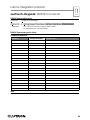
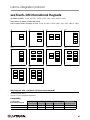
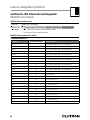
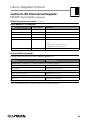
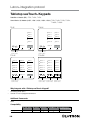
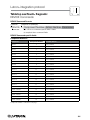
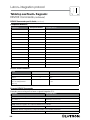
seeTouch® Keypads: DEVICE Commands (continued)
DEVICE Command-specific fields (continued)
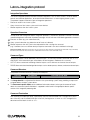
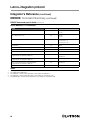
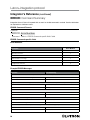
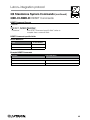
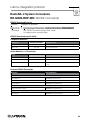
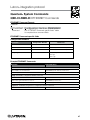
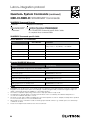
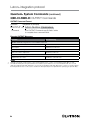
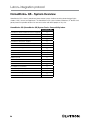
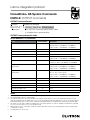
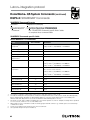
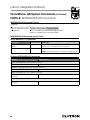
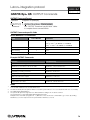
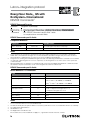
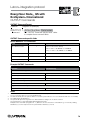
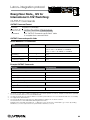
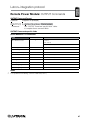
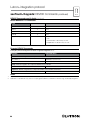
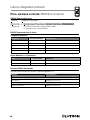
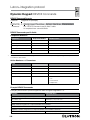
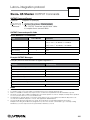
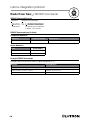
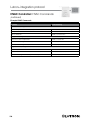
Action Numbers and Parameters:
Action
Action Number
Parameters
Press
3
None
Release
4
None
Hold
5
None 1
Multi-tap
6
None 1
Set (#) or Get (?) LED State 2
9
0 = Off
1 = On
2 = Normal-Flash: 1 flash every second 1
3 = Rapid-Flash: 10 flashes every second 1
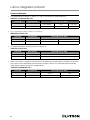
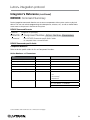
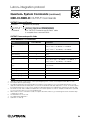
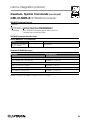
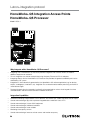
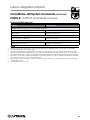
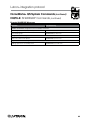
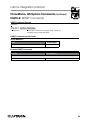
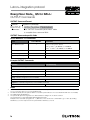
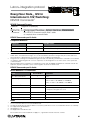
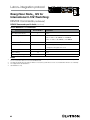
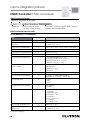
Example DEVICE Commands
Examples presume keypad has been assigned Integration ID 2.
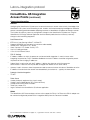
Operation
Command String
Execute: #DEVICE, Integration ID, Component Number, Action Number, Parameters
Press Button 1.
#DEVICE,2,1,3<CR><LF>
Turn On LED 5.
#DEVICE,2,85,9,1<CR><LF>
Query: ?DEVICE, Integration ID, Component Number, Action Number
What is the state of LED 1?
?DEVICE,2,81,9<CR><LF>
Response: ~DEVICE, Integration ID, Component Number, Action Number, Parameters
LED 1 is On.
~DEVICE,2,81,9,1<CR><LF>
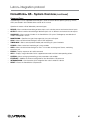
NOTES
1. Only available on units in a QuantumR or HomeWorksR system.
2.QuantumR or HomeWorksR only. "Set" is for unprogrammed buttons and buttons with LED logic 'Defined by Integration.'
96