1
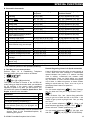
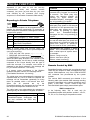
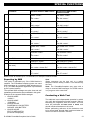
SPECIAL FUNCTIONS Important! If you wish to exit the two-way communication mode and execute another command, just press [] and then key your user code followed by the command (see “keying sequences” in Executable Commands table above). Reporting to Private Telephone control panel The PowerMaxComplete can be programmed by the installer for selective transmission of messages to private telephone subscribers. Messages are divided by type into 4 groups: Group Events Reported 1 2 3 Fire (*), Burglary (**), Panic, Tamper Arming AWAY, Arming HOME, Disarming No-activity, Emergency (***), Latchkey, Gas, Flood, Temperature 4 Low-battery AC failure Note: In control panel with no-voice option, the following siren signal will be sent to private telephone upon event reporting: * FIRE: ON - ON - ON - pause.... (- - - - - - ......). ** BURGLAR: ON continuously ( ...) *** EMERGENCY: 2-tone siren; like an ambulance. When the called party answers a call initiated by the PowerMaxComplete, he will hear a verbal message composed of the “house identity” and the type of event that occurred. For example, once smoke is detected in the Smith residence, the message will be: [The Smith Residence - Fire Alarm]. If a person under surveillance in the Watkins residence has been inactive, the message will be: [The Watkins Residence - No Activity]. The called party must acknowledge the message (as explained later on), but if he does not respond, the message will be transmitted repeatedly as many times as possible within a 45-second time limit. When the 45 seconds are up, the PowerMaxComplete will disengage the line and call the next private telephone number on its list. The called party can acknowledge the message by pressing a key on the telephone keypad, as follows. Command Acknowledge only: The PowerMaxComplete disengages the line and considers the event duly reported. 20 Key Command Acknowledge and listen-in: The protected site is “bugged” for sound for 50 seconds. The called party may prolong the listening session by pressing [3] again before the PowerMaxComplete disengages the line, or by pressing [1] to speak. Acknowledge and speak out: The called party may speak for 50 seconds to whoever is in the protected site. The called party may prolong the “speak out” session by pressing [1] again before the PowerMaxComplete disengages the line, or by pressing [3] to listen. Acknowledge and 2-way conversation: You and the called party can speak and listen without any necessity to switch the system from "listen-in" to "speak-out" and vice versa for 50 sec. (extendable). Acknowledge and request a status report: The PowerMaxComplete will issue a verbal report of system status. For example: [Disarm - ready to arm] or [Disarm - back door open] or [Disarm - alarm in memory]. Key 3 1 6 9 Remote Control by SMS PowerMaxComplete system with an optional internal GSM unit can respond to SMS commands from any cellular GSM telephone, only if the “REM ACCESS ON” command was pre-selected by the system installer. The various SMS commands are detailed in the following table (the detailed SMS message sending process is described in the cellular telephone user’s guide). In this table, “<code>” means 4-digit user code and blank space simply means blank space. SMS Command List In the following table, "P#" is used only for PowerMaxComplete with partition enabled - use P1, P2, P3, or P4, according to the partition number. 2 D-303984 PowerMaxComplete User's Guide