1
CDM-9100
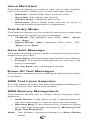
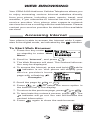
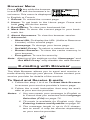
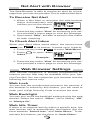
for
Bell Mobility
OWNER’S OPERATING
MANUAL
1
AUDIOVOX
AUDIOVOX
CDM-9100
CDM-9100
Tri-Mode CDMA/AMPS
Handheld Portable
Cellular Telephone
In today’s fast paced world, it has become a necessity
to have access to real-time information. Your communications tools must provide you with this access from
anywhere at anytime. With that in mind, Audiovox developed the CDM-9100, our next generation tri-mode
web browsing wireless handset.
The CDM-9100 operates on the 800 MHz Amps/CDMA
and 1900 MHz PCS frequencies allowing for seamless
nationwide coverage. The digital handset features easyto-use internet navigation keys, vibrating alert, and data
capabilities. It also has “masques”, user-changeable
face plates, enabling you to express your individuality
through your wireless handset. In addition, the phone
features menu driven operation, a built-in one-way
speaker phone, enhanced phonebook, one-touch emergency dialing, and 15 distinctive ringer options. And with
the lithium ion battery pack, you will get 170 minutes of
talk time and 170 hours of standby time.
The CDM-9100 has several optional accessories available, including: simple hands-free devices, cigarette
lighter adapter, desktop charger, travel charger, data
interface cable, belt clip, leather carrying case and of
course, “masques”.
Your new CDM-9100 provides you with something only
an Audiovox phone can: the proven reliability that has
made us a leading wireless handset provider. Please
take a few moments to read the following pages of the
owner’s operating manual. It will help you make the most
efficient use of this valuable communications tool.
2
TABLE
TABLE OF
OF CONTENTS
CONTENTS
SAFETY INSTRUCTIONS ........................................ 7
SAFETY INFORMATION FOR
WIRELESS HANDHELD PHONES ........................ 14
SAR Information .................................................... 17
SYSTEM CONFIGURATION ................................... 18
BATTERY INSTALLATION AND RECHARGING .. 19
To Attach the Battery Pack ..................................... 19
To Detach the Battery Pack ................................... 19
To Recharge Battery ............................................... 20
FUNCTIONS ............................................................ 22
External View ......................................................... 22
Function of Keys .................................................... 23
LCD Display Indication ........................................... 23
GETTING STARTED ............................................... 24
Turning the Phone On/Off ......................................
Antenna Position ....................................................
Receiving Signal Strength Indicator ( ) ..............
Battery Level Indicator ...........................................
Power Management ...............................................
24
24
24
24
24
BASIC OPERATION ............................................... 25
Placing Calls ....................................................... 25
To Place a Call ........................................................ 25
To Terminate a Call ................................................ 25
Last Number Redial ............................................... 25
To Dial the Last Number Received ........................ 25
Phonebook Dialing ................................................. 25
Speed Dialing ........................................................ 26
Quick Dialing .......................................................... 26
Emergency Call ..................................................... 26
One-Touch Emergency Call ................................... 27
Emergency Call Mode ........................................... 27
Receiving Calls ................................................... 27
To Receive a Call ...................................................
Any Key Answering ................................................
Caller ID with Name ...............................................
Automatic Calls-in-Absence Indicator ....................
Ringing Tone with Melody ......................................
Distinctive Ringing (Audible Caller ID) ...................
27
27
28
28
28
28
During Calls ......................................................... 28
To Adjust the Earpiece Volume .............................. 28
To Mute a Phone Conversation .............................. 29
Speakerphone Mode (One-Way) ........................... 29
Automatic Talk Timer ............................................... 29
Scratch Pad Dialing ............................................... 29
Call Waiting ............................................................ 29
Three-Way Calling ................................................. 30
Standby ................................................................ 30
Indicators on Standby ............................................ 30
Vibrating Alert ........................................................ 30
Multilingual ............................................................. 30
3
End to End Signaling .......................................... 31
Touch Tone™ from Display .................................... 31
Touch Tone™ from Memory ................................... 31
Entering Letters and Symbols ........................... 32
T9 Mode T9 (T9) .................................................... 32
Alpha Mode abc (abc) ............................................ 32
Numeric Mode Num (Num) .................................... 33
Symbol Mode Sym (Sym1 to 4) .............................. 33
PHONEBOOK OPERATION ................................... 34
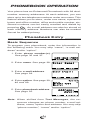
Phonebook Entry ................................................ 34
Basic Sequence ..................................................... 34
To Store a Number without Name .......................... 35
Automatic Storing into Phonebook ......................... 35
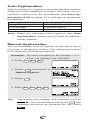
Auto Hyphenation .................................................. 36
Manual Hyphenation ............................................... 36
To Store Dual Numbers in Phonebook ................... 37
To Store a Name with the Phone Number ............. 38
To Store E-mail Address ........................................ 39
To Mark Numbers with Icon ................................... 39
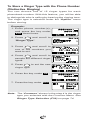
To Store a Ringer Type with the Phone Number .... 40
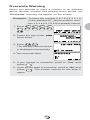
Overwrite Warning ................................................. 41
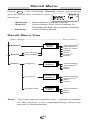
Recall Menu ......................................................... 42
Recall Menu Tree ................................................... 42
Phonebook Recall ............................................... 43
Phonebook Address Mode .................................... 43
Phonebook Sort Scroll Mode .................................. 43
Phonebook Key Word Search Mode ...................... 44
To Dial Dual Numbers ............................................ 45
To Review Long Names and Numbers .................. 45
To Review E-mail Address ..................................... 45
Prepending Dialing ................................................ 45
Phonebook Edit .................................................. 46
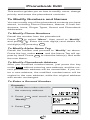
To Modify Numbers and Names .............................. 46
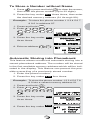
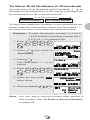
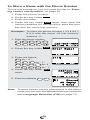
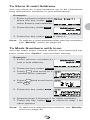
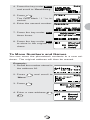
To Move Numbers and Names .............................. 47
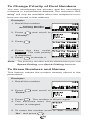
To Change Priority of Dual Numbers ..................... 48
To Erase Numbers and Names .............................. 48
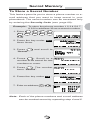
Secret Memory .................................................... 49
To Store a Secret Number ..................................... 49
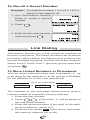
To Recall a Secret Number .................................... 50
Link Dialing ......................................................... 50
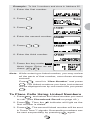
To Store Linked Numbers in Phonebook ............... 50
To Place Calls Using Linked Numbers ................... 51
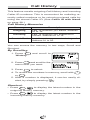
Call History .......................................................... 52
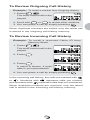
To Review Outgoing Call History ........................... 53
To Review Incoming Call History ........................... 53
To Review Scratch Pad ........................................... 54
To Save a Number to Phonebook .......................... 54
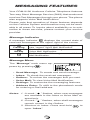
MESSAGING FEATURES ...................................... 55
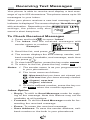
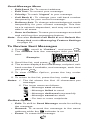
Receiving Text Messages .................................. 56
To Check Received Messages ............................... 56
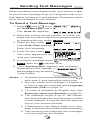
Sending Text Messages ..................................... 57
To Send a Text Message ........................................ 57
To Review Sent Messages ..................................... 58
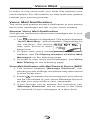
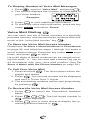
Voice Mail ............................................................ 59
Voice Mail Notification ............................................ 59
Voice Mail Dialing V ............................................ 60
4
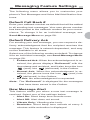
Messaging Feature Settings .............................. 61
Default Call Back # ................................................
Default Delivery Ack ...............................................
New Message Alert ................................................
Voice Mail Alert ......................................................
Text Entry Mode .....................................................
Save Sent Message ...............................................
Erase All Text Messages ........................................
SMS Text Lines Selection ......................................
SMS Memory Management ...................................
61
61
61
62
62
62
62
62
62
WEB BROWSING ................................................... 63
Accessing Internet .............................................. 63
To Start Web Browser ............................................ 63
Browser Menu ........................................................ 64
E-mailing with Browser ...................................... 64
To Send and Receive E-mails ................................ 64
Net Alert with Browser ....................................... 65
To Receive Net Alert ............................................... 65
To Check Alert Inbox ............................................... 65
Web Browser Settings ........................................ 65
Web Lock ............................................................... 65
Web Backlight ........................................................ 65
Web Idle Timer ........................................................ 65
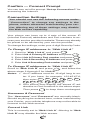
Confirm — Connect Prompt ................................... 66
Connection Settings ............................................... 66
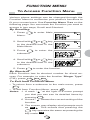
FUNCTION MENU ................................................... 67
To Access Function Menu .................................. 67
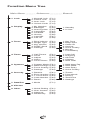
Function Menu Tree ............................................... 68
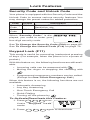
Lock Features ..................................................... 69
Security Code and Unlock Code ............................ 69
Keypad Lock (F11) ................................................. 69
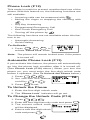
Phone Lock (F12) .................................................. 70
Automatic Phone Lock (F13) .................................. 70
To Unlock the Phone ............................................... 70
To Change the Unlock Code (F14) ........................ 70
Display Features ................................................. 71
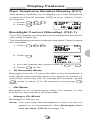
Own Telephone Number Display (F21) ..................
Backlight Control (Standby) (F22-1) ......................
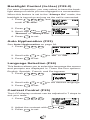
Backlight Control (In-Use) (F22-2) .........................
Auto Hyphenation (F23) .........................................
Language Selection (F24) .....................................
Contrast Control (F25) ...........................................
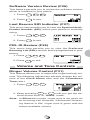
Software Version Review (F26) ..............................
Last Rescan SID Indicator (F27) ...........................
PRL ID Review (F28) .............................................
71
71
72
72
72
72
73
73
73
Volume and Tone Controls ................................ 73
Ringer Volume Control (F31) .................................. 73
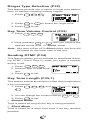
Ringer Type Selection (F32) ................................... 74
Key Tone Volume Control (F33) .............................. 74
Sending DTMF (F34) ............................................. 74
Key Tone Length (F35-1) ....................................... 74
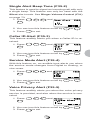
Single Alert Beep Tone (F35-2) .............................. 75
Caller ID Alert (F35-3) ............................................ 75
Service Mode Alert (F35-4) ................................... 75
Voice Privacy Alert (F35-5) .................................... 75
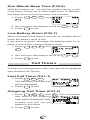
One Minute Beep Tone (F35-6) .............................. 76
Low Battery Alarm (F35-7) ..................................... 76
5
Call Timers .......................................................... 76
Last Call Timer (F41-1) ........................................... 76
Outgoing Call Timer (F41-2) .................................. 76
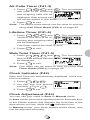
All Calls Timer (F41-3) ........................................... 77
Lifetime Timer (F41-4) ............................................ 77
Web Total Timer (F41-5) ........................................ 77
Clock Indicator (F42) ............................................... 77
Clock Adjustment (F43) ......................................... 77
Clock Alarm (F44) .................................................. 78
Countdown Timer (F45) ......................................... 79
System Features ................................................. 80
System Mode Selection (F51) ...............................
Enhanced Roaming ...............................................
NAM Selection (F52) .............................................
Force Analog Call (F53) .........................................
NAM Name Display (F54-1) ...................................
Automatic NAM (F54-2) .........................................
Automatic Retry (F54-3) ........................................
Enhanced Voice Privacy Service (F54-4) ..............
80
80
81
81
82
82
82
83
Security Features ................................................ 84
Call Restriction (F61) ............................................. 84
To Change Emergency Numbers (F62) ................. 84
To Turn On/Off One-Touch Emergency Call Feature (F63) .. 85
To Change the Security Code (F64) ...................... 85
Call Timer Reset (F65-1) ....................................... 85
Phonebook All Clear (F65-2) .................................. 85
Call History All Clear (F65-3) .................................. 86
Text Message & Voice Mail All Clear (F65-4) ......... 86
Function Reset (F65-5) ........................................... 86
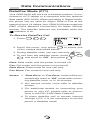
Data Communications ........................................ 87
Data/Fax Mode (F71) ............................................. 87
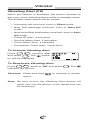
Vibrator ................................................................ 88
Vibrating Alert (F8) ................................................. 88
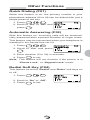
Other Functions .................................................. 89
Quick Dialing (F01) ................................................ 89
Automatic Answering (F02) .................................... 89
Redial Soft Key (F04) ............................................. 89
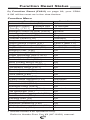
Function Reset Status ........................................ 90
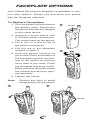
FACEPLATE OPTIONS .......................................... 92
FDA Consumer Update ......................................... 94
OPERATING PROCEDURES ................................. 98
Emergency Calls .................................................... 98
INDEX ...................................................................... 99
12 MONTH LIMITED WARRANTY ....................... 101
Quick Reference .................................................. 103
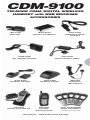
ACCESSORIES ..................................................... 105
Touch Tone™ is a registered trademark of AT & T.
6
SAFETY INSTRUCTIONS
WARNING : Always read and understand all of the
Warnings and Safety Instructions contained in this
Manual before attempting to use this Audiovox CDM9100 Cellular Phone, to help avoid potential hazards
that could result in bodily injury or property damage.
Always keep this Manual conveniently available for future reference, as it contains important information that
will help effect the safe operation and maintenance of
this instrument.
The safety instructions have been classified according
to the seriousness of the risk, as follows :
DANGER : “Danger” indicates the existence of a
hazard that could result in death or catastrophic
bodily injury, if the safety instruction is not observed.
WARNING : “Warning” indicates the existence of
a hazard that could result in serious bodily injury, if
the safety instruction is not observed.
CAUTION : “Caution” indicates the existence of a
hazard that could result in minor bodily injury or
property damage, if the safety instruction is not
observed.
NOTICE : “Notice” contains general information
that relates to the safe operation of the telephone.
7
Safe Operation of Your Phone
WARNING
•
Never attempt to disassemble the phone or any of
its accessories. If service or repair is required, return the unit to an Audiovox authorized service center. If the unit should be disassembled, a risk of electric shock or fire may result.
•
Always use authorized Audiovox accessories and optional devices when operating this cellular phone, as
the use of incompatible auxiliary equipment could
result in fire, electric shock or other bodily injury. The
use of unauthorized accessories will also void your
Warranty.
Protection of Children
•
Never allow children to play with your phone, as they
might hurt themselves or others (e.g., by poking
themselves or others in the eye with the antenna).
•
Always keep all accessories and components out of
the reach of small children. Small parts, in particular, might present a choking hazard to children.
Use in Vehicles
•
Never store or transport flammable liquids, gases or
explosive materials in the same compartment as the
phone or any of its accessories, as possible sparking in the equipment could ignite a fire or explosion.
•
Always secure the phone in its holder, when it is not
in use. Never place the phone on the passenger seat
or anyplace else in the car where it can become a
projectile during a collision or sudden stop.
8
Safe Operation of Your Phone (continued)
CAUTION
•
Never expose this phone to high temperatures, such
as those found near a heater or in a closed car parked
in the sun. This can cause heat-damage to the plastic parts, the electronic components and the battery.
•
Never drop this phone or subject it to violent impact
or shock. This can cause mechanical damage.
•
Never allow any liquids to spill on this phone or expose it to rain, water or moisture. This can cause
corrosion damage.
•
Never store this phone in cold areas. When the phone
warms up (to its normal operating temperature),
moisture can form inside the phone, which may damage the phone’s electronic circuit board.
•
Never use harsh chemicals, cleaning solvents, or
strong detergents to clean this phone. Always clean
it with a soft cloth that has been slightly dampened
in a mild soap-and-water solution.
•
Never paint this phone. This can clog the moving
parts.
Before connecting this cellular phone or any of its accessories to any other device, always read the Instruction Manual for that other device first to obtain detailed
safety instructions. Never connect this cellular phone to
any unauthorized or incompatible auxiliary product that
has not been expressly approved by Audiovox.
9
Safe Operation of Battery Pack
WARNING
•
Never short-circuit a battery pack by either accidentally or intentionally bringing the terminals in contact
with another metal object. That could result in burns,
other bodily injury or a fire, and could also damage
the battery pack.
•
Never expose the terminals of the battery pack to
any other metal object. Always wrap it or place it in a
plastic bag, whenever transporting it.
•
Never heat and never attempt to disassemble the
battery pack, as that could cause leakage of the caustic electrolyte. If the battery is accidentally broken,
avoid skin contact with the contents. In the event of
skin contact, wash the affected area immediately and
obtain prompt medical attention.
•
Never attempt to dispose of a battery pack by throwing it into a fire. That can cause the battery pack to
explode.
•
Never attempt to use an unauthorized battery pack
with your phone in order to avoid any risk of bodily
injury or property damage. Since unauthorized accessories have different specifications, they may be
incompatible with your phone.
10
Safe Operation of Battery Pack (continued)
WARNING
Safe Disposal of Used Battery Packs
•
Never discard a used battery pack with ordinary solid
wastes, since it contains toxic substances.
•
Always dispose of a used battery pack in accordance
with prevailing community regulations relating to the
disposal of household toxic wastes. Always cover the
metal terminals with insulating tape first, to prevent
accidental short-circuiting.
R B R C
CAUTION
•
Always turn your phone OFF before removing the
battery pack, and always use the battery pack for its
intended purpose only.
•
Always use the battery pack supplied by Audiovox,
or an approved replacement battery pack, to avoid
any risk of damage to your cellular phone.
11
Safe Operation of AC Adapter
The AC Adapter and the Desktop Charger that were
designed by Audiovox for this unit both require the use
of a standard 120 V AC power source for their operation.
DANGER
•
Never attempt to disassemble or repair an AC adapter
or desktop charger, as exposure to electric shock hazards may result. Always contact an Audiovox authorized
service center, if repair or replacement is required.
•
Never alter the AC cord or plug on your AC adapter
or desktop charger. If the plug will not fit into the available outlet, have a proper outlet installed by a qualified electrician. Improper connection can result in the
risk of electric shock.
WARNING
•
Never allow any liquids or water to spill on the AC
adapter or desktop charger when it is connected to
an AC power source. There is a risk of fire or electric
shock.
•
Always use the authorized Audiovox AC adapter or
desktop charger to avoid any risk of fire or damage
to your cellular phone or battery. Bodily injury or property damage may occur as a result of the use of an
unauthorized and incompatible AC adapter or desktop charger.
•
Never use an AC adapter or desktop charger if it has
a damaged or worn power cord or plug. The use of
damaged or worn power cords or plugs could result
in electric shock, burns or fire. Contact an Audiovox
authorized service center immediately to obtain a
suitable replacement.
12
Safe Operation of AC Adapter (continued)
WARNING
•
Always unplug the AC adapter or desktop charger
from the power source before attempting any cleaning in order to avoid the risk of electric shock. Always use a soft cloth dampened with water to clean
the equipment, after it has been unplugged.
•
Never attempt to use an unauthorized AC adapter or
desktop charger with your phone in order to avoid
any risk of bodily injury or property damage. Since
unauthorized accessories have different specifications, they may be incompatible with your phone.
CAUTION
•
Always confirm that the power cord for any accessory is located so that it will not be stepped on, tripped
over, or otherwise subjected to damage or stress.
•
Never place heavy objects on a power cord, as this
could result in damage to the cord.
•
Never bend or twist a power cord, and never pull on
a power cord in a attempt to remove an AC adapter
or accessory plug from a socket. Always grasp the
AC adapter or the accessory plug directly when unplugging the device in order to avoid damaging the
cord.
•
Always disconnect the AC adapter or desktop charger
from the power source when it is not in use.
13
SAFETY
SAFETY INFORMATION
INFORMATION FOR
FOR
WIRELESS
WIRELESS HANDHELD
HANDHELD PHONES
PHONES
Read this information before using your handheld
portable Cellular Telephone.
Your wireless handheld portable telephone is a low
power radio transmitter and receiver. When it is ON, it
receives and also sends out radio frequency (RF) signals.
FCC RF EXPOSURE INFORMATION
In August 1996, the Federal Communications Commission (FCC) of the United States, with its action in Report and Order FCC 96-326, adopted an updated safety
standard for human exposure to radio frequency (RF)
electromagnetic energy emitted by FCC regulated transmitters. Those guidelines are consistent with the safety
standard previously set by both U.S. and international
standards bodies. The design of this phone complies
with the FCC guidelines and these international standards.
Use only the supplied or an approved antenna. Unauthorized antennas, damaged antennas, modifications,
or attachments could impair call quality, damage the
phone, or result in violation of FCC regulations. Please
contact your local dealer for replacement antenna.
Body-worn Operation
This device was tested for typical body-worn operations
with the BC-9100 belt-clip and LB-9100 holster models, offered by Audiovox as an accessory to this phone,
and found to comply with FCC RF exposure requirements. Third-party belt-clips, holsters and similar accessories should be avoided, as they have not been
tested and may not comply with FCC RF exposure limits.
For more information about RF exposure, please visit
the FCC website at www.fcc.gov .
PHONE OPERATION
Normal position: Hold the phone as you would any
other telephone with the antenna pointed up and over
your shoulder.
14
Tips on Efficient Operation:
For your phone to operate most efficiently:
• Extend your antenna fully.
• Do not touch the antenna unnecessarily when the
phone is in use. Contact with the antenna affects call
quality and may cause the phone to operate at a
higher power level than otherwise needed.
DRIVING
Check the laws and regulations on the use of wireless
telephones in the areas where you drive. Always obey
them. Also, if using your phone while driving, please:
• Give full attention to driving — driving safely is your
first responsibility.
• Use hands-free operation, if available.
• Pull off the road and park before making or answering a call if driving conditions so require.
ELECTRONIC DEVICES
Most modern electronic equipment is shielded from RF signals. However, certain electronic equipment may not be
shielded against the RF signals from your wireless phone.
Pacemakers
The Health Industry Manufacturers Association recommends that a minimum separation of six (6”) inches be
maintained between a handheld wireless phone and a
pacemaker to avoid potential interference with the pacemaker. These recommendations are consistent with the
independent research by and recommendations of Wireless Technology Research.
Persons with pacemakers:
Should ALWAYS keep the phone more than six
(6”) inches from their pacemaker when the
phone is turned ON.
Should not carry the phone in a breast pocket.
Should use the ear opposite the pacemaker to
minimize the potential for interference.
If you have any reason to suspect that interference is taking place, turn your phone OFF immediately.
Hearing Aids
Some digital wireless phones may interfere with some
hearing aids. In the event of such interference, you may
want to consult your service provider [or call the customer service line to discuss alternatives].
15
Other Medical Devices
If you use any other personal medical device, consult the
manufacturer of your device to determine if they are adequately shielded from external RF energy. Your physician
may be able to assist you in obtaining this information.
Turn your phone OFF in health care facilities when any
regulations posted in these areas instruct you to do so.
Hospitals or health care facilities may be using equipment that could be sensitive to external RF energy.
Vehicles
RF signals may affect improperly installed or inadequately
shielded electronic systems in motor vehicles. Check with
the manufacturer or its representative regarding your
vehicle. You should also consult the manufacturer of any
equipment that has been added to your vehicle.
Posted Facilities
Turn your phone OFF in any facility where posted notices so require.
AIRCRAFT
FCC regulations prohibit using your phone while in the
air. Switch OFF your phone before boarding an aircraft.
BLASTING AREAS
To avoid interfering with blasting operations, turn your
phone OFF when in a “Blasting area” or in areas posted
“Turn off two-way radio”. Obey all signs and instructions.
POTENTIALLY EXPLOSIVE ATMOSPHERES
Turn your phone OFF when in any area with a potentially explosive atmosphere and obey all signs and instructions. Sparks in such areas could cause an explosion or fire resulting in bodily injury or even death.
Areas with a potentially explosive atmosphere are often, but not always marked clearly. Potential areas may
include: fueling areas (such as gasoline stations); below deck on boats; fuel or chemical transfer or storage
facilities; vehicles using liquefied petroleum gas (such
as propane or butane); areas where the air contains
chemicals or particles (such as grain, dust, or metal
powders); and any other area where you would normally
be advised to turn off your vehicle engine.
For Vehicles Equipped with an Air Bag
An air bag inflates with great force. DO NOT place objects, including either installed or portable wireless
equipment, in the area over the air bag or in the air bag
deployment area. If in-vehicle wireless equipment is improperly installed and the air bag inflates, serious injury could result.
16
SAR
SAR Information
Information
THIS MODEL PHONE MEETS THE GOVERNMENT’S REQUIREMENTS FOR EXPOSURE TO RADIO WAVES.
Your wireless phone is a radio transmitter and receiver. It is
designed and manufactured not to exceed the emission limits
for exposure to radiofrequency (RF) energy set by the Federal Communications Commission of the U.S. Government.
These limits are part of comprehensive guidelines and establish permitted levels of RF energy for the general population.
The guidelines are based on standards that were developed
by independent scientific organizations through periodic and
thorough evaluation of scientific studies. The standards include
a substantial safety margin designed to assure the safety of
all persons, regardless of age and health.
The exposure standard for wireless mobile phones employs a
unit of measurement known as the Specific Absorption Rate,
or SAR. The SAR limit set by the FCC is 1.6 W/kg.* Tests for
SAR are conducted with the phone transmitting at its highest
certified power level in all tested frequency bands. Although the
SAR is determined at the highest certified power level, the actual SAR level of the phone while operating can be well below
the maximum value. This is because the phone is designed to
operate at multiple power levels so as to use only the power
required to reach the network. In general, the closer you are to
a wireless base station antenna, the lower the power output.
Before a phone model is available for sale to the public, it
must be tested and certified to the FCC that it does not exceed the limit established by the government-adopted requirement for safe exposure. The tests are performed in positions
and locations (e.g., at the ear and worn on the body) as required by the FCC for each model. The highest SAR value for
this model phone when tested for use at the ear is 1.48 W/kg
and when worn on the body, as described in this user guide,
is 1.22 W/kg. (Body-worn measurements differ among phone
models, depending upon available accessories and FCC requirements). While there may be differences between the SAR
levels of various phones and at various positions, they all meet
the government requirement for safe exposure.
The FCC has granted an Equipment Authorization for this
model phone with all reported SAR levels evaluated as in compliance with the FCC RF exposure guidelines. SAR information on this model phone is on file with the FCC and can be
found under the Display Grant section of http://www.fcc.gov/
oet/fccid after searching on FCC ID CJ6DCE42903A.
Additional information on Specific Absorption Rates (SAR) can
be found on the Cellular Telecommunications & Internet Association (CTIA) web-site at http://phonefacts.net.
*
In the United States and Canada, the SAR limit for mobile
phones used by the public is 1.6 watts/kg (W/kg) averaged
over one gram of tissue. The standard incorporates a substantial margin of safety to give additional protection for the
public and to account for any variations in measurements.
17
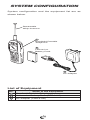
SYSTEM
SYSTEM CONFIGURATION
CONFIGURATION
System configuration and the equipment list are as
shown below.
Retractable
Whip Antenna
1
Handheld Portable
Telephone
2
Lithium Ion
Battery Pack
3
AC Adapter
List of Equipment
No.
1
2
3
Name of the Equipment
Handheld Portable Telephone
Lithium Ion Battery Pack (BTR-9100)
AC Adapter (CNR-9100)
18
BATTERY
BATTERY INSTALLATION
INSTALLATION
AND
AND RECHARGING
RECHARGING
To Attach the Battery Pack
1. Press and slide the battery cover to remove it.
2. Place the BTR-9100 battery pack in the battery
cavity so that it fits over
the connector.
Connector
3. Slide the cover back to
snap it on.
To Detach the Battery Pack
1. Press and hold
key to
turn the phone off. Then
press and slide the battery cover to remove it.
2. Lift the battery pack up to
take it out.
19
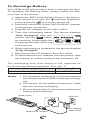
To Recharge Battery
Your CDM-9100 phone has a built-in charger function.
To recharge the Battery Pack, always install the Battery Pack to the phone.
1. Attach the BTR-9100 Battery Pack to the phone.
2. If the phone is on with the
press and hold
indicator displayed,
to turn the phone off.
3. Insert the connector of the CNR-9100 AC Adapter
to the phone connector.
4. Plug the AC Adapter to AC120V outlet.
5. Then the recharging starts. The phone displays
“Now Charging” with animation and the
indica-
Now Charging
tor scrolling. It also lights the
Charging Indicator at the top
of the phone.
6. When recharging is completed, the phone displays
“Fully Charged!”.
7. Disconnect the AC Adapter from the outlet.
8. To disconnect the AC Adapter from the phone, hold
the buttons to unlatch and pull the connector off.
The recharging time, from empty to full, depends on
the environmental temperature, 0 to +35 °C.
Battery Type
Lithium Ion Battery Pack (BTR-9100)
Recharging Time
1.5 to 2 h
Notes: 1. For complete recharging, it is recommended
that the phone be turned off during recharging.
2. It is normal for the battery to become a little
warmer during recharging.
3. Do not feed power to the phone without the
battery pack attached.
CDM-9100
AC120V
Buttons to unlatch
20
AC Adapter
CNR-9100
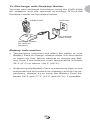
To Recharge with Desktop Holder
You can also recharge the phone using the CNR-9100
AC Adapter and the optional accessary DTH-9100
Desktop Holder as illustrated below.
CDM-9100
AC120V
AC Adapter
CNR-9100
Desktop Holder
DTH-9100
(Option)
Battery Information
•
Temperature extremes will affect the ability of your
Battery Pack to charge; always allow it to cool down
or warm up first. Never attempt to charge the Battery Pack if the ambient room temperature is below
32°F (0°C) or above 105°F (40°C).
•
Subjecting the Battery Pack to extremely high or low
temperatures will reduce its capacity and its life expectancy. Always try to keep the Battery Pack between 59°F and 77°F (15°C and 25°C), if possible.
21
FUNCTIONS
FUNCTIONS
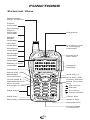
External View
Retractable
Whip Antenna
Power
Indicator
Receiving
Signal
Strength
Indicator
Earpiece
Digital
Mode
Indicator
IN USE
Indicator
Incoming Call
& Charging
Indicator
Roaming
Indicator
Message
Indicator
Vibrating
Indicator
Battery Level
Indicator
Soft Key 1
Earphone
Mic Jack
Tri-Mode
Rm
ABCDEFGHIJKL
MNOPQRSTUVWX
YZ1234567890
Graphic
Display
Send Key
Soft Key 2
Message
Access Key
One-Touch
Emergency Key
Digit Keys
End Key with
Power On/Off
Rcl F
Voice Mail &
Speakerphone
V
CLR
1
2ABC
3DEF
4 GHI
5JKL
6 MNO
7PQRS
8TUV
9WXYZ
Multi Function
Key
Up-arrow
Recall
Function
Down-arrow
0
Shift Key
Clear Key
Next Key
Space Key
Microphone
Power/Data
Connector
22
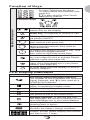
Function of Keys
Digit Keys
1
2ABC
3DEF
4 GHI
5JKL
6 MNO
7PQRS
8TUV
9WXYZ
0
To enter Telephone Numbers.
To enter letters and symbols (see
page 32).
1
is also used for One-Touch
Emergency feature.
Function Keys
Rcl F
Key- Board Arrangement
V
CLR
Soft keys. To function as shown in the
bottom line on the display.
SEND key. To originate or receive a Call.
Rcl
F
V
CLR
END key. To terminate a Call and to turn
the phone ON/OFF.
To recall phone numbers from memory.
Also used as Left-arrow key.
To be used with other keys to activate
various special features. Also used as
Right-arrow key.
To control the volume of Ringer, Key Tone
and Earpiece/Speakerphone.
Also used as Up/Down-arrow keys.
To access your Voice Mail with only one
key (see page 60) and to activate Speakerphone mode (see page 29).
To review Text Messages or to learn how
many Voice Messages are in your Voice
Mailbox (see page 55).
To clear digits from the display or from a
memory location.
LCD Display Indication
Items
Descriptions
Receiving Signal Strength Indicator.
The number of lines indicates the received
Signal Strength, and is also used as a
POWER ON Indicator.
Digital Mode Indicator. To indicate the
phone is operating in digital mode.
A Call is in progress.
The phone is out of Service Area.
Rm
The phone is out of the Home Area.
Message Indicator. To indicate that new
Text Messages are stored in memory or new
Voice Messages are in your Voice Mailbox.
Vibrating Indicator. To indicate that the
vibrating alert is active.
Battery Level Indicator.
Monitors the battery charge condition.
ABCDEFGHIJKL
full-dot matrix display with flexible
MNOPQRSTUVWX Graphic
YZ1234567890 font size in 3 to 7 lines.
23
GETTING
GETTING STARTED
STARTED
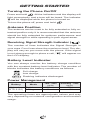
Turning the Phone On/Off
Press and hold
. All the indicators and the display will
light momentarily, and a tone will be heard. The indicator
will be displayed while the phone is turned on.
To turn the phone off, press and hold
.
Antenna Position
The antenna can be used in its fully extended or fully retracted position only. It is recommended that the antenna
should be fully extended for optimum performance and
signal strength or while operating in poor signal areas.
Receiving Signal Strength Indicator (
)
The number of lines indicates the Signal Strength in
your area. Four lines show the maximum level. The display will vary as you move with the phone. If the signal
is not strong enough to place a call, “
” will appear on
the LCD display.
Battery Level Indicator
You can always monitor the battery charge condition
with the constant battery level indicator. The number of
blocks indicates the battery conditions as follows:
Full charge
Low charge
Flashing indicates discharged.
Power Management
Battery
Mode
Lithium Ion Digital
(BTR-9100) Analog
Talk Time
up to
170 min.
60 min.
Standby Time
up to
170 h
15 h
The operating times are approximate values and may
vary depending on network configuration and handset
usage.
24
BASIC
BASIC OPERATION
OPERATION
Placing Calls
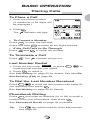
To Place a Call
1. Enter the phone number.
(A maximum of 32 digits will
be displayed.)
123-456-7890
STO
Menu
.
2. Press
Calling...
indicator will light.
The
123-456-7890
• To Correct a Number
Press
to clear the last digit.
CLR
Press and hold
to erase all the digits entered.
CLR
• If the Call Fails to Go Through
Press
and
to redial the number.
To Terminate a Call
Press
. The
indicator will go out.
Last Number Redial
1. Press the key under Redial , or press
to
Rcl
recall the last number you dialed.
to redial it.
2. Press
See Call History on page 52 for details. See also Redial Soft Key (F04) on page 89.
To Dial the Last Number Received
Press
to recall the last number with Caller ID
Rcl
.
you received, then press
See Call History on page 52 for details.
Phonebook Dialing
Press
Rcl
and enter an address (01 to 99) to recall a
number from your phonebook, then press
.
See Phonebook Recall on page 43 for details.
Tip:
The
V
key will be used for Voice Mail access.
See page 60.
25
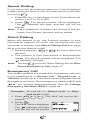
Speed Dialing
If you know the phonebook address of the telephone
number that you want to call, you may place a call without using
Rcl
.
1. Enter the one or two digits of your Phonebook address (1 to 9 or 10 to 99).
2. Press
The
. The phone number will be displayed.
indicator will light, and the call will be
placed.
Note: If two telephone numbers are stored in the address, the Primary Number will be dialed.
Quick Dialing
When this feature is on, the Primary number in your
Phonebook address 02 to 09 can be dialed with just
one push of the key. See Quick Dialing (F01) on page
89 to turn this feature on/off.
1. Press a digit key ( 2
ABC
to 9
WXYZ
) for more than one
second.
2. The number in your phonebook is automatically
dialed. The phone number will be displayed. The
indicator will light.
Note: The key 1 is not for Quick Dialing, but for One-
Touch Emergency Call, page 27.
Emergency Call
This feature permits you to place an emergency call even
if your telephone is in “Phone Lock”, “Keypad Lock” or
“Restrict” mode. Up to 3 numbers can be programmed as
Emergency numbers. The emergency numbers “911” and
“ 911” are already preprogrammed. See To Change
Emergency Numbers (F62) on page 84.
Example: To Call 911 in “Phone Lock” or “Keypad Lock” mode.
1. Enter 9 WXYZ 1
1
. The “911” will not be dis-
played.
2. Press
.
The “911” will be displayed.
The
indicator will light,
and the call will be placed.
26
Calling...
Emergency
911
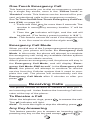
One-Touch Emergency Call
This feature permits you to dial an emergency number
by a single key stroke, even in the “Phone Lock” or
“Restrict” mode. This feature can be turned off to prevent unintentional calls to the emergency number.
See To Turn On/Off One-Touch Emergency Call Feature (F63) on page 85.
1. Press and hold 1
for more than 2 seconds. The
number in emergency memory location “1” will be
dialed.
2. Then the
indicator will light, and the call will
be placed. (The factory preset number is “911”.)
Note: This feature cannot be used if the Keypad Lock
.
is on. You need to dial all the digits and
Emergency Call Mode
When you dial one of the 3 preprogrammed emergency
numbers, your phone will enter the Emergency Call
Mode. In this mode, the phone will attempt to complete
the emergency call using any available cellular system
from which it can obtain service.
After it places an emergency call, the phone will stay in
the Emergency Call Mode, and will display “Emergency Call Mode, END to exit”. In the Emergency Call
Mode, the phone will attempt to continue to receive
service from the Cellular system that it used to complete the call. The phone will automatically exit the
Emergency Call Mode after 5 minutes or after you
press
.
Receiving Calls
The phone sounds an alert or vibrates to alert you of
an incoming call. It also flashes the Incoming Call Indicator at the top of the phone.
To Receive a Call
When the telephone rings, press
The
to answer the call.
indicator will light.
Note: To mute the ringer or stop the vibrating, press
.
Any Key Answering
This feature permits you to answer an incoming call by
pressing any key on the key pad except
27
and
Rcl F
.
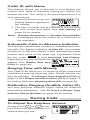
Caller ID with Name
This feature allows you to preview in your display the
number and name of the party calling you before you
answer the call. The name is as you programmed it in
your phonebook.
1. When the phone rings, the
Incoming Call
Calling Number appears in
JACK
the display.
123-456-7890
2. The last 10 Caller IDs are stored in the memory
for your review and redial. See Call History on
page 52 for details.
Note: “Number Restricted” or “Number Unavailable”
is displayed when the Caller ID is restricted or
not available.
Automatic Calls-in-Absence Indicator
This feature indicates the number of unanswered incoming calls. The display indicates “Called XX”, the number
of calls (01 to 99) you missed. It also indicates the caller
number and name of the latest call, if available. Press
the key under Refer to view Incoming Call History.
Depressing any key will clear the
display. See Redial Soft Key
(F04) on page 89.
Called 12
May 21 10:25 am
JACK
123-456-7890
Refer
Ringing Tone with Melody
The CDM-9100 offers you 15 styles of ringer tones and
melodies for alerting incoming calls. Ringer volume can
also be adjusted. See Ringer Type Selection (F32) on
page 74 and Ringer Volume Control (F31) on page 73
for setting. See also Vibrating Alert (F8) on page 88.
Distinctive Ringing (Audible Caller ID)
You may program different ringer styles for different
phonebook addresses. See To Store a Ringer Type
with the Phone Number on page 40 for setting.
During Calls
To Adjust the Earpiece Volume
Simply press
or
to ad-
just Earpiece/Speakerphone
Volume during a call.
28
Ear/SPK Vol.
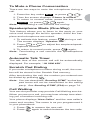
To Mute a Phone Conversation
There are two ways to mute the microphone during a
call.
1. Press the key under Mute , or press
F
F
.
2. Then the screen displays “Phone is muted!”.
3. To return to normal mode, press the key under
Unmute , or press
F
F
again.
Note: Terminating a call cancels the muting.
Speakerphone Mode (One-Way)
This feature allows you to listen to the party or your
voice mail through the built-in speaker, while the earpiece and microphone are muted.
1. To activate this feature, press
during a call.
V
The screen displays “Speaker ON!”.
or
2. Press
to adjust the earpiece/speak-
erphone volume.
3. To return to normal mode, press
V
again.
Note: Terminating a call cancels the speakerphone
mode.
Automatic Talk Timer
The talk time of the current call will be automatically
displayed. For example, “1H 23M 45S”.
Scratch Pad Dialing
If you enter a telephone number during a call, the number will be stored in the Scratch Pad memory.
After terminating the call, the number you entered can
be dialed by pressing
.
Note: You can deactivate “Sending DTMF” so that keypad tones will not be transmitted to the calling
party. See Sending DTMF (F34) on page 74.
Call Waiting
Your service provider may provide Call Waiting service.
When you are on a call, you may hear a beep tone alerting you of another incoming call.
Your phone displays “New Caller” and the new caller’s
name and number. The name is as you programmed it
in your phonebook.
1. Press
to answer the new call.
2. Press
again to switch between the two calls.
29
Three-Way Calling
Your service provider may provide Three-Way Calling
service. When a call is already in progress, you may
call the third party.
1. Enter a number and press
to call the third
party.
2. Press
again to connect all three parties.
Ask your service provider for the detailed information.
Standby
Indicators on Standby
Your phone displays date and
time, various settings status, and
soft keys in standby.
May 21 Mon
3 : 15 pm
Redial
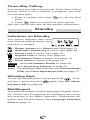
Web
: Ringer Volume is in Silent mode. See page 73.
: Automatic Answering is active. See page 89.
: Phone Lock is active. See page 70.
: Keypad Lock is active. See page 69.
: Countdown Timer is active. See page 79.
: Clock Alarm is active. See page 78.
Redial : See Last Number Redial on page 25.
Web : See Accessing Internet on page 63.
Note: For displaying date and time, see Clock Indicator
(F42) and Clock Adjustment (F43) on page 77.
Vibrating Alert
To activate Vibrating Alert, press and hold
. To de-
again. See also Vibrat-
activate it, press and hold
ing Alert (F8) on page 88.
Multilingual
Your phone provides multiple languages: English, Spanish, French and Portuguese for displaying the menus
and prompts in the Basic Operation, Phonebook Operation and Function Menu. See Language Selection
(F24) on page 72.
30
End to End Signaling
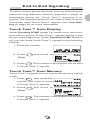
To utilize certain phone services, such as accessing an
alternate long distance network, signaling a pager or
banking by phone etc., Touch Tone™ signaling is required. The following features will make it easy to send
frequently used Touch Tone™ signals. See Link Dialing on page 50 for more information.
Touch Tone™ from Display
When Sending DTMF (page 74) mode is on, the numbers will be sent in Touch Tone™ signals during a call
as you press digit keys. When Sending DTMF mode is
off, you can send Touch Tone™ signals in the following
manner.
1. Enter the number.
123-456-7890
STO
2. Press
F
Menu
and scroll to
Menu
Mute On
Tone
Link Mark
“Tone”.
OK
3. Press
. The number in the display will be sent
F
in Touch Tone™ signals.
Touch Tone™ from Memory
Touch Tone™ signals can be sent from memory during
a call.
1. Press
, and recall the
Rcl
01
number you want to send JACK123-456-7890
in Touch Tone™ signals.
2. Press
F
E-mail
Menu
and scroll to
Menu
Tone
View Number
View Name
“Tone”.
OK
3. Press
F
. The number in the display will be sent
in Touch Tone™ signals.
31
Entering Letters and Symbols
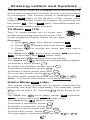
The text entry mode T9 or Alpha will automatically be
active when necessary to enter letters, such as names
or messages. The current mode is displayed as T9
(T9) or abc (abc) at the bottom of the screen. Also
numeric or symbol mode will appear by pressing the
key under T9 (T9) or abc (abc). Available modes depend on the feature that you use.
T9 Mode
(T9)
T9
The T9 mode allows you to enter text
quickly by pressing one key per letter. This
mode suggests English words as you type.
Example:
1. Type 4
GHI
6 MNO . Your phone displays in .
2. Press 0
to display the next choice go .
3. Press
to decide the word “go” and add a
space.
The Shift key
T9
turns letter cases: T9 (normal),
(initial cap.) and T9
The Next key 0
The Space key
(caps. lock).
displays the next choice.
decides a word and adds a space.
To decide a word, press
F
.
To insert punctuation marks, press 1
To delete a character, press
CLR
To delete a word, press and hold
To move the cursor, press
.
CLR
or
Rcl
.
.
.
F
To enter digits, press and hold the key 0
to 9 WXYZ .
Note: For more information, visit www.T9.com.
Alpha Mode
abc
(abc)
The Alpha mode allows you to enter characters by
pressing the digit key repeatedly. For example, press
5 JKL once to enter “J”, or press 5 JKL three times to en-
ter “L”.
turns letter cases: abc (normal),
(initial cap.) and ABC (caps. lock).
The Shift key
Abc
The Space key
adds a space.
To decide a character, press
To delete a character, press
F
CLR
To delete a word, press and hold
.
.
CLR
.
Rcl
F .
or
To enter digits, press and hold the key 0
To move the cursor, press
32
to 9
WXYZ
.
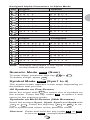
Assigned Alpha Characters in Alpha Mode
Key
1
2 ABC
3 DEF
4 GHI
5 JKL
6 MNO
7PQRS
8 TUV
9 WXYZ
0
Key
1
2 ABC
3
DEF
4 GHI
5 JKL
6 MNO
7PQRS
8 TUV
9 WXYZ
0
English
1 @ /
A B C
D E F
G H I
J K L
M N O
P Q R
T U V
W X Y
0
Spanish
- : ’ ? . , ( ) ;
2
A Á B C
3
D E É F
4
G H I Í
5
J K L 5
6
M N Ñ O
S 7
P Q R S
8
T U Ü Ú
Z 9
W X Y Z
0
French
1 @ /
A À Â
D E Ë
G H I
J K L
M N O
P Q R
T U Ù
W X Y
0
B
È
Ï
5
Ô
S
Û
Z
:
C
É
Î
6
7
V
9
2
3
4
Ó 6
7
V 8
9
Portuguese
’ ? . , ( ) ;
Ç 2
A À Á Ã B
Ê F 3 D E É Ê F
4
G H I Í 4
J K L 5
M N O Ó Ô
P Q R S 7
8
T U Ü Ú V
W X Y Z 9
0
C Ç 2
3
Õ 6
8
Note: Available languages in the Alpha mode depend
on the feature that you use.
Numeric Mode
(Num)
Num
To enter digits, press the digit key 0
To delete a digit, press
Symbol Mode
Sym
to 9 WXYZ .
.
CLR
(Sym1 to 4)
The symbol mode appears in two ways depending on
the feature that you use.
All Symbols on One Screen
Move the cursor with
to select one of symbols on
the screen. Press the key under OK to select it and
Rcl F
return to the previous mode.
Symbols on Multi-Screen (Web Browser)
Scroll the screens Sym1, Sym2, Sym3 and Sym4 with
or
. Press the digit key ( 1
to 9
WXYZ
) to se-
lect a symbol and return to the previous mode.
Shortcut: Press and hold the key under T9 or abc
to turn to Sym . (except Web Browser)
33
PHONEBOOK
PHONEBOOK OPERATION
OPERATION
Your phone has an Enhanced Phonebook with 99 dualnumber memory addresses. At each address, you can
store up to two telephone numbers under one name. This
feature allows you to store, under one name, a person’s
home and office number, office and mobile number, etc.
Stored numbers can be easily recalled and dialed by
pressing
. An e-mail address can also be stored at
each memory address. Numbers can also be marked
Secret for added privacy.
Phonebook Entry
Basic Sequence
To program your phonebook, enter the information in
the following order. You may skip “name”, “e-mail address” and/or “option”.
1. Enter phone number(s).
See page 35 and 37.
123-456-7890
STO
Menu
2. Enter name. See page 38. Enter Name!
STO
3. Enter e-mail address.
Abc
Enter E-mail!
See page 39.
STO
4. Enter option. See page 39,
40 and 49.
5. Enter phonebook address.
See page 35.
abc
Option
Icon
Ringer Type
Secret
Address:
Auto:01
STO
Option
Note: When shifted from Text Messages, the sequence changes as: phone number, e-mail address, name, option and address. You may skip
“phone number”, “name” and/or “option”.
34
To Store a Number without Name
1. Press
or press and hold
CLR
to clear the screen,
then enter the phone number (up to 32 digits).
2. Press the key under STO three times, then enter
the desired memory address (01 through 99).
Example: To store the phone number 1 2 3 4 5 6 7
8 9 0 in address 07.
1. Press and hold
CLR
2. Enter 1
3
5 JKL
0
2
6 MNO
ABC
.
4 GHI
DEF
7PQRS 8 TUV
9 WXYZ
123-456-7890
.
STO
3. Press the key under STO
three times.
Address:
Auto:01
STO
4. Enter an address 0
7PQRS .
Menu
07
Option
Stored
98 Empty
1 Used
Automatic Storing into Phonebook
This feature allows convenient automatic storing into a
vacant phonebook address. The number will be stored
in the first available memory address which will be indicated in the display. This feature can prevent the possible overwriting of a previously stored number.
1. Enter the phone number.
2. Press the key under STO four times.
Example: To store the phone number 1 2 3 4 5 6 7 8
9 0 into a vacant memory address 01.
1. Press and hold CLR .
2
3
4
2. Enter 1
ABC
5
0
6
JKL
MNO
7
PQRS
DEF
8
TUV
9
GHI
WXYZ
123-456-7890
.
STO
3. Press the key under STO
three times.
Address:
Auto:01
STO
4. Press the key under STO .
35
Menu
01
Option
Stored
97 Empty
2 Used
Auto Hyphenation
With this feature on, hyphens are automatically inserted
when you enter telephone numbers and when you recall the numbers from the phonebook. See Auto Hyphenation (F23) on page 72 to activate or deactivate
this feature.
Length of Number
10 digits or less
11 to 21 digits
22 digits or more
Display Example
123-456-7890
1-234-567-89012
No hyphens
Note: When you manually insert hyphens, the “Auto
Hyphenation” feature will not work for that particular number.
Manual Hyphenation
You can manually insert a hyphen at any place when
you enter a telephone number. The maximum number
is 32 digits long including hyphens.
Example: To insert a hyphen in the number 1 2 3
4 5 6 7 to display it as 123-4567.
1. Enter 1
2 ABC 3 DEF .
123
STO
2. Press
and scroll to
F
“Manual Hyphen”.
Menu
Menu
Link Mark
Dual Entry
Manual Hyphen
OK
3. Press
F
.
123STO
Menu
4. Enter 4 GHI 5 JKL 6 MNO 7PQRS .
123-4567
STO
Tip:
Menu
The screen may display dual prompts such as
Menu
. This means that pressing the
F
key
operates the same as pressing the key under
Menu .
36
To Store Dual Numbers in Phonebook
You can store Dual Numbers with Dual Mark “ \ ” up to
40 digits for the address 01 to 90, and up to 80 digits for
the address 91 to 99 in the phonebook.
Up to 40 or 80 digits
Primary Number \ Secondary Number
To store two telephone numbers in one phonebook address, enter the first number, select the Dual Mark “ \ ”
by using the menu, then enter the second number.
Example: To store the primary number 1 2 3 4 5 6
7 8 9 0 and the secondary number 9 8 7
6 5 4 3 2 1 0 in address 08.
1. Enter 1
5
6
JKL
0
MNO
2 ABC 3 DEF
4 GHI
7
9 WXYZ
PQRS
8
TUV
123-456-7890
.
STO
2. Press
and scroll to
F
“Dual Entry”.
Menu
Menu
Link Mark
Dual Entry
Manual Hyphen
OK
3. Press
F
.
Primary
The Dual Mark “ \ ” is inserted.
STO
4. Enter 9 WXYZ 8 TUV 7PQRS 6 MNO
5 JKL
0
4 GHI
1
23-456-7890\
3 DEF
2 ABC
Secondary
1
987-654-3210
.
STO
5. Press the key under STO
three times.
8 TUV .
Menu
Address:
Auto:02
STO
6. Enter an address 0
Menu
08
Option
Stored
96 Empty
3 Used
Note: You can add a second number after storing a
first number. See To Enter a Second Number
on page 46.
37
To Store a Name with the Phone Number
To use this procedure, you will need to refer to “Entering Letters and Symbols” on page 32.
1. Enter the phone number.
2. Press the key under STO .
3. Enter the name.
4. Press the key under STO twice, then enter the
memory address (01 through 99) to store the number with the name into memory.
Example: To store the phone number 1 2 3 4 5 6 7
8 9 0 with the name Jill into memory
address 11.
1. Enter the phone number;
1
6
2 ABC 3 DEF 4 GHI 5 JKL
MNO
7PQRS 8 TUV 9 WXYZ 0
123-456-7890
.
STO
Menu
2. Press the key under STO . Enter Name!
STO
3. Enter the Name;
Abc
Jill
5 JKL for “ J ”,
4 GHI 4 GHI 4 GHI for “ i ”,
5 JKL 5 JKL 5 JKL
and 5
JKL
F
STO
abc
for “ l ”,
5 JKL 5 JKL for “ l ”.
4. Press the key under STO
Address:
Auto:02
twice.
STO
5. Enter an address 1
1
.
11
Option
Stored
95 Empty
4 Used
Note: To enter names into the phonebook in the Alpha
mode you can use the alphabet that you selected
with Language Selection (F24) on page 72.
38
To Store E-mail Address
You can store an e-mail address up to 48 characters
long with phone numbers in your phonebook.
Example:
1. Enter a phone number and
Enter E-mail!
press the key under STO
twice. Enter e-mail address.
STO
2. Press the key under STO .
abc
Address:
Auto:02
STO
Option
3. Press the key under STO to store it.
Note: To add an e-mail address after storing numbers,
see “Modify” menu on page 46.
To Mark Numbers with Icon
You can mark every number with an icon among 9 options under the “Option” menu before storing.
Example:
1. Enter phone number(s)
Address:
Auto:03
and e-mail address.
STO
Option
2. Press the key under Option .
3. Press
F
and scroll to a
number to be marked.
Icon
123-456-7890
987-654-3210
abcde@audiovo
OK
4. Press
with
F
Rcl F
and scroll icons
Select
Icon
.
Set
5. Press the key under Set .
Icon
123-456-7890
987-654-3210
abcde@audiovo
OK
Select
6. Repeat steps 3 through 5 for other numbers.
7. Press the key under OK to return to step 1 for
other options.
Note: To add icons after storing numbers, see “Modify”
menu on page 46.
39
To Store a Ringer Type with the Phone Number
(Distinctive Ringing)
You can choose one of 15 ringer types for each
phonebook number. With this feature, you will be able
to distinguish who is calling by hearing the ringing tone.
The ringer type is selected under the “Option” menu
before storing.
Example:
1. Enter phone number(s),
Address:
Auto:04
and press the key under
STO three times.
2. Press
F
STO
and scroll to
“Ringer Type”.
3. Press
F
and scroll to
one of the numbers you
Option
Icon
Ringer Type
Secret
Ringer Type
123-456-7890
987-654-3210
want to set.
4. Press
F
OK
and scroll to
sample the different ringer
types.
5. Press
Option
Select
Ringer Type
Common
Ringer 01
Ringer 02
Set
F
to set the new
ringer type.
Ringer Type
02 123-456-7890
987-654-3210
-
OK
6. Press the key under OK .
Select
Address:
Auto:04
STO
7. Press the key under STO .
04
Option
Stored
92 Empty
7 Used
Note: The “Common” shown in the step 4 is the ringer
type you selected with the Function Menu. See
Ringer Type Selection (F32) on page 74.
40
Overwrite Warning
When you attempt to store a number in an address
where another number has already been stored, the
“Overwrite” warning will appear on the screen.
Example: To store the number 9 8 7 6 5 4 3 2 1 0
in the address 07, where another number 1 2 3 4 5 6 7 8 9 0 is already stored.
1. Enter 9 WXYZ 8 TUV 7PQRS 6 MNO
5 JKL
0
4 GHI
3 DEF
2 ABC
1
987-654-3210
.
STO
2. Press the key under STO
three times.
Address:
Auto:05
STO
3. Enter 0
Menu
7PQRS .
Option
123-456-7890
The already stored number
is displayed momentarily.
4. Two seconds later.
07 is used.
Overwrite?
Yes
No
OK
5. If you accept to overwrite, scroll to “Yes” and
press
F
.
6. If you do not want to overwrite, scroll to “No” and
press
F
. The screen returns to the step 2
again.
41
Recall Menu
Press
Rcl
. The following “Recall” menu will prompt
you to recall the number from
memory.
Address
Search
History
Recall
:
:
• “Address” : Phonebook Address Mode
• “Search” :
Phonebook Sort Scroll Mode or
Phonebook Key Word Search Mode
• “History” :
Call History Mode
Recall Menu Tree
Main Menu
Sub-menu
Phonebook
Address
Search
(Sort Scroll)
(Key Word)
History
Outgoing
Outgoing
History
Incoming
Incoming
History
Scratch Pad
Scratch
Pad
View Number*
View Name*
View E-mail*
Modify
Move
Priority*
Erase
View Number
View Name*
Save
Erase
View Number
View Name*
Save
Erase
View Number
Save
Erase
Note: The sub-menus marked with * will be available
on the screen, if the corresponding items are
stored in that address.
42
Phonebook Recall
To recall the numbers stored in your phonebook, you
have three methods: Address Mode, Sort Scroll Mode
and Key Word Search Mode.
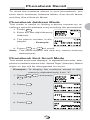
Phonebook Address Mode
This mode is useful in finding a phone number by recalling a specific address or by scrolling the phonebook.
1. Press
.
Rcl
Address
Search
History
2. Enter the two-digit Memory
Address.
Recall
:
:
3. The phone number is dis-
27
JACK
played.
Example:
222-222-2222
E-mail
or
4. Press
Menu
to scroll.
Note: The scroll feature will skip any vacant memory
address(es).
Phonebook Sort Scroll Mode
This mode sorts and displays, in alphabetical order, telephone numbers stored with “Alpha Tags” (Names). Blank
digits on top will be disregarded for scroll.
Example: To display the numbers stored in the
memory alphabetically from “J”.
1. Press
and press
Rcl
5 JKL for “J”.
Address
Search
History
Recall
:
:J
ABC
2. Press
F
27
.
JACK
222-222-2222
E-mail
3. Press
Menu
22
.
Jill
333-333-3333
E-mail
4. Press
Menu
24
.
KEN
111-111-1111
444-444-4444
E-mail
43
Menu
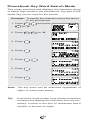
Phonebook Key Word Search Mode
This mode searches and displays the character string
of Alpha Tags stored in the phonebook. Any part of the
Alpha Tag can be used for the search.
Example: To search the character string AN stored
in the phonebook.
1. Press
and press
Rcl
Recall
:
:A
Address
Search
History
2 ABC for “A”.
ABC
2. Press 6
6 MNO for “N”.
MNO
Key Word?
AN
ABC
3. Press
F
Search
.
37
Albany
777-777-7777
E-mail
4. Press
.
32
LOUISIANA
888-888-8888
555-555-5555
E-mail
.
5. Press
Menu
34
San Francisc
o
999-999-9999
E-mail
6. Press
Menu
Menu
.
37
Albany
777-777-7777
E-mail
7. Press
.
Menu
34
San Francisc
o
999-999-9999
E-mail
Menu
Note: The key word can be searched regardless of
upper or lower case letters.
Tip:
In all three recall modes, long names and phone
numbers are displayed in the short form as necessary: a name in the first 12 characters and a
number in the last 12 digits.
44
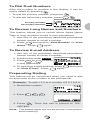
To Dial Dual Numbers
After the number is recalled in the display, it can be
.
easily called by pressing
.
• To dial the primary number, just press
.
• To dial the secondary number, press
Primary Number
Secondary Number
08
Lucas
123-456-7890
987-654-3210
E-mail
Menu
To Review Long Names and Numbers
This feature allows you to review whole Alpha Name
Tags or long numbers stored in your phonebook.
1. Use any of the previously described phonebook
search modes to recall a number.
2. Press
F
and scroll to “View Number” or “View
Name”. Press
F
again.
To Review E-mail Address
1. Use any of the previously described phonebook
search modes to recall a number.
2. Press the key under E-mail . Audiovox
3. Press
or
to scroll
20
[email protected]
om
e-mail addresses.
Tel
4. To view long e-mail address, press
to “View E-mail”. Press
F
Menu
F
and scroll
again.
Prepending Dialing
This feature will be convenient when you need to add
an area code to the number in the phonebook.
Example: To add 1 2 3 to a number 4 5 6 7 8 9 0.
1. Recall the number.
14
Katie
456-7890
E-mail
2. Enter 1
Menu
2 ABC 3 DEF .
123456-7890
3. Press
. Then the call is placed to 123-
4567890.
Note: The added digits will not be stored in the phonebook memory.
45
Phonebook Edit
This section guides you on how to modify, move, change
priority and erase the phonebook contents.
To Modify Numbers and Names
You can modify any of the phonebook contents you have
stored, including Phone Numbers, Names, E-mail Addresses, Icons, Ringer Types, Secret and Phonebook
Addresses.
To Modify Phone Numbers
Recall the number from the phonebook.
Press
F
to select “Menu”, then scroll to “Modify”
and press
F
. Enter the new digit(s) and delete the
old digit(s) by pressing
CLR
.
To Modify Alpha Name Tag
Recall the number and proceed to “Modify” as above.
Press the key under STO , and the Name Tag will appear by itself. Press
CLR
to clear the letter(s), and enter
the new Name.
To Modify Phonebook Address
After you modified number/name, just press the key
under STO without entering new address, and the current phonebook address will be overwritten. If you enter a new address, the modified number/name will be
copied to the new address, while the original address
will remain unchanged.
To Enter a Second Number
Example:
1. Recall the number stored in
12
the memory address.
123-456-7890
E-mail
2. Press
Menu
and scroll to
F
Menu
View Number
Modify
Move
“Modify”.
OK
3. Press
F
.
123-456-7890
STO
46
Menu
4. Press the key under Menu
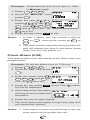
and scroll to “Dual Entry”.
Menu
Link Mark
Dual Entry
Manual Hyphen
OK
5. Press
Primary
.
F
The Dual Mark “ \ ” is in-
1
23-456-7890\
STO
serted.
6. Enter the second number.
Menu
Secondary
987-654-3210
STO
7. Press the key under STO
three times.
Address:
Original:12
STO
8. Press the key under STO
to store in the original ad-
Menu
12
dress.
Option
Stored
90 Empty
9 Used
To Move Numbers and Names
You can move the phonebook contents to a new address. The original address will then be erased.
Example:
1. Recall the number stored in
20
Audiovox
the address 20.
123-456-7890
E-mail
2. Press
Menu
and scroll to
F
Menu
View E-mail
Modify
Move
“Move”.
OK
3. Press
F
.
Move to:
Auto:05
STO
4. Enter a new address 1
5 JKL .
47
15
Moved
90 Empty
9 Used
To Change Priority of Dual Numbers
You can interchange the primary and the secondary
numbers in a phonebook address. The submenu “Priority” will only be available when two telephone numbers are stored in that address.
Example:
1. Recall the number.
08
Primary Number
Secondary Number
123-456-7890
987-654-3210
E-mail
2. Press
Menu
and scroll to
F
Menu
Modify
Move
Priority
“Priority”.
OK
3. Press
.
F
Priority Change
123-456-7890
987-654-3210
Change
4. Press the key under
Change . The new priority
is displayed.
5. Press
OK
Priority Change
987-654-3210
123-456-7890
Change
OK
to decide it.
F
Note: The primary number will be dialed when you use
Speed Dialing and Quick Dialing features.
To Erase Numbers and Names
This feature erases the number already stored in the
phonebook.
Example:
1. Recall the number.
16
123-456-7890
E-mail
2. Press
F
Menu
and scroll to
Menu
Modify
Move
Erase
“Erase”.
OK
3. Press
F
. The number is shown again.
4. Two seconds later the
screen is changed.
Erase?
Yes
No
OK
5. To erase the number scroll to “Yes”, otherwise
“No”, and press
F
.
48
Secret Memory
To Store a Secret Number
This feature permits you to store a phone number or email address that you want to keep secret in your
phonebook. The secret number can be accessed only
by entering the Security Code (see page 69).
Example: To store the phone number 1 2 3 4 5 6 7
8 9 0 in address 30 as a secret number.
1. Enter 1
5
0
6
JKL
MNO
2 ABC 3 DEF
4 GHI
7
9 WXYZ
PQRS
8
TUV
123-456-7890
.
STO
2. Press the key under STO
Address:
Auto:10
three times.
STO
3. Press
F
F
Option
Icon
Ringer Type
Secret
. Scroll to a
Secret
123-456-7890
number to be secret for two
numbers or more.
5. Press
F
Option
and scroll to
“Secret”.
4. Press
Menu
OK
. The number
Secret
Secret
turns “Secret”.
OK
6. Press the key under OK .
DEF
0
On/Off
Address:
Auto:10
STO
7. Enter an address 3
On/Off
.
30
Option
Stored
80 Empty
19 Used
Note: Each of the phone numbers and e-mail address
can be marked secret by repeating step 4 and 5.
49
To Recall a Secret Number
Example: To recall the number 1 2 3 4 5 6 7 8 9 0
stored in the address 30.
1. Use Phonebook Search
30
Mode to recall a secret
number.
2. Press
Secret
E-mail
F
.
Code
Security Code:
OK
3. Enter the four-digit security
code and press
F
30
.
123-456-7890
E-mail
Menu
Link Dialing
This feature permits you to link groups of numbers to
be sent in sequence. The linked numbers can be stored
in memory. When dialed, the first group of numbers will
be sent in digital signaling, and the rest of the numbers
will be sent in Touch Tone™ group by group each time
you press
.
To Store Linked Numbers in Phonebook
You can store Linked Numbers with Link Marks “ = ” up
to 40 digits for the address 01 to 90, and up to 80 digits
for the address 91 to 99 in the phonebook.
Up to 40 or 80 digits
L01
=
31 digits or less
L02
31 digits or less
=
L03
31 digits or less
The example on the next page shows how to store a
Linked number at a specific memory address.
1. Enter the first number.
2. Press
F
F
. A link mark “ = ” will be added at
the end of the number.
3. Enter the second number. If you wish to link additional number(s), return to 2.
4. Press the key under STO three times, then enter
the memory address (01 to 99).
50
Example: To link 3 numbers and store in Address 35.
1. Enter the first number.
987-654-3210
STO
2. Press
.
F
Menu
Menu
Link Mark
Dual Entry
Manual Hyphen
OK
3. Press
.
F
Link01
9
87-654-3210
STO
4. Enter the second number.
Menu
Link02
456
STO
5. Press
F
F
.
Menu
Link02
456
STO
6. Enter the third number.
Menu
Link03
1234567890
STO
7. Press the key under STO
35
three times. Enter an address 3 DEF 5 JKL .
Menu
Stored
90 Empty
9 Used
Note: While entering a linked number, you may review
all the parts of that number, even those already
entered.
Press
F
F
, scroll to “View Number” and press
. The linked numbers you have just entered
will be displayed one by one each time you press
F
.
To Place Calls Using Linked Numbers
1. Press
Rcl
, and select the linked number you want
to call. (See Phonebook Recall on page 43.)
2. Press
. Then the
indicator will light as the
first number is dialed.
3. Press
. The second linked number will be sent
in Touch Tone™ signals. Succeeding numbers can
be sent sequentially by pressing
51
again.
Call History
This feature recalls outgoing Call History and incoming
Caller ID numbers. This is convenient for redialing recently called numbers or for returning missed calls by
using the stored Caller ID. (See Caller ID with Name
on page 28.)
Call History Memories
Memory
Outgoing
Description
Last 10 numbers you dialed. Address
01 to 10.
Last 10 numbers you answered or
missed. Address 01 to 10.
Last 3 numbers you wrote during calls.
Address 01 to 03.
Incoming
Scratch Pad
You can access the memory in two ways, Scroll and
Shortcut.
By Scrolling
1. Press
and scroll to
Rcl
Address
Search
History
“History”.
2. Press
F
and scroll to the
menu item you want.
3. Press
F
Recall
:
:
History
Outgoing
Incoming
Scratch Pad
to select.
4. To review the numbers in memory, scroll with
or
.
5. After a number is displayed, it can be easily dialed, by simply pressing
.
Shortcut:
• Press
Rcl
to display the latest number in the
outgoing history memory.
• Press
Rcl
to display the latest number in the
incoming history memory.
52
To Review Outgoing Call History
Example: To recall a number from Outgoing History.
1. Press
.
Rcl
01
The most recent call is displayed.
123-456-7890
May 21 11:15 am
Next
2. Scroll with
or
Menu
to review other numbers.
3. You can place a call by simply pressing
.
When duplicate numbers are called, only the latest call
is stored in the outgoing call history memory.
To Review Incoming Call History
Example: To recall a received Caller ID from
Memory Stack.
1. Press
.
Rcl
01
The most recent call is displayed.
2. Press
123-456-7890
May 21 10:45 am
Next
Menu
.
02
987-654-3210
May 21 9:12 am
Next
3. Press
Menu
.
03
A name is shown, if available in your phonebook.
Jill
333-333-3333
May 19 3:35 pm
Next
Menu
4. You can place a call by simply pressing
.
In the incoming call history, the calls are marked with
or
. Numbers with
and numbers with
represent calls you missed,
represent calls that you answered.
When duplicate numbers are received, only the latest
call is stored in the incoming call history memory.
53
To Review Scratch Pad
Example:
1. Press
and scroll to “History”.
Rcl
2. Press
F
3. Press
F
and scroll to “Scratch Pad”.
01
.
123-456-7890
Menu
4. Scroll with
or
to review other num-
bers.
.
5. You can place a call by simply pressing
To Save a Number to Phonebook
The numbers in the Call History and Scratch Pad
Memory can be stored in your phonebook. You can add
a name in the same way as “Modify”. See To Modify
Numbers and Names on page 46.
Example: To save a received Caller ID to phonebook.
1. Recall a number.
01
123-456-7890
May 21 10:45 am
Next
2. Press
Menu
and scroll to
F
Menu
View Number
Save
Erase
“Save”.
OK
3. Press
F
.
123-456-7890
STO
4. Press the key under STO
three times.
Address:
Auto:25
STO
5. Enter 4 GHI 0
as an ad-
dress.
54
Menu
40
Option
Stored
84 Empty
15 Used
MESSAGING
MESSAGING FEATURES
FEATURES
Your CDM-9100 Audiovox Cellular Telephone features
Two-way Short Message Service (SMS) that sends and
receives Text Messages through your phone. The phone
also supports Voice Mail Notification.
Please note that operation of these features depends
on the Cellular System and therefore may not be available in all areas. To inquire about availability or to subscribe to these services, please contact your service
provider.
Message Indicator
A message indicator
displays the current state of
received messages at the upper right of the screen.
Flashing
Steady
off
You have new “urgent” Text Messages or
new “urgent” Voice Mail Notification.
You have new Text Messages or new
Voice Mail Notification.
Neither new Text Message nor new Voice
Mail Notification.
Message Menu
The “Message” main menu appears by pressing
.
Message
Send Message
Inbox
Outbox
Voice Mail
• Send Message: To create and send message.
• Inbox: To check the received messages.
• Outbox: To review the messages that you sent.
• Voice Mail: To view Voice Mail Notification.
• Settings: To customize the messaging features.
• Address Entry: To shift to the phonebook mode
for entering e-mail address.
Notes: 1. A mark “
” flashes, when new messages
are available in the Inbox or Voice Mail respectively.
2. A mark “
” flashes, when draft messages
remain unsent in the Outbox.
3. Shortcut to Inbox: Press and hold
open “Inbox”.
55
to
Receiving Text Messages
Your phone is able to receive and display a text message of up to 255 characters. The phone saves up to 30
messages in your Inbox.
When your phone receives a new text message, the
indicator is displayed. The screen displays “New Message”
with animation. Depending on the
NewMessage 12/30
settings, the phone may also
sound a short beep tone.
To Check Received Messages
1. Press and hold
to open “Inbox”.
2. The Inbox lists the received messages with
sender name or number.
Example:
3. Scroll the list, and press
Inbox
Jack
Jill
1234567890
Ken
F
01
.
4. The screen displays the time stamp, sender, callback number if available, and message, each time
.
you press
5. To view Inbox Option, press the key under Option .
6. To return to the list, press the key under OK .
Notes: 1. The sender name is as you programmed it
in your phonebook.
2. The icons mean as follows:
: New text that you have not viewed yet.
: Old text that you have already viewed.
: Urgent, new text
: Urgent, old text
3. To dial a callback number, press the key under Send when the number appears.
Inbox Option
• Reply: To shift to Send Message mode for replying to the message. Note this feature may not be
available at all locations.
• Forward: To shift to Send Message mode for forwarding the received message.
• Erase: To erase the received message.
• Save Address: To save the sender address, callback number or the both in your phonebook.
56
Sending Text Messages
While operating in the digital mode, your phone is able
to send a text message of up to 5 recipients with a cellular phone number or e-mail address. The phone saves
up to 30 messages in your Outbox.
To Send a Text Message
1. Press
and
F
to en-
Send To:
(01)
Num
P-Book
ter “Send Message” menu.
The “Send To” appears.
2. Enter the cellular phone number or e-mail address. You can also recall it from your phonebook
by pressing the key under P-Book .
3. Press the key under OK .
Enter Text
140
Then “Enter Text” appears.
Enter your message.
4. Press the key under OK .
The menu appears for editing your message.
OK
Send Message
Edit Send To
Edit Text
Priority
Send
5. To send the message, press
Send while the
T9
or the key under
indicator is on.
6. Then “Sending Mail” appears with animation.
Depending on the settings,
Sending Mail
the message may be saved
in the Outbox.
Notes: 1. To specify two or more recipients, press
after step 2, and repeat the same step.
2. You can create your message in English or
in French that you selected with Language
Selection (F24) on page 72.
3. T9 mode is available for English only. See
Entering Letters and Symbols on page 32.
4. The message length is up to 140 characters that includes the text message and the
e-mail address. It may be shorter depending on your service provider.
5. If attempted in the analog mode, your message is saved to the Outbox without sending.
6. If an incoming call interrupts your message,
it will be saved to the Outbox.
57
Send-Message Menu
• Edit Send To: To correct address.
• Edit Text: To correct your message.
• Priority: To mark “Urgent” to your message.
• Call Back # : To change your call back number
temporarily for your current message.
• Delivery Ack: To change acknowledgment mode
temporarily for your current message. This feature is network dependent, and may not be available in all areas.
• Save to Outbox: To save your message as a draft
and exit from the messaging feature.
Note: See also Default Call Back # and Default Delivery Ack under Messaging Feature Settings
on page 61.
To Review Sent Messages
1. Press
, scroll to “Outbox”, and press
F
.
2. The Outbox lists the messages that you have
Outbox
01
Thank you fo
Please call
Meeting wil
Hello katie
sent.
Example:
3. Scroll the list, and press
F
.
4. The screen displays the time stamp, recipient, callback number if available, and message, each time
.
you press
5. To view Outbox Option, press the key under
Option .
6. To return to the list, press the key under OK .
Notes: 1. The list shows the first 12 characters per
message.
2. The icons mean as follows:
: Message sent already
: Message failed to send
: Message delivered successfully
: Message saved as draft
: For two or more recipients.
Outbox Option
• Edit: To shift to Send Message mode for editing
the message.
• Resend: To re-send the message to the same
address while the
indicator is on.
• Erase: To erase the message.
58
Voice Mail
In order to use voice mail, you must first activate your
voice mailbox. For information on how to do this, please
contact your service provider.
Voice Mail Notification
The voice mail system sends a notification to your phone
when new messages are left in your voice mailbox.
Normal Voice Mail Notification
Your phone notifies you when new messages are in your
voice mailbox.
1. The
indicator is displayed. The screen displays
“Voice Mail Msg.” with animation. Depending on
the settings, the phone
Voice Mail Msg.
may also sound a short
beep tone.
2. To learn how many messages are in your voice
mailbox, see To Display Number of Voice Mail
Messages on the following page.
3. To listen to your voice mail messages, see Voice
Mail Dialing on the following page.
Voice Mail Notification with Mail Retrieval Service (MRS)
1. The screen displays “Message Retrieval”. Depending on the settings, the phone may also sound
a short beep tone.
2. Press
to answer the incoming call, your phone
will be connected to your Voice Message Service
so that you may retrieve your messages.
3. If you choose not to answer the incoming call,
“Message Retrieval” will be stored in the stack
for retrieval of your messages at a later time.
59
To Display Number of Voice Mail Messages
1. Press
, scroll to “Voice Mail”, and press
F
.
2. The screen displays the number of messages in
Voice Mail
Apr 11 10:15 am
your voice mailbox.
Example:
12 Waiting
Option
OK
to view additional information.
3. Press
4. To erase the voice mail notification, press the key
under Option and select “Erase”.
Voice Mail Dialing
V
You can store one set of linked numbers in a specially
provided memory, and access these numbers with one
touch of the “Voice Mail Access” key
V
.
To Store the Voice Mail Access Number
Please see To Store Linked Numbers in Phonebook
on page 50, and follow the steps 1 through 3 to make a
set of linked numbers. Press the key under STO three
times, and press
to store.
V
Up to 80 digits of linked numbers can be stored including link mark “ = ”. You can also add a Name Tag (up to
24 characters) with your voice mail number. (See To
Store a Name with the Phone Number on page 38.)
To Call Your Voice Mail
1. Press and hold
. The first number will be dis-
V
played and dialed.
2. Press
. The second number will be displayed
V
and sent in Touch Tone™ signal.
3. The succeeding numbers can be sent sequentially
by pressing
.
V
To Review the Voice Mail Access Number
1. Press
to select the Phonebook Address
Rcl
Mode.
2. Press
V
V
F
F
. The first linked number in
will be displayed.
3. Press
F
(one or more times) to display the re-
maining linked numbers in
60
V
.
Messaging Feature Settings
The following menu allows you to customize your
phone’s Text Messages and Voice Mail Notification features.
Default Call Back #
Enter your callback number as default that will be added
to all sending text messages. Your own phone number
has been preset to the callback number for your convenience. To change it for an individual message, see
Send-Message Menu on page 58.
Default Delivery Ack
For sending your text message, you can request a delivery acknowledgment that the recipient receives the
message. This feature is network dependent, and may
not be available in all areas.
Select one of the following modes as default. To change
it for an individual message, see Send-Message Menu
on page 58.
• Enhanced Ack: When the acknowledgment is received, the phone displays “Delivered!” with the
time stamp and recipient, and it also turns the icon
(sent) into
(delivered) in the Outbox.
• Normal Ack: When the acknowledgment is received, the phone turns the icon
(sent) into
(delivered) in the Outbox.
• No Ack: No acknowledgment is requested.
Note: The “Delivered!” is displayed for the messages
that have been saved in the Outbox.
New Message Alert
This feature alerts you when a new text message is
received. Select one of the settings below.
• Alert On: Short beep tone sounds once.
• Alert Off: Alert does not sound.
• Vibrate Only: Vibrating alert only.
• Reminder: Short beep tone sounds at every 2
minutes while animation is displayed.
61
Voice Mail Alert
This feature alerts you when a new voice mail notification is received. Select one of the settings below.
• Alert On: Short beep tone sounds once.
• Alert Off: Alert does not sound.
• Vibrate Only: Vibrating alert only.
• Reminder: Short beep tone sounds at every 2
minutes while animation is displayed.
Text Entry Mode
This feature allows you to select a text entry mode that
appears first for entering your message.
• T9 Mode: “T9” appears first, then, “Abc”, “Num”
and “Sym”.
• Alpha Mode: “Abc” appears first, then, “T9”,
“Num” and “Sym”.
Save Sent Message
This feature allows you to select whether to save messages that you sent.
• Auto Save: All messages are saved in the Outbox.
• Prompt: The phone prompts you to choose it for
every message.
• Do not Save: No message is saved.
Erase All Text Messages
This feature erases all text messages saved in the Inbox
or Outbox.
SMS Text Lines Selection
You can select to have the text messages displayed in
4 or 6 lines for the Inbox and Outbox.
SMS Memory Management
This feature allows you to select Inbox memory management.
• Auto Delete: If the Inbox is full, it deletes the oldest text message to save a new text message.
• Warning Msg.: If the Inbox is full, it does not save
any new text message, displaying “Memory Full,
New Text Rejected”.
Note: The Outbox functions always in Auto Delete
mode.
62
WEB
WEB BROWSING
BROWSING
Your CDM-9100 Audiovox Cellular Telephone allows you
to enjoy accessing various Internet websites directly
from your phone, including news, sports, travel, and
weather, if you subscribe to Internet service with your
service provider. Your phone also supports network
services such as e-mailing with the web browser. Please
contact your service provider for details of the available
services.
Accessing Internet
Your phone is able to access the Internet while it operindicator.
ates in the digital mode, as indicated by the
To Start Web Browser
1. Press the key under Web
on standby to enter “Web
Menu”.
Web Menu
1:Alert Inbox
2:Internet
3:Settings
2. Scroll to “Internet”, and press
F
.
3. The Web Browser will start. The cached information may be displayed.
4. To access the Internet, press and hold
while
CLR
indicator is on. Your phone will display your
service provider’s home
.
page with a flashing
Example:
or
5. Scroll the page by
6. Press
or
Home Menu
1>Email
2 Contacts
3 Calendar
Inbox
OK
.
to select the menu option in
the bottom line of the display.
7. To return to the previous page, press
Rcl
or
8. To terminate the network access, press
CLR
.
. The
indicator will go out. You can still browse the
cached information.
9. Press
again to close the web browser.
63
Browser Menu
Press
V
key while the browser
is active to see the browser’s local menu. This menu is displayed
Browser Menu
1>Reload
2 Home
3 Bookmarks
Back
OK
in English or French.
1. Reload: To reload the current page.
2. Home: To get back to the Home page. Press and
hold
CLR
will do the same.
3. Bookmarks: To view your bookmark list.
4. Mark Site: To store the current page in your bookmark list.
5. About Openwave: To view the browser version.
6. Advanced:
• Show URL: To display the URL (Uniform Resource
Locator) of the current page.
• Homepage: To change your home page.
• Set WAP Proxy: To select a network server.
• Restart Browser: To clear the cache memory in
your browser.
• Encryption: To use for security.
Note: Altering of the settings on the “Homepage” and
“Set WAP Proxy” may disable the web access.
E-mailing with Browser
The Web Browser allows you to send and receive emails directly through your phone. Please contact your
service provider for details of the service.
To Send and Receive E-mails
1. Follow the step 1 to 4 on To Start Web Browser
to access your service provider’s home page.
2. Follow the e-mail instruction that may be available at your service provider.
Notes: 1. You can create your message in English or
in French that you selected with Language
Selection (F24) on page 72.
2. T9 mode is available for English only. See
Entering Letters and Symbols on page 32.
3. The message length is up to 512 characters to send. It may be shorter depending
on your service provider.
64
Net Alert with Browser
The Web Browser is able to receive an alert for a message from your service provider. This is called a Net Alert.
To Receive Net Alert
1. When a Net Alert is received, the web browser
starts automatically and Message from
notifies you on the screen.
Example:
UP.link.
View it now?
Skip
View
2. Press the key under “View” for accessing your service provider’s home page to view the message.
3. If you select “Skip”, the alert is saved in Alert Inbox
for later checking.
To Check Alert Inbox
When your Alert Inbox saves alerts, the screen turns
Web into
Web at its bottom. It saves up to 9 alerts.
1. Press the key under
2. Press
F
Web to enter “Web Menu”.
to open “Alert
Inbox”.
Example:
Alert Inbox
1>XXXX
2 XXXX
Erase
View
3. Press the key under “View” for accessing your service provider’s home page to view the message.
Web Browser Settings
Your cellular telephone is already programmed for
Internet service that may be available from your Service Provider. You can customize your browser with the
following four menus only.
Web Lock
You can lock the unauthorized access to the Internet. If
the browser is locked by this feature, you will need to
enter your 4 digit Security Code to access the web.
Web Backlight
You can turn on/off the backlight setting during the web
access. Select the menu: “30sec.” (5s to 99sec), “Off”
or “Always On”.
Web Idle Timer
If there is no network activity within a specific time, the
web access call is automatically terminated. Set the
timer between “0min.01sec.” and “9min.59sec.” To deactivate this feature, set the timer to “0min.00sec.”
65
Confirm — Connect Prompt
You can turn on/off a prompt “Set up Connection?” for
accessing the Internet.
Connection Settings
You should not use the following menus under
“Connection” to change any settings in the
phone, unless otherwise instructed by your carrier. Altering any of these settings may disable
the Web access capability.
Your phone can have up to 4 sets of the server IP
(Internet Protocol) addresses and Port numbers to access your service provider’s website. These may already
be preset or be advised by your service provider.
To change the settings, enter your 4-digit Security Code.
To Change IP addresses in “Web Link A”
1. Scroll to “Web Link A” and press
F
.
2. Enter Link A Primary IP Address and press
.
F
3. Enter Link A Primary Port number and press
F
.
4. Enter Link A Secondary IP Address and press
F
.
5. Enter Link A Secondary Port number and press
F
.
To Change IP addresses in “Web Link B”
Scroll to “Web Link B” and press
F
, and follow the
above steps 2 through 5 for Link B.
Notes: 1. An IP address must be 12-digit long to enter. If you have, for example, 123.45.67.8,
then enter 1
0
6
MNO
7
PQRS
2 ABC 3 DEF , 0
, 0
0
8
TUV
4 GHI
5 JKL ,
.
2. Your phone may display the stored IP addresses or Port numbers in the above steps.
Then press
F
to keep them unchanged.
Username & Password
The “Username” and “Password” are normally blank.
Should anything be entered here, unless instructed by
your Carrier, your cellular telephone may not be able to
connect to the Web service.
Current Link
This is normally set to “Web Link A”. Altering to “Web
Link B” may disable the Web access.
66
FUNCTION MENU
To Access Function Menu
Various phone settings can be changed through the
Function Menu to customize your phone’s functions to
fit your convenience. See Function Menu Tree on the
following page. You can reach the Function you want to
access in two ways; Scroll and Shortcut.
By Scrolling
1. Press
to enter Main
F
Menu.
or
2. Scroll with
key
to the desired item in the
Main Menu.
3. Press
to enter the
F
submenu.
or
4. Scroll with
key
to the desired item in the
submenu.
5. Press
F1
1:Lock
2:Display
3:Tones
4:Times
F
F3
1:Lock
2:Display
3:Tones
4:Times
F31
1:Ring Volume
2:Ringer Type
3:Key Volume
4:DTMF Send
F32
1:Ring Volume
2:Ringer Type
3:Key Volume
4:DTMF Send
to enter the function.
By Shortcut
Each Function has its shortcut number for direct access. For example, to enter the function “Ringer Type”
(F32), press
F
3 DEF 2 ABC .
To Exit from Function Menu
• To return from a submenu to the main menu, press
Rcl
.
• To exit from Function Menu, press
Notes: 1. A mark “
.
” at the right in a menu prompt
you that you can see its detailed items by
pressing
2. A mark “
F
.
” shows the current setting of the
function.
3. The screen may display dual prompts such
as OK
. This means that pressing the
F key operates the same as pressing the
key under OK .
67
Function Menu Tree
Main Menu
Submenu
Branch
1: Lock
1: Keypad Lock
2: Phone Lock
3: Auto Lock
4: Unlock Code
(F11)
(F12)
(F13)
(F14)
2: Display
1: My Number
2: Backlight
3: Auto Hyphen
4: Language
5: Contrast
6: Version
7: Last SID
8: PRL ID
(F21)
(F22)
(F23)
(F24)
(F25)
(F26)
(F27)
(F28)
3: Tones
1: Ring Volume
2: Ringer Type
3: Key Volume
4: DTMF Send
5: Settings
(F31)
(F32)
(F33)
(F34)
(F35)
1: Key Tone
2: Beep Alert
3: Caller ID
4: Service
5: Voice Privacy
6: Minute
7: Low Battery
4: Times
1: Call Timers
2: Clock
3: Adjust
4: Alarm
5: Count Down
(F41)
(F42)
(F43)
(F44)
(F45)
1: Last Call
2: Outgoing
3: All Calls
4: Lifetime
5: Web Total
5: Systems
1: System Mode (F51)
2: NAM Change (F52)
3: Force Analog (F53)
4: Settings
(F54)
1: NAM Name Tag
2: Auto NAM
3: Auto Retry
4: Voice Privacy
6: Security
1: Restrict
(F61)
2: Emer. Number (F62)
3: 1-Touch Emer. (F63)
4: Code Number (F64)
5: Reset
(F65)
1: Timers
2: Phonebook
3: History
4: Text/Voice
5: Settings
7: Data/Fax
1: Mode
(F71)
1: Quick Dialing
2: Auto Answer
3: Absence
4: Redial Key
(F01)
(F02)
(F03)
(F04)
8: Vibrator
0: Other
68
1: Standby
2: In-Use
Lock Features
Security Code and Unlock Code
Your phone is equipped with the Security Code and the
Unlock Code to access various security features. You
may change the preset codes for added protection.
Code
Preset
Description
Security 1234
To access Secret Number, to set Call
Code
Restriction, etc.
Unlock 1234
To unlock the Phone
Code
When “Security Code:” is dis-
Security Code:
played, you need to enter your
four-digit security code.
OK
See To Change the Security Code (F64) on page 85.
See To Change the Unlock Code (F14) on page 70.
Keypad Lock (F11)
This mode is useful for preventing inadvertent pressing
of keys. (For example, when the phone is in a purse or
pocket.)
With this feature on, the following functions are still available.
• Incoming calls can be answered with
.
• Muting the ringer or stopping the vibrating with
.
• Programmed emergency numbers can be called.
(Except for One-Touch Emergency Call.)
When this feature is on, the following functions are not
available.
• Automatic Answering
• Any Key Answering
• One-Touch Emergency Call
• Quick Dialing
• Turning off the phone by
.
To Activate/Deactivate this Feature:
1. Press
F
1
1
to ac-
tivate “Keypad Lock”
Keypad Lock
May 21 Mon
3 : 36 pm
mode.
2. Press
F
1
1
again to deactivate.
69
Phone Lock (F12)
This mode is useful to prevent unauthorized use of the
phone. With this feature on, the following functions are
still available.
• Incoming calls can be answered with
.
• Muting the ringer or stopping the vibrating with
.
• Any Key Answering
• Programmed Emergency Call
• One-Touch Emergency Call
• Turning off the phone by
.
The following functions are not available when this feature is on.
• Automatic Answering
• Quick Dialing
To Activate:
1. Press
1
F
2 ABC to
Phone Lock
May 21 Mon
3 : 52 pm
activate “Phone Lock” mode.
Note: The phone will remain locked even if the power
is turned off.
Automatic Phone Lock (F13)
If you activate this feature, the phone will automatically
go into the phone lock condition after it is turned off.
(See Phone Lock (F12) above.) When you turn the
phone on, you must enter the four-digit unlock code
before it operates. (See To Unlock the Phone below.)
1. Press
F
1
3 DEF .
2. You can turn this feature
or
on/off by
3. Press
F
.
Automatic
Phone Lock
On
Off
F13
OK
to set.
To Unlock the Phone
1. Enter the four-digit unlock code.
2. The “Phone Lock” indicator will go out.
To Change the Unlock Code (F14)
1. Press
F
1
4 GHI .
2. Enter the four-digit security code and press
3. The current unlock code
will be displayed.
4. Enter a new four-digit unlock
code and press
F
.
70
F
New
F14
Unlock Code?
1234
Set
.
Display Features
Own Telephone Number Display (F21)
This feature enables you to display your own telephone
number and the ID number (SID) of your “Home” Cellular System.
1. Press
F
2 ABC 1
2. Press
F
to exit.
.
My Number
(SIDH)
F21
00020
123-456-7890
OK
Backlight Control (Standby) (F22-1)
The LCD display and keypad are backlighted automatically after Power-On.
The backlighting duration can be changed. Three modes
are available.
1. Press
F
2. Press
F
2 ABC 2 ABC .
.
Backlight
Control
1:Standby
2:In-Use
F221
Backlight
Standby
10sec.
Off
Always On
F221
3. You can change the current mode by
4. Press
F
or
.
to set.
• 10 Seconds Mode
Backlight is on for 10 seconds after a key is pressed. It
also lights automatically when the power is turned on
and for an incoming call. To change the duration, press
F
, enter a value (5 to 30 seconds) and press
F
again.
• Off Mode
Backlight is on momentarily when the power is first
turned on, but remains off thereafter.
• Always On Mode
Backlight is always on.
Note: You can keep the backlight on while you are engaged in a conversation. See Backlight Control (In-Use) (F22-2) on page 72.
71
Backlight Control (In-Use) (F22-2)
For ease of operation, you may select to have the backlight always on while you are engaged in a conversation.
When this feature is set to the “Always On” mode, the
backlight is turned on as long as the call is connected.
1. Press
2 ABC 2 ABC , and Backlight
F
2. Press
F
3. Scroll with
.
or
to
“Normal” or “Always On”.
4. Press
F
F222
Control
1:Standby
2:In-Use
scroll to “In–Use”.
Backlight
In-Use
Normal
Always On
F222
to set.
Auto Hyphenation (F23)
See Auto Hyphenation on page 36.
1. Press
F
2 ABC 3 DEF .
Auto Hyphen F23
On
Off
OK
2. Scroll with
3. Press
F
or
to “On” or “Off”.
to set.
Language Selection (F24)
This feature allows you to select the language the menus
and prompts are displayed in. There are four options:
English, Spanish, French, and Portuguese.
1. Press
F
2 ABC 4 GHI .
Language
F24
English
Español
OK
2. Scroll with
3. Press
F
or
to the desired language.
to set.
Contrast Control (F25)
The LCD display contrast can be adjusted in 7 steps to
suit your taste.
1. Press
F
2 ABC 5 JKL .
Contrast
F25
OK
2. Adjust the contrast with
3. Press
F
to set.
72
or
.
Software Version Review (F26)
This feature permits you to review the software version
which is installed in your phone.
1. Press
F
2. Press
F
2 ABC 6 MNO .
Version
F26
01.23
to exit.
OK
Last Rescan SID Indicator (F27)
This menu item permits you to view the System Identification Number (SID), which your phone is currently
using.
1. Press
2. Press
F
F
2 ABC 7PQRS .
Last Rescan F27
SID
NID
to exit.
00020
00005
OK
PRL ID Review (F28)
This menu item permits you to view the Preferred
Roaming List (PRL) version that is programmed in your
phone.
1. Press
F
2. Press
F
2 ABC 8 TUV .
PRL ID
F28
12345
to exit.
OK
Volume and Tone Controls
Ringer Volume Control (F31)
This feature allows you to adjust the ringer/melody volume. The following adjustment will also change the volume of the Clock Alarm alert and the Countdown
Timer alert.
1. Press
F
3 DEF 1
2. Keep pressing
.
or
Ring Volume
until you get the de-
sired sound level, or “Silent” mode.
Note: In Silent alert mode, ringer tone is not given for
an incoming call. However, if Automatic Answering feature is ON, ringer tone is given with the
lowest available volume.
73
Ringer Type Selection (F32)
This feature permits you to select a ringer tone pattern
from 15 options including melody ringers.
1. Press
3 DEF 2 ABC .
F
Ringer Type F32
Ringer
Ringer
01
02
OK
or
2. Press
3. Press
to select the ringer tone.
to set.
F
Key Tone Volume Control (F33)
1. Press
3 DEF 3 DEF .
F
2. Keep pressing
or
Key Volume
until you achieve the
desired sound level, or “Silent” mode.
Note: Key tone will be off in Silent mode, but tone will
be heard on the other side of the line.
Sending DTMF (F34)
This feature allows you to activate or deactivate Sending DTMF (Touch Tone™) when you enter a number
during a call.
1. Press
F
3 DEF 4 GHI .
DTMF Send
2. Scroll to “On” or “Off” to se-
F34
On
Off
lect.
OK
3. Press
F
to set.
Key Tone Length (F35-1)
This feature selects the duration of the tone length when
a key is pressed.
1. Press
1
F
3 DEF
5 JKL and Key Tone
F351
Length
Normal
Short
.
OK
2. You can change the current mode by
3. Press
F
or
.
to set.
• Normal Mode
Tone is heard as long as the key is being pressed.
• Short Mode
Tone is heard for a short time even if the key remains
pressed.
74
Single Alert Beep Tone (F35-2)
This feature is used to signal an incoming call with only
a single beep. This feature can only be used with the
Silent alert mode. See Ringer Volume Control (F31)
on page 73.
1. Press
2 ABC .
F
3 DEF
5 JKL and Beep Alert
F352
On
Off
OK
2. You can turn this feature on/off by
3. Press
F
or
.
to set.
Caller ID Alert (F35-3)
This feature audibly alerts you when a Caller ID is received.
1. Press
F
3 DEF
5 JKL and Caller ID
F353
Alert
On
Off
3 DEF .
OK
2. You can turn this feature on/off by
3. Press
F
or
.
to set.
Service Mode Alert (F35-4)
With this feature on, an audible tone alerts you when
the service mode changes from Digital to Analog, or
vice versa.
1. Press
F
3 DEF 5 JKL and Service
F354
Alert
On
Off
4 GHI .
OK
2. You can turn this feature on/off by
3. Press
F
or
.
to set.
Voice Privacy Alert (F35-5)
This feature audibly alerts you when the voice privacy
service is provided, and also when the service is canceled.
1. Press
5
JKL
F
3 DEF
5 JKL and Voice
F355
Privacy Alert
On
Off
.
OK
2. You can turn this feature on/off by
3. Press
F
to set.
75
or
.
One Minute Beep Tone (F35-6)
With this feature on, you will be notified during a call,
once every minute by a short beep tone. In addition,
two beep tones will sound every five minutes.
1. Press
F
3 DEF
5 JKL and Minute
F356
Alert
On
Off
6 MNO .
OK
2. You can turn this feature on/off by
3. Press
F
or
.
to set.
Low Battery Alarm (F35-7)
When activated, this feature sounds an audible alarm
when the battery level is low.
If the alarm is given, recharge the battery pack or replace it with a fully charged battery pack.
1. Press
7
PQRS
F
3 DEF
5 JKL and Low
F357
Battery Alarm
On
Off
.
OK
2. You can turn this feature on/off by
3. Press
F
or
.
to set.
Call Timers
To help you manage your calls, your phone is equipped
with several Call Timers.
Last Call Timer (F41-1)
1. Press
F
4 GHI 1
.
The talk time of the last call
will be displayed.
2. Press
F
Call Timers F411
1M 23S
1:Last Call
2:Outgoing
OK
to exit.
Outgoing Call Timer (F41-2)
1. Press
F
4 GHI
1
and 2 ABC . The cumulative
talk time of all outgoing
calls will be displayed. Web
access call will not be
added in this timer.
2. Press
F
to exit.
76
Call Timers F412
34M 56S
2:Outgoing
3:All Calls
OK
All Calls Timer (F41-3)
1. Press
F
4 GHI
1
and 3
talk time of all incoming
and outgoing calls will be
displayed. Web access call
DEF
. The cumulative
Call Timers F413
1H 23M 45S
3:All Calls
4:Lifetime
OK
will not be added in this timer.
2. Press
F
to exit.
Note: The above three timers can be reset to zero by
using Call Timer Reset (F65-1) on page 85.
Lifetime Timer (F41-4)
1. Press
F
4 GHI
1
and 4
“lifetime” talk time of all incoming and outgoing calls
will be displayed.
GHI
. The cumulative
Call Timers F414
12H 34M 56S
4:Lifetime
5:Web Total
OK
This timer cannot be reset to zero.
2. Press
F
to exit.
Web Total Timer (F41-5)
1. Press
F
4 GHI
1
and 5
time of web access call will
be displayed.
2. Press
F
to exit.
JKL
. The cumulative
Call Timers F415
53M 45S
5:Web total
1:Last Call
OK
Note: This timer can be reset to zero by using Call
Timer Reset (F65-1) on page 85.
Clock Indicator (F42)
Date and Time are automatically displayed, if this feature is enabled.
1. Press
F
4 GHI 2 ABC .
2. You can turn this feature
or
on/off by
3. Press
F
.
Clock
Indicator
On
Off
F42
OK
to set.
Clock Adjustment (F43)
You can use your clock in Auto or Manual mode.
In Auto mode, your clock synchronizes to the base time
of the CDMA system and displays the local time of the
area where you are, while the
indicator is on.
In Manual mode, your clock always works alone, and
can be adjusted manually.
77
Example: To set the time to 9:15 a.m. Apr. 21, 2001
in Manual mode.
1. Press
4 GHI 3 DEF .
F
Adjust
2. Scroll to “Manual” and
press
F
.
3. Enter the year 0
month 0
1
4
, time 0
5 JKL and 1
GHI
1
, day 2
,
F43
Auto
Manual
Adjust
F43
'01 04/21
09:15am
ABC
9 WXYZ 1
STO
for a.m. (or
2 ABC for p.m.)
4. Press the key under STO to set.
Notes: 1. In step 3 above, you can correct a digit by
or
, moving the cursor by
Rcl
or
.
F
2. The clock works internally during power off,
and will display the time in the same mode
when you turn the power on.
Clock Alarm (F44)
This feature alerts you repeatedly at the alarm time you
programmed.
Example: To set the alarm time to 7:30 a.m.
1. Press
F
4 GHI 4 GHI .
Alarm
2. Scroll to “On” and press
F
.
3. Enter the alarm time 0
7PQRS 3 DEF 0
and 1
F44
On
Off
Alarm
for
F44
07:30am
a.m. (or 2 ABC for p.m.)
STO
4. Press the key under STO to set. The
indica-
tor will be displayed.
5. At the alarm time, the alarm
It's Time.
will ring for one minute with
animation.
6. Press any key to stop ringing.
7. The clock alarm will repeat to ring every day until
you cancel the feature.
Notes: 1. If the alarm is set to sound during a call, the
clock alarm will ring after the call.
78
2. The clock alarm does not ring during power
off, but this feature will be activated again
when you turn the power on.
3. The clock alarm may not ring in Auto mode
if you skip the alarm time traveling into an
area with the different local time.
4. See Ringer Volume Control (F31) on page
73 to change the alarm sound volume.
5 In place of the alarm sound, you can use
Vibrating Alert (F8) on page 88.
Countdown Timer (F45)
This feature alerts you when the countdown timer expires. The timer can be set to 1 through 99 minutes.
To Start the Countdown Timer
1. Press
F
4 GHI
5 JKL .
2. Enter the duration, 1 to 99
Count Down
Timer
F45
00min.
minutes.
OK
3. Press
F
to start. The
indicator will be dis-
played.
4. When the timer expires, the
Time is UP!
alarm will ring for one
minute with animation.
5. Press any key to stop ringing.
To Cancel the Countdown Timer
1. Press
F
4 GHI 5 JKL again Count Down
after the timer has started.
2. “Count Down Stop?” is dis-
Stop?
Yes
No
F45
30min.
OK
played with the remaining
minutes to expire.
3. Scroll to “Yes” and press
F
to cancel. The
indicator will go out.
Notes: 1. If the timer expires during a call, the alarm
will ring after the call.
2. When you turn the power off, the countdown
timer will be canceled.
3. See Ringer Volume Control (F31) on page
73 to change the alarm sound volume.
4. In place of the alarm sound, you can use
Vibrating Alert (F8) on page 88.
79
System Features
System Mode Selection (F51)
This feature permits you to select which Cellular system your phone uses.
Leave this setting as it has been preprogrammed unless you have a reason to alter the system selection.
To alter the system selection:
1. Press
5 JKL 1
F
. The
System Mode F51
current mode will be displayed.
Automatic
Home Only
OK
2. You can change the current mode by
3. Press
F
or
.
to set.
• Automatic
The phone will scan the priority systems first, and then
non-priority systems. For more information as to how
this mode works, see Enhanced Roaming below.
• Home Only
You can place or receive calls only within your home
area or home affiliated area.
• Analog Only
The phone will scan the Analog systems only. The phone
will return to the original mode, Automatic or Home
Only, when the power is turned on next time.
Enhanced Roaming
Cellular systems are identified by a number called System Identifier or SID. Your phone is equipped with a Preferred Roaming List (PRL) which can be programmed
by your Carrier to take advantage of the families of cellular system (SIDs) that your Carrier owns, or has special billing arrangements with, in different cities.
In your Home System Area, both “
” and “ Rm ” are not
displayed on your phone. Outside of the Home System
in Service Areas closely associated with your Carrier,
the phone’s display may appear the same as when operating in the Home System.
80
In areas where your Carrier has Roaming agreements,
your phone will display a steady “ Rm ” indication. If your
display indicates a flashing “ Rm ”, you are in a cellular
system which is not associated with your Carrier (you
can still make or receive calls).
”, you may have to
If your display indicates a flashing “
change your System Mode Selection or NAM Selection in
”, you
order to obtain service. If your display indicates “
are in an area where there is no cellular service.
NAM Selection (F52)
Some Cellular users may find it beneficial to register
their phones with multiple numbers, for different cities
where they may frequently travel. To provide this ability,
your phone has two NAMs (Number Assignment Modules) enabling up to two registrations.
If you have multiple registrations, the NAM Selection
feature enables you to change the NAM being used by
your phone. Do not use this feature, if you do not have
multiple registrations.
To change NAMs:
1. Press
F
5 JKL 2 ABC .
NAM Change
2. You can change the current
or
NAM by
3. Press
F
F52
1 1234567890
2 9876543210
.
OK
to set.
Force Analog Call (F53)
This feature temporarily directs the phone to use the
Analog Mode even if the Digital Mode has been previously selected.
1. Press
F
2. Press
F
5 JKL 3 DEF .
when scanning
the Analog Mode.
Force
Analog
Yes
Quit
F53
OK
Notes: This feature automatically ends if:
1) The phone is turned off.
2) An outgoing call is made.
3) An incoming call is received.
4) After 10 minutes if items 1) ~ 3) did not occur.
81
NAM Name Display (F54-1)
You can program a greeting or a name of a maximum
12 characters on your LCD display. This will be displayed
when the phone is turned on or when you change the
NAM. (See NAM Selection (F52) on page 81.) As you
can program a different name for each NAM, you can
tell which NAM is currently active when you turn the
phone on.
1. Press
1
F
5 JKL
4 GHI and NAM Name
F541
Tag
1 <No Name>
2 <No Name>
.
2. You can select other NAM
or
by
Then press
NAM Name
F541
.
F
to edit.
STO
abc
3. Enter your message.
(See Entering Letters and Symbols on page 32.)
4. Press the key under STO to store the message.
Automatic NAM (F54-2)
If you have multiple NAM registrations (see previous description), your phone will recognize NAMs for which you
are registered. The phone will then automatically switch
to the proper NAM for the area in which you are in.
1. Press
2
ABC
F
5 JKL
4 GHI and Automatic
F542
NAM
On
Off
.
OK
2. You can turn this feature on/off by
3. Press
F
or
.
to set.
Automatic Retry (F54-3)
With this feature on, your telephone will automatically
make up to seven call attempts when the first try is not
successful.
The
indicator will stay on, and the speaker will be
to cancel the Automatic Retry.
muted. Press
1. Press
F
5 JKL
4 GHI and Automatic
F543
Retry
On
Off
3 DEF .
OK
2. You can turn this feature on/off by
3. Press
F
to set.
82
or
.
Enhanced Voice Privacy Service (F54-4)
(Digital Mode Only)
This feature requests the cellular system to provide the
enhanced voice privacy service. This service can only
be provided in the Digital Mode, and its availability depends on the cellular system and your service provider.
To Set the Enhanced Voice Privacy Mode:
1. Press
F
5 JKL
4 GHI and Voice
F544
Privacy
Enhanced
Standard
4 GHI .
OK
2. To request the cellular system to provide the enhanced voice privacy service, select “Enhanced”
with
or
, and press
F
.
3. When the phone is operating in the Enhanced
Voice Privacy Mode, “VP” appears in the upper
line of the display during talking.
4. To request the cellular system not to use the enhanced voice privacy service, select “Standard”
with
or
, and press
F
.
Notes: 1. This feature must be activated before the call
is initiated.
2. Even if the standard mode is selected, the
cellular system may direct the phone to use
the Enhanced Voice Privacy Mode.
83
Security Features
Call Restriction (F61)
This feature permits you to impose various kinds of restrictions on outgoing calls. Emergency numbers can
be placed even when this feature is on.
To Set Call Restriction Mode
1. Press
F
6 MNO 1
.
2. Enter the four-digit security
code and press
F
.
Restrict
Off
11Digits
OK
or
3. You can select the mode by
4. Press
F
F61
.
to set.
The available Restriction modes are as follows:
• 11 Digits Mode
Only phone numbers of 11 digits or less are accepted.
Operator assisted dialing is prohibited.
• 7 Digits Mode
Only phone numbers of 7 digits or less are accepted.
Operator assisted dialing is prohibited.
• Operator Mode
Operator assisted dialing (0 Origination Call) is prohibited.
• Rcl 01-09 Mode
Only outgoing calls to the numbers stored in the phonebook
address range 01 – 09 can be made. If there is a need to
expand this range of addresses please ask your dealer.
• Off Mode
No restriction.
To Change Emergency Numbers (F62)
You can program your own emergency numbers. Up to
3 numbers of maximum 32 digits can be stored.
Memory Location
Preset Emergency Number
1
911
2
911
3
Blank
1. Press
F
6 MNO 2 ABC .
2. Enter the four-digit security
code and press
3. Press
or
F
.
Emergency
Number
1 911
2 911
3
F62
to select the emergency num-
ber memory location (1, 2 or 3) that you want to
change or program, and press
F
.
4. Enter the new emergency number, and press
84
F
.
Note: The emergency number in memory location 1
will be dialed when the One-Touch Emergency
Call feature is used.
To Turn On/Off One-Touch Emergency
Call Feature (F63)
1. Press
6 MNO 3 DEF .
F
2. Enter the four-digit security
code and press
F
.
1 Touch
Emergency
On
Off
OK
or
3. You can turn this feature on/off by
4. Press
F
F63
.
to set.
To Change the Security Code (F64)
1. Press
6 MNO 4 GHI .
F
New Code?
F64
2. Enter the four-digit security
code and press
F
1234
.
Set
3. The current security code is displayed.
4. Enter a new four-digit security code and press
F
.
Call Timer Reset (F65-1)
This feature resets all the following four Call Timers;
Last Call Timer, Outgoing Call Timer, All Calls Timer
and Web Total Timer.
1. Press
6 MNO 5 JKL .
F
2. Enter the four-digit security
code and press
3. Press 1
4. Press
F
.
.
F
Reset
Timers
Yes
No
F651
OK
to reset the call timers.
Phonebook All Clear (F65-2)
This feature clears all the phonebook locations (01 to
99) and the voice mail dialing memory
1. Press
F
2. Enter the four-digit security
code and press
3. Press 2 ABC .
4. Press
F
V
.
6 MNO 5 JKL .
F
.
Reset
Phonebook
Yes
No
F652
OK
to clear the memory.
85
Call History All Clear (F65-3)
This feature clears the call history for outgoing and incoming calls including Caller ID.
1. Press
6 MNO 5 JKL .
F
2. Enter the four-digit security
code and press
3. Press 3 .
.
F
Reset
History
Yes
No
DEF
4. Press
F
F653
OK
to clear the history.
Text Message & Voice Mail All Clear (F65-4)
This feature clears all Text Messages and the Voice Mail
Notification.
1. Press
6 MNO 5 JKL .
F
2. Enter the four-digit security
code and press
.
F
3. Press 4 GHI .
4. Press
Reset
Text/Voice
Yes
No
F654
OK
to clear the message.
F
Function Reset (F65-5)
This feature resets the User-Programmable functions.
F
6
5 .
1. Press
2. Enter the four-digit security
MNO
code and press
3. Press 5
4. Press
JKL
F
JKL
F
.
.
Reset
Settings
Yes
No
F655
OK
to reset.
Note: See Function Reset Status on page 90.
86
Data Communications
Data/Fax Mode (F71)
Your CDM-9100 will work as a wireless modem, if connected to a PC laptop or a computer with the optional
data cable (DIC-9100). When operating in Digital mode,
the phone can be used for Async Data or Fax at the
speed of up to 14.4kbps. Your CDM-9100 also supports
QNC (Quick Network Connection) for faster internet
access. The data/fax features are available while the
indicator is on.
To Receive Data/Fax Call
1. Press
F
7PQRS 1
.
Data/Fax
Mode
Off
Data
F71
OK
2. Scroll the menu, and press
F
to select one
of the modes described below.
key.
3. During data/fax calls, you can use only
4. To exit from the data/fax mode, press
1
, and scroll to “Off”, then press
F
F
7PQRS
.
Data: Data mode until the power is turned off.
Fax: Fax mode until the power is turned off.
Data Once: Data mode for one call only.
Fax Once: Fax mode for one call only.
Notes: 1. “Data Once” or “Fax Once” mode will be automatically reset to “Off” mode after receiving data/fax once, or in 10 minutes.
2. You cannot receive voice calls in data/fax
modes.
3 For additional details on connecting your
phone to your PC, please refer to instructions in the DIC-9100 Data Cable Kit.
4. To place data/fax call or access internet
through a PC, it is not necessary to set the
phone in data/fax mode.
87
Vibrator
Vibrating Alert (F8)
When this feature is activated, the phone vibrates to
alert you of the following items while in standby mode.
The audible alerts below will be muted.
• Incoming call received, even in Silent mode.
• New Text Message received, even in Alert Off
mode.
• New Voice Mail Notification received, even in Alert
Off mode.
• Caller ID Alert, if activated.
• Service Mode Alert, if activated.
• Clock Alarm Alert, if activated.
• Countdown Timer Alert, if activated.
To Activate Vibrating Alert
Press
F
and press
8 TUV , scroll to “On” Vibration
F
. The
indica-
tor will be displayed.
F8
Alert
On
Off
OK
To Deactivate Vibrating Alert
Press
F
8 TUV , scroll to “Off” and press
F
. The
indicator will go out.
Shortcut: Press and hold
to activate or deacti-
vate it.
Note: Be sure to turn the Vibrating Alert feature off
when you use the phone in the hands-free car
kit accessory.
88
Other Functions
Quick Dialing (F01)
When this feature is on, the primary number in your
phonebook address 02 to 09 can be dialed with just a
single press of the key.
1. Press
0
F
1
.
2. Scroll to “On” or “Off” and
press
F
.
Quick
Dialing
On
Off
F01
OK
Automatic Answering (F02)
With this feature on, incoming calls will be automatically answered after a preset duration of ringer tones.
This feature may be convenient when your telephone is
installed in the hands-free car kit.
1. Press
F
0
2 ABC .
2. Scroll to “On” and press
F
.
Automatic
Answering
On
Off
F02
OK
3. Enter duration (5 to 30) in seconds.
4. Press
F
to set.
Note: This feature will not function if the phone is in
“Phone Lock”, or “Keypad Lock” mode.
Redial Soft Key (F04)
This feature turns the “Redial” and “Refer” soft keys on
or off.
1. Press
F
0
4 GHI .
2. Scroll to “On” or “Off”.
3. Press
F
to set.
89
Redial
Soft Key
On
Off
F04
OK
Function Reset Status
By Function Reset (F65-5) on page 86, your CDM9100 will be reset as in the chart below.
Function Menu
Functions
Automatic Phone Lock (F13)
Backlight Control
Portable Use
(Standby) (F22-1) With Car Kit
Backlight Control (In-Use) (F22-2)
Auto Hyphenation (F23)
Language Selection (F24)
Contrast Control (F25)
Earpiece Volume Control
Ringer Volume Control (F31)
Ringer Type Selection (F32)
Key Tone Volume Control (F33)
Sending DTMF (F34)
Key Tone Length (F35-1)
Single Alert Beep Tone (F35-2)
Caller ID Alert (F35-3)
Service Mode Alert (F35-4)
Voice Privacy Alert (F35-5)
One Minute Beep Tone (F35-6)
Low Battery Alarm (F35-7)
Clock Indicator (F42)
Clock Adjustment (F43)
Clock Alarm (F44)
Countdown Timer (F45)
System Mode Selection (F51)
NAM Selection (F52)
Automatic NAM (F54-2)
Automatic Retry (F54-3)
Voice Privacy Service (F54-4)
Call Restriction (F61)
One-Touch Emergency Call (F63)
Data/Fax Mode (F71)
Vibrating Alert (F8)
Quick Dialing (F01)
Automatic Answering (F02)
*Calls-in-Absence Indicator (F03)
Redial Soft Key (F04)
*
Reset Status
Off
10 seconds
Always On
Normal
On
English
Standard
Level 3 (Max = 5)
Level 3 (Max = 5)
Ringer #1
Level 3 (Max = 5)
On
Normal
Off
On
Off
Off
Off
On
On
Auto
Off
0 minute
Automatic
NAM #1
Off
Off
Standard
Off
On
Off
Off
On
Off
Off
On
Affects hands-free operation only.
Refer to Hands-Free Car Kit (HF-9100) manual.
90
Function Reset Status (continued)
Messaging Feature Settings
Functions
Default Call Back Number
Default Delivery Ack
New Message Alert
Voice Mail Alert
Entry Mode
Save Sent Message
SMS Lines
SMS Memory Management
Reset Status
Own phone number
Enhanced Ack
Alert On
Alert On
T9 Mode
Auto Save
4 Lines
Auto Delete
See page 61 – 62.
Web Browser Settings
Functions
Web Lock
Web Backlight
Web Idle Timer
Connect Prompt
See page 65 – 66.
Reset Status
Off
30 seconds
30 seconds
On
91
FACEPLATE
FACEPLATE OPTIONS
OPTIONS
Your CDM-9100 phone’s faceplate is available in various color options. Always use and store your phone
with the faceplate attached.
To Replace Faceplates
1. Turn the phone off and remove
2
Screw
the battery pack. Disconnect
the phone from the AC Adapter
or any other device.
2. Unscrew a screw with a size
S Phillips-head screwdriver.
The screw stays on the phone.
3. Put a coin in a slot at top of
the phone and twist it.
4. Pull the top of the faceplate
forward to open it.
3
5. Hold the phone leaning on
your hand. Place the bottom of
the faceplate against the bottom of the phone so that the
inner tabs fit the slots. Close
the faceplate and snap it shut.
Make sure that all seven hooks
are closed and all keys operate smoothly.
6. Tighten the screw.
Note:
Prevent any dust or small
things going into the phone.
4
5
Hooks
92
Memo
Memo
93
The U.S. Food and Drug Administration’s
Center for Devices and Radiological Health
Consumer Update on Mobile Phones
FDA has been receiving inquiries about the safety of mobile
phones, including cellular phones and PCS phones. The following summarizes what is known—and what remains unknown—about whether these products can pose a hazard to
health, and what can be done to minimize any potential risk.
This information may be used to respond to questions.
Why the concern?
Mobile phones emit low levels of radiofrequency energy (i.e.,
radiofrequency radiation) in the microwave range while being
used. They also emit very low levels of radiofrequency energy
(RF), considered non-significant, when in the stand-by mode.
It is well known that high levels of RF can produce biological
damage through heating effects (this is how your microwave
oven is able to cook food). However, it is not known whether,
to what extent, or through what mechanism, lower levels of
RF might cause adverse health effects as well. Although some
research has been done to address these questions, no clear
picture of the biological effects of this type of radiation has
emerged to date. Thus, the available science does not allow
us to conclude that mobile phones are absolutely safe, or that
they are unsafe. However, the available scientific evidence does
not demonstrate any adverse health effects associated with
the use of mobile phones.
What kinds of phones are in question?
Questions have been raised about hand-held mobile phones,
the kind that have a built-in antenna that is positioned close to
the user’s head during normal telephone conversation. These
types of mobile phones are of concern because of the short
distance between the phone’s antenna—the primary source
of the RF—and the person’s head. The exposure to RF from
mobile phones in which the antenna is located at greater distances from the user (on the outside of a car, for example) is
drastically lower than that from hand-held phones, because a
person’s RF exposure decreases rapidly with distance from
the source. The safety of so-called “cordless phones,” which
have a base unit connected to the telephone wiring in a house
and which operate at far lower power levels and frequencies,
has not been questioned.
How much evidence is there that hand-held mobile phones
might be harmful?
Briefly, there is not enough evidence to know for sure, either
way; however, research efforts are on-going. The existing scientific evidence is conflicting and many of the studies that have
been done to date have suffered from flaws in their research
methods. Animal experiments investigating the effects of RF
exposures characteristic of mobile phones have yielded conflicting results. A few animal studies, however, have suggested
that low levels of RF could accelerate the development of cancer in laboratory animals. In one study, mice genetically altered to be predisposed to developing one type of cancer developed more than twice as many such cancers when they
were exposed to RF energy compared to controls. There is
much uncertainty among scientists about whether results obtained from animal studies apply to the use of mobile phones.
First, it is uncertain how to apply the results obtained in rats
and mice to humans. Second, many of the studies that showed
increased tumor development used animals that had already
been treated with cancer-causing chemicals, and other studies exposed the animals to the RF virtually continuously—up
to 22 hours per day.
For the past five years in the United States, the mobile phone
industry has supported research into the safety of mobile
phones. This research has resulted in two findings in particular that merit additional study:
94
1. In a hospital-based, case-control study, researchers looked
for an association between mobile phone use and either glioma
(a type of brain cancer) or acoustic neuroma (a benign tumor
of the nerve sheath). No statistically significant association
was found between mobile phone use and acoustic neuroma.
There was also no association between mobile phone use
and gliomas when all types of types of gliomas were considered together. It should be noted that the average length of
mobile phone exposure in this study was less than three years.
When 20 types of glioma were considered separately, however, an association was found between mobile phone use
and one rare type of glioma, neuroepithelliomatous tumors. It
is possible with multiple comparisons of the same sample that
this association occurred by chance. Moreover, the risk did
not increase with how often the mobile phone was used, or
the length of the calls. In fact, the risk actually decreased with
cumulative hours of mobile phone use. Most cancer causing
agents increase risk with increased exposure. An ongoing
study of brain cancers by the National Cancer Institute is expected to bear on the accuracy and repeatability of these results.1
2. Researchers conducted a large battery of laboratory tests
to assess the effects of exposure to mobile phone RF on genetic material. These included tests for several kinds of abnormalities, including mutations, chromosomal aberrations,
DNA strand breaks, and structural changes in the genetic
material of blood cells called lymphocytes. None of the tests
showed any effect of the RF except for the micronucleus assay, which detects structural effects on the genetic material.
The cells in this assay showed changes after exposure to simulated cell phone radiation, but only after 24 hours of exposure.
It is possible that exposing the test cells to radiation for this
long resulted in heating. Since this assay is known to be sensitive to heating, heat alone could have caused the abnormalities to occur. The data already in the literature on the response of the micronucleus assay to RF are conflicting. Thus,
follow-up research is necessary.2
FDA is currently working with government, industry, and academic groups to ensure the proper follow-up to these industry-funded research findings. Collaboration with the Cellular
Telecommunications & Internet Association (CTIA) in particular is expected to lead to FDA providing research recommendations and scientific oversight of new CTIA-funded research
based on such recommendations.
Two other studies of interest have been reported recently in
the literature:
1. Two groups of 18 people were exposed to simulated mobile
phone signals under laboratory conditions while they performed cognitive function tests. There were no changes in the
subjects’ ability to recall words, numbers, or pictures, or in
their spatial memory, but they were able to make choices more
quickly in one visual test when they were exposed to simulated mobile phone signals. This was the only change noted
among more than 20 variables compared.3
1
Muscat et al. Epidemiological Study of Cellular Telephone
Use and Malignant Brain Tumors. In: State of the Science
Symposium;1999 June 20; Long Beach, California.
2 Tice et al. Tests of mobile phone signals for activity in
genotoxicity and other laboratory assays. In: Annual Meeting of the Environmental Mutagen Society; March 29, 1999,
Washington, D.C.; and personal communication, unpublished results.
3 Preece, AW, Iwi, G, Davies-Smith, A, Wesnes, K, Butler, S,
Lim, E, and Varey, A. Effect of a 915-MHz simulated mobile
phone signal on cognitive function in man. Int. J. Radiat.
Biol., April 8, 1999.
95
2. In a study of 209 brain tumor cases and 425 matched controls, there was no increased risk of brain tumors associated
with mobile phone use. When tumors did exist in certain locations, however, they were more likely to be on the side of the
head where the mobile phone was used. Because this occurred in only a small number of cases, the increased likelihood was too small to be statistically significant.4
In summary, we do not have enough information at this point
to assure the public that there are, or are not, any low incident
health problems associated with use of mobile phones. FDA
continues to work with all parties, including other federal agencies and industry, to assure that research is undertaken to
provide the necessary answers to the outstanding questions
about the safety of mobile phones.
What is known about cases of human cancer that have
been reported in users of hand-held mobile phones?
Some people who have used mobile phones have been diagnosed with brain cancer. But it is important to understand that
this type of cancer also occurs among people who have not
used mobile phones. In fact, brain cancer occurs in the U.S.
population at a rate of about 6 new cases per 100,000 people
each year. At that rate, assuming 80 million users of mobile
phones (a number increasing at a rate of about 1 million per
month), about 4800 cases of brain cancer would be expected
each year among those 80 million people, whether or not they
used their phones. Thus it is not possible to tell whether any
individual’s cancer arose because of the phone, or whether it
would have happened anyway. A key question is whether the
risk of getting a particular form of cancer is greater among
people who use mobile phones than among the rest of the
population. One way to answer that question is to compare
the usage of mobile phones among people with brain cancer
with the use of mobile phones among appropriately matched
people without brain cancer. This is called a case-control study.
The current case-control study of brain cancers by the National Cancer Institute, as well as the follow-up research to be
sponsored by industry, will begin to generate this type of information.
What is FDA’s role concerning the safety of mobile
phones?
Under the law, FDA does not review the safety of radiationemitting consumer products such as mobile phones before
marketing, as it does with new drugs or medical devices. However, the agency has authority to take action if mobile phones
are shown to emit radiation at a level that is hazardous to the
user. In such a case, FDA could require the manufacturers of
mobile phones to notify users of the health hazard and to repair, replace or recall the phones so that the hazard no longer
exists.
Although the existing scientific data do not justify FDA regulatory actions at this time, FDA has urged the mobile phone
industry to take a number of steps to assure public safety. The
agency has recommended that the industry:
■
■
■
4
support needed research into possible biological effects of
RF of the type emitted by mobile phones;
design mobile phones in a way that minimizes any RF exposure to the user that is not necessary for device function;
and
cooperate in providing mobile phone users with the best
possible information on what is known about possible effects of mobile phone use on human health.
Hardell, L, Nasman, A, Pahlson, A, Hallquist, A and Mild,
KH. Use of cellular telephones and the risk for brain tumors:
a case-control study. Int. J. Oncol., 15: 113-116, 1999.
96
At the same time, FDA belongs to an interagency working
group of the federal agencies that have responsibility for different aspects of mobile phone safety to ensure a coordinated
effort at the federal level. These agencies are:
■
■
■
■
■
National Institute for Occupational Safety and Health
Environmental Protection Agency
Federal Communications Commission
Occupational Health and Safety Administration
National Telecommunications and Information Administration
The National Institutes of Health also participates in this group.
In the absence of conclusive information about any possible risk, what can concerned individuals do?
If there is a risk from these products—and at this point we do
not know that there is—it is probably very small. But if people
are concerned about avoiding even potential risks, there are
simple steps they can take to do so. For example, time is a
key factor in how much exposure a person receives. Those
persons who spend long periods of time on their hand-held
mobile phones could consider holding lengthy conversations
on conventional phones and reserving the hand-held models
for shorter conversations or for situations when other types of
phones are not available.
People who must conduct extended conversations in their cars
every day could switch to a type of mobile phone that places
more distance between their bodies and the
source of the RF, since the exposure level drops off dramatically with distance. For example, they could switch to:
■ a mobile phone in which the antenna is located outside the
vehicle,
■ a hand-held phone with a built-in antenna connected to a
different antenna mounted on the outside of the car or built
into a separate package, or
■ a headset with a remote antenna to a mobile phone carried
at the waist.
Again, the scientific data do not demonstrate that mobile
phones are harmful. But if people are concerned about the
radiofrequency energy from these products, taking the simple
precautions outlined above can reduce any possible risk.
Where can I find additional information?
For additional information, see the following websites:
Federal Communications Commission (FCC) RF Safety
Program (select “Information on Human Exposure to RF Fields
from Cellular and PCS Radio Transmitters”): http://
www.fcc.gov/oet/rfsafety
World Health Organization (WHO) International Commission
on Non-Ionizing Radiation Protection (select Qs & As): http://
www.who.int/emf
United Kingdom, National Radiological Protection Board:
http://www.nrpb.org.uk
Cellular Telecommunications & Internet Association (CTIA):
http://www.wow-com.com
U.S. Food and Drug Administration (FDA) Center for Devices and Radiological Health: http://www.fda.gov/cdrh/consumer/
97
OPERATING
OPERATING PROCEDURES
Never violate any of the following Rules and Regulations of the FCC when using your Cellular Phone. Such
violations are punishable by fine, imprisonment or both.
• Never use obscene, indecent, or profane language.
• Never use your Cellular Phone to send false distress calls.
• Never wiretap or otherwise intercept a phone call,
unless you have first obtained the consent of the
parties participating in the call.
• Never make any anonymous calls to annoy, harass, or molest other people.
• Never charge another account without authorization, to avoid payment for service.
• Never willfully or maliciously interfere with any
other radio communications.
• Never refuse to yield the line when informed that
it is needed for an Emergency Call. Also, never
take over a line by stating falsely that it is needed
for an emergency.
Emergency
Emergency Calls
Calls
•
Never rely solely upon your wireless phone for essential communications (e.g. medical emergencies),
if it can be avoided, since a wireless phone requires
a complex combination of radio signals, relay stations and landline networks for its operation. Consequently, emergency calls may not always be possible
under all conditions on all wireless phone systems.
•
Your wireless phone, however, may sometimes be
the only available means of communication at the
scene of an accident. When making an emergency
call, always give the recipient all necessary information as accurately as possible. Never terminate an
emergency call until you have received clearance to
do so.
98
INDEX
INDEX
A
P
Alpha Mode ....................... 32
Any Key Answering ......... 27
Automatic Answering ...... 89
Phone Lock ....................... 70
Automatic ....................... 70
Unlock ............................ 70
Phonebook
All Clear ......................... 85
Phonebook Edit
Change Priority .............. 48
Erase .............................. 48
Modify ............................ 46
Move .............................. 47
Phonebook Entry
Automatic Storing ........... 35
Dual Numbers ................ 37
Name ............................. 38
Number .......................... 35
Overwrite ........................ 41
Ringer Type .................... 40
Phonebook Recall
Address Mode ................ 43
Key Word Search Mode ... 44
Sort Scroll Mode ............ 43
Prepending Dialing .......... 45
PRL .............................. 73, 80
B
Backlight Control
In-Use ............................ 72
Standby .......................... 71
Battery
Alarm ............................. 76
Attach/Detach ................ 19
Recharge ....................... 20
C
Call
Place .............................. 25
Receive .......................... 27
Terminate ....................... 25
Call History ....................... 52
All Clear ......................... 86
Call Restriction ................. 84
Calls-in-Absence Indicator ... 28
Call Timers ........................ 76
Reset .............................. 85
Call Waiting ....................... 29
Caller ID ............................ 28
Alert ............................... 75
Clock Alarm ................ 30, 78
Clock Indicator ........... 30, 77
Contrast ............................ 72
Countdown Timer ...... 30, 79
Q
Quick Dialing .............. 26, 89
R
Recall Menu ...................... 42
Retry .................................. 82
Ringer Type ...................... 74
Ringing Tone .................... 28
D
S
Data/Fax ............................ 87
Distinctive Ringing .......... 28
DTMF ................................. 74
Scratch Pad ................ 29, 54
Secret Memory ................. 49
Security Code ............. 69, 85
Short Message Service .... 55
SID ............................... 73, 80
Speakerphone .................. 29
Speed Dialing ................... 26
System Mode Selection ... 80
E
E-mail .............. 39, 45, 57, 64
Emergency Call ................ 26
One-Touch ............... 27, 85
Emergency Number
Change .......................... 84
Enhanced Roaming ......... 80
T
Talk Timer ......................... 29
Text Messages .................. 55
Alert ............................... 61
All Clear ......................... 86
Receive .......................... 56
Send ............................... 57
Touch Tone™
from Display ................... 31
from Memory .................. 31
F
Force Analog Call ............. 81
Function Menu
Access ........................... 67
Tree ................................ 68
Function Reset ................. 86
H
Hyphenation
Auto .......................... 36, 72
Manual ........................... 36
U
Unlock Code ............... 69, 70
K
V
Keypad Lock ..................... 69
Vibrating Alert ............ 30, 88
Voice Mail
Alert ............................... 62
All Clear ......................... 86
Dialing V ..................... 60
Notification ..................... 59
Voice Privacy .................... 83
Alert ............................... 75
Volume
Earpiece ......................... 28
Key Tone ........................ 74
Ringer ............................ 73
L
Language .................... 30, 72
Link Dialing ....................... 50
M
Mute ................................... 29
N
NAM
Automatic ....................... 82
Selection ........................ 81
Name Display ................... 82
W
O
Web Browsing .................. 63
Own Telephone
Number ............................. 71
99
The CDM-9100 is using one or more of the
following US patents licensed by
QUALCOMM Incorporated:
4,901,307
5,490,165
5,056,109
5,504,773
5,101,501
5,506,865
5,109,390
5,511,073
5,228,054
5,535,239
5,267,261
5,544,196
5,267,262
5,568,483
5,337,338
5,600,754
5,414,796
5,657,420
5,416,797
5,659,569
5,710,784
5,778,338
T9® Text Input is covered by U.S. Pat. 5,818,437, U.S.
Pat. 5,953,541, U.S. Pat. 6,011,554 and other patents
pending.
100
12 MONTH LIMITED WARRANTY
WARRANTY
AUDIOVOX COMMUNICATIONS CORP. (the Company), warrants to the original retail purchaser of
this Audiovox Handheld Portable Cellular Telephone, that should this product or any part thereof
(except the items listed below), under normal use
and conditions, be proven defective in material or
workmanship within the first twelve (12) month period from the date of purchase, such defect(s) will
be repaired or replaced (with new or rebuilt parts)
at the Company’s option, without charge for parts
or labor directly related to the defect(s).
The keypad and display are similarly warranted for
ninety (90) days from date of purchase.
The accessories consisting of the rechargeable
battery pack and desktop charger are similarly warranted for twelve (12) months from original purchase.
This Warranty does not apply to:
(a) Any damage that has resulted from the connection to, or use of, any accessories not expressly approved by Audiovox;
(b) Battery Packs, fuses, or any costs incurred for
testing or checking;
(c) Theft, battery leakage or use of an improper
electrical source;
(d) Any product or component that has been subjected to serial number defacement, misuse,
physical abuse, unauthorized alteration or repair, improper installation, mishandling, neglect
or improper storage;
(e) Any damage that has resulted from exposure
to excessive temperature or humidity, exposure
to excessive moisture or dampness, or exposure to extreme environmental or weather conditions; or,
(f) Any accidental damage, whether caused by impact with another object, fire, flood or other
event.
This Warranty is not assignable or transferable.
To obtain repairs or replacement within the terms
of this Warranty, the product should be delivered
with proof of warranty coverage, specification of
defect(s), transportation prepaid, to the Company
at the address shown below. For TRAVELERS
WARRANTY SERVICE.
Call toll free to (800) 229-1235 (in N.Y. State, (631)
233-3410) for reference to an Authorized Warranty
Station in your area.
101
THE EXTENT OF THE COMPANY’S LIABILITY
UNDER THIS WARRANTY IS LIMITED TO THE
REPAIR OR REPLACEMENT PROVIDED ABOVE
AND, IN NO EVENT, SHALL THE COMPANY’S LIABILITY EXCEED THE PURCHASE PRICE PAID
BY PURCHASER FOR THE PRODUCT.
The Company disclaims liability for geographic coverage, inadequate signal to antenna, communications range or operation of the Cellular System as
a whole.
ANY IMPLIED WARRANTIES, INCLUDING ANY
IMPLIED WARRANTY OF MERCHANTABILITY
SHALL BE LIMITED TO THE DURATION OF THIS
WRITTEN WARRANTY. ANY ACTION FOR
BREACH OF ANY WARRANTY HEREUNDER INCLUDING ANY IMPLIED WARRANTY OF MERCHANTABILITY MUST BE BROUGHT WITHIN A
PERIOD OF 24 MONTHS FROM DATE OF ORIGINAL PURCHASE. IN NO CASE SHALL THE COMPANY BE LIABLE FOR ANY CONSEQUENTIAL
OR INCIDENTAL DAMAGES FOR BREACH OF
THIS OR ANY OTHER WARRANTY, EXPRESS OR
IMPLIED, WHATSOEVER.
No person or representative is authorized to assume for the Company any liability other than expressed herein in connection with the sale of this
product.
Some states do not allow limitations on how long
an implied warranty lasts or the exclusion or limitation of incidental or consequential damage so the
above limitation or exclusions may not apply to you.
This Warranty gives you specific legal rights, and
you may also have other rights which vary from state
to state.
IN U.S.A.:
AUDIOVOX COMMUNICATIONS
CORP.
555 Wireless Blvd., Hauppauge,
New York 11788
(800) 229-1235
IN CANADA: AUDIOVOX CANADA LTD.
5155 Spectrum Way, Unit #5
Mississauga, Ontario L4W 5A1
(905) 712-9299
102
Quick Reference
Basic Operation
Turn On/Off
Press and hold
Place a Call
Phone Number,
Terminate a Call
Receive a Call
Any Key (except
Clear Last Digit
and
Rcl F
)
CLR
Clear All Digits
Press and hold
Ear/SPK Volume
or
Speakerphone (One-Way)
V
CLR
during a call
during a call
Convenience Features
Phonebook Dialing
Rcl
Speed Dialing
, Phonebook Address,
Phonebook Address,
Last Number Redial
Rcl
Dial last Number Received
Rcl
Vibrating Alert
Press and hold
Messaging Features
Received Text Messages
Press and hold
Number of Voice Mail
Voice Mail Dialing
, “Voice mail”,
F
V
Quick Reference
Basic Operation
Turn On/Off
Place a Call
Terminate a Call
Receive a Call
Clear Last Digit
Clear All Digits
Ear/SPK Volume
Speakerphone (One-Way)
Convenience Features
Phonebook Dialing
Speed Dialing
Last Number Redial
Dial last Number Received
Press and hold
Phone Number,
Any Key (except
Rcl F
CLR
Press and hold CLR
or
during a call
V
during a call
Rcl
, Phonebook Address,
Phonebook Address,
Rcl
Rcl
Vibrating Alert
Press and hold
Messaging Features
Received Text Messages
Press and hold
Number of Voice Mail
Voice Mail Dialing
and
, “Voice mail”,
103V
F
)
Functions
Mute/Unmute
F
Keypad Lock
F
1
1
Lock the Phone
F
1
2 ABC
Automatic Lock
F
1
3 DEF
Display Own Phone Number & SID
F
2 ABC 1
Backlight Control
F
2 ABC 2 ABC
Language Selection
F
2 ABC 4 GHI
Last Call Time Display
F
4 GHI 1
Outgoing Call Time Display
F
4 GHI 1
2 ABC
All Calls Time Display
F
4 GHI 1
3 DEF
System Mode Selection
F
5 JKL 1
Force Analog Call
F
5 JKL 3 DEF
Data/Fax Mode
F
7PQRS 1
Vibrating Alert
F
8 TUV
Automatic Answering
F
0
F
2 ABC
Functions
Mute/Unmute
F
Keypad Lock
F
1
1
Lock the Phone
F
1
2 ABC
Automatic Lock
F
1
3 DEF
Display Own Phone Number & SID
F
2 ABC 1
Backlight Control
F
2 ABC 2 ABC
Language Selection
F
2 ABC 4 GHI
Last Call Time Display
F
4 GHI
1
Outgoing Call Time Display
F
4 GHI
1
2 ABC
All Calls Time Display
F
4 GHI
1
3 DEF
System Mode Selection
F
5
1
Force Analog Call
F
5 JKL
Data/Fax Mode
F
7PQRS 1
Vibrating Alert
F
8 TUV
F
0
Automatic Answering
104
F
JKL
3 DEF
2 ABC
CDM-9100
TRI-MODE CDMA DIGITAL WIRELESS
HANDSET with WEB BROWSER
ACCESSORIES
BTR-9100
Lithium Ion Battery
BC-9100
Belt Clip
DIC-9100
Data Interface Cable
CNR-9100
AC Adapter Charger
DTC-9100
Desktop Charger
HF-9100
Hands-Free Car Kit
CLC-9100
Cigarette Lighter
Charger
DTH-9100
Desktop Holder
LB-9100
Leather
Carrying Case
EM-425
Earphone
Microphone
User Changeable
Color Faceplates
(actual colors may vary)
Not Shown: TRC-9100 Travel Charger
105
PROTECT
PROTECT YOUR
YOUR WARRANTY
WARRANTY
Carefully read the Limited Warranty for your
cellular phone, giving special consideration to
paragraph seven.
“Warranty does not apply to... any damage that has resulted from the connection
to, or use of, any accessories not expressly approved by Audiovox”.
Some companies are marketing look-alike accessories that are not compatible for use with
your Audiovox product and may damage the
unit or cause it to malfunction.
If service is required on your unit, and it is determined that a non-Audiovox accessory has
created the problem, your Warranty will not
apply.
In addition, if the unit has sustained irreversible damage by reason of a non-compatible
accessory, the Warranty will also be voided.
To protect your Warranty, always use compatible accessories that are approved by Audiovox
and that cannot damage or interfere with the
proper functioning of your cellular phone.
AUDIOVOX COMMUNICATIONS CORP.
555 Wireless Blvd., Hauppauge, New York 11788, 800-229-1235
16808 Marquardt Avenue, Cerritos, California 90701, 562-802-5100
Audiovox Canada
5155 Spectrum Way, Unit #5, Mississauga, Ontario
Canada L4W 5A1, 905-712-9299
Audiovox Pacific Pty Ltd
110 Rocky Point Road, Kogarah, NSW 2217, Australia,
02-9587-0000
Audiovox New Zealand Pty Ltd
Unit B, 6 Henderson Place, Auckland, 6496345720
Audiovox Singapore Pte Ltd
268 Orchard Road, #07-07, Singapore, 238856, 65-733-5902
http://www.audiovox.com
© 2001 Audiovox Communications Corporation
106
107