1
®
8" ULTIMA 2000
INSTRUCTION MANUAL
WARNING
Removal of the Optical Tube Assembly, the Fork Tines or the
Drive Base will disable precise alignment calibrations and void
the warranty of the telescope.
This manual is dedicated to the memory of Mark J. Coco.
Mark will be remembered by many people for his love of Astronomy and his
talent for writing. He made many contributions to Celestron as our Staff
Astronomer and Technical Writer for which we will be forever grateful. He
will be missed as a great friend and co-worker.
In sadness there is peace .... Mark is where he always loved to be..... under
the stars.
2
TABLE OF CONTENTS
CHAPTER 1 - INTRODUCTION .................................................................................................................................... 7
WARNING: BE CAREFUL WITH SOLAR OBSERVING ................................................................................................................... 7
CHAPTER 2 - QUICK SETUP......................................................................................................................................... 8
GETTING FAMILIAR - INDOOR USE .......................................................................................................................................... 8
How to scroll through the Main Menu List. ....................................................................................................................... 8
How to Enter into a Menu Item and Return to the Main Menu List................................................................................... 9
How to Slew the Telescope................................................................................................................................................. 9
USING THE TELESCOPE UNDER THE NIGHT SKY ................................................................................................................... 10
Two Star Alignment.......................................................................................................................................................... 10
Turning Tracking On ....................................................................................................................................................... 11
Finding Objects................................................................................................................................................................ 11
CHAPTER 3 - ASSEMBLING YOUR ULTIMA 2000 ................................................................................................ 13
SETTING UP THE TRIPOD ....................................................................................................................................................... 13
ADJUSTING THE TRIPOD HEIGHT ........................................................................................................................................... 14
ATTACHING THE TELESCOPE TO THE TRIPOD ........................................................................................................................ 15
INSTALLING THE FINDER ....................................................................................................................................................... 16
Attaching the Finderscope Bracket to the Telescope ....................................................................................................... 16
Attaching the Finder to the Bracket ................................................................................................................................. 17
FOCUSING THE FINDERSCOPE AND RETICLE .......................................................................................................................... 18
ALIGNING THE FINDERSCOPE ................................................................................................................................................ 18
ATTACHING THE VISUAL BACK ............................................................................................................................................. 19
ATTACHING THE STAR DIAGONAL......................................................................................................................................... 19
ATTACHING THE EYEPIECE ................................................................................................................................................... 19
BALANCING THE TELESCOPE................................................................................................................................................. 20
ADJUSTING THE CLUTCHES ................................................................................................................................................... 22
Altitude clutch .................................................................................................................................................................. 22
Azimuth clutch.................................................................................................................................................................. 23
ATTACHING AN EQUATORIAL WEDGE TO THE TRIPOD .......................................................................................................... 24
ATTACHING THE ULTIMA 2000 TO A WEDGE ........................................................................................................................ 25
INSERTING THE BATTERIES ................................................................................................................................................... 25
STORING YOUR ULTIMA 2000............................................................................................................................................... 26
CHAPTER 4 - HAND CONTROL AND DRIVE BASE .............................................................................................. 27
BUTTONS FOR THE HAND CONTROL...................................................................................................................................... 27
Control Buttons................................................................................................................................................................ 28
Diamond Buttons ............................................................................................................................................................. 28
MAIN MENU ......................................................................................................................................................................... 28
COMMAND TREE .............................................................................................................................................................. 27
NAVIGATING THROUGH THE MENU ....................................................................................................................................... 30
Scrolling Through the Menu ............................................................................................................................................ 30
Entering and Exiting a Menu ........................................................................................................................................... 30
Looking Up a Messier Object .......................................................................................................................................... 31
DESCRIPTION OF EACH MENU ............................................................................................................................................... 32
Menu ALIGN.................................................................................................................................................................... 32
Menu GO TO................................................................................................................................................................... 33
Menu CATALOG.............................................................................................................................................................. 33
Menu POSITION.............................................................................................................................................................. 37
Menu IDENTIFY .............................................................................................................................................................. 38
Menu TIMER.................................................................................................................................................................... 38
Menu SETUP ................................................................................................................................................................... 38
Menu TOUR ..................................................................................................................................................................... 44
BRIGHTNESS SETTING ........................................................................................................................................................... 45
3
SLEWING SPEED SETTING ...................................................................................................................................................... 45
DRIVE BASE ...................................................................................................................................................................... 46
CHAPTER 5 - TELESCOPE BASICS........................................................................................................................... 47
THE SCHMIDT-CASSEGRAIN SYSTEM .................................................................................................................................... 47
IMAGE ORIENTATION ............................................................................................................................................................ 48
YOUR FIRST LOOK ................................................................................................................................................................ 49
Daytime Observing .......................................................................................................................................................... 50
CALCULATING MAGNIFICATION ............................................................................................................................................ 50
DETERMINING FIELD OF VIEW............................................................................................................................................... 50
GENERAL OBSERVING HINTS ................................................................................................................................................ 51
GENERAL PHOTOGRAPHY HINTS ........................................................................................................................................... 51
CHAPTER 6 - ASTRONOMY BASICS ........................................................................................................................ 52
THE CELESTIAL COORDINATE SYSTEM ................................................................................................................................. 52
MOTION OF THE STARS ......................................................................................................................................................... 53
POLAR ALIGNMENT (WITH WEDGE) ...................................................................................................................................... 54
Finding the Pole............................................................................................................................................................... 55
Latitude Scales ................................................................................................................................................................. 56
Pointing at Polaris........................................................................................................................................................... 57
Declination Drift .............................................................................................................................................................. 58
The 7x50mm Finder ......................................................................................................................................................... 58
CHAPTER 7 - PROCEDURES ...................................................................................................................................... 60
DRIVE SYSTEM ..................................................................................................................................................................... 60
Turning the Tracking On and Off .................................................................................................................................... 60
Changing Slewing Speeds (Button Speed ON)................................................................................................................. 61
Changing Slewing Speeds (Button Speed OFF)............................................................................................................... 61
Saving Power ................................................................................................................................................................... 62
Determining the Altitude Backlash Compensation .......................................................................................................... 63
Finding 90º Declination for Polar Alignment.................................................................................................................. 63
ALIGNMENT .......................................................................................................................................................................... 65
SKY - Two Star Alignment ............................................................................................................................................... 65
EQ North - Polar Aligned, one star alignment ................................................................................................................ 65
SKY - Updating Alignment............................................................................................................................................... 66
CHANGE - Changing Alignment Stars ............................................................................................................................ 66
SKY - One Star Alignment................................................................................................................................................ 67
EARTH - Terrestrial Alignment ....................................................................................................................................... 69
EARTH - Terrestrial Alignment to User Defined NEW Objects....................................................................................... 70
Finding 90º Declination for Polar Alignment.................................................................................................................. 71
POINTING .............................................................................................................................................................................. 72
GO TO Command ............................................................................................................................................................ 72
Increasing Pointing Accuracy using Enhanced Encoder Resolution - EER .................................................................... 72
Precise Pointing - Relative Command ............................................................................................................................. 73
CHAPTER 8 - CELESTIAL OBSERVING .................................................................................................................. 74
OBSERVING THE MOON......................................................................................................................................................... 74
Lunar Observing Hints..................................................................................................................................................... 74
OBSERVING THE PLANETS ..................................................................................................................................................... 74
Planetary Observing Hints............................................................................................................................................... 74
OBSERVING THE SUN ............................................................................................................................................................ 74
Solar Observing Hints...................................................................................................................................................... 75
OBSERVING DEEP SKY OBJECTS ........................................................................................................................................... 75
SEEING CONDITIONS ............................................................................................................................................................. 75
Transparency ................................................................................................................................................................... 75
Sky Illumination ............................................................................................................................................................... 75
Seeing............................................................................................................................................................................... 76
4
CHAPTER 9 - PHOTOGRAPHY .................................................................................................................................. 77
CELESTIAL PHOTOGRAPHY ................................................................................................................................................... 77
SHORT EXPOSURE PRIME FOCUS PHOTOGRAPHY.................................................................................................................. 77
PIGGYBACK PHOTOGRAPHY .................................................................................................................................................. 79
EYEPIECE PROJECTION .......................................................................................................................................................... 80
Effective Focal Length ..................................................................................................................................................... 81
Effective Magnification .................................................................................................................................................... 81
Effective f# or f-ratio........................................................................................................................................................ 82
LONG EXPOSURE PRIME FOCUS PHOTOGRAPHY ................................................................................................................... 82
CCD IMAGING................................................................................................................................................................... 84
Fastar Lens Assembly Option -- Using your Ultima 2000 telescope at f/1.95 with optional PixCel CCD Camera ........ 84
Description of F-numbers ................................................................................................................................................ 85
FASTAR CONFIGURATIONS .................................................................................................................................................... 86
Imaging at f/1.95.............................................................................................................................................................. 86
Imaging at f/6.3 (Medium size to small galaxies) ............................................................................................................ 86
Imaging at f/10 (Lunar or small planetary nebulae)........................................................................................................ 87
Imaging at f/20 (Planetary or lunar) ............................................................................................................................... 87
CHAPTER 10 - TELESCOPE MAINTENANCE......................................................................................................... 90
CARE AND CLEANING OF THE OPTICS.................................................................................................................................... 90
COLLIMATION ....................................................................................................................................................................... 90
OPTIONAL ACCESSORIES ........................................................................................................................................... 92
APPENDIX A - DATA BASE STAR INFORMATION ............................................................................................... 96
ALIGNMENT STAR LIST ......................................................................................................................................................... 96
CONSTELLATION ABBREVIATIONS ........................................................................................................................................ 97
LIST OF NAMED OBJECT CATALOG ....................................................................................................................................... 98
APPENDIX B - ULTIMA 2000 COMMUNICATION PROTOCOL ......................................................................... 99
APPENDIX C - TECHNICAL SPECIFICATIONS ................................................................................................... 102
APPENDIX D - CCD AUTOGUIDE PIN OUT .......................................................................................................... 105
APPENDIX E - OPERATION TIPS ............................................................................................................................ 106
Setting the backlash compensations for an auto guider................................................................................................. 106
Viewing near the zenith in Alt-Az................................................................................................................................... 106
The effects of a star diagonal on pointing accuracy ...................................................................................................... 106
Viewing objects below the horizon................................................................................................................................. 107
Using Cord Wrap ........................................................................................................................................................... 107
Slewing Autostop............................................................................................................................................................ 107
GLOSSARY...................................................................................................................................................................... 108
THE SKY MAPS.............................................................................................................................................................. 112
5
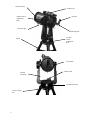
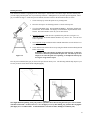
Tube Downstop
Altitude Clutch
Adjustment
knob
Finderscope
Eyepiece
Counterweight
Star Diagonal
Azimuth
Clutch
Adjustment
Rod
Tripod
Focus Knob
Altitude
Downstop
Hand Control
Azimuth Downstop
Scope-to-tripod
bolt
6
CHAPTER 1 - INTRODUCTION
Congratulations on your purchase of a Celestron Ultima 2000! The Ultima 2000 ushers in a whole new generation of
computer automated technology. Simple and friendly to use, the Ultima 2000 is up and running after locating just two
alignment stars. And then the fun begins. Start off with our built-in Sky Tour package or begin to observe any of the over
10,000 objects in the standard data base. The Ultima 2000 will unfold for you and your friends the wonders of the
planets, stars and galaxies. You may even discover and track your own comet!
Many of the standard features of the Ultima 2000 have never been available previously:
•
•
•
•
•
•
•
•
Incredible 10°/second (or faster) slewing speed;
Fully enclosed optical encoders for position location - you can manually move the telescope and it will still know its
location;
Precision worm drive on both axes;
Radical and innovative new fork mount;
Extremely low power consumption - runs off 8 AA batteries for 20 hours under normal usage;
CCD compatible, auto-guider ready;
RS-232 port allows use of PC’s; and
Many other high performance features!
The Ultima 2000’s deluxe features combine with Celestron’s legendary Schmidt-Cassegrain optical system to give
amateur astronomers the most sophisticated visual and photographic telescope available on the market today.
Take time to read through this manual before embarking on your journey through the universe. It may take a few
observing sessions to become familiar with your Ultima 2000. The laminated summary sheet has a very useful diagram
that will demonstrate access to the different menus of operation. Also, you should keep this manual handy until you have
fully mastered your telescope’s operation.
Your Ultima 2000 telescope is designed to give you years of fun and rewarding observations. However, there are a few
things to consider before using your telescope that will ensure your safety and protect your equipment.
Warning: Be careful with solar observing
Never look directly at the sun with the naked eye or with a telescope (unless you have the proper solar filter).
Permanent and irreversible eye damage may result.
Never use your telescope to project an image of the sun onto any surface. Internal heat build-up can damage the telescope
and any accessories attached to it.
Never use an eyepiece solar filter or a Herschel wedge. Internal heat build-up inside the telescope can cause these devices
to crack or break, allowing unfiltered sunlight to pass through to the eye.
Never leave the telescope unsupervised, either when children are present or adults who may not be familiar with the
correct operating procedures of your telescope.
Never point your telescope at the sun unless you have the proper solar filter. When using your telescope with the correct
solar filter, always cover the finderscope. Although small in aperture, the finderscope has enough light gathering power to
cause permanent and irreversible eye damage. In addition, the image projected by the finderscope is hot enough to burn
skin or clothing.
7
CHAPTER 2 - QUICK SETUP
This section is intended to help the new user get the Ultima 2000 up and running, in the altazimuth configuration,
immediately after assembly. To assemble the telescope, refer to the chapter entitled “Assembling your Ultima 2000”.
There are two steps required to become familiar with the Ultima 2000’s operations. First, use the telescope indoors to get
acquainted with all the controls and second, use the telescope under the night sky to find objects. This section covers
both.
Getting Familiar - Indoor Use
This section will show you how to navigate through the user interface of the Ultima 2000. The interface has four buttons
that allow you to run the Ultima 2000 hand control software. One is the MENU button which will bring you back to the
main menu. The other three are the control buttons named ENTER, UP, and DOWN. The control buttons can act on any
item that is blinking on the display screen. When you turn the telescope on, the first screen that appears is MENU
ALIGN. You will notice the “A” in ALIGN is blinking. This indicates that you can use the control buttons on this item
(Note : In this document, bold text represents a blinking character on the display). This section will also show you how to
Slew the telescope.
How to scroll through the Main Menu List.
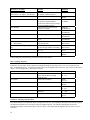
Here is an example that illustrates how to scroll through the different items of the main menu. There are eight items in all.
A detailed description of each item is discussed later.
ACTION
NOTES
DISPLAY
Turn on the telescope
The telescope always starts off at the
ALIGN menu.
Scrolling to different items in the
main menu.
Scrolling to different items in the
main menu.
Scrolling to different items in the
main menu.
Scrolling back to the original item
MENU
ALIGN
MENU
GO TO
MENU
CATALOG
MENU
SETUP
MENU
ALIGN
Press the button labeled DOWN
Press the button labeled DOWN
Press the button labeled DOWN 4 times
Press the button labeled UP 6 times
8
How to Enter into a Menu Item and Return to the Main Menu List
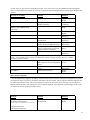
The blinking letter indicates that the item can be “acted on” by any of the three control buttons (ENTER, UP, DOWN). In
this section we will illustrate how to enter into a menu item and how to get back out to the main menu.
ACTION
Turn on the telescope and scroll to
MENU CATALOG
Press the button labeled ENTER
Press the button labeled ENTER
Press the button labeled DOWN 12 times
Press the button labeled ENTER
Press the button labeled MENU
NOTES
Entered into the CATALOG menu.
The “S” is blinking so we can press
ENTER or UP/DOWN
Entered into a list of named stars.
Scroll UP or DOWN to find other
stars.
Scrolled to a star named Betelgeuse.
A list of information on the star
scrolls by and an option to go to the
object appears. Wait 5 seconds and
the screen returns to the previous
screen.
Returned to the main menu.
DISPLAY
MENU
CATALOG
NAMED
STAR
0138-572
ACHERNAR
0555+074
BETELGEU
GO TO
(scrolling list of
information)
MENU
CATALOG
How to Slew the Telescope
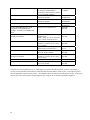
This section uses the direction buttons that control the motors. These are the four buttons laid out in a diamond pattern
underneath the control buttons. They will be referred to as the Diamond buttons. It is nice to see the telescope slew when
getting familiar with the operation of the telescope. It turns out, that when observing, the slew function is almost never
used because it is more convenient to move the telescope by hand. This is true for first time users as well as established
amateurs. Here is how to slew the telescope:
ACTION
Turn the Telescope ON
(For simplicity, if the telescope is already
on, cycle power{turn off then on}.)
Press the right Diamond button.
While holding the right Diamond button
Press the UP button once
Let go of the Diamond button
Press any Diamond button
Press the right Diamond button then while
holding down the right button, press the left
diamond button.
NOTES
The telescope moves at center speed
in the westerly or clockwise
direction.
Now the default speed is set to finder
rate (2º per second)
The telescope stops moving and the
display returns to its last Menu
location.
The telescope moves at finder rate.
You will need to balance the
telescope to get it to move in Altitude
(Up/Down) smoothly.
The telescope moves at slew speed
(>10º per second)
DISPLAY
MENU
ALIGN (if you just
turned the scope on.)
SPEED
CENTER
SPEED
FINDER
MENU
ALIGN
SPEED
FINDER
SPEED
FINDER
9
To get the telescope to slew, set the SPEED to FINDER using the above procedure. Hold down the Diamond button
corresponding to the direction you want the telescope to slew, then press the opposite button to reach the slew rate.
Using the Telescope Under the Night Sky
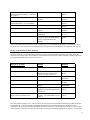
The purpose of this section is to get the telescope aligned and tracking under the stars as soon as possible. You need to
have the telescope assembled and on the tripod to utilize this quick setup section. You also need to balance the telescope.
See the section Balancing the Telescope in the Chapter 3.
Two Star Alignment
ACTION
NOTES
DISPLAY
Turn the telescope ON
Turn the hand control ON
The telescope always starts off at the
ALIGN menu.
MENU
ALIGN
Press ENTER
Entered into the ALIGN menu and
the message “INITIALIZING”
scrolls across followed by the prompt
to set the azimuth downstop.
Initialized the encoder downstop
position for azimuth.
SET FORK
TO ZERO
Initialized the encoder downstop
position for altitude.
Entered into the star list catalog.
SKY
ACHERNAR
NEW OBJ
ACHERNAR
NEW OBJ
ALTAIR
Move the telescope to its downstop
positions in both Alt and Az. (See the
Chapter on the Hand Control, Menu Setup
Press ENTER
Press ENTER
Press ENTER
Use the UP/DOWN buttons to scroll
through the list of alignment stars.
(example: ALTAIR - press DOWN nine
times)
Move and center telescope on alignment
star and press ENTER
Press ENTER
Use the UP/DOWN buttons to scroll to a
second alignment star.
(example Deneb - Press DOWN 7 times)
Move and center telescope on alignment
star and press ENTER
A few seconds pass
Press MENU
Scrolled to first alignment star.
Aligned the Ultima 2000 to first
alignment star.
NOTE: Move the scope by hand and
center with the diamond buttons)
Entered back in star list
Scrolled to second alignment star.
Aligned to second star and the warp
error message displays briefly. An
error of less than 0.5 is desirable.
Display returns to the SKY screen
after a few seconds.
Returns you to the ALIGN Menu.
TUBE TO
DOWNSTOP
SKY
ALTAIR
NEW OBJ
ALTAIR
NEW OBJ
DENEB
NEW OBJ
W=(<.5)
SKY
DENEB
MENU
ALIGN
Note: Even with the tracking motors off, the telescope still keeps track of the passage of sidereal time.
10
Turning Tracking On
To turn tracking on or off, start at the SETUP menu. The instructions below will start there. Here is how to do it:
ACTION
NOTES
Get to the SETUP menu.
Press ENTER
Speed could be at FINDER, PHOTO,
or 2 X SDRL. It defaults to the last
setting used.
Press DOWN
Scrolls through the different setup
functions.
Moves the cursor to “O” of OFF.
This makes it possible to change the
tracking state of the telescope.
Set the telescope motors to track in
Alt-Az rates. If the scope is on a
wedge, then set tracking to EQ
NORTH or EQ SOUTH.
Returns to main menu.
Press ENTER
Press DOWN
Press MENU
DISPLAY
MENU
SETUP
SPEED
CENTER
(will be at the last
setting)
TRACKING
OFF
TRACKING
OFF
TRACKING
ALT AZM
MENU
SETUP
Finding Objects
To use this section, the telescope has to be aligned to the sky. See the previous reference section. This quick reference
will show you how to find stars, Messier objects and Planets. For more information, see the Section “Menu Catalog” in
Chapter 5.
ACTION
NOTES
Go to the CATALOG Menu
Press ENTER
Press ENTER and UP/DOWN to find a
star that is up. example, Arcturus
Press Down 11 times
Press ENTER, wait 1/2 second and press
ENTER again.
Enter the Named star list in the
Catalog menu.
The telescope will slew to the object.
Find Messier Objects
Press MENU, press ENTER, press UP four Returned to the Menu Catalog, enter
times
the Menu Catalog, and scroll through
the different catalogs until the
Messier catalog comes up.
Choose a Messier object that is up.
The second zero is blinking. Use the
Consult a star atlas. example: M13
UP/DOWN arrows to change it.
Press ENTER two times
Press UP
Press ENTER and then UP two times
Press ENTER, wait 1/2 second and press
The telescope slews to the chosen
ENTER again.
Messier object
DISPLAY
MENU
CATALOG
NAMED
STAR
1416+191
ARCTURUS
(example star)
1416+191
ARCTURUS
(example star)
M
001
M
001
M 011
M 013
GO TO
SLEWING
11
Press MENU, press ENTER, press the UP
or DOWN buttons until the display reads...
Press ENTER
for the example date of 3-18-97
Press ENTER and press the UP Arrow
once
Press ENTER twice and press UP once.
Press ENTER three times
Use the UP/DOWN arrows to chose the
desired planet. example VENUS
Press UP once
Press ENTER, wait 1/2 second and press
ENTER again.
12
Find Planets
Scroll though the different
CATALOGS
The last date entered shows in the
display.
Change the month from Feb. to
March.
Change the date.
Venus is selected from the database
The telescope slews to Venus
SOLAR
SYSTEM
02-17-97
03-17-97
03-18-97
2320-066
MERCURY
0240+178
VENUS
GO TO
SLEWING
CHAPTER 3 - ASSEMBLING YOUR ULTIMA 2000
The Ultima 2000 is a sophisticated computerized telescope with the GO TO function. The Ultima 2000 can be used in
either Altazimuth mode or Equatorial mode (optional wedge #93655 is required). In addition, the Ultima comes standard
with Starbright® coatings, an enhanced multi-layer coating on the primary and secondary mirrors for increased reflectivity.
Also, the corrector plate is fully coated to allow maximum light transmission. The Ultima 2000 is shipped in three boxes.
One contains the telescope, one contains the tripod and the third contains the standard accessories, which are:
•
•
•
•
•
•
•
•
•
26mm Plössl Ocular 1-1/4"
Visual Back 1-1/4"
Star Diagonal, Prism 1-1/4"
7x50mm Finderscope with Bracket
Lens Cap
Standard counterweights (1 sliding weight, four small weights)
no tool bolts for attaching the telescope to the tripod
bolts for attaching the telescope to the optional wedge
diameter rod for azimuth clutch adjustment
The Ultima telescope should be set up indoors the first time so that it is easy to identify the various parts and familiarize
yourself with the correct assembly procedure before attempting it outdoors.
Remove the tripod and telescope from their respective boxes. Remove all the accessories as well. Save the boxes since
you may want to ship your telescope at some time in the future.
Setting Up the Tripod
For maximum rigidity, the Celestron field tripod has a leg support bracket. This bracket fits snugly against the tripod legs,
increasing stability while reducing vibration and flexure. However, the tripod is shipped with each arm of the leg support
bracket in between the legs so the tripod legs can collapse. To set up the tripod:
1.
Hold the tripod with the head up and the legs pointed toward the ground.
2.
Pull the legs away from the central column until they will not separate any further. A small stop on the top of each
tripod leg presses against the tripod head to indicate maximum separation.
3.
Rotate the tension knob (located underneath the support bracket on the central column) clockwise until it is close to
the bottom of the central column.
4.
Turn the leg support bracket until the cups on the end of each bracket are directly underneath each leg.
5.
Rotate the tension knob clockwise until the bracket is secure against the tripod legs. Do not over tighten.
13
The tripod will now stand by itself. Once the wedge and/or telescope are attached to the tripod, readjust the tension knob
to ensure that the leg support bracket is snug. Once again, do not over tighten!
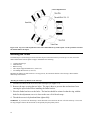
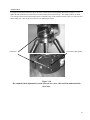
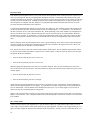
Figure 3-1 The field tripod completely set up.
Adjusting the Tripod Height
The tripod that comes with your Ultima 2000 telescope is adjustable. To adjust the height at which the tripod stands:
1.
2.
3.
4.
Loosen the extension clamp on one of the tripod legs (see figure 3-2).
Extend the leg to the desired height.
Tighten the extension clamp to hold the leg in place.
Repeat this process for each of the remaining legs.
You can do this while the tripod legs are still folded together.
Remember that the higher the tripod legs are extended, the less stable it is. For casual observing, this may not pose a
problem. However, if you plan on doing photography, the tripod should be set low to ensure stability. A recommended
height is to set the tripod in such a manner that you can look directly into the eyepiece on the telescope with a diagonal
while seated.
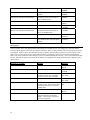
Figure 3-2
To adjust the height, loosen the extension clamps and slide the tripod legs to the desired height.
Do not loosen the leg clamps with the telescope on the tripod.
14
Attaching the Telescope to the Tripod
The telescope is fully assembled and ready to attach directly to a tripod or to an optional equatorial wedge. To attach the
telescope to the tripod:
1. Align the center hole on the bottom of the telescope with the center post on the tripod. Lower the
telescope onto the tripod.
2. Rotate the drive base on the tripod in order to line up the three holes of the telescope drive base
with the three holes of the tripod head. The larger holes in the tripod head are for the extended
screws that attach the bolts to the tripod directly (see Figure 3-3b).
3. Insert the three extended screws into the bottom of the tripod head through the three holes.
4. Thread the three extended screws into the holes until tight (see Figure 3-3b).
5. Tighten the bolts until the telescope is secure.
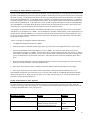
Figure 3-3a
15
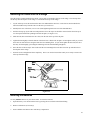
Figure 3-3b: Top view of the tripod head. Place the Ultima 2000 on top of the tripod. Use the open holes to mount
the Ultima 2000 to the tripod.
Installing the Finder
The finderscope is used to help you locate and center objects in the main field of your telescope. To start, remove the
finder and hardware from the plastic wrapper. Included are the following:
•
•
•
•
•
7x50mm Finderscope
Finder Bracket
Rubber O-ring
Three Nylon-Tipped Thumbscrews (10-24x1/2”)
Two Phillips Head Screws (8-32x1/2”)
Mounting the finderscope and bracket is a two step process; first mount the bracket to the telescope, then mount the
finderscope in the bracket.
Attaching the Finderscope Bracket to the Telescope
1. Find the two holes in the rear cell of the telescope (see Figure 3-4).
2. Remove the tape covering the two holes. The tape is there to prevent dust and moisture from
entering the optical tube before installing the finder bracket.
3. Place the finder bracket over the holes. The bracket should be oriented so that the ring with the
holes for the adjustment screws is closer to the rear cell of the telescope .
4. Thread the screws in by hand and then tighten fully.
WARNING: If you remove the finderscope, do not thread the screws back into the rear cell of the telescope. The screws
are long enough to obstruct the movement of, and possibly chip the primary mirror.
16
Attaching the Finder to the Bracket
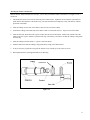
With the bracket firmly attached to the telescope, you are ready to attach the finder to the bracket. See Figure 3-4 for a
visual aide.
1.
Thread the three nylon screws into the front ring of the finder bracket. Tighten the screws until the nylon heads are
flush with the inner diameter of the bracket ring. Do NOT thread them in completely or they will interfere with the
placement of the finder.
2.
Slide the O-Ring over the back of the finder (it may need to be stretched a little).
3.
Position the O-Ring on the main body of the finder so that it is toward the front (i.e., objective) end of the finder.
4.
Slide the end of the finder where the eyepiece mounts into the front of the bracket. Push it back until the end of the
finder, where the eyepiece attaches, is past the back ring of the bracket , but NOT so far that the O-Ring is snug inside
the back ring.
5.
Slide the O-Ring toward the back(i.e., eyepiece end) of the finder.
6.
Push the finder back until the O-Ring is snug inside the back ring of the finder bracket.
7.
It may be necessary to push the O-ring into the bracket recess with the tip of one of the set screws.
8.
Hand tighten the three nylon-tipped thumbscrews until snug.
Nylon Screws
Figure 3-4
17
Focusing the Finderscope and Reticle
The finderscope can be focused by loosening the locking ring, on the front of the finder, then rotate the front cell. When
you have reached the desired focus, turn the locking ring so it pushes against the front cell. This locks the focus. See
Figure 3-5.
To focus the reticle, rotate the eyepiece
Figure 3-5
Aligning the Finderscope
The Ultima 2000 comes with a 7x50mm finderscope. The finderscope is designed to help you find alignment stars and for
terrestrial use of a wide field. The first number used to describe the finderscope is the power. The second number is the
diameter of the objective lens in millimeters. So the 7x50 finderscope is 7 power and has a 50mm objective lens.
Incidentally, power is always compared to the unaided human eye. So, a 7 power finderscope magnifies images seven
times more than the human eye.
To make things a little easier, you should align the finderscope during the day when it is easier to locate objects. To align
the finderscope:
1.
There is no need to turn on the telescope for this procedure.
2.
Choose a conspicuous object that is over 500 yards away. This will eliminate any possible parallax effect.
3.
Point your telescope at the target and center it in the eyepiece of the telescope.
4.
Check the finderscope to see where the object is located in the field of view.
5.
Adjust the screws on the finder bracket, tightening one while loosening another, until the cross hairs are centered on
the target.
6.
Tighten each screw an additional quarter of a turn until you are sure they will not come loose easily.
Accurate alignment of the finderscope will make it much easier to find objects in the main optical tube.
18
Attaching the Visual Back
The visual back allows you to attach most visual accessories to the telescope (see Figure 3-7). To attach the visual back:
•
Remove the rubber cover on the rear cell.
•
Place the knurled slip ring on the visual back over the threads on the rear cell.
•
Tighten by rotating the slip ring clockwise until tight.
Once this is done you are ready to attach other accessories such as eyepieces, diagonal prisms, etc.
If you want to remove the visual back, rotate the slip ring counterclockwise until it is free of the rear cell.
Attaching the Star Diagonal
The star diagonal is a prism that diverts the light at a right angle from the light path of the telescope. For astronomical
observing, this allows you to observe in positions that are more comfortable than if you were to look straight through. To
attach the star diagonal:
1.
Turn the thumbscrew on the visual back until its tip no longer extends into or obstructs the inner diameter of the
visual back.
2.
Slide the chrome portion of the star diagonal into the visual back.
3.
Tighten the thumbscrew on the visual back to hold the star diagonal in place.
If you wish to change the orientation of the star diagonal, loosen the thumbscrew on the visual back until the diagonal
rotates freely. Rotate the diagonal to the desired position and tighten the thumbscrew. For best results, rotate the diagonal
in the same position as you had it when you did your star alignment. This will maintain pointing accuracy.
Attaching the Eyepiece
The eyepiece, or ocular, is the optical element that magnifies the image focused by the telescope. The eyepiece fits either
into the visual back directly or into the star diagonal. To install an eyepiece into a diagonal:
1.
Loosen the thumbscrews on the star diagonal so that it does not obstruct the inner diameter of the eyepiece end of the
diagonal.
2.
Slide the chrome portion of the eyepiece into the star diagonal.
3.
Tighten the thumbscrew on the diagonal to hold the eyepiece in place.
To remove the eyepiece, loosen the thumbscrew on the star diagonal and slide the eyepiece out.
Barrel diameter is the diameter of the barrel that slides into the star diagonal. Standard barrel diameters are .96”, 1.25”,
and 2”. The Ultima 2000 comes standard for use with 1.25” barrel eyepieces.
In addition to barrel diameter, eyepieces are also referred to in terms of their focal length. The focal length of each
eyepiece is printed on the eyepiece barrel. The longer the focal length (i.e., the larger the number), the lower the eyepiece
power and the shorter the focal length (i.e., the smaller the number), the higher the magnification. Generally, you will use
low-to-moderate power when viewing. For more information on how to determine power, see the section on “Calculating
Magnification.”
19
Figure 3-6
Image will be upside down
Figure 3-7
Image will be right side up but reversed
Balancing the Telescope
Balance is a necessity for proper use of any telescope. Balancing maximizes tracking accuracy and lessens vibrations
in all telescopes. The Ultima 2000 is a precision instrument and so it is assumed that the user will balance the system.
The clutches are designed to only tighten a certain amount. This protects the precision gears driving the telescope. Heavy
stresses on the worm block assembly can cause damage.
The Ultima 2000 comes with a balance system that allows the telescope to be dynamically balanced (rotate the tube
anywhere and it remains balanced). Most balance systems sold today only balance the telescope for a range of ±10-20º.
The Ultima 2000 balance system balances the telescope for all 360º.
To balance the telescope:
1.
Put all the accessories on the telescope (i.e. visual back, diagonal, eyepiece, etc....). The finderscope must be
mounted on the telescope.
2.
Put the telescope in the horizontal position. See figure 3-8.
3.
Hold the telescope and loosen the altitude clutch so the telescope rotates freely. (The altitude clutch is adjusted by
turning the black knob located on the side of the larger fork arm, counter clockwise loosens and clockwise tightens).
Don’t let go of the telescope; it could rotate forward quickly and strike the downstop.
4.
Slide the counterweight to a position such that the telescope does not rotate when you let go of it.
5.
Tighten the nylon screw on the counterweight.
The Ultima 2000 is now dynamically balanced. If the counter weight is pushed all the way forward and the telescope still
rotates up (so the front of the tube points up), then additional weights are needed. There are 4 accessory weights provided
with the telescope and more optional weights are available through Celestron. The weights are small steel disks with a
threaded hole on one side and a threaded rod on the other. This way the weights can be attached to each other. To add the
extra weights:
1.
Remove the screw on the top of the front cell of the telescope, near the Starbright Coatings Sticker.
2.
Attach two of the weights to the front cell via the threads.
20
3.
Place the two other weights under the sliding counterweight on the bottom of the telescope. The sliding
counterweight has a threaded hole on its bottom face. To maintain a dynamic balance, equal weights must be added
to the top and the bottom of the telescope; i.e., two on top of the tube and two on the bottom of the tube.
4.
Put the telescope in the horizontal position. See figure 3-8.
5.
Hold the telescope and loosen the altitude clutch so the telescope rotates freely. Don’t let go of the telescope, it could
rotate forward quickly and strike the downstop.
6.
Slide the counterweight to a position such that the telescope does not rotate when you release it.
To maintain a dynamic balance, any extra weights added must be added in pairs, one on the top of the tube and one on the
bottom. See Figure 3-8.
Horizontal Position
Vertical Position
Figure 3-8
A telescope balances much like a scale. You need as much weight in the front as you have in the back. The sliding
weight allows for adjustability. If the sliding weight is adjusted all the way forward and more weight is needed,
use the extra counterweights provided with the telescope. Two weights should be placed on the top of the tube and
two placed under the sliding weight on the bottom. When the telescope is pointed in the vertical position, there
must be equal amounts of weight on the top and on the bottom (when the tube is pointed up, the top of the tube
becomes the left side of the scale and the bottom becomes the right side of the scale). Notice that when the sliding
weight is moved with the tube pointed straight up, the weight on the right side of the scale does not change.
21
Adjusting the clutches
The Ultima 2000 has a dual axis clutching system. A clutching system is a necessity for two reasons. First it is
convenient. You can move the telescope without unlocking any of the axis. Second, it protects the precision worm
assemblies that drive the telescope. If there is too much load placed on a telescope without a clutch, the worm assemblies
feel all the force. This can easily damage the telescope. The clutch is designed to slip when the telescope is too much outof-balance or if a force is being applied to the system.
There is an ideal clutch setting for the telescope. For normal visual observing, you want to set the clutch as loose as
possible. This makes it easy for you to move the telescope by hand and also extends the battery life by creating less
resistance when the telescope is slewing. If you are doing CCD imaging or astrophotography, then you will want to
tighten the clutches to about 75%. When the clutch is this tight it will be difficult to center objects by hand so the hand
control should be used. Here is how to adjust the Altitude and the Azimuth clutches.
Altitude clutch
Altitude clutch adjustment
knob
Figure 3-9 - The Altitude clutch adjustment knob
To tighten the altitude clutch, turn the Altitude Clutch Adjustment knob clockwise. To loosen, turn it counter-clockwise.
There are stops placed on the adjustment knob. The full range of the clutch knob is about 360º. This will prevent you
from over tightening the system.
22
Azimuth clutch
To change the azimuth clutch tension, place the clutch rod into the RA clutch adjusting ring shown in Figure 3-10. To
tighten the clutch turn the rod counter-clockwise when looking down on the telescope. The clutch rod allows for about
110º of motion which is more than enough motion to adjust the range of clutch tensions needed. There are stops placed on
the RA clutch ring. This will prevent you from over tightening the system.
Clutch Rod
RA Clutch Adjusting Ring
Figure 3-10
The azimuth clutch adjustment location shown in two views, side and from underneath the
drive base.
23
Attaching an Equatorial Wedge to the Tripod
The Ultima 2000 attaches to an optional equatorial wedge, 93655, so it can be used for astrophotography or CCD
imaging. It is a good idea to purchase the Deluxe Latitude Adjuster kit (DLA), 93662, in addition to the wedge. This aids
in getting an accurate polar alignment.
The tripod has six holes on its head for mounting equipment. Three of the holes are threaded with 5/16-18 threads and
three of the holes are open. The three open holes are for mounting the Ultima 2000 telescope to the tripod directly for
altazimuth use. This procedure is covered earlier in this chapter. To mount the wedge to the tripod, the through holes
need to have threads. This is accomplished with inserts provided with the wedge. The inserts are placed in the through
holes from the bottom side of the tripod head. With the inserts in place, all of the holes are threaded. Now you can attach
the wedge.
To attach the wedge to the tripod (Figure 3-11):
1.
Place the black metallic inserts in the open holes from underneath the tripod head. The inserts fit into the tripod head
with the flange end down.
2.
Hold the wedge over the center post on the tripod.
3.
Rotate the wedge so the through holes of the wedge line up with the threaded inserts in the tripod head. Notice that
there is a pin on the bottom of the wedge which protrudes from the azimuth adjusting block. The pin fits into one of
the existing threaded holes. You may need to rotate the wedge slightly back-and-forth to get the azimuth block pin to
fall into the existing threaded hole on the head of the tripod.
4.
Use the 5/16-18 bolts and the washers provided with the wedge to attach the wedge to the tripod.
Figure 3-11 - Front exploded view of the wedge and tripod head.
24
Attaching the Ultima 2000 to a Wedge
Once the wedge is firmly attached to the tripod, you are ready to mount the telescope on the wedge. The telescope base
fits directly onto the tilt plate of the wedge. To mount the telescope on the wedge:
1.
Lay the telescope on its side and locate the three feet underneath the drive base. Each foot has two threaded holes.
The holes furthest away from the center are the ones you need to use.
2.
Partially insert one of the three (3/8-16x1.25") hand tightening knobs into one of the threaded holes.
3.
Pick the telescope up by the fork tines and position it above the tripod. It should be oriented so that the telescope is
over the tripod with the base pointing toward the tilt plate (see Figure 3-12).
4.
Slide the bolt, that is attached to the drive base, into the slot on the top of the tilt plate.
5.
Tighten the bolt slightly so that the bottom of the drive base is flush to the tilt plate. Do not tighten it fully or you will
not be able to rotate the base enough to insert the two remaining bolts. (If you do not tighten the bolt at all, the drive
base may be tilted slightly, preventing the remaining two bolts from threading straight in.)
6.
Move the base of the telescope side-to-side until the two remaining holes in the drive base line up with the holes in
the tilt plate on the wedge.
7.
Insert the screws and tighten all three completely. There is no need to loosen these until you are ready to remove the
telescope from the wedge.
Figure 3-12
Inserting the Batteries
Use only alkaline batteries in your Ultima 2000. To insert the batteries:
1.
Open the battery cover located on the base by pressing the recessed tab on the lid and lifting.
2.
Remove old batteries (if necessary).
3.
Insert 4 alkaline AA batteries into each battery compartment.
25
4.
Close the battery compartment lid and press down until it snaps shut.
NOTE: The use of non-alkaline batteries may cause improper functioning of your Ultima 2000.
Storing Your Ultima 2000
When not in use, all lenses and eyepieces should be covered. This will reduce the amount of dust build-up on all optical
surfaces and reduce the number of times you need to clean the instrument. You may want to return everything to its
original shipping container and store it there. If this is the case, all optical surfaces should still be covered to prevent dust
accumulation. It is a good idea to remove the batteries when storing the telescope for long periods of time.
26
CHAPTER 4 - HAND CONTROL AND DRIVE BASE
The Hand Control allows you to control the telescope and specify various parameters. To use, insert the batteries in the
telescope drive base (see the section, Inserting the Batteries, in the Assembly chapter). This section gives details on all the
different menus and sub-menus of the Ultima 2000 hand control.
Buttons for the Hand Control
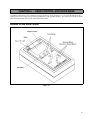
Figure 4-1
27
The hand control is quite simple. There are 4 buttons for the interface controls, 4 buttons for moving the telescope, and a
display screen. The interface is a list of 8 menus with each menu having several sub-menus.
Here is what each button on the hand control is for:
POWER
Turns the power of the hand control on and off. The “O” is the off position. When
the telescope is aligned and tracking the sky, the hand control can be turned off and on
and it will not affect the telescopes alignment. This feature can be used to save
battery life when leaving the telescope ON overnight.
BRIGHTNESS
There are 5 different brightness settings for the display screen. This button changes
the brightness of the display.
MENU
Returns the display to the main menu from anywhere in the software.
Control Buttons
ENTER
Used to enter into a menu or select an item from a list.
UP
Used to scroll through the list of menus or through a sub menu.
DOWN
Used to scroll through the list of menus or through a sub menu.
Diamond Buttons
These four buttons move the telescope. If in Slewing or Finder rates the telescope will move in the direction the arrows
are pointing. If the speeds are set at Center, 2X Sidereal, or Photo, the buttons cause the object in the eyepiece to move in
the direction the buttons are pointed. (This is assuming you are using a diagonal.)
Main Menu
The user interface of the Ultima 2000 consists of eight main menu items. Each of these has sub menus.
•
Menu ALIGN, for aligning the Ultima 2000 to catalog objects.
•
Menu GO TO, for commanding the telescope to move to a selected catalog object.
•
Menu CATALOG, for choosing objects out of a catalog.
•
Menu POSITION, for finding the R.A. and DEC position, the relative position, or the constellation to which the
telescope is pointing.
•
Menu IDENTIFY, for identifying unknown objects.
•
Menu TIMER, for performing stopwatch functions.
•
Menu SETUP, for setting up scroll rate, motor speeds, mode of operation and other user functions.
•
Menu TOUR, for touring special objects for a given month of the year.
28
ULTIMA 2000
A L IG N M E N U
GO TO M ENU
C AT AL O G
PO S IT IO N
S ky
A u to
N am ed S ta r
RA DEC
E arth
M an u al
N am ed O b je ct
Trac kin g
C h an g e
R e la tive
S olar S ys te m
Te lesc op
E Q S ou th
S ta r C a ta lo g (S T )
C o n stell
E Q N o rth
M ess ier (M )
IDENTIFY
TIMER MENU
Fin d
S tart
M ag
S to p
R e se t
SETUP MENU
SPEED
SLEW
FINDER
CENTER
2X SDRL
PHO TO
TO UR
D emo
M a n ua l
T R AC K
N ew G en eral
C atalog (N G C )
O FF
ALT AZ
EQ SO UTH
EQ NO RTH
In d ex C a ta log (IC )
R AT E
N on -S tellar
C atalog (N S )
E u rop e an S o u th ern
O b se rvatory (E S O )
SIDEREAL
KING
SO LAR
LUNAR
PEC
U p p sala G e n eral
C atalog (U G C )
U ser D efin ed
C atalog (N E W )
TRAIN
ON
O FF
VO L T S
AZ M G E AR
AL T G E AR
AZ M B AC K
AL T B AC K
CORD
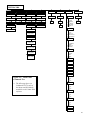
Figure 4-2: Ultima 2000
Command Tree
•
The following figure is a
Command Tree of each of
the Menus and Sub-Menus
available in the Ultima 2000
software.
ON
O FF
BT N SPEED
ON
O FF
BNT N SLEW
ON
O FF
C H AR T
SA
UA
SCRO LL
VE R S IO N
29
Navigating through the Menu
The user interface is basically sets of menus and sub-menus. When you turn the telescope ON, you are in the main menu.
The first menu item that comes up in the display is,
MENU
ALIGN
Notice that the “A” is blinking. (Note, a blinking item on the display will be shown as a bold letter in this manual). A
blinking item is a prompt to use any one of the control buttons (ENTER, UP, or DOWN). If you press ENTER, you will
enter into the ALIGN menu. If you press UP or DOWN, you will scroll through the other seven main menu items.
Here are some examples of how to use the interface.
Scrolling Through the Menu
BUTTON or ACTION
NOTES
DISPLAY
Turn On
(telescope and hand control)
DOWN
The telescope always starts off in the
ALIGN menu.
Scrolling to different items in the
main menu.
Scrolling to different items in the
main menu.
Scrolling to different items in the
main menu.
Scrolling back to the original item
MENU
ALIGN
MENU
GO TO
MENU
CATALOG
MENU
SETUP
MENU
ALIGN
NOTES
DISPLAY
DOWN
DOWN 4 times
UP 6 times
Entering and Exiting a Menu
BUTTON or ACTION
Turn the telescope ON and scroll to
MENU CATALOG
press ENTER
press DOWN 12 times
Entered into the CATALOG menu.
The “S” is blinking so we can press
ENTER or UP/DOWN
Entered into a list of named stars.
Scroll UP or DOWN to find other
stars.
Scrolled to a star named Betelgeuse.
press MENU
Puts you back to the main menu
press ENTER
30
MENU
CATALOG
NAMED
STAR
0138-572
ACHERNAR
0555+074
BETELGEU
MENU
CATALOG
Looking Up a Messier Object
BUTTON or ACTION
Turn on the telescope
and scroll to
MENU CATALOG
press ENTER
press UP 4 times
press ENTER
press ENTER
press UP 4 times
press ENTER
NOTES
MENU
CATALOG
Entered into the CATALOG menu. The “S” is blinking so
we can press ENTER or UP/DOWN
Scrolled to the Messier catalog. Let’s look at M42. The
“M” is blinking
Enter into the Messier catalog. The leading “0” is blinking.
We want M 042 so press enter to except the leading zero.
Now the second zero is blinking indicating that it can be
edited by using the UP/DOWN Buttons.
Adjusted the second number to 4.
press UP
Accepted the value “4” and now we are able to adjust the
last digit via the UP/DOWN buttons
Change “1” to “2”.
press ENTER
Gives the position of M42
press ENTER
The display reads GO TO with the “G” blinking and scrolls
information about the object. When the scrolling is
complete, the screen returns to the previous screen.
(Note: if you hit enter while the display is scrolling, the
telescope will slew to the object.) Don’t do this now
because the telescope is not aligned.
Returned to the main menu.
press MENU
DISPLAY
NAMED
STAR
M
001
M
001
M
001
M
041
M
041
M 042
0535-055
M 042
GO TO
(scrolls object
info.)
MENU
CATALOG
31
Description of each Menu
Menu ALIGN
This menu is the first menu to be displayed when the telescope is turned on. There are five sub menus under ALIGN.
Each of these is a different way to align the telescope. Here are the sub menus:
This is used for the initial Alt-Az two star alignment or updating your alignment during the
evening. If you are looking at a non-stellar object, you can center the object and update
your alignment in this mode.
SKY
NOTE: The Ultima 2000 uses two stars to align to the sky. If you align to two stars then
later align to a third, the telescope overrides the closer of the two original alignment stars.
This maximizes the distance between your alignment objects, even if you update your
alignment with many objects in one part of the sky. Alignment stars should be more than
20º apart.
EARTH
This is used to align to terrestrial objects that you have defined in the NEW Catalog
database (example given in Chpt. 8). Terrestrial objects don’t move as the night
progresses, so in this mode the positions of the objects are not updated with time. In Earth
mode, the telescope assumes the objects are not moving. An example is given in Chapter
8.
CHANGE
This mode allow the user to choose which alignment star he/she wishes to replace with a
third star. The Ultima 2000 uses two stars for its alignment to the sky. These stars remain
in the memory until you update it with a new alignment star. This setting allows you to
view the names of the stars the Ultima 2000 is aligned to. You may have reason to replace
one alignment star over another. This mode gives you the choice. An example is given in
Chapter 8.
EQ SOUTH
Use this setting in the Southern hemisphere with a polar aligned telescope. The polar
alignment accuracy is critical. The telescope implicitly uses the celestial pole for one of
the alignment objects. This way you only need one star to align the telescope. This setting
is useful for telescopes permanently mounted or being used remotely. A wedge is
necessary.
EQ NORTH
Use this setting in the Northern hemisphere with a polar aligned telescope. The polar
alignment accuracy is critical. The telescope implicitly uses the celestial pole for one of
the alignment stars. This way you only need one star to align the telescope. This setting is
useful for telescopes permanently mounted or being used remotely. . A wedge is
necessary.
When you first attempt to align the telescope to the sky, you are prompted to set the telescope to its downstops. This sets
the position of the encoders. There is a downstop for each axis, azimuth and altitude.
The azimuth downstop is referenced by two stickers on the drive base. Rotate the fork arms until the stickers are lined up.
The altitude downstop position is with the telescope tube pointed down. In this position, the pin on the front of the tube
presses flush against the pin on the fork arm. Gently move the tube down until it hits its stop. Don’t slam the two
downstop pins together; this could damage the pins.
When you first press ENTER at the ALIGN menu, the screen scrolls,
INITIALIZING.....
32
Then the display will read,
SET FORK
TO ZERO
This is your cue to rotate the telescope in azimuth until the two stickers on the drive base line up. Then press ENTER.
Next the display will read,
TUBE TO
DOWNSTOP
Now move the telescope tube to the downstop position (pointing down). Press ENTER. The display places you into the
SKY align menu. The display will look like this,
SKY
ACHERNAR (this will show the catalog object last displayed in the CATALOG menu)
Use the UP/DOWN buttons to scroll through the different ALIGN menu settings (SKY, EARTH, ETC...). Press ENTER
when you decide which alignment method you wish to use. The display will now read,
SKY
ACHERNAR
with the “A” blinking. You can use the UP/DOWN buttons to scroll to different alignment objects until you have reached
the desired object. Center the telescope on the object and press ENTER. You have just aligned to your first alignment
star. Align the telescope to another star to complete the alignment procedure (an example is given in Chapter 8).
Menu GO TO
This menu tells the telescope to go to the last object displayed in the Catalog Menu. GO TO has three sub menus. Use
the UP or DOWN arrows to scroll to the different sub menus. Here is an explanation of each.
AUTO:
Press ENTER here to have the telescope automatically slew to the last object accessed in the Catalog
menu.
MANUAL:
Press ENTER here and the display will tell you how far and in what direction the telescope should move
to center the object. Press ENTER again and the information about the object will scroll across the
screen. If you press ENTER while the screen is scrolling, the telescope will slew to the object.
You can also move the telescope by hand to the object. The guide arrows that tell you how far away
you are from the object will guide you to the object.
RELATIVE:
This GO TO feature is an even more precise way of finding non-stellar objects. This option is to ensure
that an object is in the field of view of a CCD chip or a medium power eyepiece. When you press
ENTER from this setting, the computer searches through a database of stars to find the brightest star
within 5º of the faint object. The display will prompt you to center the object. After you have centered
the object, using the Diamond Buttons, press ENTER. The telescope will slew to the original object
sought.
Menu CATALOG
This menu is very extensive. You may scroll through the list of catalogs with the UP and DOWN buttons; pressing
ENTER selects a particular catalog for you to scan. Catalogs can be accessed in two ways. You may scroll through the
items or you may input a particular object. Once an object is selected, press ENTER to get a description of type, size,
magnitude, and chart number. Press ENTER twice and the Ultima 2000's built-in high speed motor drive system will
locate the object for you, typically in 10 seconds or less.
The CATALOG menu contains the following: a Star Catalog (ST) which is unique to the Ultima 2000, the Messier
Catalog (M), the Revised New General Catalog (RNGC), Non-Stellar Catalog (NS), portions of the Index Catalog (IC),
portions of the European Southern Observatory (ESO) Catalog, portions of the Uppsala General Catalog (UGC), a user
33
definable catalog (NEW), and the PLANETS listed in order by increasing distance from the Sun. When used in
conjunction with the GO TO function, the Ultima 2000 will guide you to any of the more than 10,000 objects in its
database. There is a description of each catalog in the following section.
The "S" blinks, indicating that the catalog selection can be changed. Press the DOWN button to scroll through the various
catalog and planet selections. The order and explanation is as follows:
DISPLAY
DESCRIPTION
NAMED STAR
List of Stars by Name, mainly for alignment
NEW01
User Definable Catalog (NEW)
U00148
Uppsala General Catalog (UGC)
E263-48
European Southern Observatory Catalog (ESO)
NS141
Non-Stellar Catalog (NS)
IC434
Index Catalog (IC)
NGC4565
Revised New General Catalog (RNGC)
M013
Messier Catalog (M)
ST055
Star Catalog (ST)
SOLAR
SYSTEM
NAMED
OBJECT
Planets Catalog
List of popular objects by name
Any time the catalog selection is changed, the first letter of each catalog abbreviation will blink.
As an example, if you want to select star 55 you will need to enter the number 055. Leading zeros in a catalog number
must be entered. Press ENTER and the catalog abbreviation will stop blinking and the first character of the catalog
number will start blinking. Once again, this indicates that this number can be changed. Press the ENTER button again
and now the second digit will blink. Press the UP button until the number "5" displays, then press ENTER. The last digit
will blink. Press the DOWN button until the "5" displays. (The UP button could have been pressed 5 times to achieve the
same result.) Now press the ENTER button. The screen will display the catalog entry and the coordinates. Keep in mind
that you enter one digit at a time.
After you have selected an object, press ENTER and the display will scroll from left to right. For our example the display
will scroll:
ST055 MAG= 0.5 SIZE= * ACHERNAR
ERADINUS STAR SA=24
The CATALOG menu provides the following information in this order:
ST Number:
ST055
Coordinates:
0138 -57.2
Magnitude:
+0.5
34
Size or separation:
(if applicable)
Name:
Achernar
Constellation:
Eradinus
Description:
Star
Chart(SA or UA):
SA=24
Once the scroll is finished, the screen will display the catalog designation and the coordinates. You can replay the
information by pressing the ENTER button again. While the information is scrolling, the top part of the display will read
GO TO. The leading “G” will be blinking. This indicates that you can press ENTER again and the telescope will slew to
the object. The screen will display the catalog designation and the coordinates.
So, from the CATALOG menu, you can press ENTER twice and the Ultima 2000 will slew to the object for you.
If the object displayed is not the one you want, you may press the UP button to display the next entry for this catalog. You
can scroll through the entire catalog in sequential order by pressing the UP button. Pressing the DOWN button scrolls
through in reverse order. This only allows you to scroll items in the currently selected catalog. For example, if ST055
displayed while you pressed the UP button, the readout will display ST056. If you scroll through the end of the catalog,
the readout will roll over and start with the first entry, ST001. If you scroll through the catalog backwards, once it reaches
zero, it will roll over to the last entry in the catalog.
If an erroneous catalog number is entered (like M505 or RNGC 9000) the readout will automatically default to the first
entry for that particular catalog (i.e., M001, ST001, RNGC0001, or NEW01). Also, each time you enter the catalog
menu, the readout will display the last object accessed in either CATALOG, GO TO, or ALIGN menus.
In the SETUP menu you can use the CHART sub-menu to select which catalog you want the readout to display; either Sky
Atlas 2000.0 or Uranometria.
STOO1
The Star Catalog (ST)
The Star Catalog contains many interesting stars, double stars and red stars, including all of the alignment stars.
M013
The Messier Catalog (M)
This catalog contains 110 objects, those cataloged by Messier himself and several added later which Messier was known
to have observed.
NGC4565 The Revised New General Catalog (RNGC)
The Revised New General Catalog (RNGC) contains 7840 non-stellar objects that came from the original catalog
compiled by J. L. E. Dreyer and updated descriptions compiled by Steve Gotleib.
IC434
The Index Catalog (IC)
The Index Catalog (IC) contains selections of objects that are not contained in the original New General Catalog.
35
NS141
The Non-Stellar Catalog (NS)
The Non-Stellar Catalog (NS) contains objects not found in either the New General Catalog or the Index Catalog. In all,
there are a total of 661 interesting objects.
E263-48
The European Southern Observatory (ESO) and
U00148
Uppsala General Catalog (UGC)
The European Southern Observatory (ESO) and the Uppsala General Catalog (UGC) contain still more objects not found
in either the New General Catalog or the Index Catalog.
NEW01
The User Catalog (NEW)
In addition to all the catalogs described thus far, the Ultima 2000 has a user definable catalog. Referred to as NEW, this
catalog will accept up to 27 objects - planetary, deep sky, or terrestrial. You define the catalog designation and enter the
coordinates. The user catalog is initially empty. You add the objects you want (i.e., favorite deep-sky objects, comets,
variable stars, etc.). All information is stored in the nonvolatile memory which is retained when you turn your telescope
off.
Once the NEW catalog designation displays, press the ENTER button. You may enter objects into the catalog in any
order you wish by scrolling and selecting any number from 1 to 27. Press ENTER again and the display will read,
SET TO
CUR POSITION
with the “S” blinking. If you press ENTER, the telescope will record the RA and DEC of the location the telescope is
pointing. This defines the NEW object position. The other option is to press the Down button where the display will
read,
NEW
RA DEC
This allows you to put in an RA and DEC manually. Press ENTER and the default screen will read,
+00 00.0
24 00 00
(Declination in degrees and minutes)
(Right Ascension in Hours Minutes and Seconds)
You are now ready to enter the coordinates—both right ascension and declination—for your first catalog entry. Press the
ENTER button and the first character in the DEC coordinates will blink. Use the UP or DOWN button to change the
character, in this case + or -. Once the correct character displays, press ENTER. The next character will blink indicating
that it can be changed. Continue entering the coordinates one character at a time until all the coordinates have been
entered.
SOLAR SYSTEM
In addition to the thousands of deep-sky objects in the database, the Ultima 2000 contains the eight planets visible from
Earth and also has the Sun. (Do not view the Sun without a Solar Filter placed over the front of the telescope!) The
Ultima 2000 requires the date of your observing session. The date is entered one character at a time using the month-dayyear format. The first two characters are for the month, the next two are for the day of the month, and the last two are the
year. The readout will default to the last date entered. The date is stored in nonvolatile memory and does NOT have to be
entered more than once each day.
When scrolling through the list, the first character of each planet's name blinks, indicating the selection can be changed.
Once the planet you want to observe is displayed, press ENTER. The Ultima 2000 will display the coordinates for that
planet based on the date entered. Coordinates are computed for Epoch 2000.0. The positions will be accurate through the
twenty-first century.
36
Here is the Planetary Catalog under the SOLAR SYSTEM menu.
DATE
SUN
MERCURY
VENUS
MARS
JUPITER
SATURN
URANUS
NEPTUNE
PLUTO
Requires entering the current date
Sun
Mercury
Venus
Mars
Jupiter
Saturn
Uranus
Neptune
Pluto
Named Object
This is a list of popular objects by name. It is sometimes convenient to look up an object by its name rather than its
Messier or RNGC number. See Appendix A for the complete list of objects. To use this catalog, enter into the
CATALOG menu and scroll down to the NAMED OBJECT catalog by using the UP or DOWN button. Press ENTER, to
activate the catalog. Use the UP/DOWN buttons to scroll through the catalog. At any object, you can press ENTER and
the display will scroll information about the object. While the information is scrolling, the top part of the display will read
GO TO with the “G” blinking. This indicates that you can press ENTER again and the telescope will slew to the object.
After the scrolling message has finished, the display will return to the object name and list its coordinates.
Menu POSITION
There are four choices under the POSITION menu. Three give you the direction the Ultima 2000 is pointed and one gives
you information on the tracking motors. Here are the choices under POSITION.
RA DEC
This gives the right-ascension and declination of the telescope. RA appears on the top of the display
and DEC is on the bottom. The telescope must be aligned for this to be valid.
TRACKING
This mode monitors the tracking motors. This displays a number for each tracking motor between 32768 and 32767. This can be used for setting the backlash compensation for each axis of the
telescope. See the section on SETUP in this chapter.
TELESCOP
This gives the relative direction the telescope is pointing compared to its downstop positions. The
azimuth reads from 0 to 359º and the altitude reads from 0 to 90º. This does not give you the Alt-Az
position. You must turn the telescope ON at the downstop positions or set the downstops through the
alignment menu.
CONSTELL
This gives the constellation toward which the telescope is pointing. The telescope must be aligned for
this to be valid.
Here is an example of how to use the POSITION menu.
ACTION
NOTES
Start off at the POSITION menu
Press ENTER
DISPLAY
MENU
POSITION
Press DOWN
Enter into the POSITION menu
and view the first item in the list.
Scroll down to the next item
Press DOWN
Scroll down to the next item
Press DOWN
Scroll to the next and last item
RA DEC
TRACKING
TELESCOP
CONSTELL
37
Press ENTER
The telescope tells you what
constellation it is pointed at. See
the Appendix A for abbreviations.
Returns you to the CONSTELL
mode.
Scroll down to the RA DEC mode
Press ENTER
Press DOWN
Press ENTER
Press ENTER
Displays the RA and DEC of the
direction the telescope is pointed
in. RA is on top.
Returns you to the RA DEC mode.
Press DOWN
Scroll down to the next menu item
Press DOWN
Scroll down to the next menu item
Press ENTER
Displays the direction the telescope
is pointed in Altitude and Azimuth.
Azimuth is displayed on top.
Returns you to the main menu.
2226-249
PSA 946
CONSTELL
RA DEC
02 50 13
- 56 36.0
RA DEC
TRACKING
Press MENU
TELESCOP
216.34
-088.89
MENU
POSITION
Menu IDENTIFY
This menu has two functions. First, it can be used to identify an object that you do not recognize. For example, if while
sweeping the sky you stumble across an unknown object, you can use this menu to find its name. Second, it can be used to
find another object close to the one you are currently observing. In either case the menu works the same.
You will need to enter two parameters when selecting an object. The first parameter is the object type or catalog, and the
second is the magnitude range. The following object types and catalogs are available:
•
•
•
•
•
•
•
•
•
NS
ST
GC
OC
GX
PN
NB
2*
R*
Object from Non-Stellar Catalog
Star from catalog
Globular cluster
Open cluster
Galaxy
Planetary Nebula
Nebula
Double star
Red or colored star
Use the ENTER, UP and DOWN buttons to enter and change these parameters. The hand control will display the object
you have in view. When you move the telescope, the hand control displays the objects as they come into view.
Menu TIMER
Included in the Ultima 2000 software is a timer mode that allows you to time images, photographs, eclipses, occultations,
etc. Operated by pressing ENTER, the timer works like a stopwatch and elapsed time is not affected by accessing other
modes.
Menu SETUP
This menu allows you to check the battery power, set the scroll rate, pick chart preference, set slewing rate and customize
certain user features. It also allows you to set the type of tracking—altazimuth, equatorial or terrestrial. Use the ENTER,
UP and DOWN buttons to change and enter preferences.
38
The scroll rate ranges from 0, the slowest, to 9, the fastest. The chart can be changed from SA, Wil Tirion's Sky Atlas
2000.0, to UA, the Uranometria catalog.
Here is a list of the sub-menus in the SETUP menu.
•
SPEED
•
AZM GEAR
•
BTN SPD
•
TRACK
•
ALT GEAR
•
BTN SLEW
•
RATE
•
AZM BACK
•
CHART
•
PEC
•
ALT BACK
•
SCROLL
•
VOLTS
•
CORD
•
VERSION
Here is a description of each SETUP item.
SPEED
This allows you to adjust the speed the telescope is driven by the diamond buttons. The Ultima 2000 has five speed
settings:
SLEW
10 degrees per second, or faster. This depends on the power source.
FINDER
2 degrees per second.
CENTER
6 x sidereal rate
2 X SDRL
2 x sidereal rate
PHOTO
.5 x sidereal rate
Here is how to change the SPEED setting.
ACTION
Start off at the
SETUP menu
press ENTER
NOTES
press ENTER
The telescope comes from the factory set so the speed
should be at CENTER. Otherwise the speed will remain at
its last setting.
Enter into the SPEED selection list.
press DOWN
Scroll to the next SPEED setting.
press DOWN
Scroll to the next SPEED setting.
press DOWN
Scroll to the next SPEED setting.
DISPLAY
MENU
SETUP
SPEED
CENTER
SPEED
CENTER
SPEED
2 X SDRL
SPEED
PHOTO
SPEED
FINDER
39
You may have noticed that you cannot get to the SLEW rate. This is because the SLEW option is disabled at the factory.
It is disabled as a safety feature. It is possible to slew the telescope into your head because you thought you were in a
different speed rate.
There are two ways to SLEW the telescope.
•
One is set the speed to FINDER rate, hold down the diamond button for the direction you want to slew, then press the
opposite diamond button simultaneously. The telescope will SLEW.
•
The second way is to disable the safety, which we do not recommend for normal use. If there are circumstances that
require this, see the section on “SETUP-BTN SLEW”.
Here is another method for changing speeds, but be sure the BTN SPD is set to ON. See the description of BTN SPD,
later on in this section.
ACTION
NOTES
DISPLAY
Start anywhere
You can be in the main menu or any sub menu and this method
will work. Just be sure the BTN SPD is set to ON or this will
not work. For an example we will be at the TIMER menu
The screen changes to the SPEED screen with the speed setting
blinking. Let’s say it was last set to CENTER, so the “C” is
blinking.
The SPEED selection changes to...
MENU
TIMER
hold down the right
DIAMOND button
while still holding the
DIAMOND button,
press UP once
SPEED
CENTER
SPEED
FINDER
You can change to any of the speeds this way except for SLEW. Again for SLEW, you need to leave the telescope in
FINDER speed and use one of the techniques described above.
TRACK
There are four tracking rate settings:
•
•
•
•
OFF
ALT AZ
EQ SOUTH
EQ NORTH
The OFF setting is useful when aligning the telescope to the stars or when the telescope is being used terrestrially.
The most common use of the Ultima 2000 is in ALT-AZ mode. In this setting, the telescope will track the stars in the
altazimuth configuration. Just put the telescope on the tripod, align it to two stars and you are ready to go.
EQ NORTH and EQ SOUTH are for polar aligned scopes using the optional wedge. This makes the RA tracking motors
run at sidereal rate. The DEC motors do not run unless you are running them manually.
RATE
The Ultima 2000 has four tracking rates for tracking the objects in the sky. Here is what each is for:
SIDEREAL
Use this rate for tracking the stars.
KING
Use this rate for tracking stars low on the horizon. Due to atmospheric refraction, stars
and objects near the horizon travel at a slightly slower rate.
SOLAR
This rate is used for tracking the Sun.
40
LUNAR
This rate is used for tracking the Moon.
PEC
This is only used on a telescope that is polar aligned on a wedge. Furthermore, you need to have the tracking rate set to
EQ NORTH or EQ SOUTH.
Periodic error correction, or PEC, is used for astrophotography or CCD work. PEC corrects for repeating errors caused
by the worm gear. The worm takes about 5.4 minutes to make one complete revolution. Any errors in the worm will
repeat every time the worm makes a revolution. These are called periodic errors. These errors can be corrected by using
the PEC TRAIN function.
Watch a star with an illuminated reticle eyepiece, like the Celestron Micro Guide Eyepiece. You will notice that the star
will slowly drift ahead or behind the illuminated crosshairs. Using the diamond buttons, set to PHOTO speed, practice
keeping the star centered. Set PEC to TRAIN. Keep the star centered using the diamond buttons. The PEC is
remembering the corrections you make. After 5.4 minutes, it will play back the corrections you made and still keep
recording any new corrections. When you feel it is tracking well, switch PEC to ON. Now, the PEC will play back the
corrections and will not record any new corrections you make. Any resulting tracking errors are random in nature and
must be corrected manually.
VOLTS
This is a built-in voltmeter to give you an idea of the status of your batteries. 8.5 volts is about the minimum the telescope
needs to run. The maximum voltage is about 18 Volts. Any higher voltage is not recommended and can significantly
shorten the life of the SLEW motors.
AZM GEAR
The Azimuth Gear Ratio: This allows you to change the relative speed of the tracking motors. This can be useful for
tracking comets or asteroids. The factory setting is 1.0000. The range of settings is from 0.0000 to 2.9999. When set to
0.0000, the motors will not drive at all, and when set to 2.9999, the motors will run almost 3 times faster. The relationship
of drive speed to this number is linear. 1.5000 will run the motors at 1.5X.
Here is how to change the gear ratio.
ACTION
NOTES
DISPLAY
Start at SETUP menu
MENU
SETUP
press ENTER
If you want to do this under the sky you will be able to see the
effects in an eyepiece. Be sure tracking is ON and the
telescope is star aligned.
Enter into the list of SETUP items.
press DOWN 5 times
Scroll down to the AZM GEAR item
press ENTER
Enter into the AZM GEAR menu. The leading “1” will now
blink.
Changes the one to zero. The tracking rate is now zero.
press DOWN
press ENTER
press UP 5 times
press MENU
Accept the entry of zero and move the cursor to the next
character.
Change tracking speed to 1/2 normal speed
Return to main menu. The new AZM GEAR ratio will remain
.5 even after cycling power.
SPEED
CENTER
AZM GEAR
1.0000
AZM GEAR
1.0000
AZM GEAR
O.0000
AZM GEAR
0.0000
AZM GEAR
0.5000
MENU
SETUP
41
ALT GEAR
Altitude Gear Ratio: This works the same as AZM GEAR.
AZM BACK - Azimuth Backlash Compensation
There is an enormous gear reduction between the tracking motor and the telescope. Highly accurate tracking is best
obtained by running the tracking motor at a relatively high speed. (If an electric motor is run too slowly, it runs at an
inconsistent speed, and can burn the brushes.) The high speed of the tracking motor requires a very large gear ratio, on
the order of 600,000 to 1. When the tracking motor changes direction, there is a slight delay before movement is visible
in the field of view due to the high gear ratio. This phenomenon is referred to as backlash. The Ultima 2000
automatically compensates for backlash, and this compensation is settable. The displayed number is the specified width of
the backlash deadzone (the time where the telescope is motionless) in eighths of a tracking motor revolution.
The backlash compensation is preset at the factory to zero. When the telescope is equatorially mounted (on a wedge), the
azimuth backlash does not matter. So the AZM BACK value can remain set at zero. The azimuth compensation is only
needed for Alt-Az tracking and for most people, it still won’t be needed. To change the setting see the next section, “ALT
BACK”.
ALT BACK
For astrophotography or CCD imaging, the altitude backlash compensation is critical. The azimuth compensation is only
needed for Alt-Az tracking.
It is easiest to set the backlash compensation in the daytime on a distant object with a high power eyepiece. For step-bystep instructions on how to determine the backlash compensation, see the chapter called Procedures. Here is how to set
the altitude backlash compensation value on the hand control.
ACTION
NOTES
DISPLAY
Example: Set the ALT BACK to 400 from 340
Go to the SETUP menu
Press ENTER
Set SPEED to 2 X SDRL
Press DOWN 7 times
and note the setting
Press ENTER
Enter into the SETUP menu and change the SPEED setting.
Press ENTER twice
Place the cursor at the leading number.
Press UP
Change the 3 to a 4.
Press ENTER
Move the cursor to the next digit to the right.
Press DOWN 4 times
Set the 4 to 0.
Press ENTER 2 times
The compensation is set to 400.
Press MENU
Return to the main menu.
Scroll down to the ALT BACK mode.
The cursor is at the first digit of the azimuth backlash value.
MENU
SETUP
SPEED
2 X SDRL
ALT BACK
00340
ALT BACK
00340
ALT BACK
00340
ALT BACK
00440
ALT BACK
00440
ALT BACK
00400
ALT BACK
00400
MENU
SETUP
For more information see the section “Determining the Altitude Backlash Compensation” in Chapter 8.
42
CORD - Cord Wrap Control
This is the cord wrap mode. This keeps the telescope from wrapping the cord around itself. The mode can be ON or
OFF. It is useful to turn this OFF if you are not using an external power source and desire the telescope to slew through
the shortest distance to the object.
To turn cord wrap ON and OFF:
ACTION
NOTES
Start at SETUP menu
press ENTER
Enter into the list of SETUP items.
press UP 6 times
(For changing BTN SPD, press UP 5 times)
(For changing BTN SLEW, press UP 4 times)
press ENTER
press UP
Turn the Cord Wrap mode OFF.
press UP
Turn the Cord Wrap mode ON
press MENU
Return to main menu
DISPLAY
MENU
SETUP
SPEED
CENTER
CORD
ON
CORD
ON
CORD
OFF
CORD
ON
MENU
SETUP
BTN SPD - Button Speed
This function, when turned ON, displays the SPEED menu whenever a diamond button is pressed. When the button is
released, the display returns to its original screen. The advantage is, you can change the SPEED just by holding down a
diamond button and then using the UP or DOWN buttons to scroll through the different speeds.
There are times you might want this function turned off. When you are looking at the RA and DEC of the telescope under
the POSITION menu, you might not want the screen to change when you press a diamond button.
Turning BTN SPEED ON and OFF is exactly the same as turning cord wrap ON and OFF (the previous example). The
only difference is on the third step, press the UP button 5 times instead of 6 times.
BTN SLEW - Button Slew
This is a safety mode for slewing. When this is turned OFF (as it comes from the factory), the SLEW setting cannot be
activated. The only way to activate SLEW speed is described in the SPEED section of this Chapter. When BTN SLEW
is set to ON, then SLEW can be activated like any of the other speeds.
Turning BTN SLEW ON and OFF is exactly the same as turning cord wrap ON and OFF. The only difference is on the
third step, press the UP button 4 times instead of 6 times. This places you at the BTN SLEW option.
CHART
This menu allows you to select the type of star atlas the Ultima 2000 is using. The two atlas choices are Uranometria or
W. Tirion’s Sky Atlas 2000. These are represented in the Ultima 2000 by UA and SA respectively. In CONSTELL menu
under POSITION, the displayed atlas page is keyed to the selected atlas.
43
SCROLL
This mode sets the speed at which information is scrolled across the screen. The range goes from 1 to 9, slowest to
fastest.
VERSION
This tells the version of the software that is installed in the telescope. The display shows eight digits. The first four digits
show the version of the Hand Control software while the last four digits show the version of the telescope software.
Menu TOUR
This menu item has a list of interesting objects for each month of the year. In this mode, you choose either DEMO or
MANUAL. Then, you choose a month of the year. If you choose DEMO, the telescope automatically slews to each of the
objects on the list, pausing about 20 seconds at each object. This is useful for watching the scope move indoors for
demonstration purposes. This is not useful for observing because the telescope slews without any warning.
In MANUAL, the telescope does not initiate slew operations until you tell it to. The UP and DOWN buttons let you skip
forward in the list or backwards in the list. The down button is forward, as in reading down a list. Pressing the ENTER
button once, you get a scrolling message with information about the object. While the message is scrolling in the bottom
part of the display, the top part of the display reads GO TO with the “G” blinking. If you press ENTER while the display
says GO TO, the telescope will slew to the object. If you wait for the message to finish, the display will give the name of
the object and give directional arrows that will guide you to the object.
Here is an example of each.
DEMO mode indoors
1.
Place the telescope to its downstops.
2.
Turn the telescope ON.
3.
Press the UP button to scroll to the TOUR menu.
4.
Press ENTER and ignore the “STAR ALIGNMENT REQUIRED” message.
5.
The display will read, “TOUR JAN”. Since you are not really looking at the star, the month does not matter.
6.
Press ENTER. The telescope will start slewing.
7.
To stop the telescope from slewing to objects, press the MENU.
Note: Continuous slewing will greatly decrease the life of the batteries. It is advisable to use an external power source
when using the TOUR option for any length of time. If you are using an external power source, be sure that the Cord
Wrap mode is enabled. Do this in the SETUP menu under the CORD sub-menu.
44
MANUAL mode under the sky
Set up the telescope outside and align it to the night sky. Here is how to activate the tour option.
ACTION
Start at the TOUR menu
NOTES
Press ENTER
Enter into the TOUR menu.
DISPLAY
MENU
TOUR
DEMO
Press DOWN - to the
MANUAL option
Press ENTER
Use the UP/DOWN buttons to
scroll to the appropriate month.
Press ENTER
Choose the MANUAL option.
MANUAL
Enter into MANUAL.
For example, use July.
TOUR JAN
TOUR JUL
The first object to come up in July is M92. It
will be different for you depending on the
month you picked.
Message scrolls and the display changes to
the GO TO menu. It stays at the GO TO
menu until the display stops.
The telescope slews to the object.
57 ! 94"
M 092
Press ENTER
Press ENTER
while GO TO is still displayed
NA
At the end of the slew the display reads.
Press DOWN
Scroll to the next Tour object.
Press Enter twice
Activate the GO TO function.
GO TO
Message Scrolls
GO TO
SLEWING
0º0 0º0
M 092
83 # 129 "
013
M
GO TO
SLEWING
Brightness Setting
The brightness of the display can be varied by pressing the BRIGHTNESS button, which is above and to the right of the
readout. The hand control has five settings. The lowest setting is bright enough for night time use. Using the lowest
setting will increase battery life.
Slewing Speed Setting
You may change the slewing and positioning speed of your Ultima 2000. There are 5 different settings:
•
SLEW
10 degrees per second High Speed Slewing, default setting. (Not shown on the display unless
BTN SLEW is turned to ON under the SETUP menu.)
•
FINDER
2 degrees per second Slow Speed Slewing, used for fine positioning.
•
CENTER
6 times sidereal Rate Speed used for centering an object in the eyepiece.
•
2 X SDRL
2 times sidereal Rate Guide speed, used for fine centering or astrophotography.
•
PHOTO
.5 times sidereal Rate Fine guide speed, used for Astrophotography.
To change the slewing rate, go to the SPEED sub-menu under the SETUP menu. When you press ENTER at the SPEED
sub-menu, the first letter of the current speed rate will blink. Use the UP/DOWN buttons to change the current setting.
45
The SLEW setting might not appear as one of the choices. This depends on the SLEW SPEED sub-menu (under SETUP)
being set ON or OFF. To make the SLEW option available within the SPEED menu, set SLEW SPEED to ON.
WARNING: It is advisable to leave SLEW SPEED set to OFF. The telescope slews quickly and could possibly hit
you in the eye if you forget that you have the setting at the slew rate.
Another way to move the telescope at the SLEW rate is to set SPEED to FINDER. If you press the diamond button that
corresponds to the direction you want the telescope to slew, then simultaneously press the opposite diamond button, the
telescope will move at the SLEW rate. This same procedure works with PHOTO and 2XSDRL speeds; the telescope will
jump up to CENTER speed when the buttons are pressed simultaneously.
DRIVE BASE
Figure 4-3: The Drive base cover of the Ultima 2000
Here are the functions of the different drive base controls and interfaces.
LABEL
PURPOSE
FOCUS
This jack is for the optional focus motor, #94143. To use the focus motor, hold
down the MENU button then press the UP or the DOWN button while still holding
down the MENU button. The UP button turns the focus knob counter-clockwise.
AUX
This jack is for a CCD Auto Guider.
HC
Hand controller plug-in jack.
ON/OFF
On/Off power switch.
EER
Enhanced Encoder Resolution. When the light is blinking about once a second, the
standard resolution is operational. When the light blinks about twice a second, then
one of the axes is in enhanced resolution. When the light stays on, then both of the
axes are in enhanced encoder resolution. The way to activate EER on any one of
the axes is to run the motor at CENTER speed in one direction for a few seconds
until the light blinking changes. When centering on an alignment star, it is best to
move the telescope with the tracking motors (at center speed) until the star is
centered. This should activate the EER and give you a better alignment.
12V
Used to run off of an external source like a car battery or a wall transformer - AC
Adapter (12V 500mA center tip positive).
46
CHAPTER 5 - TELESCOPE BASICS
The Schmidt-Cassegrain System
A telescope is an instrument that collects and focuses light. The nature of the optical design determines how the light is
focused. Some telescopes, known as refractors, use lenses. Other telescopes, known as reflectors, use mirrors. The
Schmidt-Cassegrain optical system (or Schmidt-Cass for short) uses a combination of mirrors and lenses and is referred to
as a compound or catadioptric telescope. This unique design offers large-diameter optics while maintaining very short
tube lengths, making them extremely portable. The Schmidt-Cassegrain system consists of a zero power corrector plate, a
spherical primary mirror, and a secondary mirror. Once light rays enter the optical system, they travel the length of the
optical tube three times.
The optics of the Ultima 2000 has Starbright coatings - an enhanced multi-layer coating on the primary and secondary
mirrors for increased reflectivity and a fully coated corrector for the finest anti-reflection characteristics.
Inside the optical tube a black tube (not illustrated) extends out from the center hole in the primary mirror. This is the
primary baffle tube and it prevents stray light from passing through to the eyepiece or camera.
Figure 5-1
This cross-sectional diagram shows the light path of the Schmidt-Cassegrain optical system. Note that the light
rays travel the length of the telescope tube three times, making this a compact optical design. Note that the curve
of the corrector plate is greatly exaggerated.
47
Image Orientation
It should be noted that the image orientation will change depending on the viewing configuration. When using the star
diagonal, the image is right-side-up, but reversed from left-to-right. If inserting the eyepiece into the visual back (i.e.,
without the star diagonal), the image is inverted (upside down and reversed from left-to-right). This holds true for the
7x50 finder as well as the telescope. For correct orientation through the telescope, which is important primarily for
terrestrial observing, use the optional 45° erect image diagonal 1-1/4” (#94112-A) or the 90º model (#94108)
Figure 5-2
These simplified drawings of the planet Jupiter illustrate the different image
orientations obtained when using various viewing configurations.
48
Figure 5-3
The decal on the end of the focus knob
shows the correct rotational direction
for focusing your telescope.
The primary mirror is mounted on a ring which slides back
and forth on the primary baffle tube (see Figure 4-4). The
focusing knob, which moves the primary mirror, is on the
rear cell of the telescope. To focus, turn the focusing knob
until the image is sharp. If the knob will not turn, it has
reached the end of its travel on the focusing mechanism.
Turn the knob in the opposite direction until the image is
sharp. Once an image is in focus, turn the knob clockwise to
focus on a closer object and counterclockwise for a more
distant object. A single turn of the focusing knob moves the
primary mirror only slightly. Therefore, it will take many
turns (about 40) to go from close focus (approximately 25
feet) to infinity.
For astronomical viewing, out of focus star images are very
diffuse making them difficult, if not impossible, to see. If
you turn the focus knob too quickly, you can go right
through focus without seeing the image. To avoid this
problem, your first astronomical target should be a bright
object (like the Moon or a planet) so that the image is
visible even when out of focus.
Critical focusing is best accomplished when the focusing
knob is turned in such a manner that the mirror moves
against the pull of gravity. In doing so, any mirror shift is
minimized. For astronomical usage, both visually and
photographically, this is done by turning the focus knob
counterclockwise.
Figure 5-4
This diagram shows the focusing mechanism
Your First Look
With the telescope fully assembled and all the accessories attached you are ready for your first look. Your first look
should be done in the daytime.
49
Daytime Observing
Your Celestron telescope works well as a terrestrial spotting scope. When not used to examine objects in the night sky, it
can be used to study objects here on Earth.
WARNING ! NEVER POINT YOUR TELESCOPE AT THE SUN UNLESS YOU HAVE THE PROPER SOLAR
FILTER. PERMANENT AND IRREVERSIBLE EYE DAMAGE MAY RESULT AS WELL AS DAMAGE TO
YOUR TELESCOPE. ALSO, NEVER LEAVE YOUR TELESCOPE UNATTENDED DURING A DAYTIME
OBSERVING SESSION, ESPECIALLY WHEN CHILDREN ARE PRESENT.
1.
Begin by finding a distant object that is fairly bright.
2.
Insert a low power eyepiece (one with a large focal length) into the telescope. The standard 26mm eyepiece is fine.
3.
Point the telescope in the general direction of the object you selected.
4.
Locate the object in your finderscope.
5.
Center the object in the field of the finderscope by using the hand control buttons or moving the tube manually very
slowly.
6.
Once centered, look through the main optics and the object will be there (if you aligned the finder first).
Try using different optional eyepieces to see how the field changes with various magnifications. Casual terrestrial
observing can be done with the telescope and fork mount placed on a flat, sturdy surface.
Calculating Magnification
You can change the power of your telescope just by changing the eyepiece (ocular). To determine the magnification for
the Ultima 2000 - 8", you would simply divide the focal length of the telescope (2032mm) by the focal length of the
eyepiece that you are using. In equation format, the formula looks like this:
Focal Length of Telescope (mm)
Magnification = ———————————————
Focal Length of Eyepiece (mm)
Let’s say, for example, that you are using a 10mm eyepiece. To determine the magnification, simply divide the focal
length of your 8” (2032mm) by the focal length of the eyepiece (lOmm). Dividing 2032 by 10 yields a magnification of
203 power.
Although the power is variable, each instrument has a limit to the highest useful magnification. The general rule is that 60
power can be used for every inch of aperture. For example, the Ultima 2000-8” is 8” in diameter. Multiplying 8 by 60
gives a maximum useful magnification of 480 power. Although this is the maximum useful magnification, most observing
is done in the range of 20 to 35 power for every inch of aperture which is 160 to 280 power for the 8”.
Determining Field of View
Determining the field of view is important if you want to get an idea of the size of the object you are observing. To
calculate the actual field of view, divide the apparent field of the eyepiece (supplied by the eyepiece manufacturer) by the
magnification. In equation format, the formula looks like this:
Apparent Field of Eyepiece (in degrees)
True Field = ———————————————
Magnification
50
Using the example we started with above, we can determine the field of view using the same 10mm eyepiece. The 10mm
eyepiece has an apparent field of view of 46°. Divide the 46° by the magnification, which is 200 power. This yields an
actual field of .2°, or a little less than a quarter of a degree.
For terrestrial viewing, field size is often referred to as feet at a thousand yards. To convert this to feet at one thousand
yards, multiply the actual field of .2° by 52.5. This produces a field width of 10.5 feet at one thousand yards.
The apparent field of each eyepiece that Celestron manufacturers is found in the Celestron Accessory Catalog (#93685).
General Observing Hints
When working with any optical instrument, there are a few things to remember to ensure you get the best possible image.
•
Never look through window glass. Glass found in household windows is optically imperfect and, as a result, may
vary in thickness from one part of a window to the next. This inconsistency can and will affect the ability to focus
your telescope. In most cases you will not be able to achieve a truly sharp image. In some cases, you may actually
see a double image.
•
Never look across or over objects that are producing heat waves. This includes asphalt parking lots on hot summer
days or building rooftops.
•
Hazy skies, fog, and mist can also make it difficult to focus when viewing terrestrially. The amount of detail seen
under these conditions is greatly reduced. Also, when photographing under these conditions, the processed film may
come out a little grainier than normal with lower contrast.
•
When using your telescope as a telephoto lens, the split screen or microprism focuser of the 35mm SLR camera may
"black out." This is common with all long focal length lenses. If this happens, use the ground glass portion of your
focusing screen. To achieve a very sharp focus, consider using a focusing magnifier. These are readily available from
your local camera store.
•
If you wear corrective lenses (specifically eyeglasses), you may want to remove them when observing with an
eyepiece attached to your telescope. When using a camera, however, you should always wear corrective lenses to
ensure the sharpest possible focus. If you have astigmatism, corrective lenses should be worn at all times.
General Photography Hints
Your Ultima 2000 can be used for both terrestrial and astronomical photography. It has a fixed aperture and, as a result, a
fixed f/ratio. To properly expose your subjects photographically, you need to set your shutter speed accordingly. Most
35mm single lens reflex (SLR) cameras offer through-the-lens metering that lets you know if your picture is under or
overexposed. This is important for terrestrial photography where exposure times are measured in fractions of a second. In
astrophotography, the exposures are much longer, requiring that you use the “B”
setting on your camera. The actual exposure time is determined by how long you
keep the shutter open. More on this in the section on “Celestial Photography.”
To reduce vibration when tripping the shutter, use a cable release. Releasing the
shutter manually can cause vibration, something that produces blurred photos. A
cable release allows you to keep your hands clear of the camera and telescope, thus
reducing the possibility of shaking the telescope. Mechanical shutter releases can be
used, though air type releases are best.
51
CHAPTER 6 - ASTRONOMY BASICS
This section deals with observational astronomy in general. It includes information on the night sky, polar alignment and
using your telescope.
The Celestial Coordinate System
To help find objects in the sky, astronomers use a celestial coordinate system that is similar to our geographical coordinate
system here on Earth. The celestial coordinate system has poles, lines of longitude and latitude, and an equator. For the
most part, these remain fixed against the background stars.
The celestial equator runs 360 degrees around the Earth and separates the northern celestial hemisphere from the southern.
Like the Earth's equator, it bears a reading of zero degrees. On Earth this would be latitude. However, in the sky this is
referred to as declination, or DEC for short. Lines of declination are named for their angular distance above and below
the celestial equator. The lines are broken down into degrees, minutes of arc, and seconds of arc. Declination readings
south of the equator carry a minus sign (-) in front of the coordinate and those north of the celestial equator are either
blank (i.e., no designation) or preceded by a plus sign (+).
The celestial equivalent of longitude is called Right Ascension, or R.A. for short. Like the Earth's lines of longitude, they
run from pole to pole and are evenly spaced 15 degrees apart. Although the longitude lines are separated by an angular
distance, they are also a measure of time. Each line of longitude is one hour apart from the next. Since the Earth rotates
once every 24 hours, there are 24 lines total. As a result, the R.A. coordinates are marked off in units of time. It begins
with an arbitrary point in the constellation of Pisces designated as 0 hours, 0 minutes, 0 seconds. All other points are
designated by how far (i.e., how long) they lag behind this coordinate after it passes overhead moving toward the West.
Your Ultima 2000 telescope is computer driven which translates the celestial coordinates into a precise location for the
telescope to point.
Figure 6-1
The celestial sphere seen from the outside showing R.A. and DEC.
52
Motion of the Stars
Like the Sun, the stars also appear to move across the sky. This motion is caused by the Earth's rotation. For observers in
the northern hemisphere, all stars appear to move around the north celestial pole. For observers in the southern
hemisphere, all stars appear to move around the south celestial pole. This means that over a 24-hour period, any given
star will scribe out a complete circle around its respective celestial pole. The farther you move away from the celestial
pole, the larger this circle becomes and is largest at the celestial equator. Stars near the celestial equator rise in the east
and set in the west. However, stars near the celestial poles are always above the horizon. They are said to be circumpolar
because they don't rise and set. You will never see the stars complete one circle because the sunlight during the day
washes out the starlight. However, part of this circular motion of stars in this region of the sky can be seen by setting up a
camera on a tripod and opening the shutter for a couple of hours. The processed film will reveal circular arcs that are
centered on the pole. This information will be useful for certain methods of polar alignment.
Figure 6-2 All stars appear to rotate around the celestial poles. However, the appearance of this motion
varies depending on where you are looking in the sky. Near the north celestial pole the stars scribe out
recognizable circles centered on the pole (1). Stars near the celestial equator also follow circular paths around
the pole. But, the complete path is interrupted by the horizon. These appear to rise in the East and set in the
West (2). Looking toward the opposite pole, stars curve or arc in the opposite direction scribing a circle
around the opposite pole (3).
53
Polar Alignment (with Wedge)
In order to do astrophotography, your Ultima 2000 requires an optional equatorial wedge. Ultima 2000’s have built-in
drive motors designed specifically for tracking. Then you need to set the telescope’s axis of rotation so that it tracks in the
right direction. Since the motion of the stars across the sky is caused by the Earth's rotation about its axis, the telescope's
axis must be made parallel to the Earth's.
Polar alignment is the process by which the telescope's axis of rotation (called the polar axis) is aligned (made parallel)
with the Earth's axis of rotation. Once aligned, a telescope with a clock drive will track the stars as they move across the
sky. The result is that objects observed through the telescope appear stationary (i.e., they will not drift out of the field of
view). If you are not using the clock drive, all objects in the sky (day or night) will slowly drift out of the field. This
motion is caused by the Earth's rotation. Since the Ultima 2000 tracks the stars in the Alt-Az configuration, the only time
you will need to polar align the telescope is when you are doing astrophotography or CCD imaging. But, for any sort of
long exposure astrophotography, you must polar align the telescope on a wedge due to field rotation. There are several
methods of polar alignment, all work on a similar principle, but performed somewhat differently. Each method is
considered separately, beginning with the easier methods and working to the more difficult.
Although there are several methods mentioned here, you will never use all of them during one particular observing
session. Instead, you may use only one if it is a casual observing session. Or, you may use two methods; one for rough
alignment followed by a more accurate method.
Definition:
The polar axis is the axis around which the telescope rotates when moved in right ascension. This axis
points the same direction even when the telescope moves in right ascension and declination.
Figure 6-3
54
Finding the Pole
In each hemisphere, there is a point in the sky around which all the other stars appear to rotate. These points are called the
celestial poles and are named for the hemisphere in which they reside. For example, in the northern hemisphere all stars
move around the north celestial pole. When the telescope's polar axis is pointed at the celestial pole, it is parallel to the
Earth's rotational axis.
Many methods of polar alignment require that you know how to find the celestial pole by
identifying stars in the area. For those in the northern hemisphere, finding the celestial pole
is not too difficult. Fortunately, we have a naked eye star less than a degree away. This
star, Polaris, is the end star in the handle of the Little Dipper. Since the Little Dipper
(technically called Ursa Minor) is not one of the brightest constellations in the sky, it may
be difficult to locate from urban areas. If this is the case, use the two end stars in the bowl
of the Big Dipper (the pointer stars). Draw an imaginary line through them toward the
Little Dipper. They point to Polaris (see Figure 6-4). The position of the Big Dipper
changes during the year and throughout the course of the night (see Figure 6-4). When the
Big Dipper is low in the sky (i.e., near the horizon), it may be difficult to locate. During
these times, look for Cassiopeia (see Figure 6-5).
Figure 6-4
The position of the Big Dipper
changes throughout the year
and throughout the night.
Observers in the southern hemisphere are not as fortunate as those in the northern
hemisphere. The stars around the south celestial pole are not nearly as bright as those
around the North. The closest star that is relatively bright is Sigma Octantis. This star is
just within naked eye limit (magnitude 5.5) and lies about 59 arc minutes from the pole.
For more information about stars around the south celestial pole, please consult a star atlas.
Figure 6-5
The two stars in the front of the bowl of the Big Dipper point to Polaris which is less than one degree from the true
(north) celestial pole. Cassiopeia, the “W” shaped constellation, is on the opposite side of the pole from the Big
Dipper. The North Celestial Pole (N.C.P.) is marked by the “+” sign.
55
Latitude Scales
The easiest way to polar align a telescope is with a latitude scale, which should be located on the wedge. Unlike other
methods that require finding the celestial pole by identifying certain stars near it, this method works off of the fact that you
know the latitude of the site you are observing from and you know which direction is North.
If you know your latitude, then you know how high the pole is above the Northern Horizon. The angular distance from
the northern horizon to the north celestial pole is always equal to your latitude. To illustrate this, imagine that you are
standing on the north pole, latitude +90°. The north celestial pole, which has a declination of +90°, would be directly
overhead (i.e., 90° above the horizon). Now, let's say that you move one degree south - your latitude is now +89° and the
celestial pole is no longer directly overhead. It has moved one degree closer toward the northern horizon. This means the
pole is now 89° above the northern horizon. If you move one degree further south, the same thing happens again. As you
can see from this example, the distance from the northern horizon to the celestial pole is always equal to your latitude.
This relationship between the celestial pole and the horizon also works for the southern hemisphere. However, the angle
is then measured from the southern horizon.
If you are observing from Los Angeles, which has a latitude of 34°, then the celestial pole is 34° above the northern
horizon. A latitude scale points the polar axis of the telescope at the right elevation above the northern (or southern)
horizon.
To align your telescope:
1.
Make sure the polar axis of the mount is pointing due north. Use a landmark that you know faces north. The Polar
axis on the Ultima 2000 starts at the base and points up through the forks. If you rotate the forks, they will circle the
polar axis of the telescope. So, point the forks due North.
2.
Level the tripod by adjusting the length of the tripod legs. There is a bubble level built into the wedge for this
purpose.
NOTE: Leveling the tripod is only necessary if using this method of polar alignment. Perfect polar alignment is
still possible using other methods described later in this manual without leveling the tripod.
3.
Adjust the wedge in altitude until the latitude indicator points to your latitude.
This method can be done in daylight, thus eliminating the need to fumble around in the dark. Although this method does
NOT put you directly on the pole, it will limit the number of corrections you will make when tracking an object. It is
accurate enough for short exposure prime focus planetary photography (a couple of seconds) and short exposure
piggyback astrophotography (a couple of minutes).
56
Pointing at Polaris
This method uses Polaris as a guidepost to the celestial pole. Since Polaris is less than a degree from the celestial pole,
you can simply point the polar axis of your telescope at Polaris. Although this is by no means perfect alignment, it does
get you within one degree. Unlike the previous method, this must be done in the dark when Polaris is visible.
Figure 6-6
1.
Set the telescope up so that the polar axis is pointing north.
2.
Move the telescope to its downstop position. Turn the telescope ON.
3.
Go to the POSITION menu. Press ENTER and DOWN. The display should read,
TELESCOP. Press ENTER. The display reads azimuth on top and altitude on the
bottom. The bottom number is the one you are interested in.
4.
Move the telescope so that the tube is parallel to the polar axis (see figure 7-6)..
When this is done, the bottom number should be very close to +90°. Get it as close
to 90º as possible.
5.
Now adjust the wedge in altitude and/or azimuth until Polaris is in the field of view
of the finder.
6.
Center Polaris in the field of the telescope using the altitude and azimuth adjustment
knobs of the wedge.
Remember, while polar aligning, do NOT move the telescope. You do not
want to move the telescope itself, but the polar axis. The telescope is used
simply to see where the polar axis is pointing. You adjust the telescope by
moving the wedge and/or tripod.
Like the previous method, this gets you close to the pole but not directly on it. The following methods help improve your
accuracy for more serious observations and photography.
Figure 6-7
One might think that pointing at the pole produces a parallax effect, thus skewing the telescope’s axis of rotation
with that of the Earth’s. Polaris, however, is over 50 light years away, thus making any parallax effect negligible.
(One light year is 6.4 trillion miles. To find the distance to Polaris in miles, multiply 6.4 trillion by 50!)
57
Declination Drift
This method of polar alignment allows you to get the most accurate alignment on the celestial pole and is required if you
want to do long exposure deep-sky astrophotography through the telescope. The declination drift method requires that
you monitor the drift of selected stars. The drift of each star tells you how far away the polar axis is pointing from the true
celestial pole and in what direction. Although declination drift is simple and straight-forward, it requires a great deal of
time and patience to complete when first attempted. The declination drift method should be done after any one of the
previously mentioned methods has been completed.
To perform the declination drift method you need to choose two bright stars. One should be near the eastern horizon and
one due south near the meridian. Both stars should be near the celestial equator (i.e., 0° declination). You will monitor
the drift of each star one at a time and in declination only. While monitoring a star on the meridian, any misalignment in
the east-west direction is revealed. While monitoring a star near the east/west horizon, any misalignment in the northsouth direction is revealed. As for hardware, you will need an illuminated reticle ocular to help you recognize any drift.
For very close alignment, a Barlow lens is also recommended since it increases the magnification and reveals any drift
faster.
When looking due south, insert the diagonal so the eyepiece points straight up. Insert the cross hair ocular and align the
cross hairs so that one is parallel to the declination axis and the other is parallel to the right ascension axis. Move your
telescope manually in R.A. and DEC to check parallelism.
First, choose your star near where the celestial equator and the meridian meet. The star should be approximately within
1/2 an hour of the meridian and within five degrees of the celestial equator. Center the star in the field of your telescope
and monitor the drift in declination.
•
If the star drifts south, the polar axis is too far east.
•
If the star drifts north, the polar axis is too far west.
Make the appropriate adjustments to the polar axis to eliminate any drift. Once you have eliminated most of the drift,
move to the star near the eastern horizon. The star should be 20 degrees above the horizon and within five degrees of the
celestial equator.
•
If the star drifts south, the polar axis is too low.
•
If the star drifts north, the polar axis is too high.
Again, make the appropriate adjustments to the polar axis to eliminate any drift. Unfortunately, the latter adjustments
interact with the prior adjustments ever so slightly. So, repeat the process again to improve the accuracy checking both
axes for minimal drift. Once the drift has been eliminated, the telescope is very accurately aligned. You can now do
prime focus deep-sky astrophotography for long periods.
NOTE: If the eastern horizon is blocked, you may choose a star near the western horizon, but you must reverse the polar
high/low error directions. Also, if using this method in the southern hemisphere, the direction of drift is reversed for both
R.A. and DEC.
The 7x50mm Finder
Another general method of polar alignment is by using the Polaris finderscope. Built into the Polaris finder is a reticle
with a single cross hair and two circles which will be used for polar alignment. The inner circle is approximately 4/5 of a
degree in radius, roughly the distance between Polaris and the celestial pole. In order to use the 7x50 Polaris finder, you
58
will need two optional parts. The first is the illuminator (#60001) which, among other things, illuminates the cross hairs
of the finder. The second thing you are going to need is a Polaris Setting Plate (#60121). This accessory indicates the
position of Polaris relative to the celestial pole. Prior to using the finder for polar alignment, it must be aligned with the
telescope. To polar align:
•
Wait until it is dark enough to see Polaris with the naked eye. Remember, Polaris is the last star in the handle of the
Little Dipper.
•
Move the telescope, with the tripod attached, until its polar axis is pointing in the general direction of Polaris. (The
forks should be pointed toward Polaris.)
•
Move the telescope tube to Polaris.
•
Hold the Polaris Setting Plate alongside the telescope. The edge with the arrow should point up, away from the
northern horizon.
•
Rotate the inner circle, which is a graduated hour circle, until your current local time corresponds to the proper date
on the outer circle. If this is done during daylight savings time, subtract one hour. The time is listed as a 24 hour
clock (i.e., 6:00 PM is 1800 hours, etc.). The date circle lists the months numerically (i.e., January is 1, February is 2,
etc.) and there is an indicator for every fifth day. Once this is done, the position of Polaris relative to the celestial
pole is indicated by the slanted tab that extends out into the month circle. The numbers 1990 and 2000 show the
position of Polaris in 1990 and 2000, respectively.
Figure 6-8
Figure 6-9
The Polaris Setting Plate indicates the position of Polaris relative to the celestial pole as seen through the Polaris
finder. The center of the Polaris Setting Plate corresponds to the celestial pole while the dated tab
corresponds to the position of Polaris.
With the position provided by the Polaris Setting Plate, you are now ready to polar align your telescope. The outer portion
of the month circle (i.e., the two concentric circles) looks exactly like the reticle in the finder. While looking through the
finder, move the telescope mount in altitude and azimuth (i.e., vertically and horizontally) until Polaris is in the same
position on the reticle as indicated on the Polaris Setting Plate.
Once this is done, your telescope is properly polar aligned and ready for use.
59
CHAPTER 7 - PROCEDURES
This chapter is basically a list of procedures for operating the Ultima 2000. The procedures are grouped into three
sections, Drive System, Alignment, and Pointing. Each of these sections give examples of procedures applicable to the
section.
Drive System
Turning the Tracking On and Off
There are two basic ways a telescope can track the sky, Equatorial tracking and Altazimuth tracking. The Ultima 2000
can track both ways. If you are setting up the telescope to track in Alt-Az, it is easier to have tracking turned OFF during
the star alignment process. After you have aligned the telescope, then you would turn the tracking back on. For an
equatorially mounted telescope, it is easier to align the telescope to the sky with the tracking turned ON.
BUTTON or ACTION
NOTES
Turn ON telescope
Turn ON hand control
If already ON, go to the ALIGN menu.
Press UP twice
Scroll to the SETUP menu
Press ENTER
Enter into the SETUP menu.
Press DOWN
Scroll down to the TRACK menu
Press ENTER
Enter into the TRACK menu
Press DOWN
Change TRACK setting Altazimuth
Press DOWN twice
Press DOWN once
Change TRACK setting to Equatorial
North.
Turn TRACK to OFF
Press MENU
Return to main menu
DISPLAY
MENU
ALIGN
MENU
SETUP
SPEED
CENTER
TRACK
OFF
TRACK
OFF
TRACK
ALT AZM
TRACK
EQ NORTH
TRACK
OFF
MENU
SETUP
For aligning the telescope to the sky in Alt-Az mode, you will want to turn TRACK to OFF. Then when you are aligned,
you will need to turn TRACK to ALT AZM.
60
Changing Slewing Speeds (Button Speed ON)
Here are some examples of how to change the slewing speeds when BTN SPD is turned ON. The BTN SPD option
allows the display to jump to the SPEED menu any time a diamond button is pressed. When the diamond button is
released, the display returns to its last location. This allows you to change SPEED easily. (For more on BTN SPD see the
chapter “Hand Control and Drive Base”) In order to follow this example, set SPEED to CENTER (this can be changed
under the SETUP menu).
BUTTON or ACTION
NOTES
DISPLAY
Start at ALIGN menu
You can be at any menu for this to
work, but this example we will be at
the ALIGN menu.
The telescope moves at CENTER
speed and the display changes to the
SPEED option under SETUP
The display returns to its last
location. This is the result of BTN
SPEED being in the ON position.
This changes SPEED to FINDER
rate.
This leaves SPEED at FINDER but
temporarily causes the telescope to
move at SLEW speed.
This changes SPEED to PHOTO
rate.
This leaves SPEED at PHOTO but
temporarily causes the telescope to
move at CENTER speed.
This changes SPEED to 2 X SDRL.
MENU
ALIGN
Press the right Diamond button
Release the button
While holding down the right Diamond
button press the UP button
Hold down the right Diamond Button then
press the left button simultaneously.
While holding down the right Diamond
button press the UP button
Hold down the right Diamond Button and
then press the left button simultaneously.
While holding down the right Diamond
button press the UP button
While holding down the right Diamond
button press the UP button
This leaves SPEED at 2 X SDRL but
temporarily causes the telescope to
move at CENTER speed.
SPEED
CENTER
MENU
ALIGN
SPEED
FINDER
SPEED
FINDER
SPEED
PHOTO
SPEED
PHOTO
SPEED
2 X SDRL
SPEED
CENTER
If you are at Photo or 2 X SDRL speed and press one Diamond button then simultaneously press the opposite diamond
button, the telescope will jump up to CENTER SPEED. If you are at FINDER speed and press one Diamond button then
simultaneously press the opposite diamond button, the telescope will jump up to SLEW SPEED. The display does not
change, only the telescope speed changes.
Changing Slewing Speeds (Button Speed OFF)
With BTN SPD set to OFF, the slew rates need to be changed in SETUP under the option called SPEED. Here are a few
examples.
BUTTON or ACTION
NOTES
Start at SETUP menu
Press ENTER
Enter into the SETUP menu.
Press ENTER
Enter into SPEED in order to edit the
current setting. The “C” is now
blinking, so it can be edited with the
UP/DOWN buttons.
DISPLAY
MENU
SETUP
SPEED
CENTER
SPEED
CENTER
61
Press UP
Change SPEED to FINDER rate.
Press the right Diamond button.
Press UP
The telescope moves at 2 degrees per
second.
This leaves SPEED at FINDER but
temporarily causes the telescope to
move at SLEW speed.
Change SPEED to PHOTO.
Press UP
Change SPEED to 2 X SDRL.
Hold down the right Diamond Button and
then press the left button simultaneously.
This leaves SPEED at 2 X SDRL but
temporarily causes the telescope to
move at CENTER speed.
Change SPEED to CENTER.
Hold down the right Diamond Button and
then press the left button simultaneously.
Press UP
Press the right Diamond button.
The telescope moves at center speed.
You should be able to hear the motor
running.
SPEED
FINDER
SPEED
FINDER
SPEED
FINDER
SPEED
PHOTO
SPEED
2 X SDRL
SPEED
2 X SDRL
SPEED
CENTER
SPEED
CENTER
Saving Power
You may want to leave your aligned Ultima 2000 running for extended periods. One example is to leave the aligned
telescope ON all night so you can do some daytime observing. There are many stars that can be seen in the day as well as
some planets. Jupiter is easily seen through a telescope in the day. But to do this you need to leave the telescope on all
night. There are some steps you can take to minimize battery consumption. You need to turn off the tracking motors.
There is no reason to have the motors running if you are not looking through the telescope. Also you can turn off the hand
control. This will save battery power because the LED is off. Doing this does not upset the telescope’s alignment. Here
is how to do it.
BUTTON or ACTION
NOTES
Scroll to SETUP menu.
Press ENTER
Enter into the SETUP menu.
Press DOWN
Scroll down to the TRACK option of
the SETUP menu. We will assume
you are in Alt-Az for this example.
Select the TRACK option.
Press ENTER
Use UP/DOWN buttons to scroll to OFF.
Press Menu
Turn hand control to OFF.
62
Edit the TRACK option by setting
tracking to OFF. The telescope does
not lose track of the sky, even with
tracking OFF.
Returns you to the main menu.
This turns off the hand control
operation and turns off the LED
display. The telescope will not lose
track of its alignment.
DISPLAY
MENU
SETUP
SPEED
CENTER
TRACK
ALT AZM
TRACK
ALT AZM
TRACK
OFF
MENU
SETUP
Determining the Altitude Backlash Compensation
All drive systems using gears have some amount of backlash. For astrophotography or CCD imaging, this backlash can be
a problem. Backlash appears to the user as the time period for which an object in the eyepiece does not move even though
the motor is driving. At CENTER speed (which is the fastest speed the tracking motors run) it takes about 1-2 seconds to
traverse the backlash dead zone. At 2 X SDRL speed it would take 3-6 seconds to traverse the dead zone. 1-2 seconds is
acceptable, but greater than 3 seconds would ruin an astrophoto. By setting the backlash compensation, the deadzone will
be traversed at CENTER speed. As the edge of the zone is reached, the speed will drop down to the pre-selected guiding
rate; either PHOTO or 2 X SDRL. When the motor is not activated, the compensation sets the drive system in the center
of the dead zone. This cuts the time it takes the motors to traverse the dead zone in half.
For a properly set backlash compensation, it should take about half to one second for the object to move in the eyepiece
when the rate is set at PHOTO or 2 X SDRL. The star should move smoothly without jumping. If the compensation is set
too high, the star will jump suddenly as it overshoots the deadzone, then slow down to the pre-selected guide rate. If it is
set too low, the motor will run at CENTER speed then drop down to the guide rate and it will still take a second or more
for the object to begin to move.
Here is a procedure for testing the backlash compensation.
1.
Set SPEED (under SETUP menu) to 2 X SDRL.
2.
Point the telescope at a stationary distant object (in the day) or at Polaris (in the night) and center it in the eyepiece.
3.
Press the up DIAMOND button while SPEED is set at 2 X SDRL. The motor will run at full speed for a brief
moment then slow down to 2 X SDRL. You know the motor is moving at full speed because you can hear it. When it
slows down to 2 X SDRL, you probably won’t be able to hear the motor. During the time the motor is running at full
speed, you should not see any movement of the object. Only when the motor slows down should the object start to
move.
4.
Release the button and the object will stop moving and the motor will run at full speed again (too center itself in the
dead zone) for a brief moment. The object should not move.
5.
If the object moves while the motor is running at full speed, then the backlash compensation is set too high.
6.
If the object doesn’t start to move after the motors stop running at full speed, then the backlash is set too low.
If the backlash compensation is set incorrectly, lower or raise the value (under the ALT BACK menu under the SETUP
menu) in increments of 50. When you get close to the correct value, use increments of 10. You do not need to get the
value more accurate then increments of 10.
Finding 90º Declination for Polar Alignment
For polar alignment, it is essential to know when the telescope is pointed straight up, relative to the forks. When the
telescope is on a wedge, this is 90º declination. You know when the telescope is pointed straight up, parallel to the forks
by using the POSITION menu. Here is how to do it!
BUTTON or ACTION
NOTES
DISPLAY
Turning the telescope ON at the
altitude downstop, references the
encoder so it knows where it is.
Go down to the POSITION menu.
MENU
ALIGN
Set the telescope to its downstops.
Turn telescope and hand control ON.
Press DOWN three times.
MENU
POSITION
63
Press ENTER
Enter into the POSITION menu.
RA DEC
Press DOWN
Press ENTER
Point the tube upward until the altitude
display reaches a maximum value.
Scroll down to the TELESCOP
setting.
Relative telescope positions are
displayed. The bottom number is the
altitude axis.
About +090 is straight up relative to
the forks. The actual number will be
+089.???.
TELESCOP
174.96
-088.85
189.83
+089.47
The value will not actually be +90º. This is because the telescope has some mechanical characteristics which are unique
to each telescope. All telescopes have mechanical characteristics like non-perpendicularity of the two axes, nonparallelism of the optical axis with the mechanical axis, and encoder errors. The Ultima 2000 software accounts for these
errors and makes corrections for them. Because of these corrections, the altitude reading will not read 90º. It will reach a
maximum value before 90º then start counting down again. The maximum value is the position you should use for polar
aligning. You will also notice that when you move the telescope in altitude, the azimuth display will change slightly. This
is also due to the computer compensating for the mechanical characteristics of the telescope.
64
Alignment
There are several different ways to align the Ultima 2000 to the sky. The most popular way is a two star alignment with
the telescope in the Alt-Az configuration. Here are some methods of aligning the Ultima 2000.
SKY - Two Star Alignment
This is the most popular and the quickest method. It is easiest if you turn the tracking to OFF then after the alignment,
turn the tracking back on. Do this under the SETUP menu. This method is described in the laminated sheets and is also
described in the QUICK SETUP chapter. For the best results, you should pick alignment stars that are at least 20º apart.
ACTION
NOTES
DISPLAY
Move the telescope to its downstop
positions in both Alt and Az.
The telescope starts at the ALIGN menu.
MENU
ALIGN
Entered into the ALIGN menu and the
message “INITIALIZING” scrolls across
followed by the prompt to set the
azimuth downstop.
Initialized the encoder downstop
position for azimuth.
Initialized the encoder downstop
position for altitude.
Select the SKY option for alignment.
SET FORK
TO ZERO
(See the Chapter on the Hand Control, Menu Setup)
Turn the telescope and hand control ON.
Press ENTER
Press ENTER
Press ENTER
Press ENTER
Use the UP/DOWN buttons to scroll
through the list of alignment stars.
(example: ALTAIR - press DOWN nine
times).
Move and center telescope on alignment
star and press ENTER
Press ENTER
Use the UP/DOWN buttons to scroll to a
second alignment star.
(Ex: POLARIS - Press DOWN 14 times)
Move and center telescope on alignment
star and press ENTER.
A few seconds pass.
Press MENU
Scrolled to first alignment star.
Aligned the Ultima 2000 to first
alignment star.
NOTE: Move the scope by hand and
center with the diamond button.
Select the SKY option for alignment.
Scrolled to second alignment star.
Aligned to second star and the warp
error message displays briefly. An error
of less than 0.5 is desirable.
Display returns to the SKY screen after a
few seconds.
Returns you to the ALIGN Menu.
TUBE TO
DOWNSTOP
SKY
ACHERNAR
NEW OBJ
ACHERNAR
NEW OBJ
ALTAIR
SKY
ALTAIR
NEW OBJ
ALTAIR
NEW OBJ
POLARIS
NEW OBJ
W=(<.5)
SKY
POLARIS
MENU
ALIGN
Now turn the tracking on.
EQ North - Polar Aligned, one star alignment
To do a one star alignment, the EQ NORTH setting is available. The only time this is really practical is on a permanent
pier mount. This is because it requires an almost perfect polar alignment. Here is how to use a one star EQ NORTH
alignment.
65
BUTTON or ACTION
NOTES
DISPLAY
Polar align the telescope using declination
drift method. (see chapter, Astro Basics)
Start at the ALIGN menu.
See the Polar Alignment section of
the chapter Astronomy Basics.
NA
Press ENTER
Press ENTER
Entered into the ALIGN menu and
the message “INITIALIZING”
scrolls across followed by the prompt
to set the azimuth downstop.
Initialized the encoder downstop
position for azimuth.
Enter into the ALIGN menu.
Press UP
Scroll to the EQ NORTH menu.
Press ENTER
Select the EQ NORTH alignment
mode.
Alignment star should be at least 20º
away from Polaris.
Use the Diamond buttons to center.
Be sure the light, EER is not flashing.
NEW OBJ
W=(<.5)
Back to the main menu.
Press ENTER
Scroll to a name of an alignment star.
(ex. ARCTURUS)
Move and center telescope to alignment
star.
Press ENTER
Press MENU
MENU
ALIGN
SET FORK
TO ZERO
TUBE TO
DOWNSTOP
SKY
ACHERNAR
EQ NORTH
ACHERNAR
NEW OBJ
ACHERNAR
NEW OBJ
ARCTURUS
NEW OBJ
ARCTURUS
NEW OBJ
W=0.1
MENU
ALIGN
Turn tracking to EQ North setting. See the first section in this chapter.
SKY - Updating Alignment
Sometimes you may find it useful to update your alignment during an observing session. Let’s say you just slewed to
M51, the Whirlpool Galaxy. You decide it would be nice to do an alignment here to increase your accuracy in this part of
the sky. You can align to M51. Here is how to do this.
BUTTON or ACTION
Center M51 with the Diamond buttons
Press Menu
NOTES
Your display should be in the GO TO
menu, with the Messier catalog
displaying M51.
Back to the main menu.
Press UP
Scroll to the ALIGN menu.
Press ENTER
Enter into the ALIGN menu.
Press ENTER
Enter into the SKY type of
alignment.
Align to the object on display
Press ENTER
DISPLAY
0º0 0º0
M 051
MENU
GO TO
MENU
ALIGN
SKY
M 051
NEW OBJ
M 051
NEW OBJ
W=0.0
CHANGE - Changing Alignment Stars
The Ultima 2000 uses two alignment objects to align itself to the sky. If you align to a third object, the telescope replaces
the alignment information of one of the previous two alignment objects. The software automatically replaces the
alignment information of the nearest object to the new object. This ensures that the alignment stars are not too close to
each other.
66
In some cases you may want to override this procedure. If so, here is how to use the CHANGE option in the ALIGN
menu. For this example, let’s assume the telescope is aligned to Spica and Regulus and you want to replace Regulus with
Arcturus.
BUTTON or ACTION
NOTES
Start at the ALIGN menu.
Press DOWN twice.
Press ENTER and use the UP/DOWN
buttons to find NAMED STAR
CATALOG.
Press MENU and UP twice.
Make sure we are in the NAMED
STAR CATALOG.
Scroll to NAMED STAR
Scroll to the ALIGN menu.
Press ENTER
Enter into the ALIGN menu.
Press DOWN twice
Scroll to the CHANGE option of the
ALIGN menu.
Select the CHANGE option and
scroll to the desired alignment object.
Select Arcturus as the new alignment
object. The first of the two previous
alignment objects is displayed.
Switch to the other alignment star.
Press ENTER, then scroll to Arcturus.
Press ENTER
Press DOWN
DISPLAY
MENU
ALIGN
MENU
CATALOG
NAMED
STAR
MENU
ALIGN
SKY
REGULUS
CHANGE
REGULUS
NEW OBJ
ARCTURUS
OLD OBJ
SPICA
OLD OBJ
REGULUS
If you want to abort the change and new alignment or just check to see what the alignment stars are, press
MENU. Pressing MENU puts you back to the main menu without changing anything. Don’t press MENU
to continue with this example.
OLD OBJ
Press ENTER
Replace REGULUS with
ARCTURUS as the second alignment W=-0.1
object.
A few seconds pass
Display returns to the CHANGE
CHANGE
option.
ARCTURUS
Press MENU
Return to the main menu.
MENU
ALIGN
SKY - One Star Alignment
A one star alignment is a rough way to align the telescope to the sky so it will track in the Alt-Az configuration. The idea
is to align to an object, wait for 5 to 10 minutes, then align to the object again. This is useful for situations when few stars
are visible, like just after sunset. This is also useful if you want to do some Alt-Az solar observing. The only object to
align to would be the Sun. This method gives you a rough sky alignment. This alignment is good enough to track in AltAz, but may not be very good for pointing accuracy.
ACTION
NOTES
DISPLAY
Move the telescope to its downstop
positions in both Alt and Az.
The telescope always starts off at the
ALIGN menu.
MENU
ALIGN
(See the Chapter on the Hand Control, Menu Setup)
Turn the telescope ON
Turn the hand control ON
67
Press ENTER
Press ENTER
Press ENTER
Press ENTER
Use the UP/DOWN buttons to scroll
through the list of alignment stars.
(example: ALTAIR - press DOWN nine
times)
Move and center telescope on alignment
star and press ENTER.
Press ENTER
Press ENTER
Wait 5 to 10 minutes
Center the telescope on the same alignment
star and Press ENTER
Press Enter
A few seconds pass.
Entered into the ALIGN menu and
the message “INITIALIZING”
scrolls across followed by the prompt
to set the azimuth downstop.
Initialized the encoder downstop
position for azimuth.
Initialized the encoder downstop
position for altitude.
Select the SKY option for alignment.
Scrolled to first alignment star.
Align the Ultima 2000 to first
alignment star.
NOTE: Move the scope by hand and
center with the diamond buttons)
Selects the SKY option for
alignment. (Now the cursor is at the
“A” for Altair)
Aligned to Altair and a large warp
value was given (in most cases)
During this time the star will move
due to the Earth’s rotation.
Selects the SKY option for
alignment. (Now the cursor is at the
“A” for Altair)
Aligns on the same star again.
Display returns to the SKY screen
after a few seconds.
SET FORK
TO ZERO
TUBE TO
DOWNSTOP
SKY
ACHERNAR
NEW OBJ
ACHERNAR
NEW OBJ
ALTAIR
SKY
ALTAIR
NEW OBJ
ALTAIR
NEW OBJ
W=(??)
SKY
ALTAIR
NEW OBJ
ALTAIR
W= X.X (X<5)
SKY
ALTAIR
The telescope is now aligned to the sky to a small degree of accuracy and will track in Alt-Az mode. The pointing
accuracy for this method will most likely be within the Finderscope but unlikely in the eyepiece. The longer the period
between alignments will increase the accuracy. This method is meant for someone who only knows one star. At this point
the telescope can be used to point to another alignment star. Align to the second star to gain better alignment.
68
EARTH - Terrestrial Alignment
The Ultima 2000 can be used as a spotting scope on terrestrial objects. It is possible to align to objects of interest so you
can slew back and forth between them. Say you are looking at two different bird nests, you can align to them and
automatically slew back and forth between them. You can define terrestrial objects in the NEW Catalog and then slew
between them. Furthermore, if you set up the telescope the next day in the same location and align to two of the NEW
objects you programmed into the NEW database, you can slew around to all the objects again. To do this though, you
must set up in the same spot to avoid a parallax effect. Here is how to align to terrestrial objects.
BUTTON or ACTION
NOTES
MENU
ALIGN
Turn the telescope and hand control ON
and turn tracking rate OFF. Return to the
ALIGN menu.
Place the telescope to its downstops and
press ENTER.
Press ENTER
Aligns the azimuth downstop.
Press ENTER
Aligns the altitude downstop.
Press DOWN once.
Press MENU
Scroll to the EARTH option under
the ALIGN menu.
Return to the main menu.
Find an object you would like to define as a
NEW object. Center the telescope on the
object.
Press DOWN twice.
Scroll to the CATALOG menu.
Press ENTER
Enter into the CATALOG menu.
Press DOWN once.
Scroll to the NEW object catalog.
Press ENTER
Enter the NEW catalog and place the
cursor at the leading zero.
Place the cursor at the second digit.
Press ENTER
Press ENTER
Press ENTER
Press ENTER
Press MENU, Press UP twice, Press
ENTER.
Press ENTER
Press ENTER
DISPLAY
View the current coordinates stored
in the NEW catalog.
This allows you to set the coordinates
to the position the telescope is
pointed.
Set the coordinates to the NEW
position.
Go to the ALIGN menu and scroll to
EARTH mode. EARTH mode sets
the passage of sidereal time to zero.
If you decide you don’t want to name
the object NEW01, then use the UP
DOWN arrows here to change the
name.
Align to the object.
SET FORK
TO ZERO
TUBE TO
DOWNSTOP
SKY
ACHERNAR
EARTH
ACHERNAR
MENU
ALIGN
MENU
ALIGN
MENU
CATALOG
NAMED
STAR
NEW01
NEW01
NEW01
0000+000
NEW01
SET TO
CUR POSN
0320+420(example)
NEW01
EARTH
NEW01
NEW OBJ
NEW01
EARTH
NEW01
69
Press Menu, Press DOWN 2X, Press
ENTER.
Press ENTER, Press ENTER, Press UP.
Press ENTER, Press ENTER.
Find another object and center it in the
telescope.
Press ENTER
Press the MENU button and go back to the
ALIGN menu.
Press ENTER
Press ENTER
Press ENTER
Enter into the CATALOG menu.
NEW01
Change to a different NEW object,
for this example NEW02.
This allows you to set the coordinates
to the position the telescope is
pointed.
Set the coordinates to the NEW
position.
Enter into the ALIGN menu.
Choose the EARTH option under the
ALIGN menu.
Align to object. A warp displays for
a few seconds, then the display
returns to EARTH.
NEW02
SET TO
CUR POSN
SET TO
CUR POSN
1234+543(example)
NEW02
MENU
ALIGN
EARTH
NEW02
NEW OBJ
NEW02
EARTH
NEW02
Now you are aligned to two terrestrial objects. You can slew back and forth between them and you can also define NEW
objects 3-27 as other terrestrial objects. But when you define other objects, you can skip the align operations because you
are already aligned. If you want to view these same terrestrial objects after turning off the telescope, you need to align to
any two NEW objects. It is important to make a note for yourself which terrestrial object is in what NEW memory
position if you plan on aligning to them again later. It is also important that the telescope is set up in the same location so
the relative positions of the terrestrial objects have not changed.
EARTH - Terrestrial Alignment to User Defined NEW Objects
Let’s say you have previously defined a few terrestrial objects of interest that you would like to align the Ultima 2000 to
again. Since the objects are already in the user defined NEW database, all you have to do is align the telescope to any
two of them. Here is how.
BUTTON or ACTION
NOTES
Set the telescope up in the same location as
when you defined the objects.
Turn the scope ON and set it to the
downstops. (Turn tracking OFF)
Press ENTER
This is to set the downstops.
Press ENTER
Define the azimuth downstop.
Press ENTER
Define the altitude downstop.
Press MENU, scroll to CATALOG.
Press ENTER, press DOWN.
Press MENU, scroll back to ALIGN. Press
ENTER.
Press DOWN
70
Let’s assume you are going to align
to NEW01 first.
Enter into the ALIGN menu.
Scroll down to the EARTH option
under the ALIGN menu.
DISPLAY
MENU
ALIGN
SET FORK
TO ZERO
TUBE TO
DOWNSTOP
SKY
ACHERNAR
MENU
CATALOG
NEW01
SKY
NEW01
EARTH
NEW01
Move the telescope to the object you
previously defined as NEW01. Center it in
the eyepiece.
Press ENTER, Press ENTER
Move the telescope to another previously
defined NEW object. Let’s say NEW03.
Press ENTER
Press UP 2X
Press ENTER
Press MENU
EARTH
NEW01
Perform an align operation on
NEW01.
Enter into the EARTH option.
Choose the NEW object you want to
align to.
Perform an align operation on the
NEW object.
Return to the main menu. Now you
can slew to any of the NEW objects
you have programmed into the
database.
EARTH
NEW01
EARTH
NEW01
NEW OBJ
NEW01
NEW OBJ
NEW03
EARTH
W= -0.1
MENU
ALIGN
You are now aligned to the terrestrial objects you defined in your user definable NEW catalog. You can slew to any of
the objects now. You can only slew to the objects that you programmed into the database for a particular observing site.
Finding 90º Declination for Polar Alignment
For polar alignment, it is essential to know when the telescope is pointed straight up, relative to the forks. When the
telescope is on a wedge, this is 90º declination. You know when the telescope is pointed straight up, parallel to the forks
by using the POSITION menu. Here is how to do it!
BUTTON or ACTION
NOTES
DISPLAY
MENU
ALIGN
Press DOWN three times.
Turning the telescope ON at the
altitude downstop, references the
encoder so it knows where it is.
Go down to the POSITION menu.
Press ENTER
Enter into the POSITION menu.
Press DOWN
Scroll down to the TELESCOP
setting.
Relative telescope positions are
displayed. The bottom number is the
altitude axis.
About +090 is straight up relative to
the forks. The actual number will be
+089.???.
Set the telescope to its downstops.
Turn telescope and hand control ON.
MENU
POSITION
RA DEC
Press ENTER
Point the tube upward until the altitude
display reaches a maximum value.
TELESCOP
174.96
-088.85
189.83
+089.47
The value will not actually be +90º. This is because the telescope has some mechanical characteristics which are unique
to each telescope. All telescopes have mechanical characteristics like non-perpendicularity of the two axes, nonparallelism of the optical axis with the mechanical axis, and encoder errors. The Ultima 2000 software accounts for these
errors and makes corrections for them. Because of these corrections, the altitude reading will not read 90º. It will reach a
71
maximum value before 90º then start counting down again. The maximum value is the position you should use for polar
aligning. You will also notice that when you move the telescope in altitude, the azimuth display will change slightly. This
is also due to the computer compensating for the mechanical characteristics of the telescope.
Pointing
GO TO Command
This is the command that tells the telescope to slew to an object. To use this command, the telescope needs to be
previously aligned.
BUTTON or ACTION
NOTES
Start at the ALIGN menu.
Press DOWN twice.
Press ENTER
Press UP
Scroll to the CATALOG menu. Here
you can find the object you want to
look at.
Enter into the CATALOG menu.
Press MENU
Scroll up to the NAMED OBJECT
catalog.
Enter into the NAMED OBJECT
catalog.
While the message scrolls across the
bottom, you are at GO TO.
The telescope slews to Andromeda
Galaxy.
Return to the main menu.
Press UP
Scroll to the GO TO menu.
Press ENTER
Press DOWN
Enter into the GO TO menu. Notice
that you are still in the NAMED
OBJECT CATALOG and last object
is displayed.
Choose the MANUAL option.
Press ENTER
Enter into the MANUAL option.
Press DOWN until you reach PINWHEEL.
Scroll down the list of named objects.
Press ENTER two times.
The telescope will slew to the object.
Press ENTER
Press ENTER
Press ENTER while display reads GO TO.
DISPLAY
MENU
ALIGN
MENU
CATALOG
NAMED
STAR
NAMED
OBJECT
0043+413
ANDROMED
GO TO
Scrolling Message
0043+413
ANDROMED
MENU
CATALOG
MENU
GO TO
AUTO
ANDROMED
MANUAL
ANDROMED
0º0 0º0
ANDROMED
12! 5$2
PINWHEEL
0º0 0º0
PINWHEEL
Increasing Pointing Accuracy using Enhanced Encoder Resolution - EER
The Ultima 2000 has optical encoders on both axes. The resolution of each encoder is 2.5 arc minutes. Using the
enhanced encoder resolution gives the telescope eight times better resolution, approximately 19 arc seconds. This is the
maximum theoretical pointing accuracy. In order to use EER, you must center alignment objects with the tracking motors.
The blinking light on the drive base indicates what state the resolution is in. Blinking about once a second means the
telescope is in standard resolution mode, 2.5 arc minutes. Blinking twice a second means one of the axes is in EER When
both axes are in EER, the light stays on. This is the goal. Here is a demonstration you can try to get EER activated.
72
•
•
•
•
•
•
•
Turn the telescope and hand control ON.
Turn Tracking OFF
Set SPEED to CENTER.
Press the right Diamond button until the blinking light changes to 2 times a second. Now the azimuth is in EER.
Press the UP button until the light stops blinking. Now both axis are in EER.
Move azimuth by hand. Notice the light starts blinking at two times a second again. Now azimuth has been taken out
of EER.
Move the altitude by hand and the light will start blinking once per second. Now EER is not activated on either axis.
To center an alignment star, it is good practice to move the telescope by hand until the star is in the field of view. Then,
use the diamond buttons at CENTER speed to center the star. Check to be sure that the light is not blinking. Then press
ENTER to align.
You will notice, whenever the telescope slews to an object, it always finishes the slew in EER. But if you don’t align the
telescope in EER, the accuracy is diminished. You should use a reticle eyepiece to center the alignment stars.
Precise Pointing - Relative Command
This is a more accurate way of pointing the telescope, but takes a little bit longer. If you use the RELATIVE GO TO
command, the computer searches through its database for the brightest star within 5º of the object you are trying to go to.
After the computer locates the star, it will slew to the star. Then you center the reference star. The computer uses this
new information to find the object. Here is how to use the RELATIVE command.
(The telescope must be aligned (on a wedge or Alt-Az) to use the RELATIVE command)
BUTTON or ACTION
NOTES
Start at the GO TO menu.
press ENTER
press UP
press ENTER
For this example we will use M81 as
the target.
Scroll to RELATIVE
Activate a search through the
database for a reference star. Then
telescope slews to the star.
Telescope slews by itself.
Center the brightest star in the field by
using the Diamond buttons.
press ENTER
DISPLAY
MENU
GO TO
AUTO
M 081
RELATIVE
M 081
RELATIVE
SLEWING
CENTER
You should set diamond buttons to
CENTER speed or 2 X SDRL. A
reticle eyepiece should be used here.
The telescope slews and centers the
object.
CENTER
0º0 0º0
M 081
73
CHAPTER 8 - CELESTIAL OBSERVING
With your telescope set up, you are ready to use it for observing. This section covers visual observing for both solar
system and deep sky objects.
Observing the Moon
In the night sky, the Moon is a prime target for your first look because it is extremely bright and easy to find. Often, it is
tempting to look at the Moon when it is full. At this time, the face we see is fully illuminated and its light can be
overpowering. In addition, little or no contrast can be seen during this phase.
One of the best times to observe the Moon is during its partial phases (around the time of first or third quarter). Long
shadows reveal a great amount of detail on the lunar surface. At low power you will be able to see most of the lunar disk
at one time. The optional Reducer/Corrector lens allows for breathtaking views of the entire lunar disk when used with a
low power eyepiece. Change to higher power (magnification) to focus in on a smaller area. Keep in mind that if you are
not using the clock drive, the rotation of the Earth will cause the Moon to drift out of your field of view. You will have to
manually adjust the telescope to keep the Moon centered. This effect is more noticeable at higher power. If you are using
the clockdrive and have polar aligned, the Moon will remain centered if using the lunar tracking rate. Consult your local
newspaper or a current astronomy magazine to find out when the Moon is visible.
Lunar Observing Hints
•
To ensure accurate tracking, be sure to select the lunar tracking rate.
•
To increase contrast and bring out detail on the lunar surface, use filters. A yellow filter works well at improving
contrast.
Observing the Planets
Other easy targets include the five naked eye planets. You can see Venus go through its lunar-like phases. Mars can
reveal a host of surface detail and one, if not both, of its polar caps. You will be able to see the cloud belts of Jupiter and
the great Red Spot (if it is visible at the time you are observing). In addition, you will also be able to see the moons of
Jupiter as they orbit the giant planet. Saturn, with its beautiful rings, is easily visible at moderate power. All you need to
know is where to look. Most astronomy publications indicate where the planets are in the sky each month.
Planetary Observing Hints
•
King or sidereal rates work best for tracking the planets.
•
To increase contrast and bring out detail on the planetary surface, try using Celestron eyepiece filters.
Observing the Sun
Although overlooked by many amateur astronomers, solar observation is both rewarding and fun. However, because the
Sun is so bright, special precautions must be taken when observing our star so as not to damage your eyes or your
telescope.
Never project an image of the Sun through the telescope. Because of the folded optical design, tremendous heat build-up
will result inside the optical tube. This can damage the telescope and/or any accessories attached to the telescope.
74
For safe solar viewing, use a Celestron solar filter. This filter reduces the intensity of the Sun's light, making it safe to
view. With this filter you can see sunspots as they move across the solar disk and faculae, which are bright patches seen
near the Sun's edge. Be sure to cover the lens of the finder or completely remove the finderscope when observing the Sun.
This will ensure that the finderscope itself is not damaged and that no one looks through it inadvertently.
Solar Observing Hints
•
The best time to observe the Sun is in the early morning or late afternoon when the air is cooler.
•
To locate the Sun without a finder, watch the shadow of the telescope tube until it forms a circular shadow.
•
To ensure accurate tracking, be sure to select the solar tracking rate.
Observing Deep Sky Objects
Deep-sky objects are simply those objects outside the boundaries of our solar system. They include star clusters, planetary
nebulae, diffuse nebulae, double stars and other galaxies outside our own Milky Way. Unlike the Sun, Moon, and five
major planets, most deep sky objects are not visible to the naked eye. The Ultima 2000 can find these objects for you.
The Celestron Sky Maps (#93722) can help you decide what objects are visible, or the TOUR feature can show you some
objects that are visible during your observing session.
Most deep-sky objects have a large angular size. Therefore, low-to-moderate power is all you need to see them. Visually,
they are too faint to reveal any of the color seen in long exposure photographs. Instead, they appear black and white.
And, because of their low surface brightness, they should be observed from a dark-sky location. Light pollution around
large urban areas washes out most nebulae making them difficult, if not impossible, to observe. Light Pollution Reduction
filters help reduce the background sky brightness, thus increasing contrast.
Seeing Conditions
Viewing conditions affect what you can see through your telescope during an observing session. Conditions include
transparency, sky illumination, and seeing. Understanding viewing conditions and the effect they have on observing will
help you get the most out of your telescope.
Transparency
Transparency is the clarity of the atmosphere which is affected by clouds, moisture, and other airborne particles. Thick
cumulus clouds are completely opaque while cirrus clouds can be thin, allowing the light from the brightest stars through.
Hazy skies absorb more light than clear skies making fainter objects harder to see and reducing contrast on brighter
objects. Aerosols ejected into the upper atmosphere from volcanic eruptions also affect transparency. Ideal conditions are
when the night sky is inky black.
Sky Illumination
General sky brightening caused by the Moon, aurorae, natural airglow, and light pollution greatly affect transparency.
While not a problem for the brighter stars and planets, bright skies reduce the contrast of extended nebulae making them
difficult, if not impossible, to see. To maximize your observing, limit deep sky viewing to moonless nights far from the
light polluted skies found around major urban areas. LPR filters enhance deep sky viewing from light polluted areas by
blocking unwanted light while transmitting light from certain deep sky objects. You can, on the other hand, observe
planets and stars from light polluted areas or when the Moon is out.
75
Seeing
Seeing conditions refer to the stability of the atmosphere and directly affects the amount of fine detail seen in extended
objects. The air in our atmosphere acts as a lens which bends and distorts incoming light rays. The amount of bending
depends on air density. Varying temperature layers have different densities and, therefore, bend light differently. Light
rays from the same object arrive slightly displaced creating an imperfect or smeared image. These atmospheric
disturbances vary from time-to-time and place-to-place. The size of atmospheric turbulent cells compared to your
aperture determines the "seeing" quality. Under good seeing conditions, fine detail is visible on the brighter planets like
Jupiter and Mars, and stars are pinpoint images. Under poor seeing conditions, images are blurred and stars appear as
blobs. Seeing conditions are rated on five-point scale where one is the worst and five is the best (see Figure 9-1). Seeing
conditions can be classified in one of three categories which are based on the cause.
Type 1 seeing conditions are characterized by rapid changes in the image seen through the telescope. Extended objects,
like the Moon, appear to shimmer while point sources (i.e., stars) appear double. Type 1 seeing is caused by currents
within or very close to the telescope tube. These currents could be caused by a telescope that has not reached thermal
equilibrium with the outdoor surroundings, heat waves from people standing near the telescope, or heated dew caps. To
avoid the problems associated with Type 1 seeing, allow your telescope approximately 45 minutes to reach thermal
equilibrium. Once adjusted to the outdoor temperature, don't touch the telescope tube with your hands. When pointing
the telescope, hold the Ultima by the handle on the rear cell. If observing with others, make sure no one stands in front of
or directly below the telescope tube.
The images produced by Type 2 seeing conditions don't move as quickly as those produced by Type 1 conditions, but the
images are quite blurry. Fine detail is lost and the contrast is low for extended objects. Stars are spread out and not sharp.
The source of Type 2 seeing is the lower atmosphere, most likely heat waves from the ground or buildings. To avoid the
problems associated with Type 2 seeing, select a good observing site. Look for broad hill tops or open grassy fields.
Stable thermal conditions found near lakes and atmospheric inversions also tend to produce good seeing. Avoid sites that
overlook asphalt parking lots or plowed fields. Stay away from valleys and shorelines. If you can't get a better location,
wait until the early morning hours when the surroundings are uniformly cool and the seeing is generally better.
Type 3 seeing conditions are characterized by fast ripples, but sharp images. In extended objects fine detail is visible, but
the images shift around the field. Stars are crisp points, but they shift small distances rapidly around the field. The cause
of Type 3 seeing is turbulence in the upper atmosphere which means the observer has less control over it. However, the
effects of Type 3 seeing are generally less pronounced than the other two types. You can never really avoid Type 3 seeing.
Your best bet is to wait until moments of steadiness. If the seeing is extremely bad, pack up and wait for a better night.
The conditions described here apply to both visual and photographic applications.
Figure 8-1 Seeing conditions directly affect image quality. These drawings represent a point source (i.e., star)
under bad seeing conditions (left) to excellent condition (right). Most often, seeing conditions produce images that
lie somewhere between these two extremes.
76
CHAPTER 9 - PHOTOGRAPHY
Note: All the different types of photography described in this chapter will require the use of an optional wedge for polar
aligning the telescope.
Celestial Photography
After looking at the night sky for a while you may want to try photographing it. Several forms of celestial photography are
possible with your Celestron telescope. The most common forms of celestial photography, in order of difficulty are; short
exposure prime focus, piggyback, eyepiece projection, and long exposure deep sky. Each of these is discussed in
moderate detail with enough information to get you started. Topics include the accessories required and some simple
techniques.
In addition to the specific accessories required for each type of celestial photography, there is the need for a camera - but
not just any camera. The camera does not need many of the features offered on today's state-of-the-art equipment. For
example, you don't need auto focus capability or mirror lock up. Here are the mandatory features a camera needs for
celestial photography. First, a 'B' setting which allows for time exposures. This excludes point and shoot cameras and
limits the selection to SLR cameras, the most common type of 35mm camera on the market today.
Second, the 'B' or manual setting should NOT run off the battery. Many new electronic cameras use the battery to keep
the shutter open during time exposures. Once the batteries are drained, usually after a few minutes, the shutter closes,
whether you were finished with the exposure or not. Look for a camera that has a manual shutter when operating in the
time exposure mode. Olympus, Nikon, Minolta, Pentax, Canon and others have made such camera bodies.
The camera must have interchangeable lenses so you can attach it to the telescope and so you can use a variety of lenses
for piggyback photography. If you can't find a new camera, you can purchase a used camera body that is not 100-percent
functional. The light meter, for example, does not have to be operational since you will be determining the exposure
length manually.
You also need a cable release with a locking function to hold the shutter open while you do other things. Mechanical and
air release models are available.
Short Exposure Prime Focus Photography
Short exposure prime focus photography is the best way to begin recording celestial objects. It is done with the camera
attached to the telescope without an eyepiece or camera lens in place. To attach your camera you need the Celestron TAdapter (#93633-A) and a T-Ring for your specific camera (i.e., Minolta, Nikon, Pentax, etc.). The T-Ring replaces the
35mm SLR camera's normal lens. Prime focus photography allows you to capture the majority of the lunar disk or solar
disk. To attach your camera to your Ultima Telescope:
1.
Remove all visual accessories.
2.
Thread the T-Ring onto the T-Adapter. (See Figure 9-1)
3.
Mount your camera body onto the T-Ring the same as you would any other lens.
4.
Thread the T-Adapter onto the back of the Celestron Telescope while holding the camera in the desired orientation
(either vertical or horizontal).
77
Figure 9-1
With your camera attached to the telescope, you are ready for prime focus photography. Start with an easy object like the
Moon. Here's how to do it:
1.
Load your camera with film that has a moderate-to-fast speed (i.e., ISO rating). Faster films are more desirable when
the Moon is a crescent. When the Moon is near full, and at its brightest, slower films are more desirable. Here are
some film recommendations:
•
•
•
•
•
T-Max 100
T-Max 400
Any 100 to 400 ISO color slide film
Fuji Super HG 400
Ektar 25 or 100
2.
Center the Moon in the field of your Ultima Telescope.
3.
Focus the telescope by turning the focus knob until the image is sharp.
4.
Set the shutter speed to the appropriate setting (see Table 9-1).
5.
Trip the shutter using a cable release.
6.
Advance the film and repeat the process.
Lunar Phase
ISO 50
ISO 100
ISO 200
ISO 400
Crescent
1/2
1/4
1/8
1/15
Quarter
1/15
1/30
1/60
1/125
Full
1/30
1/60
1/125
1/250
Table 9-1 Above is a listing of recommended exposure times when photographing the Moon at the prime focus of
your Celestron Ultima Telescope.
78
The exposure times listed in Table 9-1 should be used as a starting point. Always make exposures that are longer and
shorter than the recommended time. Also, take a few photos at each shutter speed. This will ensure that you will get a
good photo. If using black and white film, try a yellow filter to reduce the light intensity and to increase contrast.
Keep accurate records of your exposures. This information is useful if you want to repeat your results or if you want to
submit some of your photos to various astronomy magazines for possible publication!
This technique is also used for photographing the Sun with the proper Celestron solar filter.
Piggyback Photography
The easiest way to enter the realm of deep-sky, long exposure astrophotography is via the piggyback method. Piggyback
photography is done with a camera and its normal lens riding on top of the telescope. The telescope is mounted on a
wedge and is polar aligned. Through piggyback photography you can capture entire constellations and record large scale
nebulae that are too big for prime focus photography. Because you are photographing with a low power lens and guiding
with a high power telescope, the margin for error is very large. Small mistakes made while guiding the telescope will not
show up on film. To attach the camera to the telescope, use the piggyback mount. This can be purchased as an optional
accessory.
As with any form of deep-sky photography, it should be done from a dark sky observing site. Light pollution around
major urban areas washes out the faint light of deep-sky objects.
1.
Polar align the telescope (using one of the methods described earlier) and start the clock drive.
2.
Load your camera with slide or print film, ISO 400 or faster!
3.
Attach the camera with a normal or wide angle lens to the piggyback mount.
4.
Set the f/ratio of your camera lens so that it is a half stop to one full stop down from completely open.
5.
Set the shutter speed to the "B" setting and focus the lens to the infinity setting.
6.
Locate the area of the sky that you want to photograph and move the telescope so that it points in that direction.
7.
Find a suitable guide star in the telescope field. This is relatively easy since you can search a wide area without
affecting the area covered by your camera lens. If you do not have an illuminated cross hair eyepiece for guiding,
simply defocus your guide star until it fills most of the field of view. This makes it easy to detect any drift.
8.
Release the shutter using a cable release.
9.
Monitor your guide star for the duration of the exposure making all corrections using the hand controller.
10. Close the camera's shutter.
As for lenses, use only those that produce sharp images near the edge of the field. The lenses should have a resolving
power of at least 40 lines per millimeter. A good focal length range is 35 to 200mm for lenses designed for 35mm
cameras.
The exposure time depends on the film being used. However, five minutes is usually a good starting point. With slower
films, like ISO 100, you can expose as long as 45 minutes. With faster films, like ISO 1600, you really shouldn't expose
more than 5 to 10 minutes. When getting started, use fast films to record as much detail in the shortest possible time.
Here are proven recommendations:
•
Ektar 1000 (color print)
•
T-Max 3200 (black and white print)
79
•
Konica 3200 (color print)
•
Fujichrome 1600D (color slide)
•
3M 1000 (color slide)
•
T-Max 400 (black and white print)\
As you perfect your technique, try using specialized films that are designed or specially treated for celestial photography.
Here are some popular choices:
•
Ektar 125 (color print)
•
Tech Pan, gas hypered (black and white print)
•
Fujichrome 100D (color slide)
•
T-Max 400 (black and white print)
As with all forms of photography, keep accurate records of your work. This information can be used later if you want to
reproduce certain results or if you want to submit photos for possible publication.
Once you have mastered piggyback photography with wide angle and normal lenses, try longer focal length lenses. The
longer the focal length, the more accurate your guiding must be. You can continue to increase the focal length of the lens
until you are ready for prime focus photography with your Celestron Ultima Telescope.
Eyepiece Projection
This form of celestial photography is designed for objects with small angular sizes, primarily the Moon and planets.
Planets, although physically quite large, appear small in angular size because of their great distances. Moderate to high
magnification is, therefore, required to make the image large enough to see any detail. Unfortunately, the
camera/telescope combination alone does not provide enough magnification to produce a usable image size on film. In
order to get the image large enough, you must attach your camera to the telescope with the eyepiece in place. To do so,
you need two additional accessories; a deluxe tele-extender (#93643), which attaches to the visual back, and a T-ring for
your particular camera make (i.e., Minolta, Nikon, Pentax, etc.).
Because of the high magnifications during eyepiece projection, the field of view is quite small which makes it difficult to
find and center objects. To make the job a little easier, align the finder as accurately as possible. This allows you to get
the object in the telescope's field based on the finder's view alone.
Another problem introduced by the high magnification is vibration. Simply tripping the shutter even with a cable
release produces enough vibration to smear the image. To get around this, use the camera's self-timer if the exposure
time is less than one second a common occurrence when photographing the Moon. For exposures over one second, use
the "hat trick." This technique incorporates a hand-held black card placed over the aperture of the telescope to act as a
shutter. The card prevents light from entering the telescope while the shutter is released. Once the shutter has been
released and the vibration has diminished (a few seconds), move the black card out of the way to expose the film. After
the exposure is complete, place the card over the front of the telescope and close the shutter. Advance the film and you're
ready for your next shot. Keep in mind that the card should be held a few inches in front of the telescope, and not
touching it. It is easier if you use two people for this process; one to release the camera shutter and one to hold the card.
Here's the process for making the exposure.
1.
Find and center the desired target in the view finder of your camera.
2.
Turn the focus knob until the image is as sharp as possible.
3.
Place the black card over the front of the telescope.
4.
Release the shutter using a cable release.
80
5.
Wait for the vibration caused by releasing the shutter to diminish. Also, wait for a moment of good seeing.
6.
Remove the black card from in front of the telescope for the duration of the exposure (see accompanying table).
7.
Replace the black card over the front of the telescope.
8.
Close the camera's shutter.
Advance the film and you are ready for your next exposure. Don't forget to take photos of varying duration and keep
accurate records of what you have done. Record the date, telescope, exposure duration, eyepiece, f/ratio, film, and some
comments on the seeing conditions.
The following table lists exposures for eyepiece projection with a 10mm eyepiece. All exposure times are listed in
seconds or fractions of a second.
Planet
Moon
Mercury
Venus
Mars
Jupiter
Saturn
ISO 50
4
16
1/2
16
8
16
ISO 100
2
8
1/4
8
4
8
ISO 200
1
4
1/8
4
2
4
ISO 400
1/2
2
1/15
2
1
2
Table 9-2
The exposure times listed here should be used as a starting point. Always make exposures that are longer and shorter than
the recommended time. Also, take a few photos at each shutter speed. This will ensure that you get a good photo. It is
not uncommon to go through an entire roll of 36 exposures and have only one good shot.
NOTE: Don't expect to record more detail than you can see visually in the eyepiece at the time you are photographing.
Once you have mastered the technique, experiment with different films, different focal length eyepieces, and even
different filters.
Effective Focal Length
The effective focal length of the optical system for eyepiece projection is given by this formula:
E . F . L.= Magnification × DF
where DF is the distance from the center of the eyepiece to the film and magnification is the focal length of the telescope
divided by the focal length of the eyepiece.
Effective Magnification
To determine the magnification when using eyepiece projection, use the equation
E . M . = E . F . L. 50
where E.F.L. is the effective focal length , in millimeters and E.M. is the effective magnification.
81
Effective f# or f-ratio
The effective f# can be found by this equation:
E . F .# = E . F . L. Dp
where E.F.L. is the effective focal length, Dp is the diameter of the primary mirror and E.F.# is the effective f-ratio. Make
sure you are consistent with units. Use millimeters or inches, not both.
Long Exposure Prime Focus Photography
This is the last form of celestial photography to be attempted after others have been mastered. The telescope must be
polar aligned on a wedge. It is intended primarily for deep sky objects, that is objects outside our solar system which
includes star clusters, nebulae, and galaxies. While it may seem that high magnification is required for these objects, just
the opposite is true. Most of these objects cover large angular areas and fit nicely into the prime focus field of your
Celestron Telescope. The brightness of these objects, however, requires long exposure times and, as a result, are rather
difficult.
There are several techniques for this type of photography, and the one chosen will determine the standard accessories
needed. If, for example, you use a separate guidescope, the camera attaches to the telescope with a T-Adapter (#93633-A)
and a T-Ring for your specific camera. However, the best method for long exposure deep sky astrophotography is with an
off-axis guider. This device allows you to photograph and guide through the telescope simultaneously. Celestron offers a
very special and advanced off-axis guider, called the Radial Guider (#94176). In addition, you will need a T-Ring to
attach your camera to the Radial Guider.
Other equipment needs include a guiding eyepiece. Unlike piggyback photography which allows for fairly loose guiding,
prime focus requires meticulous guiding for long periods. To accomplish this you need a guiding ocular with an
illuminated reticle to monitor your guide star. For this purpose, Celestron offers the Micro Guide Eyepiece (#94171).
Here are the accessories needed to do long exposure, deep sky photography.
•
•
•
Telescope
Radial Guider
Guiding Eyepiece
•
•
•
T-Ring (for your camera brand)
35mm Camera
Cable Release
•
•
Wedge
Tripod
Here is a brief summary of the technique.
1.
Polar align the telescope using the declination drift method.
2.
Remove all visual accessories.
3.
Thread the Radial Guider onto your Celestron Ultima 2000.
4.
Thread the T-Ring onto the Radial Guider.
5.
Mount your camera body onto the T-Ring the same as you would any other lens.
6.
Set the shutter speed to the "B" setting.
7.
Focus the telescope on a star.
8.
Center your subject in the field of your camera.
82
9.
Insert an illuminated reticle eyepiece into the radial guider.
10. Find a suitable guide star in the telescope field. Do this by rotating the guider and adjusting the prism. This can be
the most time consuming process.
11. Open the shutter using a cable release.
12. Monitor your guide star for the duration of the exposure using the buttons on the hand controller to make the needed
corrections. Don't forget to use the PEC function.
13. Close the camera's shutter.
When getting started, use fast films to record as much detail in the shortest possible time. Here are proven
recommendations:
•
Ektar 1000 (color print)
•
T-Max 3200 (black and white print)
•
Konica 3200 (color print)
•
T-Max 400 (black and white print)
•
Fujichrome 1600D (color slide)
•
3M 1000 (color slide)
As you perfect your technique, try specialized films, that is films that are designed or specially treated for celestial
photography. Here are some popular choices:
•
Ektar 125 (color print)
•
Tech Pan, gas hypered (black and white print)
•
Fujichrome 100D (color slide)
•
T-Max 400 (black and white print)
There is no exposure determination table to help you get started. The best way to determine exposure length is look at
previously published photos to see what film/exposure combinations were used. Or take unguided sample photos of
various parts of the sky while the drive is running. Always take exposures of various lengths to determine the best
exposure time.
83
CCD IMAGING
Fastar Lens Assembly Option -- Using your Ultima 2000 telescope at f/1.95 with optional PixCel
CCD Camera
Your Ultima 2000 telescope is equipped with a removable secondary mirror that allows you to convert
your f/10 telescope into an f/1.95 imaging system capable of exposure times 25 times shorter than those
needed with a f/10 system! Used with Celestron's PixCel CCD System, objects will be easily found due to
the ultra-wide 2/3• by 1/2• field of view provided. With the optional Fastar lens assembly you can easily
convert your Fastar compatible telescope to f/1.95 prime focus use in a matter of seconds. Your telescope
can now be used in many different f-number’s for CCD imaging. It can be used at f/1.95 (with optional
Fastar Lens Assembly), f/6.3 (with the optional reducer corrector), f/10, and f/20 (with the optional 2x
barlow) making it one of the most versatile imaging systems available today. This makes the system ideal
for imaging deep sky objects as well as planetary detail. The key to the Fastar’s versatility is the variety of
different F-numbers in which it can be used. Described below is the significance of each F-number and the
type of object best suited to that kind of imaging.
Secondary
Mirror
Secondary
Mirror
Retaining Ring
Corrector Plate
Secondary
Mirror Mount
Handle
Figure 9-2
The above figure shows how the secondary mirror is removed when using the optional PixCel CCD camera
at f/1.95 and the Fastar lens assembly. Warning: The secondary mirror should never be removed
unless installing the optional Fastar lens assembly. Adjustments to collimation can easily be made by
turning the screws on the top of the secondary mirror mount without ever having to remove the secondary
mirror (see Telescope Maintenance section of this manual).
84
Description of F-numbers
The F/# stands for the ratio between the focal length and the diameter of the light gathering element. A
standard C8 has a focal length of 80 inches and a diameter of 8 inches. This makes the system an f/10,
(focal length divided by diameter). When the secondary is removed and the CCD is placed at the Fastar
position, the system becomes f/1.95, this is unique to Celestron telescopes (see figures below).
Fastar Lens Assembly
PixCel 237 CCD Camera
•
Fig 9-3 -- Light path at f/10 focus
•
Fig 9-4 -- Light path at Fastar f/1.95 focus
The key factors for good CCD imaging are; exposure time, field-of-view, image size, and pixel resolution.
As the F/# goes down (or gets faster), the exposure times needed decreases, the field-of-view-increases, but
the image scale of the object gets smaller. What is the difference between f/1.95 and f/10? F/1.95 has 1/5
the focal length of f/10. That makes the exposure time needed about 25 times shorter than at f/10, the field
of view 5 times larger and the object size 1/5 compared to that of f/10. (see Table 9-3)
Standard Cassegrain
With Reducer/corrector
Accessory
With Fastar lens
Accessory
Focal Length & Speed
80" (2000mm) @f/10
50" (1250mm) @f/6.3
16"(400mm) @
f/1.95
PixCel 237 F.O.V.
8.1 x 6.3 (arc min)
13 x 10 (arc min)
.69 x .53 (degrees)
41 x 31 (arc min)
PixCel Sampling
sec/pixel)
(arc
.75 (arc sec)
1.2 (arc sec)
3.8 (arc sec)
Table 9-3
85
Fastar Configurations
The following is a brief description of the advantages of imaging at each f-number configuration and the
proper equipment needed to use the telescope in any of its many settings. Refer to Figure 9-7 for a more
detailed description of the accessories offered for each configuration.
Imaging at f/1.95
As stated above, the exposure times are much shorter at f/1.95 then at f/6.3 or f/10. The field-of-view is
wider, so it is easier to find and center objects. Also with a wider field-of-view you can fit larger object
(such as M51, The Whirlpool Galaxy) in the frame. Typical exposure times can be 20-30 seconds for many
objects. With the Track and Accumulate function on the PixCel software (see the PixCel Operating Manual
for more details about its software features), the camera can shoot and stack several images automatically
without ever having to guide the exposure. Under dark skies you can get an excellent image of the
Dumbbell Nebula (M27) with only a few 30 second exposures (see figure 9-5 below). The spiral arms of the
Whirlpool galaxy (Figure 9-6) can be captured with a 30 second exposure and can be improved upon
dramatically if several 30-60 second exposures are added together using the Track and Accumulate feature.
Figure 9-5 M27 – The Dumbbell Nebula
4 exposures at 30 seconds each!
Figure 9-6 M51 – The Whirlpool Nebula
9 exposures at 60 seconds each.
When imaging some objects like planetary nebula (for example M57, the Ring Nebula) and small galaxies
(M104, the Sombrero Galaxy), larger image scale is needed to resolve finer detail. These objects are better
shot at f/6.3 or even f/10.
Imaging at f/6.3 (Medium size to small galaxies)
F/6.3 imaging gives you finer resolution then at f/1.95, but the slower f-number will usually
require you to guide the image while you are taking longer exposures. Guiding can be
accomplished by using an optional Radial Guider or a piggyback guidescope. The exposure
times are about 10 times longer but the results can be worth the extra effort. There are some
objects that are small enough and bright enough that they work great at f/6.3. M104 (the
Sombrero Galaxy) can be imaged under dark skies with a series of short exposures using Track
and Accumulate. Ten exposures at 15 seconds each will yield a nice image and is short enough
86
that you may not need to guide the exposure at all. For f/6.3 imagining the optional f/6.3
Reducer/Corrector is needed. (see Optional Accessory section at the end of this manual).
Imaging at f/10 (Lunar or small planetary nebulae)
f/10 imaging is more challenging for long exposure, deep sky imaging. Guiding needs to be very accurate
and the exposure times need to be much longer, about 25 times longer than f/1.95. There are only a select
few objects that work well at f/10. The moon images fine because it is so bright, but planets are still a bit
small and should be shot at f/20. The Ring nebula is a good candidate because it is small and bright. The
Ring Nebula (M57) can be imaged in about 30-50 seconds at f/10. The longer the exposure the better.
Imaging at f/20 (Planetary or lunar)
f/20 is a great way to image the planets and features on the moon. With the PixCel CCD camera and
optional Color Filter Wheel, it is easy to take tri-color images of planets also. When imaging the planets,
very short exposures are needed. Many cameras have trouble taking images under .1 seconds. The PixCel
camera can image at .01 seconds exposures due to the design of the CCD array. The exposure lengths range
from .03 to .1 seconds on planetary images. Focus is critical as is good atmospheric conditions. Generally
you will take one image after another until one looks good (see AutoGrab feature in the PixCel Operating
Manual). This is do to the atmospheric "seeing" conditions. For every 10 exposures you might save 1. To
image at f/20 you need to purchase a 2x Barlow and a T-adapter or Radial Guider.
87
Figure 9-7 - Accessory Configurations for Fastar Compatible Telescopes
1
Optical Tube Assembly
12
Pulstar Illuminator
2
Secondary Mirror
13
Illuminator (Microguide Eyepiece only)
3
Secondary Mirror Retaining Ring
14
Reducer/Corrector f/6.3
4
Fastar Lens Assembly
15
T-Adapter
5
Tricolor Spacer Ring
16
Cross Hair Eyepiece
6
T-1 ¼" Adapter
17
Visual Back 1 ¼"
7
IR Cutoff Filter (for use with Color Filter
18
Star Diagonal
8
PixCel CCD Camera
19
26mm Plossl Eyepiece
9
Rear Cell Counterweight
20
T-Ring (for 35mm SLR Camera)
10
Radial Guider
21
35mm SLR Camera
11
Microguide Eyepiece
22
2X Barlow Lens
For more information about the above accessories refer to the Optional Accessories section at the end of
this manual
88
89
CHAPTER 10 - TELESCOPE MAINTENANCE
While your Ultima 2000 telescope requires little maintenance, there are a few things to remember that will
ensure your telescope performs optimally.
Care and Cleaning of the Optics
Occasionally, dust and/or moisture may build up on the corrector plate of your Ultima telescope. Special
care should be taken when cleaning any instrument so as not to damage the optics.
If dust builds up on the corrector plate, remove it with a brush (made of camel's hair) or a can of pressurized
air. When using pressurized air, spray at an angle to the corrector for approximately two to four seconds.
Then, use an optical cleaning solution and white, unscented (Kleenex type) tissue paper to remove any
remaining debris. Apply the solution to the tissue and then apply the tissue paper to the lens. Low pressure
strokes should go from the center of the corrector to the outer edge. Do NOT rub in circles!
You can use a commercially made lens cleaner or mix your own. A good cleaning solution is isopropyl
alcohol mixed with distilled water. The solution should be 60% isopropyl alcohol and 40% distilled water.
Or, liquid dish soap diluted with water (a couple of drops per one quart of water) can be used.
Occasionally, you may experience dew build-up on the corrector plate of your telescope during an
observing session. If you want to continue observing, the dew must be removed, either with a hair dryer or
by pointing the telescope at the ground until the dew has evaporated.
If moisture condenses on the inside of the corrector, place the telescope in a dust-free environment. Remove
the accessories from the rear cell and point the telescope down. This will remove the moisture from the
telescope tube.
To minimize the need to clean your telescope, replace all lens covers once you have finished using it. Since
the rear cell is NOT sealed, the cover should be placed over the opening when not in use. This prevents
contaminants from entering the optical tube.
Internal adjustments and cleaning should be done only by the Celestron repair department. If your telescope
is in need of internal cleaning, please call the factory for a return authorization number and price quote.
Collimation
The optical performance of your Celestron telescope is directly related to its collimation, the alignment of
its optical system. Your Celestron Ultima 2000 was collimated at the factory after it was completely
assembled. However, if the telescope is dropped or jarred severely during transport, it may have to be
collimated. The only optical element that may need to be adjusted, or is possible, is the tilt of the secondary
mirror.
Collimation is the alignment of the optical elements. In the Schmidt-Cassegrain optical system used in the
Ultima, this is the alignment of the primary and secondary mirrors.
90
Figure 10-1 A collimation pattern (left) of a slightly out of focus
star shows concentric rings. An example of an out of collimation
system (right) is shown by non symmetric rings that flare out to one
side.
To check the collimation of your telescope you will need a light source. A bright star near the zenith is
ideal since there is a minimal amount of atmospheric distortion. Turn your telescope drive on so that you
won't have to manually track the star. If you are not using the clock drive, use Polaris. It’s position relative
to the celestial pole means that it moves very little thus eliminating the need to manually track it.
Before you begin the collimation process, be sure that your telescope is in thermal equilibrium with the
surroundings. Allow 45 minutes for the telescope to reach equilibrium if you move it between large
temperature extremes.
To verify collimation, view a star near the zenith. Use a medium to high power ocular—12mm to 6mm
focal length. It is important to center a star in the center of the field to judge collimation. Slowly cross in
and out of focus and judge the symmetry of the star. If you see a systematic skewing of the star to one side,
then re-collimation is needed.
To accomplish this, you need to locate the secondary alignment screws which are located on the secondary
mirror housing. The secondary mirror housing is mounted in the center of the corrector plate. On most
models it will be necessary to remove the cap which covers the three secondary alignment screws. The cap
just snaps off. You need to tighten the secondary collimation screw(s) that move the star across the field
toward the direction of the skewed light. These screws are located in the secondary mirror holder. Make
only a small 1/6 to 1/8 field correction and re-center the star by moving the scope before making any
improvements or before making further adjustments.
When using higher power, 6mm and above, collimation is best accomplished with the telescope in focus. In
this instance, you are observing the Airy disk (see Figure 10-1), not the shadow of the secondary housing.
This (stellar) image will appear as a bright point of light with a diffraction ring around it. When the point of
light is perfectly centered within the diffraction ring, your telescope is in collimation. Keep in mind that to
use high power, the seeing conditions must be very good.
Perfect collimation will yield a star or planetary image very symmetrical just inside and outside of focus. In
addition, perfect collimation delivers the optimal optical performance specifications that your telescope is
built to achieve.
If seeing (i.e., air steadiness) is turbulent, collimation is difficult to judge. Wait until a better night if it is
turbulent or aim to a steadier part of the sky. A steadier part of the sky is judged by steady versus twinkling
stars.
THE ADJUSTMENT SCREWS ON THE SECONDARY MIRROR ARE VERY SENSITIVE.
USUALLY A TENTH OF A TURN WILL COMPLETELY CHANGE THE COLLIMATION OF THE
TELESCOPE. DO NOT FORCE THESE SCREWS IF THEY WILL NOT TURN. IF TIGHTENING
ONE SCREW IN THE DIRECTION YOU NEED TO GO IS DIFFICULT, SIMPLY LOOSEN THE
OTHER TWO SCREWS BY EQUAL AMOUNTS TO BRING ABOUT THE SAME CHANGE. DO
NOT BE INTIMIDATED TO TOUCH UP COLLIMATION AS NEEDED TO ACHIEVE OPTIMAL
HIGH-RESOLUTION VIEWS. IT IS WORTH THE TROUBLE!!!!
91
OPTIONAL ACCESSORIES
The following is a partial list of optional accessories that can be used with your Ultima 2000 telescope:
AC Adapter - 110V - 60Hz (#18770) - The AC Adapter allows you to run your Ultima 2000 telescope off of AC
rather than the standard DC batteries.
Accessory Case (#93500) - This rugged ABS plastic case is designed for carrying a few accessories. Inside is foam
padding that is die cut to l x l inch squares. These squares can be removed to accommodate accessories with a
custom fit.
Barlow Lenses - A Barlow lens is a negative lens that increases the focal length of a telescope. Used with any
eyepiece, it doubles the magnification of that eyepiece. Celestron offers two Barlow lenses in the 1-1/4" size. The
2x Ultima Barlow (#93506) is a compact triplet design that is fully multicoated for maximum light transmission and
parfocal when used with the Ultima eyepieces. It works very well with all Celestron eyepieces. The latest Barlow to
be added to Celestron's product line (#93507) is a low profile achromatic design at an economical price. It weighs
just 4 oz. and it is under 3" in length.
Car Battery Adapter (#18769) - To save the internal battery, Celestron offers the Car Battery Adapter which
allows you to run the Ultima 2000 off an external 12 VDC power source. The adapter attaches to the cigarette
lighter plug of your car.
Collimated Barlow Diagonal-90º-11/4" (#94117) - An ultra compact 90º barlow diagonal. It contains an integral
1.7X large aperture multi-coated achromatic Barlow lens. The diagonal is laser aligned for rotating centration. Ideal
for centering of CCD objects and critical setting circle use.
Counterweight Set (#94190)- Using this counterweight set with the standard counterpoise system that comes with
the Ultima 2000 allows you to dynamically balance the telescope with heavier accessories.
Diagonal, Erect Image (#94112-A) - For daytime terrestrial viewing the Erect Image Diagonal produces images
through your Schmidt-Cassegrain telescope that match what you see with the unaided eye. This accessory uses an
Amici prism arrangement that, in addition to producing correctly oriented images, allows you to look into the
telescope at a 45° angle, a desirable arrangement for terrestrial viewing.
Eyepiece Filters - To enhance your visual observations of planetary objects, Celestron offers a wide range of
colored filters that thread into the 1-1/4" oculars. Available are: #12 Deep Yellow, #21 Orange, #25 Red, #58
Green, #80A Light Blue, #96 Neutral Density (25% T and 13% T) and Polarizing filters. These filters are also
available in sets.
92
Eyepieces - Like telescopes, eyepieces come in a variety of designs. And, with the advent of different eyepieces,
Celestron also has a variety of designs each with its own advantages and disadvantages. For the 1-1 /4" barrel
diameter there are four different eyepiece designs available.
•
SMA - Super Modified Achromat. Good quality at an economical price. Models available are a 25mm, 12mm,
10mm and a 6mm.
•
Plossl - Plossl eyepieces have a 4-element lens system designed for low-to-high power observing. The Plossls
offer razor sharp views across the entire field, even at the edges! In the 1-1 /4" barrel diameter, they are
available in the following focal lengths: 6.3mm, 7.5mm, 10mm, 12.5mm, 17mm, 20mm, 26mm, 32mm, and
40mm.
•
Ultima - Ultima is not really a design, but a trade name for our 5-element, wide field eyepieces. In the 1-1/4"
barrel diameter, they are available in the following focal lengths: 5mm, 7.5mm, 12.5mm, 18mm, 24mm, 30mm,
35mm, and 42mm. These eyepieces are all parfocal. The 35mm Ultima gives the widest possible field of view
with a 1-1 /4" diagonal and is ideal for use with or without the Reducer/Corrector.
•
Lanthanum Eyepieces (LV Series) - Lanthanum is a unique rare earth glass used in one of the field lenses of this
new eyepiece. The Lanthanum glass reduces aberrations to a minimum. All are fully multicoated and have an
astounding 20mm of eye relief—perfect for eyeglass wearers! In the 1-1/4" barrel diameter, they are available in
the following focal lengths: 2.5mm, 4mm, 5mm, 6mm, 9mm, 10mm, 12mm, 15mm. and a 8-24mm zoom.
In addition to the previously mentioned eyepieces, there is also a deluxe compact zoom ocular (#93306) that has a
variable focal length of 6.5 to 18mm. This provides 113 to 313 power on this telescope.
Fastar Lens Assembly – Allows you to convert your f/10 Fastar compatible telescope into a f/1.95 imaging system
capable of exposure times 25 times shorter than at f/10.
Flashlight, Red Astro Lite (93590) - A disposable red flashlight with a removable red filter. This can be used as a
red light for astronomy or as a regular flashlight. Just squeeze to operate. This includes a key chain for convenient
carrying.
Flashlight, Night Vision (93588) - This is a premium red LED flashlight for astronomy. Double LED’s allow
brightness adjustment to suit your needs. This is bright enough for evening walks or dim enough for map reading
with dark adapted eyes. It comes with a lanyard to carry around your neck or on your wrist.
Flashlight (#93592) - The LED flashlight uses a red LED to allow reading star maps without ruining your night
vision. The LED flashlight is small, only 6 inches long, and weighs in at a mere 3 ounces.
Focus Motor (#94143) - For high power observations of planets and/or any objects, a focus motor is a necessity.
The focus motor allows for focusing an object without having to touch the telescope. This eliminates unwanted
vibrations.
Light Pollution Reduction (LPR) Filters - These filters are designed to enhance your views of deep-sky
astronomical objects when viewed from urban areas. LPR Filters selectively reduce the transmission of certain
wavelengths of light, specifically those produced by artificial lights. This includes mercury and high and low
pressure sodium vapor lights. In addition, they also block unwanted natural light (sky glow) caused by neutral
oxygen emission in our atmosphere. Celestron offers a model for 1-l/4" eyepieces (#94126A) and a model that
attaches to the rear cell ahead of the star diagonal and visual back (#94127A)
Lens Shade (#94019) - The Dew Cap/Lens shade is a tube that fits on the front end of the telescope to reduce the
amount of dew that builds up on the corrector plate when observing at night. For daytime observing, this accessory
works as a lens shade to prevent stray light from falling on the corrector, a situation which reduces contrast. Day or
night, the Dew Cap/Lens Shade will enhance all your views.
93
Micro Guide Eyepiece(#94171) - This multipurpose illuminated 12.5mm reticle can be used for guiding deep-sky
astrophotos, measuring position angles, angular separations, and more. The laser etched reticle provides razor sharp
lines and the variable brightness illuminator is completely cordless. The Micro Guide eyepiece produces 163 power
when used with this telescope.
Piggyback Mount (#93598) - The best way to enter the realm of deep-sky photography is via the piggyback
method. Piggyback photography allows you to record constellations and large scale nebulae that don't fit in the field
of your telescope. The piggyback mount allows you to attach a camera to the top of the telescope. This way, the
camera can photograph with its normal or wide angle lens while you guide through the telescope. The piggyback
mount attaches to the rear cell of the telescope next to the finder.
Planisphere (#93720-30/40/50) - A rotating star map which indicates when specific constellations are visible. It
also has removable markers for tracking the movements of solar system objects. There are models for three different
latitudes; 30º, 40º, and 50º.
Polarizing Filter Set (#93608) - The polarizing filter set limits the transmission of light to a specific plane, thus
increasing contrast between various objects. This is used primarily for terrestrial, lunar, and planetary observing.
Quick Release Finder Bracket (#51149-A) - This finder bracket allows you to remove and protect the finderscope
(50mm) from the telescope tube and yet maintain the alignment of the finder to the main telescope.
Radial Guider (#94176) - The Celestron Radial Guider is specifically designed for use in prime focus, deep-sky
astrophotography as well as CCD imaging and takes the place of the T-Adapter. This device allows you to
photograph and guide simultaneously through the optical tube assembly of your telescope. This type of guiding
produces the best results since what you see through the guiding eyepiece is exactly reproduced on the processed
film. The Radial guider is a "T'-shaped assembly that attaches to the rear cell of the telescope. As light from the
telescope enters the guider, most passes straight through to the camera. A small portion, however, is diverted by a
prism at an adjustable angle up to the guiding eyepiece. This guider has two features not found on other off-axis
guiders; first, the prism and eyepiece housing rotate independently of the camera orientation making the acquisition
of a guide star quite easy. Second, the prism angle is tunable allowing you to look at guide stars on-axis. This
accessory works especially well with the Reducer/Corrector (#94175).
Reducer/Corrector (#94175) - This lens reduces the focal length of the telescope by 37%, making your Ultima2000 a 1280mm f/6.3 instrument. In addition, this unique lens also corrects inherent aberrations to produce crisp
images all the way across the field. It also increases the field of view significantly and is ideal for wide-field, deepsky viewing. It is perfect for beginning prime focus long-exposure astrophotography. It makes guiding easier and
exposures shorter. It is also a necessity for CCD imaging.
Sky Maps (#93722) - When learning the night sky, the Celestron Sky Maps offer the ideal solution. The maps
include all the constellations and brighter deep-sky objects. The maps are printed on a heavy stock paper that is
moisture-resistant. On the front cover is a rotating planisphere which indicates when specific constellations are
visible.
Skylight Filter (#93621) - The Skylight Filter is used on Celestron Schmidt-Cassegrain telescopes as a dust seal.
The filter threads onto the rear cell of your telescope. All other accessories, both visual and photographic, thread
onto the Skylight Filter. Although it does cut down on a portion of the incoming light, it is a very small amount. It
should be noted, that most Barlow lenses can NOT be inserted into the visual back when the skylight filter is
attached.
94
Solar Filter (#94162) - The Celestron Solar Skreen® solar filter permits direct observation of the Sun in complete
safety. This filter, which transmits .001% of visible light, allows you to see sunspots as they move across the solar
disk. In addition to reducing the intensity of the Sun's visible light, it also blocks 99.999% of invisible infrared light.
The Celestron Solar Skreen solar filter is made of precision engineered Mylar polyester film. A layer of aluminum is
vacuum-deposited on one surface of the dual sheets of Mylar used to make each filter. The aluminum coating
produces a cool, comfortable pale blue image of the Sun. (A #21 orange eyepiece filter works well in conjunction
with this filter to produce a more natural color Sun). This filter can be used for visual observation and photography.
NEVER LOOK DIRECTLY AT THE SUN WITH THE NAKED EYE OR WITH A TELESCOPE. NEVER
POINT YOUR TELESCOPE AT THE SUN UNLESS YOU HAVE THE PROPER FILTER.
Star Diagonal - 2”(#93519) - The 2" mirror Star Diagonal allows you to use 2" eyepieces with your Celestron
telescope. These larger eyepieces offer wider fields and better eye relief for greater viewing comfort. This
accessory is NOT recommended for use with the Reducer/Corrector Lens.
Star Pointer (#51630) - This accessory is used to aim a telescope at a visible object very quickly. This projects a
point of light onto a clear screen which allows you to see the object and point simultaneously. To aim the telescope
at an object, just line up the object and the projected point of light. The Star Pointer is powered by a 3-volt lithium
battery (included). It is super compact and light weight - 4.5” long and only 1.5 oz. Mounts easily with double
sided adhesive to you telescope and has a quick release from its base. Extra mounting bases are available for use
with additional telescopes.
T-Adapter (#93633-A) - A T-Adapter (with T-Ring) allows you to attach your camera to the prime focus of a
Celestron Schmidt-Cassegrain telescope. This is used for terrestrial photography and short exposure lunar and
filtered solar photography. It can be used for long exposure deep-sky photography if you use a separate guidescope.
T-C Adapter (#93636) - This adapter allows you to couple a video or movie camera to a telescope. The camera
must have a removable lens with a standard "C" thread. The T-C adapter threads into the camera and then onto the
T-Adapter.
T-Ring - The T-Ring couples your camera body to the T-Adapter, Radial Guider Body, or Tele-Extender. This
accessory is mandatory if you want to do astrophotography through the telescope. Each camera make (i.e., Minolta,
Nikon, etc.) has its own unique mount and therefore, its own T-Ring.
Tele-Extender, Deluxe (#93643) - The tele-extender is a hollow tube that allows you to attach a camera to the
telescope when the eyepiece is installed. This accessory is used for eyepiece projection photography which allows
you to capture very high power views of the Sun, Moon, and planets on film. The tele-extender fits over the
eyepiece onto the visual back and works with eyepieces that have large housings, like the Celestron Ultima series.
Vibration Suppression Pads (#93503) - These pads reduce the amplitude and vibration time of your telescope
when shaken by the wind or an accidental bump. They rest between the ground and tripod feet of your telescope.
VSPs are recommended for all observing conditions.
Wedge (#93655) - This heavy duty wedge is used to Polar Align the Ultima 2000 so it can be used for long exposure
CCD imaging or astrophotography.
Wedge Upgrade Kit (#93662) - This kit upgrades the wedge so that no tools are necessary to attach the wedge to
the tripod and to attach the telescope to the wedge. This kit also allows you to fine adjust the latitude and azimuth of
the wedge for polar alignment purposes.
A full description of all Celestron accessories can be found in the Celestron Accessory Catalog (#93685).
95
Appendix A
Data Base Star Information
APPENDIX A - DATA BASE STAR INFORMATION
Alignment Star List
Name
Greek
Constellation
hms
deg min sec
V
Type
Achernar
Albireo
Aldebaran
Alphard
Alpha Centauri
alpha
beta
alpha
alpha
alpha
Eri
Cyg
Tau
Hya
Cen
1 37 42.9
19 30 43.1
4 35 55.2
9 27 35.2
14 39 36.7
-57 14 12
27 57 35
16 30 33
-8 39 31
-60 50 02
0.5
3.1
0.9
2.0
0.0
star
dbl
col
dbl red
star
Alpheratz
Altair
Antares
Arcturus
Betelgeuse
alpha
alpha
alpha
alpha
alpha
And
Aql
Sco
Boo
Ori
0 08 23.2
19 50 46.8
162924.3
14 15 39.6
5 55 10.2
29 05 26
8 52 06
-26 25 5
19 10 57
7 24 26
2.1
0.8
1.0
0.0
0.1
dbl
star
star
dbl red
star red
Canopus
Capella
Castor
Deneb
Denebola
alpha
alpha
alpha
alpha
beta
Car
Aur
Gem
Cyg
Leo
62357.1
5 16 41.3
7 34 35.9
20 41 25.8
11 49 03.5
-52 41 44
45 59 53
31 53 18
45 16 49
14 34 19
-0.7
0.1
1.6
1.3
2.1
star
star
dbl
star
dbl col
Fomalhaut
Mirfak
Mizar
Navi
Polaris
alpha
alpha
zeta
amma
alpha
PsA
Per
UMa
Cas
UMi
22 57 38.9
32419.3
13 23 55.5
0 56 42.4
2 3150.4
-29 37 20
49 51 40
54 55 31
60 43 00
89 15 51
1.2
1.8
2.3
2.5
2.0
star
star
dbl
dbl
dbl
Procyon
Rasalhague
Regulus
Rigel
Sirius
alpha
alpha
alpha
beta
alpha
Cmi
Oph
Leo
Ori
CMa
7 39 18.1
17 34 55.9
10 08 22.2
5 14 32.2
6 45 08.9
5 13 30
12 33 36
11 58 02
-8 12 06
-16 42 58
0.4
2.1
1.4
0.1
-1.5
star
star
dbl
dbl
dbl
Spica
Suhail
Vega
alpha
mbda
alpha
vir
Vel
Lyr
132511.5
9 07 59.7
18 36 56.2
-11 09 41
-43 25 57
38 47 01
1.0
2.2
0.0
star
star
mpl
96
Appendix A
Data Base Star Information
Constellation Abbreviations
Abbreviation
Constellation
Abbreviation
Constellation
Abbreviation
Constellation
AND
ANT
APS
AOL
AQR
ARA
ARI
AUR
BOO
CAE
CAM
CAP
CAR
CAS
CEN
CEP
CET
CHA
CIR
CMA
CMI
CNC
COL
COM
CRA
CRB
CRT
CRU
CRV
Andromeda
Antilia
Apus
Aquila
Aquarius
Ara
Aries
Auriga
Bootes
Caelum
Camebpardalis
Capricomus
Carina
Cassiopeia
Centaurus
Cepheus
Cetus
Chamaeleon
Circinus
Canis Major
Canis Minor
Cancer
Columba
Coma Berenices
Corona Australis
Corona Borealis
Crater
Crux
Corvus
CVN
CYG
DEL
DOR
DRA
EQU
ERI
FOR
GEM
GRU
HER
HOR
HYA
HYI
IND
LAC
LEO
LEP
LIB
LMI
LUP
LYN
LYR
MEN
MIC
MON
MUS
NOR
OCT
Canes Venatici
Cygnus
Delphinus
Dorado
Draco
Equuleus
Eridanus
Fomax
Gemini
Grus
Hercules
Horologium
Hydra
Hydrus
Indus
Lacerta
Leo
Leprus
Libra
Leo Minor
Lupus
Lynx
Lyra
Mensa
Microscopium
Monoceros
Musca
Morma
Octans
OPH
ORI
PAV
PEG
PER
PHE
PIC
PSC
PUP
PYX
RET
SCL
SCO
SCT
SER
SEX
SGE
SGR
TAU
TEL
TRA
TRI
TUC
UMA
VEL
VIR
VOL
VUL
Ophiuchus
Orion
Pavo
Pegasus
Perseus
Phoenix
Pictor
Pisces
Puppis
Pyxis
Reticulum
Sculptor
Scorpius
Scutum
Serpens
Sextans
Sagitta
Sagittarius
Taurus
Telescopium
Triangulum
Triangulum
Tucana
Ursa Major
Vela
Virgo
Volans
Vulpecula
97
Appendix A
Data Base Star Information
List of Named Object Catalog
Here is the list of all the objects under the NAMED OBJECTS menu.
Display
ANDROMED
BEEHIVE
BLACKEYE
BLINKING
BUTTERFL
CATS EYE
CRAB NEB
DOUBLE C
DUMBBELL
EAGLE NE
ESKIMO N
GHOST OF
HELIX NE
HERCULES
HUBBLES
LAGOON N
NORTH AM
OMEGA CE
ORION NE
OWL NEBU
PINWHEEL
PLEIADES
RING NEB
ROSETTE
SATURN N
SOMBRERO
SUNFLOWE
OMEGA NE
TRIFID
VEIL NEB
WHIRLPOO
WILD DUC
98
Common Name
Andromeda Galaxy
Beehive Cluster
Blackeye Galaxy
Blinking Planetary
Butterfly Cluster
Cats Eye
Crab Nebula
Double Cluster
Dumbbell Nebula
Eagle Nebula
Eskimo Nebula
Ghost of Jupiter
Helix Nebula
Hercules Cluster
Hubbles Variable
Lagoon Nebula
North American Nebula
Omega Centaurus
Orion Nebula
Owl Nebula
Pinwheel Galaxy
Pleiades (The Seven Sisters)
Ring Nebula
Rosette Nebula
Saturn Nebula
Sombrero Galaxy
Sunflower Galaxy
Omega Nebula (Swan Nebula)
Trifid Nebula
Veil Nebula
Whirlpool Galaxy
Wild Duck Cluster
Identification
M031
M044
M064
NGC6826
M006
NGC6543
M001
NGC0869
M027
M016
NGC2392
NGC3242
NGC7293
M013
NGC2261
M008
NGC7000
NGC5139
M042
M097
M033
M045
M057
NGC2237
NGC7009
M104
M063
M017
M020
NGC6960
M051
M011
Type
Galaxy
Open Cluster
Galaxy
Planetary Nebula
Open Cluster
Planetary Nebula
Nebula
Open Cluster
Nebula
Nebula
Nebula
Planetary Nebula
Planetary Nebula
Globular Cluster
Nebula
Nebula
Nebula
Globular Cluster
Nebula
Planetary Nebula
Galaxy
Open Cluster
Planetary Nebula
Nebula
Planetary Nebula
Galaxy
Galaxy
Nebula
Nebula
Nebula
Galaxy
Open Cluster
Appendix B
Ultima 2000 Communication Protocol
APPENDIX B - ULTIMA 2000 COMMUNICATION
PROTOCOL
You can control the Ultima 2000 telescope with a PC. You use Terminal under the Accessories Menu in
Windows. The settings needed to allow your computer to communicate to the telescope through Terminal
are shown in the figure below. Communication with the telescope is via an RS-232 port running at 9600
baud, 8 data bits, 1 stop bit, no parity, and no flow control.
The cable required to interface to the telescope has an RS-232 male plug at one end and a 6-pin telephone
jack at the other end. The wiring is as follows:
•
•
•
•
Green wire to pin 2
Yellow wire to pin 3
Red wire to pin 7
Black wire to pin 8.
Depending on the configuration of the serial interface on the PC, it may be necessary to get an RS-232
wiring box and attach male pin 4 to male pin 8 and male pin 6 to male pin 20. The telescope neither
monitors nor sets Data Terminal Ready or Data Set Ready. Similarly, for Ready to Send and Clear to Send.
What this means is, some computers send 5 volts over a line to tell the device it is trying to communicate
with that it is on. These computers would also expect to receive a 5 volt signal coming back to them so they
know the device they are trying to communicate with is on. The Ultima 2000 does not send or monitor 5
volt signals. If a PC requires these signals, it is necessary to feed the signals provided by the PC back to the
PC.
99
Appendix B
Ultima 2000 Communication Protocol
Commands
The commands all start with a capital letter indicating the type of request, and then any data necessary for
the request. All letters must be upper case.
To activate a command press return. To nullify a command, press the “delete” button on the computer
keyboard. So, if you partially type in a command and decide you made a mistake, press “delete” and a new
line will appear but the command will not be sent to the telescope.
Here are a list of the commands and their functions.
Note: All the numbers unless otherwise stated are written in hexadecimal.
Command Name
Description
PC Command
Return Message
PCALIGN
“F” is the command followed by the RA
and DEC 16-bit angles written in
hexadecimal. Use this to perform a star
alignment operation. The return message is
a warp factor in decimal form.
Cancels a slew that is in progress
These are the current tracking rates for the
alt and az axes. The values are in
hexadecimal. The displayed value “x”
indicates that the telescope is moving at a
rate of x/65536 tracking encoder ticks per
millisecond. There are eight tracking ticks
per tracking motor shaft revolution.
Set tracking rate for azimuth axis and
tracking for altitude axis. Sidereal tracking
rate is about hex 0800. “T” is the command
followed by the azimuth and the altitude
values.
Return database info on current object.
F4321,8765
-23.1#
M
U
#
1234,5678#
T1234,5678
#
D
This command causes the telescope to
return the character it was sent. This
command makes it possible for the PC to
know that communication between the PC
and the telescope is synchronized.
“A” is the command, the relative
coordinates follow. Az is first; in this case
az is hex 12AB, alt is hex 4000. These are
16-bit angles. These are Alt-Az positions
relative to the downstops. They are not
actual Alt-Az coordinates.
“B” is the command, the relative
coordinates follow. Az is first; in this case
az is hex 12AB, alt is hex 4000. These are
16-bit angles. This command applies the
Kx
object name, constel,
description, MAG#
x#
A12AB,4000
#
B12AB,4000
#
PCCANSLEW
PCGETTRACK
PCCSETTRACK
PCLOOKUP
PCECHO
PCGOTOALTAZ
PCGOTOCORRALTAZ
100
Appendix B
PCGOTOCUR
PCGOTORADEC
PCNMLTRACK
PCRADEC
PCSETALTAZ
PCSETCUR
PCSLEWQUERY
PCTELESCOPE
Ultima 2000 Communication Protocol
accurization algorithm to the specified
coordinates to provide high all-sky pointing
accuracy.
Slew the telescope to the current object
Slew to specified RA/DEC. The command
is “R” followed by the RA 16-bit angle
(34AB) and the DEC 16-bit angle (12CE)
Have the telescope go to alt/az tracking
Return the current RA and DEC. RA is
first. These are 16-bit angles.
Define wherever the telescope is pointing to
by the specified alt and az. This is a
potentially dangerous command; the
telescope depends on having alt = 0 when
the tube is perpendicular to the fork arms. If
this is not true it will invalidate the
computation of RA and DEC. “S” is the
command, followed by the 16-bit positions;
az and alt respectively.
Make the named catalog object the 'current'
object. The command is “O” followed by
an object in one of the catalog databases.
(ex. NGC0001, M001, etc.)
Query the telescope to see if a slew is
currently in progress. A return of 0
indicates no slew and a return of 1 indicates
a slew in progress.
This gives the telescope’s relative position.
This is the same as TELESCOP under the
POSITION menu. The command is “Z” and
the return is 16-bit angles, azimuth and
altitude respectively.
C
R34AB,12CE
#
#
N
E
#
34AB,12CE#
S1234,5678
#
ONGC4002
#
L
0# or 1#
Z
128E,FFD4
101
Appendix C - Technical Specifications
APPENDIX C - TECHNICAL SPECIFICATIONS
Optical Specifications
Design
Aperture
Focal Length
F/ratio of the Optical System
Primary Mirror
Figure:
Diameter:
f/ratio:
Radius of Curvature:
Material:
Coatings:
Secondary Mirror
Figure:
Diameter:
Radius of Curvature:
Material:
Coatings:
Central Obstruction
Corrector Plate
Figure
Material
Thickness
Coatings
Highest Useful Magnification
Lowest Useful Magnification (7mm exit pupil)
Resolution:
Rayleigh Criterion
Dawes Limit
Photographic Resolution
Image Scale ( CCD imaging or astrophotography)
Light Gathering Power
Back Focus
Optimum Back Focus (f/10)
with optional f/6.3 Reducer Corrector
Near Focus standard eyepiece
Near Focus with Camera
Field of View
with Standard Eyepiece
with 35mm Camera
Magnification
with Standard Eyepiece
with Camera
Optical Tube Length
Optical Tube Diameter
Front Cell Diameter
102
Schmidt-Cassegrain Catadioptric
8 inches (203mm)
80 inches (2032mm)
10
Spherical
81/4”
f/1.9
32”
Fine Annealed Pyrex
Starbright Coatings - 5 step multilayer process
Spherical (final hand figuring yields slightly aspheric figure)
21/4”
9.7
Fine Annealed Pyrex
Starbright Coatings - 5 step multilayer process
23/4”
True aspheric Schmidt curve on one side.
Optical Quality Crown Glass
.190”
A-R Coatings both sides
480x ( ~ 4mm eyepiece)
29x ( ~ 70mm eyepiece)
( ~ 44mm eyepiece with optional Reducer Corrector)
.68 arc seconds
.57 arc seconds
182 lines/mm
100 arcseconds/mm
64 arcseconds/mm
842x unaided eye
18 ± 5 inches
~ 4”
~ 4” from outside optical surface of the Reducer Corrector
~ 25 feet
~ 25 feet
.65º
.99º x .68º (.62º x .43º - with optional Reducer Corrector)
78x
41x
16 inches
9 inches
91/8 inches
Appendix C - Technical Specifications
Mechanical Specifications
AZM Drive System
Tracking Motor
Slewing Motor
ALT Drive System
Tracking Motor
Slewing Motor
AZM Tracking Gear
Number of Teeth
Type
Pitch Diameter
Final Gear Ratio
ALT Tracking Gear
Number of Teeth
Type
Pitch Diameter
Final Gear Ratio
AZM Slewing Gear
Number of Teeth
Type
Pitch Diameter
Final Gear Ratio
ALT Slewing Gear
Number of Teeth
Type
Pitch Diameter
Final Gear Ratio
Time for AZM worm to rotate one revolution at
sidereal rate.
Altitude Encoder
Resolution
Enhanced Encoder Resolution (EER)
Azimuth Encoder
Resolution
Enhanced Encoder Resolution (EER)
Maximum Weight Capacity
Weight of Telescope
Weight of Tripod
3-speed DC-Servo
2-Speed DC
3-Speed DC-Servo
2-Speed DC
266 teeth
48 pitch - Helical / Worm
5.535 inches
665,000:1
241 teeth
48 pitch - Helical / Worm
5.021 inches
602,500:1
288 teeth
48 pitch
6.00 inches
2000:1
240 teeth
48 pitch
5.00 inches
1663:1
5.41 minutes This only applies when the telescope is set to EQ
NORTH under the TRACKING option within the SETUP menu
8192 counts per 360º
~ 2.5 arc-minutes
65536 counts per 360º ~ 19 arc-seconds
8192 counts per 360º
~2.5 arc-minutes
65536 counts per 360º ~ 19 arc-seconds
25 Lbs.
31 Lbs.
19 Lbs.
103
Appendix C - Technical Specifications
Shipping Information
Shipping Dimensions
Telescope Box
Tripod Box
Accessory Box
Shipping Weights
Telescope
Accessories
Tripod
21” x 15” x 30”
18” x 16” x 37”
12” x 8” x 4”
53 Lbs.
5 Lbs.
26 Lbs.
Electronic Specifications
Input Voltage
Maximum
Minimum
Batteries Required
Power Supply Requirements
104
12 VDC Nominal
18 VDC Max.
8 VDC Min.
8 AA Alkaline
12 VDC-500 mA (Tip positive)
Appendix D - Autoguide Pin Out
APPENDIX D - CCD AUTOGUIDE PIN OUT
For long exposure astrophotography, you can use an auto guider to guide the exposure for you. The
telescope should be on the optional wedge and polar aligned. Here is the pin layout for the jack on the
drive base labeled GUIDE. Below is a diagram of the jack and pertinent information needed to attach a
CCD autoguider.
Label
Direction
Corresponding Button
1
West
Right
2
South
Up
3
North
Down
4
East
Left
5
Common
-
6
Not Used
-
All the pins are normally open. To get the telescope to guide at photo rate in any particular direction, the
autoguider must close the pin that coincides with the direction you need to guide with the common pin. For
example, if you need the telescope to guide North, the guider must close the connection between pin 3
(North) and pin 5 (common). If you need the telescope to guide East, the guider must close the connection
between pin 4 (North) and 5 (common). Refer to the auto guider’s manual to actually connect it to the
Ultima 2000.
105
Appendix E - Operational Tips
APPENDIX E - OPERATION TIPS
Setting the backlash compensations for an auto guider
HAND CONTROL RESPONSE
The Ultima 2000 has a unique user programmable anti-backlash feature. Due to the enormous gear
reductions required for Alt-Az tracking and also the fact that direction changes are required, a high speed
crossover and dead zone centering feature is supplied. Depending upon the amount of backlash
compensation desired, an interval of time is required for this to properly occur after a directional button is
pressed and released. Upon releasing a button, the tracking motor centers itself, in the dead zone, to offer a
shortened response time to the next button movement command. A couple of seconds is usually required
for this re-centering. A relaxed (under damped) button response gives best results while guiding (it is best
to wait a second or two before pressing a button again). This is true for both human and auto-guiders. For
equatorially mounted telescopes, the RA tracking will not require or use the backlash compensation (this is
true for photo rate and 2X sidereal) since button corrections never reverse the RA tracking motor. The 6X
centering speed uses the backlash compensation since it can reverse during visual acquisition of objects.
The declination axis nearly always reverses direction whether in equatorial or Alt-Az , so backlash
compensation is important there.
AUTO GUIDING
As explained above, the Ultima 2000 requires under damped, relaxed commands to guide with backlash
compensation activated. If your auto guider can be adjusted to make corrections about every 5 seconds, this
should allow for best results.
Viewing near the zenith in Alt-Az
Altazimuth tracking requires motors on both axis to move at varying rates. The rates are dependent on
which part of the sky the telescope is pointed and the latitude of your observing location. If you are
observing stars rising in the east, the altitude tracking motor is doing almost all the work. If you are
observing near the celestial equator and close to the meridian, then the azimuth motor is doing nearly all the
work. Altazimuth tracking becomes extremely difficult at and near the zenith. As the telescope tracks close
to the zenith, the azimuth tracking motors must run very fast. As the telescope tracks across the zenith, the
azimuth tracking motors need to run infinitely fast. Since this is not possible, the telescope will not track
well near the zenith. You will also notice that the azimuth centering speed seems very slow as you get
closer to the zenith. This is a normal effect of observing near the zenith with an altazimuth mount. You
will not notice these problems if you are using a wedge and polar align the telescope.
The effects of a star diagonal on pointing accuracy
A diagonal can slightly change the optical axis of a telescope. A star that is in the center of the field in an
eyepiece can be off center when a diagonal is used. This angular error is known as cone angle. If you
center the star in the eyepiece then rotate the diagonal, you will notice the star does not stay in one place.
This is because the diagonal mirror is not placed perfectly in its holder (all diagonals are like this except for
collimated diagonals). Because of this you need to be aware of how to use a diagonal with a computerized
telescope. Let’s consider altitude first.
106
Appendix E - Operational Tips
When you place your diagonal in a position (i.e. upright, or to the left 20º, or to the right 45º, etc..) for
observing, it introduces some amount of cone angle in the altitude direction. This does not matter unless
you rotate the diagonal. When you rotate the diagonal, some component of the altitude cone angle is
transferred to azimuth. So when you align the telescope to your alignment stars, don’t change the position
of the diagonal. If you do change the position while you are observing an object, move the diagonal back to
its original position before slewing to the next object. (You only need to worry about this if you are
concerned about maximum pointing accuracy. Don’t worry about this if you are just observing.)
There is azimuth cone angle introduced by a star diagonal too. But, there is not a way to counter it without
using a collimated star diagonal. The cone angle is usually pretty small on the diagonals and the effect of
the angle is cut in half if you align to objects between 30º and 60º in altitude. The effect is maximized at
the zenith and the horizon.
The bottom line of diagonal use if pointing accuracy is an issue.
1.
2.
3.
Align stars with the diagonal in one orientation around the optical axis.
Use the same orientation of the diagonal to align and to find objects.
For the absolute best pointing accuracy, use a laser collimated diagonal in one position only or don’t
use a diagonal at all.
Viewing objects below the horizon
The Ultima 2000 does not stop you from slewing the telescope to an object that is below the horizon. On
large professional telescopes it can be dangerous for the telescope to slew below the horizon, but there is no
danger to the Ultima 2000. Since you can slew below the horizon, you can get a feel for the locations of
celestial objects in the sky; even if they are not yet in the sky. The Ultima 2000 can still point to them. If
you see the telescope slew just below the horizon to the East, you know the object is going to rise shortly.
If you want to illustrate to your friends or yourself how the Earth is rotating, it might be instructive to slew
to the Sun at 2:00 AM in the morning. The Ultima 2000 will point to you where the Sun is. You can have a
feel of how the stars rise and set and rise again!
Using Cord Wrap
In the event that the telescope continues to slew in only one direction in azimuth while the Cord Wrap
feature is on, you may need to cycle the power OFF, then turn the power ON again. This should return the
telescope to slewing in the direction that will keep it from wrapping the powercord around itself. If you are
not using an external power source, it is useful to turn the Cord Wrap Control to OFF.
Slewing Autostop
The Ultima 2000 has an auto stop feature should you need to stop the telescope from slewing. The first way
to stop your telescope from slewing is to press any of the diamond buttons on the hand control. The second
way is to push the tube slightly in the opposite direction to which it is slewing. This will also abort the
slew. One consideration to the second method is that if the telescope is not balanced in altitude, it is
possible that when the telescope slews to an object, the telescope may move slightly in the opposite
direction which will abort the slew. To fix this, either carefully balance the telescope or press the GO TO
command again. Another consideration is that from time to time, when the telescope is commanded to slew
to an object, it may pass by the object in the final phase of centering . Instead of stopping at the object the
motors stay on and the telescope continues pass the object. The telescope has not lost its alignment but has
been confused by the abort command and does not successfully abort. When this occurs, press any of the
diamond buttons to finally abort the slew, then slew to the object again.
107
Glossary
GLOSSARY
16-bit
This is the resolution of the software of the Ultima 2000. 16-bit resolution gives 216 discrete
integers for the software to calculate the transformation from RA/DEC to Alt-Az.
Airy Disk
The central bright spot in the focused diffraction pattern of an optical system. A star focused
in a telescope forms a diffraction pattern rather than a point. The diffraction pattern looks like
a central bright spot with a series of rings around it which are successively less bright. If the
telescope is defocused a slight amount, the diffraction pattern is easier to see. The diffraction
pattern is small, so in order to see it, you must use a high power eyepiece. Furthermore, the
radius of the Airy Disk is inversely dependent on the radius of the aperture of the telescope.
The larger the telescope, the smaller the Airy Disk, therefore the better the resolution.
Alignment Stars
These are stars used to align the Ultima 2000’s model of the sky with the actual sky. The
Ultima 2000 has a list of 28 bright alignment stars. You do not have to align the telescope to
only these stars as any object contained in the database of the Ultima 2000 can be used.
All-Sky Pointing
Accuracy
This refers to how well the telescope points at objects all over the sky. It is common for
computerized telescopes to point well near their alignment stars but not quite as well away
from their alignment stars.
Altazimuth
A form of telescope mounting in which the two independent rotation axes allow movement of
the instrument in altitude (up/down) and azimuth (left/right). It is the simplest type of
telescope mounting but it requires movement of both axes in order to track the motion of the
stars. For that reason it was not a suitable mount for amateur telescopes until computerized
telescopes, like the Ultima 2000, were made available.
Altitude
The angle between the horizon and a point in the sky. Directly overhead is 90º and the horizon
is 0º. Usually used in conjunction with azimuth to locate a specific point in the sky from a
specific location.
Aperture
The diameter of the objective lens.
Astronerd
A person that all should aspire to be like.
Auto guider
A CCD chip used in place of a guiding eyepiece for long exposure astrophotography or CCD
imaging. The auto guider makes fine adjustments to the telescopes tracking rate to correct for
errors in the tracking gears. It can also make adjustments in declination to correct for polar
alignment errors.
Azimuth
The angle between the direction of a point with North. Usually used in conjunction with
altitude to locate a specific point in the sky from a specific location. It is standard that azimuth
is measured by the number of degrees a point is away from North. South would be 180º. A
compass measures azimuth.
Back Focus
Refers to how far back of the rear cell (back of the telescope) the telescope focuses. This only
applies to telescopes with a variable focus like a Schmidt-Cassegrain.
Backlash
Compensation
This minimizes the effect of backlash (see Backlash Dead Zone) by running the motors at
maximum speed through the dead zone then returning to the normal speed just as the dead zone
is traversed. The Ultima 2000 does this automatically and allows you to change the
compensation value.
108
Glossary
Backlash Dead Zone
Gears in telescope have some amount of play. The dead zone refers to the time it takes for the
gears to traverse the play. This is seen in the eyepiece as a period when the telescope does not
move even though the motors have been activated. It is most noticeable when the direction of
the motor is changed.
CCD
Abbreviation for charge-coupled device. An electronic imaging device widely used in
astronomical applications. The CCD consists of semiconducting silicon; when photons of light
fall on it, free electrons are released. An array of electrodes collect the liberated electrons in
the same pattern as the photons fall onto the silicon. Each electrode is known as a well or a
pixel. Electric charge in each pixel is transferred through a series of gates to a place where the
charge can be counted and converted into a form in which the whole image can be stored in a
computer.
Clutch
An adjustable mechanism that causes friction between the drive gears of the telescope and the
telescope itself. The advantage to a clutch drive system is that the telescope can be moved by
hand or by the motors.
Collimation
The alignment of the optical components of an optical system. In Schmidt-Cassegrains, the
secondary mirror is adjusted in order to collimate the system. In Newtonian telescopes the
primary mirror is adjusted.
Control Buttons
Refers to the UP, DOWN, and ENTER buttons on the hand control of the Ultima 2000. These
buttons control the software.
Declination (DEC)
This is the terrestrial latitude system projected onto the sky. Used with Right Ascension, an
objects location can be defined. The system of RA and DEC is referred to as the Celestial
Coordinate System.
Diamond Buttons
Refers to the four directional buttons on the hand control of the Ultima 2000 that control the
motors. These buttons are laid out in a diamond pattern and are diamond shaped.
Diffraction
Since light behaves like a wave when it encounters an edge, or in our case, an aperture, a
focused plane wave does not form a point. It forms a pattern with a central bright disk with
successively dimmer rings. Each are separated by dark rings. See Airy Disk
Downstop
A reference position for the optical encoders on the Ultima 2000. There is an encoder for each
axis, Altitude and Azimuth. Each of these axes has a downstop. The Altitude downstop is a
black pin located on the inside of the fork arm which contacts a black pin located on the front
cell of the tube. The Azimuth downstop position is referenced by a sticker located on the drive
base and a sticker located on the polar housing. Line up the two stickers for the downstop
position.
Point Source
An object which cannot be resolved into an image because it to too far away or too small is
considered a point source. A planet is far away but it can be resolved as a disk. Most stars
cannot be resolved as disks, they are too far away. The image of a point source is a diffraction
pattern formed by the aperture interacting with the plane wave (light from a distant object).
Extended Object
An object that has some measurable angle. Some examples are the Moon, Jupiter, the
Andromeda Galaxy, and the Dumbbell Nebula. The significance of an extended object versus
a point source in astronomy is that the extended object has a surface brightness.
109
Glossary
Field Rotation
This is when the star images in a field of view of some device rotate about the center of the
field. This occurs when you have a telescope that is tracking the sky and is not polar aligned.
At the celestial equator, this effect is minimized. At the celestial poles this effect is
maximized. The Ultima 2000 will exhibit field rotation when you are using it in the Alt-Az
configuration.
Focal Ratio, f#
The ratio of the focal length to aperture.
Go To
This a feature that is unique to a computerized telescope. When the telescope is given the GO
TO command, it slews to the current object selected in its object catalog.
Hex
Short for hexadecimal. This is a base-16 numbering system. Rather than having 10 different
integers, like the decimal system, hexadecimal has 16 different integers. They are; 0-9, A, B,
C, D, E, F. A=10, B=11, ... , and F=15.
Latitude
The coordinate system on the Earth which measures angular distance from the equator. The
equator is 0º and the North pole is 90º. When polar aligning a telescope, the altitude the
Celestial pole is above the horizon is equal to the latitude of the observing sight.
Longitude
The coordinate system on the Earth which measures the angular distance around the planet
orthogonal to its axis of rotation.
Meridian
A reference line in the sky that starts at the North celestial pole and ends at the South celestial
pole and passes through the zenith. If you are facing South, the meridian starts from your
Southern horizon and passes directly overhead to the North celestial pole.
Messier
Messier was a French astronomer in the late 1700’s who was primarily looking for comets.
Comets are hazy diffuse objects and so Messier cataloged objects that were not comets to help
his search. This catalog became the Messier Catalog, M1 through M110.
North Celestial Pole
The point in the Northern hemisphere around which all the stars appear to rotate. This is
caused by the fact that the Earth is rotating on an axis that passes through the North and South
celestial poles.
Objective
Refers to the primary mirror of a reflecting telescope or the front lens of a refracting telescope.
Parallax
The difference in apparent direction of an object as seen from two different points. Humans
can distinguish distances between objects due to the parallax caused by having two eyes. Most
astronomical objects are so for away that the effects of parallax are negligible.
Parfocal
Refers to a group of eyepieces that all require the same distance from the focal plane of the
telescope to be in focus. This means when you focus one parfocal eyepiece all the other
parfocal eyepieces, in a particular line of eyepieces, will be in focus.
Polar Alignment
Making the axis of rotation of a telescope mount parallel to the axis of rotation of the Earth.
Prime Focus
This usually refers to the position of an instrument, like a camera, on a telescope. A telescopes
objective focuses on a plane known as the focal plane. Placing a camera in a position such that
the film plane coincides with the focal plane is known as placing the camera at prime focus.
110
Glossary
Resolution
The minimum detectable angle an optical system can detect. Because of diffraction, there is a
limit to the minimum angle, resolution. The larger the aperture, the better the resolution as
shown by the equation,
. •λ D
θ = 122
where θ is the resolution of the system, in radians, λ is the wavelength of light, and D is the
diameter of the objective lens.
Right-Ascension (RA)
This is like the terrestrial longitude system extended onto the sky. The difference is this
coordinate system is fixed to the sky rather than being fixed to the Earth. Therefore, the RA of
a point in the sky does not change. Used in conjunction with Declination, an objects position
can be defined.
Sidereal Rate
This is the angular speed at which the Earth is rotating. Telescope tracking motors drive the
telescope at this rate. The rate is 15 arc seconds per second or 15 degrees per hour.
Slew
When the telescope moves quickly across the sky, this is referred to as slewing. But, some
refer to slewing as any time the telescope is moving at greater or less than sidereal rate such
that an object in the eyepiece can noticeable be seen to move rapidly. For a telescope tracking
at sidereal rate, an object in the eyepiece does not move at all.
South Celestial Pole
The point in the Southern hemisphere around which all the stars appear to rotate. This is
caused by the fact that the Earth is rotating on an axis that passes through the North and South
celestial poles.
User Interface
The display screen and the control buttons on the hand control that allow the telescope to be
used and commanded.
Warp
When the Ultima 2000 is aligned to the sky a warp error is given. The number is measured in
degrees and it tells you how well the angle between the alignment objects matches the angle the
telescope measured itself move.
Wedge
A wedge allows the telescope to be polar aligned. The wedge is attached to the tripod and the
telescope is attached to the wedge. The wedge has a tilt plate that the telescope is attached to
which allows the angle of the R.A. axis of the telescope to be adjusted to match the angle of the
Earth’s axis of rotation.
Zenith
The point directly over head or 90º altitude.
111
THE SKY MAPS
The sky is dynamic and appears to change from month-to-month, night-to-night, and even hour-to-hour.
This is caused by the Earth moving around the Sun and the Earth rotating on its axis. On the following
pages are sky maps for each month of the year. The first, although showing January, can be used at other
times throughout the year and night. Below each map is the time the particular map can be used. You will
notice that on the January map it says,
Early December.........................10:00 PM
Late December.............................9:00 PM
Early January...............................8:00 PM
Late January.......................................Dusk
This means that the sky that the January map shows, is ‘up’ in early December at 10:00 PM and in early
January at 8:00 PM.
The sky maps main purpose is to provide an avenue for you to easily locate two alignment stars. All the
alignment stars are printed in italic, bold, and underlined. Stars are either circled, pointed to, or have the
star name next to them. Because of its proximity to the celestial pole, Polaris should NOT be used as an
alignment star for equatorial mounts. If you are using the telescope in the altazimuth configuration, don’t
align to an object that is at the zenith (straight above).
112
113
114
115
116
117
118
CELESTRON ONE YEAR WARRANTY
A. Celestron International (CI) warrants this telescope to be free from defects in materials and
workmanship for one year. CI will repair or replace such product or part thereof which, upon
inspection by CI, is found to be defective in materials or workmanship. As a condition to the obligation
of CI to repair or replace such product, the product must be returned to CI together with proof-ofpurchase satisfactory to CI.
B.
The Proper Return Authorization Number must be obtained from CI in advance of return. Call Celestron at (310) 328-9560 to
receive the number to be displayed on the outside of your shipping container.
All returns must be accompanied by a written statement setting forth the name, address, and daytime telephone number of the
owner, together with a brief description of any claimed defects. Parts or product for which replacement is made shall become
the property of CI.
The customer shall be responsible for all costs of transportation and insurance, both to and from the factory of CI, and
shall be required to prepay such costs.
CI shall use reasonable efforts to repair or replace any telescope covered by this warranty within thirty days of receipt. In the
event repair or replacement shall require more than thirty days, CI shall notify the customer accordingly. CI reserves the right to
replace any product which has been discontinued from its product line with a new product of comparable value and function.
This warranty shall be void and of no force of effect in the event a covered product has been modified in design or
function, or subjected to abuse, misuse, mishandling or unauthorized repair. Further, product malfunction or
deterioration due to normal wear is not covered by this warranty.
CI DISCLAIMS ANY WARRANTIES, EXPRESS OR IMPLIED, WHETHER OF MERCHANTABILITY OF FITNESS FOR
A PARTICULAR USE, EXCEPT AS EXPRESSLY SET FORTH HEREIN.
THE SOLE OBLIGATION OF CI UNDER THIS LIMITED WARRANTY SHALL BE TO REPAIR OR REPLACE THE
COVERED PRODUCT, IN ACCORDANCE WITH THE TERMS SET FORTH HEREIN. CI EXPRESSLY DISCLAIMS
ANY LOST PROFITS, GENERAL, SPECIAL, INDIRECT OR CONSEQUENTIAL DAMAGES WHICH MAY RESULT
FROM BREACH OF ANY WARRANTY, OR ARISING OUT OF THE USE OR INABILITY TO USE ANY CI PRODUCT.
ANY WARRANTIES WHICH ARE IMPLIED AND WHICH CANNOT BE DISCLAIMED SHALL BE LIMITED IN
DURATION TO A TERM OF ONE YEAR FROM THE DATE OF ORIGINAL RETAIL PURCHASE.
Some states do not allow the exclusion or limitation of incidental or consequential damages or limitation on how long an
implied warranty lasts, so the above limitations and exclusions may not apply to you.
This warranty gives you specific legal rights, and you may also have other rights which vary from state to state.
CI reserves the right to modify or discontinue, without prior notice to you, any model or style telescope.
If warranty problems arise, or if you need assistance in using your telescope contact:
Celestron International
Customer Service Department
2835 Columbia Street
Torrance, CA 90503
Tel. (310) 328-9560
Fax. (310) 212-5835
Monday-Friday 8AM-4PM PST
This warranty supersedes all other product warranties.
1097
NOTE:
This warranty is valid to U.S.A. and Canadian customers who have purchased this product from an Authorized
CI Dealer in the U.S.A. or Canada. Warranty outside the U.S.A. and Canada is valid only to customers who
purchased from a CI International Distributor or Authorized CI Dealer in the specific country and please contact
them for any warranty service.
Celestron International
2835 Columbia Street
Torrance, CA 90503
Tel. (310) 328-9560
Fax. (310) 212-5835
Copyright 1997 Celestron International
All rights reserved.
(Products or instructions may change
without notice or obligation.)
Item# 11010-I
03-98
Price $10.00