1
98648-006-82
Operating Design
Sartorius Factory Series
FC Models
Electronic Precision Scales
Operating Instructions
ial
ogy
Industring Technol
Weigh
1
Practical Use
Application 2:
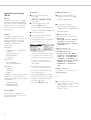
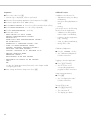
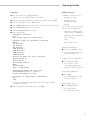
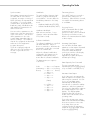
Contents
– Checkweighing
Practical Use ..............................2
– Time-controlled functions
The Factory Series from Sartorius
offers precision scales with
capacities ranging from 1 to 34 kg.
Contents .................................. 2
Application 3:
Safety Precautions ..................... 3
– Totalizing
Operating Design ...................... 3
A broad range of special performance features make the Factory
scales ideal for use as measuring
and test equipment in ISO or GMP
quality management systems.
These features include:
– Formulation
Getting Started ......................... 7
– Statistics
– Self-calibrating and adjustment
function, isoTEST
– Identifier
Configuring the Scale
Setting the Language .............
‘Info’ Display ........................
Entering User Data (Input) .......
Entering Date and Time ......
Application Menu Parameters .
Scale Menu Parameters .........
– reproTEST for quick determination
of the standard deviation to check
the reproducibility of results
– ISO/GMP-compliant recording
capability for printouts
– Password-protected menu lock
Factory scales meet the highest
requirements on the accuracy and
reliability of weighing results
through the following features:
with the following additional
functions:
– Second tare memory
– Manual data storage
in Application 3
– Automatic initialization when you
switch on the scale
– Easy input of alphanumeric
sample, lot and scale IDs
– Flexible, easy-to-use display and
control unit
– Connectivity for control through
an on-line computer
– Efficient filtering-out of interference
from ambient conditions, e.g.
vibrations, drafts, etc.
– Stable and reproducible results
– Excellent readability under any
lighting conditions
– Rugged, durable weighing system
Factory scales save work and
speed up simple routine applications
through:
– Ultrafast response times
– Built-in application programs,
including
Operating the Scale
Basic Weighing Function ........ 33
Calibration/Adjustment .......... 36
ReproTEST ........................... 43
Application Programs
Toggle between
Two Weight Units ............... 44
Counting .......................... 46
Weighing in Percent ........... 49
Animal Weighing ............... 53
Calculation ...................... 57
Checkweighing .................. 60
Timer Functions ................. 65
Totaling ........................... 68
Formulation ...................... 72
Statistics .......................... 76
Additional Functions
(Application Menu) ............... 80
Basic Settings ...................... 85
Additional Functions
(Scale Menu) ....................... 86
Combining Applications ........ 87
Examples of Application
Combinations ...................... 89
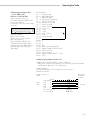
Data Output Functions ............. 94
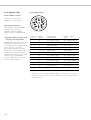
Pin Assignment Chart ....... 106
Cabling Diagram ............. 107
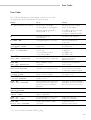
Error Codes .......................... 109
Application 1:
Care and Maintenance ........... 111
– Toggling between two
weight units
Instructions for Recycling ........ 112
– Counting
– Weighing in percent
– Animal weighing
– Calculation
For advice on the use of these
applications, just call or fax:
Telephone: (0) 551 308-500
2
13
13
14
16
18
28
Telefax:
(0) 551 308-595
Overview
General Views
of the Scales ......................
Description of the Keys .........
Specifications .....................
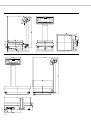
Dimensions (Scale Drawings).
Accessories (Options) ...........
Declaration of Conformity .....
EC Type Approval ..............
Index ................................
Appendix
Entering the User Password
113
115
117
121
123
125
128
130
Operating Design
Safety Precautions
Operating Design
This scale has been constructed
in accordance with the European
Directives as well as international
regulations and standards for
operation of electrical equipment,
electromagnetic compatibility, and
stipulated safety requirements.
Improper use or handling, however,
can result in damage and/or injury.
The scales in the Factory Series
consist of a weighing cell and
a display and control unit. In
addition to the choice of power
supply (via AC adapter or external
rechargeable battery pack), your
scale also has an interface port
for connecting a printer, computer or
universal remote control switch.
Read these operating instructions
thoroughly before using your
scale to prevent damage to the
equipment. Keep these instructions
in a safe place.
The display and control unit and the
weighing cell can be set up
separately. Operation of Factory
scales follows a uniform “philosophy”
which is described in this manual.
Follow the instructions below
to ensure safe and trouble-free
operation of your scale:
Where not expressly indicated
otherwise, the uses described
in this manual apply to verified and
verifiable scale versions
(indicated by the suffix “-0CE” in
the model number), as well as the
standard version.
! Do not use this scale in
a hazardous area/location
! Make sure that the voltage rating
printed on the AC adapter is
identical to your local line voltage
– The only way to switch the power
off completely is to disconnect
the AC adapter
– The scale housing is protected
as listed below against dust
deposits and water splashes –
the housing is not completely
dust-tight, however.
Combining Applications
You can combine the use of various
application programs to meet your
more complicated requirements.
Press the k/[TOGGLE] key to select
the desired application programs.
Keys
Your Factory scale is operated either
through the keys on the display and
control unit or via a connected PC.
Operation through the scale keys is
described in the following.
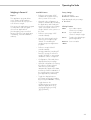
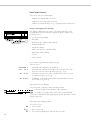
Function Keys (Soft Keys)
The current function of a soft key
is indicated in the bottom line of
the display. (In the example shown
below, oo: Exit the setup menu
App:
Application menu
Info:
Scale data
Menu:
Scale operating menu
Input: User data input)
The function keys are numbered F1
through F6, from right to left.
Labeled Keys
These keys always have the function
indicated, but are not available at
all times. Availability of these
functions depends on the current
operating status and menu settings.
– FC…EDE models:
IP 65 protection
– Scales with a capacity ≤ 12 kg:
IP 54 protection
– Protect the AC adapter from
contact with liquid.
– Connect only Sartorius accessories and options, as these are
optimally designed for use with
your Factory scale.
Do not open the scale housing.
If the seal is broken, this will result in
forfeiture of all claims under the
manufacturer’s warranty.
In case you have any problems with
your scale:
$ contact your local Sartorius
office, dealer or service center
3
Display
There are two fundamentally different
types of display:
– display of measured and
calculated values
– display for menu parameter
settings (setup)
The following symbols may be
displayed here:
0%
Lower load limit
100%
Upper load limit
Bar graph showing 10%
intervals
-
Minimum for checkweighing
=
Target for checkweighing
Display of Measured and
Calculated Values
+
Maximum for checkweighing
This display is divided into
nine sections.
Plus/Minus Sign, Stability Symbol:
A plus or minus sign (F or H) is
shown here for a weight value (e.g.,
a calculated value when weighing
in percent) or the S symbol, indicating
that the verified or verifiable scale has
been zeroed or tared.
Measured Value Line:
Line for Metrological Data:
When used in legal metrology, the
following metrological specifications
are shown here:
Max
Maximum capacity of
the scale
Min
Minimum capacity of the scale;
i.e., the minimum weight
allowed when the scale is used
in legal metrology
df Tare memory used by an
application program (e.g.,
formulation, second tare)
Application Pictograms:
The pictograms displayed here
indicate the application(s) selected.
The pictogram is displayed inversely
when the corresponding application
is active.
For example, the following symbols
may be displayed simultaneously:
H
S
T
Checkweighing is also active
For verified scales that have
a verification scale interval e
which is greater than the scale
interval d, the last digit on the
display is bordered.
Readability: indicates the scale
interval of the scale
When the scale reaches stability,
the weight unit or calculation unit is
displayed here.
4
Calculated value
Note Concerning Verified Scales
Approved for Use as Legal
Measuring Instruments in the EU*:
d
The bar graph indicates how much
of the scale’s capacity is
“used up” by the current load; during
checkweighing, it indicates the
control limits.
a
The counting application
is active
Unit and Stability:
Bar Graph:
These symbols are as follows:
A
Verification scale interval
of the scale
Max
The symbols displayed here indicate
when there is a value in one of the
tare memory modules or when the
value shown is a result of calculation
rather than direct measurement.
This section shows the weighed or
calculated value or alphanumeric input.
e
On standard scales, only
and d are shown.
Tare Memory, Calculated Values:
When the a symbol is
displayed here, the value indicated in the readout cannot be
used in legal metrology.
* including the Signatories of
the Agreement on the European
Economic Area
Print
Data record
Text Line:
Additional information is displayed
here (e.g., operator guidance
prompts, name of the active program, etc.).
Soft Key Labels:
The current functions of the soft keys
are indicated here; during
calibration/adjustment, this line
shows up- and down-arrows (Q
and q) for selecting calibration and
adjustment functions.
Operating Design
Display for Menu Parameter Settings
(Setup)
This display is divided into
three sections.
Footer
Input
The bottom line shows symbols
and/or abbreviations to indicate soft
key functions. The abbreviations
are usually self-explanatory.
Numeric Input
To enter numbers: Press the
1 2 … 0 . keys
To store numbers entered: Press
the corresponding soft key (i.e., the
arrow key under the appropriate
abbreviation in the bottom line
of the display)
Header
The header indicates the function
of the current screen page. In the
Setup program, the current menu
path is shown here.
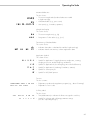
The arrows shown in this line
indicate the following functions:
oo
Example in the Path “Setup/Menu”:
o
Go back to the higher
selection level
O
Show sub-items under the
active item
Q
Move upward in the input/
output window
q
Move downward in the input/
output window
l
Set the selected menu parameter
Input and Output Window
This window contains either detailed
information (e.g., on the active
application) or a pick list. A selected item is displayed inversely. You
can also enter information in an
active field in this window using the
alphanumeric keys.
Example in the Path “Setup/Menu”:
Return to Setup menu
(in the Setup menu: save settings
and exit the Setup program)
To interrupt/cancel numeric input:
Press c
Alphabetic Input
(see also the example given
on page 34)
§ To enter letters or characters:
first press the a key
> Letters are displayed in the
bottom line
§ To select a different letter:
press the corresponding soft key
to change the letter shown (i.e.,
the arrow key under the letter
displayed)
§ To select the letter/character
shown: press the corresponding
soft key
> The selected letter is shown
in the display
$ Enter the next letter/character,
if desired, as above.
§ To store a word: press the corresponding soft key (e.g., S ID)
§ To delete a word: press c
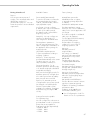
Parameter Settings
The o symbol in this window
indicates the current menu setting.
The parameters for configuration
are in the application menu
and the scale operating menu.
These menus have several levels.
§ To set parameters: press M
and then the appropriate soft key
(e.g., App for the application
menu)
§ To move within a menu level:
use the Q and q soft keys
5
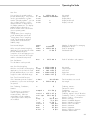
To select a parameter:
Data Output
Error Codes
§ Press Q or q repeatedly until
the desired setting is selected
(displayed inversely)
Your Factory scale is equipped with
an interface port for connecting your
choice of the following:
§ Confirm your selection by pressing
the l soft key
– Printer
If you press a key that has no
function, or which is blocked at a
certain point in an application
program, this error is indicated
as follows:
To change the numeric value
of a parameter:
– Universal remote control switch
§ Press Q or q repeatedly until the
desired setting is selected (displayed inversely)
§ Enter the desired number using the
1 2 … 0 . keys
§ Confirm your selection by pressing
the l soft key
To return to the Setup/Select level:
§ Press the oo soft key
See the chapter entitled “Configuring
the Scale” for a complete
description of all parameters.
To save the parameter settings
and exit the Setup menu: press M
or the oo soft key
To cancel the parameter setting
operation: press e/[ON/OFF]
– Peripheral device (e.g., computer)
Printer
You can configure the print functions
to meet your individual requirements
by selecting the corresponding
menu code.
You can have printouts generated
automatically, or by pressing
p/[PRINT]; dependent on or
independent of the stability or time
parameters; with
or without IDs; and as standard or
ISO/GMP-compliant printouts.
ISO: International Organization
for Standardization
GMP: Good Manufacturing Practice
See the section on “Data Output
Functions” in the chapter entitled
“Operating the Scale” for
a detailed description of data
output options.
Interface Port
Instead of a printer, you may choose
to connect a different peripheral
device, e.g. a computer (PC). With
an on-line PC you can control both
the weighing cell and the display
unit of the Factory scale.
Request messages are sent via the
interface to initiate functions in the
weighing cell and in the display unit.
Some of the functions generate
response messages.
See the chapter entitled “Operating
the Scale” under the section on
“Data Output” for a detailed
description of the interface port.
6
– a double-beep is sounded as
an acoustic signal if the key has
no function
– a double-beep is sounded and a
message is displayed for 2 seconds
in the text line if the key function
is not available at that time
The response to an operator error
is identical in all models of the
Factory series. See the chapter
entitled “Error Codes” for a detailed
description.
Storing Settings
Storing Parameter Settings
The settings configured are stored
in the scale’s non-volatile memory.
The most recent parameter settings
are active when you switch on
the scale.
Saving Parameter Settings
You can assign passwords in order
to block access to:
– the application menu
App
– the balance operating menu
Menu and
– user data input functions
Input
Getting Started
Getting Started
Storage and
Shipping Conditions
Allowable storage temperature:
+5 °C ...+40 °C
+41°F ...+104°F
The packaging has been designed
to ensure that the scale will not be
damaged even if it is dropped from
a height of 80 centimeters (about
31 inches).
Unpacking the Scale
Warranty
Installation Instructions
Do not miss out on the benefits of
our full warranty. Complete the
warranty registration card, indicating
the date of installation, and return
the card to your Sartorius office
or dealer.
The Sartorius Factory scales
are designed to provide reliable
weighing results under normal
ambient conditions in the laboratory
and in industry. When choosing a
location to set up your scale,
observe the following so that you will
be able to work with added speed
and accuracy:
Equipment Supplied
The equipment supplied includes the
components listed below:
– Set up the scale on a stable,
even surface
FC06BBE-S
– Avoid placing the scale in close
proximity to a heater or otherwise
exposing the scale to heat or
direct sunlight
● After unpacking the scale, check
it immediately for any
visible damage as a result of
rough handling during shipment.
– Complete scale with data
interface port
$ If this is the case, proceed
as directed in the chapter entitled
“Care and Maintenance,”
under the section on “Safety
Inspection.”
– Support arm
It is a good idea to save the box
and all parts of the packaging
until you have successfully installed
your scale. Only the original
packaging provides the best
protection for shipment. Before
packing your scale, unplug all
connected cables to prevent
damage. The strip of cardboard
between the display and control
unit and the weighing platform
is important for protecting the equipment during shipment!
Important Note Concerning
Verified Scales Approved for Use
as Legal Measuring Instruments
in the EU*:
Provided that an official seal is
required for the verified scale,
a control seal is affixed to the
scale. This seal will be
irreparably damaged if you
attempt remove it. If the seal is
broken, the validity of the
verification will become void and
you must have your scale
re-verified.
* including the Signatories of
the Agreement on the European
Economic Area
– AC adapter
– Dust cover
– Shield disk
– Pan support
– Weighing pan
– Glass draft shield cylinder
– Draft shield cover
FC6CCE-H, FC2CCE-S
– Complete scale with data
interface port
– AC adapter
– Support arm
– Dust cover
– Pan draft shield
– Weighing pan
FC12CCE-S, FC6CCE-S
– Complete scale with data
interface port
– AC adapter
– Support arm
– Dust cover
– Weighing pan
FC34EDE-P, FC16EDE-S, FC12EDE-P,
FC64EDE-S
– Complete scale with data
interface port
– AC adapter
– Support arm
– Weighing pan
– Protect the scale from drafts that
come from open windows
or doors
– Avoid exposing the scale to
extreme vibrations during weighing
– Protect the scale from aggressive
chemical vapors
– Do not expose the scale to
extreme moisture over long periods
– Level the scale at the place
of installation
Conditioning the Scale
Moisture in the air can condense
on the surfaces of a cold scale
whenever it is brought into a
substantially warmer place. If you
transfer the scale to a warmer area,
make sure to condition it for about
2 hours at room temperature, leaving
it unplugged from AC power.
Afterwards, if you keep the scale
connected to AC power, the
continuous positive difference
in temperature between the inside
of the scale and the outside
will practically rule out the effects
of moisture condensation.
Monitoring Ambient Conditions
When Using Verified Scales
Approved for Use as Legal
Measuring Instruments in the EU*:
$ For scales of accuracy class
k, a thermometer and barometer are recommended for
monitoring ambient conditions.
7
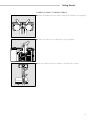
Setting up the Scale and the Column
FC06BBE-S, FC6CCE-H, FC2CCE-S, FC12CCE-S, FC6CCE-S
§ Fasten the display unit to the retainer using the two Phillips screws supplied
§ Fasten the column to the scale using the screws supplied
§ Press the cable into the two clamps on the back of the column and then
press it into the channel (raceway) on the bottom of the scale
8
Getting Started
FC34EDE-P, FC16EDE-S, FC12EDE-P, FC64EDE-S
§ Fasten the display unit to the retainer using the two Phillips screws supplied
§ Fasten the column to the scale using the screws supplied
§ Press the cable into the three clamps on the back of the column
9
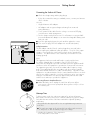
Preparing the Scale
FC06BBE-S
§ Place the components listed below on the scale in the order given:
– Dust cover
– Protective disk; turn counter-clockwise until it stops and is secure
– Pan support
– Weighing pan
– Glass draft shield cylinder
– Draft shield cover
FC6CCE-H, FC2CCE-S, FC12CCE-S, FC6CCE-S
§ Place the components listed below on the scale in the order given:
– Dust cover (remove the protective foil from the adhesive strip)
– Pan draft shield (depending on the scale model)
– Weighing pan
FC34EDE-P, FC16EDE-S, FC12EDE-P, FC64EDE-S
§ Place the weighing pan on the scale
10
Getting Started
Connecting the Scale to AC Power
● Check the voltage rating and the plug design
– If they do not match the rating or standard you use, contact your Sartorius
office or dealer
Use only
– Original Sartorius AC adapters
– AC adapters with a registered approval rating from a national
testing laboratory
$ To use a main feeder cable from the ceiling or to mount a CEE plug,
you will have to make arrangements
$ See the chapter entitled “Accessories” for information on using an IP65protected industrial AC adapter or an external rechargeable battery pack
with your scale
● Insert the right-angle plug into the jack and then tighten the screws
● Then insert the plug of the AC adapter into a wall outlet (mains)
Safety Precautions
The AC adapter rated to Class 2 can be plugged into any wall outlet
without requiring any additional safety precautions. The pole of the output
voltage is connected to the scale housing, which can be grounded for
operation. The data interface is also electrically connected to the scale
housing (ground).
Note:
This equipment has been tested and found to comply with the limits
for a Class A digital device, pursuant to Part 15 of the FCC rules.
These limits are designed to provide reasonable protection against harmful
interference when the equipment is operated in a commercial environment.
This equipment generates, uses and can radiate radio frequency energy
and, if not installed and used in accordance with the instruction manual,
may cause harmful interference to radio communications. Operation of this
equipment in a residential area is likely to cause harmful interference in which
case the user will be required to correct the interference at his own expense.
Changes or modifications not expressly approved by Sartorius AG could
void the user’s authority to operate the equipment.
Connecting Electronic Peripheral Devices
● Make absolutely sure to unplug the scale from AC power before
you connect or disconnect a peripheral device (printer or PC) to or from
the interface port.
Warmup Time
To deliver exact results, the scale must warm up for at least 30 minutes
after initial connection to AC power or after a relatively long power outage.
Only after this time will the scale have reached the required operating
temperature.
Using Verified Scales Approved for Use as Legal Measuring Instruments
in the EU*:
● The scale must warm up for at least 24 hours after initial connection
to AC power or after a relatively long power outage.
* including the Signatories of the Agreement
* on the European Economic Area
11
Fastening an Antitheft Locking Device
$ Models FC06BBE-S, FC6CCE-H, FC2CCE-S, FC12CCE-S,
and FC6CCE-S only.
To fasten an antitheft locking device, use the lug located on the rear panel
of the scale.
● Secure the scale at the place of installation, e.g., with a chain
or a lock.
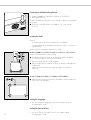
Leveling the Scale
Purpose:
– To compensate for unevenness at the place of installation
– To achieve perfectly horizontal positioning of the scale for consistent
reproducibility
Always level the scale again any time it is moved.
Models FC06BBE-S, FC6CCE-H, FC2CCE-S, FC12CCE-S, and FC6CCE-S:
Only the 2 front feet are used for leveling.
● Turn the 2 front feet as shown in the illustration until the air bubble
is centered within the circle of the level indicator
> Several leveling steps are usually required.
● When weighing heavy samples (or when the YDH 01 LP display arm
is attached):
Retract the 2 rear feet until they touch the surface on which the
scale rests
Models FC34EDE-P, FC16EDE-S, FC12EDE-P, and FC64EDE-S:
● Adjust the three leveling feet until the air bubble is centered within the
circle of the level indicator
Setting the Language
> See the “Setting the Language” section in the chapter entitled
“Configuring the Scale”
Setting the Date and Time
12
> See the “Entering User Data” section in the chapter entitled
“Configuring the Scale”
Configuring the Scale
Configuring the Scale
Setting the Language
‘Info’ Display (Info)
Purpose
Features
Purpose
You can configure your Factory scale
to meet individual requirements by
entering user data and setting
parameters in the Setup program.
You can choose from 5 languages
for the information display:
To have information about the
equipment displayed
The Setup menu is divided into three
functions: the application menu,
scale data and user data input.
You can also configure the display
to show scale-specific information
(serial no., etc.).
1 German
2 English (factory setting)
Display scale-specific information
3 English with US date/time format
§ Select the Setup program:
Press M
4 French
5 Italian
> “SETUP SELECTION” is displayed.
6 Spanish
Selecting the Language
§ Enter the corresponding number
§ Press M
§ Exit the Setup menu:
Press M
§ Select information:
Press the Info soft key
> Scale-specific information
is displayed (see also the “Data
Output Functions” section in
the chapter entitled “Operating
the Scale”):
$ Print information:
Press p/[PRINT]
> Example of a printout
Mod.
FC6CCE-H
Ser. no.
70406913
Ver. no.
01-35-02
(Software version, display and
control unit)
Ver. no.
00-20-06
(Software version, weighing
platform)
§ Return to
SETUP SELECTION:
Press the « soft key
§ Exit the Setup menu:
Press M
> Scale returns to previous status
13
Entering User Data
(Input)
Factory Settings
Enter/Change Password
Password: No designation
Purpose
If no password has been assigned,
anyone can access the Setup:Input,
Setup:App and Setup:Menu functions
without entering a password.
§ Select the Setup program:
Press M
To display, input or change user
data. You can block access to these
data by assigning a password.
Features
You can display, input or change the
following user data:
If you assign a password and
then forget what the word is, you
can use the General Password (see
Appendix) to access these menus.
> SETUP SELECTION
is displayed
§ Select Information:
Press the Input soft key
If you have already assigned
a password:
> The password prompt is displayed
– Workstation number for the scale:
ID (scale ID; max. 20 characters)*
Preparation
– Weighing series number,
to designate a series or lot: L ID
(Lot ID; max. 20 characters)*
§ Select the Setup program:
Press M
$ Enter the password
> “SETUP SELECTION” is displayed.
$ Press l to confirm the password
– Weight set number for
calibration/adjustment: W ID
(weight ID; max.14 characters)*
– Exact calibration weight value
for calibration/adjustment of the
scale, e.g. for adjustment
according to a DKD certificate
(see the section on “Calibration/
Adjustment” in the chapter
entitled “Operating the Scale”)
– Time (hh.mm.ss; hh can be
entered without a preceding zero)
– Date (dd.mm.yy, or mm.dd.yy
when you select “English with US
date/time” as the language)
– Contrast/angle of the display
(enter a number from 0 to 7;
factory setting: 3)
– Password for access to the Setup
menu, which contains the Input,
Application and Scale Menu
functions (max. 8 characters)*
*:
If the last character of user
data is a letter: conclude input
by pressing a
To delete user data: Enter a
. (decimal point) or a space
and confirm
To delete the last character
entered: Press c (see the
section on “Basic Settings” in
the chapter entitled “Operating
the Scale”)
14
Display existing user data
> User data is displayed:
§ Write down the password here
for easy reference:
§ Select User Data:
Press the Input soft key
If you have already assigned
a password:
> The password prompt is displayed
$ If access is blocked by a password:
enter the password using the
alphanumeric keys
$ If the last character of the
password is a letter: conclude
input by pressing a
§ Press l to confirm the password
> User data is displayed:
Password = .............................
If you assign a password and then
forget what the word is:
$ Enter the User Password
(see Appendix)
$ Press l to confirm the password
> User data is displayed:
§ Select the password-setting
function:
Press the q soft key repeatedly
until
> Password: and any
existing password are displayed
§ New password: Enter the letters/
numbers for the new password
(max. 8 characters)*
If “none” is displayed as the
password, this means no
password has been assigned
To delete the password:
Enter . and confirm
§ To confirm:
press the l soft key
§ Exit the Setup menu:
Press M
> Restart the application
Configuring the Scale
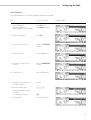
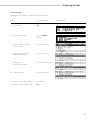
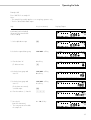
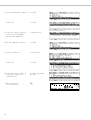
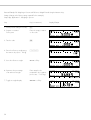
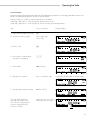
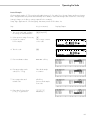
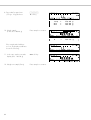
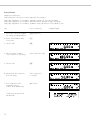
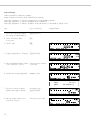
Practical Example 1:
Enter “Workstation 234” as scale ID; display and print other user data
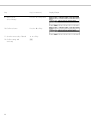
Step
Key (or instruction)
1. Select Setup:Input
Display workstation ID
(in this example: no ID assigned)
Press M, then
the Input soft key
2. Before entering letters –
Press a
3. Select the letters group
Press the STUVWX
soft key
4. Set the letter “M”
Press the W soft key
5. Enter the next letters of the –
scale ID
Press the MNOPQR
soft key
6. Set the letter “e”
Press the O soft key
7. Repeat steps 5 and 6 to enter
the required letters
Soft key ...
8. Enter the numbers 234
234
If the last character entered
is a letter:
Conclude input of letters
9. Store scale ID
Display/Output
a
Press the l soft key
15
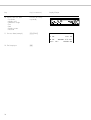
Step
Key (or instruction)
10. Display other user data
– Lot number
– Weight set ID
– Calibration weight
– Time
– Date
– Display contrast
– Password
Press the q soft key
repeatedly
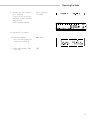
11. Print user data (example)
p/[PRINT]
Display/Output
WORKSTATION 234
L ID
LOT 23
W ID
WEIGHT 23"F1"
Cal. Wt.
12. Exit Setup:Input
16
M
+2000.00
Configuring the Scale
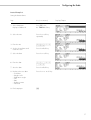
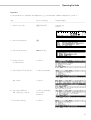
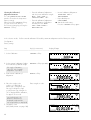
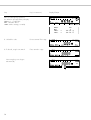
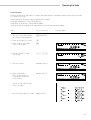
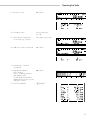
Practical Example 2:
Setting the date and time
Step
Key (or instruction)
1. Select Setup:Input
Display workstation ID
Press M, then
the Input soft key
2. Select the time
Press the q soft key
repeatedly
3. Enter the time
11.12
.30
4. Set the selected time and
restart the clock
Press the l soft key
5. Select the date
Press the q soft key
6. Enter the date
13.03
.97
7. Store the date
Press the l soft key
8. Display other user data
– Lot number
– Weight set ID
– Calibration weight
– Time
– Date
– Display contrast
– Password
Press the q or Q soft key
9. Exit Setup:Input
M
Display/Output
17
Application Menu Settings
(App)
Purpose
To configure the scale, i.e., adapt
the scale to individual requirements
by selecting from a list of parameter
options in a menu. You can block
access to this menu by assigning
a password.
Features
The simple weighing function is
available at all times. You can select
one from each of the following
application groups. This means
a number of combinations
are possible.
Preparation
Additional Functions
§ Select the Setup program:
Press M
§ Save settings and exit the
application menu: Press M
> SETUP SELECTION
is displayed
> Restart the application
§ Select the application menu:
Press the App soft key
If a password has been assigned:
> The password prompt is displayed
Toggle between 2 weight units
Counting
Weighing in percent
Animal weighing
Calculation
Application 2
– Checkweighing
– Time-controlled functions
Application 3
– Totalizing
– Formulation
– Statistics
In addition, you can assign 2 extra
functions to each of the soft keys,
in some cases (depends on the Setup
configuration):
– 2nd tare memory
– Identification code
– Manual totalizing
Factory Settings
The factory-set configurations
are marked with an “o “ in the list
starting on page 21.
18
– When the application menu
is displayed: Press p/[PRINT]
> Printout (Example)
§ Enter the password
§ Confirm the password entered:
Press the l soft key
> The application menu is displayed
(1st menu level):
Application 1
–
–
–
–
–
§ Print parameter settings:
$ Select the next group:
Press the q soft key (arrow down)
$ To select the previous item in the
group: press Q soft key (arrow up)
$ To select one item lower in
the group: Press the O soft key
(arrow right)
$ To return to the next level up:
Press the o soft key (arrow left)
Application 1
-------------------Counting
Average piece weigh
Display accuracy
Average piece weigh
Automatic
Application 2
-------------------Checkweighing
Activation of port
Within checkweighi
Type of checkweighi
Target, minimum, m
Weight display mode
Absolute value
Automatic printout
No
$ Confirm the selected menu item:
Press the l soft key
Application 2
-------------------Totalizing
$ Move the highlight bar to the first
menu item on the list: Press c
etc.
$ Toggle to the Setup:Scale menu
(see also page 28):
Press the Menu soft key
§ To reset parameters to the
factory settings: see the following
chapter, entitled “Scale
Operating Menu,” and set menu
code 9 1 1
Configuring the Scale
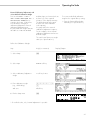
Practical Example
Make every printout a ISO/GMP-compliant printout
Step
Key (or instruction)
1. Select Setup
M
2. Select the application menu
Press the App soft key
3. Menu level 1:
Select Basic Settings
Press the q soft key
repeatedly
4. Confirm selection
Press the O soft key
5. Menu level 2:
Select Printout Configuration
Press the q soft key twice
6. Confirm selection and go
to menu level 3
Press the O soft key
7. Menu level 3:
Select “ISO/GLP/GMP Printout”
Press the q soft key twice
8. Confirm selection and go
to menu level 4
Press the O soft key
Display/Output
19
Step
Key (or instruction)
9. Menu level 4:
Select “Always”
Press the q soft key twice
10.Confirm selection
Press the l soft key
11. Set other menu codes, if desired
q Q soft key
12. Confirm setting and
exit Setup
M
20
Display/Output
Configuring the Scale
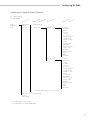
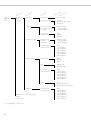
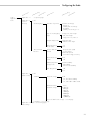
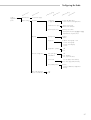
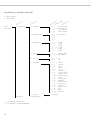
Setup Parameters, “Application Menu” (Overview)
o Factory setting
√ User setting
M
Setup –
Application
menu
enu
leve
l1
Application 1
(Basic
settings)
F
or y
act
sett
ing
M
enu
leve
l2
M
enu
leve
l3
F
or y
act
sett
ing
M
enu
leve
l4
o Off (weighing)
Toggle units
Weight unit 1
o Grams**
Kilograms
Carats*
Pounds*
Ounces*
Troy ounces*
Hong Kong taels*
Singapore taels
Taiwanese taels*
Grains
Pennyweights*
Milligrams*
Parts per pound*
Chinese taels*
Mommes*
Austrian carats*
Tola*
Baht*
Mesghal*
Weight unit 2
o Grams**
Kilograms
Carats*
Pounds*
Ounces*
Troy ounces*
Hong Kong taels*
Singapore taels
Taiwanese taels*
Grains
Pennyweights*
Milligrams*
Parts per pound*
Chinese taels*
Mommes*
Austrian carats*
Tola*
Baht*
Mesghal*
Counting through Calculation – see next page
Application 2 – see following pages
through
Basic Settings
** = not applicable to verified scales
** = not applicable to model FC64EDE-S0CE
21
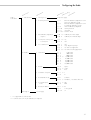
M
Setup –
Application
menu
enu
leve
l1
Application 1
(Basic
settings)
M
enu
leve
l2
Toggle units
Counting
Weighing in percent
Animal weighing
Calculation
Application 2 – see following pages
through
Basic Settings
* = not applicable to verified scales
22
M
enu
leve
l3
F
or y
act
sett
ing
M
enu
leve
l4
Weight unit 2
see previous page
Display accuracy 2
o All digits
Fewer for weight change
Last digit off
Accuracy – average
piece weight calculation
(resolution)
o Display accuracy
+ 1 decimal place
+ 2 decimal places
Average piece
weight updating
Off
Manual
o Automatic
Weight storage
accuracy
(resolution)
o Display accuracy
+ 1 decimal place
+ 2 decimal places
Decimal places for
readout in percent
None
1 decimal
o 2 decimal
3 decimal
4 decimal
5 decimal
6 decimal
Animal activity
Calm
o Normal
Active
Start
Manual mode
o Automatic mode
Decimal places in
calculated result
None
1 decimal
o 2 decimal
3 decimal
4 decimal
5 decimal
6 decimal
Printout
None
o Average weight only
Average and calculated value
Decimal places in
calculated result
None
1 decimal
o 2 decimal
3 decimal
4 decimal
5 decimal
6 decimal
place
places
places
places
places
places
place
places
places
places
places
places
place
places
places
places
places
places
Configuring the Scale
M
Setup –
Application
menu
enu
leve
l1
Application 1 –
Application 2
(Control
functions)
F
or y
act
sett
ing
M
enu
l2
M
enu
leve
l3
F
or y
act
sett
ing
M
enu
leve
l4
see previous page
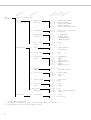
o Off
Checkweighing
Time-controlled
functions
Application 3
(Data records)
leve
Activation of port lines
o Within check range
Always on
Stability and check range
At stability
Stability + check range -> on
Type of checkweighing
input
o Target, min, max weight
Min, max weight
Target, min in %, max in %
Weight display mode
o Absolute value
Difference from target
Automatic printout
of OK values
Yes
o No
Function after time
interval
Beep (acoustic signal)
Lock-in readout
o Automatic printout
Store value in App. 3 memory
Automatic function
restart
o On
Off
Stability-dependent
storage mode
o Without stability
After stability
After increased stability
Tare after printout
Off
o On
Automatic storage
o Off
On, first value at stability
On, last value at stability
On, value 70% –130% at stab.
Minimum load for
automatic storage
None
o 10 digits
20 digits
50 digits
100 digits
200 digits
500 digits
1,000 digits
o Off
Totalizing
Source of data for auto storage – see next page
Formulation – see next page
Application 3 through – see following pages
Basic Settings
23
M
Setup –
Application
menu
enu
leve
l1
Application 3
(Data records)
M
enu
leve
l2
Totalizing
Formulation
Statistics
Application 3 – see following pages
through
Basic Settings
24
M
enu
leve
l3
Minimum load
F
or y
act
sett
ing
M
enu
leve
l4
see previous page
Source of data for
automatic storage
o Application 1
Application 2
Evaluated values
o Net
Calculated
Net + calculated
Evaluation mode,
MR function
o Intermediate evaluation, print
Final evaluation, print
Intermediate eval., display+print
Final evaluation, display+print
Tare after M+/M–
o Off
On
Printout of individual
components
No
o Yes
Automatic storage
Off
o On, first value at stability
Minimum load for
automatic storage
None
o 10 digits
20 digits
50 digits
100 digits
200 digits
500 digits
1,000 digits
Source of data for
automatic storage
o Application 1
Application 2
Evaluated values
o Net
Calculated
Net + calculated
Evaluation mode,
MR function
o Intermediate evaluation, print
Final evaluation, print
Printout of individual
components
No
o Yes
see next page
Configuring the Scale
M
Setup –
Application
menu
enu
leve
l1
Application 3
(Data records)
M
enu
leve
l2
M
enu
leve
l3
F
or y
act
sett
ing
M
enu
leve
l4
Formulation
see previous page
Statistics
Automatic storage
o Off
On, first value at stability
On, last value at stability
On, value 70% – 130% at stab.
Minimum load for
automatic storage
None
o 10 digits
20 digits
50 digits
100 digits
200 digits
500 digits
1,000 digits
Source of data for
automatic storage
o Application 1
Application 2
Evaluated values
o Net
Calculated
Net + calculated
Evaluation mode,
MR function
o Intermediate evaluation, print
Final evaluation, print
Intermediate eval., display+print
Final evaluation, display+print
Tare after M+/M–
o Off
On
Printout of individual
components
No
o Yes
Extra Functions – see following pages
and
Basic Settings
25
M
Setup –
Application
menu
enu
leve
l1
Application 3
Extra function
F4 key
F
or y
act
sett
ing
M
enu
leve
l2
M
enu
leve
l3
F
or y
act
sett
ing
M
enu
leve
l4
see previous page
o Off
2nd tare memory
Automatic printout
Last net value
Tare/preset tare
o Off
Identification codes
Printout
Automatic, if configured
Once when p pressed, if conf.
o Each time p is pressed
Once for M+ function (App. 3)
Manual storage in App. 3
memory (M+) (totalizing,
formulation, statistics)
Extra function
F5 key
o Off
2nd tare memory
Automatic printout
Last net value
Tare/preset tare
o Off
Identification codes
Printout
Automatic, if configured
Once when p pressed, if conf.
o Each time p is pressed
Once for M+ function (App. 3)
Manual storage in App. 3
memory (M+) (totalizing,
formulation, statistics)
Basic settings – see following page
26
Configuring the Scale
M
Setup –
Application
menu
'
enu
leve
l1
M
enu
leve
l2
Extra function
see previous page
Basic settings
Keypad
Display
Printout configuration
Auto start app when
power is switched on
F
or y
act
sett
ing
M
enu
leve
l3
F
or y
act
sett
ing
M
enu
leve
l4
CF function
in application
o Clear all applications
Clear only selected applications
CF function for input
Delete entire input
o Delete last character
Block key functions
o All keys accessible
All keys blocked except M and e
Alphanumeric keys blocked
Background
o White
Black
Digit size
o 10
13
13
13
Application symbols
Off
o On
Auto print upon
initialization
Off
o On, all value
On, only main values
Line format
For raw data (16 characters)
o For other apps/GLP (22 char.)
ISO/GMP printout
o None
Only for calibration/adjustment
Always
mm + bar graph + text
mm + bar graph
mm + text display
mm
On
o Off
27
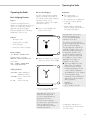
Scale Operating Menu
(Menu)
Purpose
To configure the scale, i.e., adapt
the scale to individual requirements
by selecting from a list
of parameter options in a menu.
You can block access to this menu
by assigning a password.
Features
The parameters are grouped together
as follows (menu level 1):
1 Scale functions
Preparation
Additional Functions
§ Select the Setup program:
Press M
§ Save settings and exit the
application menu: Press M
> SETUP SELECTION
is displayed
> Restart the application
§ Select the scale menu:
Press the Menu soft key
If a password has been assigned:
> The password prompt is displayed
§ Enter the password
§ Confirm the password entered:
Press the l soft key
> The scale menu is displayed
(1st menu level):
5 Interface
6 Print in weighing mode
8 Extra functions
9 Reset menu
Factory Settings
The factory-set configurations are
marked with an “o” in the list starting
on page 29.
$ Select the next group:
Press the q soft key (arrow down)
$ To select the previous item in the
group: press Q soft key (arrow up)
$ To select one item lower in
the group: Press the O soft key
(arrow right)
$ To return to the next level up:
Press the o soft key (arrow left)
$ Confirm the selected menu item:
Press the l soft key
$ Toggle to the Setup:Application
menu (see also page 17):
Press the App soft key
28
§ Print parameter settings:
– When the 3rd menu level
is displayed: Press p/[PRINT]
> Printout (Example)
6 1 Manual/auto pr
2 Manual with s
– When the 3nd menu level
is displayed: Press p/[PRINT]
> Printout (Example)
6 Print in weighing
--------------------6 1 Manual/auto pr
2 Manual with s
6 2 Stop auto prin
2 Not possible
6 3 Time-dependent
1 1 display upd
6 4 Print on reque
1 Off
– When the 1st menu level
is displayed: Press p/[PRINT]
> All current parameters settings
are printed
Configuring the Scale
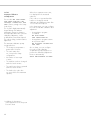
Practical Example
Adapt the scale to ambient conditions of “extreme vibration.”
Step
Key (or instruction)
1. Select Setup
M
2. Select the scale menu
Press the Menu
soft key
3. Confirm selection of scale
function menu
Press the O soft key
4. Confirm selection of filter
adaptation menu item
Press the O soft key
5. Menu level 3:
Select the desired item
Press the q soft key twice
6. Confirm selection
Press the l soft key
7. Set other menu codes, if desired
q Q soft keys
8. Confirm setting and exit Setup
M
Display/Output
29
Setup Parameters, “Scale Menu” (Overview)
o Factory setting
√ User setting
M
Setup –
Scale Menu
enu
leve
l1
1 Scale functions
leve
l2
M
1
1
1
1
1
1
1
1
1
2
3
4
1 2 Application filter
1
1
1
1
2
2
2
2
1
2
3
4
1 3 Stability range
1
1
1
1
1
1
3
3
3
3
3
3
1
2
3
4
5
6
M
1 1 Adapt filter
1 5 Taring*
5 through 9
** = not applicable to verified scales
** = not applicable to model FC64EDE-S0CE
30
leve
enu
enu
1 5 1
1 5 2
ng
l4
l3
etti
leve
ry s
u
o
t
n
Fac
Me
o
o
o
o
o
1 6 Auto zero
1 6 1
1 6 2
1 7 Weight unit 1
1
1
1
1
1
1
1
1
1
1
1
1
1
1
1
1
1
1
1
1 9 through 1 15
see following pages
see next page
7
7
7
7
7
7
7
7
7
7
7
7
7
7
7
7
7
7
7
2 o
3
4
5
6
7
8
9
10
11
12
13
14
15
16
17
18
19
20
Minimum vibration
Normal vibration
Strong vibration
Extreme vibration
Final readout
1/ digit
4
1/ digit
2
1 digit
2 digits
4 digits
8 digits
Without stability
After stability
On
Off
Grams**
Kilograms
Carats*
Pounds*
Ounces*
Troy ounces*
Hong Kong taels*
Singapore taels
Taiwanese taels*
Grains*
Pennyweights*
Milligrams*
Parts per pound*
Chinese taels*
Mommes*
Austrian carats*
Tola*
Baht*
Mesghal*
Configuring the Scale
M
Setup –
Scale Menu
enu
leve
l1
1 Scale functions
M
enu
leve
l2
M
enu
leve
ng
l4
l3
etti
leve
ry s
u
o
t
n
Me
Fac
1 1 through 1 8
see previous page
1 9 CAL key function
1 9 1
1 9 3
1
1
1
1
5 Interface
4
10
11
12 o
1 10 Calibration/adjustment
sequence
1 10 1 o
1 10 2
Calibrate, then auto adjust
Calibrate, then manual adjust
1 13 Tare/zero when power
is switched on
1 13 1 o
1 13 2
On
Off
1 15 isoCAL function
1
1
1
1
15
15
15
15
Off
Only adjustment prompt
On and reset application
On without resetting application
5 1 Baud rate
5
5
5
5
5
5
5
5
1
1
1
1
1
1
1
1
5 2 Parity
6 through 9
9
9
9
9
External calibration/adjustment** with
factory-set calibration weight
External calibration/adjustment** with
user-defined calibration weight
Internal calibration/adjustment
CAL key blocked
reproTEST
Selection mode
1
2
3
5 o
1
2
3
4
5
6
7
8
5 2 2
5 2 3
5 2 4
5 3 Number of stop bits
5 3 1
5 3 2
5 4 Handshake mode
5 4 1
5 4 3
o
o
o
o
o
5 5 Communication
mode
5 5 1
5 5 2
5 6 Network address
5 6 1 o
5 6 x
5 6 32
150
300
600
1,200
2,400
4,800
9,600
19,200
baud
baud
baud
baud
baud
baud
baud
baud
Space
Odd
Even
1
2
Software
Hardware, 1 character after CTS
SBI
XBPI
0
1 through 30
31
see next page
* = not applicable to verified scales
** = verified scales can only be calibrated, not adjusted
31
M
Setup –
Scale Menu
enu
leve
l1
M
enu
leve
l2
leve
M
enu
Manual/auto
print mode
6
6
6
6
6
1
1
1
1
1
Stop auto print
6 2 1
6 2 2
ng
l4
l3
etti
leve
ry s
u
o
t
n
Fac
Me
1 and 5 – see previous page
6 Print in
weighing mode
6 1
6 2
8 Extra functions
o
o
Manual without stability
Manual with stability
Automatic without stability
Automatic at stability
Automatic after weight change**
Press print key or enter <ESC P>
Not possible
6 3
Time-dependent
auto print
6
6
6
6
1
2
4
7
o
1 display update
2 display updates
10 display updates*
100 display updates*
6 4
Print on request,
then tare
6 4 1
6 4 2
o
Off
On
8 1
Menu
8 1 1
8 1 2
o
Change parameters
Read parameters
8 2
Acoustic signal
8 2 1
8 2 2
o
On
Off
8 4
External switch
function
8
8
8
8
8
8
1
2
3
4
5
6
o
p/[PRINT] key
t key
Calibrate/adjust
N F1 function key
c key
N F2 function key
8 5
Display
backlighting
8 5 1
8 5 3
o
On
Auto off after 4 minutes
8 6
Power-on mode
8 6 1
8 6 2
8 6 4
o
Off/on/standby
Off/on***
Auto on
8 7
Automatic shutoff
8 7 1
8 7 2
o
After 4 minutes
Off
8 8 1
8 8 2
o
Input
Output
8 8
9 Reset menu
1
2
4
5
6
Control port
function
3
3
3
3
4
4
4
4
4
4
8 10 ISO/GLP/
GMP printout
8 10 1 o
8 10 2
8 10 3
Off
Only for calibration/adjustment
Always on
9 1
9 1 1
9 1 2
Restore
Do not restore
Factory settings
o
*
= not applicable to verified scales
** = auto print when load change is > 10 d; no printout until residual difference in load value is < 5 d
*** = not applicable to scales with a weighing capacity of ≥ 16 kg
32
Operating the Scale
Operating the Scale
Basic Weighing Function
Purpose
The basic weighing function is
always accessible and can be used
alone or in combination with an
application program (Toggle
between Weight Units, Counting,
Weighing in Percent, etc.).
Below-Scale Weighing
Preparation
A port for a below-scale weighing
hanger is located on the bottom of
the scale (for scales with a weighing
capacity ≥ 12 kg, see the
“Accessories” section in the chapter
entitled “Overview”).
§ Turn on the scale:
Press e/[ON/OFF]
§ Open cover plate (1) on the
bottom of the scale
– Taring the scale
– Assigning IDs to weights
– Printing weights
1
Factory Settings
Tare: After
stability
Manual/auto print mode:
Manual with stability
Line format:
§ Attach the sample (e.g., using a
suspension wire) to the hook (2).
For other apps/GLP
(22 characters)
Initiate calibration/
adjustment routine
isoCAL
Press to start isoCAL
routine
S ID
Store ID entered
> The S symbol is displayed
when a verified scale is tared or
zeroed (± 0.25 digits).
This scale is not allowed to be
used for weighing goods intended
for direct sale to the public.
The type-approval certificate for
verification applies only to nonautomatic weighing instruments;
for automatic operation with
or without auxiliary measuring
devices, you must comply with
the regulations of your country
applicable to the place of
installation of your scale.
§ You must calibrate the scale
at the place of installation
before using it as a legal
measuring instrument (see the
section entitled “Calibration
and Adjustment” in this chapter)
Soft Key Functions
isoTST
$ To tare the scale, if desired:
Press t
Important Note Concerning
Verified Scales Approved
for Use as Legal Measuring
Instruments in the EU*:
Features
– Printing ID codes for weights
> The Sartorius logo is displayed
2
$ The temperature range
indicated on the verification ID
label must not be exceeded
during operation
Example:
MA BF 200
K +10 °C./.+30 °C
$ If necessary, install a shield for
protection against drafts
Important Note Concerning
Verified Scales Approved
for Use as Legal Measuring
Instruments in the EU*:
The below-scale weighing
port may not be opened or used
when an approved scale
is being operated as a legal
measuring instrument.
* including the Signatories of
the Agreement on the European
Economic Area
33
ID for weight value (if desired):
§ Select the parameters “Line
format” and “For other app./
GLP” from the Setup menu:
Press M
§ Select mode:
Press the App softkey
§ Set parameters:
See the chapter entitled
“Configuring the Scale”
§ Exit the Setup program:
Press M
Additional Functions
you can also access the following
functions from the weighing
application:
– calibration (not during alphanumeric input)
– setup
– turning off the scale
Calibration
§ Press
isoTST
> See the section on
“Calibration/Adjustment” for
further instructions.
In addition to the functions:
– alphanumeric input
– taring (not during
alphanumeric input)
– printing
Setup
§ Press M
> See the chapter entitled
“Configuring the Scale” for further
instructions.
Turning Off the Scale
§ Press e/[ON/OFF]
> The scale shuts off
> The display goes blank
Practical Examples
Example W1: Simple weighing
Step
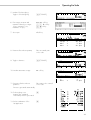
Key (or instruction)
1. If necessary, tare the scale
(S symbol: scale is tared,
– verified scales only)
t
2. Enter sample ID
see Example W2
3. Determine sample weight
(Example)
Place load on scale
4. Print weight value
p/[PRINT]
34
Display/Output
S-ID
N
+
ABC123
2231.56 g
Operating the Scale
Example W2
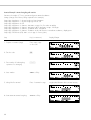
Enter “ABC123” as sample ID
Note:
– The sample ID generally applies to one weighing operation only
– The ID is deleted after data output
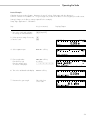
Step
Key (or instruction)
Display/Output
Initial status (scale unloaded)
(ID can also be entered while
scale is loaded)
1. Select alphabetic input
a
2. Select the required letter group
ABCDEF soft key
3. Enter the letter “A”
A soft key
(To delete a letter:
c)
4. Select the letter group and
enter “B”
ABCDEF soft key
B soft key
5. Select the letter group and
enter “C”
ABCDEF soft key
C soft key
(If only letters are entered,
conclude input:
a)
6. Enter the numbers 1, 2 and 3
123
7. Store the ID
(max. 20 characters)
S ID soft key
– The next printout will include
the sample ID
35
Calibration/Adjustment
“isoTEST”
Purpose
Calibration is the determination
of the difference between the weight
readout and the true weight (mass)
of a sample. Calibration does
not entail making any changes within
the scale.
Adjustment is the correction of this
difference between the measured
value displayed and the true
weight (mass) of the sample, or the
reduction of the difference to an
allowable level within maximum
permissible error limits.
Using Verified Scales as Legal
Measuring Instruments in the EU*:
Before using your scale as
a legal measuring instrument, you
must perform “internal calibration”
at the place of installation after
the warmup period.
Available Features
You can start the isoTEST function at
the press of a key to check a scale
used as measuring, inspection and
test equipment at any time. The scale
is calibrated and any deviation is
displayed. Press the Start soft key
to start adjustment. If you do not wish
to have the scale adjusted, press the
End soft key to cancel the isoTEST.
Your scale can be calibrated
externally (Scale menu: CAL/isoTST
key function; menu item Ext.
cal./adj.;factory-def.
wt. or Ext. cal./adj.;
user-defined wt.) or
internally (Internal cal./
adjustment).
External calibration can
be performed
– using a pre-set weight value
Ext. cal./adj.;
factory-def. wt.,
or
– with a user-defined weight
Ext. cal./adj.;
user-defined wt.
The adjustment can be performed
– automatically following
calibration: Cal., then
auto adjust. or
– if desired, the adjustment
operation can be started manually after calibration: Cal.,
then manual adjust
You can also configure whether the
calibration mode
– will be activated according
to the specific setting (external/
internal) or
– can be selected by the user after
pressing the isoTST soft key:
Selection mode.
You can have the scale automatically
display an adjustment prompt after
a certain time interval has elapsed
since the last calibration/adjustment
or when the ambient temperature
changes by a defined amount.
You can also configure the scale
to perform calibration and
adjustment automatically (isoCAL)
when the pre-set time and/or
temperature limit is reached On
and reset application
and On without resetting
app.
You can have the calibration/
adjustment results documented in
a ISO/GMP-compliant printout;
see page 100.
Factory Settings
Calibration/adjustment mode:
Internal cal./
adjustment
Calibration/adjustment sequence:
Calibrate, then manual
adjust
isoCAL function (automatic
initiation of cal./adj. sequence):
On without resetting
app.
External Calibration in Verified
Scales of Accuracy Class K
– External calibration is blocked
when the scale is used in legal
metrology
> External calibration can only be
released after removing the
verification control seal, in which
case the validity of the
verification becomes void and the
scale must be re-verified
– External calibration can now
be performed
* including the Signatories of
the Agreement on the European
Economic Area
36
Operating the Scale
Preparation
Set the parameters for calibration and adjustment; e.g., with automatic calibration/adjustment, isoCAL on
Step
Key (or instruction)
Display/Output
––––––––––––––––––––––––––––––––––––––––––––––––––––––––––––––––––––––––––––––––––––––––––––––––––
1. Switch on the scale
e/[ON/OFF]
2. Select the Setup menu
M
3. Select the Scale menu
Menu soft key
4. Confirm selection
of Scale functions
O soft key
5. Select CAL/isoTST key function
q soft key repeatedly
and confirm
Sartorius logo
Self test
O soft key
o = last setting selected
6. Select desired function
and confirm (e.g., item 4)
q soft key, repeatedly,
if necessary
l soft key
7. Exit CAL key function
o soft key
37
8. Select Cal./adjustment sequence
and confirm
q soft key
O soft key
o = last selected setting
9. Select other settings, if desired
and confirm (e.g., Calibration
with automatic adjustment)
Q and l soft keys
10.Exit Cal./adjustment sequence
o soft key
11.Select isoCAL function
q soft key twice
and confirm
O soft key
o = last setting selected
12.Select other settings, if desired
and confirm (e.g., turn off
isoCAL function)
q soft key repeatedly
l soft key
13.Save settings and
exit the Setup menu
M
38
Operating the Scale
Internal Calibration/Adjustment
Calibration and
Adjustment Sequence
First set either
In the Setup menu, you can configure
the scale so that:
Internal cal./
adjustment or Selection
mode (factory setting) in the Setup:
Scale menu.
Inside the scale housing is a built-in
motorized calibration weight.
The internal calibration/adjustment
sequence is as follows:
– calibration is always followed
automatically by adjustment
Calibrate, then auto
adjust (factory setting) or
– you have the choice of ending
the sequence or starting adjustment after calibration
Calibrate, then
manual adjust
§ Select the calibration function:
Press the isoTST soft key twice
> The internal calibration weight
is applied automatically
> The scale is calibrated
> If the setting
Calibrate,
then auto adjust is
selected in the Scale menu,
the scale is now automatically
adjusted
> If the setting
Calibrate,
then manual adjust
is
selected in the Scale menu,
the internal calibration routine is
now ended without adjusting
the scale (see “Calibration and
Adjustment Sequence”, next
column)
If no deviation is determined in
calibration, or the deviation is within
the tolerance limits dictated by the
degree of accuracy you require, it
is not necessary to adjust the scale.
In this case, you can end the
calibration/adjustment sequence
after calibration. There are
2 softkeys active at this point:
–
Start to
–
End
start adjustment
to end the sequence
> The internal calibration weight
is removed
> (ISO/GMP printout:
see page 100)
39
Selecting the Calibration/
Adjustment Parameter
The setting Selection mode
must be selected in the Setup menu
(factory setting).
After pressing the isoTST soft key,
you can choose from among
the following settings by pressing the
Select soft key:
– External calibration/adjustment
with the preset calibration weight:
Ext. cal./adj.;
factory-def. wt.
– Internal calibration/adjustment
Internal cal./
adjustment
– Reproducibility test
– External calibration/adjustment
with a calibration weight determined by the user: Ext.
cal./adj.;userdefined wt.
reproTEST
§ Start the desired routine:
Press the isoTST soft key again
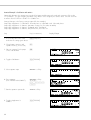
In the selection mode: Perform external calibration followed by automatic adjustment with the factory-set weight
Configuration:
factory settings
Step
Key(s) (or instruction)
Display/Output
––––––––––––––––––––––––––––––––––––––––––––––––––––––––––––––––––––––––––––––––––––––––––––––––––
1. Select Calibration
isoTST
soft key
6
2. Select external calibration/adjustment with factory-defined weight
Select
soft key repeatedly
6
(for scales of accuracy
class K, only “external
adjustment” is possible)
3. Start external calibration/
adjustment
Start
4. Place the weight on the
scale (e.g., 2,000.00 g)
Minus sign –: Weight too low
Plus sign + Weight too high
no plus/minus sign: Weight o.k.
Place weight on scale
This is displayed after calibration,
for approx.10 seconds:
(on verified scales, the
difference between the
displayed weight and the
true weight (mass) is displayed)
5. Unload the scale
(ISO/GMP printout: see page 100)
40
soft key
Operating the Scale
External Calibration/Adjustment* with
a User-Defined Calibration Weight
First set either
Ext. cal./
adj.;user-defined wt.
Selection mode (factory
or
setting) in the Setup: Scale menu.
You can define a weight for
calibration/adjustment. External
calibration/adjustment must
be performed with weights that are
traceable to a national standard
and that have error limits which are
at least 1/3 of the required
tolerance of the display accuracy.
The defined weight must equal
at least 10% of the maximum
scale capacity.
To reset a user-defined calibration
weight to the original factory setting:
$ Enter the factory-defined value
manually (see “Specifications”)
See page 40 for the external
calibration/adjustment sequence.
For this example, select external
calibration/adjustment with a userdefined weight.
The scale has a factory-set weight
value (see “Specifications”).
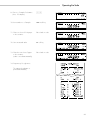
Define the Calibration Weight
Step
Key(s) (or instruction)
Display/Output
––––––––––––––––––––––––––––––––––––––––––––––––––––––––––––––––––––––––––––––––––––––––––––––––––
1. Select Setup
M
2. Select Input
Input
3. Select calibration/adjustment
weight
q soft key 3 times
soft key
3000.00 = last setting selected
4. Enter calibration weight
(e.g., 4000.00 g)
and store
6. Exit the Setup menu
4000.0
0
l soft key
M
* for verified scales, only “external adjustment” is possible
41
isoCAL:
Automatic Calibration
and Adjustment
First set either
On and reset
the application or On
without resetting the
app. (factory setting) in the Setup:
Scale menu.
The “isoCAL” display automatically
begins flashing if the ambient
temperature changes in relation to
the temperature at the time of the last
calibration/adjustment, or after
a defined time interval has elapsed.
The scale is telling you that it wants to
adjust itself.
This automatic calibration prompt
is triggered when:
– The change in temperature is
greater than 10 Kelvin
– The scale status does
not correspond to Setup
configurations
– No number or letter input
is active
– The load has not been changed
within the last 2 minutes
– The scale has not been operated
within the last 2 minutes
– The load on the scale does
not exceed 2% of the maximum
capacity
* including the Signatories
of the Agreement on the European
Economic Area
42
When these requirements are met,
C is displayed in the measured
value line.
If the scale is not operated and the
load is not changed, internal
calibration and adjustment starts after
15 seconds have elapsed.
In the Setup menu, you can configure
the scale so that after calibration and
adjustment
– the application program
is restarted
On and reset
the application
– the application program remains
at its previous status
On without resetting
the app.
Also in Setup, you can configure
the scale so that it displays
a calibration prompt, but does not
perform the calibration/adjustment
functions automatically
Only adjustment prompt
Operating the Scale
Determination of the
Reproducibility (reproTEST)
Definition
Reproducibility is the ability of the
scale to display identical readouts
when it is loaded several times
with the same weight under constant
ambient conditions.
The standard deviation for a given
number of measurements is used
to quantify the reproducibility.
Purpose
Preparation
The “reproTEST” function automatically determines the
reproducibility of results (based on
6 individual measurements).
In this way, the scale determines one
of the most important quantities
in relation to the place of installation.
The results are displayed with the
scale’s accuracy.
§ Turn on the scale:
Press e/[ON/OFF]
> The Sartorius logo is displayed
> The scale performs a self-test
§ Select reproTEST in the Setup
menu: Press M
§ Select the Scale menu:
Menu soft key
§ Select either reproTEST
or Selection mode
(factory setting): see “Configuring
the Scale”
§ Exit the Setup menu:
Press M
Check the Reproducibility of the Scale
Step
Key(s) (or instruction)
Display/Output
––––––––––––––––––––––––––––––––––––––––––––––––––––––––––––––––––––––––––––––––––––––––––––––––––
1. If reproTEST is set:
and proceed with step 4.
isoTST
soft key
isoTST
soft key
2. Select reproTEST
Select
soft key
3. Start reproTEST
Start
If
Selection mode is
set:
6
6
soft key
4. Number of measurements
is displayed; 6 measurements will
now be performed
Max4200 g
0%
F
S
CAL: reproTEST
Start
d= 0.01g
100% A
OO6 g
aH
L
sS
T
Wahl
The standard deviation
is displayed
5. End reproTEST
or restart reproTEST
End soft key
Start soft key
43
Application Programs
Preparation
Scales used as legal measuring instruments: grams and kilograms are the
only weight units available
Using Verified Scales as Legal
Measuring Instruments in the EU*:
All application programs can be
selected on scales used as legal
measuring instruments.
Non-metric values are indicated
as follows:
– Percent
=%
– Piece counting (Counting) = pcs
– Computed value
=o
Soft Key Functions
Start
Start application program
Weigh.
Toggle to basic
weighing functions
Toggle between
Weight Units $ %
Purpose
With this application program you
can switch the display of a weight
value back and forth between two
weight units by pressing a soft key.
You can use this application program
in combination with a program
chosen from Application 2 (checkweighing, time-controlled functions)
and one from Application 3 (totalizing, net-total formulation, statistics).
Standard scales: The following weight units are available in both ranges:
Unit
Grams
Kilograms
Carats
Pounds
Ounces
Troy ounces
Hong Kong taels
Singapore taels
Conversion factor
1.00000000000
0.00100000000
5.00000000000
0.00220462260
0.03527396200
0.03215074700
0.02671725000
0.02646063000
Display/
Printout
g
kg
ct
lb
oz
ozt
tlh
tls
Singapore taels
0.02645544638
tls
Taiwanese taels
Grains
Pennyweights
Milligrams
Parts per pound
Chinese taels
Mommes
Austrian carats
Tola
Baht
Mesghal
0.02666666000
15.43235835000
0.64301493100
1000.00000000000
1.12876677120
0.02645547175
0.26670000000
5.00000000000
0.08573333810
0.06578947437
0.21700000000
tlt
GN
dwt
mg
/lb
tlc
mom
K
tol
bat
MS
Line for
metrological
data
g
kg
ct
lb
oz
ozt
tlh
tls (up to
scale version
00-20-06)
tls (from
scale version
00-20-07)
tlt
GN
dwt
mg
lb
tlc
M
K
tol
bat
MS
§ Turn on the scale: Press e/[ON/OFF]
Available Features
– Toggling the displayed weight
– Setting the display accuracy
– Other features as for the basic
weighing function
> Sartorius logo is displayed, self-test is performed
§ Select the “Toggle weight units” program in the Setup menu: Press M
§ Select the Application menu:
App
§ Select
Application 1:
§ Select
Toggle wt. units:
O soft key
§ Confirm
Weight unit 1:
§ Select and confirm:
– Weight unit 1: see above
Display accuracy 1:
All digits
Weight unit 2:
Grams /g
Display accuracy 2:
All digits
* including the Signatories
of the Agreement on the European
Economic Area
44
–
Q or q soft key (repeatedly)
Toggle wt. units:
Factory Settings
Grams /g
Weight unit 2:
soft key
O soft key
see above
see also the “Application Menu (Overview)” in the chapter entitled
“Configuring the Scale”
§ Save settings and exit the Setup menu: Press M
Operating the Scale
Additional Functions
Calibration/Adjustment
In addition to the functions for:
§ Press the
– alphanumeric input,
> See “Calibration/Adjustment”
for further instructions
– taring (not during
alphanumeric input),
– printing (NUM print; S ID),
you can also access the following
functions from this application:
– calibration (not during
alphanumeric input),
– toggling to the next application
(e.g., checkweighing),
– setup,
– turning off the scale.
isoTST
Turning Off the Scale
soft key
§ Press e/[ON/OFF]
> The scale shuts off
> The display goes blank
Toggling to the Next Application
§ Press D/[TOGGLE]
> See the section on the
corresponding application
program for further instructions
Setup (setting parameters)
§ Press M
> See “Configuring the Scale” for
further instructions
Practical Example
Toggle the Display From Grams [g] (1st Unit) to Pounds [lb] (2nd Unit)
Settings (changes in the factory settings required for this example):
Setup: App: Application 1: Toggle wt. units: Weight unit 2: Pounds/lb
Step
Key (or instruction)
1. Delete previous setting if necessary
c
Display/Output
($: Weight unit 1)
2. Change weight unit
to Pounds [lb]
(%: Weight unit 2)
lb
soft key
3. Change weight unit
to Grams [g]
g soft key
45
Counting A
Purpose
With the Counting program you
can determine the number of pieces
of approximately equal weight.
You can use this application program
in combination with a program
chosen from Application 2
(checkweighing, time-controlled
functions) and one from Application
3 (totalizing, net-total formulation,
statistics).
Available Features
Factory Settings
– Optional scale configuration in
Setup for automatically initializing
this application and loading
the most recent reference sample
quantity “nRef” and average
piece weight “wRef” when you
switch on the scale (automatic
initialization)
Accuracy when calculating piece
weight: Display accuracy
– Reference sample quantity “nRef”
entered manually
– Average piece weight “wRef”
entered manually
– Storage of the current weight
value for the preset reference
sample quantity “nRef”, to
be called up when the Counting
program is initialized
– Setting the accuracy when the
reference sample weight
“wRef” is stored for calculating
a piece count
– Optional configuration for having
the quantity and sample weight
output automatically via the data
interface port after initialization or
reference sample updating while
running the Counting program
(print application parameters)
– Toggling between piece count
and weight value by pressing the
Count. or Weigh. soft key
46
Reference sample updating:
Automatic
Soft Key Functions
nRef
Store value input
as reference sample
quantity
wRef
Store input value
as reference sample
weight
Update
Reference updating
criteria met; reference
updating can be
performed
Count.
Toggle to the Counting
application
Operating the Scale
Preparation
Additional Functions
To calculate a piece count, the average weight of one piece must be known.
This average piece weight can be entered into the Counting program in one of
three ways:
In addition to the functions for:
– Enter the average piece weight using the numeric keys and store it;
– The last reference sample quantity entered is loaded and displayed when you
turn on the scale. Place the same number of parts on the scale and initialize
the Counting program;
– With automatic initialization parameter on, the scale goes into the
“Counting” mode when you turn it on and loads the last average piece
weight and corresponding reference sample quantity that were
entered or calculated.
– alphanumeric input,
– taring (not during
alphanumeric input),
– printing,
you can also access the following
functions from this application:
– calibration (not during
alphanumeric input),
– toggling to the next application
(e.g., checkweighing),
Reference Sample Updating
– setup,
You can have the average piece weight updated during counting (with
the piece count displayed) if “AWP update” is set to “manual” or “automatic”
in the Setup menu. Manual updating can only be performed when
the Update soft key is displayed. Reference sample updating must be
completed before using an application program from Application 3.
– turning off the scale.
The
> See “Calibration/Adjustment”
for further instructions
Update
soft key is displayed when:
– the scale has reached stability (stability symbol displayed)
Calibration/Adjustment
§ Press the
isoTST
soft key
– the current piece count is less than double the original piece count
– the current piece count is less than 100
Toggling to the Next Application
– the internally calculated piece count (e.g., 17.24) differs from the nearest
whole number (here: 17) by less than 0.3
§ Press D/[TOGGLE]
Reference updating can be repeated several times with an approximately
doubled piece count.
§ To perform reference updating: Press the
Update
soft key
> See the section on the
corresponding application
program for further instructions
Setup (setting parameters)
§ Press M
§ Turn on the scale: Press e/[ON/OFF]
> See “Configuring the Scale”
for further instructions
> Sartorius logo is displayed, self-test is performed
§ Select the Counting program in the Setup menu: Press M
§ Select the Application menu: Press the
§ Select
Application 1:
§ Select
Counting:
§ Confirm
App
soft key
Turning Off the Scale
O soft key
§ Press e/[ON/OFF]
Q or q soft key, repeatedly
Counting:
> The scale shuts off
O soft key
> The display goes blank
§ Select and confirm:
– Average piece
weight calculation
Display accuracy or +1 decimal place
+2 decimal places
–
or
Average piece weight updating:
Off or Manual or Automatic
see also the “Application Menu (Overview)” in the chapter entitled
“Configuring the Scale”
§ Save settings and exit the Setup menu: Press M
47
Practical Example
Determining an Unknown Piece Count; Weighing in the Preset Reference Sample Quantity
Settings (changes in the factory settings required for this example):
Setup: App: Application 1: Counting: Average piece weight updating: Manual
Step
Key (or instruction)
1. Delete previous setting if necessary
c
2. Prepare a container for the
parts to be counted
Place the empty container
on the scale
Display/Output
6
isoTST
3. Tare the scale
6
t
isoTST
4. Place the reference sample quantity Place the displayed number
on the scale (example: 10 pcs)
of parts in the container
6
isoTST
5. Determine the average piece
weight (number of decimal
places displayed depends on
the scale model)
Start
soft key
6
isoTST
nRef
wRef
6. If necessary, increase the number
of parts and perform reference
sample updating (example:
7 additional pieces)
Place additional parts
in the container
Update soft key
10 pcs
2.14800 g
+
+
17 pcs
2.14800 g
+
153 pcs
6
isoTST
nRef
wRef
7. Weigh uncounted parts
+
+
Place parts to be counted
in the container
6
isoTST
8. If desired, print total piece count
(here: 153 pcs)
48
p/[PRINT]
Qnt
Operating the Scale
Weighing in Percent B
Purpose
This application program allows
you to obtain weight readouts
in percent which are in proportion
to a reference weight.
You can use this application program
in combination with a program
chosen from Application 2
(checkweighing, time-controlled
functions) and one from Application
3 (totalizing, net-total formulation,
statistics).
Available Features
Factory Settings
– Reference percentage “pRef”
loaded from long-term memory
when you turn on the scale
Storage parameter:
– Optional scale configuration in
Setup for automatically initializing
this application and loading the
most recent reference percentage
“pRef” entered with reference
weight “Wxx%” when you turn on
the scale
2 digits
– Reference percentage “nRef”
entered manually
– Store the current weight as the
reference percentage weight
“Wxx%” for initializing the
weighing-in-percent application
program
Display accuracy
Digits displayed with percentage:
Soft Key Functions
pRef
Store value input as
reference percentage
Wxx%
Store input value as
reference sample weight
Perc.
Toggle to the Weighing-inpercent application
Restar
(New)
Store next value
– Reference weight “Wxx%”
entered manually
– Storage parameter (rounding-off
factor) for storing the reference
weight “W100%” in percentage
calculation can be configured
– Configuration of decimal places
displayed with a percentage
– Optional configuration for having
the reference weight “Wxx%”
and reference percentage
automatically output via the data
interface port after initialization of
the weighing-in-percent program
(print application parameters)
– Toggle the display between
percentage and weight readout
by pressing the Weigh. soft key
– Toggle between the
weighing-in-percent program
and other applications (e.g.,
checkweighing) by pressing
D/[TOGGLE]
49
Preparation
Additional Functions
To calculate a value in percent, the reference percentage must be known. This
value can be entered into the weighing-in-percent program in one of three ways:
In addition to the functions for:
– The last reference percentage entered is loaded and displayed when
you turn on the scale. Place the corresponding weight on the scale and
initialize the weighing-in-percent program;
– With automatic initialization switched on, the scale goes into the
“weighing in percent” mode when you turn it on and loads the last reference percentage entered as well as the corresponding reference weight;
– Enter the reference weight using the numeric keys and store it
(Wxx% soft key).
§ Turn on the scale: Press e/[ON/OFF]
> Sartorius logo is displayed, self-test is performed
§ Select the Weighing in percent application in the Setup menu: Press M
App
§ Select
Application 1:
O soft key
§ Select
Percent weigh.:
Q or q soft key repeatedly
Percent weigh.:
– taring (not during
alphanumeric input),
– printing,
you can also access the following
functions from this application:
– calibration (not during
alphanumeric input),
– toggling to the next application
(e.g., checkweighing),
– setup,
– turning off the scale.
soft key
§ Select the Application menu:
§ Confirm
– alphanumeric input,
O soft key
Calibration/Adjustment
§ Press the
isoTST
soft key
> See “Calibration/Adjustment”
for further instructions
§ Select and confirm:
– Weight storage
accuracy:
Display accuracy or
+1 decimal place or
+2 decimal places
–
Decimal places for readout in pct:
None or
1 decimal place or
2 decimal places or
3 decimal places or
4 decimal places or
5 decimal places or
6 decimal places
see also the “Application Menu (Overview)” in the chapter entitled
“Configuring the Scale”
§ Save settings and exit the Setup menu: Press M
Toggling to the Next Application
§ Press D/[TOGGLE]
> See the section on the
corresponding application
program for further instructions
Setup (setting parameters)
§ Press M
> See “Configuring the Scale”
for further instructions
Turning Off the Scale
§ Press e/[ON/OFF]
> The scale shuts off
> The display goes blank
50
Operating the Scale
Examples
Practical Example P1: Weighing in Percent with Reference Weight Taken From Weight on Scale
Settings (changes in the factory settings required for this example):
Setup: App: Application 1: Weighing in percent
Step
Key (or instruction)
1. Delete previous setting if necessary
c
2. Prepare a container
for the parts
Place the empty container
on the scale
Display/Output
6
isoTST
3. Tare the scale
6
t
isoTST
4. Place the reference weight
on the scale
(here: 1821.48 g = 100%)
Place weight equal
to reference weight in
the container
6
isoTST
5. Initialize the scale
Start
soft key
6
isoTST
pRef
Wxx%
6. Unload the scale
Remove reference
sample from the container
+
+
100 %
1821.48 g
+
g
98.37 %
6
isoTST
7. Determine the percentage
of an unknown weight
Place sample to be
measured in the container
6
isoTST
8. If desired, print percentage
(here: 98.37%)
p/[PRINT]
Prc
51
Practical Example P2: Weighing in Percent with Reference Weight Entered Using the Numeric Keys
Settings (changes in the factory settings required for this example):
Setup: App: Application 1: Weighing in percent
Step
Key (or instruction)
1. Delete previous setting if necessary
c
2. Prepare a container
for the parts
Place the empty container
on the scale
Display/Output
6
isoTST
3. Tare the scale
t
6
isoTST
4. Enter the reference weight using
the numeric keys (here: 120 g)
120
5. Store the reference weight
Wxx%
soft key
6
6
isoTST
6. Determine the percentage
of an unknown weight
Place sample to be
measured in the container
(in the case: 114.78 g)
6
isoTST
7. Toggle to weight display
Weigh.
soft key
6
isoTST
52
Operating the Scale
Animal Weighing C
Available Features
Purpose
– Animal weighing started manually
or automatically
Use this program to determine the
weights of unstable samples (e.g.,
live animals) or to determine weights
under unstable ambient conditions.
In this program, the scale calculates
the weight as the average of a
defined number of individual
weighing operations. These
weighing operations are also known
as “subweighing operations.”
You can use this application program
in combination with a program
chosen from Application 2
(checkweighing, time-controlled
functions) and one from Application
3 (totalizing, net-total formulation,
statistics).
– Automatic output of results
(printout) via the interface port:
– Weighing result xNet
– Calculated result xRes
– Optional scale configuration in
the Setup menu for automatically
initializing this application
when you turn on the scale
– The unload threshold hold is
equal to one-half the minimum
scale capacity
– Minimum load threshold
(100 display increments) for automatic start of animal weighing
– Return to weighing mode
by unloading the scale; i.e.,
when the load is below the
unload threshold
– Start range: Automatic start of
animal weighing operation when
three successive subweights lie
within a user-defined tolerance
range (calm = 2%, normal = 5%,
active = 10%)
– Number of weighing operations
for calculation of an average
(mDef) can be set before
the beginning of each animal
weighing operation
– The factor for calculation
of the result can be set before
the beginning of each animal
weighing operation
Factory Settings
Animal activity:
Start:
Automatic
Decimal places in result display:
2 decimal places
Printout:
Average weight only
Soft Key Functions
Restar
Automatic start:
– Unload scale and
weigh next animal,
if desired
– Press key to start
next subweigh
Manual start:
Start next subweigh
mDef
Store user-input number of
subweighs for averaging
Mul
Store user-input factor as
multiplication factor for
calculated the arithmetic
mean
xNet
Toggle to the Animal
weighing application
xRes
Toggle to the calculated
animal weighing result
– The number of subweighs
remaining to be performed is
indicated in the text display
during weighing
– Arithmetic average displayed as
a result in the pre-set weight unit
(identified by the a symbol).
– Optional multiplication of the
arithmetic average by a userdefined factor Mul.
A circle “o” is displayed as
weight unit and Mul = xxx
is shown in the text line
– Toggling between the weight
and the calculated value by
pressing the xNet soft key and
the xRes soft key
Normal
– Automatic output of results via the
interface port:
– Number of weighing
operations mDef
– Multiplication factor Mul
53
Preparation
Additional Functions
§ Turn on the scale: Press e/[ON/OFF]
In addition to the functions for:
> Sartorius logo is displayed, self-test is performed
– alphanumeric input,
§ Select the Animal weighing application in the Setup menu: Press M
– taring (not during
alphanumeric input),
§ Select the Application menu:
App
§ Select
Application 1:
O soft key
§ Select
Animal weigh.:
Q or q soft key repeatedly
§ Confirm
Animal weigh.:
soft key
O soft key
§ Select and confirm:
– Animal activity:
Calm or
Normal or
– printing,
you can also access the following
functions from this application:
– calibration (not during
alphanumeric input),
– toggling to the next application
(e.g., checkweighing),
Active
– setup,
–
Start:
Manual mode or
Automatic mode
– turning off the scale.
–
Decimal places in result display:
None or
1 decimal place or
2 decimal places or
3 decimal places or
4 decimal places or
5 decimal places or
6 decimal places
–
Printout:
None or
Average weight only or
Average and calculated value
see also the “Application Menu (Overview)” in the chapter entitled
“Configuring the Scale”
§ Save settings and exit the Setup menu: Press M
Calibration/Adjustment
§ Press the
isoTST
soft key
> See “Calibration/Adjustment”
for further instructions
Toggling to the Next Application
§ Press D/[TOGGLE]
> See the section on the
corresponding application
program for further instructions
Setup (setting parameters)
§ Press M
> See “Configuring the Scale”
for further instructions
Turning Off the Scale
§ Press e/[ON/OFF]
> The scale shuts off
> The display goes blank
54
Operating the Scale
Practical Example
Determining Animal Weight With Automatic Start of 20 Subweighing Operations for Averaging; Automatic Printout of the
Number of Subweighing Operations and of the Animal Weight
Settings (changes in the factory settings required for this example):
Setup: App: Application 1: Animal weighing: Animal activity: Active
Setup: App: Application 1: Animal weighing: Printout: Average and calculated values
Step
Key (or instruction)
1. Delete previous setting if necessary
c
2. Prepare a container (cage)
Place empty cage
on the scale
Display/Output
6
isoTST
3. Tare the scale
t
6
isoTST
4. Enter number of subweighing
operations for averaging
20
5. Save number
mDef
6
soft key
6
isoTST
6. Weigh the first animal
Place 1st animal in cage
weight value fluctuates due to animal activity
6
isoTST
7. Start automatic animal weighing
Start
soft key
6
isoTST
The scale delays starting the
subweighing operation until
three successive subweights lie
within the range defined for
an “active” animal
When this criterion is met, the
subweighing series begins
6
isoTST
55
Step
Key (or instruction)
After 20 subweighing operations
the arithmetic average (xNet) is display
(mDef: no. of subweighs
Mul: calculation factor
xNet: arithm. average, net value)
Display/Output
6
isoTST
mDef
Mul
xNet
xRes
8. Unload the scale
Remove animal from cage
6
isoTST
9. If desired, weigh next animal
Place animal in cage
6
isoTST
Next weighing series begins
automatically
6
isoTST
56
+
+
20
1
69.72 g
69.72 o
Operating the Scale
Calculation D
Purpose
With this application program you
can calculate a weight value using
an algebraic equation. This can
be used, for example, to determine
the gsm weight (grams per square
meter) of paper.
You can use this application program
in combination with a program
chosen from Application 2
(checkweighing, time-controlled
functions) and one from Application
3 (totalizing, formulation, statistics).
Available Features
Factory Settings
– You can store an equation and
configure the Setup menu to
initialize this program automatically with the stored equation
Decimal places in calculated result:
– The o symbol is displayed to
indicate a calculated vale.
The equation used is displayed
in the text line
– If no equation was entered, the
weight value is displayed
– Toggle between the weight
readout, equation input and
display of the calculated result
by pressing the corresponding
soft keys (or press c to
toggle between weight and
calculated value)
2 decimal places
Soft Key Functions
Equat.
Toggle to equation
+
Enter an addition
operator in the equation
-
Enter a subtraction
operator in the equation
*
Enter a multiplication
operator in the equation
/
Enter a division operator
in the equation
Weight
Enter a weight value
in the equation
– The are four operators
(+, –, *, /) and one factor
(weight value) available
when you enter an equation
– Max. equation length:
28 characters
– Pressing c will delete either
the equation or the last character
entered, depending on the
configuration in the Setup menu
(see “Configuring the Scale”)
– The calculated result is displayed
with the number of decimal
places configured in the Setup
menu. Not all decimal places
are displayed if the result is
longer than the display allows.
If there are more digits before
the decimal point than the
display can show, an error
message is displayed.
– The equation is stored in
non-volatile memory
57
Preparation
Additional Functions
§ Turn on the scale: Press e
In addition to the functions for:
> Sartorius logo is displayed, self-test is performed
– alphanumeric input,
§ Select the Calculation application program in the Setup menu: Press M
– taring (not during
alphanumeric input),
§ Select the Application menu:
App
§ Select
Application 1:
O soft key
§ Select
Calculation:
§ Confirm
1
2
3
4
5
6
Q or q soft key repeatedly
Calculation:
§ Select and confirm:
– Decimal places
None or
decimal
decimal
decimal
decimal
decimal
decimal
soft key
O soft key
in calculated result:
place or
places or
places or
places or
places or
places
see also the “Application Menu (Overview)” in the chapter entitled
“Configuring the Scale”
§ Save settings and exit the Setup menu: Press M
– printing,
you can also access the following
functions from this application:
– calibration (not during
alphanumeric input),
– toggling to the next application
(e.g., checkweighing),
– setup,
– turning off the scale.
Calibration/Adjustment
§ Press the
isoTST
soft key
> See “Calibration/Adjustment”
for further instructions
Toggling to the Next Application
§ Press D/[TOGGLE]
> See the section on the
corresponding application
program for further instructions
Setup (setting parameters)
§ Press M
> See “Configuring the Scale”
for further instructions
Turning Off the Scale
§ Press e/[ON/OFF]
> The scale shuts off
> The display goes blank
58
Operating the Scale
Practical Example
Calculate the gsm weight of paper: determine the gsm of a sheet of A4 paper with the dimensions
0.210 m x 0.297 m = 0.06237 m2. The gsm weight is a product of the division of the weight by the surface area.
Settings (changes in the factory settings required for this example):
Setup: App: Application 1: Calculation
Step
Key (or instruction)
1. Turn on the scale and configure
the settings as indicated above
e/[ON/OFF]
2. Delete previous setting if necessary
c
3. Tare the scale
t
4. Select equation input
Equat.
soft key
5. Enter weight value
Enter division sign
Enter the surface area
of a sheet of A4 paper
Weight
* soft key
soft key
6. Turn on the calculated result display
Start
7. Determine the gsm weight
Place A4 sheet
on the scale
Display/Output
.06237
soft key
59
Over/Under Checkweighing H
Purpose
This program is used to check
whether a sample corresponds to
a pre-set target value or is within
a specific tolerance range. In
addition to the display in the
measured value line, the results are
shown on the bar graph and can
also be routed through the interface
port via control lines for further
electronic processing.
You can use this application program
in combination with a program
chosen from Application 1 (e.g.,
counting, weighing in percent) and
one from Application 3 (totalizing,
formulation, statistics).
Available Features
– Optional configuration in
the Setup menu for long-term
storage of target value and
tolerance limits
– Optional scale configuration
in Setup for automatically initializing this application and loading
the values stored in long term
memory for the target value
and the upper and lower tolerance limits when you turn on
the scale
– You can perform checkweighing
– without entering a target value,
but only upper and lower
tolerance limits;
– as differential checkweighing;
– with symmetric or asymmetric
limits which can be entered
as percentages
– Enter target value and limits by
placing a load on the scale or
using the numeric keys
– Weight value in bar graph
displayed in relation to upper
and lower limits and target value.
– “OK” value counter displayed in
the text line (e.g., n = 4).
This counter shows the number
of measured values that lie within
the tolerance range.
– Optional automatic printout of
weight value when it is within the
control range at stability
After an automatic printout, the
scale is blocked. Before you can
generate the next printout,
you must unblock the scale by
unloading it (weight must be under
30% of the target) or by placing
a load on the scale (bringing the
weight up to at least 170%
of the target).
– Control in entering target and
tolerance values, so that the upper
limit ≥ the target ≥ the lower limit
≥ 1 display increment
– Press c to delete the
initialization parameters and end
the Checkweighing program
– Accuracy of a weight readout or
keyboard input as target/tolerance
values corresponds to the display
accuracy
Factory Settings
– Optional scale configuration in the
Setup menu for automatic output to
the interface port (print application
parameters) of target value and
tolerance limits when initialization
is completed
– Control range for the scale’s data
output port lines is 30% to 170% of
the target value
– Optional configuration in the
Setup menu for activation of control
lines dependent on weight value
(weight value within control range,
stability reached)
– Toggling the display between
weight readout and control
(checkweighing) display by
pressing the corresponding soft
key. If the weight value exceeds
tolerances, the measured value
line shows the weight while the
control display shows “LL” for “too
low” or “HH” for “too high.”
60
– Press the Show soft key to
display target value and
tolerance limits in the text line
after initializing the application.
Activation of port lines: Within
checkweighing range
Type of checkweighing input:
Target, minimum,
maximum weight
Weight display mode:
Absolute value
Automatic printout of OK values:
No
Soft Key Functions
Param.
Begin input of target and
tolerance values
Show
Display target and
tolerance values in turn
during checkweighing
LLHH
Toggle to control display
(“LL” for too light and
“HH” for too heavy)
Diff.
Display difference
between current value
and target
Net
Display net weight
Operating the Scale
Preparation
The checkweighing program often
requires a target value for
comparison to the current value.
This target has a tolerance range,
which is defined by absolute
weight values. The tolerance range
is defined as either an absolute
value or a percentage: upper and
lower limits. Percentage values can
be symmetric or asymmetric to the
target value. These values can
be entered either by storing weights
on the scale or via key input.
Response of Control Lines During
Checkweighing
Configurations:
– always on
– activated at stability
There are four control lines, called
data output port lines, which are
activated as follows: (see also the
diagram at the right):
– lighter
– equal
– heavier
– set
Configurations:
– activated within control range
– activated at stability within
control range
The control range spans 30% to
170% of the target value. You
can configure this parameter in the
Setup menu (App: Application 2:
Checkweighing: Activation of
port lines:) to select whether the
control lines are:
– activated within the control range
– always on
– activated at stability within the
control range
– activated at stability
This makes it possible, for example,
to connect a simple indicator for the
weighing results (e.g., three different
colors, one each for the weighing
results: too light, O.K., too heavy).
61
Preparation
Additional Functions
§ Turn on the scale: Press e
In addition to the functions for:
> Sartorius logo is displayed, self-test is performed
– alphanumeric input, (not during
initialization),
§ Select the Checkweighing application in the Setup menu: Press M
– taring (not during alphanumeric
input)
§ Select the Application menu:
App
§ Select
Application 2:
Press the q soft key and then theO soft key
§ Select
Checkweighing:
Q or q soft key repeatedly
§ Confirm
Checkweighing:
soft key
O soft key
§ Select and confirm:
– Activation of
port lines:
Within checkweighing range or
Always on or
Stability and checkweighing range
At stability or
Stability + checkwgh range -Oon
–
– printing,
you can also access the following
functions from this application:
– calibration (not during alphanumeric input or initialization),
or
– toggling to another application
(e.g., counting),
– setup, (not during initialization),
– turning off the scale.
Type of checkweighing input:
Target, minimum, maximum weight or
Minimum, maximum weight or
Target, minimum in %, maximum in %
Calibration/Adjustment
–
Weight display mode:
Absolute value or
Difference from the target
> See “Calibration/Adjustment”
for further instructions
–
Automatic printout of OK values:
Yes or
No
Toggling to Another Application
see also the “Application Menu (Overview)” in the chapter entitled
“Configuring the Scale”
§ Save settings and exit the Setup menu: Press M
§ Press the
isoTST
soft key
§ Press D/[TOGGLE]
> See the section on the
corresponding application
program for further instructions
Setup (setting parameters)
§ Press M
> See “Configuring the Scale”
for further instructions
Turning Off the Scale
§ Press e/[ON/OFF]
> The scale shuts off
> The display goes blank
62
Operating the Scale
Practical Example
Checkweighing samples of 170 g, with an allowable tolerance of –5 g and +10 g. Printout of upper and lower tolerance
limits. Weighed values are printed out automatically when stability is reached and weight value is within the control range.
Settings (changes in the factory settings required for this example):
Setup: App: Application 2: Checkweighing: Automatic printout of OK values: Yes
Step
Key (or instruction)
1. Turn on the scale and configure
the settings as indicated above
e/[ON/OFF]
2. Delete previous setting if necessary
c
3. Prepare a container
for the samples
Place empty container
on the scale
Display/Output
6
isoTST
4. Tare the scale
6
t
isoTST
5. Enter initialization values
Param.
soft key
6. Enter target value via the
scale (here: 170 g)
Place ideal sample
in container
7. Store target value and
unload scale
l soft key
Remove ideal sample
from scale
8. Enter value for lower limit
(170 g – 5 g) and store
165
l soft key
63
9. Enter value for upper limit
(170 g + 10 g) and store
180
l soft key
6
isoTST
Setp
Min
Max
10. Weigh sample
(in this case 169.48 g)
Place sample in container
+
+
+
170.00 g
165.00 g
180.00 g
+
169.48 g
6
isoTST
N
If the weight value had been
too low, the display would have
shown the following:
6
isoTST
11. In this case, switch to net value
display (here: 163.28 g)
Net
soft key
6
isoTST
12. Weigh next sample (if any)
64
Place sample in container
Operating the Scale
Time-Controlled Functions K
Available Features
Factory Settings
Purpose
– Time-controlled triggering of
scale functions:
Function after time interval:
With this application program, you
can configure the scale to perform
certain functions (e.g., automatic
printout of values, store value in
totalization memory) at a given time
or after a set interval.
You can use this application program
in combination with a program
chosen from Application 1 (e.g.,
counting, weighing in percent) and
one from Application 3 (e.g.,
totalizing, formulation).
– one time only, at a given time
(Setting=
the text line)
is displayed in
– repeatedly, at given intervals
(Interval= is displayed in
the text line before the function
is started, and
Repeat = is displayed after
the function is started)
– Functions that can be timecontrolled include:
Automatic printout
of values
Automatic function restart: On
Storage mode:
Without stability
Print then tare:
Soft Key Functions
Stop
Stop the application
Quit
Confirm performed
function (e.g., “Lock in
readout” or “Beep”)
Interv
Store input interval for
time-controlled functions
Set.
Store input time for
one-time performance
of function
– Acoustic signal
– Lock in readout
– Automatic printout of values
– Store values for totalizing,
formulation or statistics
On
– Print time in addition to
weight value
– Store value independent
of stability
– Tare the scale after printout
of weight values
– Press the corresponding soft key
to cancel time-controlled functions
65
Preparation
Additional Functions
§ Turn on the scale: Press e/[ON/OFF]
In addition to the functions for:
> Sartorius logo is displayed, self-test is performed
– alphanumeric input,
§ Select the “Time-controlled functions” application in the Setup menu:
Press M
– taring (not during alphanumeric
input),
§ Select the Application menu:
§ Select Application
O soft key
§ Select
App
2:
soft key
Press the q soft key and then the
Time-controlled functions:
§ Confirm
– printing,
Q or q soft key
Time-controlled functions:
§ Select and confirm:
– Function after
Beep or
O soft key
time interval:
Lock in readout or
Automatic printout of values or
Store value in applicat. 3 memory
–
Automatic function restart:
On or
Off
–
Storage mode:
Without stability or
After stability or
After higher stability
–
Print then tare:
Off or
On
see also the “Application Menu (Overview)” in the chapter entitled
“Configuring the Scale”
§ Save settings and exit the Setup menu: Press M
you can also access the following
functions from this application:
– calibration (not during alphanumeric input or initialization),
– toggling to another application
(e.g., counting),
– setup,
– turning off the scale.
Calibration/Adjustment
§ Press the
isoTST
soft key
> See “Calibration/Adjustment”
for further instructions
Toggling to Another Application
§ Press D/[TOGGLE]
> See the section on the
corresponding application
program for further instructions
Setup (setting parameters)
§ Press M
Print Net Values without Printout of Time
Configuration settings:
> See “Configuring the Scale”
for further instructions
Setup: App: Basic settings: Printout configuration: Auto. at init.: Off
Turning Off the Scale
§ Press e/[ON/OFF]
> The scale shuts off
> The display goes blank
66
Operating the Scale
Practical Example
Document the amount of evaporation of a sample with defined surface, temperature and air pressure at preset intervals
of 1 minute, 30 seconds.
Settings (changes in the factory settings required for this example):
Setup: App: Application 2: Time-controlled functions
Setup: Menu: Scale functions: Taring: Without stability
Setup: Menu: Print in weighing mode: Manual/auto print mode: Manual without stability
Step
Key (or instruction)
1. Turn on the scale and configure
the settings as indicated above
e/[ON/OFF]
2. Delete stored values if necessary
c
3. Place container with sample
on the scale and tare
t
4. Enter time interval: 1 minute,
30 seconds
1.30
5. Store time interval
Interv
6. Begin documentation
(Time remaining until the
next printout is displayed
in the text line)
Start
Display/Output
soft key
soft key
Printout of evaporation amount
every 11/2 minutes
7. Stop the documentation procedure
Stop
soft key
67
Totalizing L
Purpose
This application program acts as
a cumulative memory function.
You can use this application program
in combination with a program
chosen from Application 1 (e.g.,
counting, weighing in percent) and
one from Application 2 (checkweighing, time-controlled functions).
Available Features
– Totalization of weight values
and calculated values
– Optional configuration in
the Setup menu for simultaneous
storage of net and calculated
values
– Optional configuration in the
Setup menu for loading weight
values and calculated values
either from Application 1 (e.g.,
counting, weighing in percent)
or from Application 2 (checkweighing, time-controlled
functions)
– Totalization memory for up to
65535 values
– Simultaneous display in the text
line of transaction counter and,
e.g., the current total
– Optional configuration in
the Setup menu for having the
scale tare automatically
after a value is stored in the
totalization memory
– Manual input of the number of
individual weighing operations
(enter on numeric keys and
press nDef). Result printed and
memory cleared when
the number entered has been
reached.
– Optional configuration in the
Setup menu to add the current
weight, with display accuracy,
to the current total by pressing the
M+ soft key and generate
a printout of the result
– Optional configuration in the
Setup menu for stability-dependent storage of the measured
value: Stability range
– Optional automatic storage of
measured values
Storage of measured value is
indicated by Uu.
zz indicates that you can place
a load on the scale.
– Minimum load threshold for
automatic storage
Automatic storage:
Off
Minimum load for automatic storage:
10 digits
Source of data for auto storage:
Application 1
Evaluated values:
Net
Evaluation mode, MR key function:
Intermediate
evaluation, print
M+/M– function, then tare:
Off
– Press the M- soft key to delete
the last value added to the
totalization memory. The
transaction counter value is
reduced by one and a printout
is generated.
Printout of individual components:
– Press the MR soft key for information about number of transactions and the current total. By
configuring the Setup menu, you
can define whether the information is displayed and printed,
or only printed, and whether the
information comprises an intermediate or final evaluation (see
the example)
Tare after individual printout: No
– In the Info window you can
choose which value is displayed
in the text line during weighing
– Printout of the end result independent of which program is configured for Application 1 or
Application 2. Configure the
Setup menu to define which
values are included on the
printout (Printout of individual
components)
– Press MR for a printout of an
intermediate evaluation after each
addition or a final evaluation
– Optional configuration in the
Setup menu to clear the totalization memory and reset the
transaction counter by pressing
c or after an evaluation is
printed out
– Totalization data and transaction
counter data are stored in nonvolatile memory
– Continue totalization after turning
the scale off and back on
68
Factory Settings
On
Stability range:
1-3-4
2 increments
Soft Key Functions
M+
Add weight values or
application values to the
total in the totalization
memory. The component
or transaction counter
value increases by one
each time you press
this key.
M-
Delete the last value
added to memory. The
transaction counter value
decreases by 1. You
cannot delete previous
values by repeatedly
pressing this key.
MR
Print or display an
intermediate or final
evaluation
nDef
Store the input number
of components
Operating the Scale
Preparation
Additional Functions
§ Turn on the scale: Press e/[ON/OFF]
In addition to the functions for:
> Sartorius logo is displayed, self-test is performed
– alphanumeric input,
§ Select the Totalizing application program in the Setup menu: Press M
– taring (not during alphanumeric
input),
§ Select the Application menu:
App
§ Select
Application 3:
Press the q soft key twice and then press O
§ Select
Totalizing:
§ Confirm
soft key
you can also access the following
functions from this application:
Q or q soft key
Totalizing:
O soft key
– calibration (not during alphanumeric input or initialization),
§ Select and confirm:
– Automatic storage:
Off or
– toggling to another application
(e.g., counting),
On, first value at stability or
On, last value at stability or
On, value bet. 70-130% at stabil.
–
– setup,
– turning off the scale.
Minimum load for automatic storage:
None or
Calibration/Adjustment
10 digits or
20 digits or
50 digits or
100 digits or
200 digits or
500 digits or
1000 digits
–
Evaluated values:
Net or
Calculated or
Net + calculated
–
Evaluation mode, MR function:
Intermediate evaluation, print or
Final evaluation, print or
Intermediate eval., display+print
Final evaluation, display+print
–
§ Press the
isoTST
soft key
> See “Calibration/Adjustment”
for further instructions
Toggling to Another Application
Source of data for auto storage:
Application 1 or
Application 2
–
–
– printing,
§ Press D/[TOGGLE]
> See the section on the
corresponding application
program for further instructions
Setup (setting parameters)
§ Press M
or
> See “Configuring the Scale”
for further instructions
M+/M- function, then tare:
Off or
On
Turning Off the Scale
Printout of individual components:
No or
Yes
> The scale shuts off
§ Press e/[ON/OFF]
> The display goes blank
see also the “Application Menu (Overview)” in the chapter entitled
“Configuring the Scale”
§ Save settings and exit the Setup menu: Press M
69
Practical Example
Totalize counted pieces
Settings (changes in the factory settings required for this example):
Setup: App: Application 1: Counting
Setup: App: Application 3: Totalizing: Evaluated values: Net + calculated
Setup: App: Application 3: Totalizing: Evaluation mode, MR function: Final evaluation, display + print
Step
Key (or instruction)
1. Turn on the scale and configure
the settings as indicated above
e/[ON/OFF]
2. Delete old totalization data,
if necessary
c
3. Tare the scale
t
Display/Output
6
isoTST
4. Toggle to Application 1: Counting
D/[TOGGLE]
6
isoTST
5. Place the displayed number of
parts on the scale (here: 10 pcs)
Place parts to be counted
on the scale
6
isoTST
6. Initialize the Counting application
Start
soft key
6
isoTST
nRef
wRef
7. Remove the reference sample
quantity and toggle to Totalizing
Unload the scale
D/[TOGGLE]
6
isoTST
8. Place a number of parts on the
scale (here: 50 pcs)
Place parts on the scale
6
isoTST
70
10 pcs
35.28900 g
Operating the Scale
9. Store piece count
M+
soft key
6
isoTST
-------------------16.01.97
11:06:54
n
+
1
N
+ 1764.45 g
Qnt
+
50 pcs
10. Unload the scale
Remove parts from the scale
11. Place another load of parts
on the scale (e.g., 60 pcs)
Place parts on the scale
6
isoTST
12. Add piece count to stored total
M+
soft key
6
isoTST
n
N
Qnt
+
+
+
2
2117.34 g
60 pcs
13. Repeat steps 10 and 11
as required
14. Display final evaluation
(“Info” window)
(here: 5 weighing operations;
total weight: 8751.67 g;
total quantity: 248)
The o indicates which value
is displayed in the text line; you
can change this selection
MR
soft key
15. Print final evaluation
p/[PRINT]
71
Formulation M
Purpose
With this application program you
can add weight values and
calculated values to a totalization
memory as components of a formula.
You can use this application program
in combination with a program
chosen from Application 1 (e.g.,
counting, weighing in percent) and
one from Application 2 (checkweighing, time-controlled functions).
Available Features
– Totalization of weight values and
calculated values
– Simultaneous storage of net and
calculated values
– Optional configuration in the
Setup menu for loading weight
values and calculated values
either from Application 1 (e.g.,
counting, weighing in percent)
or from Application 2 (checkweighing, time-controlled
functions)
– Totalization memory for up to
65535 values
– Optional automatic storage of
measured values
Storage of measured value is
indicated by Uu.
zz indicates that you can place
a load on the scale.
– Minimum load threshold for
automatic storage
– Press the M- soft key to delete
the last value added to the
totalization memory.
The transaction counter value
is reduced by one and a printout
is generated.
– Printout of an evaluation of
results, depending on the
Application 1 or Application 2
parameters. Configure the Setup
menu to define the information
included on this printout.
– Press MR for a printout of an
intermediate evaluation after each
addition or a final evaluation
– Optional configuration in the
Setup menu to clear the
totalization memory and reset
the transaction counter by
pressing c or after an evaluation is printed out
– Transaction counter and current
total displayed in the text line
– Totalization data and transaction
counter data are stored in nonvolatile memory
– Scale tared after a value
is stored
– Continue formulation after turning
the scale off and back on
– Manual input of the number of
individual weighing operations
(enter on the numeric and press
nDef). Result printed and
memory cleared when number
entered has been reached
– Optional configuration in the
Setup menu to add the current
weight, with display accuracy,
to the current total by pressing
the M+ soft key and generating
a printout of the result
– Optional configuration in the
Setup menu for stability-dependent storage of the measured
value: Stability range
72
Factory Settings
Automatic storage:
Off
Minimum load for automatic storage:
10 digits
Source of data for auto storage:
Application 1
Evaluated values:
Net
Evaluation mode, MR key function:
Intermediate
evaluation, print
Printout of individual components:
On
Stability range:
1-3-4 2 increments
Tare after individual printout: No
Soft Key Functions
M+
Add weight values or
application values to the
total in the totalization
memory. The component
or transaction counter
value increases by one
each time you press
this key.
M-
Delete the last value
added to memory. The
transaction counter value
decreases by 1. You
cannot delete previous
values by repeatedly
pressing this key.
MR
Print or display an
intermediate or final
evaluation
nDef
Store the input number
of components
Operating the Scale
Preparation
Additional Functions
§ Turn on the scale: Press e/[ON/OFF]
In addition to the functions for:
> Sartorius logo is displayed, self-test is performed
– alphanumeric input,
§ Select the Formulation application program in the Setup menu: Press M
– taring (not during
alphanumeric input),
§ Select the Application menu:
App
§ Select
Application 3:
Press the q soft key twice and then press O
§ Select
Formulation:
§ Confirm
Formulation:
soft key
Q or q soft key
O soft key
§ Select and confirm:
– Automatic storage:
Off or
On, first value at stability.
–
Minimum load for automatic storage:
None or
10 digits or
20 digits or
50 digits or
100 digits or
200 digits or
500 digits or
1000 digits
–
Source of data for auto storage:
Application 1 or
Application 2
– printing,
you can also access the following
functions from this application:
– calibration (not during alphanumeric input or initialization),
– toggling to another application
(e.g., counting),
– setup,
– turning off the scale.
Calibration/Adjustment
§ Press the
isoTST
soft key
> See “Calibration/Adjustment”
for further instructions
Toggling to Another Application
§ Press D/[TOGGLE]
–
Evaluated values:
Net or
Calculated or
Net + calculated
–
Evaluation mode, MR function:
Intermediate eval., print or
Final evaluation, print
Setup (setting parameters)
Printout of individual components:
No or
Yes
> See “Configuring the Scale”
for further instructions
see also the “Application Menu (Overview)” in the chapter entitled
“Configuring the Scale”
Turning Off the Scale
–
§ Save settings and exit the Setup menu: Press M
> See the section on the
corresponding application
program for further instructions
§ Press M
§ Press e/[ON/OFF]
> The scale shuts off
> The display goes blank
73
Practical Example
Weighing in Components
Settings (changes in the factory settings required for this example):
Setup: App: Application 3: Formulation: Automatic storage: On, first value at stability
Setup: App: Application 3: Formulation: Minimum load for automatic storage: 100 digits
Setup: App: Application 3: Formulation: Evaluation mode, MR function: Final evaluation, print
Step
Key (or instruction)
1. Turn on the scale and configure
the settings as indicated above
e/[ON/OFF]
2. Delete old formulation data,
if necessary
c
3. Tare the scale
t
Display/Output
6
isoTST
4. Place the empty container
on the scale (here: 180.59 g)
Place load on the scale
6
isoTST
5. Tare the scale
t
6
isoTST
6. Weigh in the first component
(here: 42.88 g)
Place components
in container
6
isoTST
7. Store components in the
formulation memory
Scale is tared automatically
M+
soft key
6
isoTST
Components are printed out
automatically
74
Operating the Scale
8. Weigh in the next component
(here: 50.80 g)
Place components
in container
Components are stored in the
totalization memory at stability
and printed out
Scale is tared automatically
6
isoTST
9. Repeat step 7 as required
10. Print final evaluation
(here: with total weight of all
components: 212.43 g)
MR
11. Delete old formulation data,
if necessary
c
soft key
75
Statistics N
Purpose
With this application program you
can have weight values and
calculated values totalized and
statistically evaluated.
The values determined for the
evaluation are:
–
–
–
–
–
–
–
average
standard deviation
variation coefficient
sum of all values
lowest value (minimum)
highest value (maximum)
difference between the minimum
and the maximum
You can use the statistics application
in combination with a program
chosen from Application 1 (e.g.,
counting, weighing in percent) and
one from Application 2 (checkweighing, time-controlled functions).
Available Features
– Totalization of weight values and
calculated values
– Simultaneous storage of net and
calculated values
– Optional configuration in the
Setup menu for loading weight
values and calculated values
either from Application 1 (e.g.,
counting, weighing in percent) or
from Application 2 (checkweighing, time-controlled functions)
– Totalization memory for up to
65535 values
– Simultaneous display in the text
line of transaction counter and,
e.g., the current total
– Optional configuration in
the Setup menu for having the
scale tare automatically
after a value is stored in the
totalization memory
– Manual input of the number of
individual weighing operations
(enter on numeric keys and press
nDef). Result printed and
memory cleared when number
entered has been reached.
76
– Optional configuration in the
Setup menu to add the current
weight, with display accuracy,
to the current total by pressing
the M+ soft key and generate
a printout of the result
– Optional configuration in the
Setup menu for stability-dependent storage of the measured
value: Stability range
– Optional automatic storage of
measured values
Storage of measured value is
indicated by Uu.
zz indicates that you can place
a load on the scale.
– Totalization data and transaction
counter data are stored in nonvolatile memory
– Continue totalization after turning
the scale off and back on
Factory Settings
Automatic storage:
Off
Minimum load for automatic storage:
10 digits
Source of data for auto storage:
Application 1
Evaluated values:
Net
Evaluation mode, MR key function:
– Minimum load threshold for
automatic storage
Intermediate
evaluation, print
– Press the M- soft key to
delete the last value added to
the totalization memory.
The transaction counter value
is reduced by one and a printout
is generated.
M+/M– function, then tare:
– Press the MR: soft key for
information about number of
transactions and the current total.
By configuring the Setup menu,
you can define whether the information is displayed and printed,
or only printed, and whether the
information comprises an intermediate or final evaluation
(see the example)
Tare after individual printout: No
Off
Printout of individual components:
Off
Stability range:
1-3-4 2 increments
Soft Key Functions
M+
– In the Info window you can
choose which value is displayed
in the text line during weighing
Add weight values or
application values to the
total in the totalization
memory. The component
or transaction counter
value increases by one
each time you press
this key.
M-
– Printout of the end result
depending on the Application 1
or Application 2 parameters.
Configure the Setup menu to
define which values are included
on the printout (Printout of
individual components)
Delete the last value
added to memory. The
transaction counter value
decreases by 1. You
cannot delete previous
values by repeatedly
pressing this key.
MR
– Press MR for a printout of an
intermediate evaluation after each
addition or a final evaluation
Print or display an
intermediate or final
evaluation
nDef
Store the input number
of components
– Optional configuration in the
Setup menu to clear the
totalization memory and reset the
transaction counter by pressing
c or after an evaluation
is printed out
Operating the Scale
Preparation
Additional Functions
§ Turn on the scale: Press e
In addition to the functions for:
> Sartorius logo is displayed, self-test is performed
– alphanumeric input,
§ Select the Statistics application program in the Setup menu: Press M
– taring (not during
alphanumeric input),
§ Select the Application menu:
App
§ Select
Application 3:
Press the q soft key twice and then press O
§ Select
Statistics:
§ Confirm
soft key
you can also access the following
functions from this application:
Q or q soft key
Statistics:
O soft key
– calibration (not during alphanumeric input or initialization),
§ Select and confirm:
– Automatic storage:
Off or
– toggling to another application
(e.g., counting),
On, first value at stability or
On, last value at stability or
On, value bet. 70-130% at stabil.
–
– setup,
– turning off the scale.
Minimum load for automatic storage:
None or
Calibration/Adjustment
10 digits or
20 digits or
50 digits or
100 digits or
200 digits or
500 digits or
1000 digits
–
Evaluated values:
Net or
Calculated or
Net + calculated
–
Evaluation mode, MR function:
Intermediate evaluation, print or
Final evaluation, print or
Intermediate eval., display+print
Final evaluation, display+print
–
§ Press the
isoTST
soft key
> See “Calibration/Adjustment”
for further instructions
Toggling to Another Application
Source of data for auto storage:
Application 1 or
Application 2
–
–
– printing,
§ Press D/[TOGGLE]
> See the section on the
corresponding application
program for further instructions
Setup (setting parameters)
§ Press M
or
> See “Configuring the Scale”
for further instructions
M+/M- function, then tare:
Off or
On
Turning Off the Scale
Printout of individual components:
No or
Yes
> The scale shuts off
§ Press e/[ON/OFF]
> The display goes blank
see also the “Application Menu (Overview)” in the chapter entitled
“Configuring the Scale”
§ Save settings and exit the Setup menu: Press M
77
Practical Example
Totalize counted pieces and print out statistics
Settings (changes in the factory settings required for this example):
Setup: App: Application 1: Counting: Average piece weight updating: Manual
Setup: App: Application 3: Statistics: Evaluated values: Calculated
Setup: App: Application 3: Statistics: Evaluation mode, MR function: Final evaluation, display + print
Step
Key (or instruction)
1. Turn on the scale and configure
the settings as indicated above
e/[ON/OFF]
2. Delete old statistics data,
if necessary
c
3. Tare the scale
t
Display/Output
6
isoTST
4. Toggle to Application 1: Counting
D/[TOGGLE]
6
isoTST
5. Place the displayed number of parts
on the scale (here: 10 pcs)
Place parts to be counted
on the scale
6
isoTST
6. Initialize the Counting application
Start
soft key
6
isoTST
nRef
wRef
7. Remove the reference sample
quantity and toggle to Statistics
Unload the scale
D/[TOGGLE]
6
isoTST
8. Place a number of parts on the
scale (here: 35 pcs)
Place parts on the scale
6
isoTST
78
10 pcs
10.62600 g
Operating the Scale
9. Store piece count
M+
soft key
10. Unload the scale
Remove parts from
the scale
11. Place another load of parts
on the scale (e.g., 29 pcs)
Place parts on the scale
12. Add piece count to stored total
M+
soft key
14. Display final evaluation
(“Info” window)
(here: 5 weighing operations;
total quantity: 165)
The o indicates which value is
displayed in the text line; you can
change this selection
MR
soft key
15. Print final evaluation
p/[PRINT]
13. Repeat steps 11 and 12
as required
79
Extra Functions
(in the Application menu)
Second Tare Memory
(Preset Tare)
Purpose
With this function you can store the
weight currently on the scale
as a tare weight, or use the numeric
keys to enter a number for a preset
tare weight.
You can use this function in
combination with a program from
Application 1 (e.g., counting,
weighing in percent), one from
Application 2 (checkweighing, timecontrolled functions) and one from
Application 3 (totalizing, formulation,
statistics).
Available Features
Factory Settings
– Store a weight on the scale
in the second tare memory
(without numeric input)
Automatic printout:
Off
Soft Key Functions
– Store a numeric value in the
second tare memory (input using
the numeric keys)
PT1/T1
Store weight as tare value
PT1
Store input value
as tare value
– Label a net value as d
when there is a value stored in
the second tare
– You can assign this function to
the fourth or fifth soft key (from the
right), i.e. F4 or F5
The soft key designation for this
function is: PT1/T1
– Automatic printout when
a value is stored or input (see
“Configuring the Scale”)
– Press c to delete the (preset)
tare value
Preparation
§ Turn on the scale: Press e/[ON/OFF]
> Sartorius logo is displayed, self-test is performed
§ Select Extra function (F4) or Extra function (F5) in the Setup menu:
Press M
§ Select the Application menu:
App
§ Select
Extra func. (F4)
§ Select
2nd tare memory
§ Confirm
soft key
or
Extra func. (F5)
2nd tare memory
§ Select and confirm:
– Automatic printout:
Net value or
Tare/preset tare or
Off
see also the “Application Menu (Overview)” in the chapter entitled
“Configuring the Scale”
§ Save settings and exit the Setup menu: Press M
80
Operating the Scale
Practical Example
Determine the Contents of Bottles: Bottle weight = 400 g.
Settings (changes in the factory settings required for this example):
Setup: App: Extra function(F4): 2nd tare memory: Automatic printout: Tare/preset tare
Step
Key (or instruction)
Display/Output
1. If necessary: turn on the scale
and enter the settings given above
e/[ON/OFF]
2. Enter bottle weight
(here: 400 g)
400
6
3. Store tare value
PT1
soft key
6
isoTST
PT1
4. Determine content weight of bottles
(here: contents = 650 g)
Place filled bottles
on the scale
+
400.00 g
6
isoTST
81
Identification Codes
Purpose
With this function you can assign
identifiers to values for
documentation and printouts.
You can use this function in
combination with a program from
Application 1 (e.g., counting,
weighing in percent), one from
Application 2 (checkweighing, timecontrolled functions) and one from
Application 3 (totalizing, formulation,
statistics).
Available Features
Factory Settings
– Store up to 4 identifiers
Printout:
– Access 1 of the 4 identifiers
directly using the numeric keys
Each time the print
key is pressed
– Up to 20 characters per identifier
Soft Key Functions
– You can assign this function to
the fourth or fifth soft key (from the
right), i.e. F4 or F5
– Press the ID soft key to display
an identifier
ID
Toggle to “Identification
codes” menu
Delete
Delete input of selected
identifier
– You can configure when
the identifier is included on the
printout (see “Preparation,”
this page)
– Press Delete to delete
an identifier
– Optional configuration in the
Setup menu to delete a single
character of an identifier by
pressing c. Basic settings:
Keypad: CF function for input:
Delete last character
Preparation
§ Turn on the scale: Press e/[ON/OFF]
> Sartorius logo is displayed, self-test is performed
§ Select Extra function (F4) or Extra function (F5) in the Setup menu:
Press M
§ Select the Application menu:
App
soft key
§ Select
Extra func. (F4)
§ Select
Identification codes
§ Confirm
or
Extra func. (F5)
Identification codes
§ Select and confirm:
– Printout:
Automatic, if configured or
Once aft.pressing Print, if config. or
Each time the print key is pressed or
Once for M+ func. (app.3 memory)
see also the “Application Menu (Overview)” in the chapter entitled
“Configuring the Scale”
§ Save settings and exit the Setup menu: Press M
82
Operating the Scale
Practical Example
Include company address as well as the lot number of the sample on printout.
Include this ID on every printout of the net value.
Settings (changes in the factory settings required for this example):
Setup: App: Extra function(F4): Identification codes: Printout: Each time the print key is pressed
Step
Key (or instruction)
1. If necessary: turn on the scale
and enter the settings given above
e/[ON/OFF]
2. Select Identification code input
ID
3. Enter data for ID1:
(here: Sartorius)
a ...
see also page 34
4. Confirm input
l
Display/Output
soft key
soft key
5. Repeat steps 3 and 4 for
ID2: GOETTINGEN
ID3: WEENDER STRASSE
ID4: LOT 15
6. Place the first sample on the
scale (here: 210.53 g)
Place load on the scale
7. Print weight value
p/[PRINT]
(If desired, perform further weighing
operations and print values)
8. When weighing is completed,
delete each ID code
ID soft key
Press the Delete soft key
4 times
83
Manual Storage (M+)
Purpose
With this function you can load
weight values and calculation results
directly from Application 1 (e.g.,
counting, weighing in percent) or
Application 2 (checkweighing, timecontrolled functions) into Application
3 (totalizing, formulation, statistics).
Preparation
§ Turn on the scale: Press e/[ON/OFF]
> Sartorius logo is displayed, self-test is performed
§ Select Extra function (F4) or Extra function (F5) in the Setup menu:
Press M
§ Select the Application menu:
– You can assign this function to
the fourth or fifth soft key (from the
right), i.e. F4 or F5
The soft key designation for this
function is: M+
– An Application 3 program
(totalizing, formulation or
statistics) must be running so you
can display and print the result
Factory Settings
There are no optional parameters
84
soft key
§ Select
Extra func. (F4)
§ Select
Man. store in app.3 memory (M+)
§ Confirm
Available Features
App
or
Extra func. (F5)
Man. store in app.3 memory (M+)
see also the “Application Menu (Overview)” in the chapter entitled
“Configuring the Scale”
§ Save settings and exit the Setup menu: Press M
Operating the Scale
Basic Settings
Display
Printout Configuration
Keypad
You can configure the display for
your individual needs.
Many of the application programs
require values to be input for
initialization. You can configure the
scale to print all initialization values,
or only the main values,
automatically as soon as they are
set. Auto print upon
You can assign different functions
to the c key for deleting input and
applications.
When you delete applications, you
can delete either all data stored for
that application or just selected data.
CF function
in application
When you delete input, you can
either delete all the data input
in a field, or only the last character
entered.
CF function for inputs
You can block key functions;
you can choose whether to block all
keys (except e and M) or just
the alphanumeric keys.
Block key functions
Characters can be displayed
in black on white or vice versa.
Background
6
isoTST
You can blank out either the bar
graph or the text line or both
Digit size
6
isoTST
10mm + bar graph
+ text display
initialization
You can have weighed and calculated
values printed without an ID code
(16 characters) or with an ID code
designation (22 characters)
Line format. See also
“Data Output Functions.”
You can have the ISO/GLP/GMPcompliant printout generated each
time, only after calibration/
adjustment or never. See also
“Data Output Functions.”
ISO/GLP/GMP printout
6
isoTST
13mm + bar graph
6
isoTST
13mm + text display
6
Auto-Start Application when the
Scale is Switched On
You can configure the scale so that,
when you turn on the scale, the
application that was running before
the scale was turned off is started
automatically.
Auto-Start app. when
power goes on
isoTST
13mm
You can blank out the display of
application symbols
Application symbols
85
Additional Functions
(in the Scale menu)
Password
You can block access to parameter
settings in the Setup menu and to
the ID-code input function, as well as
to the exact calibration weight, by
assigning a password.
Enter the password under Setup:
Input. See “Configuring the Scale”
for a detailed description.
Protecting Menu Parameters
In the Setup menu, you can define
whether menu parameters are
– accessible for changes
(Change parameters,
[8-1-1])
– can be read only (Read
parameters, [8-1-2])
Function
p PRINT key
t key
q key
N F1 function key
c key
N F2 function key
Menu item
[8-4-1]
[8-4-2]
[8-4-3]
[8-4-4]
[8-4-5]
[8-4-6]
See the “Pin Assignment Chart”
in this manual for further information.
You can have the display
backlighted for improved readability
of displayed values. In the Setup
menu, you can configure whether the
– display backlighting is on
(On, [8-5-1])
– display backlighting shuts off
automatically after 4 minutes
without activity
(Auto off after
4 minutes, [8-5-3])
Acoustic Signal
Power-On Mode
– the acoustic signal should sound
(On, [8-2-1])
– the scale switches on
automatically (Auto
[8-6-4])
– the acoustic signal should not
sound (Off, [8-2-2])
Universal Switch for Remote Control
You can connect an external universal switch to the interface port of
your scale (e.g., a foot switch) for
remote control of the functions listed
below. In the Setup menu, you
can configure which function is to
be controlled via remote switch:
86
After the self-test has been
completed, the weighing range of
the scale is displayed (line for
metrological data shows different
increments)
Automatic Shutoff
Display Backlighting
An acoustic signal is emitted when
you press a key. When the key
pressed is allowed, the signal
is a single beep-tone; when it is
not allowed, this is signaled by
a double-beep (key does not initiate
a function). In the Setup menu,
you can configure whether
After you turn on the scale,
a self-test of the functions is run
(TEST is displayed in the text line;
the bar graph is shown)
You can configure the scale
so that when a power supply
is connected,
– the scale is off
(Off/on/standby [8-6-1]
or Off/on [8-6-2])
on,
You can also set the configurations
so that when the scale is turned off
after use, it is
– off (Off/on, [8-6-2]) (not
possible with scales that have a
weighing capacity ≥16 kg)
– in the standby mode (Off/on/
standby, [8-6-1])
When parameter [8-6-2] is
selected in the Setup menu, you can
configure whether
– the scale shuts off automatically
after 4 minutes without use
(After 4 minutes,
[8-7-1])
– automatic shutoff is deactivated
(Off, [8-7-2])
Printing an ISO/GLP/GMPcompliant Record
In the Setup menu, you can configure
whether
– no ISO/GLP/GMP-compliant
record will be printed
(Off, [8-10-1])
– an ISO/GLP/GMP-compliant
record will be printed only after
calibration/adjustment
(Only for
calibration/
adjustment, [8-10-2])
– every printout will be an ISO/
GLP/GMP-compliant record
(Always on, [8-10-3])
Undoing All Parameter Changes –
Reset Function
There is a factory setting for each
parameter. In the Setup menu, you
can configure whether
– factory settings will be restored
after exiting Setup (Factory
settings, [9-1-1])
Operating the Scale
Combining Applications
The following table summarizes the possibilities for combination of the application programs described here.
Each line stands for one combination. The weighing function is generally available, and does not have to be
combined with a calculating function.
Application 1
(calculating function)
Application 2
(checkweighing function)
Application 3
(documenting function)
Counting
–
Totalizing
Counting
–
Formulation
Counting
–
Statistics
Weighing in percent
–
Totalizing
Weighing in percent
–
Formulation
Weighing in percent
–
Statistics
Animal weighing
–
Totalizing
Animal weighing
–
Statistics
Calculating
–
Totalizing
Calculating
–
Formulation
Calculating
–
Statistics
–
Checkweighing
Totalizing
–
Checkweighing
Formulation
–
Checkweighing
Statistics
Counting
Checkweighing
Totalizing
Counting
Checkweighing
Formulation
Counting
Checkweighing
Statistics
Weighing in percent
Checkweighing
Totalizing
Weighing in percent
Checkweighing
Formulation
Weighing in percent
Checkweighing
Statistics
Calculating
Checkweighing
Totalizing
Calculating
Checkweighing
Formulation
Calculating
Checkweighing
Statistics
–
Time-controlled functions
Totalizing
–
Time-controlled functions
Formulation
–
Time-controlled functions
Statistics
Counting
Time-controlled functions
Totalizing
Counting
Time-controlled functions
Formulation
Counting
Time-controlled functions
Statistics
Weighing in percent
Time-controlled functions
Totalizing
Weighing in percent
Time-controlled functions
Formulation
Weighing in percent
Time-controlled functions
Statistics
Animal weighing
Time-controlled functions
Totalizing
Animal weighing
Time-controlled functions
Statistics
Calculating
Time-controlled functions
Totalizing
Calculating
Time-controlled functions
Formulation
Calculating
Time-controlled functions
Statistics
87
Using Applications in Combination
Example 1: Checkweighing with statistical evaluation
You want to check a piece count, and have the results that lie within the tolerance range statistically evaluated and
printed as a ISO/GMP-compliant record.
Settings (changes in the factory settings required for this example):
Setup:
Setup:
Setup:
Setup:
Setup:
App:
App:
App:
App:
App:
Application 3: Statistics: Automatic storage: On, first value at stability
Application 3: Statistics: Source of data for auto storage: Application 2
Application 3: Statistics: Evaluated value: Calculated
Application 3: Statistics: Evaluation mode, MR function: Intermediate evaluation, display+print
Basic application: Printout configuration: ISO/GLP/GMP printout: Always
Step
Key (or instruction)
1. If necessary: turn on the scale
and enter the settings given above
e/[ON/OFF]
Display/Output
6
isoTST
2. Place reference sample quantity
on the scale
Place parts on the scale
6
isoTST
3. Initialize the scale
Start
soft key
6
isoTST
4. Remove reference sample quantity
Unload the scale
6
isoTST
88
Operating the Scale
5. Initialize Checkweighing
Toggle to Checkweighing
D/[TOGGLE]
6. Enter target, minimum and
maximum values (here: target:
10 pcs; minimum: 7 pcs;
maximum: 12 pcs)
Param.
7. Store input
l soft key
soft key
1 0, l soft key
7, l soft key
12
8. Determine first unknown quantity
Place uncounted parts
on the scale
9. Toggle to Statistics
D/[TOGGLE]
10. Initialize automatic storage
M+
11. Determine further unknown
quantities
Setp
Min
Max
+
+
+
10 pcs
7 pcs
12 pcs
n
Qnt
+
1
9 pcs
soft key
Place parts to be counted
on the scale
Printout is generated automatically
12. End weighing series
Statistics are evaluated
Final GMP printout is generated
c
13. Delete initialization of the
last application
c
89
Practical Example 2: Animal weighing with statistics
Determine the weights of 7 mice; generate and print a statistical evaluation.
Settings (changes in the factory settings required for this example):
Setup:
Setup:
Setup:
Setup:
Setup:
Setup:
Setup:
Setup:
App:
App:
App:
App:
App:
App:
App:
App:
Application 1: Animal weighing: Start: Automatic
Application 1: Animal weighing: Printout: Off
Application 2: Off
Application 3: Statistics: Automatic storage: On, first value at stability
Application 3: Statistics: Minimum load for automatic storage: 100 digits
Application 3: Statistics: Evaluated value: Calculated
Application 3: Statistics: Evaluation mode, MR function: Intermediate evaluation, display+print
Extra function(F4): Man. store in app. 3 memory (M+)
Step
Key (or instruction)
1. Prepare a container (cage)
Place empty cage
on the scale
2. Tare the scale
t
3. Enter number of subweighing
operations for averaging
20
4. Save number
mDef
5. Weigh the first animal
Place 1st animal in cage
6. Start automatic animal weighing
Start
90
Display/Output
soft key
soft key
weight value fluctuates due to animal activity
Operating the Scale
Step
Key (or instruction)
The scale delays starting the
subweighing operation until
three successive subweights lie
within the range defined for
a “calm” animal
When this criterion is met, the
subweighing series begins
Display/Output
After 20 subweighing operations
(n: number of current subweigh
x-Net: arithm. average, net value)
7. Store result and activate autom.
storage by pressing the M+ soft key
(automatic storage is not
active here*)
M+
8. Unload the scale
Remove animal from cage
9. Weigh all 7 animals
Place one animal
after another in the cage
soft key
n
x-Net +
1
31.70 g
The next weighing operation
starts automatically; the result
is stored automatically in the
Statistics program
10. View display, then print
D/[TOGGLE]
soft key
p/[PRINT]
MR
*
The first time you store a value
after the Statistics memory
has been cleared, storage
must be initiated manually,
by pressing the M+ soft key.
The subsequent values in
the statistics series will be
stored automatically.
91
Practical Example 3: Calculation with statistics
Statistically determine the average gsm weight of A4 paper and document the result with a printout of the results
on 10 samples. The gsm weight is a product of the division of the weight by the surface area. One A4 sheet has
a surface area of 0.210 m x 0.297 m = 0.06237 m2.
Settings (changes in the factory settings required for this example):
Setup:
Setup:
Setup:
Setup:
App:
App:
App:
App:
Application
Application
Application
Application
1:
3:
3:
3:
Calculation: Decimal places in calculated result: 3 decimal places
Statistics: Automatic storage: On, first value at stability
Statistics: Evaluated value: Calculated
Statistics: M+/M- function, then tare: On
Step
Key (or instruction)
1. If necessary: turn on the scale
and enter the settings given above
e/[ON/OFF]
2. Clear Statistics memory and
equation memory, if necessary
c
3. Place a container for the paper
on the scale and tare
t
4. Toggle to Calculation
D/[TOGGLE]
5. Select equation input
Equat.
soft key
6. Enter equation
(here: EQUAT.=W*0.06237)
Weight
* soft key
soft key
0.062
37
7. Quit the equation input mode
Start
8. Toggle to Application 3:
Statistics
D/[TOGGLE]
92
soft key
Display/Output
Operating the Scale
9. Enter no. of samples for Statistics
(here: 10 samples)
10
10. Store number no. of samples
nDef
11. Place one sheet of A 4 paper
in the container
Place load on scale
12. Store measured value
M+
13. Place the next sheet of paper
in the container
(value is stored automatically)
Place load on scale
soft key
soft key
14. Repeat step 13 eight times
The statistical evaluation is
printed automatically
93
Data Output Functions
There are 3 options for data output:
– Output to the display and control unit
– Output to a printer (generate a printout)
– Output to a peripheral device (e.g., computer) via the interface port
Output to the Display and Control Unit
The display is divided into 9 sections. Information about the scale,
the application being used and the sample weighed is output in the
following sections:
– Line for metrological data
– Bar graph
– Plus/minus sign, stability symbol display
– Measured value line
– Weight unit display
– Data in tare memory; calculated value
– Application symbol display
– Text line
– Soft key labels
Line for Metrological Data (in legal metrology)
This line shows:
Max6200 g
– Maximum scale capacity (e.g., 6,200 g)
Min
10 g
– Minimum scale capacity; the weight must not go below this limit
when the scale is used in legal metrology (e.g., 10 g)
e=
0.1g
– Verification interval of the scale; irrelevant if the scale is not used
in legal metrology (e.g., 0.1 g)
d= 0.01g
– Readability: Indicates the actual scale interval (display increment
of the scale) (e.g., 0.01 g)
Bar Graph (overview display)
In the bar graph, weighing results are displayed either
– as a percentage of the maximum scale capacity, or
– in relation to a target value, with tolerance limits indicated.
You can turn off (blank) the bar graph display (Setup: App: Basic settings:
Display: Digit size)
Plus/Minus Sign, Stability Symbol
This section shows:
J
FH
S
94
– “Busy” symbol
– Plus or minus sign
– Zero symbol (indicating the scale has been zeroed)
Operating the Scale
Measured Value Line
This line shows:
1250é
35
=W*18.3*0.9
– The current weight value (bordered values are invalid
in legal metrology)
– Calculated values (e.g., piece count)
– User input (e.g., lot number, equation)
Weight Unit Display
This section shows:
kg
pcs
– The current weight unit (e.g., kg)
– Designation of other values (e.g., “pcs”)
Tare Memory, Calculated Value
This section shows:
a
s d f h
– Indication that value is calculated (not valid in legal metrology)
– Indication that the tare memory contains application data
Application Symbols
This column shows:
$ABCD
– Symbol for Application 1 (toggling between weight units, counting,
weighing in percent, animal weighing, calculation)
HK
LMN
S
T
– Symbol for Application 2 (checkweighing, time-controlled functions)
– Symbol for Application 3 (totalizing, formulation, statistics)
– Symbol for current print job
– Symbol for ISO/GMP printout
Text Line
This line contains:
COUNTING: nRef = 10 pcs
– Explanatory text about the application program (e.g., about “Counting”)
Ref.wt. too light
– Explanation of error codes
Soft Key Labels
This line shows
Cal
PT1/T1
S ID
M+
oo o Q q O l
– Texts (abbreviations) to indicate the function assigned to each key
– Symbol for selecting and confirming parameter settings
(see also “Operating Design”)
95
Scale Information
In the Setup menu, you can select Setup:
information. The display includes:
– Software version number
– Scale version number
– Scale model
– Scale serial number
96
Info
for a display of scale
Operating the Scale
Printing a Data Record
Available Features
Factory Settings
Print manually/automatically:
To print the information contained in
the measured value line (weight
readout, calculated value, numeric
input, alphabetic input)
Manual/auto print mode:
Individual printout on request,
or automatic printing dependent
on stability:
Manual with stability [6-1-2]
Line format: You can configure
a data ID code of up to 6 characters
for each of the values printed;
this data ID code is printed at the
beginning of the line
Print basic application settings:
Printout of one or more initialization
values for the current application: Off
Purpose
You can generate a printout of
weights, other measured values and
identification numbers for
documentation purposes. You can
format the printout to meet individual
requirements.
Sample ID: You can configure an
extra line for identification of
each weighed or calculated value
Print application parameters:
You can generate a printout of the
values configured for initialization of
an application before printing the
measured results
ISO/GMP-compliant printout:
To print out parameters relating to
weighing conditions
Auto print: To have a printout
generated automatically when certain
conditions are met, e.g., time
elapsed, stability reached, etc.
Print animal weights: For an
automatic printout of animal weight,
or of animal weight plus calculated
weight after averaging
Line format:
ID code for weighed or calculated
value; up to 6 characters:
For other apps/GLP (22 characters)
ISO/GLP/GMP printout:
Documentation of weighing
conditions for every series of
weighing operations: Off
Auto print:
Automatic printout of
weighed values:
No setting; see: Manual/
auto print mode [6-1-2]
Stop auto print: not possible
[6-2-2]
Time-dependent auto print:
1 display update [6-3-1]
Print animal weights:
Automatic printout of average or
average and calculated values:
Average weight only
Auto print checkweighing results: for
automatic printout of a weight when
it lies within preset limits at stability
Auto print checkweighing:
Automatic printout of weight values
within the checkweighing range
at stability: Off
Auto print with time-controlled
functions: for automatic printout
of weights after a preset time period
has elapsed or at a defined time
Auto print time-controlled functions:
Function after time interval: acoustic
signal (not: Automatic printout)
Printout of intermediate or final
evaluation for totalizing, formulation
and statistics by pressing the MR
soft key
Evaluation of totalizing, formulation
and statistics data:
Evaluation mode, MR function:
Intermediate evaluation, print
§ See “Configuring the Scale” for
details on how to set parameters
Setting a Printout Acceptable
for Legal Metrology
You can configure the scale menu to
generate data records on a Sartorius
printer that are acceptable for
legal metrology (last digit marked):
– YDP01IS: 5 5 4
– YDP02: 5 5 5
– YDP03: 5 5 6
97
Print Manually/Automatically
Examples
The printout contains the current
value in the measured value
display (weight readout with weight
unit; calculated value; numeric/
alphabetic display)
Setting:
Setup: Menu: Print in weighing
mode: Manual/auto print mode
Line Format
The current value displayed can be
printed with a data ID code of up to
6 characters at the beginning of the
line. You can use this data ID code,
e.g., to designate a weight readout
as a net weight (N) or a calculated
value as a piece count (QNT)
Setting:
Setup: App: Basic settings: Printout
configuration: Line format: For other
apps./GLP (22 characters)
ID
L ID
W ID
N
Qnt
Prc
Nom.
+ 1530.000 g
+ 58.5620 ozt
+
253 pcs
+
88.23 %
+
105.78 o
Weight in grams
Weight in Troy ounces
Piece count
Percentage
Calculated value
ABC123DEF456GH
ABC123DEF456GH
ABC123DEF456GH
+ 1530.000 g
+
253 pcs
+
88.23 %
+ 2000.00 g
Identification number*
Lot number (weighing series)*
Weight set number*
Net value
Quantity
Percentage
Exact calibration weight
* = only for ISO/GMP-compliant
records
Sample ID
You can have each weighed or
calculated value that you print
preceded by a line of text containing
numbers and/or letters. You can
either print this ID immediately
as alphanumeric input (press p/
[PRINT]) or store it as the sample ID
(S ID soft key) to be included on
the next printout, if the “For other
apps./GLP (22 characters)” setting
is configured.
S ID
ABC123DEF456GH
ABC123DEF456GHI789JK
NUM
12345678
Sample ID
(with less than 14 characters)
Sample ID
(with more than 14 characters)
Numeric key output when
p pressed
Print Application Parameters
You can generate a printout of one
or more of the values configured for
initialization of an application as
soon as you initialize the scale.
This can include such values as nRef,
wRef, pRef, etc.
Setting:
Setup: App: Basic settings:
Printout configuration: Autoprint upon
initialization
nRef
wRef
pRef
10 pcs
1.23456 g
80 %
Wxx%
1200.00 g
mDef
Mul
10
0.00347
EQUAT.=W*18.3*0.9
Setp + 1000.035 g
Min
+ 981.054 g
Max
+ 1020.063 g
98
Counting: Reference sample quantity
Counting: Average piece weight
Weighing in percent:
Reference percentage
Weighing in percent:
Reference weight
Animal weighing:
Number of subweighs for averaging
Animal weighing:
Multiplication factor
Calculation: Equation for calculation
Checkweighing: Target weight
Checkweighing: Lower limit
Checkweighing: Upper limit
Operating the Scale
Auto Print
You can have the weight readout
printed automatically1. This printout
can be generated after a certain
number of display updates2; you can
also configure whether or not the
auto-print function is dependent on
the stability parameter3. The display
update frequency depends on
both the model of the scale and the
current operating status.
Setting:
1Setup: Menu: Print in weighing
mode: Manual/auto print mode
2Setup: Menu: Print in weighing
mode: Time-dependent autoprint
3Setup: Menu: Scale functions:
Stability range
Print Animal Weights
When using the animal weighing
application, you can have the results
printed automatically upon
completion of the averaging process.
You can also have both the weight
and the calculated result printed.
Print: Calculation
N
S ID
Stat
Stat
Stat
+ 1530.00 g
12345678901234
L
H
mDef
Mul
xNet
xRes
+
+
10
0.00347
1530.00 g
5.30 o
Res
+
693.88 o
N
Setp
Min
Max
N
+
+
+
+
+
Net weight
Sample ID
Display blank
Display underload
Display overload
Number of subweighs for averaging
Multiplication factor
Result of averaging
Calculated result
Result of calculation with equation
The calculation result is printed.
Auto Print Checkweighing
With the over/under checkweighing
application, you can have the result
printed automatically as soon as the
weight lies within a defined range.
1530.000
1000.035
981.054
1020.063
1010.147
g
g
g
g
g
Net weight
Target weight
Lower limit
Upper limit
“OK” values-printout
Print: Time-Controlled Functions
If the “Automatic printout of values”
parameter is set, the time and weight
are printed.
Time:
N
+
Print: Totalizing, Formulation,
Statistics
n
The transaction or component
counter is printed before the
measured value. When an
intermediate or final evaluation
is printed, all results to that point
are included.
Comp2 +
Total +
Tot.cp+
n
Avg. +
s
+
srel +
Total +
Min
+
Max
+
Diff +
10:15:00
3150.00 g
5
42.38 g
8751.67
324.89
5
33.0
3.2
9.70
165
29
37
8
g
g
pcs
pcs
%
pcs
pcs
pcs
pcs
Time that values were stored
Net weight
Totalizing, statistics:
Transaction counter
Formulation:
Weight, 2nd component
Totalizing, statistics: Sum of all values
Formulation: Total no. of components
Statistics: Total no. of transactions
Statistics: Average
Statistics: Standard deviation
Statistics: Variation coefficient
Statistics: Sum of all values
Statistics: Minimum
Statistics: Maximum
Statistics: Difference between
maximum and minimum
99
2nd Tare Memory/Identifier
Printout shows either
– Net value N1,
– Tare weight T1, or
– Manually entered tare value PT1
Up to 4 identifier lines can be
included on the printout
63.48 g
138.73 g
150.00 g
Batch no. 1234
Eisenmeier GmbH
Screws: M4x6
Mr. Smith
Net val. with data in 2nd tare memory
Tare weight
Manually entered tare weight
Identifier 1
Identifier 2
Identifier 3
Identifier 4
-------------------17.01.97
16:12:12
SARTORIUS
Mod.
FC6CCE-H
Ser. no.
70419914
Ver. no.
01-35-02
ID
12345678901234
-------------------L ID 12345678901234
nRef
10 pcs
wRef
1.35274 g
Qnt
+
235 pcs
Qnt
+
4721 pcs
S ID 12345678901234
Qnt
+
567 pcs
-------------------17.01.97
16:13:59
Name:
Dotted line
Date/time
Scale manufacturer
Scale model
Scale serial number
Software vers. (display and control unit)
Scale ID no.
Dotted line
Weighing series no.
Application initialization value
Application initialization value
Counting result
Counting result
ID for counting result
Counting result
Dotted line
Date/time
Field for operator signature
Blank line
Dotted line
N1
T1
PT1
ID1
ID2
ID3
ID4
ISO/GMP-compliant Printout/Record
You can have the parameters pertaining to weighing conditions printed
before (GMP header) and after
(GMP footer) the values from the
weighing series. These parameters
include:
– Date
– Time at the beginning
of a weighing series
– Scale manufacturer
– Scale model
– Model serial number
– Software version
– Lot number (weighing series no.)
– Time at the conclusion of the
weighing series
– Field for operator signature
Operating the Scale with an
ISO/GMP-capable Documentation
Device (Printer)
ISO/GMP-compliant documentation
requires a computer with special
software. Contact Sartorius for
a detailed description for creating
this software.
Setting:
Setup: App: Basic settings:
Printout configuration: ISO/GLP/
GMP printout: Always
The record is output to a Sartorius
printer or a computer.
End GMP printout:
§ Press c
End GMP printout while application
is active:
This requires the following settings:
Setup: App: Basic settings: Keypad:
CF function in application: Clear only
selected applications
§ Press c
> Text line: CF selected:
clear application
§ Press the GLP soft key
100
--------------------
Record of Internal
Calibration/Adjustment:
-------------------17.01.97
16:24:12
SARTORIUS
Mod.
FC6CCE-H
Ser. no.
70419914
Ver. no.
01-35-02
ID
-------------------L ID
Internal calibration
Start:
manual
Diff. +
0.006 g
Internal calibration
completed
Diff. +
0.000 g
-------------------17.01.97
16:25:57
Name:
--------------------
Dotted line
Date/time
Scale manufacturer
Scale model
Scale serial number
Software vers. (display and control unit)
Scale ID no.
Dotted line
Weighing series no.
Calibration adjustment mode
Beginning mode for calibration/
adjustment
Difference after calibration/adjustment
Confirmation of completed
calibration/adjustment routine
Difference between current and target
values after calibration
Dotted line
Date/time
Field for operator signature
Blank line
Dotted line
Operating the Scale
Interface Description
Purpose
Your Factory scale comes equipped
with an interface port for connection
to a computer or other peripheral
device.
You can use an on-line computer
to change, start and/or monitor the
functions of the scale and the
application programs. The interface
port also has four data output
port lines for the over/under checkweighing program.
Available Features
Type of interface:
Operating mode:
Standard:
Transmission rates:
Parity:
Character format:
Handshake:
Operating mode:
Network address*:
Data output format of the scale:
Serial interface
Full duplex
RS-232
150; 300; 600; 1,200; 2,400;
4,800; 9,600; 19,200 baud
Space, odd, even
1 start bit, 7-bit ASCII, parity,
1 or 2 stop bits
2-wire interface: via software
(XON/XOFF); 4-wire interface:
via hardware handshake lines
(CTS/DTR)
SBI, XBPI*
0, 1, 2, ..., 30, 31
16 or 22 characters
* XBPI operating mode: 9,600 baud, 8 bits, odd parity, 1 stop bit
Network address is only valid in the XBPI mode
Factory Settings:
Transmission rate:
Parity:
Stop bits:
Handshake:
Operating mode:
Network address:
Print manually/automatically:
Stop automatic printing:
Automatic printout, time-dependent:
Tare after ind. printout:
Application initialization values:
Line format:
1,200 baud
[5-1-4]
Odd
[5-2-3]
1 stop bit
[5-3-1]
Hardware
[5-4-3]
1 character after CTS
SBI
[5-5-1]
0
[5-6-1]
Manual after stability
[6-1-2]
Not possible
[6-2-2]
After 1 display update [6-3-1]
Off
[6-4-1]
Off
For other applications/GLP
(22 characters)
Preparation
§ See the chapter entitled “Overview” for the pin assignment chart
101
Line Format (Data Output Format)
Output Format With 16 Characters
You can output the values displayed
in the measured value line and
the weight unit with or without a
data ID code
Display segments that are not activated are output as spaces. Characters
without a decimal point are output without a decimal point.
Example: Without data ID code
+
253 pcs
Example: With data ID code
Qnt
+
253 pcs
Configure this parameter in the
Setup menu (Setup: Basic settings:
Printout configuration: Line format).
The output with data ID code has
16 characters; without data ID code,
22 characters.
The following characters can be output, depending on the characters
displayed on the scale:
Normal Operation
Position 1
+
or
–
or
*
or
*:
D:
U:
CR:
LF:
2
*
3
D
.
*
4
D
.
*
5
D
.
*
0
6
D
.
*
0
7
D
.
*
0
8
D
.
*
0
9 10 11 12 13 14 15 16
D D * U U U CR LF
. .
* * *
* *
0 0
5
*
6
*
7 8
– –
H H
L L
C
9 10 11 12 13 14 15 16
* * * * * * CR LF
Space
Digit or letter
Unit symbol
Carriage return
Line feed
Special Codes
Position 1
*
or
or
or
*:
– –:
H:
H H:
L:
L L:
C:
2
*
3
*
4
*
Space
Weight
Overload
Overload in checkweighing
Underload
Underload in checkweighing
Calibration/adjustment
Error Codes
Position 1
*
2
*
3
*
4
E
5
r
*:
Space
# # #: Error code number
102
6
r
7 8 9 10 11 12 13 14 15 16
* */# # # * * * * CR LF
Operating the Scale
Data output example: + 1255.7 g
Position 1
+
Position
Position
Position
Position
Position
Position
Position
2
*
1:
2:
3–10:
11:
12–14:
15:
16:
3
*
4
*
5
1
6
2
7
5
8
5
9 10 11 12 13 14 15 16
. 7 * g * * CR LF
Plus or minus sign or space
Space
Weight with a decimal point; leading zeros = space
Space
Unit symbol or space
Carriage return
Line feed
Data Output With ID Code
When data with an ID code is output, the ID code consisting of 6 characters
precedes the data with the 16-character format. These 6 characters identify
the subsequent value.
1 2 3 4 5 6 7 8 9 10 11 12 13 14 15 16 17 18 19 20 21 22
I I I I I I + * D D D D D D D D * U U U CR LF
* * * * * –
. . . . . . . .
* * *
*
* * * * * * * *
0 0 0 0 0 0
ID code character1)
Space
Digit or letter
I:
*:
D:
1)
Unit symbol1) see “Toggling
between Weight Units”
CR: Carriage return
LF: Line feed
U:
depends on scale type; e.g., not all units and characters are
available on scales verified for use in legal metrology
Special Codes
1 2 3 4 5 6 7 8 9 10 11 12 13 14 15 16 17 18 19 20 21 22
S t a t * * * * * * * * – – * * * * * * CR LF
H H
L L
C
*:
– –:
H:
H H:
Space
Weight
Overload
Overload in checkweighing
L:
L L:
C:
Underload
Underload
in checkweighing
Calibration/adjustment
Error Codes
1 2 3 4 5 6 7 8 9 10 11 12 13 14 15 16 17 18 19 20 21 22
S t a t * * * * * E r r * # # # * * * * CR LF
*:
Space
ID code characters I 1)
Stat
Status
ID
Identifier
L ID
Weighing series no.
W ID
Weight set number
Nom.
Exact calibration weight
S ID
Sample ID
NUM
Numeric input
T1
Application tare
memory 1
N
Net weight (T1 = 0)
N1
Net weight (T1# 0)
Qnt
Quantity
Prc
Percentage
nRef
Reference sample
quantity
pRef
Reference percentage
wRef
Average piece weight
Wxx%
Reference percentage
weight
mDef
Target value for animal
weighing
Mul
Multiplication factor for
animal weighing
x-Net Result in animal weighing
x-Res Calculated result in
animal weighing
Res
Result using equation
(Calculation)
Setp
Target value for
checkweighing
Min
Lower limit for
checkweighing
Max
Upper limit for
checkweighing
Time
Time that a value
was stored
Compxx No. of components
in formulation
Tot.cp Total weight
in formulation
n
Transaction counter
Total Sum of all values
Avg
Average in statistics
s
Standard deviation
srel
Variation coefficient
Diff
Difference between
maximum and minimum
# # #: Error code number
103
Data Input Format
You can connect a computer to your scale to send commands via the scale
interface port to control scale functions and applications.
The commands sent are control commands and may have different formats;
e.g., control commands can have up to 26 characters. Each character must
be transmitted according to the settings configured in the Setup menu for
data transmission.
Format
Format
Format
Format
Format
Esc:
!:
#:
&:
for
1:
2:
3:
4:
Control Commands
Esc !
CR LF
Esc !
#
_
Esc !
#
&
Esc !
#
&
Escape
Command character
Number
Number or letter
See “Overview”
for an ASCII table
CR LF
(max. 20 &)
(max. 8 &)
_:
CR:
LF:
max:
&
&
_
_
CR
CR
LF
LF
Underline (ASCII: 95)
Carriage RETURN (optional)
Line FEED (optional)
depends on
command character:
i.e. parameter:
once the max. length is
reached, input received is
cut off, rather than
discarded as with keyboard
input
Format 1
!
Meaning
I
Weighing mode 1
L
Weighing mode 2
M Weighing mode 3
N Weighing mode 4
O Block keys
P
Print
R
Unblock keys
S
Restart
T
Tare and zero
Z
Internal calibration/adjustment
Format 2
!# Meaning
f3 Zero
f4 Tare (without zeroing)
kF1 Soft key 1* Function depends
...
on setting in applickF6 Soft key 6* ation program
kF7 Function key M
kF8 Function key D
s3 Function key c
x0 Perform internal calibration
x1 Print scale model
x2 Print weighing cell
serial number
x3 Print weighing cell
software version
x4 Print display and control unit
software version
x5 Print (GMP) scale ID number
x6 Print weight set (“inventory”)
number
x7 Print weighing series number
Format 3 (not allowed
in the Setup menu)
!# Meaning
z5 Input (GMP) scale ID number
z6 Input weight set (“inventory”)
number
z7 Input weighing series number
Format 4
!
Meaning
t
Text input in display
* numbered from right to left
104
Operating the Scale
Synchronization
Handshake
Transmitting Device:
During data communication between
the scale and an on-line device
(computer), messages consisting of
ASCII characters are transmitted via
the interface. For error-free data
communication, the parameters for
baud rate, parity, handshake mode
and character format must be the
same for both units.
The scale interface (Sartorius Scale
Interface = SBI) has transmit and
receive buffers. You can define the
handshake parameter in the Setup
menu:
Once XOFF has been received, it
prevents further transmission of
characters. When XON is received,
it re-enables the transmitting device
to send data.
You can set these parameters in the
Setup menu so that they match those
of the on-line device. You can also
define parameters in the scale
to make data output dependent on
various conditions. The conditions
that can be configured are described
under each of the application
program descriptions.
If you do not plug a peripheral
device into the scale interface port,
this will not generate an error
message.
– Hardware handshake (CTS/DTR)
– Software handshake (XON, XOFF)
Hardware Handshake
With a 4-wire interface, 1 more
character can be transmitted after
CTS (Clear to Send).
Receiving Device:
XOFF is transmitted after the 26th
character has been stored. To
prevent too many control commands
from being received at one time,
XON is not transmitted until the buffer
is almost empty.
Software Handshake
The software handshake is controlled
via XON and XOFF. When a
device is switched on, XON must be
transmitted to enable any connected
device to communicate.
When the software handshake is
configured in the Setup menu, the
hardware handshake becomes
active after the software handshake.
The data transmission sequence
is as follows:
Scale
––– byte –––> Computer
(transmitting ––– byte –––> (receiving
device)
––– byte –––> device)
––– byte –––>
<––– XOFF –––
––– byte –––>
––– byte –––>
…
(Pause)
…
<––– XON –––
––– byte –––>
––– byte –––>
––– byte –––>
––– byte –––>
Activating Data Output
You can define the data output
parameter so that output is activated
either when a print command is
received or automatically and
synchronous with the scale display
or at defined intervals (see
application program descriptions
and auto-print setting).
Data Output by Print Command
The print command can be
transmitted by pressing p/[PRINT]
or by a software command (Esc P).
Automatic Data Output
In the “auto print” operating mode,
data are output to the interface port
without a print command. You can
choose to have data output
automatically at defined print
intervals with or without the stability
parameter. Whichever parameter
you select, the data will be output as
the readouts appear on the scale
display. The display update
frequency depends on both the
model of the scale and the current
operating status.
If you select the auto print setting,
data will be transmitted immediately
the moment you turn on the scale.
In the Setup menu you can
configure whether this automatic
output can be stopped and started
by pressing p/[PRINT].
105
Pin Assignment Chart
Pin Assignment Chart:
Female Interface Connector:
12-contact, with screw-lock
hardware for cable gland
Male Connector Required:
Type C091D, 12-pin round male
connector with screw-lock
hardware, Amphenol (IP65);
Sartorius order no.: 69QC0010.
! Warning When Using Pre-wired
RS-232 Connecting Cables!
RS-232 cables purchased from other
manufacturers often have incorrect
pin assignments for use with Sartorius
scales. Be sure to check the
pin assignment against the chart
below before connecting the cable,
and disconnect any lines marked
“Internally Connected” (e.g., pin 6).
Failure to do so may damage
or even completely ruin your scale
and/or peripheral device.
12-pin round 25-pin
connector
adapter
RS-232 signal
(SBI and xBPI)
RS-485* signal
(xBPI)
A
18
Ctrl. output “heavier”
Ctrl. output “heavier”
B
2
Data output (TxD)
RxD – TxD – N
C
3
Data input (RxD)
RxD – TxD – P
D
20
Data Terminal Ready (DTR)
E
7, 8, 14
Signal GND
F
13, 25, 12 +5 V output
+5 V output
G
16
Ctrl. output “lighter”
Ctrl. output “lighter”
H
5
Clear to Send (CTS)
J
17
Ctrl. output “equal”
Ctrl. output “equal”
K
15
Universal switch**
Universal switch**
L
19
Ctrl. output “set”
Ctrl. output “set”
M
11
+12 V output
+12 V output
Signal GND
Connect shield with low ohms to the housing.
* Optional – only with a special data output – see “Accessories” section
** See the “Extra Functions” section for information on the universal remote
switch functions
106
Operating the Scale
Cabling Diagram (adapter cable
– round – DB25-scale)
Order No. YCC01-0016M3
Female interface connector:
25-contact, D-Submini DB25S with
screw lock hardware
Pin labeling of the 25-contact D-SUB
connector:
Connector – front view
Male connector used:
(please use connectors with the
same specifications):
25-pin D-Submini DB25S, with
integrated shielded cable clamp
assembly (Amp type 826 985-1C)
and fastening screws (Amp type
164 868-1)
Pin
Pin
Pin
Pin
Pin
Pin
Pin
Pin
Pin
Pin
Pin
Pin
Pin
Pin
Pin
Pin
Pin
Pin
Pin
Pin
Pin
Pin
Pin
Pin
Pin
Pin
Assignment:
1: Signal Ground
2: Data Output (TxD)
3: Data Input (RxD)
4: Signal Return (TxD/RxD)
5: Clear to Send (CTS)
6: Internally Connected
7: Internal Ground
8: Internal Ground
9: Reset _ In**)
10: –12 V
11: +12 V
12: Reset _ Out**)
13: +5 V
14: Internal Ground
15:
16: <
17: =
18: >
19: SET
20: Data Terminal Ready (DTR)
21: Supply Voltage Ground “COM”
22: Not Connected
23: Not Connected
24: Supply Voltage Input +15…25 V
25: +5 V
Cabling Diagram (Adapter Cable for PC)
(Adapter cable YCC01-03ISM5 – round – DB25-PC)
– Diagram for interfacing a computer to the scale using the RS-232C/V24
standard and cables up to 15 m (50 ft) long
Cabling diagram:
Connection assignments for the cable from the scale to an
RS-232 PC interface
Round connector or,
12-pin
Scale
side
Shield
Sgn GNDE
TxD
B
RxD
C
DTR
D
CTS
H
(The other pins are
not connected)
25-contact
D-Submini
connector
1
7
3
2 PC side
5
20
Shield on
both sides
107
Scale
Peripheral Device (PC)
V24
PC
25-pin
Type of cable: AWG 24 specification
108
9-pin
2
3
20
4
3
2
5
8
6
6
7
5
Error Codes
Error Codes
Error codes are displayed in the main display or text line for 2 seconds.
The program then returns automatically to the previous status.
Display
Cause
Solution
No segments appear on the display
No AC power is available
Check the AC power supply
The AC adapter is not plugged in
Plug in the AC adapter
Automatic shutoff configured in
Setup (code 8 7 1)
Press e to switch on the scale
or select code 8 7 2
in Setup (“no automatic shutoff”)
H
The load exceeds the
scale capacity
Unload the scale capacity
L or Err 54
The weighing pan is not in place
Place the weighing pan
on the scale
Err 01
Data output not compatible with
output format
Change the configuration in
the Setup menu
Err 02
Calibration/adjustment condition
not met, e.g.,
– The scale was not tared
– The scale is loaded
Calibrate only when zero
is displayed
Press t to tare
Unload the scale
Err 03
Calibration/adjustment could not
be completed within a certain time
Allow the scale to warm up
again and repeat the
adjustment process
Err 06
Built-in calibration weight
is defective
Contact your local Sartorius
Service Center
Err 07
Function not allowed in scales
verified for use in legal metrology
Contact your local Sartorius
Service Center for information
on having the settings changed
Err 08*
The load on the scale is too
heavy to zero the readout
Check whether the “power-on
zero range” is set
Err 09*
Taring is not possible when the gross
weight is ≤ zero
Zero the scale
Err 10
Tare key and 2nd tare memory are
blocked when there is data in the
tare memory for the formulation
application
Press c to clear the formulation
application; the tare key and 2nd
tare memory are then accessible
Err 11
Tare memory not allowed
Check the tare value entered
Err 12
Tare memory greater than weighing
range or range limits
Check sample/container
Err 17
Internal adjustment is not possible
because preload is too heavy
Reduce the preload or
change the configuration
Err 30
Interface port for printer output
is blocked
Contact your local
Sartorius Service Center
O Display range
Cal. n. possible
Cal./adj. interrupt
Int. wt. defective
Function blocked
oO zero range
o 0 not allowed
Tare fct. blocked
Tare2 blocked
Tare2 O Max.
Adj.-wt. O Max.
Print fct. blocked
* = occurs only via the SBI interface (ESC f3_/f4_)
109
Display/Problem
Cause
Solution
Err 31
Interface handshake interrupted
(XOFF, CTS)
Transmit XON, then CTS
Ref.wt. too light
Error in storing reference weight
(with the counting or weighingin-percent application)
Weight too light or there is
no sample on the scale
Cannot update
Reference updating not possible
(with the counting application)
See “Counting” in “Operating
the Scale“ for reference
updating criteria
xxxxx Too
xxxxx Too
Not a number
low
high
Input wrong (with any
application program), e.g.,
alphabetic input not allowed
Follow the instructions for the
application programs
Too many char.
Input text too long
Allowable text lengths, incl.
decimal point:
– S ID, NUM, L ID,
ID: max. 20 characters
– W ID: max. 14 characters
Err 10x
Key is stuck
Release key
or
Contact your local
Sartorius Service Center
Print fct. blocked
x
x
x
x
=
=
=
=
1:
2:
3:
4:
“Checkerboard” pattern displayed
continuously
Key pressed when switching on
the scale:
N (F1, F2, F5, F6), c
D, N (F3), 0, 3, 4, 9
2, 5, 6, ., p, t-right
1, 7, 8, N (F4), a,
t-left
M key was pressed when turning on
the scale, or is stuck
Err 340
Operating parameter (EEPROM)
is wrong
Contact your local Sartorius
Service Center
No WP
Weighing platform is defective
Contact your local Sartorius
Service Center
blocked
Function blocked
none
The special code J
remains displayed
None of the keys has been pressed
since the scale was turned on
Press a key
The weight readout
changes constantly
Unstable ambient conditions
Set up the scale
in another area
Change Setup configurations
to adapt the scale to the
ambient conditions
Remove the foreign object
Too much vibration, or the scale
is exposed to a draft
A foreign object is caught between
the pan and the scale housing
The weight readout is
obviously wrong
The scale has not been
calibrated/adjusted
The scale was not tared
before weighing
The scale is not level
The dust cover is caught under the
weighing pan
If any other errors occur, contact your local Sartorius Service Center!
110
Calibrate/adjust the scale
Tare before weighing
Level the scale
See “Replacing the Dust Cover” in
the chapter “Care and Maintenance”
Error Codes
Care and Maintenance
Replacing the Dust Cover
Service
> Instructions for replacing
a damaged dust cover
Regular servicing by a Sartorius
technician will extend the service
life of your scale and ensure
its continued weighing accuracy.
Sartorius can offer you service
contracts, with your choice of regular
maintenance intervals ranging from
1 month to 2 years.
FC06BBE-S
§ Remove the following parts from
the scale:
– Draft shield cover
– Glass draft shield cylinder
– Weighing pan
– Pan support
Repairs
– Shield disk: turn clockwise
and lift off
Repair work must be performed by
trained service technicians. Any
attempt by untrained persons to
perform repairs may lead to hazards
for the user.
– Old dust cover
Cleaning
! Make sure that no dust or liquid
enters the scale housing
! Do not use any aggressive
cleaning agents (solvents or
similar agents)
§ Unplug the AC adapter from the
wall outlet (mains supply)
§ If you have a data cable
connected to the interface,
unplug it from the scale
§ Carefully remove any sample
residue/spilled powder by using
a brush or a hand-held vacuum
cleaner
§ Clean the scale using a piece
of cloth which has been wet with
a mild detergent (soap)
§ After cleaning, wipe down the
scale with a soft, dry cloth
§ Place the new dust cover on
the scale and press down
on the front and back along the
edges until it is seated firmly
§ Place the shield disk
on the scale and turn it
counterclockwise
§ Follow the above instructions
in reverse order when placing
remaining parts back on
the scale.
FC6CCE-H, FC2CCE-S, FC12CCE-S,
FC6CCE-S
§ Remove the following parts from
the scale:
– Weighing pan
– Pan draft shield (depending on
scale model)
– Old dust cover
§ Place the new dust cover over
the scale
§ Follow the above instructions
in reverse order when placing
remaining parts back on
the scale.
! The dust cover must not touch the
weighing pan
Safety Inspection
If there is any indication that safe
operation of the scale with the AC
adapter is no longer warranted:
§ Turn off the power and
disconnect the equipment from
AC power immediately
> Lock the equipment in a secure
place to ensure that it cannot be
used for the time being
Safe operation of the scale with the
AC adapter is no longer ensured
when:
– there is visible damage
to the AC adapter
– the AC adapter no longer
functions properly
– The AC adapter has been stored
for a relatively long period under
unfavorable conditions
In this case, notify your nearest
Sartorius Service Center or the
International Technical Support Unit
based in Goettingen, Germany.
Maintenance and repair work may
only be performed by service
technicians who are authorized by
Sartorius and who
– have access to the required
maintenance manuals
– have attended the relevant
service training courses
111
Instructions for
Recycling the Packaging
To ensure safe shipment, your scale
has been packaged using
environmentally friendly materials.
After successful installation of
the scale, you should return this
packaging for recycling.
For information on recycling options,
including recycling of old weighing
equipment, contact your municipal
waste disposal center or local
recycling depot.
112
Overview
Overview
General Views of the Scales
FC06BBE-S(0CE)
No. Designation
1
2
3
4
5
6
7
8
9
10
11
12
Display and control unit
Draft shield cover
Glass draft shield cylinder
Weighing pan
Pan support
Shield disk
Leveling foot
Metrological ID label
(only on verified models or models
for legal metrological verification)
Tare key
Function keys
Print key
Keys for numeric input
Order no.
for replacement
69
69
69
69
69
69
LP 0002
14290
LP 0004
LP 0005
LP 0003
B20005
acceptable
No. Designation
13
14
15
16
17
18
19
Order no.
for replacement
Toggle key for alphabetic input
On/off key
Weight display
Lug for attaching an antitheft
locking device
AC jack
Interface port
Level indicator
Not shown:
Dust cover for weighing platform
Dust cover for display and control unit
Protective caps and plugs (set)
69 60FB01
69 60LP03
69 B20009
113
General Views of the Scales
FC6CCE-H(0CE), FC2CCE-S(0CE), FC12CCE-S(0CE), FC6CCE-S(0CE)
The “0CE” suffix appended to the model number indicates a verified or verifiable scale model
No. Designation
1
2
3
4
5
6
7
8
9
114
Display and control unit
Load plate
Glass draft shield cylinder
(depending on model)
Leveling foot
Shock absorber
Metrological ID label
(only on verified models or models
for legal metrological verification)
Tare key
Function keys
Print key
Order no.
for replacement
69 LP0007
69 LP0008
69 B20005
69 LP0010
acceptable
No. Designation
10
11
12
13
14
15
16
17
Order no.
for replacement
Keys for numeric input
Toggle key for alphabetic input
On/off key
Weight display
Lug for attaching an antitheft
locking device
AC jack
Interface port
Level indicator
Not shown:
Dust cover for weighing platform
Dust cover for display and control unit
Protective caps and plugs (set)
69 60FB02
69 60LP03
69 B20009
Overview
General Views of the Scales
FC34EDE-P(0CE), FC16EDE-S(0CE), FC12EDE-P(0CE), FC64EDE-S(0CE)
The “0CE” suffix appended to the model number indicates a verified or verifiable scale model
No. Designation
1
2
3
4
5
6
7
8
9
Level indicator
Interface port
AC jack
Tare key
Function keys
Print key
Keys for numeric input
Toggle key for alphabetic input
On/off key
Order no.
for replacement
No. Designation
10
11
12
13
14
Order no.
for replacement
Weight display
Leveling foot
69 LC0093
Metrological ID label
Load plate
69 LC0106
Display and control unit
(only on verified models or models acceptable
for legal metrological verification)
Not shown:
Dust cover for display and control unit
69 60LP03
115
Description of the Keys
c key
Standard Function Keys
This key is generally used to
interrupt/cancel functions:
e key
On/off switch
Switches the display on/off.
The scale remains in standby mode.
M key
Configuring the Scale
– Access to the Setup menu
– Stores settings and exits
Setup menu
You can select:
App
Application menu with
plain English prompts for
adapting applications
to individual requirements
Info
Display basic information
about the equipment (e.g.,
model name, serial no.,
software version)
Menu
Scale operating menu with plain
English prompts for adapting the
scale to individual requirements
Input
For entering identifying
information (e.g., scale ID)
N key
Function Keys (F1– F6)
– Select and start application
program functions
– Select and start calibration/
adjustment routines
– Navigation within App, Info,
Menu and Input parameters in the
Setup menu
D/[TOGGLE] Toggle
key
Application
Programs
For toggling the display
between applications in the different
application groups
116
Clear
– Delete keyboard input and clear
memory
– Interrupt calibration/adjustment
routines
– Return application program to
previous status
t key
Tare
Two large keys for initiating the
tare function. Ideally situated for
both right-handed and left-handed
operation.
Sets the readout to zero. With
scales that have the “PolyRange”
weighing capacity structure, the fine
range is available when this key
is pressed.
a key
Press this key to enter alphabetic
characters and/or special characters
(*, /, space, etc.).
1 2 ... 9 0 keys
For numeric input (e.g., ID numbers)
. key
Define the decimal point position
(conclude input of digits that come
before the decimal point)
p /[PRINT]
key
Toggle
Data Output
Press this key to output data
to via the interface to a Sartorius
“DataPrinter” or a computer.
Overview
Specifications
Standard Models
General Specifications:
AC power source/power requirements
AC adapter, 230 or 115 V, +15% ... – 20%
Frequency
48 – 60 Hz
Allowable ambient operating temperature
0 ... +40 °C (273 ... 313 K, 32 °F ... 104 °F)
Operating temperature range
+ 10 ... + 30 °C
Dust and water protection rating according
to EN 60529
IP54
Adaptation to ambient conditions
By selection of 1 of 4 optimized filter levels
Display update
(depends on the filter level selected)
0.1 – 0.4
Power consumption
16 VA: maximum; 9 VA: average
Hours of operation with fully charged
YRB 06 Z external battery pack, approx.
14 h
Selectable weight units
Grams, kilograms, carats, pounds, ounces, Troy ounces, Hong Kong taels, Singapore taels,
Taiwanese taels, grains, pennyweights, milligrams, parts per pound, Chinese taels, Mommes,
Austrian carats, Tola, Baht and Mesghal
Selectable application programs
Mass unit conversion, counting, weighing in percent, animal weighing, calculation, over/under
checkweighing, time-controlled functions, totalizing, statistics, 2nd tare memory, identifiers
Built-in interface
RS-232C
Format:
7-bit ASCII, 1 start bit,
1 or 2 stop bits
odd, even or space
150 to 19,200 baud
Software or hardware
Parity:
Transmission rates:
Handshake:
Model-Specific Specifications:
Model
Readability
g
FC06BBE-S
FC6CCE-H
FC2CCE-S
FC12CCE-S
FC6CCE-S
0.001
0.01
0.01
0.1
0.1
Weighing capacity
g
620
6,200
2,200
12,000
6,200
Max. capacity
kg
3
25
10
50
50
Tare range (by subtraction)
g
– 620
– 6,200
– 2,200
– 12,000
– 6,200
Electronically compensated preload
(without restricting weighing range)
g
93
–
110
1,200
1,240
Max. preload when starting
calibration/adjustment (isoTEST)
(scale must be zeroed)
g
110
5,200
1,300
10,000
6,400
Reproducibility (standard deviation)
≤±g
0.001
0.01
0.01
0.05
0.05
Linearity
≤±g
0.002
0.02
0.02
0.2
0.1
4 • 10-6
Sensitivity drift within +10 ... +30 °C
≤±/K
2 • 10-6
2 • 10-6
2 • 10-6
4 • 10-6
Response time (average)
s
1.5
1.5
1.5
1
1
External calibration weight
(of at least accuracy class...)
g
500 (E2)
5,000 (E2)
2,000 (F1)
5,000 (F1)
5,000 (F2)
Pan size
mm
Ø 130
218 x 200
218 x 200
218 x 200
218 x 200
Dimensions (W x D x H)
mm
240x294x86
240x294x86
240x294x86
240x294x86
240x294x86
Net weight, approx.
kg
7
8.4
7.3
7.3
7.3
Dust and water protection rating
according to EN 60529
IP54
117
Model
FC16EDE-S
FC34EDE-P
FC12EDE-P
FC64EDE-S
Readability
g
0.1
0.1/0.2/0.5
0.1/0.2
1
Weighing capacity
kg
16
8/16/34
6/12
64
Max. capacity
kg
130
130
130
130
Tare range (by subtraction)
kg
– 16
– 34
– 12
– 64
Electronically compensated preload
(without restricting weighing range)
kg
4
–
3
–
Max. preload when starting
calibration/adjustment (isoTEST)
(scale must be zeroed)
kg
18
18
15
32
Reproducibility (standard deviation)
≤±g
0.1
0.1/0.2/0.5
0.1/0.2
1
Linearity
≤±g
0.2
0.2
2
Sensitivity drift within +10 ... +30 °C
≤±/K
2 • 10-6
0.2/0.2/0.5
2 • 10-6
2 • 10-6
3 • 10-6
Response time (average)
s
1.5
1.5
1.5
1
External calibration weight
(of at least accuracy class...)
kg
10 (F1)
10 (F2)
10 (F1)
10 (F2)
Pan size
mm
307 x 417
Dimensions (W x D x H)
mm
417x368x120.5
Net weight, approx.
kg
15.8
Dust and water protection rating
according to EN 60529
118
IP65
Overview
Verified Models with EU Type Approval
General Specifications
AC power source/power requirements
AC adapter, 230 or 115 V, +15% ... – 20%
Frequency
48 – 60 Hz
Operating temperature range
+10 ... + 30 °C (+50 ... + 86 °F)
Adaptation to ambient conditions
By selection of 1 of 4 optimized filter levels
Display update
(depends on the filter level selected)
0.1 – 0.4
Power consumption
16 VA: maximum; 9 VA: average
Hours of operation with fully charged
YRB 06 Z external battery pack, approx.
14 h
Selectable weight units
Grams, kilograms
Selectable application programs
Mass unit conversion, counting, weighing in percent, animal weighing, calculation, over/under
checkweighing, time-controlled functions, totalizing, statistics, 2nd tare memory, identifiers
Built-in interface
RS-232C
Format:
7-bit ASCII, 1 start bit,
1 or 2 stop bits
odd, even or space
150 to 19,200 baud
Software or hardware
Parity:
Transmission rates:
Handshake:
Model-Specific Specifications:
Model
FC06BBE-S0CE
FC6CCE-H0CE
FC2CCE-S0CE
FC12CCE-S0CE
FC6CCE-S0CE
Type
BA BF 500
MA BF 200
BA BF 500
BA BF 500
BA BF 500
Accuracy class *
K
K
K
K
K
Increment d*
g
0.001
0.01
0.01
0.1
0.1
Max. weighing capacity*
g
620
6,200
2,200
12,000
6,200
Verification interval e*
g
0.01
0.1
0.1
1
1
Min. capacity*
g
0.02
0.5
0.5
5
5
Max. capacity
kg
3
25
10
50
50
≤ 100% of the max. weighing capacity
Tare range (by subtraction)
Electronically compensated preload
(without restricting weighing range)
g
93
–
110
1,200
1,240
Max. preload when starting
calibration/adjustment (isoTEST)
(scale must be zeroed)
g
110
5,200
1,300
8,200
2,440
Application range according to CD*
g
0.02 – 620
0.5 – 6,200
0.5 – 2,200
5 – 12,000
5 – 6,200
Response time (average)
s
1.5
1.5
1.5
1
1
Pan size
mm
Ø 130
218 x 200
218 x 200
218 x 200
218 x 200
Dimensions (W x D x H)
mm
240x294x86
240x294x86
240x294x86
240x294x86
240x294x86
Net weight. approx.
kg
7
8.4
7.3
7.3
7.3
1) = With the isoCAL function deactivated, the verified scale can only be used within the limited temperature range (can only be modified by the
Sartorius Service Center): For scales of accuracy class k: +15°C to +25°C
For scales of accuracy class K: +10°C to +30°C
*
CD = Council Directive 90/384/EEC for non-automatic weighing instruments used within the European Economic Area
119
Verified Models** with EU Type Approval
General Specifications:
AC power source/power requirements
AC adapter, 230 or 115 V, +15% ... – 20%
Frequency
48 – 60 Hz
Operating temperature range
+10 ... + 30 °C (+50 ... + 86 °F)
Adaptation to ambient conditions
By selection of 1 of 4 optimized filter levels
Display update
(depends on the filter level selected)
0.1 – 0.4
Power consumption
16 VA: maximum; 9 VA: average
Hours of operation with fully charged
YRB 06 Z external battery pack, approx.
14 h
Selectable application programs
Mass unit conversion, counting, weighing in percent, animal weighing, calculation, over/under
checkweighing, time-controlled functions, totalizing, statistics, 2nd tare memory, identifiers
Built-in interface
RS-232C
Format:
7-bit ASCII, 1 start bit,
1 or 2 stop bits
odd, even or space
150 to 19,200 baud
Software or hardware
Parity:
Transmission rates:
Handshake:
Model-Specific Specifications:
Model
FC16EDE-S0CE
FC34EDE-P0CE
FC12EDE-P0CE
FC64EDE-S0CE
Type
BB BD 523
BB BD 523
BB BD 523
BB BD 523
Accuracy class *
K
K
K
K
1
Increment*
g
0.1
0.1/0.2/0.5
0.1/0.2
Max. weighing capacity*
kg
16
8/16/34
6/12
64
Verification interval e*
g
1
1
1
10
Min. capacity*
g
5
5
5
50
≤ 100% of the max. weighing capacity
Tare range (by subtraction)
Max. capacity
kg
130
130
130
130
Electronically compensated preload
(without restricting weighing range)
kg
4
–
3
–
Max. preload when starting
calibration/adjustment (isoTEST)
(scale must be zeroed)
kg
15
18
10
14
Application range according to CD*
g
5 – 16,000
5 – 34,000
5 – 12,000
50 – 64,000
Response time (average)
s
1.5
1.5
1.5
1
Grams and kilograms
Grams and kilograms
Grams and kilograms
Kilograms
Pan size
mm
307 x 417
Dimensions (W x D x H)
mm
307 x 538 x 121
Net weight, approx.
kg
15.8
Selectable weight units
Dust and water protection rating
according to EN 60529
IP65
* CD = Council Directive 90/384/EEC for non-automatic weighing instruments used within the European Economic Area
** = Models acceptable for verification must be initially verified at the place of installation
120
Overview
Dimensions (Scale Drawings)
FC06BBE-S (0CE)
FC6CCE-H (0CE), FC2CCE-S (0CE)
121
FC12CCE-S (0CE), FC6CCE-S (0CE)
FC16EDE-S (0CE), FC34EDE-P (0CE), FC12EDE-P (0CE), FC64EDE-S (0CE)
122
Overview
Accessories (Options)
Product
Order No.
External rechargeable battery pack
YRB06Z
has a battery-level indicator (LED); can be recharged
using the AC adapter (time it takes to charge
the discharged battery pack: 15 hours);
see “Specifications” for hours of operation
can be used in legal metrology
3-segment checkweighing display
YRD11Z
Conveniently shows whether a sample
(amount filled) is within the tolerance limits.
For checkweighing or as a filling guide
(requires YCC01-0016M3 adapter cable)
Hanger for below-scale weighing
YSH01IB
for FC ... EDE models
SartoWedge data transfer software
YSW01
enables you to have data, recorded by your scale,
input directly into any application program you
are running on your PC (e.g., Excel). Memory-resident
software (5 KB) for all IBM-compatible computers
and scales that are equipped with a serial interface
and run DOS and Windows.
This application kit includes the following software
and equipment:
– 31/2” program diskette
– interface cable
– adapter (25-pin to 9-pin)
Connecting cable
for the YDP03-0CE printer
YCC01-0019M3
Adapter cable
RS-232-DB25 round connector for connecting
Sartorius accessories
YCC01-0016M3
Extension data cable
Round plug/round socket (6 m)
YCC01-01ISM6
Data cable
for connecting a PC
YCC01-03ISM5
Adapter cable –D-Sub 25-plug to
D-Sub 9-contact socket, length: 0.25 m
6965619
123
Product
Order No.
Data Printer
YDP03-0CE
with date/time, statistics and transaction counter functions
and LCD (requires YCC01-0016M3 adapter cable
or without the cable supplied with the printer, with the
YCC01-0019M3 data cable)
can be used in legal metrology
Data Printer
YDP01IS-0CE
Strip and label printer with thermal head,
paper width: 60 mm, includes connecting cable
and external AC adapter
124
RS-485 interface port
for FC...EDE models
for models with a weighing capacity ≤12 kg
YDO01F
YDO02F
Connecting cable – Weighing platform to separate
display and control unit (length: 2.70 m)
for FC...EDE models
for models with a weighing capacity ≤12 kg
YCC01-18M3
YCC01-19M3
Wrap-around load plate
for FC6CCE-S(0CE), FC12CCE-S(0CE) models
YLP01
Calibration weights
for all FC scales, extensive assortment, optionally
available with officially recognized DKD certificate
Information
on request
Overview
Declarations of Conformity
The C Mark on Sartorius Equipment
In 1985, the Council of the European
Community approved a resolution
concerning a new approach to the
technical harmonization and
standardization of national
regulations. The organization for
monitoring compliance with the
directives and standards concerning
C marking is governed in the
individual EU Member States through
the implementation of the EC
Directives adopted by the respective
national laws. As of December
1993, the scope of validity for all
EC Directives has been extended
to the Member States of the
European Union and the Signatories
of the Agreement on the European
Economic Area.
Sartorius complies with the EC
Directives and European Standards
in order to supply its customers with
weighing instruments and related
equipment that feature the latest
advanced technology and provide
many years of trouble-free service.
The C mark may be affixed only to
weighing instruments and associated
equipment that comply with the
applicable Directive(s):
Weighing Instruments for Use
in Legal Metrology:
Directive 90/384/EEC “Non-automatic
Weighing Instruments”
Council Directive 89/336/EEC
“Electromagnetic Compatibility
(EMC)”
This Directive regulates the
determination of mass in legal
metrology.
Acceptable European Standards:
For the respective Declaration of
Conformity for weighing instruments
that have been verified by Sartorius for
use as legal measuring instruments and
that have an EC Type-Approval
Certificate, see page 127.
Limitation of emissions:
EN 50081-1
Residential, commercial and
light industry
EN 50081-2
Industrial environment
Defined immunity to interference:
EN 50082-1
Residential, commercial and
light industry
EN 50082-2
Industrial environment
Important Note:
The operator shall be responsible
for any modifications to Sartorius
equipment and for any connections
of cables or equipment not supplied
by Sartorius and must check and,
if necessary, correct these
modifications and connections.
On request, Sartorius will provide
information on the minimum operating specifications (in accordance
with the Standards listed above for
defined immunity to interference).
Council Directive 73/23/EEC
“Electrical Equipment Designed for
Use within Certain Voltage Limits”
Applicable European Standards:
EN 60950
Safety of information technology
equipment including electrical
business equipment
This Directive also regulates the
performance of the EC verification by
the manufacturer, provided that an EC
Type-Approval Certificate has been
issued and the manufacturer has been
accredited by an officer
or a Notified Body registered
at the Commission of the European
Community for performing such
verification.
The legal basis allowing Sartorius to
perform EC verification is constituted
by the EC Council Directive No. 90/
384/ EEC on non-automatic weighing
instruments that has been in effect
since January 1, 1993, in the Internal
Market as well as by the Certificate of
Accreditation of the Sartorius AG
Quality Management System issued by
the Metrology Department of the
Regional Administration Office of
Lower Saxony, Germany (“Niedersächsisches Landesverwaltungsamt
-Eichwesen”) on February 15, 1993.
For information on the C mark
on Sartorius equipment and legal
regulations currently applicable
in your country, and to obtain the
names of the persons to contact,
please ask your local Sartorius office,
dealer or service center.
EN 61010
Safety requirements for electrical
equipment for measurement, control
and laboratory use
Part 1: General requirements
If you use electrical equipment in
installations and under ambient
conditions requiring higher safety
standards, you must comply with the
provisions as specified in the
applicable regulations for installation
in your country.
125
“New Installation” Service
Subsequent Verifications within the
European Countries
Initial verification is covered in our
“New Installation” service package.
In addition to initial verification,
this package provides you with
a series of important services which
will guarantee you optimal results
in working with your weighing
instrument:
The validity of the verification
will become void in accordance with
the national regulations of the
country in which the weighing
instrument is used. For information
on verification and legal regulations
currently applicable in your country,
and to obtain the names of the
persons to contact, please contact
your local Sartorius office, dealer
or service center.
–
–
–
–
–
Installation
Startup
Inspection
Training
Initial verification
If you would like Sartorius to perform
initial verification of your weighing
instrument, contact an authorized
service representative.
“EC Verification” –
A Service offered by Sartorius
Our service technicians are
authorized to perform the
verification* of your weighing
instruments that are acceptable for
legal metrological verification
and can inspect and verify the
metrological specifications at the
place of installation within the
Member States of the European
Union and the Signatories of the
Agreement on the European
Economic Area.
* in accordance with the
accreditation certificate issued
to Sartorius AG
126
Overview
127
128
Z.14-755 320 34-10.93
Z.14-755 320 34-10.93
Overview
129
Index
Page
Page
Accessories (options)
Acoustic signal
Additional functions (scale menu)
Animal weighing
Animal weighing with stat. evaluation
Antitheft device
Application filter
Application programs
Applications menu
Applications, combining
Applications, configuring
Auto print functions
Auto start application with power-on
Auto zero
Bar graph
Basic settings
Basic weighing functions
Below-scale weighing
Cabling diagram
Calculation
Calculation with statistical evaluation
Calibration/adjustment
Calibration/adjustment, automatic
Care and maintenance
Checkweighing
Checkweighing w/stat. evaluation
Cleaning the scale
Combining applications
Configuring applications
Configuring the scale
Connecting to AC power
Consultation
Contents
Control port
Counting
Data output functions
Data ID codes
Data input format
Data interface port
Data output format
Data output, following print command
Data output, activate
Declaration of conformity
Display
Display backlighting
Dustcover, replacing
EC type-approval certificate
Enter/change password
Equipment supplied
Error codes
External calibration
Extra functions (application menu)
Factory settings
Formulation
General view of scales
Getting Started
Handshake mode
Identifiers
Input
Installation
Interface port
Internal calibration
ISO/GMP printout/record
isoCAL function
130
123
86
86
53
90
12
30
44
18
87
18
99
85
30
94
85
33
33
107
57
92
36
42
111
60
88
111
87
18
13
11
2
2
61
46
94
98
104
101
102
105
105
125
85
86
111
127
14
7
109
40
80
21
72
113
7
105
82
14
7
101
39
86, 100
42
Keypad
Language setting
Leveling the scale
Line format
Manual storage – M+
Manual/automatic print mode
Menu – reset factory settings
Menu parameters – read only
Metrological data, in display
Mounting the display and control unit
Operating design
Operating the scale
Options (accessories)
Overview of Application menu
Parameter settings
Parameters in menu – read only
Password, enter/change
Password, user
Pin assignment chart
Power-on mode
Practical use
Preset tare (2nd tare memory)
Print application parameters
Print manually/automatically
Printout
Printout configuration
Printout, animal weighing
Printout, calculation
Printout, time-controlled functions
Printout, totalizing, formulation, statistics
Recycling instructions
Reference sample updating
Repairs
Replacing the dust cover
Reproducibility test (reproTEST)
Reset factory settings – menu
Safety inspection
Safety precautions
Scale operating menu
Scale, automatic shutoff
Scale, installation
Scale-specific information
Second tare memory (preset tare)
Service
Software handshake
Specifications
Statistics
Storage and shipping conditions
Symbols in display
Synchronization
Time-controlled functions
Toggling between weight units
Totalizing
Type-approval certificate
Universal remote control switch
Unpacking the scale
User data, input
User password
Warmup time
Warnings and safety precautions
Warranty
Weighing in percent
Weighing series number
Weight set number
Workstation number
85
13
12
98
84
98
86
86
94
8
3
33
123
21
18
86
14
Appendix
106
86
2
80
98
98
97
85
99
99
99
99
112
47
111
111
43
86
111
11
28
86
7
13
80
111
105
117
76
7
95
105
65
44
68
127
86
7
14
Appendix
11
3
7
49
14
14
14
Appendix
Entering the User Password
Enter/Change Password
§ Select the Setup menu: Press M
> SETUP SELECTION
is displayed
§ Select the user input function:
Press the Input soft key
> The password prompt
is displayed:
$ Enter the User Password
(see below)
$ Confirm password:
Press the l soft key
> User data is displayed
§ Select the password setting
function: Press the q soft key
repeatedly until
> Enter password:
is displayed, together with the
current password setting
§ Define a new password:
Enter letters/numbers for the new
password (8 characters max.)
To delete the current password:
press . and confirm
§ To confirm the new password:
press the l soft key
§ Exit the Setup menu:
Press M
> Restart your application
User Password: 40414243
Sartorius AG
b 37070 Goettingen, Germany
p Weender Landstrasse 94–108, 37075 Goettingen, Germany
t (551) 3 08-0, f (551) 3 08-32 89
Internet: http://www.sartorius.com
Copyright by Sartorius AG, Goettingen, Germany.
All rights reserved. No part of this publication
may be reprinted or translated in any form or by any means
without the prior written permission of Sartorius AG.
The status of the information, specifications and
illustrations in this manual is indicated by the date
given below. Sartorius AG reserves the right to
make changes to the technology, features,
specifications, and design of the equipment
without notice.
Status: May 1997, Sartorius AG, Goettingen, Germany
Printed in Germany on paper that has been bleached without any use of chlorine · W397-A00.Factory FC e (PM5) · KT
Publication No.: WFC6001-e97051