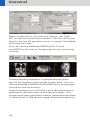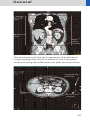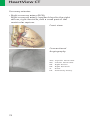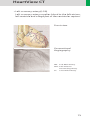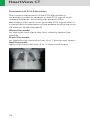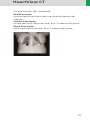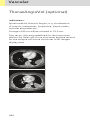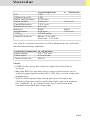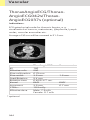
1
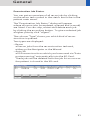
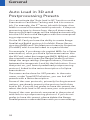
SOMATOM
Sensation Cardiac
Application Guide
Protocols
Principles
Helpful Hints
syngo Calcium Scoring
syngo InSpace 4D
syngo Vessel View
syngo Argus
Software Version B10
The information presented in this application guide
is for illustration only and is not intended to be relied
upon by the reader for instruction as to the practice
of medicine. Any health care practitioner reading this
information is reminded that they must use their own
learning, training and expertise in dealing with their
individual patients.
This material does not substitute for that duty and is
not intended by Siemens Medical Solutions Inc., to
be used for any purpose in that regard. The drugs and
doses mentioned are consistent with the approval
labeling for uses and/or indications of the drug. The
treating physician bears the sole responsibility for the
diagnosis and treatment of patients, including drugs
and doses prescribed in connection with such use.
The Operating Instructions must always be strictly
followed when operating the CT System. The source
for the technical data is the corresponding data
sheets.
The pertaining operating instructions must always
be strictly followed when operating the SOMATOM
Sensation Cardiac. The statutory source for the
technical data are the corresponding data sheets.
We express our sincere gratitude to the many customers
who contributed valuable input.
Special thanks to Thomas Flohr, Rainer Raupach,
Bettina Klingemann, Axel Barth, Kristin Pratt and the
CT-Application Team for their valuable assistance.
To improve future versions of this application guide,
we would highly appreciate your questions, suggestions
and comments.
Please contact us:
USC-Hotline:
Tel. no. +49-1803-112244
email
[email protected]
Editors: Christiane Bredenhöller and Ute Feuerlein
2
3
Overview
4
General
14
HeartView CT
70
syngo CalciumScoring
98
Coronary CTA
116
syngo InSpace 4D
138
syngo Vessel View
140
syngo Argus
164
Children
184
Head
234
Neck
258
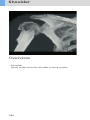
Shoulder
266
Thorax
272
Abdomen
290
Overview
Pelvis
304
Spine
314
Upper Extremities
330
Lower Extremities
338
Vascular
348
Specials
380
5
Content
General
· User Documentation
· Concept of Scan Protocols
· Straton-Tube (optional)
· Scan Set Up
· Scan Modes
– Sequential Scanning
– Spiral Scanning
– Dynamic Multiscan
– Dynamic Serioscan
· Slice Collimation and Slice Width
· Increment
· Pitch
· Kernels
· Image Filters
· Improved Head Imaging
· Dose Information
– CTDIW and CTDIVol
– Effective mAs
· CARE Dose 4D
– How does CARE Dose 4D work?
– Special Modes of CARE Dose 4D
– Scanning with CARE Dose 4D
– Adjusting the Image Noise
– Activating and Deactivating CARE Dose 4D
– Conversion of Old Protocols into
Protocols with CARE Dose 4D
· 100kV-Protocols
· WorkStream 4D
– Recon Job
– 3D Recon
– Key Features
– Description
– Display of Recon Ranges in the
Toposegment
– Case Examples
· Workflow
– Recon Job
– Examination Job Status
· Auto Load in 3D and Postprocessing Presets
6
14
14
16
17
17
18
18
18
18
18
19
20
21
22
23
25
27
27
29
30
31
33
34
35
37
37
40
42
42
42
43
43
47
48
50
50
51
52
Content
General
· How to Create your own Scan Protocols
1. Edit/Save Scan Protocol
2. Scan Protocol Manager
– Hints
– Additional Information
· Contrast Medium
– The Basics
– IV Injection
– Bolus Tracking
– General Hints
– Test Bolus using CARE Bolus
– Test Bolus
· General Application Information
– Image Converter
– Report Template Configuration
– File Browser
– Patient Protocol
HeartView CT
· Heart Anatomy
– Important Anatomical Structures
of the Heart
– Placement of ECG-Electrodes
– Cardiac Cycle and ECG
– Temporal Resolution
– Technical Principles
– Prospective ECG-Triggering Versus
Retrospective ECG-Gating
– ECG-Correlated Thorax Imaging (optional)
– Determine ED and ES on the Test Series
– Preview Series
– ECG-Trace Editor
– ECG-Pulsing
– ACV on/off
– Synthetic Trigger
53
53
54
56
57
58
58
60
61
61
63
64
65
65
66
67
68
70
70
70
74
76
76
77
79
80
82
82
85
86
87
88
7
Content
HeartView CT
· Recon Jobs for Postprocessing
– Axial Images
– Double-Oblique Images
– Short Axis Images
– Multiphase Reconstruction on the
Examination or Recon Taskcard
– Reconstruction Examples
· Postprocessing on the 3D Card for
Short Heart Axis
8
89
89
91
92
93
94
96
syngo Calcium Scoring
· Hints in General
· CaScoreRoutine
· CaScoreFast
· CaScoreSeq
· Prerequisites
· General Workflow
1. Loading the Images
2. Evaluating Coronary Lesions
3. Automatic Result Display
4. Reporting and Filming
· Additional Information
98
99
100
101
102
105
106
106
107
110
112
113
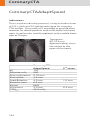
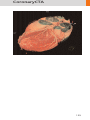
CoronaryCTA
· Hints in General
– Contrast Medium
· CoronaryCTARoutine
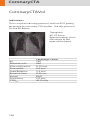
· CoronaryCTAFast
· CorCTALowHeartRate
· CoronaryCTA100kV
· CoronaryCTAAdaptSpeed
· 3D Recon Protocols
· CoronaryCTAVol
· CoronaryCTALowHeartRateVol
· CoronaryCTAAdaptedSpeedVol
· 4DCTAVol
· 4DCTALowHeartRateVol
· Aortic and Pulmonary Studies
116
118
118
120
121
122
123
124
126
128
129
130
131
132
133
Content
CoronaryCTA
· ThorAngioECG
· ThorAngioECGSeq
· ThoraxECGHRSeq
134
134
135
syngo InSpace 4D
· 4D Viewer
138
138
syngo Vessel View
· Key Features
· Prerequisites
· Workflow
1. Loading the Images
2. Visualization
3. Segmentation
Path Modification
4. Measurement Analysis
5. Documentation of Results
· Case Examples
– Workflow for an Aortic Aneurysm Case
– Workflow for a Coronary CTA Case,
e.g. LM and LAD
– Workflow for a Carotid Stenosis Case
140
140
141
142
142
144
145
150
151
154
156
156
syngo Argus
· Key Features
· Prerequisites
· Preparation
· Scan Protocols
· Image Reconstruction of Short Axis
MPR Images in Different Heartphases
– Multiphase Reconstruction on the
Examination or Recon Taskcard
– Reconstruction Examples
– Postprocessing on the 3D Card
· General Workflow
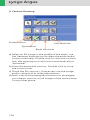
1. Image Loading
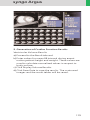
2. Argus Viewer
3. Argus Evaluation
4. Contour Drawing
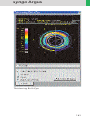
5. Generation of Cardiac Function Results
· Hints in General
158
160
164
164
164
165
166
168
169
171
173
174
174
174
176
178
179
182
9
Content
Children
184
· Overview
184
· Hints in General
186
– Head Kernels
189
– Body Kernels
190
· HeadRoutine
192
· HeadRoutine05s
194
· HeadSeq
196
· HeadSeq05s
198
· InnerEar
200
· InnerEarSeq
202
· SinusOrbi
204
· NeckRoutine
208
· ThoraxRoutine
210
· ThoraxCombi
212
· ThoraxHRSeq
214
· AbdomenRoutine
216
· SpineRoutine
218
· SpineThinSlice
220
· ExtrUHRRoutine
222
· ExtremityCombi
224
· HeadAngio
226
· CarotidAngio/CarotidAngio042s
(optional)
228
· BodyAngio/BodyAngio042s (optional)
230
· NeonateBody/NeonateBody042s (optional)232
Head
· Overview
· Hints in General
– Head Kernels
· HeadRoutine
· HeadRoutine05s
· HeadRoutineSeq
· HeadSeq
· HeadSeq05s
· InnerEarUHR
· InnerEarSeq
· SinusOrbi
· SinusOrbiVol (optional)
· Dental
10
234
234
235
236
238
240
242
244
246
248
250
252
254
256
Content
Neck
· Overview
· Hints in General
– Body Kernels
· NeckRoutine
· NeckThinSlice
258
258
259
260
262
264
Shoulder
· Overview
· Hints in General
– Body Kernels
· Shoulder
266
266
267
268
270
Thorax
· Overview
· Hints in General
– Body Kernels
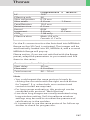
· ThoraxRoutine
· ThoraxCombi
· ThoraxHR
· ThoraxHRSeq
· ThoraxECGHRSeq (optional)
· LungLowDose
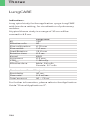
· LungCARE
272
272
273
274
276
278
280
282
284
286
288
Abdomen
· Overview
· Hints in General
– Body Kernels
· AbdomenRoutine
· AbdomenCombi
· AbdMultiPhase
· AbdSeq
· CTColonography
290
290
291
293
294
296
298
302
303
11
Content
12
Pelvis
· Overview
· Hints in General
– Body Kernels
· Pelvis
· Hip
· SI_Joints
304
304
305
306
308
310
312
Spine
· Overview
· Hints in General
– Body Kernels
· C-Spine
· SpineRoutine
· SpineThinSlice
· SpineVol (optional)
· SpineSeq
· Osteo
314
314
315
316
318
320
322
324
326
328
Upper Extremities
· Overview
· Hints in General
– Body Kernels
· WristUHR
· ExtrRoutineUHR
· ExtrCombi
330
330
331
332
334
336
337
Lower Extremities
· Overview
· Hints in General
– Body Kernels
· KneeUHR
· FootUHR
· ExtrRoutineUHR
· ExtrCombi
338
338
339
340
342
344
346
347
Content
Vascular
· Overview
· Hints in General
– Head Kernels
– Body Kernels
· HeadAngio
· HeadAngio100kV (optional)
· CarotidAngio
· CarotidAngioVol (optional)
· ThoraxAngioRoutine/
ThoraxAngio042s (optional)
· ThoraxAngioVol (optional)
· ThoraxAngioECG/ThoraxAngioECG042s/
ThoraxAngioECG037s (optional)
· Embolism/Embolism042s (optional)
· Embolism100kV
· BodyAngioRoutine
· BodyAngioFast/BodyAngio042s (optional)
· BodyAngioVol (optional)
· AngioRunOff
· WholeBodyAngio
348
348
350
351
351
352
354
356
358
364
366
368
370
372
374
376
378
Specials
· Overview
· Trauma
· The Basics
· How to do it
– Trauma
– PolyTrauma
– Additional Important Information
· Interventional CT
· CARE Vision
– The Basics
– Scan Protocols
– CAREView
– HandCARE
· Application Procedure
– Hints
· TestBolus
380
380
381
381
382
382
382
383
384
386
386
387
389
390
391
393
394
360
362
13
General
User Documentation
For further information about the basic operation,
please refer to the corresponding syngo CT Operator
Manual:
syngo CT Operator Manual
Volume 1:
Security Package
Basics
Preparations
Examination
HeartView CT
CARE Bolus CT
CARE Vision CT
syngo CT Operator Manual
Volume 2:
syngo Patient Browser
syngo Viewing
syngo Filming
syngo 3D
syngo CT Operator Manual
Volume 3:
syngo Data Set Conversion
syngo Calcium Scoring
syngo Dental CT
syngo Dynamic Evaluation
syngo Osteo CT
syngo Perfusion CT
syngo Pulmo CT
syngo Volume
14
General
syngo CT Operator Manual
Volume 4:
syngo Colonography
syngo InSpace 4D
syngo LungCARE CT
syngo CT Operator Manual
Volume 5:
syngo Argus
syngo Vessel View
15
General
Concept of Scan Protocols
The scan protocols for adult and children are defined
according to body regions – Head, Neck, Shoulder,
Thorax, Abdomen, Pelvis, Spine, Upper Extremities,
Lower Extremities, Vascular, Specials, Private and
optional Cardiac, and PET.
The protocols for special applications are defined in
the Application Guide “Clinical Applications 1” and
“Clinical Applications 2“ – or in case of Heart View
examinations, in the Application Guide “Heart View“.
The general concept is as follows: All protocols without suffix are standard spiral modes. E. g. “Shoulder”
means the spiral mode for the shoulder.
The suffixes of the protocol name are follows:
“Routine“: for routine studies
“Seq”: for sequence studies
“Fast“: use a higher pitch for fast acquisition
“ThinSlice“: use a thinner slice collimation
for thin slice Multi-Planar-Reconstruction – or
Maximum-Intensity-Projection studies
“Combi“: use a thinner slice width for Multi-PlanarReconstruction – or Maximum-Intensity-Projection
studies and thicker slice width for soft tissues studies
“042”: use the rotation time of 0.42 seconds
“037”: use the rotation time of 0.37 seconds
“UHR“: use a thinner slice width for Ultra High
Resolution studies and a FoV of 250 mm*
“ECG“: ECG gated or trigged mode
“100kV”: use the Tube Voltage 100*
“Vol”: use the 3D-Recon Workflow*
The availability of scan protocols depends on the
system configuration.
*optional
16
General
Straton-Tube (optional)
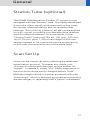
The SOMATOM Sensation Cardiac CT-system is now
equipped with the “Straton”-tube. This newly developed
X-ray tube offers significantly reduced cooling times
for shorter interscan delays and increased power
reserves. The full X-ray power of 60 kW can be applied
for a 20 s spiral, providing considerable dose reserves
even for adipose patients. As an example, in the
“Thorax Combi“ protocol (120 kV, 100 mAs, 0.5 s rot,
16 x 0.75 mm, pitch 1.25) a scan range of 400 mm
can be covered in 14 s and dose can be increased up
to 200 mAs without reduction of the table feed.
Scan Set Up
Scans can be simply set up by selecting a predefined
examination protocol. To repeat any mode, just
click the chronicle with the right mouse button for
“repeat”. To delete it, select “cut“. Each range name in
the chronicle can be easily changed before “load“.
Multiple ranges can be run either automatically with
“auto range“, which is denoted by a bracket connecting
the two ranges, or separately with a “pause” in between.
17
General
Scan Modes
Sequential Scanning
This is an incremental, slice-by-slice imaging mode
in which there is no table movement during data
acquisition. A minimum interscan delay in between
each acquisition is required to move the table to
the next slice position.
Spiral Scanning
Spiral scanning is a continuous volume imaging
mode. The data acquisition and table movements are
performed simultaneously for the entire scan duration. There is no inter-scan delay and a typical range
can be acquired in a single breath hold.
Each acquisition provides a complete volume data
set, from which images with overlapping can be
reconstructed at any arbitrary slice position. Unlike
the sequence mode, spiral scanning does not require
additional radiation to obtain overlapping slices.
Dynamic Multiscan
Multiple continuous rotations at the same table
position are performed for data acquisition. Normally,
it is applied for fast dynamic contrast studies, such as
Perfusion CT.
Dynamic Serioscan
Dynamic serial scanning mode without table feed.
Dynamic serio can still be used for dynamic evaluation
such as Test Bolus.
18
General
Slice Collimation and
Slice Width
Slice collimation is the slice thickness resulting from
the effect of the tube-side collimator and the adaptive
detector array design. In Multislice CT, the Z-coverage
per rotation is given by the product of the number of
active detector slices and the collimation
(e. g. 16 x 0.75 mm for the SOMATOM Sensation
Cardiac.
Slice width is the FWHM (full width at half maximum)
of the reconstructed image.
With the SOMATOM Sensation Cardiac, you select the
slice collimation together with the slice width desired.
The slice width is independent of pitch, i. e. what you
select is always what you get. Actually, you do not
need to care about the algorithm any more; the software does it for you.
On the SOMATOM Sensation Cardiac some slice
widths are marked as “fast” (blue background). These
images are reconstructed with highest performance.
All others will be reconstructed up to 3 images per
second.
The reconstruction time depends on slice collimation
and the reconstructed slice width. To get the fast
performance, slice width has to be at least 3 times the
slice collimation.
During scanning the user normally will get “Real Time”
reconstructed images in full image quality, if the “fast”
slice has been selected.
In some cases – this depends also on Scan range,
Feed/Rotation and Reconstruction increment –
the Recon icon on the chronicle will be labeled with
“RT”. This indicates the Real Time display of images
during scanning. The Real Time displayed image series
has to be reconstructed after completion of spiral.
19
General
Slice Collimation and Slice Width for Spiral Mode
0.75 mm:
1.5 mm:
0.75, 1, 1.5, 2, 3, 4, 5, 6, 7, 8, 10 mm
2, 3, 4, 5, 6, 7, 8, 10 mm
Slice Collimation and Slice Width for Sequence Mode
0.75 mm:
1.0 mm:
1.5 mm:
5.0 mm:
0.75, 1.5, 3, 4.5, 9 mm
1, 2 mm
1.5, 3, 4.5, 6, 9 mm
5, 10 mm
UHR Spiral Mode
0.6 mm:
0.75 mm:
0.6, 0.75, 1, 1.5, 2, 3, 4, 5, 6 mm
(optional)
0.75, 1, 1.5, 2, 3, 4, 5, 6, 7, 8, 10 mm
UHR Sequence Mode
0.6 mm:
0.75 mm:
1.0 mm:
0.6, 1.2 mm (optional)
0.75, 1.5, 3, 4.5, 9 mm
1, 2 mm
Increment
The increment is the distance between the reconstructed images in the Z direction. When the increment
chosen is smaller than the slice thickness, the images
are created with overlap. This technique is useful to
reduce partial volume effect, giving you better detail
of the anatomy and high quality 2D and 3D postprocessing.
20
General
Pitch
In single slice CT:
Pitch = table movement per rotation/slice collimation
E. g.: slice collimation = 5 mm,
table moves 5 mm per rotation, then pitch = 1.
With the SOMATOM Sensation Cardiac, in Siemens
Multislice CT, we differentiate between:
Feed/Rotation, the table movement per rotation
Volume Pitch, table movement per rotation/
single slice collimation.
Pitch Factor, table movement per rotation/
complete slice collimation.
E. g. slice collimation = 16 x 1.5 mm,
table moves 24 mm per rotation.
Then volume pitch = 16, pitch factor = 1.
Pitch Factor, table movement per rotation/
complete slice collimation.
With the SOMATOM Sensation Cardiac, you do not
need to select pitch. Once the scan range, scan time,
slice collimation, and rotation time are defined, the
software will adapt the table feed per rotation accordingly. The Pitch Factor can be freely adapted from
0.45 – 2.0.
We recommend to use a Pitch Factor of 0.45 for MPR
reconstructions.
21
General
Kernels
There are 5 different types of kernels: “H“ stands for
Head, “B“ stands for Body, “U“ stands for High Resolution,
“C“ stands for ChildHead and ”S” stands for Special
Application, e. g. Osteo CT.
The image sharpness is defined by the numbers – the
higher the number, the sharper the image; the lower
the number, the smoother the image. The endings “s”
or “f” depend on the rotation time.
A set of 36 kernels is supplied with the SOMATOM
Sensation Cardiac Software, consisting of
• 14 body kernels B10s/f, B20s/f, B30s/f, B31s/f,
B35s/f, B36f, B40s/f, B41s/f, B45s/f, B46f, B50s/f,
B60s/f, B70s/f, B80s/f,
• 11 head kernels H10s/f, H20s/f, H21s/f, H30s/f,
H31s/f, H40s/f, H41s/f,H45s/f H50s/f, H60s/f, H70h
• 3 child head kernels C20s/f, C30s/f, C60s
• 6 high resolution kernels U30u, U40u, U70u, U80u,
U90u, U95u
• 2 special kernels S80s/f, S90s/f.
Note: Do not use different kernels for body parts other
than what they are designed for.
For further information regarding the kernels, please
refer to the “Hints in General” of the corresponding
body region.
22
General
Image Filters
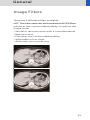
There are 3 different filters available:
LCE: The Low-contrast enhancement (LCE) filter
enhances low-contrast detectability. It reduces the
image noise.
• Similar to reconstruction with a smoother kernel
• Reduces noise
• Enhances low-contrast detectability
• Adjustable in four steps
• Automatic post-processing
23
General
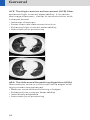
HCE: The High-contrast enhancement (HCE) filter
enhances high-contrast detectability. It increases
the image sharpness, similar to reconstruction with
a sharper kernel.
• Increases sharpness
• Faster than raw-data reconstruction
• Enhances high-contrast detectability
• Automatic post-processing
ASA: The Advanced Smoothing Algorithm (ASA)
filter reduces noise in soft tissues while edges with
high contrast are preserved.
• Reduces noise without blurring of edges
• Enhances low-contrast detectability
• Individually adaptable
• Automatic post-processing
24
General
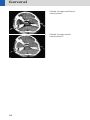
Improved Head Imaging
The software VB10 provides significant improvements
regarding image quality for heads. An automatic bone
correction algorithm has been included in the standard
image reconstruction. Using a new iterative technique,
typical artifacts arising from the beam-hardening
effect, e. g. Hounsfield bar, are minimized without any
additional post-processing. This advanced algorithm
allows for excellent images of the posterior fossa, but
also im-proves head image quality in general. Bone
correction is activated automatically for body region
“Head”.
The new reconstruction algorithm for “Head” also
employs special adaptive convolution kernels which
allow for improving the sharpness to noise ratio.
More precisely, anatomic contours are clearly displayed
while noise is suppressed at the same time without
causing a blurring of edges.
In order to optimize image quality versus radiation
dose, scans in body regions “Head” and “AngioHead”
are provided within a maximum scan field of 300 mm
with respect to the iso-center. No recon job with
a field of view exceeding those limits will be possible.
Therefore, patient positioning has to be performed
accurately to ensure a centered location of the skull.
25
General
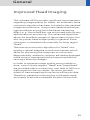
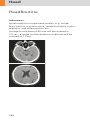
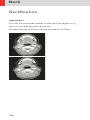
Head image without
correction.
Head image with
corrections.
26
General
Dose Information
CTDIW and CTDIVol
The average dose in the scan plane is best described
by the CTDIw for the selected scan parameters. The
CTDIw is measured in the dedicated plastic phantoms –
16 cm diameter for head and 32 cm diameter for body
(as defined in IEC 60601–2– 44). This dose index gives
a good estimate for the average dose applied in the
scanned volume as long as the patient size is similar to
the size of the respective dose phantoms.
Since the body size can be smaller or larger than
32 cm, the CTDIw value displayed can deviate from the
dose in the scanned volume.
The CTDIW definition and measurement is based on
single axial scan modes. For clinical scanning, i. e.
scanning of entire volumes in patients, the average
dose will also depend on the table feed in between
axial scans or the feed per rotation in spiral scanning.
The dose, expressed as the CTDIW, must therefore be
corrected by the Pitch Factor of the spiral scan or an
axial scan series to describe the average dose in the
scanned volume.
For this purpose the IEC defined the term “CTDIVol“ in
September 2002:
CTDIVol = CTDIW/Pitch Factor
This dose number is displayed on the user interface for
the selected scan parameters.
Please note: Up to now the dose display on the
Somaris\5 user interface was labeled “CTDIW“.
This displayed CTDIW was also corrected for the pitch.
27
General
The CTDIW value does not provide the entire information
of the radiation risk associated with CT examination.
For the purpose, the concept of the “Effective Dose“
was introduced by ICRP (International Commission on
Radiation Protection). The effective dose is expressed
as a weighted sum of the dose applied not only to the
organs in the scanned range, but also to the rest of the
body. It could be measured in whole body phantoms
(Alderson phantom) or simulated with Monte Carlo
techniques.
The calculation of the effective dose is rather complicated and has to be done by sophisticated programs.
These have to take into account the scan parameters,
the system design of individual scanner, such as x-ray
filtration and gantry geometry, the scan range, the
organs involved in the scanned range and the organs
affected by scattered radiation. For each organ, the
respective dose delivered during the CT scanning has
to be calculated and then multiplied by its radiation
risk factor. Finally, the weighted organ dose numbers
are added up to get the effective dose.
The concept of effective dose allows the comparison
of radiation risk associated with different CT or x-ray
exams, i. e. different exams associated with the same
effective dose would have the same radiation risk
for the patient. It also allows comparing the applied
x-ray exposure to the natural background radiation,
e. g. 2 – 3 mSv per year in Germany.
Note: The written CTDIVol and Effective Dose are for
the Acron Tube.
28
General
Effective mAs
In sequential scanning, the dose (Dseq) applied to the
patient is the product of the tube current-time (mAs)
and the CTDIw per mAs:
Dseq = DCTDIw x mAs
In spiral scanning, however, the applied dose (Dspiral)
is influenced by the “classical“ mAs (mA x Rot Time) and
in addition by the Pitch Factor. For example, if a Multislice CT scanner is used, the actual dose applied to the
patient in spiral scanning will be decreased when the
Pitch Factor is larger than 1, and increased when the
Pitch Factor is smaller than 1. Therefore, the dose in
spiral scanning has to be corrected by the Pitch Factor:
Dspiral = (DCTDIw x mA x Rot Time)/Pitch Factor
To make it easier for the users, the concept of the
“effective“ mAs was introduced with the SOMATOM
Multislice scanners.
The effective mAs takes into account the influence of
pitch on both the image quality and dose:
Effective mAs = mAs/Pitch Factor
To calculate the dose on the SOMATOM Sensation
Cardiac, you simply have to multiply the CTDIw per mAs
with the effective mAs of the scan:
Dspiral = DCTDIw x effective mAs
For spiral scan protocols, the indicated mAs is the effective mAs per image. The correlation between tube
current mA and effective mAs of spiral scans on a Multislice CT scanner is given by the following formula:
Effective mAs = mA x RotTime/Pitch Factor
Pitch Factor =
mA =
Feed/Rot
nrow x Slice collimation
effective mAs
x Pitch Factor
RotTime
where Slice collimation refers to the collimation
of one detector row, and nrow is the number of used
detector rows.
29
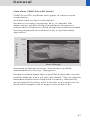
General
CARE Dose 4D
CARE Dose 4D is an automatic exposure control
which includes automatic tube current adaptation to
the patient’s size and anatomic shape together with
an on-line controlled tube current modulation for
each tube rotation. This provides well balanced image
quality at low radiation dose levels.
Based on a single a.p. or lateral Topogram CARE Dose
4D determines the adequate tube current level for
every section of the patient. Based on these levels CARE
Dose 4D modulates the tube current on-line during
each tube rotation according to the patient’s angular
attenuation profile. Thus the best distribution of dose
along the patient’s long axis and for every viewing
angle is achieved.
Based on a user defined “Image Quality Reference mAs”
CARE Dose 4D automatically adapts the (eff.) mAs
to the patient size and attenuation changes within the
scan region. With the setting of the “Image Quality
Reference mAs” the user may adjust image quality
(image noise) to the diagnostic requirements and the
individual preference of the radiologist.
Note: The “Image Quality Reference mAs” should not
be adjusted to the individual patient size!
30
General
How does CARE Dose 4D work?
CARE Dose 4D combines two types of tube current
modulation:
a) Axial tube current modulation:
Based on a single Topogram (a.p. or lateral) the
attenuation profile along the patient’s long axis is
measured in direction of the projection and estimated
for the perpendicular direction by a sophisticated
algorithm.
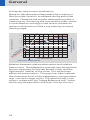
Attenuation (log)
10000
lateral
1000
100
10
1
Scan Range
Example of lateral and a.p. attenuation profile
evaluated from an a.p. Topogram.
Based on these attenuation profiles axial tube current
profiles (lateral and a.p.) are calculated. The correlation
between attenuation and tube current is defined by
an analytical function which results in an optimum of
dose and image noise in every slice of the scan.
31
General
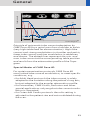
b) Angular tube current modulation:
Based on the above described axial tube current profiles the tube current is modulated during each tube
rotation. Therefore the angular attenuation profile is
measured on-line during the scan and the tube current
is modulated accordingly in real time to achieve an
optimum distribution of the x-ray intensity for every
viewing angle.
ois
en
ag
t im
tan
se
obe
a
rel. tube current
st ve w
ro ra e
ng ge ek
de de de
cr cr cr
ea ea ea
se se se
1.6
co
ns
1.4
1.2
constant dose
1
im
sl
0.8
0.6
0.4
Image Quality
reference tube current
se
crea
ng in
stro
ase
re
c
ge in
avera
ease
week incr
e
2
1.8
0.2
0
0.5
1
1.5
2
2.5
3
3.5
4
4.5
5
rel. attenuation
reference attenuation
Relation between relative attenuation and relative
tube current. The adaptation strength may be adjusted
by user separately for the left branch (slim) and the
right branch (obese) of the curve. This adjustment
effects all examinations. The gray lines here indicates
the theoretical limits of the adaptation (constant dose
resp. constant image noise). The absolute (eff.) mAs
value is scaled with the “Image Reference mAs” value,
which may be adjusted in the Scan Card by the user.
32
tube current
General
lat.
lat.
a.p.
a.p.
1st rot.
2nd rot.
scanrange z
Principle of automatic tube current adaptation by
CARE Dose 4D for a spiral scan from shoulder to pelvis
(very high table feed for demonstration): High tube
current and strong modulation in shoulder and pelvis,
lower tube current and low modulation in abdomen
and thorax. The dotted lines represent the min. and
max. tube current at the corresponding table position
and result from the attenuation profile of the Topogram.
Special Modes of CARE Dose 4D
For certain examination protocols CARE Dose 4D
uses limited tube current modulation, to meet specific
conditions, e. g.
• for Adult Head protocols the tube current is solely
adapted to the variation along the patient’s long axis,
but not adapted to the angular attenuation profile.
• for Extremities, CARE Vision, Perfusion and other
special applications only angular tube current modulation is supported.
• for Osteo and Cardio protocols the mAs setting is
adjusted to the patient size and not modulated during
the scan.
33
General
Scanning with CARE Dose 4D
With the settings of “Image Quality Reference mAs”
properly predefined*, no further adjustment of the
tube current has to be made to perform a scan.
CARE Dose 4D automatically adapts the tube current
to different patient size and anatomic shapes, but it
ignores metal implants.
For an accurate mAs adaptation to the patient’s size
and body shape with CARE Dose 4D the patient should
be carefully centered in the scan field.
When using protocols with CARE Dose 4D for other
than the body regions they are designed for, the image
quality should be carefully evaluated.
As CARE Dose 4D determines the (eff.) mAs for every
slice from the Topogram, a Topogram must be performed to use CARE Dose 4D. For an optimum image
quality the kV setting for the Topogram and the subsequent scans should be identical. The range of the
scan should not exceed the range of the Topogram.
Outside the Topogram range CARE Dose 4D will
continue the scan with the last available Topogram
information. Without a Topogram CARE Dose 4D
cannot be switched on. Repositioning of the patient
and excessive motion of the patient must be avoided
between the Topogram and the scan. If there exist
concurrent valid Topograms for one scan range,
the most up-to-date one will be used for determining
the (eff.) mAs. If there exist an a.p. and a lateral
Topogram for one scan range, both will be used for
determining the (eff.) mAs.
* For Siemens scan protocols of SW version VB10, the
settings of CARE Dose 4D are already predefined, but
may be changed to meet the customers preference
of image quality (image noise).
34
General
After the Topogram has been scanned the “(eff.) mAs”
value in the Routine Card and Scan Card displays the
mean (eff.) mAs which was estimated by CARE Dose 4D
based on the Topogram*. After the scan has been
performed this value is updated to the mean (eff.) mAs
which were applied. The values may differ because
of the on-line modulation according to the patient’s
angular attenuation profile.
Adjusting the Image Noise
The correlation between attenuation and tube current
is defined by the analytical function described above.
This function may be adjusted to adapt the image quality (image noise) according to the diagnostic requirements and the individual preference of the radiologist.
– To adapt the image noise for a scan protocol the
“Image Quality Reference mAs” value in the Scan Card
may be adjusted. This value reflects the mean (eff.)
mAs value that the system will use for a “reference
patient” with that protocol. Thereby the reference
patient is defined as a typical adult, 70 kg to 80 kg or
155 to 180 lbs. (for adult protocols) or as a typical
child, 5 years, appr. 20 kg or 45 lbs. (for child protocols). Based on that value the CARE Dose 4D adapts
the tube current (resp. the mean “(eff.) mAs value”)
to the individual patient size.
* For the tuning of the CARE Dose 4D parameter
setting to individual preference of image quality it is
recommended to keep track of this value and to compare it with the values used without CARE Dose 4D.
35
General
Important note: Do not adapt the Image Quality
Reference mAs for individual patient size.
Only change this value, if you want to adjust image
quality.
• The adaptation strength of CARE Dose 4D may be
influenced for slim or obese patients or body parts of
a patient by changing the CARE Dose 4D settings in
the “Examination Configuration”.
This may be desirable
– if the automatic dose increase for obese patients
(resp. patient sections) should be stronger than
the presetting (choose “obese: strong increase”),
resulting in less image noise and higher dose for
those images.
– if the automatic dose increase for obese patients
(resp. patient sections) should be more moderate
than the presetting (choose “obese: weak increase”),
resulting in more image noise and lower dose for
those images.
– if the automatic dose decrease for slim patients
(resp. patient sections) should be stronger than
the presetting (choose “slim: strong decrease”),
resulting in more image noise and lower dose for
those images.
– if the automatic dose decrease for slim patients
(resp. patient sections) should be more moderate
than the presetting (choose “slim: weak decrease”),
resulting in less image noise and higher dose for
those images.
36
General
Activating and Deactivating CARE Dose 4D
CARE Dose 4D may be activated or deactivated for
the current scan in the Scan Card. With CARE Dose 4D
activated as default, the “Image Quality Reference
mAs” value is set to the default value of the protocol.
After deactivating CARE Dose 4D the “Image Quality
Reference mAs” is dimmed and the “(eff.) mAs” value
has to be adjusted to the individual patient size! If
CARE Dose 4D is switched on again, the “Image Quality
Reference mAs” is reactivated. Note, that the last
setting of the “Image Quality Reference mAs” resp. the
“(eff.) mAs” will be restored, when switching back
and forth between CARE Dose 4D usage. The default
activation state of CARE Dose 4D may be set in the
Scan Protocol Manager. CARE Dose 4D must be selected
(column “CARE Dose type”). The corresponding column
for activating CARE Dose 4D is named “CARE Dose (4D)”,
with possible default “on” or “off”.
Conversion of Old Protocols into Protocols
with CARE Dose 4D
Protocols of SW versions VA70, VA47 and VA45 may
be converted to CARE Dose 4D in the Scan Protocol
Manager.
Prior to activating CARE Dose 4D an “Image Quality
Reference mAs” value has to be set in the corresponding column.
37
General
Note: The “Image Quality Reference mAs” corresponds
to the (eff.) mAs value that the radiologist would apply
for a reference patient without the use of CARE Dose 4D.
The reference patient is defined as a typical adult,
70 kg to 80 kg or 155 to 180 lbs. (for adult protocols)
or as a typical child, 5 years, appr. 20kg or 45 lbs. (for
child protocols). After entering the “Image Quality
Reference mAs” the CARE Dose type may be switched
from CARE Dose to CARE Dose 4D in the corresponding
column. In the Scan Card the checkbox name will automatically change from “CARE Dose” to “CARE Dose 4D”,
the “Image Quality Reference mAs” will be displayed
and in the Routine Card the comment “CARE Dose 4D“
will added to the “(eff.) mAs” value when CARE Dose 4D
is activated.
Note: When using CARE Dose 4D with child protocols,
make sure that all memos in the Chronicle with the
correlation between the patient’s weight and the mAs
are deleted! With CARE Dose 4D these memos loose
their meaning because the mAs are automatically
adapted to the patient size. If CARE Dose 4D is switched
off again, the mAs have to be manually adapted to the
patient size. Proposals for mAs settings may be taken
from the application guide.
38
General
If you are unsure about the correct “Image Quality
Reference mAs” value, follow this simple procedure:
• Enter the (eff.) mAs value used for that type of
protocol without CARE Dose 4D.
• When using the protocol for the first time, perform
the Topogram and adjust the “Image Quality Reference
mAs“ in the Scan Card prior to the consequent scan,
so that the displayed “(eff.) mAs” value is about that
value you would have applied for that scan without
CARE Dose 4D.
• With that setting perform the first scan and carefully
inspect the image quality. In that first step the dose
may not be lower than without CARE Dose 4D but will
be well adapted to the patient’s attenuation, resulting in improved image quality.
• Starting from that setting reduce the “Image Quality
Reference mAs“ step by step to meet the necessary
image quality level.
• Store the scan protocol with the adapted “Image
Quality Reference mAs“.
39
General
100kV-Protocols
The system offers a spectrum of four kV settings (80 kV,
100 kV, 120 kV and 140 kV) for individual adaptation
of the patient dose in pediatric scans and for optimization of the contrast-to-noise ratio in contrast-enhanced
CT angiographic studies.
In contrast enhanced studies, such as CT angiographic
examinations, the contrast-to-noise ratio for fixed
patient dose increases with decreasing tube voltage.
As a consequence, to obtain a given contrast-to-noise
ratio, patient dose can be reduced by choosing lower
kV-settings. This effect is even more pronounced for
smaller patient diameters. It can be demonstrated by
phantom measurements using small tubes filled with
diluted contrast agent embedded in plastic phantoms
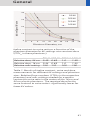
with different diameters. The iodine contrast-to-noise
ratio for various kV-settings is depicted in table 1 as
a function of the phantom diameter. Compared to a
standard scan with 120 kV, the same contrast-to-noise
ratio in a 24 cm phantom, corresponding to a slim
adult, is obtained with 0.5 times the dose for 80 kV
(1.5 times the mAs) and 0.7 times the dose (1.1 times
the mAs) for 100 kV. Ideally, 80 kV should be used
for lowest patient dose. In practice, however, the use
of 80 kV for larger patients is limited by the available
mA-reserves of the X-ray generator.
In these patients, 100 kV is a good compromise and
the preferable choice for CTA examinations.
40
General
40
80 kV
100 kV
Iodine Signal/Noise
30
120 kV
140 kV
20
10
0
0
4
8
12
16
20
24
28
32
36
Phantom Diameter, cm
Iodine contrast-to-noise ratio as a function of the
phantom diameter for kV-settings at a constant dose
(CTDIw in these phantoms).
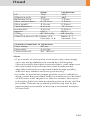
80 kV 100 kV
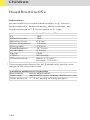
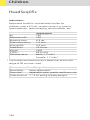
Relative dose, 24 cm 0.49 0.69
Relative dose, 16 cm 0.44 0.68
Relative mAs setting 150 110
120 kV
1.0
1.0
100
140 kV
1.49
1.43
100
Table 1: Results of iodine contrast, noise and dose
measurements for different kV settings and phantom
sizes. Relative Dose numbers (CTDIw in the respective
phantom) and mAs settings needed for a certain
contrast to noise ratio in the center of the 16 cm and
24 cm plastic phantoms. The required dose for the
same contrast to noise ratio is significantly lower for
lower kV values.
41
General
WorkStream4D
Recon Job
In the Recon card, you can now define up to 8 reconstruction jobs for each range with different parameters
either before or after you acquire the data. When you
click on “Recon“, they will all be done automatically
in the background. In case you want to add more than
8 recon jobs, simply click the icon on the chronicle with
the right mouse button and select “delete recon job“
to delete the one which has been completed, and then
one more recon job will be available in the Recon card.
Note: What you delete is just the job from the display,
not the images that have been reconstructed. Once
reconstructed, these completed recon jobs stay in the
browser, until deleted from the hard drive.
You can also reconstruct images for all scans performed by not selecting any range in the chronicle,
prior to clicking “Recon”.
3D Recon
3D Recon gives you the ability to perform oblique and/
or double oblique reconstructions in any user-defined
direction directly after scanning.
No further post-processing or data loading is needed.
The high-quality SPO (spiral oblique) images are calculated by using the system’s raw data.
42
General
Key Features
• Reconstruction of sagittal, coronal and oblique/
double oblique images
• 3 planning images in the 3 standard orientations
(coronal, axial, sagittal)
• Image types for planning MPR thick (10 mm),
MIPthin (3 mm)
• Field of view and reference image definition possible
in each planning segment
• Asynchronous reconstruction (several reconstruction jobs are possible in the background, axial and
non-axial)
• Workstream 4D performs reconstructions on the
basis of CT raw data
• If the raw data are saved you can start the 3D reconstruction either on your Navigator or Wizard console
(optional).
Description
WorkStream 4D improves your workflow whenever
non-axial images of a CT scan are required, e. g. examinations of the spine.
3D reconstructions are possible:
– spiral scan is needed
– as soon as one scan range is finished and at least one
axial reconstruction job has been performed (RTD or
RTR images).
43
General
Select a new recon job and mark “Recon Job Type –
3D” on the reconstruction tabcard. The first recon job
that fits for the 3D reconstruction is used as ”Available
planning volumes.”
You can choose between MPRThick (10 mm)
and MIPThin (3 mm) as image type for your planning
volume.
Three planning segments in perpendicular orientations will appear in the upper screen area. You can
choose between MPRthick and MIPthin as image type
via the according buttons.
In each segment you will find a pink rectangle which
represents the boundary of the result images. The
images with the right down marker, represents the field
of view (FoV) of the result images (viewing direction).
44
General
FoV
Reference
lines
Rightdown
marker
The rectangle with the grid represents the reference
image (topogram) which is added to the Topogram
series including the reference lines after reconstruction.
Topographicsindicator
Reference
lines
Recon area
(length)
45
General
Depending on the desired result images, choose
coronal, sagittal or oblique recon axis.
1. Sagittal/Coronal Reconstructions
If sagittal or coronal axis is selected, the reference
lines can be moved, but not rotated
• Adjust the field of view size to your needs.
• It is only possible to reconstruct images with
a squared matrix.
2. Oblique/Double-oblique Reconstructions
If you want to define the orientation of the result
images independent of the patient’s axis, e. g. for
heart scans in the short and long heart axis select
recon axis “oblique”.
• Enable the Free View Mode and rotate the reference
lines in the three segments until the desired image
orientation is displayed. The vertical and horizontal
line are always perpendicular to each other. With the
default orientation button you can reset the image
orientation at any time.
• It is only possible to reconstruct images with
a squared matrix.
• Set the field of view to the active segment by clicking the “Set FoV button”. The result images will then
be orientated as in the FoV segment. You can adjust
the extension perpendicular to the field of view can be
adjusted in the same way in the other two segments.
To define the Reference Image (Topogram) to the active
segment, click on the “Set Reference Segment” button.
This defines the orientation of the reference image
which will be added to the result images.
Once you have finished the adjustment start the calculation of the result images by clicking on the “Recon”
button. Each 3D recon job has to be started separately.
You can start a recon job at any time, independent
of other ongoing jobs (asynchronous reconstruction).
After starting the reconjob the layout of the Examination Taskcard changes back to the standard layout.
The progress of the reconstruction is displayed by the
slider in the Tomosegment.
46
General
Display of Recon Ranges in the Toposegment
As soon as a new recon range will be defined by the
user, all recon ranges will be shown in the Toposegment. Two numbers at the right hand side at the
beginning of each recon range indicate the recon
job the range belongs to. The first number stands for
the scan range, the second one stand for the recon
job, where the range belongs to. If no recon job is in
planning only the scan ranges are shown in the Toposegment. Only one number at the right hand side at
the beginning of each scan range indicates to which
scan the range belongs to.
• If the first recon job is saved as “Oblique” recon job,
after scanning, RTD images are displayed and the
Examination card is automatically switched to 3D
reconstruction
• Patient Browser:
for each double oblique recon job two series are
added in the Patient Browser
– one consists of the reconstructed images
– one consists of 2 reference images and if selected
the topographics image.
• All reconstructions are performed in the background
• Do not use high resolution images
• Do not use extended FoV
• If no entry is selected in the chronicle all axial reconstructions are automatically reconstructed. All double
oblique reconstructions have to be performed manually (press recon button).
47
General
Case Examples
Some scan protocols are delivered with predefined oblique reconstructions. These protocols
are marked with the suffix “VOL”
• Coronal and sagittal reconstruction of the spine:
– Scan a topogram
– Plan your axial spiral scan range
– Reconstruction of the spiral images (RTR/RTD images)
– Select “Recon job Type” sagittal/coronal
– Select the axial image segment
– Press button “Set FoV”
– Adjust the FoV to your needs
– Define your desired reconstruction parameters
(e. g. image type SPO)
– Start reconstruction
– Repeat the reconstruction steps for the other
orientation (sagittal/coronal)
• Oblique reconstruction of the sinuses:
– Scan a topogram
– Plan your spiral scan range
– Axial reconstruction of the spiral images
(RTR/RTD images)
– Select “Recon job Type” oblique
– Select the sagittal image segment
– Enable “Free Mode”
– Rotate the reference lines until the best view on the
sinuses is displayed in one of the other segments
– Select this segment and press button “Set FoV
button”
– Adjust the FoV to your needs
– Define your desired reconstruction parameters
(e. g. image type SPO)
– Start reconstruction
48
General
• Oblique reconstruction of the vascular tree:
– Scan a topogram
– Plan your spiral scan range
– Axial reconstruction of the spiral images
(RTR/RTD images)
– Select “Recon job Type” oblique
– Select button “MIPThin” as image type for the
planning volume on the toolbar
– Enable “Free Mode”
– Rotate the reference lines until the best view
on the entire vascular tree is displayed in one of the
other segments
– Select the coronal image segment
– Select this segment and press button “Set FoV
button”
– Adjust the FoV to your needs
– Define your desired reconstruction parameters
(e. g. Type MIPthin)
– Start reconstruction
• Double-oblique reconstructions of the heart
For detailed information on heart reconstructions
please refer the chapter “syngo Argus“.
49
General
Workflow
Recon Job
Reconstruction on Wizard
Now it is also possible to start all reconstructions from
your satellite console.
• Raw data have to be available in the local database
• Select the raw data series of the patient in the
PatientBrowser and load it into the Recon Taskcard
• Plan your recon jobs as usual
50
General
Examination Job Status
You can get an overview of all recon jobs by clicking
on the recon task symbol in the status bar or the in the
patient main menu.
The “Examination Job Status” dialog will appear
where all recon jobs (completed, queued and in work)
are listed. You can stop, restart and delete each job
by clicking the according button. To give a selected job
a higher priority click “urgent”.
The column “Type“ shows you which kind of reconstruction is queued.
Two types are displayed:
– Recon
all recon jobs from the reconstruction taskcard,
either on the Navigator or the Wizard
– Auto 3D
all 3D reconstructions which you have send via “Auto
postprocessing” automatically into the 3D Card.
These jobs will be deleted from the job list as soon as
the patient is closed in the 3D card.
51
General
Auto Load in 3D and
Postprocessing Presets
You can activate the “Auto load in 3D” function on the
Examination Card/Auto Tasking and link it to a recon
job. For example, the 2nd recon job with thinner slice
width in some of the examination protocols. If the postprocessing type is chosen from the pull down menu,
the reconstructed images will be loaded automatically
into the 3D Card on the Navigator with the corresponding postprocessing type.
On the 3D Card you have the ability to create Range
Parallel and Radial protocols for Multi-Planar-Reconstruction (MPR) and Thin Maximum-Intensity-Projection
(ThinMIP) which can be linked to a special series.
For example, if you always do sagittal MPRs for a Spine
examination, once you load a Spine examination into
the 3D Card, select the image type (MPR, MIPthin), select
the orientation and open the Range Parallel function.
Adapt the range settings (Image thickness, Distance
between the images etc.) and hit the link button. From
that point on, you have a predefined postprocessing
protocol, linked to the series description of a Spine
examination.
The same can be done for VRT presets. In the main
menu, under Type/VRT Definition, you can link VRT
presets with a series description.
Some of the scan protocols, primarily for Angio examinations, are already preset in the protocol with Auto
load in 3D. If you do not prefer to have this preset, deselect the Auto load in 3D and save your scan protocol.
Some of the scan protocols are preset in the protocol
with links to a postprocessing protocol. If you do not
prefer to have this preset, please delete the Range
Parallel preset or overwrite them with your own settings.
52
General
How to Create your own
Scan Protocols
There are two different ways to modify and create
your scan protocols:
1. Edit/Save Scan Protocol
If you want to modify an existing protocol or create a
new one, e. g. you want to have two “AbdomenRoutineProtocols” with different slice width, we recommend
to do this directly on the Examination card.
User-specific scan protocols can be saved with the
following basic procedure:
• Register a patient, you can choose any patient
position in the “Patient Model Dialog“.
• Select an existing scan protocol in the “Patient Model
Dialog”.
• Modify the scan protocol, change parameters, add
new ranges etc. so that the new protocols fits to your
needs.
• Scan your patient as usual.
• Check if all parameters are as you desire.
• Select Edit/Save Scan Protocol in the main menu.
• Select the folder where you want the new protocol
to appear and the scan protocol name in the pop-up
dialog.
• You can either use the same name to overwrite
the existing scan protocol, or enter a new name,
which will create a new protocol name and will not
alter any of the existing protocols already stored.
53
General
Hints:
– You can save your scan protocol at any time of the
examination.
– It is recommended that you save your own scan
protocol with a new name in order to avoid overwriting the default scan protocol.
– Do not use special characters like “/“, “.“ or “\“ within
scan protocol names.
– Do not rename scan protocol files on Windows level.
This will lead to inconsistencies.
– You can now save your own scan protocols in
any predefined folder. The organ characteristics will
belong to the scan protocol not to the region.
– In the Patient Model Dialog the modified scan protocols are marked with a dot in front of the protocol.
2. Scan Protocol Manager
If you want to modify special parameters for all
existing scan protocols or you want to modify the
folder structure we recommend to do this in the
“Scan Protocol Manager”.
User-specific scan protocols can be saved with the
following basic procedure:
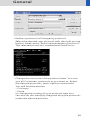
Open “Options, on the “Scan Protocol Manager” icon.
The “Scan Protocol Manager“ is opened and all protocols are loaded.
• Rename a protocol:
Select a scan protocol with the right mouse button.
Select “Rename” and enter a new name for the protocol.
• Change one (or more) parameters for all Customer
protocols:
Select “Edit – Find/Replace”. Open the “Column“ list
box and choose the desired parameter. Select a new
function of this parameter in the “Function“ list box.
Under the button next to the Function entry you can
choose special selections, e. g. you can in-/decrease
all mAs values by a certain percentage, e. g. 5%. Select
“Replace All”.
54
General
• Define a protocol as Emergency protocol.
Select the desired scan protocol with the right mouse
button. Select entry “Set as new emergency protocol”.
The selected protocol is marked with a red cross.
• Change the structure of the protocol tree. You can
sort all Customers protocols as you want to. Select
the desired protocols, press right mouse button.
You will find the entries:
– Cut/copy
– Paste
to change the sorting of your protocol tree.You
can also do this easily by drag and drop the protocols
under the desired position.
55
General
Hints:
– With the Find/Replace function you can easily insert
an API command for all protocols as needed.
– Also all Autotasking actions, e. g. the transfer to configured network nodes can be set within one action.
Within the “Function” button you can set your transfer actions depending on the slice width.
– By sorting the scan protocols all organ characteristics
will belong to the protocol, so it does not matter which
folder you choose.
– You can also move some protocols, which are often
used or very special to the folder “Private”. Then you
can easily select them in the “Patient Model Dialog“.
– The entry “Set to defaults” in the main menu/
context sensitive menu will reset all your changes to
the Siemens default values.
– Display of actions:
- Invalid protocols or parameters are marked in yellow.
- Changed, but not yet saved protocols and/or parameters are marked in green.
– With the entries Save/Save as/Save all, you can save
your changes.
– For security purposes it is not possible to do any
changes in the Siemens protocols. But you can copy
or drag&drop these protocols into a Customer folder.
– Scan protocols can be deleted if they belong to the
USER category. Only complete scan protocols can
be deleted. It isn’t possible to delete scan protocol
entries or scan protocol recon jobs.
– If there are unsaved scan protocols when closing
the scan protocol Manager you will be informed by a
message.
– You can configure the displayed columns and their
position with “View configure columns”.
56
General
Additional Information:
1. System/Run offers the tool “Restore Default Scan
Protocols“ which allows you to remove user specific
scan protocols and to restore the Siemens default
settings.
2. The main menu entry “Edit” offers save/delete Scan
Protocols.
3. System/Run or the main menu entry “View” in
the Scan Protocol Manager offer the tool “List Scan
Protocols” which generates an HTML table of all
available scan protocols. This list can be printed or
saved on Floppy (“File/Save As…”).
57
General
Contrast Medium
The Basics
The administration of intravenous (IV) contrast material
during spiral scanning improves the characterization
and characterization of lesions, as well as the opacity
of vessels. The contrast scan will yield good results
only if the acquisition occurs during the optimal phase
of enhancement in the region of interest. Therefore, it
is essential to initiate the acquisition with the correct
start delay. Since multislice spiral CT can provide much
faster speed and shorter acquisition time, it is even
more critical to get the right timing to achieve optimal
results (Fig. 1a, 1b).
Fig. 1a:
Longer scan time
40 s scan
Fig. 1b:
Shorter scan time
10 s scan
58
General
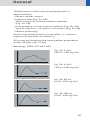
The dynamics of the contrast enhancement is
determined by:
• Patient cardiac output
• Injection rate (Fig. 2a, 2b)
• Total volume of contrast medium injected
(Fig. 3a, 3b)
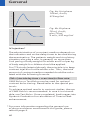
• Concentration of the contrast medium (Fig. 3b, 4a)
• Type of injection – uni-phasic or bi-phasic (Fig. 4a, 4b)
• Patient pathology
Aortic time-enhancement curves after i.v. contrast
injection (computer simulation*).
All curves are based on the same patient parameters
(male, 60-year-old, 75 kg).
* Radiology 1998; 207:647-655
Fig. 2a: 2 ml/s,
120 ml, 300 mg I/ml
Relative Enhancement [HU]
300
250
200
150
100
50
0
0
20
40
60
80
100
120
Time [s]
Fig. 2b: 4 ml/s,
120 ml, 300 mg I/ml
Relative Enhancement [HU]
300
250
200
150
100
50
0
0
20
40
60
80
100
120
Time [s]
Fig. 3a: 80 ml,
4 ml/s, 300 mg I/ml
Relative Enhancement [HU]
300
250
200
150
100
50
0
0
20
40
60
80
100
120
Time [s]
Fig. 3b:120 ml,
4 ml/s, 300 mg I/ml
Relative Enhancement [HU]
300
250
200
150
100
50
0
0
20
40
60
80
100
120
Time [s]
59
General
Fig. 4a: Uni-phase
140 ml, 4 ml/s,
370 mg I/ml
400
Relative Enhancement [HU]
350
300
250
200
150
100
50
0
0
20
40
60
80
100
120
Fig. 4b: Bi-phase
70 ml, 4 ml/s,
plus 70 ml,
2 ml/s, 370 mg I/ml
Relative Enhancement [HU]
300
250
200
150
100
50
0
0
20
40
60
80
100
120
Time [s]
IV Injection*
The administration of a contrast medium depends on
the indication and on the delay times to be used during
the examination. The patients weight and circulatory
situation also play a role. In general, no more than
3 ml per kg of body weight for adults and 2 ml per kg
of body weight for children should be applied.
For CTA study (arterial phase), the principle is to keep
contrast injection for the whole scan. Thus, the total
amount of contrast medium needed should be calculated with the following formula:
CM = (start delay time + scan time) x flow rate.
CARE Bolus or Test Bolus may be used for optimal
contrast bolus timing. Please refer to the special protocols.
To achieve optimal results in contrast studies, the use
of CARE Bolus is recommended. In case it is not available, use Test Bolus. Once completed, load images into
Dynamic Evaluation for calculation of Time to Peak
enhancement.
* For more information regarding the general use
of drugs and doses mentioned in this guide, please
refer to page 2.
60
General
Bolus Tracking
This is an automatic Bolus Tracking program, which
enables triggering of the spiral scanning at the optimal
phase of the contrast enhancement.
General Hints
1. This mode can be applied in combination with
any spiral scanning protocol. Simply insert “Bolus
Tracking” by clicking the right mouse button in
the chronicle. This inserts the entire set up including
pre-monitoring, i.v. bolus and monitoring scan
protocol. You can also save the entire set up as your
own scan protocols.
2. The pre-monitoring scan is used to determine
the position of the monitoring scans. It can be performed at any position of interest. You can also
increase the mAs setting to reduce the image noise
when necessary.
3. To achieve the shortest possible spiral start delay
(2 s), the position of the monitoring scans relative
to the beginning of spiral scan must be optimized.
A “snapping” function is provided:
– After the Topogram is performed, the predefined
spiral scanning range and the optimal monitoring
position will be shown.
– If you need to redefine the spiral scanning range,
you should also reposition the monitoring scan
in order to keep the shortest start delay time (2 s).
(The distance between the beginning of the spiral
scanning range and the monitoring scan will be
the same).
– Move the monitoring scan line towards the optimal position and release the mouse button, it will
be snapped automatically. (Trick: if you move the
monitoring scan line away from the optimal position the “snapping” mechanism will be inactive).
61
General
4. Place a ROI in the premonitoring scan on the target
area or vessel used for triggering with one left
mouse click. (The ROI is defined with double circles
– the outer circle is used for easy positioning, and
the inner circle is used for the actual evaluation).
You can also zoom the reference image for easier
positioning of the ROI.
5. Set the appropriate trigger threshold, and start
contrast injection and monitoring scans at the same
time.
During the monitoring scans, there will be simultaneous display of the relative enhancement of the
target ROI. When the predefined density is reached,
the spiral acquisition will be triggered automatically.
6. You can also initiate the spiral any time during the
monitoring phase manually – either by pressing
the START button or by left mouse clicking the START
radio button. If you do not want to use automatic
triggering, you can set your trigger threshold
number extremely high so that it will not trigger
automatically, and you can start the spiral when
you desire.
62
General
Test Bolus using CARE Bolus
You can use the CARE Bolus option as a “Test Bolus“.
How to do it
1. Insert a Bolus tracking via the right mouse button
submenue prior to the spiral.
2. Insert “contrast“ from the right mouse button
context menu.
3. Hint: By inserting “contrast“ you are interrupting
the Auto range function,and therefore an
automatic start of the spiral is not possible!
4. Start with the Topogramm.
5. Position the premonitoring scan and the spiral.
6. Perform the premonitoring scan,position and
accept the ROI.
7. Start monitoring scans and a short amount of
contrast (20 ml/2.5 ml/sec.).
8. Hint: With starting the spiral the system is
switching to the Trigger subtask card. The trigger
line is not shown at this stage.
9. Now you can read the proper delay from the
trigger card.
10. Insert the delay in the routine subtask card and
load the spiral.
11. Start spiral and injector with the full amount of
contrast.
63
General
Test Bolus
This is a low dose sequential protocol without table
feed used to calculate the start delay of a spiral scan
to ensure optimal enhancement after the contrast
medium injection. The Dynamic Evaluation function
may be used to generate the time density curve.
You can find the “Test Bolus“ scan protocol in the
chapter “Specials“.
How to do it
1. Select the spiral mode that you want to perform,
and then “Append” the TestBolus mode under
Special protocols.
2. Insert the Test Bolus mode above the spiral mode
for contrast scan by “cut/paste” (with right mouse
button).
3. Perform the Topogram, and define the slice position
for Test Bolus.
4. Check the start delay, number of scans and cycle
time before loading the mode.
5. A Test Bolus with 10-20 ml is then administered
with the same flow rate as during the subsequent
spiral scan. Start the contrast media injection and
the scan at the same time.
6. Load the images into the Dynamic Evaluation function and determine the time to the peak enhancement. Alternatively, on the image segment, click
“select series” with the right mouse button and position an ROI on the first image. This ROI will appear
on all images in the test bolus series. Find the image
with the peak HU value, and calculate the time
“delta t” taken to reach the peak HU value (do not
forget to add the preset start delay time). This time
can then be used as the optimal start delay time for
the spiral scan.
64
General
General Application
Information
Image Converter
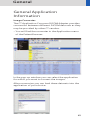
The CT Application Common DICOM Adapter provides
conversion between different DICOM data sets as they
may be provided by other CT vendors.
– You will find the converter in the Application menu
of the PatientBrowser.
In the pop-up window you can select the application
for which you want to convert the images.
After conversion you can load these datasets into the
application of your choice.
65
General
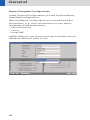
Report Template Configuration
Under Options/Configuration you will find the Report
Template Configuration.
With the Report Configuration you can edit the basic
information, e. g. clinic information for your report
templates of the applications:
– CalciumScoring
– Colon
– LungCARE
Additionally you can insert your logo and select which
reference data you want to use.
66
General
File Browser
The File Browser provides the ability to access and to
manage your created files:
• Copy images and files to the CD Burn folder.
• Access to all created reports and movies (AVI files).
• Access to the offline folder.
• Access to downloaded files.
Open the File Browser via main menu entry Options –
File Browser.
The File Browser provides special folders for our
Applications. Therein the created reports and movies
are saved.
With an external PC connected you can access your
offline data on the external PC for postprocessing.
Transfer files to floppy:
– Select the desired files and send them via the right
mouse button menu on a floppy disk.
Burn on CD:
– Select the desired files and drag&drop them into
the folder “Burn on CD” (or send them via the right
mouse button menu to the folder “Burn on CD“).
– Open the “LocalJobStatus” in the PatientBrowser and
clear all entries.
– Select “Record to Offline“ in the Transfer menu of the
PatientBrowser.
– CD burning starts.
– Hint: CD burning of offline files is only possible in a
single session.
67
General
Review reports and movies:
– Select the desired files and doubleclick on them.
– The corresponding program, e. g. Movie Media
Player will be opened and you can review what you
have saved.
– Now you can send these files to floppy or burn it
on CD.
Hint:
Files with the following extensions can not be started/
opened from the FileBrowser
“bat“, “cmd“, “com“, “exe“, “reg“, “dot“, “htm“,
“html“, “pl“, “vbs“, “js“, “wsf“, “wsh“, “xml“.
Patient Protocol
Scan:
number of scan range
kV:
kilo Volt
mAs:
averaged applied mAs of the range
ref.:
quality ref. mAs of the range
CTDIvol: CTDIw : Pitch Factor, for further information
please refer to the chapter “Dose Information“
DLP:
Dose Length Product
CTDIvol x (length + collimated slice) : 10
TI:
Rotation Time
cSL:
collimated Slice
68
General
69
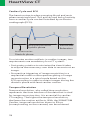
HeartView CT
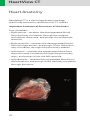
Heart Anatomy
HeartView CT is a clinical application package
specifically tailored to cardiovascular CT studies.
Important Anatomical Structures of the Heart
Four chambers:
• Right atrium – receives the deoxygenated blood
from the body circulation through the superior
and inferior vena cava, and pumps it into the right
ventricle.
• Right ventricle – receives the deoxygenated blood
from the right atrium, and pumps it into the pulmonary circulation through the pulmonary arteries.
• Left atrium – receives the oxygenated blood from
the pulmonary circulation through the pulmonary
veins, and pumps it into the left ventricle.
• Left ventricle – receives the oxygenated blood from
the left atrium, and pumps it into the body circulation
through the aorta.
70
HeartView CT
Blood fills both atria
A
P
LV
RV
Atria contract, blood
enters ventricles
LA
RA
Ventricles contract,
blood enters into
aorta and pulmonary
arteries
A:
P:
RV:
LV:
RA:
LA:
Aorta
Pulmonary Artery
Right Ventricle
Left Ventricle
Right Atrium
Left Atrium
71
HeartView CT
Coronary arteries:
• Right coronary artery (RCA)
Right coronary artery supplies blood to the right
atrium, right ventricle, and a small part of the
ventricular septum.
Front view
SVC
A
PA
RA
RV
IVC
Conventional
Angiography
SVC:
IVC:
RA:
RV:
A:
PA:
72
Superior Vena Cava
Inferior Vena Cava
Right Atrium
Right Ventricle
Aorta
Pulmonary Artery
HeartView CT
• Left coronary artery (LCA)
Left coronary artery supplies blood to the left atrium,
left ventricle and a large part of the ventricular septum.
Front view
LAD
➝
➝
LM
Cx ➝
Conventional
Angiography
LM: Left Main Artery
LAD: Left Anterior
Descending Artery
Cx: Circumflex Artery
73
HeartView CT
Placement of ECG-Electrodes
The correct placement of the ECG electrodes is
essential in order to receive a clear ECG signal with
marked R-Waves. Incorrect placement of the
electrodes will result in an unstable ECG signal which
is sensitive to movements of the patient during the scan.
US Version (AHA standard)
White Electrode
on the right mid-clavicular line, directly below the
clavicle
Black Electrode:
on the left mid-clavicular line, 6 or 7 intercostal space
Red Electrode:
right mid-clavicular line, 6 or 7 intercostal space
74
HeartView CT
Europe Version (IEC standard)
Red Electrode
on the right mid-clavicular line, directly below the
clavicle
Yellow Electrode:
on the left mid-clavicular line, 6 or 7 intercostal space
Black Electrode:
right mid-clavicular line, 6 or 7 intercostal space
75
HeartView CT
Cardiac Cycle and ECG
The heart contracts when pumping blood and rests
when receiving blood. This activity and lack of activity
from a cardiac cycle can be illustrated by an Electrocardiograph (ECG).
R
T
P
Q
U
S
Ventricular contraction
Systolic phase
Ventricular
Relaxation
Atrial contraction
Diastolic phase
To minimize motion artifacts in cardiac images, two
requirements are mandatory for a CT system:
• Fast gantry rotation to minimize the time it takes
to acquire the necessary scan data to reconstruct an
image.
• Prospective triggering of image acquisition in a
sequential mode or retrospective gating of image
reconstruction in a spiral mode based on the
ECG recording in order to obtain images during the
diastolic phase with least cardiac motion.
Temporal Resolution
Temporal resolution, also called time resolution,
represents the time window of the data that is used
for image reconstruction. It is essential for cardiac
CT imaging. The higher the temporal resolution,
the fewer the motion artifacts. With the SOMATOM
Cardiac, temporal resolution down to 93 ms
(corresponding on the scanner) can be achieved.
76
HeartView CT
Technical Principles
Basically, there are two different technical approaches
for cardiac CT acquisition:
• Prospectively ECG triggered sequential scanning.
• Retrospectively ECG gated spiral scanning.
In both cases, an ECG is recorded and used to either
initiate prospective image acquisition (ECG triggering),
or to perform retrospective image reconstruction
(ECG gating). Only scan data acquired in a userselectable phase of cardiac cycle is used for image
reconstruction. The temporal relation of the image data
interval relative to the R-waves is predefined, which
can be either relative (given as a certain percentage
of the RR-interval time) or absolute (given in ms) and
either forward or reverse.
Relative – delay: a given percentage of R-R interval (_RR)
relative to the onset of the previous or the next R-wave.
50% of R-R
ECG (t)
Scan/
Recon
Time
77
HeartView CT
-50% R-R
ECG (t)
Scan/
Recon
Time
Absolute – delay: a fixed time delay after the onset of
the R-wave.
400 msec
ECG (t)
Scan/
Recon
Time
Absolute – reverse: a fixed time delay prior to the onset
of the next R-wave.
ECG (t)
Scan/
Recon
- 400 msec
Time
78
Estimated
R-Peak
HeartView CT
Prospective ECG-Triggering Versus Retrospective
ECG-Gating
With prospective ECG-triggering, the heart volume is
covered in a “step-and-shoot” technique. The patient’s
ECG-signal is used to start sequential scans with a
pre-defined offset to the R-waves of the patient’s ECG.
With retrospective ECG-gating, the heart volume is
covered continuously by a spiral scan. The patient’s
ECG-signal is recorded simultaneously to allow
a retrospective selection of the data segments used for
image reconstruction. Prospective ECG-triggering
has the benefit of smaller patient dose than ECG-gated
spiral scanning, since scan data is acquired in the previously selected heart phases only. It does, however,
not provide continuous volume coverage with overlapping slices and mis-registration of anatomical details
may occur. Furthermore, reconstruction of images
in different phases of the cardiac cycle for functional
evaluation is not possible. Since ECG-triggered sequential scanning depends on a reliable prediction of the
patient’s next RR-interval by using the mean of the
preceding RR-intervals, the method should not be used
for patients with arrhythmia and irregular heart rates.
To maintain the benefits of ECG-gated spiral CT but
reduce patient dose, ECG-controlled dose-modulation
is available.
79
HeartView CT
ECG-Correlated Thorax Imaging (optional)
SOMATOM Sensation 10/16
ECG-Correlated thorax imaging is intended to reduce
cardiac pulsation artifacts in pericardial lung areas and
mediastinal vessels. Similar to cardiac spiral imaging the
data used for image reconstruction are acquired during
diastolic phase of the heart.
Hence, ECG-correlated reconstruction requires the
ECG of the patient.
Two scan protocols are available
– ThorAngioECG042s
(feed per rotation 5.4 mm; 0.75 mm collimation)
– ThorAngioECG037s
(feed per rotation 5.4 mm; 0.75 mm collimation)
To allow for sufficient volume coverage of the thorax,
the table feed is larger than in cardiac spiral imaging.
This is achieved by utilizing all the data acquired during
diastolic phase for image reconstruction at low heart
rates.
In addition, the image reconstruction also takes into
account the conical shape of projection data. The same
nominal slice widths as for cardiac spiral scanning
are available (0.75 mm – 3 mm nominal slice width for
0.75 mm collimated slice width and 3 mm – 5 mm for
1.5 mm collimated slice width).
Please note that in contrast to standard ECG-gated
cardiac protocols the ECG-pulsing is disabled.
80
HeartView CT
Recon
Recon
Recon
Recon
3D – Image Data
Spiral
uous
Contin and Feed
Scan
Image reconstruction for ECG-correlated thoracic
scanning. In each of the cardiac cycles a multitude of
image stacks (so-called booklets) using doubleoblique reconstruction planes (booklet pages) are
reconstructed. The data during systolic phase are not
used. The z-position of the booklet pages are drawn
as a function of scanning time. The temporal correlation to the heart beat is provided by the ECG of the
patient.
81
HeartView CT
Determine ED and ES on the Test Series
ES: end systolic, maximum contraction of the
myocardium, smallest left ventricular lumen.
ED: end diastolic, minimum contraction.
Use graphics tools (zoom & pan) to enlarge the image,
switch between images to select ES and ED, it is also
helpful to use the distance tool to find the images with
maximum and minimum myocardial contraction. If ED
or ES cannot be clearly determined because there are
two adjacent images with the same contraction, take
the phase in between.
Preview Series
A Heart View Preview series contains images at the
same slice position and of different phases of the
cardiac cycle (Phase Start). The phase interval and
the number of images can be configured in the Heart
View configuration. The slice position is determined
by selecting the appropriate image in the right segment. The preview series is used to determine the
Phase Start for ED and ES.
• For an overview, reconstruct a series at an arbitrary
heartphase. Move the grey scanbox by selecting a
phase start in the middle of the heartcycle.
• Select an appropriate slice position (e. g. Middle part
of RCA) for the Preview series in the 2. segment.
• Switch to the Trigger Card.
• Select Phase Start 0 % to reconstruct images in %
steps.
82
HeartView CT
The Preview Series should be used to define the optimal
time window for image reconstruction in ECG-gated
spiral scanning, before the full series is reconstructed.
A default value of 60% relative gating (or -400 ms
absolute reverse gating) can be used as an initial setup
for the optimization process which is best performed
as follows:
– select an image level displaying the mid RCA.
– choose 60% (or -400 ms) reconstruction phase
setting.
– reconstruct a preview series at this level of the RCA
by clicking on the “Preview Series” button in the
trigger card: a series of images with different phase
setting at the selected anatomical level of the RCA
will be reconstructed.
– choose the image with least motion artifacts.
– reconstruct the whole dataset with the phase setting
you selected. Please note that you have to enter this
phase setting manually in the trigger card.
An example for a preview series at the correct anatomical level with optimal and sub-optimal selection
of the phase setting is shown below. Usually this
procedure results in good image quality for the right
and the left coronary artery, especially at higher and
inconsistent heart rates individual optimization for
left and right coronary artery may be necessary. In
most cases, the RCA requires an earlier phase in the
cardiac cycle to obtain the period of least motion,
e. g. RCA at 40%, LAD at 60%.
83
HeartView CT
Scanbox
• Start the preview series reconstruction at a time
point over or just before the T-wave (end ventricular
systole). The settings should be sufficient to cover
the cardiac cycle up to the R-wave (end ventricular
diastole).
• Check the preview series images for the maximum
left ventricular (LV) lumen (ED) and the minimum LV
lumen (ES). If ED or ES timing cannot be clearly
determined, because there are two adjacent images
with the same contraction, take the time-point in
between.
• Reconstruction of two full axial image series with
the time-points for ES and ED determined from the
test series.
• Press preview Series button
• A preview series will be reconstructed.
Hint
Do not enter any comments on the 2nd comment line
which is reserved for labeling of the cardiac phase and
heart rate in beats per minute (bpm).
84
HeartView CT
Example of a preview series at the correct anatomical
level (mid RCA), demonstrating the importance
of optimized phase setting. Patient with an average
heart rate of 63 bpm.
Left: 57%, mid: 61%, right: 65% relative delay.
The image at 61% relative delay shows the least motion
artifacts. In this example, even a slight change of
the phase setting from 61% to 65% deteriorates image
quality.
ECG-Trace Editor
The ECG trace editor is used to modify the ECG signal.
This editing tool is available after spiral scan data has
been acquired. By using the right mouse menu on the
Trigger card you have access to several modification
tools for the ECG Sync, such as Delete, Disable, Insert.
In patients with only single or few extra-systolic beats
overall image quality may be improved by editing the
ECG prior to reconstruction. Deleting the corresponding R-peaks prevents image reconstruction in the
extra-systolic heart periods. Please keep in mind that
absolute gating (in ms) must be chosen if R-peaks are
deleted. Although ECG-gated spiral scanning is less
sensitive to variable heart rates than ECG-triggered
sequential scanning, the examination of patients
with complex arrhythmia that results in unpredictable
variations of the RR-intervals (e. g. complex ventricular arrhythmia or multiple extra beats) can result in
limited image quality and should be performed in
exceptional cases only.
85
HeartView CT
ECG-Pulsing
ECG-pulsing is a dedicated technique used for online
dose modulation in ECG-gated spiral scanning. During
the spiral scan, the output of the X-ray tube is modulated according to the patient’s ECG. It is kept at its nominal value during a user-defined phase of the cardiac
cycle, in general the mid- to end-diastolic phase.
During the rest of the cardiac cycle, the tube output is
reduced to 20% of its nominal value. The length of the
plateau with full dose is 450 ms, which is sufficient to
retrospectively shift the image reconstruction interval
for patient-individual fine-tuning of the image reconstruction phase. The tube current is reduced and not
switched off to allow for image reconstruction throughout the entire cardiac cycle. Even though their signalto-noise ratio is decreased, the low-dose images are
sufficient for functional evaluation. Clinical studies have
demonstrated dose reduction by 30-50% depending
on the patient’s heart rate using ECG-pulsing. ECGpulsing can be switched on/off by the user on the
Trigger card (Fig. 14). When using ECG-pulsing, the
desired reconstruction phase has to be estimated and
entered into the Trigger card prior to scanning, since
it determines the time interval of maximum dose.
ECG-pulsing should not be used for patients with
irregular heart rates and arrhythmia.
mA
100%
20%
Dose modulation with ECG-pulsing
86
HeartView CT
ACV on/off
On the Trigger card, ACV (Adaptive Cardio Volume
reconstruction) can be switched on/off by the user.
With ACV off, single segment reconstruction is performed for all heart rates. Data acquired in one heart
cycle are used for the reconstruction of each image,
and the temporal resolution is independent of the
heart rate. Temporal resolution is 210 ms for 0.42 s
gantry rotation time. With ACV on, the system automatically switches between single segment and two
segment reconstruction depending on the patient’s
heart rate. For heart rates below 71 bpm at 0.42 s
gantry rotation time, single segment reconstruction is
performed. For heart rates exceeding 71 bpm, two
segment reconstruction is performed, using scan data
acquired in two subsequent heart cycles to improve
temporal resolution. With ACV on, temporal resolution
is constant for heart rates below 71 bpm ( 210 ms
for 0.42 s gantry rotation time). For heart rates above
71 bpm, temporal resolution varies between 105 ms
and 210 ms depending on the patient’s heart rate,
reaching its optimum (105 ms) at 81 bpm. Temporal
resolution as a function of the patient’s heart rate is
shown in the figure below. We recommend to switch
ACV on.
Temporal resolution in sec.
0.24
0.22
0.2
0.18
0.16
0.14
0.12
0.1
0.08
50
60
70
80
90
100
Heart rate in bpm
Temporal resolution as a function of the patient’s
heart rate for 0.42 s and 0.37 s gantry rotation time.
87
HeartView CT
Synthetic Trigger
By default, the “Synthetic Trigger” (ECG triggered
scanning) or “Synthetic Sync” (ECG gated scanning)
is activated for all predefined cardiac scan protocols
(Fig. 1 and 2). It is recommended to always keep it
activated for examinations with contrast medium.
In case of ECG signal loss during the acquisition, this
will ensure the continuation of the triggered scans or
allows an ECG to be simulated for retrospective gating.
If it is deactivated, the scanning will be aborted in case
of ECG signal loss during the acquisition.
88
HeartView CT
Recon Jobs for Postprocessing
Axial Images
Reconstruction of axial images during the examination
are used for filming/archiving and for postprocessing.
A. Filming and Archiving
Use a thicker slice thickness and recon increment for
filming and archiving of the images, e. g. 3 mm slice
thickness and 3 mm increment, to produce less images.
You can send this recon job via the Autotasking Card
directly to the Filmsheet or archiving node.
B. Calcium Scoring Postprocessing
Use a thicker slice thickness and a smaller recon
increment to load the images afterwards in the
application “syngo Calcium Scoring”, e. g. 3 mm slice
thickness and 1.5 mm increment.
C. 3D Postprocessing
Use a thinner slice thickness and recon increment
for postprocessing of the images, e. g. 1.25 mm slice
thickness and 0.6 mm increment. These images are
used for postprocessing on the 3D-Card or with syngo
InSpace 4D.
You can select different image types, e. g. MIP or VRT
to get the best view of the coronary arteries.
89
HeartView CT
3D Card
syngo Inspace
90
HeartView CT
Double-Oblique Images
Reconstruction of double-oblique images are used for
postprocessing.
If you want to use short axis images of the heart, there
are different possibilities to create them:
• During scanning
(only for SOMATOM Sensation 16/10)
You can reconstruct short axis spiral oblique (SPO)
images in different heart phases directly during the
examination.
• After scanning
1. If you have saved the raw data of the Cardio scan:
You can reconstruct short axis spiral oblique (SPO)
images in different heart phases by loading the
raw data in the examination card of your Navigator,
or you can also load the raw data in the reconstruction card of your Wizard (optional) console.
2. After reconstruction of different axial heartphases, you can reconstruct short axis MPR images
on the 3D Card.
91
HeartView CT
Short Axis Images
Short axis reconstruction on the Examination (only for
SOMATOM Sensation 16/10) or Recon taskcard:
Select
• Recon axis – oblique
• Image type – spiral oblique (SPO)
• Enable Button – FreeMode
MPR
Toogle FoV: Set FoV
for the selected image
FreeMode:
• Off: You can navigate through the volume by
moving the reference lines.
The FoV does not move.
• On: The reference lines can be rotated to obtain
oblique/double oblique views.
Select the coronal view, rotate the sagittal line to the
level of the heart valve and the sulcus.
Number of images = 10
Distance between images = 8 mm
Slice Thickness = 8 mm
92
HeartView CT
Multiphase Reconstruction on the Examination
or Recon Taskcard
Select a new recon job on the Recon taskcard:
Select the “Multiphase” button on the Trigger card.
With a right mouse click on the “Multiphase” button
you can open the Heart View Configuration window.
93
HeartView CT
Three different “Multiphase settings” are possible:
1. Protocol
displays the settings for the selected scan protocol.
2. Auto
You can define the heartphase settings with a
regular interval in between, e. g. for an Argus movie.
3. Manual
You can define the irregular heartphase settings with
an interval, e. g. to calculate the Ejection fraction.
All choices are available for % or ms.
Reconstruction Examples
1. Reconstruction of the whole cardiac cycle, e. g.
to create a movie in syngo ARGUS:
Select Multiphase settings: “Auto” and choose %
values.
Enter “10” as “Start” and “100” as “Stop”.
Select “10” as ”Interval”.
As result you will get 10 series with the heartphases:
10%, 20%, 30%, 40%, 50%, 60%, 70%, 80%, 90%,
100%.
2. Reconstruction of irregular heartphases, e. g.
for the ejection fraction:
Select Multiphase settings: “Manual” and choose %
values.
Enter “20” for the reconstruction of the ES (maximum
left ventricular lumen) and “80” for the reconstruction
of the ED (minimum left ventricular lumen).
As result you will get 2 series with the heartphases:
20% and 80%
3. Reconstruction of irregular heartphases, e. g.
for the best display of the coronary arteries:
LAO:
Select Multiphase settings: “Manual” and choose %
values.
94
HeartView CT
Enter “50” “52” “55” “58” “60” to find out the best
display of the LAO view.
As result you will get 5 series with the heartphases:
50%, 52%, 55%, 58%, 60%.
If you want to create your own multiphase recon job
in a cardio scan protocol:
Define either an auto or a manual setting, than
select the “Multiphase settings – Protocol”. Press button
“Apply”, close the window with “OK”. Then you can
save the scan protocol as usual and the selected recon
job will be always reconstructed using a multiphase.
Hints
• To get a constant image quality for the Multiphase
reconstruction we recommend to turn ECG Pulsing
“OFF”.
• If you are not sure which heartphases are the best
one for the Multiphase reconstruction, perform
a preview series first.
• Press “Recon“ button for each 3D reconstruction.
95
HeartView CT
Postprocessing on the 3D Card
for Short Heart Axis
Short-axis MPR images of the Heart
• Load the first (ED) series into 3D Taskcard
• Adjust the reference plane to obtain short-axis views
of the heart
• Press button for parallel ranges
Recommended parameters:
Image thickness: 8 mm
Distance between images: 8 mm
Number of images: ~13 (adjust to cover ventricles)
• You must save this MPR range as a preset (Short-axis)
for subsequent reformatting of other time series.
• You may link one preset to the series description.
In doing this, the preset will be applied automatically
when the next series is loaded into “MPR Ranges”.
• Save the MPR series with a sensible description such
as Short Axis, 25%.
• Repeat the procedure with the next series.
Hint: Do not change any parameters for the MPR
ranges. Otherwise, syngo Argus is not able to sort the
images correctly.
96
HeartView CT
97
syngo Calcium Scoring
syngo Calcium Scoring
This application is used for identification and quantification of calcified lesions in the coronary arteries.
It can be performed with both Prospective ECG triggering (sequential scanning) and Retrospective gating
(spiral scanning) techniques. The following scan protocols are predefined:
• CaScore (Routine)
– Standard spiral protocol with ECG-gating which
has been clinically used so far.
• CaScoreFast
– Protocol with ECG-gating using 16-slice acquisition.
• CaScoreSeq
– Sequential scan protocol with ECG-triggering.
98
syngo Calcium Scoring
Hints in General
• Kernel B35f is dedicated to calcium scoring studies,
providing the most accurate determination of the
HU-value of small calcified lesions. To ensure the
optimal image quality and correlation to known
reference data, other kernels are not recommended.
• Use the ECG-triggered protocol for low-dose scanning
except for patients with arrhythmia. Use the ECG
gated protocol when accuracy and/or reproducibility
are essential, e. g. for follow-up studies of calcium
scoring.
99
syngo Calcium Scoring
CaScoreRoutine
Indications:
This is a standard spiral scanning protocol, using
an ECG gating technique for coronary calcium scoring
studies.
Topogram:
AP, 512 mm.
From the carina to
the apex of the heart.
kV
Effective mAs
Slice collimation
Slice width
Feed/Rotation
Rotation time
Kernel
Increment
CTDIVol
100
CaScoreRoutine
120
133
1.5 mm
3.0 mm
5.6 mm
0.42 sec.
B35f
1.5 mm
9.567 mGy
syngo Calcium Scoring
CaScoreFast
Indications:
This is a standard spiral scan protocol using ECG-gating
for coronary calcium scoring , with 16-slice acquisition.
Topogram:
AP, 512 mm.
From the carina to
the apex of the heart.
kV
Effective mAs
Slice collimation
Slice width
Feed/Rotation
Rotation time
Kernel
Increment
CTDIVol
CaScoreFast
120
150
1.5 mm
3.0 mm
6.8/6.0* mm
0.42/0.37* sec.
B35f
1.5 mm
10.5 mGy
* Depends on heart rate.
101
syngo Calcium Scoring
CaScoreSeq
Indications:
This is a sequential scanning protocol with ECGtriggering for coronary calcium scoring studies.
Topogram:
AP, 512 mm.
From the carina to
the apex of the heart.
If you apply API for image acquisition, please make
sure that the breathhold interval in the Patient Model
Dialog is longer than the total scan time, e. g. 50 sec.,
otherwise the image acquisition will be interrupted by
the default breathhold interval. This does not apply
when API is not activated.
kV
Effective mAs
Slice collimation
Slice width
Feed/Scan
Rotation time
Kernel
CTDIVol
* Depends on heart rate.
102
CaScoreSeq
120
30
1.5 mm
3.0 mm
18.0 mm
0.42/0.37* sec.
B35f
2.16 mGy
syngo Calcium Scoring
103
syngo Calcium Scoring
syngo Calcium Scoring is an evaluation software
used for quantification of calcified coronary lesions.
The data is based on a low dose acquisition with either
on ECG triggered Sequence or a retrospectively gated
Spiral.
• Evaluation on a separate syngo task card on the user
interface.
• Scoring is facilitated with selection and automatic
growing tools for definition of lesions in the main
coronary branches (RCA, LM, LAD, CX).
• Freehand ROI definition of lesions in addition to the
seeding method.
• 3D Edit for separation and modification of lesions
within a defined volume (depth in mm), and on
2D-slices possible.
• Correlated image display in different planes using
Maximum Intensity Projection (MIP) and Multi Planar
Reformats (MPR).
• Blow-up display for easier identification of small
lesions.
• Default threshold of 130 HU for score calculation can
be modified.
• Online display of results in a separate segment:
– Interpolated Volume (in mm3).
– Calcium mass (mg Calcium Hydroxyapatite).
– Score (Agatston method).
• Generation of HTML report including site specific
information, free text and clinical images, and saving
on floppy disc and/or printing.
• Interface to user-defined reference table can be
used for risk stratification and the corresponding risk
percentile information can be included in the report.
• Printing of results on laser film, paper printer or
saving into data base.
104
syngo Calcium Scoring
Prerequisites
To achieve standardization of the evaluation results
the image material must meet the following requirements:
• Only images of one patient must be loaded for
syngo Calcium Scoring evaluation.
• The scans must have been acquired without gantry
tilt (gantry tilt = 0).
• Only original image material must be used that
has neither been edited with 2D tools in the Viewing
task card e. g., Zoom&Pan nor with 3D tools in 3D
e. g., curved mode.
• Only image data sets with the same slice orientation
must be used.
• Only contiguously scanned and reconstructed
sequence or spiral data sets with identical slice
distances and identical thickness must be evaluated.
• The slices must have been scanned at different table
positions.
• The data capacity of the volume must not exceed
1024 images with a matrix size of 512 x 512 pixels.
• Only studies without contrast medium must be used.
Best Calcium Scoring results are achieved when
special scan protocols for image acquisition have been
used.
For this reason, the SOMATOM CT Scanners offer
several Calcium Scoring scan modes (for example:
“CaScoreSeq“ or “CaScoreRoutine“), which use the
advanced CT HeartView trigger method for scanning.
105
syngo Calcium Scoring
General Workflow
1. Loading the Images
After loading the images into Calcium Scoring the
following layout is displayed:
The loaded images are displayed in the following
projection modes:
1. Tomo segment:
Current slice in transaxial projection (caudo-cranial
direction)
2. Overview segment:
Sliding MIP mode in caudo-cranial projection (can
be changed to MIP or MPR, but will always be the
reconstructed volume in transaxial projection –
entire calcium detection)
3. Detail segment:
MPR mode in coronal projection (can be changed to
MIP or MIP Thin and from coronal to sagittal)
4. Result segment
106
syngo Calcium Scoring
2. Evaluating Coronary Lesions
– Screening loaded images for coronary lesions
with significantly increased calcification.
– Marking the detected lesions in the tomogram.
– Editing the coronary lesions in 3D or 2D.
2.1. Screening
After loading the CT images, you can
– scroll through,
– zoom,
– and window them for better display.
In the images of your Calcium Scoring examination all
structures with calcium values above the set threshold
value are displayed in color.
Before you start to identify coronary arteries and
specific coronary lesions you should optimize the
threshold settings.
Initially, the threshold value is set to a default value of
130 HU which is an empirical value. However, you can
freely configure this value yourself.
Hint: If you change the threshold value during
Calcium Scoring evaluation you will lose all the evaluation results you have obtained so far.
If you have already performed a Calcium Scoring
evaluation for a particular patient and then changed
the threshold values, those evaluation results are no
longer valid. You will then have to repeat the Calcium
Scoring evaluation for that patient.
By browsing through the axial image stack and
viewing the MIP thin, MIP or the MPR reconstruction,
you can quickly locate suspected calcification in any
of the 4 major coronary arteries.
Hint: Once you have identified calcium plaques in
the coronary arteries you improve the image display
in both the overview and the detail segment by
switching back to the MIP thin projection.
107
syngo Calcium Scoring
2.2 Marking
For better selecting, modifying and deleting the
marking of calcifications enlarge the images.
Evaluation with Calcium Scoring is based on automatic determination of the amount of calcium in the
detected coronary lesions. Evaluation must therefore
be preceded by precise marking of the lesions in the
individual coronary arteries.
To mark calcifications, you have to edit the images
in segment 1. Calcium Scoring offers 2 methods for
marking:
– Set seed points for region growing (connected
anatomic structures above the given threshold are
filled to a lesion).
– Draw a freehand ROI around a lesion.
After you have pressed Pick Lesion or Freehand ROI
button, the Artery Labels dialog box is displayed.
1
2
3
4
Artery Labels on the Floating Palette
5
6
(1) LM stands for the common branch of the left
coronary artery, left main (A. coronaria sinistra).
(2) LAD stands for the anterior branch of the left
coronary artery, left anterior descending
(A. coronaria sinistra, R.interventricularus anterior).
(3) CX stand for the circumflex branch of the left coronary artery (A. coronaria sinistra, R. circumflexus).
(4) RCA stands for the right coronary artery
(A. coronaria dextra).
(5) Allows you to assign the marking Other to a lesion
which does not pertain to the coronary arteries.
Lesions to which this marking is assigned are not
included in the evaluation but merely highlighted.
(6) Allows you to delete a marking that was not
correctly assigned.
108
syngo Calcium Scoring
Continue browsing through the data and mark all
other lesions. After checking the lesions (into the depth
of the volume) you can correct them if necessary.
2.3 Editing
You can include the entire volume of adjacent pixels
of a calcification by marking the detected lesions with
3D Region Growing.
As a result of 3D region growing calcifications of
an artery (e.g., LM) may be assigned wrong markings
(e.g., LAD) and may be evaluated as a single lesion
due the close proximity to that artery.
You can now edit such a lesion by scrolling to the
corresponding slice and splitting it into several parts
and assigning the marked parts to the corresponding
arteries.
You can either edit a lesion slice by slice with 2D Edit
mode or edit the entire volume of the lesion using 3D
Edit mode. That saves you time-consuming editing of
individual slices.
– With 3D editing, you can cut a part of a lesion in the
volume and reassign it to another artery label.
– With 2D editing, you can separate mistakenly
connected lesions in a slice.
– You can also delete a mistakenly marked lesion.
109
syngo Calcium Scoring
3. Automatic Result Display
With 3D region growing evaluation, you have selected
lesions over a volume and evaluated them as indicated
by the markings.
The following measured values are listed in the result
table:
• Artery
The label given to the artery, the calcification
belongs to.
• Lesion Index
The number of lesions per coronary artery based on
the evaluated volume.
• Volume [mm3]
Interpolated volume for this calcification.
• Equiv. Mass [mg CaHA]
The mass of calcium per coronary artery in mg
Ca-HA. To obtain the correct calcium mass, a scanner
specific calibration factor is used. A footnote displays
the calibration factor.
• Score
Agatston score or equivalent Agatston score
(depending on image data).
• You can find additional informations with a right
mouse click under “Properties”.
A pop up message with appropriate lesion information
appears:
– lesion area,
– mean CT,
– peak, volume,
– score and mass
110
syngo Calcium Scoring
The Agatston score represents the amount of
detected calcium in each individual coronary artery.
For every slice, the area of each lesion is weighed by
a factor f which depends on the peak CT value of this
lesion:
f = 1 for 130 HU/Peak CT value < 200 HU
f = 2 for 200 HU/Peak CT value < 300 HU
f = 3 for 300 HU/Peak CT value < 400 HU
f = 4 for 400 HU and above
All scores of a specific artery are added for the
Agatston score of this artery. All scores of all arteries
are added for the total Agatston score.
The original definition of the Agatston score is based
on contiguous 3 mm slices. For a study which was
acquired with a slice thickness different from 3 mm
(e. g., 2,5 mm), or for overlapping slices, an equivalent
Agatston score is calculated. It takes the different
slice width and interslice distance into account.
Hint: The score table will be updated immediately
after you have set a seed point or drawn a freehand
ROI, or after any modification or deletion of a calcification marking. The floating Score Table window
appears, whenever you temporarily blow up the
display of segment 1. Segment 4 shows the scoring
table for each evaluated arterial label (color-coded).
111
syngo Calcium Scoring
4. Reporting and Filming
• The Report Wizard helps you to create and export
the scoring reports.
After clicking the Report Wizard icon on the Report
palette, the Calcium Scoring Report Wizard pops up.
The current Calcium Scoring report is displayed.
Information about the patient (for example, patient
name, series number, date of birth) and the score
table will automatically be included in the printed report.
You can include up to six images and the result table
of the Calcium Scoring evaluation in your report and
save them for later documentation.
You can add further text to the report:
– Choose the Referring Physician from the list.
– Choose the Reading Physician from the list.
– Enter/supervise additional information:
History and Risk Factors.
– Select the desired template.
You can use customized report templates as well.
– Click the “Print“ button to finish.
The report is generated and displayed with List&Label.
You can use this tool, e. g., to print the report, or to
save it as HTML file or into a folder of the file system.
• You can also copy selected images and results to the
Filming task card.
It is possible to change the layout of the film sheet in
the Filming task card. The film task can be exposed
either from the Filming task card or from the CaScoring
task card.
• Calcium Scoring images or score results are not
saved automatically.
Use the Save All function or select individual images
or the score table to Save them. The images are saved
as secondary captures in the database.
112
syngo Calcium Scoring
Additional Information
Elements of the Sliding MIP Dialog Box
The settings will change the initial thickness of the
Sliding MIP in segment 2 or 3.
– Transaxial Sliding MIP Thickness
Sets the thickness (in mm) of the Sliding MIP in
segment 2 (axial direction). Default is 20.0 mm.
– Coronal/Sagittal Sliding MIP Thickness
Sets the thickness (in mm) of the MIP in segment
3 (coronal/sagittal direction). Default thickness is
10.0 mm.
Hint: You can graphically adjust the thickness for
the Sliding MIP in segment 3. Change the thickness by
dragging one of the two parallel (white) lines.
(1) The white slab
borders help you to
adjust the Sliding
MIP.
(2) The reference line
indicates the image
displayed in segment
1 and 2
(3) The arrows indicate the view/
projection direction.
Elements of the Threshold Dialog Box
The settings will change the threshold range for
coloring pixels to recognize calcification.
– Upper Threshold
Sets the upper value of the threshold for coloring
pixels. Default is 3071 HU.
– Lower Threshold
Sets the lower value of the threshold for coloring
pixels. Default is 130 HU.
113
syngo Calcium Scoring
Thickness for 3D Editing
The 3D edit tool allows you to draw a masking volume
for the lesions in segment 1. The editing contour is
swept up and down at a certain distance to modify
the calcification in the volume. The thickness the 3D
editing tool works is the current Sliding MIP thickness.
The customization covers:
– The information provided in the report heading
– The reference database used for diagnosis comparison.
During reporting, the Calcium Scoring software automatically adds the patient information and the score
table to a copy of the stored template files.
– Labeling marked lesions
Once you have assigned a specific lesion to a coronary artery, you might want to label this calcification
for later documentation. You can do that using
graphic tools such as lines or arrows and annotation
texts.
– Calcium Scoring images or score results are not
saved automatically. Use the Save All function or
select individual images or the score table to Save
them.
– After closing the current evaluation a new status
object is created within the last result series (e. g.
“CaScoring_SR“).
114
syngo Calcium Scoring
115
CoronaryCTA
CoronaryCTA
This is an application for imaging the coronary arteries
with contrast medium. SOMATOM Sensation Cardiac
supports 12- and 16- slice scan protocols for ECG gated
spiral scanning are supported, we recommend using
only ECG gated spiral scanning. The following scan
protocols are predefined:
116
CoronaryCTA
• CoronaryCTARoutine
– Standard spiral protocol with ECG-gating which
has been clinically used so far.
• CoronaryCTAFast
– Protocol with ECG-gating using 16-slice acquisition.
Except from these two standard protocols three
additional ECG-gated spiral protocols for coronary CTA
are available.
• CoronaryCTALowHeartRate
– This protocol is identical to CoronaryCTAFast,
except that it uses a reduced table feed. It is
intended for patients with very low heart rates
below 50 bpm.
• CoronaryCTA100kV
– This protocol is identical to CoronaryCTAFast,
except that it uses 100 kV tube voltage instead of
120 kV. To ensure equal contrast-to-noise ratio
for arteries filled with iodine contrast agent, the
effective mAs-setting has been increased by about
10%. As a consequence, patient dose with this
protocol will be reduced by 30% compared to
CoronaryCTAFast.
• CoronaryCTAAdaptSpeed
– This protocol is identical to CoronaryCTAFast,
except that it uses 0.5 s gantry rotation time instead
of 0.42 s. The protocol is intended to provide dose
reserves for obese patients with sufficiently low
heart rates. It may be also worth trying for patients
with a stable heart rate at 70 bpm, since with 0.5 s
gantry rotation time, the optimum temporal resolution of 125 ms in reached at 69 bpm.
117
CoronaryCTA
Hints in General
Contrast Medium
For homogeneous contrast enhancement in the
coronary arteries, optimized contrast protocols are
mandatory. The use of bolus tracking is helpful,
with an automatic start of the spiral scan as soon as
a contrast threshold of 100 HU has been reached in
the ascending aorta.
Please note that correct placement of the ROI in the
ascending aorta is essential. An example for an optimized contrast protocol is: Use 100 ml of contrast agent
with a density of 320 mg/ml at a flow rate of 4 ml/s
followed by 40 ml of saline chaser (double head injector).
For further information on the Bolus Tracking Application, please refer to the chapter “Bolus Tracking”.
118
CoronaryCTA
• We recommend to use ECG-gated spiral protocols
for optimized image quality of the coronary arteries
and to provide high-quality 3D image data as an
input for 3D postprocessing such as MPR, MIP, VRT
or Fly Through. Although ECG-gated spiral scanning
is less sensitive to variable heart rates than ECGtriggered sequential scanning, the examination of
patients with complex arrhythmia that results in
unpredictable variations of the RR-intervals (e. g.
complex ventricular arrhythmia or multiple extra
beats) can result in limited image quality and should
be performed in exceptional cases only.
• Acquisition with a minimum of collimated slice
width ensures best possible image quality due to the
optimized intrinsic resolution of the scan data.
Once high quality scan data has been acquired the
reconstructed slice width has to be optimized with
regard to image noise and best possible quality in
MPR, MIP and VRT reconstructions.
119
CoronaryCTA
CoronaryCTARoutine
Indications:
A standard spiral protocol with ECG-gating.
Topogram:
AP, 512 mm.
Approximately, from
the carina to the
apex of the heart.
A typical range of
12 cm covering the
entire heart can
be done in 18.7 sec.
kV
Effective mAs
Slice collimation
Slice width
Feed/Rotation
Rotation time
Kernel
Increment
CTDIVol
120
CoronaryCTARoutine 2nd recon.
120
500
0.75 mm
3.0 mm
2.8 mm
1.0 mm
0.42 sec.
B30f
3.0 mm
0.5 mm
42.0 mGy
CoronaryCTA
CoronaryCTAFast
Indications:
ECG-gating using 16-slice acquisition.
Topogram:
AP, 512 mm.
Approximately, from
the carina to the
apex of the heart.
CoronaryCTAFast
kV
120
Effective mAs
550
Slice collimation 0.75 mm
Slice width
3.0 mm
Feed/Rotation
3.4/3.0* mm
Rotation time
0.42/0.37* sec.
Kernel
B30f
Increment
3.0 mm
CTDIVol
42.9 mGy
2nd recon.
1.0 mm
0.5 mm
* Depends on heart rate.
121
CoronaryCTA
CorCTALowHeartRate
Indications:
This spiral scanning protocol is identical to
CoronaryCTAFast, except that it uses a reduced table
feed. It is intended for patients with very low heart
rates below 50 bpm.
Topogram:
AP, 512 mm.
Approximately, from
the carina to the
apex of the heart.
CoronaryCTA
LowHeartRate
kV
120
Effective mAs
700
Slice collimation 0.75 mm
Slice width
3.0 mm
Feed/Rotation
2.6 mm
Rotation time
0.42 sec.
Kernel
B30f
Increment
3.0 mm
CTDIVol
54.6 mGy
122
2nd recon.
1.0 mm
0.5 mm
CoronaryCTA
CoronaryCTA100kV
Indications:
This is a spiral scanning protocol with a 100 kV tube
voltage and with an ECG gating technique for coronary
CTA studies.
As consequence of the changed parameters (100 kV)
the patient dose will be reduced by 30%.
Topogram:
AP, 512 mm.
Approximately, from
the carina to the
apex of the heart.
CoronaryCTA100kV
kV
100
Effective mAs
600
Slice collimation 0.75 mm
Slice width
3.0 mm
Feed/Rotation
3.4 mm
Rotation time
0.42 sec.
Kernel
B30f
Increment
3.0 mm
CTDIVol
30.0 mGy
2nd recon.
1.0 mm
0.5 mm
123
CoronaryCTA
CoronaryCTAAdaptSpeed
Indications:
This is a spiral scanning protocol, using a rotation time
of 0.5 s, with an ECG gating technique for coronary
CTA studies. This protocol is intended to provide dose
reserves for obese patients with sufficiently low heart
rates. It can be also used for patients with a stable heart
rate at 70 bpm.
Topogram:
AP, 512 mm.
Approximately, from
the carina to the
apex of the heart.
CoronaryCTA
AdaptSpeed
kV
120
Effective mAs
550
Slice collimation 0.75 mm
Slice width
3.0 mm
Feed/Rotation
4.0 mm
Rotation time
0.5 sec.
Kernel
B30f
Increment
3.0 mm
CTDIVol
42.9 mGy
124
2nd recon.
1.0 mm
0.5 mm
CoronaryCTA
125
CoronaryCTA
3D Recon Protocols
• CoronaryCTAVol
• CoronaryCTAAdaptSpeedVol
• CoronaryCTALowHeartRateVol
Seven Reconjobs are predefined:
1. axial 3 mm slice,
3 mm increment for filming or archiving
2. axial 1 mm slice, increment 0.5 mm for MIP’s
3. RAO
3D Reconstruction for the best LM/LAD view
with a Heartphase of 55%
(recommended heartrate 60 bpm).
4. LAO
3D Reconstruction for the best RCA view
with a Heartphase of 55%
(recommended heartrate 60 bpm).
5. CX
3D Reconstruction for the best LM/LAD/CX
view (SpiderView) with a Heartphase of 55%
(recommended heartrate 60 bpm).
6. ShortAxis
3D Reconstruction for the best view on the short
heart axis
Multiphase reconstruction of heartphase from
10 to 100%, interval = 10% for syngo Argus.
7. EjectionFraction
3D Reconstruction for the best view on the
short heart axis
Multiphase reconstruction of heartphase 20%
(systolic) and 80% (diastolic) for syngo Argus.
126
CoronaryCTA
• 4DCTAVol
• 4DCTALowHeartRateVol
Two Reconjobs are predefined:
1. Axial Reconstruction
Multiphase reconstruction of heartphase
from 10 to 100%, interval = 10% for syngo Argus
and the syngo InSpace 4D movie.
2. ShortAxis
3D Reconstruction for the best view on the short
heart axis
Multiphase reconstruction of heartphase
from 10 to 100%, interval = 10% for syngo Argus
and the syngo InSpace 4D movie
127
CoronaryCTA
CoronaryCTAVol
Indications:
This is a spiral scanning protocol, with an ECG gating
technique for coronary CTA studies. Use this protocol
for the 3D Recon.
Topogram:
AP, 512 mm.
Approximately, from
the carina to the
apex of the heart.
kV
Effective mAs
Slice collimation
Slice width
Feed/Rotation
Rotation time
Kernel
Increment
CTDIVol
128
CoronaryCTAVol
120
550
0.75 mm
3.0 mm
3.4 mm
0.42 sec.
B30f
3.0 mm
42.9 mGy
CoronaryCTA
CoronaryCTALowHeartRateVol
Indications:
This is a spiral scanning protocol, with an ECG gating
technique for coronary CTA studies. Use this protocol
for the 3D Recon.
The protocol is intended for patients with very low
heart rates below 50 bpm.
Topogram:
AP, 512 mm.
Approximately, from
the carina to the
apex of the heart.
kV
Effective mAs
Slice collimation
Slice width
Feed/Rotation
Rotation time
Kernel
Increment
CTDIVol
CoronaryCTALowHeartRateVol
120
700
0.75 mm
3.0 mm
2.6 mm
0.42 sec.
B30f
3.0 mm
54.6 mGy
129
CoronaryCTA
CoronaryCTAAdaptedSpeedVol
Indications:
This is a spiral scanning protocol, with an ECG gating
technique for coronary CTA studies. Use this protocol
for the 3D Recon.
The protocol is intended to provide dose reserves for
obese patients with sufficiently low heart rates. It may
be also worth trying for patients with a stable heart
rate at 70 bpm, since with 0.5 s gantry rotation time,
the optimum temporal resolution of 125 ms in reached
at 70 bpm.
Topogram:
AP, 512 mm.
Approximately, from
the carina to the
apex of the heart.
kV
Effective mAs
Slice collimation
Slice width
Feed/Rotation
Rotation time
Kernel
Increment
CTDIVol
130
CoronaryCTAAdaptSpeedVol
120
550
0.75 mm
3.0 mm
4.0 mm
0.5 sec.
B30f
3.0 mm
42.9 mGy
CoronaryCTA
4DCTAVol
Indications:
This is a spiral scanning protocol, with an ECG gating
technique for syngo Argus and syngo InSpace 4D. Use
this protocol for the 3D Recon.
Use this protocol for the application syngo Argus.
Topogram:
AP, 512 mm.
Approximately, from
the carina to the
apex of the heart.
kV
Effective mAs
Slice collimation
Slice width
Feed/Rotation
Rotation time
Kernel
Increment
CTDIVol
4DCTAVol
120
550
0.75 mm
3.0 mm
3.4 mm
0.42 sec.
B30f
3.0 mm
42.9 mGy
131
CoronaryCTA
4DCTALowHeartRateVol
Indications:
This is a spiral scanning protocol, with an ECG gating
technique for syngo Argus and syngo InSpace 4D. Use
this protocol for the 3D Recon.
The protocol is intended for patients with very
low heart rates below 50 bpm combiend with the
application syngo Argus.
Topogram:
AP, 512 mm.
Approximately, from
the carina to the
apex of the heart.
kV
Effective mAs
Slice collimation
Slice width
Feed/Rotation
Rotation time
Kernel
Increment
CTDIVol
132
4DCTALowHeartRateVol
120
700
0.75 mm
3.0 mm
2.6 mm
0.42 sec.
B30f
3.0 mm
54.6 mGy
CoronaryCTA
Aortic and Pulmonary Studies
The purpose of these applications is to reduce
motion artifacts in the lung, the aorta and the pulmonary arteries due to transmitted cardiac pulsation. It is
intended for imaging the aorta and pulmonary arteries
with contrast medium and ECG-triggered sequential
scanning or ECG-gated spiral scanning, e. g. for aortic
dissection or pulmonary emboli. A special protocol is
available for high-resolution interstitial lung studies
with ECG-triggered sequential scanning. The following
scan protocols are predefined:
• ThorAngioECG06s/05s/042s/037s
– Spiral scanning protocol with ECG-gating.
• ThorAngioECGSeq
– Sequential scanning protocol with ECG triggering.
• ThoraxECGHRSeq
– Sequential scanning protocol with ECG triggering
for high resolution studies.
133
CoronaryCTA
ThorAngioECG
Indications:
This is a spiral scanning protocol using a ECG gating
technique for aortic and pulmonary studies.
Topogram:
AP, 512 mm.
Approximately, from
the carina to the
apex of the heart.
kV
Effective mAs
Slice collimation
Slice width
Feed/Rotation
Rotation time
Temporal resolution
Kernel
Increment
CTDIVol
* Depends on heart rate.
134
ThorECG
2nd reconstr.
120
250
0.75 mm
3.0 mm
1.0 mm
5.4 mm
0.42/0.37* sec.
Up to 105/94* ms*
B30f
B20f
3.0 mm
0.7 mm
19.5 mGy
CoronaryCTA
ThorAngioECGSeq
Indications:
This is a sequential scanning protocol with an ECG
triggering technique for CTA studies.
Topogram:
AP, 512 mm.
From the aortic arch
to the apex of the
heart.
If you apply API for a single breathhold acquisition,
please make sure that the breathhold interval in the
Patient Model Dialog is longer than the total scan
time, e. g. 50 s, otherwise the image acquisition will be
interrupted by the default breathhold interval. This
does not apply when API is not activated.
For longer ranges, e. g. the entire thoracic aorta,
that cannot be acquired within a single breathhold,
please ensure that the breathhold interval in the
Patient Model Dialog is set up correctly, according to
the patient’s level of cooperation.
kV
Effective mAs
Slice collimation
Slice width
Feed/Rotation
Rotation time
Temporal resolution
Kernel
Increment
CTDIVol
* Depends on heart rate.
ThorECG
2nd reconstr.
120
250
0.75 mm
3.0 mm
1.0 mm
5.4 mm
0.42/0.37* sec.
Up to 105/94* ms*
B30f
B20f
3.0 mm
0.7 mm
19.5 mGy
135
CoronaryCTA
ThoraxECGHRSeq
Indications:
This is a sequential scanning protocol with an ECG
triggering technique for high resolution studies.
Topogram:
AP, 512 mm.
From the aortic arch
to the apex of the
heart.
kV
Effective mAs
Slice collimation
Slice width
Feed/Rotation
Rotation time
Temporal resolution
Kernel
Increment
CTDIVol
* Depends on heart rate.
136
ThorECG
2nd reconstr.
120
250
0.75 mm
3.0 mm
1.0 mm
5.4 mm
0.42/0.37* sec.
Up to 105/94* ms*
B30f
B20f
3.0 mm
0.7 mm
19.5 mGy
CoronaryCTA
137
syngo InSpace 4D
4D Viewer
Please use one of the following scan protocols.
• 4DCTAVol
• 4DCTALowHeartRateVol
For further Information please refer to the chapter
“Coronary CTA – Scan Protocols“.
Two Reconjobs are predefined:
1. Axial Reconstruction
Multiphase reconstruction of heartphase from
10 to 100%, interval = 10% for Argus and the syngo
InSpace 4D movie.
2. ShortAxis
3D Reconstruction for the best view on the short
heart axis with multiphase reconstruction of heartphase from 10 to 100%, interval = 10% for syngo Argus
and the syngo Inspace 4D movie.
In addition to its unique performance in displaying
huge static CT volume data sets, the new syngo InSpace
4D offers true 4-dimensional evaluation of the heart,
based on data reconstructed in up to 24-phases of the
cardiac cycle.
The software enables real-time visualization and
diagnosis of the beating heart, evaluation of functional
defects, and navigation in any arbitrary plane.
4D reading is achieved using either clip planes or
slabs that can be positioned interactively in order to
show, in real-time, the desired anatomy.
Select multiple time-sequence volumes from the
local database (axial multiphase series). For further
information about the reconstruction, please refer to
the chapter “Multiphase”. Load these series into syngo
InSpace and select “Use 4D” from the study purifier.
138
syngo InSpace 4D
For further information about the application
syngo InSpace 4D, please refer to the Application Guide
“Clinical Applications 2“.
139
syngo Vessel View
syngo Vessel View
syngo Vessel View is a dedicated tool for 3D visualization and analysis of vascular structures in MR and CT
data sets.
In addition to vessel analysis, this option is also useful for pre-surgical evaluation, which requires direct
measurements in a 3D-volume data set.
Key Features
• 3D visualization with MPRs, MIPs, and Volume
Rendering.
• VRT presets shared with the common gallery available
with the syngo VRT option on the 3D Card.
• 3D editing with clip planes or VOI punching.
• Semi-automatic segmentation of complete vessel
trees & intuitive path planning.
• Manual path planning along the vessel & manual
vessel segmentation with the Tube Mode.
• Vessel Navigator which creates a Ribbon MPR for
close-up evaluation of the vessel.
• Display up to 3 flags at the normal and minimum
diameters or cross-sectional areas of the vessel.
• Automatic calculation of the stenotic ratio in
percent.
• Straight & curved distance measurements directly
in the Vessel Navigator or in the VRT segment.
140
syngo Vessel View
• Angle measurements directly in the volume segment.
• Automatic contour detection and area calculation of
the vessel lumen orthogonal to the centerline path.
• The quantification results are summarized in output
tables (Reports) that can be documented as hardcopy
or stored together with the corresponding images in
the database.
• Setting of Annotation Texts either along the path
in the VRT segment or anywhere in the 3D volume in
the MPR segments to identify anatomically important coordinates.
Prerequisites
Volume data set with good opacification for vascular
analysis, with overlapping thin slice and a soft kernel
reconstruction is recommended.
To ensure optimal enhancement after the contrast
medium injection a Test Bolus or Bolus Tracking using
CARE Bolus (optional) should be used. For the coronary vessels and the large thoracic vessels, best results
can be achieved with ECG-synchronized scanning
using the Heart View CT (optional).
141
syngo Vessel View
Workflow
1. Loading the Images
After loading the images into syngo Vessel View the
following layout is displayed:
Menu Bar
MPR
Segment
Sagittal View
Volume
Segment
MPR
Segment
Coronal View
MPR
Segment
Axial View
Control
Area
Measurements or
Vessel Navigator
Status Bar
MPR Segments
The three small segments on the left are referred to
as MPR Segments although these segments may also
display thinMIP and thickMPR. These segments contain manipulator lines, as in the 3D Card, which allow
the user to rotate and translate image planes. 2D
measurements are also possible on these segments.
142
syngo Vessel View
Volume Segment
This segment displays the complete volume data set
either in VRT or MIP representation.
Hint: VRT presets are shared with the common gallery
available with the VRT option on the 3D Card. Since
Vessel View applies a different volume rendering algorithm that provides no “shaded” display like the 3D
Card, it may be helpful to create and save your specific
Vessel View VRT settings.
A green arrow, the so-called Focus Pointer indicates
the current position in the volume, e. g. for creation of
annotation texts. The Focus Pointer also indicates the
intersection point of the three MPR segments.
The orientation cube in the lower right corner may be
used to quickly change the orientation of the volume
data set. Single click on one side of the cube will set
the orientation of the volume to that side. Double click
anywhere on the cube will set the orientation and the
zoom factor of the volume back to their default values.
Vessel Navigator
The Vessel Navigator shows a longitudinal cut along
the centerline of the vessel. An area curve of the
vessel’s cross-sectional area is displayed as a graphical
overlay on the Vessel Navigator image.
The user can move along the vessel and rotate the
Vessel Navigator image about the vessel axis. The
Focus Pointer (known from the Volume Segment) is
represented by a green vertical line.
When moving the Focus Pointer, the three MPR
Segments are synchronized to the position of the
Focus Pointer.
143
syngo Vessel View
2. Visualization
This step is used to get an initial impression of the
dataset and – if necessary – remove structures, which
hide the view on the structures of interest.
To get an initial impression of the dataset, the user
may view it in VRT or MIP representation in the Volume
Segment or page through the dataset in the MPR
Segments.
Working with the VRT/MIP representation in the
Volume Segment the user may typically
• Apply a VRT preset from the VRT Gallery.
• Create his own VRT preset.
• Change the W/C setting with the middle mouse
button.
• Freely rotate the volume.
• Click on the Orientation Cube to quickly set the
orientation to desired standard views.
• Blow up the Volume Segment to full screen size.
Working with the MPR Segments the user may typically
• Page through the axial, sagittal and coronal views.
• Change the views to any oblique/double oblique view.
• Change the W/C setting with the middle mouse
button.
• Blow up one MPR Segment to go to the Volume
Segment.
Working with the Vessel Navigator the user may
typically
• Change W/C setting with the middle-mouse button.
• Change the Ribbon Viewer width (if less than the full
vessel width or not enough surroundings are shown).
• Zoom/Pan to display the region of interest.
• Display curves of either the cross-sectional area of
the vessel or a combination of the minimum, maximum and equivalent diameters along the vessel’s
centerline.
• Measure straight distances perpendicular to the
vessel (e. g. diameter of the vessel).
144
syngo Vessel View
• Measure curved distances along the vessel’s centerline.
• Rotate the Ribbon MPR step by step or in cine mode.
• Change the display to thinMIP.
To remove unwanted structures the user may
• Punch out unwanted structures.
• Apply clip planes.
3. Segmentation
In this step, the user places certain seed points in
order to identify the vessel of interest and define paths
along its centerline. These paths can be the result of
a semi-automatic or fully manual segmentation procedure.
– Select “Configure – Show Magnifier Window” from
the main menu to set the seed points easier, mainly
on small vessels.
145
syngo Vessel View
a) Semi-Auto Segmentation
With the Semi-Auto Segmentation all path points are
automatically set by the application.
Segmentation steps:
Step 1: Choose a vascular area
(aorta, carotids, coronaries or other).
Step 2: Set one or more seed points.
There are two different types of seed points:
Inner points – e. g. one click for the complete aorta
End points – e. g. prevents the segmentation to run
from carotids into aortic arch.
Step 3: Adjust sensitivity (threshold for segmentation).
Step 4: Define paths along the branches of the vessel
tree by performing two clicks into the VRT
image for each path. You may define as many
paths as necessary.
146
syngo Vessel View
147
syngo Vessel View
148
syngo Vessel View
The user only has to:
– Position one or more seed points anywhere in the
vessel of interest via the left mouse button.
– Position individual seed points in the most suitable
image segment (Volume or MPR segment).
– Position an end point where vessel branches run into
other vessels, if necessary.
– In many cases, e. g. the aorta, only one seed point is
necessary to trace the whole vascular tree.
– Adjust the threshold to remove bone or any other
unwanted structures. The segmentation algorithm
automatically finds the vessel limits and determines
the whole vessel tree.
– As a last step, plan as many paths as wanted in the
Volume segment.
b) Manual mode
With the manual mode all path points have to be set
by the user.
– Position path points at the beginning of a vessel.
Wherever the vessel changes its course and at the
end of the vessel.
– Position the individual path points in the most suitable
image segment. (Volume or MPR segment).
– For the identification of branched vessels, position
a path point where the branches join.
Depending on the number as well as accuracy used in
positioning the path points, the paths represents the
actual course of the blood vessel.
Manual mode does not isolate the vessel tree from
the surrounding tissue and bones. For this purpose
Tube Mode may be used.
149
syngo Vessel View
Path Modification
After segmentation has been completed, each path is
given a unique name. You may modify the path name,
e. g. to an anatomical name and add an explanatory
note to each path.
To improve the visibility of paths the translucent mode
is automatically switched on after segmentation.
You can modify the course of a path in the Volume
or the MPR Segment by using the Edit entry in
the context sensitive menu (right mouse button).
150
syngo Vessel View
4. Measurement Analysis
Flags
Flags are special area measurements. There are usually
two or three flags associated with each path, but
they can also be turned off completely. The user can
move them in the Vessel Navigator and move them
to healthy (one or two flags, called “Normal A” and
“Normal B”) and stenotic (the flag called “Minimum”)
parts of the vessel.
When their contours (on the Vessel Orthogonal MPR)
are accepted their values are displayed in the Measurement List. Accepted area measurements and flags are
shown as (planar) contours in the Volume Segment.
They have the same color as their MPR counterpart.
Stenosis Ratio Values
Each path has a variable number of “Stenotic Ratio”
values displaying the ratio of the “Minimum” flag to
the average of the “Normal A” flag and the “Normal B”
flag (if available).
Which parts of the flags are used for this ratio – area,
minimum diameter, maximum diameter and/or
equivalent diameter, is determined globally in the
configuration dialog.
The value that is displayed is actually 100% minus the
ratio (following the NASCET criteria), resulting in a
perfectly healthy vessel being assigned a 0% stenosis
and a totally obstructed vessel being assigned a 100%
stenosis.
These values only appear in the list after the flags’
contours are accepted (= validated). The names are
automatically created, incrementing a number at the
end. The name can then be changed by the user.
151
syngo Vessel View
Navigation along a path
After creating a path the MPR Segments are automatically set to the Vessel Orthogonal Orientation.
This means that the previously “standard” axial view
will now be a view orthogonal to the center line of
the vessel; the previous “standard” coronal and sagittal
views are now views tangential to the center line of
the vessel.
The user has the ability to switch back to the Patient
Orthogonal Orientation. This means that the MPR
Segments remain in the true orthogonal orientations
(axial, sagittal, coronal view) as the user scrolls along
the path.
The user can set the MPR Segments individually
to display the current view in MPR, MIP, thickMPR or
thinMIP representation.
Using the Focus Pointer the user can move along the
path and follow the Vessel Orthogonal MPR Segments.
Tube
Tube is a clipping tool, which creates a cylindrical
volume following the centerline of the selected vessel.
The radius of the tube can be selected by the user.
Tube provides a quick way to either keep the tube
volume (= the volume around the vessel) and remove
the surrounding structures, or to remove the tube
volume and keep the surrounding structures.
Usually this only makes sense after a manual path
creation, because the segmentation does a more precise
job in separating vessel from surrounding tissue.
Fader
“Removed” parts of the volume are not really deleted
from the data set. Instead, they are hidden by the
Fader. With the Fader, you may modify the transparency
of the “removed” volume.
152
syngo Vessel View
Axial Cuts
This button is only enabled (ungrayed) when a path is
selected.
– The FoV of the axial MPR image represents the FoV
of the resulting “Axial Cuts” range: Zoom/pan the
path orthogonal MPR image to the best view, then
select button “Axial Cuts” in the control area.
– You can specify the begin and end of the range
(in mm).
– You can enter a distance between the cuts. The system
calculates the resulting number of slices (images).
– While this dialog is open, the VRT shows the location
of the cuts as squares.
– Pressing “Cancel” hides the dialog and the squares in
the VRT segment.
– Pressing “Start” saves the images to the database.
153
syngo Vessel View
Performing measurements
The user can
– Measure straight distances in MPR and VRT views
and on the Vessel Navigator (VN)
– Measure curved distances in VRT view and on the VN
– Perform automatic measurements of the vessel’s
cross-sectional area. After semi-automatic segmentation, a colored vessel contour is displayed on the
vessel-orthogonal MPR view. The user can accept
this contour as official contour.
– Draw and evaluate free-hand ROIs
– Modify existing contours
– Measure angles
– Measure volume
You can hide measurements and show them again
with the menu option Configuration Show/Show All
Measurements.
5. Documentation of Results
The buttons Save to Database and Copy to Filmsheet
are always available. The user can always document
intermediate results by these two buttons.
Hint: Save to Database and Copy to Film Sheet is
always applied to the currently selected segment.
Make sure that the correct segment is selected.
Save Session and Load Session
Use the menu option File/Save Session to save intermediate results of a Vessel View session. Restore the
session by first loading the patient images to Vessel
View and then selecting File/Load Session.
Do not delete the series VVIEW_NONIMAGE_SERIES
until you have fully completed the evaluation of your
patient. This series contains non-image data which
is required by the Load/Session function to restore a
previously interrupted session.
154
syngo Vessel View
Create report
The Report button creates several output tables of the
measurement results. These tables are automatically
stored to the database and can be sent to the film sheet.
Graphical documentation of measurements
The Measurement List displays all measurements
created in this session. Selecting an entry of this list will
display the VRT- and MPR images associated with this
measurement. The user can then apply the buttons
Save to Database and Copy to Filmsheet to the relevant segments.
AVI-File of Volume Segment and Vessel Navigator
image
The user can generate an avi-file of the Volume
Segment or the Vessel Navigator image rotating around
the vessel axis depending on which segment is
currently selected.
155
syngo Vessel View
Case Examples
Workflow for an Aortic Aneurysm Case
Visualization
Use VRT settings and window settings for good visualization of the aortic and iliac arteries.
Adjust the VRT view by using presets from the VRT
Gallery. You can fine-tune the settings by adjusting
the trapezoids in the definition card.
If necessary, remove unwanted volume structures by
using the Clip Plane or the VOI Punch function.
Hint: “Removed” parts of the volume are not really
deleted from the data set. Instead, they are hidden by
the Fader. With the Fader you can modify the transparency of the “removed” volume parts.
Semi-Automatic Segmentation
Activate the semi-automatic segmentation mode.
Place inner seed points into the aorta. In many cases,
one seed point is sufficient. Place the seed points
either in the MPR segments or in the VRT segment.
As soon as the user presses the “Next” button, an
automatic segmentation will be performed and keep
mainly the aortic lumen. After segmentation, the
translucent mode is automatically switched on.
Define paths along the aorta or other vessel branches
by two clicks for each path.
Editing & Merging Paths
Following segmentation of the aorta, the resultant
paths are shown as a list on the Measurement Card.
You can edit the paths by repositioning the path
points along the path into the center of the vessel
lumen.
You can also merge paths by selecting two paths
from the Measurement Card at a time and clicking the
“Merge” button.
156
syngo Vessel View
Measurements
Select the path of interest on the Measurements Card.
Move the Focus Pointer, e. g. by dragging the green
vertical line in the Vessel Navigator.
The 3 MPR segments are now displayed orthogonal to
the path. These images will be updated as you change
the position of the Focus Pointer.
The following measurements can be performed:
1. Curved Distance directly in the Vessel Navigator e. g.
origins of the renal arteries to neck of the aneurysm.
2. Curved Distance in the central long axis of the
aneurysm between the upper and lower necks of
the aneurysm.
3. Straight Distance for maximum diameter of the
aneurysm or any of the aortic branches, i. e. the iliac
arteries.
4. Automatic contouring and area calculation of the
lumen of the aneurysm or the aortic branches, i. e.
the iliac arteries.
5. Angle Measurement
157
syngo Vessel View
Workflow for a Coronary CTA Case, e. g. LM and LAD
Visualization
Use VRT settings and window settings for good
visualization of the Left Main (LM) and the Left
Anterior Descending Artery (LAD).
Adjust the VRT view by using presets from the VRT
Gallery. You can fine-tune the settings by adjusting
the trapezoids in the definition card.
If necessary, remove unwanted volume structures by
using the Clip Plane or the VO Punch function.
Hint: “Removed” parts of the volume are not really
deleted from the data set. Instead, they are hidden by
the Fader. With the Fader you can modify the transparency of the “removed” volume parts.
Change all MPR segments to 5 mm thin MIP for better
visualization of the coronary arteries.
Semi-Automatic Segmentation
Activate the semi-automatic segmentation mode.
Place two end points into the ascending aorta, one
above and one below the bifurcation of the coronary
arteries.
Hint: If you place the seed points in the MPR segments,
you do not need to isolate the heart in the VRT segment.
But make sure you switch the MPR segments from
5 mm thin MIP back to standard MPR prior to placing
the seed points as seed points cannot be placed on
thin MIP or MIP images.
As soon as the user presses the “Next” button, an
automatic segmentation will be performed and keep
mainly the coronary tree and part of the ascending
aorta. After segmentation, the translucent mode is
automatically switched on.
Define paths along the coronaries by two clicks for
each path.
158
syngo Vessel View
Editing & Merging Paths
Following segmentation of the aorta, the resultant
paths are shown as a list on the Measurement Card.
You can edit the paths by repositioning the path
points along the path into the center of the vessel
lumen.
You can also merge paths by selecting two paths
from the Measurement Card at a time and clicking the
“Merge” button.
Measurements
Select the Vessel Navigator for close-up evaluation
of the coronary artery.
A Ribbon/Longitudinal MPR along the path is displayed.
Zoom up the MPR display to the region of interest e. g.
a stenosis in the vessel.
You can rotate the MPR plane by using the Movie function. Choose a plane that demonstrates the tightest
stenosis.
You can move the Focus Pointer along the vessel
by dragging the green vertical line in the Vessel
Navigator.
The following measurements can be performed:
1. On the Vessel Navigator, vessel diameters at the
stenosis as well as proximal and distal to the stenosis
by placing straight distance measurements.
2. On the Vessel Navigator, length of the stenosis
along the vessel center line by measuring the curved
distance between the proximal and distal positions
of the narrowing.
3. On MPR views, luminal areas at the stenosis
(narrowest part of the vessel), proximal and distal to
the stenosis by using the automatic contouring
and area calculation functions.
For a more accurate evaluation, it is essential to
repeat the measurements from a second plane, at 90°
to the first plane. This is essential in assessing a lesion
with non-concentric narrowing.
159
syngo Vessel View
Workflow for a Carotid Stenosis Case
Visualization
Use VRT settings and window settings for good
visualization of the carotids.
Adjust the VRT view by using presets from the VRT
Gallery. You can fine-tune the settings by adjusting
the trapezoids in the definition card.
If necessary, remove unwanted volume structures by
using the Clip Plane or the VO Punch function.
Hint: “Removed” parts of the volume are not really
deleted from the data set. Instead, they are hidden by
the Fader. With the Fader you can modify the transparency of the “removed” volume parts.
160
syngo Vessel View
Semi-Automatic Segmentation
Activate the semi-automatic segmentation mode.
Place inner seed points into the carotid of interest.
In many cases, one seed point is sufficient. Place the
seed points either in the MPR segments or in the
VRT segment.
As soon as the user presses the “Next” button, an
automatic segmentation will be performed and keep
mainly the aortic lumen. After segmentation, the
translucent mode is automatically switched on.
Define paths along the carotid by two clicks for each
path.
Editing & Merging Paths
Following segmentation of the aorta, the resultant
paths are shown as a list on the Measurement Card.
You can edit the paths by repositioning the path
points along the path into the center of the vessel
lumen.
You can also merge paths by selecting two paths
from the Measurement Card at a time and clicking the
“Merge” button.
161
syngo Vessel View
Measurements
Select the Vessel Navigator for close-up evaluation
of the carotids.
A Ribbon/Longitudinal MPR along the path is displayed.
Zoom up the MPR display to the region of interest e. g.
a stenosis in the vessel.
You can rotate the MPR plane by using the Movie function. Choose a plane that demonstrates the tightest
stenosis.
You can move the Focus Pointer along the vessel
by dragging on the green vertical line in the Vessel
Navigator.
The following measurements can be performed:
1. On the Vessel Navigator, vessel diameters at the
stenosis as well as proximal and distal to the
stenosis by placing Straight Distance measurements.
2. On the Vessel Navigator, length of the stenosis along
the vessel center line by measuring the curved
distance between the proximal and distal positions
of the narrowing.
3. On MPR views, luminal areas at the stenosis
(narrowest part of the vessel), proximal and distal to
the stenosis by using the automatic contouring and
area calculation functions.
162
syngo Vessel View
163
syngo Argus
syngo Argus
syngo Argus is a dedicated software for Cardiac
Functional Analysis and 4D Visualization.
Key Features
• Support evaluation with CT and MR datasets
• Cine Preview of Ventricular Wall Motion with the
time-serial images
• Manual and Automatic Detection of Cardiac Borders
• Software guided evaluation procedure
• Quantification of Cardiac Function:
– Ventricular Volumes
– Myocardial Mass
– Hemodynamic Parameters such as Ejection
Fraction, Stroke Volume, Cardiac Output
– Left Ventricle Wall Thickening Analysis
Prerequisites
syngo Argus analysis is performed with MPR images
created from a Coronary CTA acquisition with Retrospective ECG-gating. This makes use of all the information available in the Coronary CTA data for the entire
cardiac cycle – a one-shop stop imaging technique for
both cardiac morphology and function.
164
syngo Argus
The MPR images may be oriented parallel to the long,
short or neutral axis of the heart. A neutral-axis
will generally correspond to one of the 3 orthogonal
patient axes: axial, sagittal or coronal.
Automated contour detection is only possible with
short-axis images, which are used in most instances.
In order to compute all cardiac functional parameters,
volume curves and dynamic thickening information,
sufficient slice levels to cover the heart and time frames
to cover the cardiac cycle must be available. For partial
quantitative evaluation, only images from the End
Diastole and End Systole are required.
Preparation
If you want to use short axis images of the heart there
are different possibilities to create them:
During scanning
You can reconstruct short axis spiral oblique (SPO)
images in different heart phases directly during the
examination.
After scanning
1. If you have saved the raw data of the Cardio scan:
You can reconstruct short axis spiral oblique (SPO)
images in different heart phases by loading the raw
data in the examination card of your Navigator, or
you can also load the raw data in the reconstruction
card of your Wizard (optional) console.
2. After reconstruction of different axial heartphases,
you can reconstruct short axis MPR images on the
3D Card.
Hint
Do not enter any comments on the 2nd comment line
which is reserved for labeling of the cardiac phase and
heart rate in beats per minute (bpm).
165
syngo Argus
Scan Protocols
Please use one of the following scan protocols.
For further Information please refer to the chapter
“Coronary CTA – Scan Protocols“.
• CoronaryCTAVol
• CoronaryCTAAdaptSpeedVol
• CoronaryCTALowHeartRateVol
Seven Reconjobs are predefined:
1. axial 3 mm slice, 3 mm increment for filming or
archiving
2. axial 1 mm slice, increment 0.5 mm for MIP’s
3. RAO
3D Reconstruction for the best LM/LAD view
with a Heartphase of 55% (recommended heartrate
60 bpm).
4. LAO
3D Reconstruction for the best RCA view with
a Heartphase of 55% (recommended heartrate
60 bpm).
5. CX
3D Reconstruction for the best LM/LAD/CX
view (SpiderView) with a Heartphase of 55%
(recommended heartrate 60 bpm).
6. ShortAxis
3D Reconstruction for the best view on the short
heart axis
Multiphase reconstruction of heartphase from
10 to 100%, interval = 10% for Argus.
7. EjectionFraction
3D Reconstruction for the best view on the short
heart axis
Multiphase reconstruction of heartphase 20%
(systolic) and 80% (diastolic) for Argus.
166
syngo Argus
• 4DCTAVol
• 4DCTALowHeartRateVol
Two Reconjobs are predefined:
1. Axial Reconstruction
Multiphase reconstruction of heartphase from
10 to 100%, interval = 10% for Argus and the syngo
InSpace 4D movie.
2. ShortAxis
3D Reconstruction for the best view on the short
heart axis Multiphase reconstruction of heartphase
from 10 to 100%, interval = 10% for Argus and the
syngo InSpace 4D movie.
167
syngo Argus
Image Reconstruction
of Short Axis MPR Images in
Different Heartphases:
Short axis reconstruction on the Examination or Recon
taskcard:
Select
Recon axis – oblique
Image type – MPR
Enable Button – FreeMode
MPR
Toogle FoV: Set FoV
for the selected image
FreeMode:
• Off: You can navigate through the volume by
moving the reference lines.
The FoV does not move.
• On: The reference lines can be rotated to obtain
oblique/double-oblique views.
168
syngo Argus
Select the coronal view, rotate the sagittal line to the
level of the heart valve and the sulcus.
Distance between Images = 8 mm
Slice Thickness = 8 mm
Multiphase Reconstruction on the Examination
or Recon Taskcard
Select a new recon job on the Recon taskcard:
Select the “Multiphase” button on the Trigger card
169
syngo Argus
With a right mouse click on the “Multiphase” button
you can open the HeartView Configuration window.
Three different “Multiphase settings” are possible
1. Protocol
displays the settings for the selected scan protocol.
2. Auto
You can define the heartphase settings with a
regular interval in between, e. g. for an Argus movie.
3. Manual
You can define the irregular heartphase settings with
an interval, e. g. to calculate the Ejection fraction.
All choices are available for % or ms.
170
syngo Argus
Reconstruction Examples
1. Reconstruction of the whole cardiac cycle, e. g.
to create a movie in ARGUS:
Select Multiphase settings: “Auto” and choose %
values.
Enter “10” as “Start” and “100” as “Stop”.
Select “10” as ”Interval”.
As result you will get 10 series with the heartphases:
10%, 20%, 30%, 40%, 50%, 60%, 70%, 80%, 90%,
100%.
2. Reconstruction of irregular heartphases, e. g.
for the Ejection fraction:
Select Multiphase settings: “Manual” and choose %
values.
Enter “20” for the reconstruction of the ES (maximum
left ventricular lumen) and “80” for the reconstruction
of the ED (minimum left ventricular lumen).
As result you will get 2 series with the heartphases:
20% and 80%
3. Reconstruction of irregular heartphases, e. g.
for the best display of the coronary arteries:
LAO:
Select Multiphase settings: “Manual” and choose %
values.
Enter “50” “52” “55” “58” “60” to find out the best
display of the LAO view.
As result you will get 5 series with the heartphases:
50%, 52%, 55%, 58%, 60%.
If you want to create your own Multiphase recon job
in a cardio scan protocol:
Define either an auto or a manual setting, than
select the “Multiphase settings – Protocol”. Press button
“Apply”, close the window with “OK”. Then you can
save the scan protocol as usual and the selected recon
job will be always reconstructed using a multiphase.
171
syngo Argus
Hints
• To get a constant Image quality for the Multiphase
reconstruction we recommend to turn ECG Pulsing
“OFF”.
• If you are not sure which heartphases are the best
one for the Multiphase reconstruction, perform
Preview series before.
• Press Recon button for each 3D reconstruction.
172
syngo Argus
Postprocessing on the 3D Card
Short-axis MPR images of the Heart
• Load the first (ED) series into 3D Taskcard
• Adjust the reference plane to obtain short-axis views
of the heart
• Press button for parallel ranges
Recommended parameters:
Image thickness: 8 mm
Distance between images: 8 mm
Number of images: ~13 (adjust to cover ventricles)
• You must save this MPR range as a preset (Shortaxis) for subsequent reformatting of other time
series.
• You may link one preset to the series description.
In this way, the preset will be applied automatically
when the next series is loaded into “MPR Ranges”.
• Save the MPR series with a sensible description such
as Short Axis, 25%.
• Repeat the procedure with the next series.
Hint
Do not change any parameters for the MPR ranges,
otherwise Argus is not able to sort the images correctly.
173
syngo Argus
General Workflow
1. Image Loading
• Select all short axis series in the Patient Browser
and click on the Argus Button or use the main menu
entry. The series will be loaded to Argus.
2. Argus Viewer
Layout of the Argus Taskcard after image loading
• Selection of Rows or Columns
• You can select entire Rows and columns by their
controls. Also “Shift” and “Ctrl” works for selection.
• Each Matrix element contains a complete series,
indicated by dog ears.
You have the ability to sort the images by two different
criterias:
Sort by “Series Number”, each cell with dog-ear
corresponds to one series number (One Heartphase).
Sort by “Position”, each cell with dog-ear corresponds
to one slice position.
174
syngo Argus
Movie:
• To create a movie of the pumping heart, load
all short axis images of the whole cardiac cycle
(10-100%) into the Argus Viewer.
• Select a slice of the interesting part of the heart and
load it into the first segment.
• Change the layout and start the movie.
Movie Controls
Graphics
On/Off
Movie Layout:
1 x 1, 1 x 2,
2 x 2, 2 x 4
You can save the movie via the main menu entry
“ArgusTools/MovieControl/SaveMovie as AVI“
The movie is saved
➣ On the Wizard: H:\SiteData\Argus
➣ On the Leonardo: E:\SiteData\Argus
On an external PC with a shared folder, you can open
the movie by double clicking on it. Then the movie will
be displayed using the “Windows Media Player”.
175
syngo Argus
3. Argus Evaluation
• Select the Evaluation Mode – Ventricular Analysis
Layout of “Ventricular Analysis“
• Image display
The image matrix is now displayed without dog-ears
Image sorting:
into rows by slice position with increasing cardiac
phase (in%)
into columns by cardiac phase (heartphase “xx%“)
(see comment in image text)
176
syngo Argus
• Cardiac Border Definition
Automatically:
a) “ED” and “ES” phase are automatically identified and
displayed in the corresponding column heading.
b) “Apex” and “Base” of each phase are automatically
indicated by arrows.
c) If you are satisfied with these settings, press button
Accept ED/ES
Manually:
a) Check if the automatically selection of ED, ES, Base
and Apex is correct.
b) If you are not satisfied Drag&Drop “ED” and/or “ES”
column heading to the column of your choice.
c) Positions of Base and Apex will be maintained,
indicated by arrows.
d) If you are not satisfied Drag&Drop “Base” and “Apex”
indicator (Arrow) to the image of your choice.
The “base slice“ icon cannot be moved below the
“apical slice“ icon and vice versa. It can be moved only
in the corresponding phase column.
e) If you are satisfied with these settings, press button
Accept ED/ES.
177
syngo Argus
4. Contour Drawing
Endocardium
Left Ventricle
Epicardium
Right Ventricle
a) Select an ED image in the middle of the heart, use
the freehand drawing tool to draw the endocardial
contour manually. Double-click to close the contour
line, the drawing tools will switch automatically to
”epicardial”.
b) Draw the epicardial contour. Double-click to close
the contour line.
c) Check the ED contours, if necessary use the nudge
and/or splice tool to make adjustments.
d) Press one of the propagation buttons to propagate
your drawn contours to all images of the same phase
or any other phase.
178
syngo Argus
5. Generation of Cardiac Function Results
Ventricular Volume Results
a) Proceed to the Result tabcard.
b) Enter values for mean RR interval during examination,patient height and weight. These values are
used to calculate normalized values in respect to
body surface.
c) Click Display Volume Results.
d) Click Save Data to save the results. The contoured
images and the result tables will be saved.
179
syngo Argus
Wall Thickening Analysis
a) Proceed to the Result tabcard.
b) The images are now divided into several sectors. If
necessary, adjust the number of sectors and define
the reference sector.
c) Propagate the sector definition to other images.
d) Press Display to show the result tables.
e) Press Save Data to save the images with the
thickening sectors and the thickening result tables.
f) Two types of result display are possible.
g) Figure ”Thickening Bulls Eye“ is an example of a polar
plot output of 3D ventricular thickening results.
Each ring of the plot corresponds to a different short
axis slice level. The central ring represents the most
apical slice and the outer ring represents the most
basal slice. Each section of the plot corresponds to a
sector location as depicted in the ”sectored” images.
The color scale of each section of the plot is coded
with the parameter value at that wall location. If the
analysis is only performed for a slice level, the color
plot of the various sectors will be superimposed onto
the image itself.
180
syngo Argus
Thickening Bulls Eye
181
syngo Argus
Thickening Result Tables
Hints in General
• MPR series for Argus Ventricular Function analysis
should not contain overview images. It is recommended, to deselect “Include the reference image
when storing the range” in the 3D configuration.
182
syngo Argus
• When series for Argus VF contain overview images,
it can happen that these images are sorted before
the ED/ES labeled images in the Argus splash matrix.
When computing the volume results then, Argus will
issue a warning “Volumes can not be computed for
non parallel slices. Not all results are available”. The
results of the analysis are not affected.
• syngo Argus uses a special image text configuration
which can not be changed by the user and which can
not be filmed.
• In reformatted images (MPR), Argus shows a slice
position in the image text. This slice position is given
in the patient coordinate system (PCS) as defined
by DICOM. The PCS slice position begins always
with a letter (A: anterior, P: posterior, F: feet, H: head,
R: right, L: left) followed by the coordinate e. g.
H 332.5.
• If original axial CT images are loaded, Argus shows
both definitions, the PCS slice position and the
“CT slice position”. Argus uses the PCS slice position
in its messages.
• syngo Argus requires CT MPR images reconstructed
with any Somaris version from VA70 up to now. CT
images from other vendors, or CT images that have
been reconstructed with older versions of Somaris
do not contain the cardiac phase in their DICOM
parameter set. In this case Argus will try to read the
cardiac phase from the image comment line.
Therefore the image comment line has to be modified manually.
• The format of the image comment line must be
“XXXX, ZZZ %” if the phase is specified in % of
RR interval “XXXX, ZZZ ms” if the phase is specified
in milliseconds
• XXXX is alphanumeric text of arbitrary length
without comma signs, ZZZ denotes the value.
Example 1: this is just a text, 80%
Example 2: 60 Bpm, 233 ms
183
Children
Overview
The scan protocols for children are defined according
to body regions – Head, Neck, Shoulder, Thorax,
Abdomen, Pelvis, Spine, Upper Extremities, Lower
Extremities, Vascular, Specials, Private and optional
Cardiac, and PET.
As default the quality reference mAs with CARE Dose
4D is defined for 20 kg and/or five years old children.
For children older than six years use the adult protocols
with the CARE Dose 4D.
For a few protocols, 80 kV is used instead of 120 kV,
either to exploit the significantly higher image contrast
of iodine contrast media at 80 kV or to reach a lower
dose level than possible with 120 kV.
• Head
– HeadRoutine/HeadRoutine05s
Spiral mode for routine head studies
– HeadSeq/HeadSeq05s
Sequential mode for routine head studies
– InnerEar
Spiral mode for inner ear studies
– InnerEarSeq
Sequential mode for ear studies
– SinusOrbi
Spiral mode for routine sinus or orbital studies
• Neck
– NeckRoutine
Spiral mode for soft tissues routine neck studies
• Thorax
– ThoraxRoutine
Spiral mode for routine chest studies
– ThoraxCombi
Spiral mode for the combination of thin slice lung
and routine thorax studies
– ThoraxSeqHR
Sequential mode for high resolution lung studies
184
Children
• Abdomen
– AbdomenRoutine
Spiral mode for routine abdominal studies
• Spine
– SpineRoutine
Spiral mode for routine spine studies
– SpineThinSlice
Spiral mode for thin slice spine studies
• Upper Extremities
– ExtrRoutineUHR*
Spiral mode for routine high resolution
extremity studies
– ExtrCombi
Spiral mode for the combination of thin slice
and routine studies
• Lower Extremities
– ExtrRoutineUHR*
Spiral mode for high resolution routine
extremity studies
– ExtrCombi
Spiral mode for the combination of thin slice
and routine studies
• Vascular
– HeadAngio
Spiral mode for head CTAngio studies
– CarotidAngio/CarotidAngio042s*
Spiral mode for carotid CTAngio studies
– BodyAngio/BodyAngio042s*
Spiral mode for body CTAngio studies
• Specials
– NeonateBody/NeonateBody042s*
Spiral mode for neonate studies
*optional
185
Children
Hints in General
1.Topograms: 256 mm lateral topograms are defined
for the head modes, and 512 mm AP topograms are
defined for the body modes. Please keep in mind that
the children’s size can be dramatically different. You
should press the “Hold Measurement“ button whenever the range shown on the real time growing topogram is long enough, in order to avoid unnecessary
radiation.
In a consistent effort to reduce the total dose of an
examination, all topograms of the pediatric protocols
are defined at 80 kV with minimum current (50 mA).
2. Gantry tilt is available for sequence scanning, not
for spiral scanning.
3.For all head studies, it is very important for image
quality purposes to position the patient in the center
of the scan field. Use the lateral laser beam to make
sure that the patient is positioned in the center.
4.Warm surroundings and dimmed lighting are helpful
to make children more cooperative.
5.Sedation: Although the advent of the multislice CT
scanner has enabled the user to scan through an area
of interest much faster than ever, sometimes, patient
motion can still lead to severe motion artifacts seen on
the resultant images. This becomes a factor especially
with infants and younger children who are unable to
hold still for the exam. Sedating this population may
be a viable option for your institution. Of course, appropriate protocols need to be established at your specific
institution. For instance, the drug of choice for specific
ages/weights of these patients (taking into consideration the total time of the exam), the form of administration, patient preps, adequate monitoring of the
patient (pre-scan, during the exam and post-scan) etc.
should all be taken into consideration.
186
Children
The proper personnel and equipment must also be
readily available in the event of a problem.
6.Oral and rectal contrast administration: Depending
on the reason for the exam/status of the patient, oral
contrast may or may not be given to these patients.
In general, oral contrast is recommended to opacify
the intestinal tract, as unopacified bowel can have
the appearance of abdominal fluid or mass effect. Oral,
as well as rectal contrast may be required. Usually, a
diluted mixture of iodine and water is used as an oral
agent. Different substances can be added to this mixture to help reduce the bitter taste and make it more
pleasing to the child (apple juice, fruit drink mixes
are just a few of these). Barium may of course be used
in some cases as well. Negative contrast agents such
as water are becoming more popular for delineation
of stomach or bowel wall borders, or when 3D reconstructions are needed. The user needs to be aware of
all the contraindications of any of the contrast agents
they are using. Please refer to the specific vendor’s
recommendations.
7. I.V. contrast administration: In general, 1 – 2 ml per
kg of body weight should be applied, however, since
the scanning can be completed in just a few seconds,
please keep in mind that the total injection time should
not be longer than the sum of start delay time and the
scan time – do not inject contrast after the scanning is
finished.
It is recommended to use CARE Bolus in order to
achieve optimal contrast enhancement.
Both start delay time and injection rate are exam-/
patient-dependent. I.V. injection with a power injector
is recommended for all scans whenever possible.
Some guidelines to follow with respect to flow rate are
noted in the chart below.
187
Children
Note: these injector guidelines are based on an
antecubital injection site. These guidelines may need
to be adjusted if the site is more peripheral.
Needle Size (gauge)
Flow Rate (ml/sec.)
22
1.5
20
2.0 – 3.0
18
3.0 – 5.0
Central lines and ports may need to be hand injected
or power injected at a very low flow rate (1 ml/sec.).
PIC lines and 24 gauge (or smaller) lines are usually
hand injected. All of these protocols should be decided
on by your institution’s appropriate personnel.
8.Applications with 80 kV: For CTA protocols, the tube
voltage was set to 80 kV and the mAs values were
raised by a factor of 1.5 over the reduced 120 kV values.
This measure roughly reduces the dose by another
factor of 2. At a lower kV, substances with a high atomic
number (such as iodine) have a significantly higher CT
value (= vascular contrast). Iodine CT values at 80 kV
are about 50% higher than at 120 kV.
80 kV was also used for applications when the lowest
achievable mAs at 120 kV was still higher than necessary for sufficient noise level (for technical reasons,
generators need to operate at a certain minimum
current for stable operation). For applications such
as neonate or airway scanning, the low tube output at
80 kV can be used to further reduce the dose to the
patient.
9. To further optimize MPR image quality we recommend that you reduce one or more of the following:
collimation, reconstruction increment and slice width
for image reconstruction.
188
Children
Head Kernels
The endings “s” or “f” depend on the rotation time.
• For head scans of small children, the kernels C20s,
C30s (e. g. for soft tissue studies) and C60s (e. g. for
sinuses are provided) should be chosen instead of
the ”adult” head kernels H20s, H30s and H60s.
• For soft tissue head studies, the standard kernel is
H40s; softer images are obtained with H30s or H20s,
H10s, sharper images with H50s. The kernels H21s,
H31s, H41s yield the same visual sharpness as H20s,
H30s, H40s, the image appearance, however, is more
agreeable due to a ”fine-grained” noise structure;
quite often, the low contrast detectability is improved
by using H31s, H 41s instead of H30s, H40s.
• For the standard head protocols, we propose C20s
and C30s.
• High resolution head studies should be performed
with H60s, H70s (e. g. for dental and sinuses) and
H80s, H90s (e. g. inner ear).
189
Children
Body Kernels
The endings “s” or “f” depend on the rotation time.
• As standard kernels for body tissue studies B30s or
B40s are recommended; softer images are obtained
with B20s or B10s (extremely soft). The kernels B31s
or B41s have about the same visual sharpness as B30s,
respectively, B40s, the image appearance, however,
is more agreeable due to a ”fine-grained” noise
structure; quite often, the low contrast detectability
is improved by using B31s, B41s instead of B30s,
B40s.
• For higher sharpness, as is required e. g. in patient
protocols for cervical spine, shoulder, extremities,
thorax, the kernels B50s, B60s, B70s, B80s are
available.
• The special kernels are mostly used for ”physical”
measurements with phantoms, e. g. for adjustment
procedures (S80s), for constancy and acceptance
tests (S80s, S90s), or for specification purposes (S90s).
For special patient protocols, S80s and S90s are chosen,
e. g. for osteo (S80s).
• For very high sharpness we recommended the
U70u, U80u, U90u for bone studies. UHR mode has a
maximum FoV of 250 mm.
It is mandatory to position the area of interest in the
center of the scan field. Use ExtrCombi mode when a
scan FoV > 25 cm is necessary.
190
Children
191
Children
HeadRoutine
Indications:
Spiral mode for routine head studies, e. g. tumors,
hydrocephalus, hemorrhaging, abnormalities, etc.
A typical range of 12 cm covered in 7 sec.
kV
Effective mAs
Rotation time
Slice collimation
Slice width
Feed/Rotation
Increment
Kernel
CTDIVol
Effective dose
HeadRoutine
120
150
0.75 sec.
1.5 mm
4.0 mm
13.1 mm
4.0 mm
C30s
28.5 mGy
Male: 2.3 mSv*
Female: 2.3 mSv*
* The conversion factor for an 8-week-old, and a scan
range of 90 mm was used.
Contrast medium IV injection
Start delay
exam dependent
Flow rate
dependent upon needle size/Access site
Total amount 1 – 2 ml per kg of body weight
192
Children
Hints
• Children, who are more than 6 years old, should
be scanned with an adult protocol as the skull by this
time is fully grown.
• When bone structure is of interest, use kernel C60s
for image reconstruction.
• An advanced algorithm allow for improved head
image quality, without any additional post-processing.
• In order to optimize image quality versus radiation
dose, scans are provided within a maximum scan field
of 300 mm with respect to the iso-center. No recon
job with a field of view exceeding those limits will be
possible. Therefore, patient positioning has to be
performed accurately to ensure a centered location
of the skull.
• To work without CARE Dose 4D use for children
< 6 month 90 mAs
6 month-3 years 150 mAs
3-6 years 220 mAs.
193
Children
HeadRoutine05s
Indications:
Spiral mode for routine head studies, e. g. tumors,
hydrocephalus, hemorrhaging, abnormalities, etc.
A typical range of 12 cm covered in 5.1 sec.
kV
Effective mAs
Rotation time
Slice collimation
Slice width
Feed/Rotation
Increment
Kernel
CTDIVol
Effective dose
HeadRoutine05s
120
150
0.5 sec.
1.5 mm
4.0 mm
13.1 mm
4.0 mm
C30f
28.5 mGy
Male: 2.3 mSv*
Female: 2.3 mSv*
* The conversion factor for an 8-week-old, and a scan
range of 90 mm was used.
Contrast medium IV injection
Start delay
exam dependent
Flow rate
dependent upon needle size/Access site
Total amount 1 – 2 ml per kg of body weight
194
Children
Hints
• Children, who are more than 6 years old, should
be scanned with an adult protocol as the skull by this
time is fully grown.
• When bone structure is of interest, use kernel C60s
for image reconstruction.
• An advanced algorithm allow for improved head
image quality, without any additional post-processing.
• In order to optimize image quality versus radiation
dose, scans are provided within a maximum scan field
of 300 mm with respect to the iso-center. No recon
job with a field of view exceeding those limits will be
possible. Therefore, patient positioning has to be
performed accurately to ensure a centered location
of the skull.
• To work without CARE Dose 4D use for children
< 6 month 90 mAs
6 month-3 years 150 mAs
3-6 years 220 mAs.
195
Children
HeadSeq
Indications:
Sequential mode for routine head studies for
children, e. g. tumors, hydrocephalus, hemorrhaging,
abnormalities, etc.
kV
Effective mAs
Rotation time
Slice collimation
Slice width
Feed/Scan
Kernel
CTDIVol
Effective dose
HeadSeq
120
150
0.75 sec.
1.5 mm
4.5 mm
18.0 mm
C30s
28.8 mGy
Male: 1.7 mSv*
Female: 1.7 mSv*
* The conversion factor for an 8-week-old, and a scan
range of 90 mm was used.
Contrast medium IV injection
Start delay
exam dependent
Flow rate
dependent upon needle size/Access site
Total amount 1 – 2 ml per kg of body weight
196
Children
Hints
• Children, who are more than 6 years old, should
be scanned with an adult protocol as the skull by this
time is fully grown.
• When bone structure is of interest, use kernel C60s
for image reconstruction.
• An advanced algorithm allow for improved head
image quality, without any additional post-processing.
• In order to optimize image quality versus radiation
dose, scans are provided within a maximum scan field
of 300 mm with respect to the iso-center. No recon
job with a field of view exceeding those limits will be
possible. Therefore, patient positioning has to be
performed accurately to ensure a centered location
of the skull.
• To work without CARE Dose 4D use for children
< 6 month 90 mAs
6 month-3 years 150 mAs
3-6 years 220 mAs.
197
Children
HeadSeq05s
Indications:
Sequential mode for routine head studies for
children, with a 0.5 sec. rotation time, e. g. tumors,
hydrocephalus, hemorrhaging, abnormalities, etc.
kV
Effective mAs
Rotation time
Slice collimation
Slice width
Feed/Scan
Kernel
CTDIVol
Effective dose
HeadSeq05s
120
150
0.5 sec.
1.5 mm
4.5 mm
18.0 mm
C30f
28.8 mGy
Male: 1.7 mSv*
Female: 1.7 mSv*
* The conversion factor for an 8-week-old, and a scan
range of 90 mm was used.
Contrast medium IV injection
Start delay
exam dependent
Flow rate
dependent upon needle size/Access site
Total amount 1 – 2 ml per kg of body weight
198
Children
Hints
• Children, who are more than 6 years old, should
be scanned with an adult protocol as the skull by this
time is fully grown.
• When bone structure is of interest, use kernel C60s
for image reconstruction.
• An advanced algorithm allow for improved head
image quality, without any additional post-processing.
• In order to optimize image quality versus radiation
dose, scans are provided within a maximum scan field
of 300 mm with respect to the iso-center. No recon
job with a field of view exceeding those limits will be
possible. Therefore, patient positioning has to be
performed accurately to ensure a centered location
of the skull.
• To work without CARE Dose 4D use for children
< 6 month 90 mAs
6 month-3 years 150 mAs
3-6 years 220 mAs.
199
Children
InnerEar
Indications:
Spiral mode for inner ear studies, e. g. malformations
of the inner ear, inflammatory changes, pathologies of
the mastoid process, tumor processes of the pyramids,
post-traumatic changes, etc.
A typical range of 4 cm covered in 31 sec.
kV
Effective mAs
Rotation time
Slice collimation
Slice width
Feed/Rotation
Increment
Kernel
CTDIVol
Effective dose
InnerEar
120
60
0.75 sec.
0.6 mm
0.6 mm
1.0 mm
0.6 mm
U80u
16.5 mGy
Male: 1.7 mSv*
Female: 1.7 mSv*
* The conversion factor for an 8-week-old, and a scan
range of 30 mm was used.
Contrast medium IV injection
Start delay
exam dependent
Flow rate
dependent upon needle size/Access site
Total amount 1 – 2 ml per kg of body weight
200
Children
Hints
• Children, who are more than 6 years old, should
be scanned with an adult protocol as the skull by this
time is fully grown.
• The UHR mode requires a 250 mm scan FoV. It is
mandatory to position the patient in the center of
the scan FoV.
• When soft tissue is of interest, use kernel U30 for
image reconstruction.
• In order to optimize image quality versus radiation
dose, scans are provided within a maximum scan field
of 300 mm with respect to the iso-center. No recon
job with a field of view exceeding those limits will be
possible. Therefore, patient positioning has to be
performed accurately to ensure a centered location
of the skull.
• To work without CARE Dose 4D use for children
< 3 years 40 mAs
3-6 years 60 mAs.
201
Children
InnerEarSeq
Indications:
Sequential mode for inner ear studies, e. g. malformations of the inner ear, inflammatory changes,
pathologies of the mastoid process, tumor processes
of the pyramids, post-traumatic changes, etc.
kV
Effective mAs
Rotation time
Slice collimation
Slice width
Feed/Scan
Kernel
CTDIVol
Effective dose
InnerEarSeq
120
60
0.75 sec.
0.6 mm
0.6 mm
1.0 mm
U80u
19.8 mGy
Male: 0.5 mSv*
Female: 0.5 mSv*
* The conversion factor for an 8-week-old, and a scan
range of 30 mm was used.
Contrast medium IV injection
Start delay
exam dependent
Flow rate
dependent upon needle size/Access site
Total amount 1 – 2 ml per kg of body weight
202
Children
Hints
• Children, who are more than 6 years old, should
be scanned with an adult protocol as the skull by this
time is fully grown.
• The UHR mode has a maximum FoV of 250 mm.
It is mandatory to position the patient in the center
of the scan FoV.
• When soft tissue is of interest, use kernel U30 for
image reconstruction.
• In order to optimize image quality versus radiation
dose, scans are provided within a maximum scan field
of 300 mm with respect to the iso-center. No recon
job with a field of view exceeding those limits will be
possible. Therefore, patient positioning has to be
performed accurately to ensure a centered location
of the skull.
• To work without CARE Dose 4D use for children
< 3 years 40 mAs
3-6 years 60 mAs.
203
Children
SinusOrbi
Indications:
Spiral mode for routine spiral studies of the sinuses
and paranasal sinuses, e. g. sinusitis, pneumatization,
polyposis, malformations, tumors etc.
A typical range of 6 cm covered in 6 sec.
204
Children
SinusOrbi
kV
120
Effective mAs
60
Rotation time
0.5 sec.
Slice collimation
0.75 mm
Slice width
3.0 mm
Feed/Rotation
5.4 mm
Increment
3.0 mm
Kernel
H60f
CTDIVol
12.6 mGy
Effective dose (mSv) Male: 0.5*
Female: 0.4*
2nd reconstr.
1.0 mm
0.7 mm
H60f
Male: 0.5*
Female: 0.4*
* The conversion factor for an 8-week-old, and a scan
range of 30 mm was used.
Contrast medium IV injection
Start delay
exam dependent
Flow rate
dependent upon needle size/Access site
Total amount 1 – 2 ml per kg of body weight
For the 2nd reconstruction the Autoload into MPRthick
Range on the 3D Card is activated. The images will be
automatically loaded into 3D, MPRthick, and a coronal
MPRthick Range will pop up.
Please notice, if you are not satisfied with the Range
preset, adapt the parameters to your needs and link
them to the series.
205
Children
Hints
• Children, who are more than 6 years old, should be
scanned with an adult protocol.
• The second recon job is defined with kernel H60s
and with an overlap for visualizing bone structures
with MPR.
• If the study is focused on bone structure only, the
mAs can be reduced to 20 for all age groups.
• In order to optimize image quality versus radiation
dose, scans are provided within a maximum scan field
of 300 mm with respect to the iso-center. No recon
job with a field of view exceeding those limits will be
possible. Therefore, patient positioning has to be
performed accurately to ensure a centered location
of the skull.
• To work without CARE Dose 4D use for children
< 3 years 40 mAs
3-6 years 60 mAs.
206
Children
207
Children
NeckRoutine
Indications:
Spiral mode for routine neck studies, e. g. tumors,
lymphoma, abscesses, etc.
A typical range of 17 cm covered in 8 sec.
NeckRoutine
kV
120
Effective mAs
60
Rotation time
0.75 sec.
Slice collimation
1.5 mm
Slice width
6.0 mm
Feed/Rotation
18.0 mm
Increment
6.0 mm
Kernel
B30s
CTDIVol
4.2 mGy
Effective dose (mSv) Male: 0.7*
Female: 0.8*
2ndreconstr.
2.0 mm
1.5 mm
B60s
Male: 0.7*
Female: 0.8*
* The conversion factor for an 8-week-old, and a scan
range of 80 mm was used.
Contrast medium IV injection
Start delay
exam dependent
Flow rate
dependent upon needle size/Access site
Total amount 1 – 2 ml per kg of body weight
208
Children
For the 2nd reconstruction the Autoload into MPRthick
Range on the 3D Card is activated. The images will be
automatically loaded into 3D, MPRthick, and a coronal
MPRthick Range will pop up.
Please notice, if you are not satisfied with the Range
preset, adapt the parameters to your needs and link
them to the series.
Hints
• If necessary, scan down to the aortic arch or
mediastinum to include the entire lesion.
• Cooperative children can be instructed to hold their
breath during the acquisition.
• Children, who are more than 6 years old should be
scanned with an adult protocol.
• To work without CARE Dose 4D use for children
< 3 years 40 mAs
3-6 years 60 mAs
6-12 years 120 mAs
209
Children
ThoraxRoutine
Indications:
Spiral mode for routine thorax studies, e. g.
pneumonia, tumors, metastases, lymphoma, vascular
abnormalities etc.
A typical range of 15 cm covered in 3.0 sec.
210
Children
ThoraxRoutine
kV
120
Effective mAs
30
Rotation time
0.5 sec.
Slice collimation
1.5 mm
Slice width
6.0 mm
Feed/Rotation
27.0 mm
Increment
6.0 mm
Kernel
B30f
CTDIVol
2.1 mGy
Effective dose (mSv) Male: 0.6*
Female: 0.8*
2ndreconstr.
6.0 mm
6.0 mm
B60f
Male: 0.6*
Female: 0.8*
* The conversion factor for an 8-week-old, and a scan
range of 100 mm was used.
Contrast medium IV injection
Start delay
exam dependent
Flow rate
dependent upon needle size/Access site
Total amount 1 – 2 ml per kg of body weight
Hints
• Children with a body weight of more than 55 kg
should be examined with an adult protocol.
• The first and second recon jobs are defined for
visualization of the mediastinum and the lungs,
respectively.
• To work without CARE Dose 4D use for children
< 15 kg 17 mAs
15-24 kg 20 mAs
25-34 kg 30 mAs
35-54 kg 60 mAs
211
Children
ThoraxCombi
Indications:
Combining thin slice lung and routine thorax studies
with one spiral scan, e. g. thorax studies in general and
interstitial changes in the lungs.
A typical range of 15 cm covered in 4.0 sec.
212
Children
ThoraxCombi
kV
120
Effective mAs
45
Rotation time
0.5 sec.
Slice collimation
1.5 mm
Slice width
3.0 mm
Feed/Rotation
18.0 mm
Increment
3.0 mm
Kernel
B30f
CTDIVol
4.7 mGy
Effective dose (mSv) Male: 0.9*
Female: 1.1*
2ndreconstr.
2.0 mm
1.5 mm
B60f
Male: 0.9*
Female: 1.1*
* The conversion factor for an 8-week-old, and a scan
range of 100 mm was used.
Contrast medium IV injection
Start delay
exam dependent
Flow rate
dependent upon needle size/Access site
Total amount 1 – 2 ml per kg of body weight
Hints
• Children with a body weight of more than 55 kg
should be examined with an adult protocol.
• For the 2nd reconstruction the Autoload into MPRthick
Range on the 3D Card is activated. The images will
be automatically loaded into 3D, MPRthick, and a
coronal MPRthick Range will pop up. Please notice, if
you are not satisfied with the Range preset, adapt the
parameters to your needs and link them to the series.
• To work without CARE Dose 4D use for children
< 25 kg 25 mAs
25-34 kg 45 mAs
35-54 kg 65 mAs
213
Children
ThoraxHRSeq
Indications:
Sequence mode for High Resolution lung studies, e. g.
interstitial changes of the lung parenchyma, etc.
kV
Effective mAs
Rotation time
Slice collimation
Slice width
Feed/Scan
Kernel
CTDIVol
Effective dose
ThoraxHRSeq
120
30
0.75 sec.
1.0 mm
1.0 mm
10.0 mm
B70s
0.504 mGy
Male: 0.2 mSv*
Female: 0.2 mSv*
* The conversion factor for an 8-week-old, and a scan
range of 150 mm was used.
Hints
• Children with a body weight of more than 55 kg
should be examined with an adult protocol.
• If you want to acquire the patient at full inspiration
or full expiration, you should practice the breathing
with the patient a few times before beginning
the scan, so that reproducibility may be improved.
• To work without CARE Dose 4D use for children
< 35 kg 30 mAs
35-54 kg 65 mAs
214
Children
215
Children
AbdomenRoutine
Indications:
Spiral mode for routine studies in the region
of abdomen and pelvis, e. g. tumors, lymphoma,
abscesses, post-traumatic changes, etc.
A typical range of 20 cm covered in 4 sec.
kV
Effective mAs
Rotation time
Slice collimation
Slice width
Feed/Rotation
Increment
Kernel
CTDIVol
Effective dose
AbdomenRoutine
120
55
0.5 sec.
1.5 mm
5.0 mm
27.0 mm
5.0 mm
B30f
3.8 mGy
Male: 0.9 mSv*
Female: 1.2 mSv*
* The conversion factor for an 8-week-old, and a scan
range of 100 mm was used.
Contrast medium IV injection
Start delay
exam dependent
Flow rate
dependent upon needle size/Access site
Total amount 1 – 2 ml per kg of body weight
216
Children
Hints
• Delayed scans may be required for the
kidneys & bladder.
• Rectal contrast may be required for evaluation of
pelvic mass.
• Children with a body weight of more than 55 kg
should be examined with an adult protocol.
• To work without CARE Dose 4D use for children
< 25 kg 30 mAs
25-34 kg 55 mAs
35-54 kg 100 mAs
217
Children
SpineRoutine
Indications:
Spiral mode for spine studies, e. g. post-traumatic
changes, tumors, malformations, orthopedic indications, etc.
A typical range of 16 cm covered in 7 sec.
SpineRoutine
kV
120
Effective mAs
90
Rotation time
0.75 sec.
Slice collimation
1.5 mm
Slice width
3.0 mm
Feed/Rotation
18.0 mm
Increment
3.0 mm
Kernel
B30s
CTDIVol
6.3 mGy
Effective dose (mSv) Male: 1.0*
Female: 1.0*
2nd reconstr.
2.0 mm
1.5 mm
B60s
Male: 1.0*
Female: 1.0*
* The conversion factor for an 8-week-old, and a scan
range of 100 mm was used.
For the 2nd reconstruction the Autoload into MPRthick
Range on the 3D Card is activated. The images will be
automatically loaded into 3D, MPRthick, and a sagittal
MPRthick Range will pop up.
Please notice, if you are not satisfied with the Range
preset, adapt the parameters to your needs and link
them to the series.
218
Children
Hints
• Children with a body weight of more than 55 kg
should be examined with an adult protocol.
• To work without CARE Dose 4D use for children
< 25 kg 30 mAs
25-34 kg 55 mAs
35-54 kg 120 mAs
219
Children
SpineThinSlice
Indications:
Spiral mode for the spine when Multi Planar Reformation (MPR) are intended, e. g. post-traumatic changes,
tumors, malformations, CT-myelography, etc.
A typical range of 16 cm covered in 7 sec.
SpineThinSlice
kV
120
Effective mAs
40
Rotation time
0.75 sec.
Slice collimation
0.75 mm
Slice width
2.0 mm
Feed/Rotation
18.0 mm
Increment
2.0 mm
Kernel
B30s
CTDIVol
3.1 mGy
Effective dose (mSv) Male: 1.0*
Female: 1.6*
2nd reconstr.
1.0 mm
0.7 mm
B60s
Male: 1.0*
Female: 1.6*
* The conversion factor for an 8-week-old, and a scan
range of 100 mm was used.
For the 2nd reconstruction the Autoload into MPRthick
Range on the 3D Card is activated. The images will be
automatically loaded into 3D, MPRthick, and a sagittal
MPRthick Range will pop up.
Please notice, if you are not satisfied with the Range
preset, adapt the parameters to your needs and link
them to the series.
220
Children
Hints
• Children with a body weight of more than 55 kg
should be examined with an adult protocol.
• To work without CARE Dose 4D use for children
< 25 kg 20 mAs
25-34 kg 40 mAs
35-54 kg 70 mAs
221
Children
ExtrUHRRoutine
Indications:
Spiral mode for Ultra High Resolution bone studies,
e. g. tumors, post-traumatic changes, orthopedic indications, etc.
A typical range of 6 cm covered in 45 sec.
kV
Effective mAs
Rotation time
Slice collimation
Slice width
Feed/Rotation
Increment
Kernel
CTDIVol
222
ExtrRoutineUHR
120
40
0.75 sec.
0.6 mm
0.6 mm
1.0 mm
0.5 mm
U80u
4.2 mGy
Children
Hints
• Children with a body weight of more than 55 kg
should be examined with an adult protocol.
• The UHR mode has a maximum FoV of 250 mm.
It is mandatory to position the patient in the center
of the scan FoV.
• When soft tissue is of interest, use kernel U30 for
image reconstruction.
• To work without CARE Dose 4D use for children
< 25 kg 26 mAs
25-34 kg 40 mAs
35-54 kg 80 mAs
223
Children
ExtremityCombi
Indications:
Combined spiral mode for bone and soft tissues
studies, e. g. post-traumatic changes, tumors, malformations, etc.
A typical range of 6 cm covered in 8 sec.
kV
Effective mAs
Rotation time
Slice collimation
Slice width
Feed/Rotation
Increment
Kernel
CTDIVol
ExtrCombi
120
35
0.75 sec.
0.75 mm
3.0 mm
9.7 mm
3.0 mm
B30s
2.7 mGy
2nd reconstr.
1.0 mm
0.7 mm
B60s
For the 2nd reconstruction the Autoload into MPRthick
Range on the 3D Card is activated. The images will be
automatically loaded into 3D, MPRthick, and a coronal
MPRthick Range will pop up.
Please notice, if you are not satisfied with the Range
preset, adapt the parameters to your needs and link
them to the series.
Contrast medium IV injection
Start delay
exam dependent
Flow rate
dependent upon needle size/Access site
Total amount 1 – 2 ml per kg of body weight
Hints
• Children with a body weight of more than 55 kg
should be examined with an adult protocol.
• To work without CARE Dose 4D use for children
< 25 kg 26 mAs
25-34 kg 35 mAs
35-54 kg 70 mAs
224
Children
225
Children
HeadAngio
Indications:
Spiral mode for head CT angiography, e. g. cerebral
vascular abnormalities, tumors etc.
A typical range of 6 cm covered in 5 sec.
Sensation 16
HeadAngio
kV
80
Effective mAs
100
Rotation time
0.5 sec.
Slice collimation
0.75 mm
Slice width
2.0 mm
Feed/Rotation
6.6 mm
Increment
2.0 mm
Kernel
H20f
CTDIVol
8.4 mGy
Effective dose (mSv) Male: 0.4*
Female: 0.4*
2nd reconstr.
1.0 mm
0.7 mm
H10f
Male: 0.4*
Female: 0.4*
* The conversion factor for an 8-week-old, and a scan
range of 40 mm was used.
For the 2nd reconstruction the Autoload into MIPthin
Range on the 3D Card is activated. The images will be
automatically loaded into 3D, MIPthin, and a coronal
MIPthin Range will pop up.
Please notice, if you are not satisfied with the Range
preset, adapt the parameters to your needs and link
them to the series.
Contrast medium IV injection
Start delay
exam dependent
Flow rate
dependent upon needle size/Access site
Total amount 1 – 2 ml per kg of body weight
226
Children
Hints
• Children with a body weight of more than 55 kg
should be examined with an adult protocol.
• CARE Bolus may be used to optimize the bolus timing
and with a triggering threshold of 120 HU, or use
manual triggering.
• An advanced algorithm allow for improved head
image quality, without any additional post-processing.
• In order to optimize image quality versus radiation
dose, scans are provided within a maximum scan
field of 300 mm with respect to the iso-center. No
recon job with a field of view exceeding those limits
will be possible. Therefore, patient positioning has
to be performed accurately to ensure a centered
location of the skull.
• To work without CARE Dose 4D use for children
< 6 years 100 mAs
3-6 years 150 mAs
227
Children
CarotidAngio/
CarotidAngio042s (optional)
Indications:
CT angiography of the carotid arteries, e. g. carotid
stenosis or occlusion, vascular abnormalities of the
carotids or vertebral arteries, etc.
A typical range of 17 cm covered in 10 sec.
CarotidAngio
kV
80
Effective mAs
100
Rotation time
0.5/0.42 sec.**
Slice collimation
0.75 mm
Slice width
5.0 mm
Feed/Rotation
9.0 mm
Increment
5.0 mm
Kernel
B30f
CTDIVol
2.6 mGy
Effective dose (mSv) Male: 0.6*
Female: 0.7*
2ndreconstr.
21.0 mm
0.7 mm
B20f
Male: 0.6*
Female: 0.7*
* The conversion factor for an 8-week-old, and a scan
range of 80 mm was used.
** optional
For the 2nd reconstruction the Autoload into MIPthin
Range on the 3D Card is activated. The images will be
automatically loaded into 3D, MIPthin, and a coronal
MIPthin Range will pop up.
Please notice, if you are not satisfied with the Range
preset, adapt the parameters to your needs and link
them to the series.
Contrast medium IV injection
Start delay
exam dependent
Flow rate
dependent upon needle size/Access site
Total amount 1 – 2 ml per kg of body weight
228
Children
Hints
• Children, who are more than 12 years old should be
scanned with an adult protocol.
• CARE Bolus may be used to optimize the bolus
timing and with a triggering threshold of 120 HU, or
use manual triggering.
• To work without CARE Dose 4D use for children
< 6 years 100 mAs
3-6 years 150 mAs
229
Children
BodyAngio/BodyAngio042s
(optional)
Indications:
For abdominal CT Angio studies, e. g. vascular
abnormalities, aneurysms, etc.
A typical range of 20 cm covered in 12 sec.
BodyAngio
kV
80
Effective mAs
75
Rotation time
0.5/0.42 sec.**
Slice collimation
0.75 mm
Slice width
3.0 mm
Feed/Rotation
9.0 mm
Increment
3.0 mm
Kernel
B30f
CTDIVol
1.9 mGy
Effective dose (mSv) Male: 0.4*
Female: 0.6*
2nd reconstr.
1.0 mm
0.7 mm
B20f
Male: 0.4*
Female: 0.6*
* The conversion factor for an 8-week-old, and a scan
range of 100 mm was used.
** optional
For the 2nd reconstruction the Autoload into MIPthin
Range on the 3D Card is activated. The images will be
automatically loaded into 3D, MIPthin, and a coronal
MIPthin Range will pop up.
Please notice, if you are not satisfied with the Range
preset, adapt the parameters to your needs and link
them to the series.
Contrast medium IV injection
Start delay
exam dependent
Flow rate
dependent upon needle size/Access site
Total amount 1 – 2 ml per kg of body weight
230
Children
Hints
• Children with a body weight of more than 55 kg
should be examined with an adult protocol.
• CARE Bolus may be used to optimize the bolus
timing. Set the ROI for monitoring scan in the
abdominal aorta with triggering threshold of
120 HU, or use manual triggering.
• To work without CARE Dose 4D use for children
< 25 kg 40 mAs
25-34 kg 75 mAs
35-54 kg 130 mAs
231
Children
NeonateBody/
NeonateBody042s (optional)
Indications:
Spiral mode for routine neonate body studies, e. g.
tumors, abnormalities, malformations, abscesses, etc.
A typical range of 15 cm covered in 4 sec.
kV
Effective mAs
Rotation time
Slice collimation
Slice width
Feed/Rotation
Increment
Kernel
CTDIVol
Effective dose
NeonateBody
80
33
0.5/0.42 sec.**
1.5 mm
6.0 mm
18.0 mm
6.0 mm
B30f
0.726 mGy
Male: 0.5 mSv*
Female: 0.7 mSv*
* The conversion factor for an 8-week-old, and a scan
range of 100 mm was used.
** optional
Contrast medium IV injection
Start delay
exam dependent
Flow rate
dependent upon needle size/Access site
Total amount 1 – 2 ml per kg of body weight
232
Children
Hints
• Children with a body weight of more than 55 kg
should be examined with an adult protocol.
• CARE Bolus may be used to optimize the bolus
timing. Set the ROI for monitoring scan in the
abdominal aorta with triggering threshold of
120 HU, or use manual triggering.
233
Head
Overview
– HeadRoutine/HeadRoutine05s
Spiral mode for routine head studies
– HeadRoutineSeq
Sequential mode for routine head studies
– HeadSeq/HeadSeq05s
Sequential mode for high quality head studies
– InnerEarUHR
Spiral mode for high resolution inner ear studies
– InnerEarSeq
Sequential mode for high resolution inner ear studies
– SinusOrbi
Spiral mode for routine sinus or orbital studies
– SinusOrbiVol*
Spiral mode for axial and coronal sinus or
orbital studies
– Dental
Spiral mode for the application syngo Dental
*optional
234
Head
Hints in General
• Topogram: Lateral, 256 mm.
• Patient positioning:
Patient lying in supine position, arms resting against
body, secure head well in the head holder, support
lower legs.
• Gantry tilt is available for sequence scanning,
not for spiral scanning.
• For all head studies, it is very important for image
quality to position the patient in the center of the
scan field. Use the lateral laser beam to make sure
that the patient is positioned in the center.
• In order to optimize image quality versus radiation
dose, scans are provided within a maximum scan
field of 300 mm with respect to the iso-center. No
recon job with a field of view exceeding those limits
will be possible. Therefore, patient positioning has
to be performed accurately to ensure a centered
location of the skull.
235
Head
Head Kernels
The endings “s” or “f” depend on the rotation time.
• For soft tissue head studies, the standard kernel is
H40s; softer images are obtained with H30s or H20s,
H10s, sharper images with H50s. The kernels H21s,
H31s, H41s yield the same visual sharpness as H20s,
H30s, H40s, the image appearance, however, is more
agreeable due to a ”fine-grained” noise structure;
quite often, the low contrast detectability is improved
by using H31s, H 41s instead of H30s, H40s.
• High resolution head studies should be performed
with H60s, H70s (e. g. for dental and sinuses).
• For very high sharpness we recommended the U70u,
U80u, U90u for bone studies. UHR mode has a maximum FoV of 250 mm.
It is mandatory to position the area of interest in the
center of the scan field.
Note: The FoV of all Head-Protocols is 300 mm.Use
ExtrCombi mode when a scan FoV > 25 cm is necessary.
236
Head
237
Head
HeadRoutine
Indications:
Spiral mode for routine head studies, e. g. stroke,
brain tumors, cranial trauma, cerebral atrophy, hydrocephalus, and inflammation, etc.
A range for the base of 40 mm will be covered in
7.0 sec., a range for the cerebrum of 80 mm will be
covered in 7.0 sec.
238
Head
Base
kV
120
Effective mAs
320
Rotation time
1.0 sec.
Slice collimation
0.75 mm
Slice width
4.0 mm
Feed/Rotation
6.6 mm
Increment
4.0 mm
Kernel
H31s
CTDIVol
67.52 mGy
Effective dose (mSv) Male: 2.4
Female: 2.6
Cerebrum
120
360
1.0 sec.
1.5 mm
8.0 mm
13.3 mm
8.0 mm
H31s
68.4 mGy
Male: 2.1
Female: 2.2
Contrast medium IV injection
Start delay
60 sec.
Flow rate
2 ml/sec.
Total amount
50 – 60 ml
Hints
• If you want to set up the scan with only one range,
you can easily delete one mode by clicking the
chronicle with the right mouse button, and select cut.
• An automatic bone correction and an advanced
algorithm allow for improved head image quality,
without any additional post-processing.
• In order to optimize image quality versus radiation
dose, scans are provided within a maximum scan field
of 300 mm with respect to the iso-center. No recon
job with a field of view exceeding those limits will be
possible. Therefore, patient positioning has to be
performed accurately to ensure a centered location
of the skull.
239
Head
HeadRoutine05s
Indications:
Spiral mode for routine head studies, e. g. stroke,
brain tumors, cranial trauma, cerebral atrophy, hydrocephalus, and inflammation, etc.
Two ranges are predefined for the base of the skull
and cerebrum.
A range for the base of 40 mm will be covered in
3.6 sec., a range for the cerebrum of 80 mm will be
covered in 3.6 sec.
Base
kV
120
Effective mAs
320
Rotation time
0.5 sec.
Slice collimation
0.75 mm
Slice width
4.0 mm
Feed/Rotation
6.6 mm
Increment
4.0 mm
Kernel
H31f
CTDIVol
67.52 mGy
Effective dose (mSv) Male: 2.4
Female: 2.6
Contrast medium IV injection
Start delay
60 sec.
Flow rate
2 ml/sec.
Total amount
50 – 60 ml
240
Cerebrum
120
360
0.5 sec.
1.5 mm
8.0 mm
13.3 mm
8.0 mm
H31f
68.4 mGy
Male: 2.1
Female: 2.2
Head
Hints
• If you want to set up the scan with only one range,
you can easily delete one mode by clicking the
chronicle with the right mouse button, and select cut.
• An automatic bone correction and an advanced
algorithm allow for improved head image quality,
without any additional post-processing.
• In order to optimize image quality versus radiation
dose, scans are provided within a maximum scan field
of 300 mm with respect to the iso-center. No recon
job with a field of view exceeding those limits will be
possible. Therefore, patient positioning has to be
performed accurately to ensure a centered location
of the skull.
241
Head
HeadRoutineSeq
Indications:
Sequence mode for routine head studies with
CTDIvol below 60 mGy, e. g. for stroke, brain tumors,
cranial trauma, cerebral atrophy, hydrocephalus,
and inflammation, etc.
For both ranges a typical gantry tilt of -20° is predefined.
BaseSeq
kV
120
Effective mAs
310
Rotation time
1.0 sec.
Slice collimation
1.5 mm
Slice width
4.5 mm
Feed/Scan
19.0 mm
Kernel
H31s
CTDIVol
56.387 mGy
Effective dose (mSv) Male: 2.0
Female: 2.2
Contrast medium IV injection
Start delay
60 sec.
Flow rate
2 ml/sec.
Total amount 50 – 60 ml
242
CerebrumSeq
120
310
1.0 sec.
1.5 mm
9.0 mm
19.0 mm
H31s
56.387 mGy
Male: 1.8
Female: 1.9
Head
Hints
• An automatic bone correction and an advanced
algorithm allow for improved head image quality,
without any additional post-processing.
• In order to optimize image quality versus radiation
dose, scans are provided within a maximum scan field
of 300 mm with respect to the iso-center. No recon
job with a field of view exceeding those limits will be
possible. Therefore, patient positioning has to be
performed accurately to ensure a centered location
of the skull.
243
Head
HeadSeq
Indications:
Sequence mode for routine head studies, e. g.
stroke, brain tumors, cranial trauma, cerebral atrophy,
hydrocephalus, and inflammation, etc.
For both ranges a typical gantry tilt of -20° is predefined.
244
Head
BaseSeq
kV
120
Effective mAs
320
Rotation time
1.0 sec.
Slice collimation
0.75 mm
Slice width
4.5 mm
Feed/Scan
9.5 mm
Kernel
H31s
CTDIVol
67.907 mGy
Effective dose (mSv) Male: 2.5
Female: 2.6
CerebrumSeq
120
360
1.0 sec.
1.5 mm
9.0 mm
19.0 mm
H31s
65.482 mGy
Male: 2.1
Female: 2.2
Contrast medium IV injection
Start delay
60 sec.
Flow rate
2 ml/sec.
Total amount
50 – 60 ml
Hints
• If you want to set up the scan with only one range,
you can easily delete one mode by clicking the
chronicle with the right mouse button, and select cut.
• An automatic bone correction and an advanced
algorithm allow for improved head image quality,
without any additional post-processing.
• In order to optimize image quality versus radiation
dose, scans are provided within a maximum scan field
of 300 mm with respect to the iso-center. No recon
job with a field of view exceeding those limits will be
possible. Therefore, patient positioning has to be
performed accurately to ensure a centered location
of the skull.
245
Head
HeadSeq05s
Indications:
Sequence mode for head studies, e. g. stroke,
brain tumors, cranial trauma, cerebral atrophy, hydrocephalus, and inflammation, etc.
For both ranges a typical gantry tilt of -20° is predefined.
BaseSeq
kV
120
Effective mAs
250
Rotation time
0.5 sec.
Slice collimation
0.75 mm
Slice width
4.5 mm
Feed/Scan
9.5 mm
Kernel
H31f
CTDIVol
53.053 mGy
Effective dose (mSv) Male: 2.1
Female: 2.3
Contrast medium IV injection
Start delay
60 sec.
Flow rate
2 ml/sec.
Total amount
50 – 60 ml
246
CerebrumSeq
120
250
0.5 sec.
1.5 mm
9.0 mm
19.0 mm
H31f
45.47 mGy
Male: 1.8
Female: 1.9
Head
Hints
• If you want to set up the scan with only one range,
you can easily delete one mode by clicking the
chronicle with the right mouse button, and select cut.
• An automatic bone correction and an advanced
algorithm allow for improved head image quality,
without any additional post-processing.
• In order to optimize image quality versus radiation
dose, scans are provided within a maximum scan field
of 300 mm with respect to the iso-center. No recon
job with a field of view exceeding those limits will be
possible. Therefore, patient positioning has to be
performed accurately to ensure a centered location
of the skull.
247
Head
InnerEarUHR
Indications:
Spiral mode for inner ear Ultra High-Resolution
studies, e. g. inflammatory changes, tumorous processes of pyramids, cerebellopontine angle tumors,
post-traumatic changes, etc.
A range of 43.5 cm will be covered in 44.0 sec.
Note: UHR mode has a maximum FoV of 250 mm.
It is mandatory to position the patient in the center of
the scan FoV.
kV
Effective mAs
Slice collimation
Slice width
Feed/Rotation
Rotation time
Kernel
Increment
CTDIVol
Effective dose
InnerEarUHR 2nd reconstr.
120
120
0.6 mm
2.0 mm
0.6 mm
1.0 mm
1.0 sec.
U90u
U90u
2.0 mm
0.4 mm
33.0 mGy
Male: 0.6 mSv
Female: 0.6 mSv
For the 2nd reconstruction the Autoload into MPRthick
Range on the 3D Card is activated. The images will be
automatically loaded into 3D, MPRthick, and a coronal
MPRthick Range will pop up.
Please notice, if you are not satisfied with the Range
preset, adapt the parameters to your needs and link
them to the series.
Contrast medium IV injection
Start delay
60 sec.
Flow rate
2 ml/sec.
Total amount 50 ml
248
Head
Hints
• For image reconstruction of soft tissue, use kernel U30.
• An automatic bone correction and an advanced
algorithm allow for improved head image quality,
without any additional post-processing.
• In order to optimize image quality versus radiation
dose, scans are provided within a maximum scan field
of 300 mm with respect to the iso-center. No recon
job with a field of view exceeding those limits will be
possible. Therefore, patient positioning has to be
performed accurately to ensure a centered location
of the skull.
249
Head
InnerEarSeq
Indications:
Sequence mode for inner ear Ultra High-Resolution
studies, e. g. Inflammatory changes, tumorous
processes of pyramids, cerebellopontine angle tumors,
post-traumatic changes, etc.
Note: UHR mode has a maximum FoV of 250 mm.
It is mandatory to position the patient in the center of
the scan FoV.
The scan length is 43.6 mm and a typical gantry tilt
of -20° is predefined.
250
Head
kV
Effective mAs
Slice collimation
Slice width
Feed/Scan
Rotation time
Kernel
CTDIVol
Effective dose
InnerEarSeq
120
120
0.6 mm
0.6 mm
1.0 mm
1.0 sec.
U90u
39.6 mGy
Male: 0.6 mSv
Female: 0.6 mSv
Contrast medium IV injection
Start delay
60 sec.
Flow rate
2 ml/sec.
Total amount
60 ml
Hints
• For image reconstruction of soft tissue, use kernel U30.
• An automatic bone correction and an advanced
algorithm allow for improved head image quality,
without any additional post-processing.
• In order to optimize image quality versus radiation
dose, scans are provided within a maximum scan field
of 300 mm with respect to the iso-center. No recon
job with a field of view exceeding those limits will be
possible. Therefore, patient positioning has to be
performed accurately to ensure a centered location
of the skull.
251
Head
SinusOrbi
Indications:
Spiral mode for orbital and paranasal sinuses studies,
e. g. sinusitis, mucocele, pneumatization, polyposis,
tumor, corrections etc.
Two recon jobs are predefined for image reconstruction of the soft tissue and bone structure.
A range of 80 mm will be covered in 9.9 sec.
252
Head
kV
Effective mAs
Slice collimation
Slice width
Feed/Rotation
Rotation time
Kernel
Increment
CTDIVol
Effective dose
SinusOrbi
2nd reconstr.
120
100
0.75 mm
4.0 mm
1.0 mm
6.6 mm
0.75 sec.
H60s
H60s
4.0 mm
0.7 mm
21.1 mGy
Male: 0.8 mSv
Female: 0.8 mSv
For the 2nd reconstruction the Autoload into MPRthick
Range on the 3D Card is activated. The images will be
automatically loaded into 3D, MPRthick, and a coronal
MPRthick Range will pop up.
Please notice, if you are not satisfied with the Range
preset, adapt the parameters to your needs and link
them to the series.
Contrast medium IV injection
Start delay
45 sec.
Flow rate
2.0 ml/sec.
Total amount
75 ml
Hints
• For low dose studies use only 20 mAs.
• An automatic bone correction and an advanced
algorithm allow for improved head image quality,
without any additional post-processing.
• In order to optimize image quality versus radiation
dose, scans are provided within a maximum scan field
of 300 mm with respect to the iso-center. No recon
job with a field of view exceeding those limits will be
possible. Therefore, patient positioning has to be
performed accurately to ensure a centered location
of the skull.
253
Head
SinusOrbiVol (optional)
Indications:
Spiral mode for orbital and paranasal sinuses studies,
e. g. sinusitis, mucocele, pneumatization, polyposis,
tumor, corrections etc.
A range of 80 mm will be covered in 9.9 sec.
Two recon jobs are predefined for reconstruction:
the first for axial bone structure and the second for the
coronal structure in 3D images display view.
254
Head
kV
Effective mAs
Slice collimation
Slice width
Feed/Rotation
Rotation time
Kernel
Increment
CTDIVol
Effective dose
SinusOrbiVol 2nd reconstr.
120
100
0.75 mm
4.0 mm
3.0 mm
6.6 mm
0.75 sec.
H60s
H60s
4.0 mm
3.0 mm
21.1 mGy
Male: 0.8 mSv
Female: 0.8 mSv
For the 2nd reconstruction a 3D coronal recon job will
be automatically started.
Contrast medium IV injection
Start delay
45 sec.
Flow rate
2.0 ml/sec.
Total amount
75 ml
Hints
• For low dose studies use only 20 mAs.
• An automatic bone correction and an advanced
algorithm allow for improved head image quality,
without any additional post-processing.
• In order to optimize image quality versus radiation
dose, scans are provided within a maximum scan field
of 300 mm with respect to the iso-center. No recon
job with a field of view exceeding those limits will be
possible. Therefore, patient positioning has to be
performed accurately to ensure a centered location
of the skull.
255
Head
Dental
This is the scan protocol for the Dental application
package. It is used to assist the physician with the evaluation and reformatting of the upper and lower jaws.
It enables the display and measurement of the bone
structures of the upper and lower jaw as the basis for
OR planning in oral surgery.
Indications:
A range of 50 mm will be covered in 6.5 sec.
kV
Effective mAs
Slice collimation
Slice width
Feed/Rotation
Rotation time
Kernel
Increment
CTDIVol
Effective dose
Dental
120
80
0.75 mm
0.75 mm
6.6 mm
0.75 sec.
H60s
0.5 mm
16.88 mGy
Male: 0.3 mSv
Female: 0.3 mSv
Load the study into the application “syngo dental”.
For further information, please refer to the Application
Guide “Clinical Applications 1“.
256
Head
257
Neck
Overview
– NeckRoutine
Spiral mode for soft tissue routine neck studies
– NeckThinSlice
Spiral mode for thin slice soft tissue neck studies
258
Neck
Hints in General
• Topogram: Lateral,
Lateral, 256 mm, for CTAs AP, 512 mm.
• Patient positioning:
Patient lying in supine position, hyperextend neck
slightly, secure head well in head cradle.
• Patient respiratory instruction:
do not breathe, do not swallow.
• For contrast studies, CARE Bolus (optional) may be
used to optimize the bolus timing.
• For image reconstruction of bone structure,
use kernel B60.
259
Neck
Body Kernels
The endings “s” or “f” depend on the rotation time.
• As standard kernels for body tissue studies B30s or
B40s are recommended; softer images are obtained
with B20s or B10s (extremely soft). The kernels B31s
or B41s have about the same visual sharpness as B30s,
respectively, B40s, the image appearance, however,
is more agreeable due to a ”fine-grained” noise
structure; quite often, the low contrast detectability
is improved by using B31s, B41s instead of B30s, B40s.
• For higher sharpness, as is required e. g. in patient
protocols for cervical spine, shoulder,extremities,
thorax, the kernels B50s, B60s, B70s, B80s are
available.
• The special kernels are mostly used for ”physical”
measurements with phantoms, e. g. for adjustment
procedures (S80s), for constancy and acceptance
tests (S80s, S90s), or for specification purposes (S90s).
For special patient protocols, S80s and S90s are chosen,
e. g. for osteo (S80s).
• In case of 3D study only, use kernel B10s and at least
50% overlapping for image reconstruction.
Patient positioning is very important for artifact-free
images. The thoracic girdle should be positioned as far
as possible in the caudal direction. This can be done
using a strap with a permanent loop or Velcro fastener
at its end. The ends of the strap must be attached to
the patients wrists. Then the strap must be wrapped
around the patients feet with his legs extended and
under tension. The entire thoracic girdle is thus pulled
toward the patients feet.
260
Neck
261
Neck
NeckRoutine
Indications:
For soft Tissue spiral studies in the cervical region, e. g.
tumors, lymphoma, abscesses etc.
A typical range of 20 cm will be covered in 9.0 sec.
262
Neck
kV
Effective mAs
Rotation time
Slice collimation
Slice width
Feed/Rotation
Increment
Kernel
CTDIVol
Effective dose
NeckRoutine
120
150
0.75 sec.
1.5 mm
5.0 mm
18.0 mm
5.0 mm
B31s
10.5 mGy
Male: 1.8 mSv
Female: 1.9 mSv
Contrast medium IV injection
Start delay
45 sec.
Flow rate
3.0 ml/sec.
Total amount
100 ml
Hints
• Due to its iodine content, the thyroid gland is
hyperdense in relation to the neighboring muscles
both before and after an IV CM injection. For displays
of the parotid or thyroid gland or the floor of the
mouth, the slice thickness should be < 5 mm and the
length of the range should be adapted to match the
anatomic region
• Target the FoV to ensure adequate coverage of the
region of interest in the upper neck & middle neck
levels as well as to include the axilla in the lower
neck level if required.
263
Neck
NeckThinSlice
Indications:
Spiral mode using thin slices for soft tissue studies,
e. g. the functional study of the throat.
A typical range of 18 cm will be covered in 15.0 sec.
kV
Effective mAs
Rotation time
Slice collimation
Slice width
Feed/Rotation
Increment
Kernel
CTDIVol
Effective dose
NeckThinSlice 2nd reconstr.
120
150
0.75 sec.
0.75 mm
5.0 mm
1.0 mm
9.0 mm
5.0 mm
0.7 mm
B31s
B31s
11.7 mGy
Male: 1.7 mSv
Female: 1.9 mSv
For the 2nd reconstruction the Autoload into MPRthick
Range on the 3D Card is activated. The images will be
automatically loaded into 3D, MPRthick, and a coronal
MPRthick Range will pop up.
Please notice, if you are not satisfied with the Range
preset, adapt the parameters to your needs and link
them to the series.
Contrast medium IV injection
Start delay
45 sec.
Flow rate
3 ml/sec.
Total amount
100 ml
264
Neck
Hint
• Patient positioning is very important for artifact-free
images. The thoracic girdle should be positioned
as far as possible in the caudal direction. This can be
done using a strap with a permanent loop or Velcro
fastener at its end. The ends of the strap must be
attached to the patients wrists. Then the strap must
be wrapped around the patients feet with his legs
extended and under tension. The entire thoracic girdle
is thus pulled toward the patients feet.
265
Shoulder
Overview
– Shoulder
Spiral mode for bone shoulder routine studies
266
Shoulder
Hints in General
• Topogram: AP, 256 mm.
• Patient positioning:
Patient lying in supine position, the uninjured arm
placed above the head, the injured arm placed flat
against his body. If only one side is under investigation, position this side in the center and support the
other side with a Bocollo pillow.
• If only one side is examined, it is advisable to enter
the side in the comment line.
• Contrast medium is required for soft tissue mass
evaluation.
• To further optimize MPR image quality we recommend
that you reduce one or more of the following:
collimation, reconstruction increment and slice width
for image reconstruction.
267
Shoulder
Body Kernels
The endings “s” or “f” depend on the rotation time.
• As standard kernels for body tissue studies B30s or
B40s are recommended; softer images are obtained
with B20s or B10s (extremely soft). The kernels B31s
or B41s have about the same visual sharpness as B30s,
respectively, B40s, the image appearance, however,
is more agreeable due to a ”fine-grained” noise
structure; quite often, the low contrast detectability
is improved by using B31s, B41s instead of B30s, B40s.
• For higher sharpness, as is required e. g. in patient
protocols for cervical spine, shoulder, extremities,
thorax, the kernels B50s, B60s, B70s, B80s are
available.
• The special kernels are mostly used for ”physical”
measurements with phantoms, e. g. for adjustment
procedures (S80s), for constancy and acceptance
tests (S80s, S90s), or for specification purposes (S90s).
For special patient protocols, S80s and S90s are chosen,
e. g. for osteo (S80s).
• For very high sharpness we recommended the
U70u, U80u, U90u for bone studies. UHR mode has
a maximum FoV of 250 mm.
It is mandatory to position the area of interest in the
center of the scan field. Use ExtrCombi mode when a
scan FoV > 25 cm is necessary.
• In case of 3D study only, the mAs value can be
reduced by 50%. Use kernel B10s and at least 50%
overlapping for image reconstruction.
268
Shoulder
269
Shoulder
Shoulder
Indications:
Spiral mode for bone studies and soft tissues, e. g.
evaluation of joint cavities, masses, trauma, dislocations, orthopedic indications etc.
A scan range of 15 cm will be covered in 17.9 sec.
270
Shoulder
kV
Effective mAs
Rotation time
Slice collimation
Slice width
Feed/Rotation
Increment
Kernel
CTDIVol
Effective dose
Shoulder
2nd reconstr.
120
150
1.0 sec.
0.75 mm
5.0 mm
1.0 mm
9.0 mm
5.0 mm
0.7 mm
B31s
B60s
11.7 mGy
Male: 2.0 mSv
Female: 2.4 mSv
For the 2nd reconstruction the Autoload into MPRthick
Range on the 3D Card is activated. The images will be
automatically loaded into 3D, MPRthick, and a coronal
MPRthick Range will pop up.
Please notice, if you are not satisfied with the Range
preset, adapt the parameters to your needs and link
them to the series.
Hints
• For image reconstruction of soft tissue use kernel
B31s and a slice width of 5.0 mm.
• Use raw data to review a target region if necessary.
• Coronal and sagittal 2D planar reconstructions are
important for evaluation of the joint space & bursa
sacs in CT arthograms.
• 3D renderings are helpful for complex fractures &
dislocations.
271
Thorax
Overview
– ThoraxRoutine
Spiral mode for routine chest studies
– ThoraxCombi
Spiral mode for the combination of thin slice lung
and routine thorax studies
– Thorax HR
Spiral mode for high resolution lung studies
– ThoraxHRSeq
Sequential mode for high resolution lung studies
– ThoraxECGHRSeq*
Sequential mode for high resolution, ECG triggered
lung studies
– LungLowDose
Spiral mode with very low dose for early
visualization of pathologies
– syngo LungCARE
Spiral mode used for the application LungCARE
*optional
272
Thorax
Hints in General
• Topogram: AP, 512 mm.
• Patient positioning:
Patient lying in supine position, arms positioned
comfortably above the head in the head-arm rest,
lower legs supported.
• Contrast medium administration: in general,
IV injections are employed in all mediastinal examinations, but not in routine high resolution studies
of diffused, interstitial lung diseases. An IV contrast
medium injection improves the vascular opacification and facilitates the visualization of the lesions,
lymph nodes and the vessels.
• Stasis of contrast medium in the arm & superior
vena cava often result in high density streak artifacts
either in the region of the aortic arch or in the region
of the subclavian vein. A caudo-cranial (bottom to
top) scanning direction should be used to reduce this
artifact – by simply acquiring the data in this region
at the later phase of the spiral scan. In addition, if the
patient cannot hold his/her breath for the duration
of the entire scan, breathing motion will be less apparent in the apex than in the lower lobes.
• CARE Bolus (optional) may be used to optimize the
bolus timing. Set the ROI for monitoring scan in the
aorta at the level of the diaphragm with triggering
threshold of 120 HU, or use manual triggering.
• Lung images should be documented in both soft
tissue window and lung window.
• It is also possible to interleave the soft tissue & lung
setting images in one film sheet. This can be set up in
the configuration for filming.
• To further optimize MPR image quality we recommend that you reduce one or more of the following:
collimation, reconstruction increment and slice width
for image reconstruction.
273
Thorax
Body Kernels
The endings “s” or “f” depend on the rotation time.
• As standard kernels for body tissue studies B30s or
B40s are recommended; softer images are obtained
with B20s or B10s (extremely soft). The kernels B31s
or B41s have about the same visual sharpness as B30s,
respectively, B40s, the image appearance, however,
is more agreeable due to a ”fine-grained” noise
structure; quite often, the low contrast detectability
is improved by using B31s, B41s instead of B30s, B40s.
• For higher sharpness, as is required e. g. in patient
protocols for cervical spine, shoulder, extremities,
thorax, the kernels B50s, B60s, B70s, B80s are
available.
• The special kernels are mostly used for ”physical”
measurements with phantoms, e. g. for adjustment
procedures (S80s), for constancy and acceptance
tests (S80s, S90s), or for specification purposes (S90s).
For special patient protocols, S80s and S90s are chosen,
e. g. for osteo (S80s).
• In case of 3D study only, the mAs value can be
reduced by 50%. Use kernel B10s and at least 50%
overlapping for image reconstruction.
274
Thorax
275
Thorax
ThoraxRoutine
Indications:
Routine spiral studies for the region of thorax, e. g.
visualization of tumors, metastases, lymphoma, lymph
nodes, vascular anomalies etc.
A range of 30 cm will be covered in 6.0 sec.
276
Thorax
kV
Effective mAs
Slice collimation
Slice width
Feed/Rotation
Rotation time
Kernel
Increment
CTDIVol
Effective dose
ThoraxRoutine 2nd reconstr.
120
100
1.5 mm
6.0 mm
6.0 mm
27.0 mm
0.5 sec.
B41f
B80f
6.0 mm
6.0 mm
7.0 mGy
Male: 2.8 mSv
Female: 3.6 mSv
Contrast medium IV injection
Start delay
25 – 30 sec.
Flow rate
2.5 ml/sec.
Total amount
80 ml
Hints
• You could repeat the same protocol simply by
clicking the chronicle with the right mouse button
for “repeat“. E. g. when both non-contrast and
contrast studies are required.
• For lung cancer evaluation, this protocol can be
combined with protocol “Neck Routine”.
277
Thorax
ThoraxCombi
Indications:
Combining thin slice lung and routine thorax studies
with one spiral scan, e. g. thorax studies in general and
interstitial changes in the lungs.
A range of 30 cm will be covered in 11.0 sec.
278
Thorax
ThoraxCombi 2nd recon. 3rd recon.
kV
120
Effective mAs
100
Slice collimation 0.75 mm
Slice width
5.0 mm
5.0 mm 1.0 mm
Feed/Rotation 13.5 mm
Rotation time
0.5 sec.
Kernel
B31f
B70f
B80f
Increment
5.0 mm
5.0 mm
CTDIVol
7.8 mGy
Effective dose
Male: 3.0 mSv
Female: 3.9 mSv
For the 2nd reconstruction the Autoload into MPRthick
Range on the 3D Card is activated. The images will be
automatically loaded into 3D, MPRthick, and a coronal
MPRthick Range will pop up.
Please notice, if you are not satisfied with the Range
preset, adapt the parameters to your needs and link
them to the series.
Contrast medium IV injection
Start delay
25 sec.
Flow rate
2.5 ml/sec.
Total amount
80 ml
Hints
• In addition to the mediastinum and the lungs, it may
be necessary to evaluate the axillary fatty tissue and
the bilateral mammary glands. A third reconstruction
can be set up with a wider FoV in the Recon task card.
• You could repeat the same protocol simply by clicking
the chronicle with the right mouse button for “repeat“.
E. g. when both non-contrast and contrast studies
are required.
• For lung cancer evaluation, this protocol can be
combined with protocol “Neck Routine”.
279
Thorax
ThoraxHR
Indications:
Spiral mode for HiRes studies, e. g. interstitial changes
in the lungs.
A range of 30 cm for the complete thorax will be
covered in 13.0 sec.
280
Thorax
kV
Effective mAs
Slice collimation
Slice width
Feed/Rotation
Rotation time
Kernel
Increment
CTDIVol
Effective dose
ThoraxHR
2nd reconstr.
120
90
0.75 mm
5.0 mm
1.0 mm
18.0 mm
0.75 sec.
B31s
B80s
5.0 mm
0.7 mm
7.02 mGy
Male: 2.8 mSv
Female: 3.6 mSv
For the 2nd reconstruction the Autoload into MPRthick
Range on the 3D Card is activated. The images will be
automatically loaded into 3D, MPRthick, and a coronal
MPRthick Range will pop up.
Please notice, if you are not satisfied with the Range
preset, adapt the parameters to your needs and link
them to the series.
Hints
• With studies of interstitial changes in the lungs,
contrast medium is not necessary.
• This examination is normally performed following
a standard thorax study or used for regular follow
up studies for high risk patient groups with a history
of exposure to carcinogenic agents e. g. asbestos.
281
Thorax
ThoraxHRSeq
Indications:
Sequence mode for HiRes lung studies, e. g. interstitial
changes in the lungs.
Images are acquired in 15 mm intervals, the entire
scan length is 286 mm.
282
Thorax
kV
Effective mAs
Slice collimation
Slice width
Feed/Scan
Rotation time
Kernel
CTDIVol
Effective dose
ThoraxHRSeq
120
100
1.0 mm
1.0 mm
10.0 mm
0.75 sec.
B80s
1.12 mGy
Male: 0.3 mSv
Female: 0.3 mSv
Hints
• If you want to reconstruct thin slices every 10
or 20 mm instead of 15 mm as predefined, simply
change the Feed/Scan before loading the mode.
• With studies of interstitial changes in the lungs,
contrast medium is not necessary.
283
Thorax
ThoraxECGHRSeq (optional)
Indications:
ECG triggered sequence mode for HiRes lung studies,
e. g. interstitial changes in the lungs.
Images are acquired in 15 mm intervals, the entire
scan length is 286 mm.
kV
Effective mAs
Slice collimation
Slice width
Feed/Scan
Rotation time
Kernel
CTDIVol
Effective dose
ThoraxECGHRSeq
120
120
1.0 mm
1.0 mm
10.0 mm
0.75 sec.
B80s
1.344 mGy
Male: 0.4 mSv
Female: 0.4 mSv
Hints
• If you want to reconstruct thin slices every 10
or 20 mm instead of 15 mm as predefined, simply
change the Feed/Scan before loading the mode.
• With studies of interstitial changes in the lungs,
contrast medium is not necessary.
284
Thorax
285
Thorax
LungLowDose
Indications:
Lung spiral study with low dose setting, e. g. early
visualization of pulmonary nodules.
A typical thorax study in a range of 30 cm will be
covered in 8.9 sec.
286
Thorax
kV
Effective mAs
Slice collimation
Slice width
Feed/Rotation
Rotation time
Kernel
Increment
CTDIVol
Effective dose
LungLowDose 2nd reconstr.
120
20
0.75 mm
5.0 mm
1.0 mm
18.0 mm
0.5 sec.
B50f
B50f
5.0 mm
0.7 mm
1.56 mGy
Male: 0.6 mSv
Female: 0.7 mSv
For the 2nd reconstruction the Autoload into MPRthick
Range on the 3D Card is activated. The images will be
automatically loaded into 3D, MPRthick, and a coronal
MPRthick Range will pop up.
Please notice, if you are not satisfied with the Range
preset, adapt the parameters to your needs and link
them to the series.
Contrast medium IV injection
Start delay
30 sec.
Flow rate
2.5 ml/sec.
Total amount
50 – 70 ml
Hints
• You could repeat the same protocol simply by
clicking the chronicle with the right mouse button
for “repeat“. E. g. when both non-contrast and
contrast studies are required.
• For lung cancer evaluation, this protocol can be
combined with protocol “Neck Routine“.
• Low dose lung images are usually evaluated using
lung window setting. Soft tissue/bone window
settings may be used to visualize the presence of
calcifications in the nodules.
• It is essential to use the same protocol for follow-up
studies to check for progression.
287
Thorax
LungCARE
Indications:
Lung spiral study for the application syngo LungCARE
with low dose setting, for visualization of pulmonary
nodules.
A typical thorax study in a range of 30 cm will be
covered in 8.9 sec.
kV
Effective mAs
Slice collimation
Slice width
Feed/Rotation
Rotation time
Kernel
Increment
CTDIVol
Effective dose
LungCARE
120
20
0.75 mm
1.0 mm
18.0 mm
0.5 sec.
B50f
0.5 mm
1.56 mGy
Male: 0.6 mSv
Female: 0.7 mSv
Contrast medium IV injection
Start delay
30 sec.
Flow rate
2.5 ml/sec.
Total amount
50 – 70 ml
For further information, please refer to the Application
Guide “Clinical Applications 2“.
288
Thorax
289
Abdomen
Overview
– AbdomenRoutine
Spiral mode for routine abdominal studies
– AbdomenCombi
Spiral mode for the combination of thin slice and
routine abdominal studies
– AbdMultiPhase
Spiral mode for three phases liver studies
– AbdSeq
Sequential mode for abdominal studies
– CT Colonography
Spiral mode used for the application
syngo CT Colonography
290
Abdomen
Hints in General
• Topogram: AP, 512 or 768 mm.
• Patient positioning:
Patient lying in supine position, arms positioned
comfortably above the head in the head-arm rest,
lower legs supported.
• Patient respiratory instructions: inspiration.
• Oral administration of contrast medium:
For abdominal studies, it is necessary to delineate
the bowel from other structures such as lymph
nodes, abdominal masses & abscesses. Various types
of bowel opacifying agents can be used:
– Diluted barium suspension (1% – 2%) e. g. EZCAT
– Water soluble agent (2% – 4%) e. g. Gastrografin
– Water alone as a negative contrast agent.
Timing of the oral contrast administration is important
to ensure its even distribution in the bowel.
Upper abdomen:
Minimum 600 ml of contrast divided into 3 cups
(approximately 200 – 250 ml)
1st cup to drink 30 minutes before exam
2nd cup to drink 15 minutes before exam
3rd cup to drink 5 minutes before exam
Abdomen-Pelvis:
Minimum 1000 ml of contrast divided into 4 cups
1st cup to drink 1 hour before exam
2nd – 4th cups every subsequent 15 minutes
Start exam 5 minutes after the 4th cup is administered.
291
Abdomen
– In general, for abdominal studies such as liver, gall
bladder (query stones), pancreas, gastrointestinal
studies, focal lesion of the kidneys and CTA studies,
it is sufficient to use just water. Water is more effective than positive oral contrast agent in depicting the
linings of the stomach & intestines in post enhancement studies. In addition, the use of water will not
obscure the blood vessels thus allowing CTA processing to be performed easily afterwards.
– For patients with bowel obstruction,
only water or water-soluble contrast can be used.
Barium suspension is a contraindication.
• Be careful when examining pheochromocytoma
patients. Administration of an IV CM injection in such
cases may trigger a hypertensive crisis!
• To further optimize MPR image quality we recommend that you reduce one or more of the following:
collimation, reconstruction increment and slice
width for image reconstruction.
292
Abdomen
Body Kernels
The endings “s” or “f” depend on the rotation time.
• As standard kernels for body tissue studies B30s or
B40s are recommended; softer images are obtained
with B20s or B10s (extremely soft). The kernels B31s
or B41s have about the same visual sharpness as B30s,
respectively, B40s, the image appearance, however,
is more agreeable due to a ”fine-grained” noise
structure; quite often, the low contrast detectability
is improved by using B31s, B41s instead of B30s, B40s.
• For higher sharpness, as is required e. g. in patient
protocols for cervical spine, shoulder, extremities,
thorax, the kernels B50s, B60s, B70s, B80s are
available.
• The special kernels are mostly used for ”physical”
measurements with phantoms, e. g. for adjustment
procedures (S80s), for constancy and acceptance
tests (S80s, S90s), or for specification purposes (S90s).
293
Abdomen
AbdomenRoutine
Indications:
Spiral mode for all routine studies in the region of
abdomen, e. g. follow-up examinations etc.
A complete abdomen/pelvis scan, in a range of
40 cm will be covered in 11.0 sec, and a typical liver
scan in a range of 20 cm will be covered in 5.0 sec.
294
Abdomen
kV
Effective mAs
Slice collimation
Slice width
Feed/Rotation
Rotation time
Kernel
Increment
CTDIVol
Effective dose
AbdomenRoutine
120
160
1.5 mm
5.0 mm
18.0 mm
0.5 sec.
B31f
5.0 mm
11.2 mGy
Male: 6.5 mSv
Female: 10.0 mSv
Contrast medium IV injection
Start delay
50 – 60 sec.
Flow rate
4.0 ml/sec.
Total amount
100 ml
Hints
• You could repeat the same protocol simply by
clicking the chronicle with the right mouse button
for “repeat“. E. g. when both non-contrast and
contrast studies are required.
• Delayed scans may be required for the kidneys &
bladder.
295
Abdomen
AbdomenCombi
Indications:
Thin slice scan for soft tissue spiral studies.
A range of 20 cm for liver, pancreas or kidneys will be
covered in 11.0 sec.
kV
Effective mAs
Slice collimation
Slice width
Feed/Rotation
Rotation time
Kernel
Increment
CTDIVol
Effective dose
296
AbdCombi
2nd reconstr.
120
160
0.75 mm
5.0 mm
1.0 mm
9.0 mm
0.5 sec.
B31f
B20f
5.0 mm
0.7 mm
12.48 mGy
Male: 3.9 mSv
Female: 4.7 mSv
Abdomen
For the 2nd reconstruction the Autoload into MPRthick
Range on the 3D Card is activated. The images will be
automatically loaded into 3D, MPRthick, and a coronal
MPRthick Range will pop up.
Please notice, if you are not satisfied with the Range
preset, adapt the parameters to your needs and link
them to the series.
Contrast medium IV injection
Start delay
50 – 65 sec.
Flow rate
4 ml/sec.
Total amount
100 ml
Hints
• If you want to use this protocol for a two-phase
study, repeat the same protocol as mentioned below,
and chose start delay time for arterial phase as
20–25 sec. In this case, the thin slice reconstruction
can also be used for postprocessing.
Do not administer oral contrast medium, as this
impairs the editing of MIP/SSD/VRT images. Water
could be used instead if necessary.
• You can repeat the same protocol simply by clicking
the chronicle with the right mouse button for
“repeat“. E. g. when both non-contrast and contrast
studies are required.
• Water, rather than positive oral contrast agents
should be used. Give the last cup 200 ml just prior to
positioning the patient. To ensure adequate filling
of the duodenal loop, lay the patient on the right side
for 5 minutes before performing the topogram.
• A pre-contrast examination is usually performed
only if no CT scans were previously acquired,
to exclude calculi in the common bile duct and to
visualize possible lesions in the liver.
• For pancreatic studies, the arterial phase acquisition
can be acquired later with a start delay of 40–50 sec.
It may be necessary to use a thinner collimation of
3 mm.
297
Abdomen
AbdMultiPhase
Indications:
Combination of 3 phases abdominal study.
A range of 20 cm including liver, pancreas and kidney:
arterial phase acquired in 11.0 sec.
298
Abdomen
Native
Arterial
phase
kV
120
120
Effective mAs
140
160
Slice collimation 1.5 mm
0.75 mm
Slice width
5.0 mm
5.0 mm/
1.0 mm
Feed/Rotation 18.0 mm 9.0 mm
Rotation time
0.5 sec.
0.5 sec.
Kernel
B31f
B31f
B20f
Increment
5.0 mm
5.0 mm
0.7 mm
CTDIVol
9.8 mGy
12.4 mGy
Effective dose
Male: 3.1 Male: 3.9
(mSv)
Female: 3.8 Female: 4.9
Venous
phase
120
140
1.5 mm
5.0 mm
18.0 mm
0.5 sec.
B31f
5.0 mm
9.8 mGy
Male: 3.1
Female: 3.8
For the 2nd reconstruction of the arterial phase the
Autoload into MPRthick Range on the 3D Card is
activated. The images will be automatically loaded
into 3D, MPRthick, and a coronal MPRthick Range will
pop up.
Please notice, if you are not satisfied with the Range
preset, adapt the parameters to your needs and link
them to the series.
Contrast medium IV injection
Start delay
20 – 25 sec.* (arterial phase)
50 – 75 sec.* (venous phase)
Flow rate
4 – 5 ml/sec.
Total amount
100 – 120 ml
299
Abdomen
Hints
• Do not administer oral contrast medium, as this
impairs the editing of MIP/SSD/VRT images. Use water
instead if necessary.
• Water, rather than positive oral contrast agents
should be used. Give the last cup 200 ml just prior to
positioning the patient. To ensure adequate filling
of the duodenal loop, lay the patient on the right side
for 5 minutes before performing the topogram.
• A pre-contrast examination is usually performed only
if no CT scans were previously acquired, to exclude
calculi in the common bile duct and to visualize
possible lesions in the liver. Furthermore, this also
ensures exact positioning for the CTA spiral.
• For pancreatic studies, the arterial phase acquisition
can be acquired later with a start delay of 40–50 sec.
It may be necessary to use a thinner collimation of
3 mm.
300
Abdomen
301
Abdomen
AbdSeq
Indications:
This protocol is created for measurement with
sequential mode in the region of the abdomen.
The whole scan length covers 205 mm.
kV
Effective mAs
Slice collimation
Slice width
Feed/Scan
Rotation time
Kernel
CTDIVol
Effective dose
AbdSeq
120
140
5.0 mm
5.0 mm
10.0 mm
0.75 sec.
B31s
8.82 mGy
Male: 5.1 mSv
Female: 7.8 mSv
Contrast medium IV injection
Start delay
50 – 65 sec.
Flow rate
4 ml/sec.
Total amount
100 ml
Hints
• You could repeat the same protocol simply by
clicking the chronicle with the right mouse button
for “repeat“. E. g. when both non-contrast and
contrast studies are required.
• Water, rather than positive oral contrast agents
should be used. Give the last cup 200 ml just prior to
positioning the patient. To ensure adequate filling
of the duodenal loop, lay the patient on the right side
for 5 minutes before performing the topogram.
• A pre-contrast examination is usually performed
only if no CT scans were previously acquired,
to exclude calculi in the common bile duct and to
visualize possible lesions in the liver.
302
Abdomen
CTColonography
Spiral mode used for the application
syngo CT Colonography.
Two ranges are predefined, one for supine and the
second one for prone lying patient.
A complete colon in a range of 40 cm will be covered
in 11.0 sec.
kV
Effective mAs
Slice collimation
Slice width
Feed/Rotation
Rotation time
Kernel
Increment
CTDIVol
Effective dose
Colo_supine
Colo_prone
120
120
50
30
0.75 mm
0.75 mm
1.0 mm
1.0 mm
18.0 mm
18.0 mm
0.5 sec.
0.5 sec.
B30f
B10f
0.7 mm
0.7 mm
3.90 mGy
2.34 mGy
Male: 2.2 mSv
Female: 3.4 mSv
Contrast medium IV injection
Start delay
50 – 60 sec.
Flow rate
4.0 ml/sec.
Total amount
100 ml
Load all ranges in the application “syngo Colonography“.
For further information, please refer to the Application
Guide “Clinical Applications 2“.
303
Pelvis
Overview
– Pelvis
Spiral mode for routine soft tissue pelvis studies
– Hip
Spiral mode for routine hip studies
– SI_Joints
Spiral mode for sacral iliac joints studies
304
Pelvis
Hints in General
• Topogram: AP,
512 mm for pelvis studies and
256 mm for studies of the hip.
• Patient positioning:
Patient lying in supine position, arms positioned
comfortably above the head in the head-arm rest,
lower legs supported.
• A breathing command is not necessarily required
for the pelvic examination, since respiration does
not negatively influence this region.
• Rectal contrast medium administration:
Rectal contrast media is usually required to delineate
the rectum and sigmoid colon, if lower pelvic mass
or pathology is suspected. In some cases, air may
be substituted for a positive contrast agent. The use
of vaginal tampon may be helpful in adult female
patients with suspected pelvis pathology.
• To further optimize MPR image quality we recommend
that you reduce one or more of the following:
collimation, reconstruction increment and slice width
for image reconstruction.
305
Pelvis
Body Kernels
The endings “s” or “f” depend on the rotation time.
• As standard kernels for body tissue studies B30s or
B40s are recommended; softer images are obtained
with B20s or B10s (extremely soft). The kernels B31s
or B41s have about the same visual sharpness as B30s,
respectively, B40s, the image appearance, however,
is more agreeable due to a ”fine-grained” noise
structure; quite often, the low contrast detectability
is improved by using B31s, B41s instead of B30s, B40s.
• For higher sharpness, as is required e. g. in patient
protocols for cervical spine, shoulder, extremities,
thorax, the kernels B50s, B60s, B70s, B80s are
available.
• The special kernels are mostly used for ”physical”
measurements with phantoms, e. g. for adjustment
procedures (S80s), for constancy and acceptance
tests (S80s, S90s), or for specification purposes (S90s).
306
Pelvis
307
Pelvis
Pelvis
Indications:
Spiral mode for routine pelvis studies, e. g. processes
of the prostate, urinary bladder, rectum, gynecological
indications etc.
A typical range of 20 cm will be covered in 6.0 sec.
308
Pelvis
kV
Effective mAs
Rotation time
Slice collimation
Slice width
Feed/Rotation
Increment
Kernel
CTDIVol
Effective dose
Pelvis
120
160
0.5 sec.
1.5 mm
5.0 mm
18.0 mm
5.0 mm
B31f
11.2 mGy
Male: 3.8 mSv
Female: 5.6 mSv
Contrast medium IV injection
Start delay
50 sec.*
Flow rate
2.0 – 3.0 ml/sec.
Total amount
100 – 120 ml
* If the examination performed requires a full urinary
bladder, wait at least 3 minutes following IV administration of the contrast medium.
309
Pelvis
Hip
Indications:
Spiral mode for HiRes bone studies and soft tissue
studies of the Hip, e. g. evaluation of joint cavity,
masses, trauma, dysplasia, necrosis of the head of the
hip, congruence evaluations, orthopedic indications
etc.
A typical range of 10 cm will be covered in 12.0 sec.
310
Pelvis
kV
Effective mAs
Slice collimation
Slice width
Feed/Rotation
Rotation time
Kernel
Increment
CTDIVol
Effective dose
Hip
2nd reconstr.
120
150
0.75 mm
5.0 mm
1.0 mm
9.0 mm
1.0 sec.
B31s
B60s
5.0 mm
0.7 mm
11.7 mGy
Male: 2.2 mSv
Female: 2.0 mSv
For the 2nd reconstruction the Autoload into MPRthick
Range on the 3D Card is activated. The images will be
automatically loaded into 3D, MPRthick, and a coronal
MPRthick Range will pop up.
Please notice, if you are not satisfied with the Range
preset, adapt the parameters to your needs and link
them to the series.
Hints
• In case of 3D study only, images should be reconstructed with at least 50% overlapping and kernel
B10.
• If only one side is examined, it is advisable to enter
the side in the comment line.
311
Pelvis
SI_Joints
Indications:
Spiral mode for the sacroiliac joints, e. g. evaluation
of joint cavity, masses, trauma, dysplasia, necrosis,
congruence evaluations, orthopedic indications etc.
A typical range of 15 cm will be covered in 5.0 sec.
kV
Effective mAs
Slice collimation
Slice width
Feed/Rotation
Rotation time
Kernel
Increment
CTDIVol
Effective dose
SI_Joints
2nd reconstr.
120
160
0.75 mm
3.0 mm
1.0 mm
9.0 mm
0.5 sec.
B60f
B60f
3.0 mm
0.7 mm
12.48 mGy
Male: 2.4 mSv
Female: 2.1 mSv
For the 2nd reconstruction the Autoload into MPRthick
Range on the 3D Card is activated. The images will be
automatically loaded into 3D, MPRthick, and a coronal
MPRthick Range will pop up.
Please notice, if you are not satisfied with the Range
preset, adapt the parameters to your needs and link
them to the series.
312
Pelvis
313
Spine
Overview
– C-Spine
Spiral mode for cervical spine studies
– SpineRoutine
Spiral mode for routine lumbar and thoracic
spine studies
– SpineThinSlice
Spiral mode for thin slice lumbar and thoracic
spine studies
– SpineVol*
Spiral mode for axial and sagittal lumbar and
thoracic spine studies
– SpineSeq
Sequential mode for lumbar and thoracic evaluation
of the discs
– Osteo*
Sequential mode used for the application syngo Osteo
* optional
314
Spine
Hints in General
• Topogram: Lateral,
512 mm for thoracic and lumbar spine and 256 mm
for the c-spine.
• Patient positioning for thoracic and lumbar spine
studies:
Patient lying in supine position, arms positioned
comfortably above the head in the head-arm rest,
lower legs supported.
• Patient positioning for cervical spine studies:
Patient lying in supine position, hyperextend neck
slightly, secure head well in head cradle.
• Patient respiratory instruction:
do not breathe, do not swallow.
Any possible injuries to the spinal column should
be determined before beginning the examination and
taken into account when repositioning the patient.
• In case of 3D study only, images should be reconstructed with at least 50% overlapping and kernel B10.
• For lumbar studies, place a cushion under the
patients knees. This will reduce the curve in the spine
and also make the patient more comfortable.
• For image reconstruction of bone study, use kernel
B60.
• The CT scan following myelography must be performed within 4-6 hours of the injection, otherwise,
the contrast density in the spinal canal will be too
high to obtain artifact-free images. Also, if possible,
it is a good idea to roll the patient once, or scan in
a prone position. This will prevent the contrast from
pooling posterior to the spinal cord. If a prone scan is
performed, breathing instructions are recommended
to avoid motion artifact in axial source and MPR
images.
• With CAREDose 4D the mA values are adapted for
each osteo range, according to the patient diameter.
Therefore special obese protocols for the osteo and
spine evaluation are not longer necessary.
315
Spine
Body Kernels
The endings “s” or “f” depend on the rotation time.
• As standard kernels for body tissue studies B30s or
B40s are recommended; softer images are obtained
with B20s or B10s (extremely soft). The kernels B31s
or B41s have about the same visual sharpness as B30s,
respectively, B40s, the image appearance, however,
is more agreeable due to a ”fine-grained” noise
structure; quite often, the low contrast detectability
is improved by using B31s, B41s instead of B30s, B40s.
• For higher sharpness, as is required e. g. in patient
protocols for cervical spine, shoulder, extremities,
thorax, the kernels B50s, B60s, B70s, B80s are
available.
• The special kernels are mostly used for ”physical”
measurements with phantoms, e. g. for adjustment
procedures (S80s), for constancy and acceptance
tests (S80s, S90s), or for specification purposes (S90s).
For special patient protocols, S80s and S90s are chosen,
e. g. for osteo (S80s).
316
Spine
317
Spine
C-Spine
Indications:
Spiral mode for cervical spine studies, e. g. prolapse,
degenerative changes, trauma, tumors etc.
A range of 16 cm will be covered in 14.0 sec.
318
Spine
kV
Effective mAs
Slice collimation
Slice width
Feed/Rotation
Rotation time
Kernel
Increment
CTDIVol
Effective dose
C-Spine
2nd reconstr.
120
330
0.75 mm
2.0 mm
1.0 mm
9.0 mm
0.75 sec.
B20s
B60s
2.0 mm
0.7 mm
25.74 mGy
Male: 3.6 mSv
Female: 3.9 mSv
For the 2nd reconstruction the Autoload into MPRthick
Range on the 3D Card is activated. The images will be
automatically loaded into 3D, MPRthick, and a sagittal
MPRthick Range will pop up.
Please notice, if you are not satisfied with the Range
preset, adapt the parameters to your needs and link
them to the series.
319
Spine
SpineRoutine
Indications:
Spiral mode for thoracic and lumbar spine studies, e. g.
prolapse, degenerative changes, trauma, tumors etc.
A range of 16 cm will be covered in 7.6 sec.
320
Spine
kV
Effective mAs
Slice collimation
Slice width
Feed/Rotation
Rotation time
Kernel
Increment
CTDIVol
Effective dose
SpineRoutine 2nd reconstr.
120
300
1.5 mm
3.0 mm
2.0 mm
18.0 mm
0.75 sec.
B20s
B60s
3.0 mm
1.5 mm
21.0 mGy
Male: 6.0 mSv
Female: 10.2 mSv
For the 2nd reconstruction the Autoload into MPRthick
Range on the 3D Card is activated. The images will be
automatically loaded into 3D, MPRthick, and a sagittal
MPRthick Range will pop up.
Please notice, if you are not satisfied with the Range
preset, adapt the parameters to your needs and link
them to the series.
321
Spine
SpineThinSlice
Indications:
Thin slice spiral mode for spine studies when high
resolution for fine structures are required.
A range of 16 cm will be covered in 14.0 sec.
kV
Effective mAs
Slice collimation
Slice width
Feed/Rotation
Rotation time
Kernel
Increment
CTDIVol
Effective dose
kV
Effective mAs
Slice collimation
Slice width
Feed/Rotation
Rotation time
Kernel
Increment
322
SpineThinSlice
120
300
0.75 mm
3.0 mm
9.0 mm
0.75 sec.
B20s
3.0 mm
23.4 mGy
Male: 4.8 mSv
Female: 9.6 mSv
2nd reconstr.
3rd reconstr.
1.0 mm
1.0 mm
B20s
0.7 mm
B60s
0.7 mm
Spine
For the 2nd reconstruction the Autoload into MPRthick
Range on the 3D Card is activated. The images will be
automatically loaded into 3D, MPRthick, and a sagittal
MPRthick Range will pop up.
Please notice, if you are not satisfied with the Range
preset, adapt the parameters to your needs and link
them to the series.
323
Spine
SpineVol (optional)
Indications:
Spiral mode for thoracic and lumbar spine studies, e. g.
prolapse, degenerative changes, trauma, tumors etc.
Three recon jobs are predefined for reconstruction:
the first for axial soft tissue structures and the second
for the sagittal and the third for the coronal soft
tissue structures in 3D images display view.
A range of 16 cm will be covered in 14.0 sec.
kV
Effective mAs
Slice collimation
Slice width
Feed/Rotation
Rotation time
Kernel
Increment
CTDIVol
Effective dose
kV
Effective mAs
Slice collimation
Slice width
Feed/Rotation
Rotation time
Kernel
Increment
SpineVol
120
300
0.75 mm
3.0 mm
9.0 mm
0.75 sec.
B20s
3.0 mm
23.4 mGy
Male: 4.8 mSv
Female: 9.6 mSv
2nd reconstr.
3rd reconstr.
2.0 mm
2.0 mm
B20s
2.0 mm
B20s
2.0 mm
For the 2nd reconstruction a 3D sagittal and for the 3rd
reconstruction a coronal recon job will be automatically started.
324
Spine
325
Spine
SpineSeq
Indications:
Sequence mode for spine studies, e. g. prolapse,
degenerative changes, trauma, tumors etc.
This protocol contains three ranges:
L3-L4, L4-L5, L5-S1. Three different typical gantry
tilts are pre-defined: for L3-L4: 0°, for L4-L5: +5° and for
L5-S1: +15°
326
Spine
kV
Effective mAs
Slice collimation
Slice width
Feed/Scan
Rotation time
Kernel
CTDIVol
Effective dose
L3-4
L4-5
120
120
200
200
0.75 mm 0.75 mm
1.5 mm
1.5 mm
9.0 mm
9.0 mm
1.0 sec.
1.0 sec.
B31s
B31s
16.8 mGy 16.8 mGy
Male: 0.6 – 0.7 mSv
Female: 1.0 – 2.1 mSv
L5-S1
120
220
0.75 mm
1.5 mm
9.0 mm
1.0 sec.
B31s
16.8 mGy
327
Spine
Osteo
This is the scan protocol for the Osteo application
package for the quantitative assessment of vertebral
bone mineral density (BMD) and aid the physician
in the diagnosis and follow-up of osteopenia and
osteoporosis.
kV
Effective mAs
Slice collimation
Slice width
Feed/Scan
Rotation time
Kernel
CTDIVol
Osteo
80
125
5.0 mm
10.0 mm
0.0 mm
0.5 sec.
S80f
2.625 mGy
• With CAREDose 4D the mA values are adapted for
each osteo range, according to the patient diameter.
Therefore special obese protocols for the osteo
evaluation are not longer necessary.
Load all ranges in the application “syngo osteo”.
For further information, please refer to the Application
Guide “Clinical Applications 1“.
328
Spine
329
Upper Extremities
Overview
– WristUHR
Spiral mode for routine high resolution wrist studies
– ExtrRoutineUHR
Spiral mode for routine high resolution
extremity studies
– ExtrCombi
Spiral mode for the combination of thin slice
and routine studies
330
Upper Extremities
Hints in General
• Topogram: AP, 256 mm for joint studies.
• Patient positioning:
Depends on the region of examination.
In general, for bilateral studies, you should always
try to position the patient evenly whenever the
patient can comply.
For wrists and elbow scans:
Patient lying in prone position, hands stretched
above the head and lying flat on a Bocollo pillow,
ankles supported with a pad. Both wrists should be
examined together when necessary.
• Retrospective reconstruction can be done:
a) Use B50s kernel for soft tissue evaluation.
b) For targeted FoV images on the affected side, it is
advisable to enter the side being examined in the
comment line.
• In case of 3D study only, use kernel B10 and at least
50% overlapping image reconstruction.
• To further optimize MPR image quality we recommend
that you reduce one or more of the following:
collimation, reconstruction increment and slice width
for image reconstruction.
331
Upper Extremities
Body Kernels
The endings “s” or “f” depend on the rotation time.
• As standard kernels for body tissue studies B30s or
B40s are recommended; softer images are obtained
with B20s or B10s (extremely soft). The kernels B31s
or B41s have about the same visual sharpness as B30s,
respectively, B40s, the image appearance, however,
is more agreeable due to a ”fine-grained” noise
structure; quite often, the low contrast detectability
is improved by using B31s, B41s instead of B30s, B40s.
• For higher sharpness, as is required e. g. in patient
protocols for cervical spine, shoulder, extremities,
thorax, the kernels B50s, B60s, B70s, B80s are
available.
• The special kernels are mostly used for ”physical”
measurements with phantoms, e. g. for adjustment
procedures (S80s), for constancy and acceptance
tests (S80s, S90s), or for specification purposes (S90s).
For special patient protocols, S80s and S90s are chosen,
e. g. for osteo (S80s).
• For very high sharpness we recommended the
U70u, U80u, U90u for bone studies. UHR mode has
a maximum FoV of 250 mm.
It is mandatory to position the area of interest in the
center of the scan field. Use ExtrCombi mode when a
scan FoV > 25 cm is necessary.
332
Upper Extremities
333
Upper Extremities
WristUHR
Indications:
Spiral mode for ultra HiRes bone study, e. g. trauma,
orthopedic indications etc.
Note: UHR mode has a maximum FoV of 250 mm.
It is mandatory to position the area of interest in the
center of the scan field.
A range of 6 cm will be done in 45.0 sec.
334
Upper Extremities
kV
Effective mAs
Slice collimation
Slice width
Feed/Rotation
Rotation time
Kernel
Increment
CTDIVol
Effective dose
WristUHR
2nd reconstr.
120
120
0.6 mm
2.0 mm
1.0 mm
1.0 mm
0.75 sec.
U90u
U90u
2.0 mm
0.7 mm
12.84 mGy
Male: 0.01 mSv
Female: 0.01 mSv
For the 2nd reconstruction the Autoload into MPRthick
Range on the 3D Card is activated. The images will be
automatically loaded into 3D, MPRthick, and a coronal
MPRthick Range will pop up.
Please notice, if you are not satisfied with the Range
preset, adapt the parameters to your needs and link
them to the series.
Hints
• This protocol is used for ultra high-resolution studies.
• For image reconstruction of soft tissue, use kernel U30.
335
Upper Extremities
ExtrRoutineUHR
Indications:
Spiral mode for ultra HiRes bone study, e. g. trauma,
orthopedic indications etc.
Note: UHR mode has a maximum FoV of 250 mm.
It is mandatory to position the area of interest in the
center of the scan field.
A range of 6 cm will be done in 45.0 sec.
ExtrRoutineUHR
kV
120
Effective mAs
120
Slice collimation 0.6 mm
Slice width
2.0 mm
Feed/Rotation
1.0 mm
Rotation time
0.75 sec.
Kernel
U90u
Increment
2.0 mm
CTDIVol
12.84 mGy
Effective dose
Male: 0.01 mSv
Female: 0.01 mSv
2nd reconstr.
1.0 mm
U90u
0.7 mm
For the 2nd reconstruction the Autoload into MPRthick
Range on the 3D Card is activated. The images will be
automatically loaded into 3D, MPRthick, and a coronal
MPRthick Range will pop up.
Please notice, if you are not satisfied with the Range
preset, adapt the parameters to your needs and link
them to the series.
Hints
• This protocol is used for ultra high-resolution studies.
• For image reconstruction of soft tissue, use kernel U30.
336
Upper Extremities
ExtrCombi
Indications:
Spiral mode for the combination of bone and soft
tissue studies, e. g. masses, trauma, disorders of the
joint etc.
A range of 15 cm will be done in 17.0 sec.
kV
Effective mAs
Slice collimation
Slice width
Feed/Rotation
Rotation time
Kernel
Increment
CTDIVol
Effective dose
ExtrCombi
2nd reconstr.
120
90
0.75 mm
5.0 mm
1.0 mm
6.6 mm
0.75 sec.
B60s
B60s
5.0 mm
0.7 mm
7.02 mGy
Male: 0.01 mSv
Female: 0.01 mSv
For the 2nd reconstruction the Autoload into MPRthick
Range on the 3D Card is activated. The images will be
automatically loaded into 3D, MPRthick, and a coronal
MPRthick Range will pop up.
Please notice, if you are not satisfied with the Range
preset, adapt the parameters to your needs and link
them to the series.
337
Lower Extremities
Overview
– KneeUHR
Spiral mode for routine high resolution wrist
studies–
– FootUHR
Spiral mode for routine high resolution wrist studies
– ExtrRoutineUHR
Spiral mode for routine high resolution
extremity studies
– ExtrCombi
Spiral mode for the combination of thin slice
and routine studies
338
Lower Extremities
Hints in General
• Topogram: AP, 256 mm for joint studies.
• Patient positioning:
Depends on the region of examination.
In general, for bilateral studies, you should always
try to position the patient evenly whenever the
patient can comply.
• For knee scan:
Patient lying in supine position, feet first, promote
relaxation by placing Bocollo pillows between knees
and feet, bind feet together.
The only exceptions are extremely light patients. The
latter can remove the leg not being examined from
the gantry by bending it 90° at the hip and the knee
and placing the bottom of the same foot against the
gantry casing.
• For ankle and feet scan:
Patient lying in supine position, feet first.
Bind both ankles together if necessary to assure the
AP position of both feet.
Special positioning is not necessary since the real
time MPR could simulate any view of secondary
reconstruction.
• Retrospective reconstruction can be done:
a) Use B50s kernel for soft tissue evaluation.
b) For targeted FoV images on the affected side, it is
advisable to enter the side being examined in the
comment line.
• In case of 3D study only, use kernel B10 and at least
50% overlapping image reconstruction.
• To further optimize MPR image quality we recommend
that you reduce one or more of the following:
collimation, reconstruction increment, and slice
width for image reconstruction.
339
Lower Extremities
Body Kernels
The endings “s” or “f” depend on the rotation time.
• As standard kernels for body tissue studies B30s or
B40s are recommended; softer images are obtained
with B20s or B10s (extremely soft). The kernels B31s
or B41s have about the same visual sharpness as B30s,
respectively, B40s, the image appearance, however,
is more agreeable due to a ”fine-grained” noise
structure; quite often, the low contrast detectability
is improved by using B31s, B41s instead of B30s, B40s.
• For higher sharpness, as is required e. g. in patient
protocols for cervical spine, shoulder, extremities,
thorax, the kernels B50s, B60s, B70s, B80s are
available.
• The special kernels are mostly used for ”physical”
measurements with phantoms, e. g. for adjustment
procedures (S80s), for constancy and acceptance
tests (S80s, S90s), or for specification purposes (S90s).
For special patient protocols, S80s and S90s are chosen,
e. g. for osteo (S80s).
• For very high sharpness we recommended the
U70u, U80u, U90u for bone studies. UHR mode has
a maximum FoV of 250 mm.
It is mandatory to position the area of interest in the
center of the scan field. Use ExtrCombi mode when a
scan FoV > 25 cm is necessary.
• In case of 3D study only, the mAs value can be
reduced by 50%. Use kernel B10s and at least 50%
overlapping for image reconstruction.
If the Pelvis region is included in the scan range, we
recommend at least 120 kV.
340
Lower Extremities
341
Lower Extremities
KneeUHR
Indications:
Spiral mode for ultra HiRes bone study, e. g. trauma,
orthopedic indications etc.
Note: UHR mode has a maximum FoV of 250 mm.
It is mandatory to position the area of interest in the
center of the scan field.
A range of 15 cm will be done in 31.0 sec.
342
Lower Extremities
kV
Effective mAs
Slice collimation
Slice width
Feed/Rotation
Rotation time
Kernel
Increment
CTDIVol
Effective dose
KneeUHR
2nd reconstr.
120
120
0.75 mm
3.0 mm
1.0 mm
3.7 mm
0.75 sec.
U90u
U90u
3.0 mm
0.7 mm
10.92 mGy
Male: 0.01 mSv
Female: 0.01 mSv
For the 2nd reconstruction the Autoload into MPRthick
Range on the 3D Card is activated. The images will be
automatically loaded into 3D, MPRthick, and a coronal
MPRthick Range will pop up.
Please notice, if you are not satisfied with the Range
preset, adapt the parameters to your needs and link
them to the series.
Hints
• This protocol is used for ultra high-resolution studies.
• For image reconstruction of soft tissue, use kernel U30.
343
Lower Extremities
FootUHR
Indications:
Spiral mode for ultra HiRes bone study, e. g. trauma,
orthopedic indications etc.
Note: UHR mode has a maximum FoV of 250 mm.
It is mandatory to position the area of interest in the
center of the scan field.
A range of 15 cm will be done in 31.0 sec.
kV
Effective mAs
Slice collimation
Slice width
Feed/Rotation
Rotation time
Kernel
Increment
CTDIVol
Effective dose
344
FootUHR
2nd reconstr.
120
120
0.75 mm
3.0 mm
1.0 mm
3.7 mm
0.75 sec.
U90u
U90u
3.0 mm
0.7 mm
10.92 mGy
Male: 0.01 mSv
Female: 0.01 mSv
Lower Extremities
For the 2nd reconstruction the Autoload into MPRthick
Range on the 3D Card is activated. The images will be
automatically loaded into 3D, MPRthick, and a coronal
MPRthick Range will pop up.
Please notice, if you are not satisfied with the Range
preset, adapt the parameters to your needs and link
them to the series.
Hints
• This protocol is used for ultra high-resolution studies.
• For image reconstruction of soft tissue, use kernel U30.
345
Lower Extremities
ExtrRoutineUHR
Indications:
Spiral mode for ultra HiRes bone study, e. g. trauma,
orthopedic indications etc.
Note: UHR mode has a maximum FoV of 250 mm.
It is mandatory to position the area of interest in the
center of the scan field.
A range of 6 cm will be done in 45.0 sec.
ExtrRoutineUHR
kV
120
Effective mAs
120
Slice collimation 0.6 mm
Slice width
2.0 mm
Feed/Rotation
1.0 mm
Rotation time
0.75 sec.
Kernel
U90u
Increment
2.0 mm
CTDIVol
12.84 mGy
Effective dose
Male: 0.01 mSv
Female: 0.01 mSv
2nd reconstr.
1.0 mm
U90u
0.7 mm
For the 2nd reconstruction the Autoload into MPRthick
Range on the 3D Card is activated. The images will be
automatically loaded into 3D, MPRthick, and a coronal
MPRthick Range will pop up.
Please notice, if you are not satisfied with the Range
preset, adapt the parameters to your needs and link
them to the series.
Hints
• This protocol is used for ultra high-resolution studies.
• For image reconstruction of soft tissue, use kernel U30.
346
Lower Extremities
ExtrCombi
Indications:
Spiral mode for the combination of HiRes bone and
soft tissue studies, e. g. masses, trauma, disorders of
the joint etc.
A range of 15 cm will be done in 17.0 sec.
kV
Effective mAs
Slice collimation
Slice width
Feed/Rotation
Rotation time
Kernel
Increment
CTDIVol
Effective dose
ExtrCombi
2nd reconstr.
120
90
0.75 mm
5.0 mm
1.0 mm
6.6 mm
0.75 sec.
B60s
B60s
5.0 mm
0.7 mm
7.02 mGy
Male: 0.01 mSv
Female: 0.01 mSv
For the 2nd reconstruction the Autoload into MPRthick
Range on the 3D Card is activated. The images will be
automatically loaded into 3D, MPRthick, and a coronal
MPRthick Range will pop up.
Please notice, if you are not satisfied with the Range
preset, adapt the parameters to your needs and link
them to the series.
347
Vascular
Overview
348
Vascular
– HeadAngio
Spiral mode for routine head CTAngio studies
– HeadAngio100kV*
Spiral mode for head CTAngio studies with 100 kV
– CarotidAngio
Spiral mode for carotid CTAngio studies
– CarotidAngioVol*
Spiral mode for axial and coronal carotid
CTAngio studies
– ThoraxAngioRoutine/ThoraxAngio042s*
Spiral mode for routine chest CTAngio studies
– ThoraxAngioVol*
Spiral mode for axial and oblique chest CTAngio
studies
– ThoraxAngioECG/ThoraxAngioECG042s*/
ThorAngioECG037s*
Spiral mode for ECG gated chest CTAngio studies
– Embolism/Embolism042s*
Spiral mode for routine pulmonary embolism studies
– Embolism100kV*
Spiral mode for pulmonary embolism studies
with 100 kV
– BodyAngioRoutine
Spiral mode for body CTAngio studies
– BodyAngioFast/BodyAngio042s*
Spiral mode for fast body CTAngio studies
– BodyAngioVol*
Spiral mode for axial and coronal body CTAngio
studies
– AngioRunOff
Spiral mode for long distance extremity CTAngio
studies
– WholeBodyAngio
Spiral mode for whole body angio studies
*optional
349
Vascular
Hints in General
• Topogram: AP, 512/1024 or LAT 256
• Patient positioning:
Patient lying in supine position, arms positioned
comfortably above the head in the head-arm rest,
lower legs supported.
• Patient respiratory instructions: inspiration.
• Oral administration of contrast medium:
The use of water will not obscure the blood vessels
thus allowing CTA processing to be performed easily
afterwards.
• Be careful when examining pheochromocytoma
patients. Administration of an IV CM injection in such
cases may trigger a hypertensive crisis!
• To further optimize MPR image quality we recommend
that you reduce one or more of the following:
collimation, reconstruction increment and slice width
for image reconstruction.
350
Vascular
Head Kernels
The endings “s” or “f” depend on the rotation time.
• For soft tissue head studies, the standard kernel is
H40s; softer images are obtained with H30s or H20s,
H10s, sharper images with H50s. The kernels H21s,
H31s, H41s yield the same visual sharpness as H20s,
H30s, H40s, the image appearance, however, is more
agreeable due to a ”fine-grained” noise structure;
quite often, the low contrast detectability is improved
by using H31s, H 41s instead of H30s, H40s. For the
standard head protocols, we propose H21s, H31s,
H41s.
• High resolution head studies should be performed
with H60s, H70s (e. g. for dental and sinuses).
Body Kernels
• As standard kernels for body tissue studies B30s or
B40s are recommended; softer images are obtained
with B20s or B10s (extremely soft). The kernels B31s
or B41s have about the same visual sharpness as B30s,
respectively, B40s, the image appearance, however,
is more agreeable due to a ”fine-grained” noise
structure; quite often, the low contrast detectability
is improved by using B31s, B41s instead of B30s, B40s.
• For higher sharpness, as is required e. g. in patient
protocols for cervical spine, shoulder, extremities,
thorax, the kernels B50s, B60s, B70s, B80s are
available.
• In case of 3D study only, the mAs value can be
reduced by 50%. Use kernel B10s and at least 50%
overlapping for image reconstruction.
351
Vascular
HeadAngio
Indications:
Spiral mode for cerebral CT Angios, e. g. cerebral
vascular abnormalities, tumors and follow up studies
etc.
A range of 80 mm will be covered in 3.0 sec.
352
Vascular
kV
Effective mAs
Slice collimation
Slice width
Feed/Rotation
Rotation time
Kernel
Increment
CTDIVol
Effective dose
HeadAngio
2nd reconstr.
120
100
0.75 mm
4.0 mm
1.0 mm
13.5 mm
0.5 sec.
H20f
H10f
4.0 mm
0.7 mm
21.1 mGy
Male: 0.5 mSv
Female: 0.6 mSv
For the 2nd reconstruction the Autoload into MIPthin
Range on the 3D Card is activated. The images will be
automatically loaded into 3D, MIPthin, and a coronal
MIPthin Range will pop up.
Please notice, if you are not satisfied with the Range
preset, adapt the parameters to your needs and link
them to the series.
Contrast medium IV injection
Start delay
18 sec.
Flow rate
3.5 ml/sec.
Total amount
75 ml
Hints
• Use of CARE Bolus with monitoring scans positioned
at the level of the basilar artery or carotid artery.
Set the trigger threshold at 120 HU, or use manual
triggering.
• An automatic bone correction and an advanced
algorithm allow for improved head image quality,
without any additional post-processing.
• In order to optimize image quality versus radiation
dose, scans are provided within a maximum scan field
of 300 mm with respect to the iso-center. No recon
job with a field of view exceeding those limits will be
possible. Therefore, patient positioning has to be
performed accurately to ensure a centered location
of the skull.
353
Vascular
HeadAngio100kV (optional)
Indications:
Spiral mode for cerebral CT Angios, e. g. cerebral
vascular abnormalities, tumors and follow up studies
etc.
A range of 80 mm will be covered in 3.0 sec.
HeadAngio100kV
kV
100
Effective mAs
120
Slice collimation 0.75 mm
Slice width
4.0 mm
Feed/Rotation
13.5 mm
Rotation time
0.5 sec.
Kernel
H20f
Increment
4.0 mm
CTDIVol
16.92 mGy
Effective dose
Male: 0.4 mSv
Female: 0.5 mSv
354
2nd reconstr.
1.0 mm
H10f
0.7 mm
Vascular
For the 2nd reconstruction the Autoload into MIPthin
Range on the 3D Card is activated. The images will be
automatically loaded into 3D, MIPthin, and a coronal
MIPthin Range will pop up.
Please notice, if you are not satisfied with the Range
preset, adapt the parameters to your needs and link
them to the series.
Contrast medium IV injection
Start delay
18 sec.
Flow rate
3.5 ml/sec.
Total amount
75 ml
Hints
• Use of CARE Bolus with monitoring scans positioned
at the level of the basilar artery or carotid artery.
Set the trigger threshold at 120 HU, or use manual
triggering.
• An automatic bone correction and an advanced
algorithm allow for improved head image quality,
without any additional post-processing.
• In order to optimize image quality versus radiation
dose, scans are provided within a maximum scan field
of 300 mm with respect to the iso-center. No recon
job with a field of view exceeding those limits will be
possible. Therefore, patient positioning has to be
performed accurately to ensure a centered location
of the skull.
355
Vascular
CarotidAngio
Indications:
Noninvasive CT angiography of carotid stenosis or
occlusions, plaques course abnormalities of the
carotids and vertebral arteries, etc.
A range of 20 cm including the aorta arch will be
covered in 8.0 sec.
356
Vascular
kV
Effective mAs
Slice collimation
Slice width
Feed/Rotation
Rotation time
Kernel
Increment
CTDIVol
Effective dose
CarotidAngio 2nd reconstr.
120
120
0.75 mm
5.0 mm
1.0 mm
13.5 mm
0.5 sec.
B30f
B20f
5.0 mm
0.7 mm
9.36 mGy
Male: 1.6 mSv
Female: 1.7 mSv
For the 2nd reconstruction the Autoload into MIPthin
Range on the 3D Card is activated. The images will be
automatically loaded into 3D, MIPthin, and a coronal
MIPthin Range will pop up.
Please notice, if you are not satisfied with the Range
preset, adapt the parameters to your needs and link
them to the series.
Contrast medium IV injection
Start delay
4 – 20 sec.
Flow rate
4 ml/sec.
Total amount
90 ml
Hints
• CARE Bolus may be used to optimize the bolus
timing.
• Set the ROI for monitoring scan in the aortic arch
with triggering threshold of 120 HU, or use manual
triggering.
• High quality 2D & 3D postprocessing can be achieved
using a thin slice thickness and 50% overlapping
increments.
• Thick MPRs and ThinMIPs can be created very quickly
on the 3D Task Card by just clicking on the appropriate
icons. The thickness of these reconstructed images
can be defined by clicking on the icons with the right
mouse to open the entry field.
357
Vascular
CarotidAngioVol (optional)
Indications:
Noninvasive CT angiography of carotid stenosis
or occlusions, plaques course abnormalities of the
carotids and vertebral arteries, etc.
A range of 20 cm including the aorta arch will be
covered in 8.0 sec.
Two recon jobs are predefined for reconstruction:
the first for axial soft tissue structures and the second
for the coronal soft tissue structures in 3D images
display view.
358
Vascular
CarotidAngioVol
kV
120
Effective mAs
120
Slice collimation 0.75 mm
Slice width
5.0 mm
Feed/Rotation
13.5 mm
Rotation time
0.5 sec.
Kernel
B30f
Increment
5.0 mm
CTDIVol
9.36 mGy
Effective dose
Male: 1.6 mSv
Female: 1.7 mSv
2nd reconstr.
3.0 mm
B30f
3.0 mm
For the 2nd reconstruction a 3D coronal recon job will
be automatically started.
Contrast medium IV injection
Start delay
4 – 6 sec.
Flow rate
4 ml/sec.
Total amount
90 ml
Hints
• CARE Bolus may be used to optimize the bolus
timing.
• Set the ROI for monitoring scan in the aortic arch
with triggering threshold of 120 HU, or use manual
triggering.
• High quality 2D & 3D postprocessing can be achieved
using a thin slice thickness and 50% overlapping
increments.
• Thick MPRs and ThinMIPs can be created very quickly
on the 3D Task Card by just clicking on the appropriate
icons. The thickness of these reconstructed images
can be defined by clicking on the icons with the right
mouse to open the entry field.
• Editing is necessary for SSD display of the thoracic
aorta without the bone.
359
Vascular
ThoraxAngioRoutine/
ThoraxAngio042s (optional)
Indications:
Spiral mode for thoracal Angios, e. g. visualization
of tumors, metastases, lymphoma, lymph nodes,
vascular anomalies etc.
A range of 40 cm will be covered in 15.0 sec.
ThorAngioRoutine
kV
120
Effective mAs
140
Slice collimation 0.75 mm
Slice width
5.0 mm
Feed/Rotation
13.5 mm
Rotation time
0.5 sec.
Kernel
B30f
Increment
5.0 mm
CTDIVol
10.92 mGy
Effective dose
Male: 4.2 mSv
Female: 5.6 mSv
360
2nd reconstr.
1.0 mm
B20f
0.7 mm
Vascular
ThorAngio
kV
120
Effective mAs
140
Rotation time
0.5 sec.
Slice collimation 0.75 mm
Slice width
5.0 mm
Feed/Rotation
13.5 mm
Increment
5.0 mm
Kernel
B30f
CTDIVol
10.92 mGy
Effective dose
Male: 3.0 mSv
Female: 3.9 mSv
2nd reconstr.
1.0 mm
0.7 mm
B20f
For the 2nd reconstruction the Autoload into MIPthin
Range on the 3D Card is activated. The images will be
automatically loaded into 3D, MIPthin, and a oblique
MIPthin Range will pop up.
Please notice, if you are not satisfied with the Range
preset, adapt the parameters to your needs and link
them to the series.
Contrast medium IV injection
Start delay
10 – 15 sec.
Flow rate
2.5 ml/sec.
Total amount
80 ml
Hints
• CARE Bolus may be used to optimize the bolus
timing.
• Set the ROI for monitoring scan in the aortic arch
with triggering threshold of 120 HU, or use manual
triggering.
• You could repeat the same protocol simply by
clicking the chronicle with the right mouse button
for “repeat“. E. g. when both non-contrast and
contrast studies are required.
361
Vascular
ThoraxAngioVol (optional)
Indications:
Spiral mode for thoracic Angios, e. g. visualization
of tumors, metastases, lymphoma, lymph nodes,
vascular anomalies etc.
A range of 40 cm will be covered in 15.0 sec.
Two recon jobs are predefined for reconstruction:
the first for axial soft tissue structures and the second
for the oblique soft tissue structures in 3D images
display view.
362
Vascular
ThorAngioVol
kV
120
Effective mAs
140
Slice collimation 0.75 mm
Slice width
5.0 mm
Feed/Rotation
13.5 mm
Rotation time
0.5 sec.
Kernel
B30f
Increment
5.0 mm
CTDIVol
10.92 mGy
Effective dose
Male: 3.0 mSv
Female: 3.9 mSv
2nd reconstr.
3.0 mm
B30f
3.0 mm
For the 2nd reconstruction a 3D oblique recon job will
be automatically started.
Contrast medium IV injection
Start delay
10 – 15 sec.
Flow rate
2.5 ml/sec.
Total amount
80 ml
Hints
• CARE Bolus may be used to optimize the bolus
timing.
• Set the ROI for monitoring scan in the aortic arch
with triggering threshold of 120 HU, or use manual
triggering.
• You could repeat the same protocol simply by
clicking the chronicle with the right mouse button
for “repeat“. E. g. when both non-contrast and
contrast studies are required.
363
Vascular
ThoraxAngioECG/ThoraxAngioECG042s/ThoraxAngioECG037s (optional)
Indications:
ECG gated spiral mode for thoracic Angios, e. g.
visualization of tumors, metastases, lymphoma, lymph
nodes, vascular anomalies etc.
A range of 30 cm will be covered in 21.0 sec.
kV
Effective mAs
Slice collimation
Slice width
Feed/Rotation
Rotation time
Kernel
Increment
CTDIVol
Effective dose
* optional
364
ThorAngioECG
120
250
0.75 mm
3.0 mm
5.4 mm
0.42/0.37* sec.
B30f
3.0 mm
19.5 mGy
Male: 7.5 mSv
Female: 9.7 mSv
2nd reconstr.
1.0 mm
B20f
0.7 mm
Vascular
For the 2nd reconstruction the Autoload into MIPthin
Range on the 3D Card is activated. The images will be
automatically loaded into 3D, MIPthin, and a oblique
MIPthin Range will pop up.
Please notice, if you are not satisfied with the Range
preset, adapt the parameters to your needs and link
them to the series.
Contrast medium IV injection
Start delay
10 – 15 sec.
Flow rate
2.5 ml/sec.
Total amount
80 ml
Hints
• CARE Bolus may be used to optimize the bolus
timing.
• Set the ROI for monitoring scan in the aorta
thoracalis with triggering threshold of 120 HU, or use
manual triggering.
• You could repeat the same protocol simply by
clicking the chronicle with the right mouse button
for “repeat“. E. g. when both non-contrast and
contrast studies are required.
365
Vascular
Embolism/Embolism042s
(optional)
Indications:
Spiral mode for Pulmonary Emboli studies.
A range of 30 cm will be covered in 9.3 sec.
kV
Effective mAs
Slice collimation
Slice width
Feed/Rotation
Rotation time
Kernel
Increment
CTDIVol
Effective dose
366
Embolism
2nd reconstr.
120
120
0.75 mm
5.0 mm
1.0 mm
10.0 mm
0.5 sec.
B30f
B20f
5.0 mm
0.7 mm
9.36 mGy
Male: 3.6 mSv
Female: 4.5 mSv
Vascular
kV
Effective mAs
Slice collimation
Slice width
Feed/Rotation
Rotation time
Kernel
Increment
CTDIVol
Effective dose
Embolism
2nd reconstr.
120
120
0.75 mm
5.0 mm
1.0 mm
10.0 mm
0.42 sec.
B30f
B20f
5.0 mm
0.7 mm
9.36 mGy
Male: 3.6 mSv
Female: 4.5 mSv
For the 2nd reconstruction the Autoload into MIPthin
Range on the 3D Card is activated. The images will be
automatically loaded into 3D, MIPthin, and a oblique
MIPthin Range will pop up.
Please notice, if you are not satisfied with the Range
preset, adapt the parameters to your needs and link
them to the series.
Contrast medium IV injection
Start delay
4 – 10 sec.
Flow rate
4 ml/sec.
Total amount
80 – 100 ml
Hints
• CARE Bolus may be used to optimize the bolus
timing.
• Set the ROI for monitoring scan in the aortic arch
with triggering threshold of 120 HU, or use manual
triggering.
367
Vascular
Embolism100kV
Indications:
Spiral mode for Pulmonary Emboli studies using 100 kV.
A range of 30 cm will be covered in 15.0 sec.
Embolism100kV
kV
120
Effective mAs
140
Slice collimation 0.75 mm
Slice width
5.0 mm
Feed/Rotation
10.0 mm
Rotation time
0.5 sec.
Kernel
B30f
Increment
5.0 mm
CTDIVol
7.0 mGy
Effective dose
Male: 2.7 mSv
Female: 2.1 mSv
368
2nd reconstr.
1.0 mm
B20f
0.7 mm
Vascular
For the 2nd reconstruction the Autoload into MIPthin
Range on the 3D Card is activated. The images will be
automatically loaded into 3D, MIPthin, and a oblique
MIPthin Range will pop up.
Please notice, if you are not satisfied with the Range
preset, adapt the parameters to your needs and link
them to the series.
Contrast medium IV injection
Start delay
4 – 10 sec.
Flow rate
4 ml/sec.
Total amount
80 – 100 ml
Hints
• CARE Bolus may be used to optimize the bolus
timing.
• Set the ROI for monitoring scan in the aortic arch
with triggering threshold of 120 HU, or use manual
triggering.
369
Vascular
BodyAngioRoutine
Indications:
For abdominal CTA studies.
A typical study in a range of 40 cm will be covered
in 15.0 sec.
370
Vascular
BodyAngio
kV
120
Effective mAs
140
Slice collimation 0.75 mm
Slice width
5.0 mm
Feed/Rotation
13.5 mm
Rotation time
0.5 sec.
Kernel
B30f
Increment
5.0 mm
CTDIVol
10.92 mGy
Effective dose
Male: 6.0 mSv
Female: 9.1 mSv
2nd reconstr.
1.0 mm
B20f
0.7 mm
For the 2nd reconstruction the Autoload into MIPthin
Range on the 3D Card is activated. The images will be
automatically loaded into 3D, MIPthin, and a oblique
MIPthin Range will pop up.
Please notice, if you are not satisfied with the Range
preset, adapt the parameters to your needs and link
them to the series.
Contrast medium IV injection
Start delay
10 – 15 sec.
Flow rate
3.0 – 3.5 ml/sec.
Total amount
100 – 120 ml
Hints
• CARE Bolus may be used to optimize the bolus timing.
• Set the ROI for monitoring scan in the aorta
abdominalis with triggering threshold of 120 HU, or
use manual triggering.
• Do not administer oral contrast medium, as this
impairs the editing of MIP/SSD/VRT images.
• Use water as oral contrast.
• The length of the CM spiral in the topogram (via the
table position) can be planned exactly by means of
pre-contrast images.
• Precontrast images are used to visualize calcification.
• Excellent postprocessed images can be created using
a thin slice thickness and overlapping images, i. e. the
increment should be smaller than the slice thickness.
371
Vascular
BodyAngioFast/
BodyAngio042s (optional)
Indications:
Long range CTA studies of the body.
A typical study of the whole aorta including its
branchiocephalic trunk and iliac arteries in a range of
60 cm will be covered in 11.7 sec.
BodyAngioFast
kV
120
Effective mAs
140
Slice collimation 1.5 mm
Slice width
5.0 mm
Feed/Rotation
27.0 mm
Rotation time
0.5 sec.
Kernel
B30f
Increment
5.0 mm
CTDIVol
9.8 mGy
Effective dose
Male: 10.5 mSv
Female: 11.9 mSv
372
2nd reconstr.
2.0 mm
B20f
1.5 mm
Vascular
BodyAngioFast
kV
120
Effective mAs
140
Slice collimation 0.75 mm
Slice width
5.0 mm
Feed/Rotation
13.5 mm
Rotation time
0.42 sec.
Kernel
B30f
Increment
5.0 mm
CTDIVol
9.8 mGy
Effective dose
Male: 10.5 mSv
Female: 11.9 mSv
2nd reconstr.
1.0 mm
B20f
0.7 mm
For the 2nd reconstruction the Autoload into MIPthin
Range on the 3D Card is activated. The images will be
automatically loaded into 3D, MIPthin, and a oblique
MIPthin Range will pop up.
Please notice, if you are not satisfied with the Range
preset, adapt the parameters to your needs and link
them to the series.
Contrast medium IV injection
Start delay
10 sec.
Flow rate
3.5 ml/sec.
Total amount
120 ml
Hints
• CARE Bolus may be used to optimize the bolus timing.
• Set the ROI for monitoring scan in the aorta
abdominalis with triggering threshold of 120 HU, or
use manual triggering.
• Do not administer oral contrast medium, as this
impairs the editing of MIP/SSD/VRT images.
• Use water as oral contrast.
• The length of the CM spiral in the topogram (via the
table position) can be planned exactly by means of
pre-contrast images.
• Precontrast images are used to visualize calcification.
• Excellent postprocessed images can be created using
a thin slice thickness and overlapping images, i. e. the
increment should be smaller than the slice thickness.
373
Vascular
BodyAngioVol (optional)
Indications:
For abdominal CTA studies.
A typical study in a range of 40 cm will be covered
in 15.0 sec.
Two recon jobs are predifined for reconstruction:
the first for axial soft tissues structure and the second
for the coronal soft tissue structures in 3D images
display view.
374
Vascular
BodyAngioVol
kV
120
Effective mAs
140
Slice collimation 0.75 mm
Slice width
5.0 mm
Feed/Rotation
13.5 mm
Rotation time
0.5 sec.
Kernel
B30f
Increment
5.0 mm
CTDIVol
10.92 mGy
Effective dose
Male: 11.0 mSv
Female: 12.3 mSv
2nd reconstr.
3.0 mm
B30f
3.0 mm
For the 2nd reconstruction a 3D coronal recon job will
be automatically started.
Contrast medium IV injection
Start delay
10 – 25 sec.
Flow rate
3.0 – 3.5 ml/sec.
Total amount
100 – 120 ml
Hints
• CARE Bolus may be used to optimize the bolus timing.
• Set the ROI for monitoring scan in the aorta
abdominalis with triggering threshold of 120 HU, or
use manual triggering.
• Do not administer oral contrast medium, as this
impairs the editing of MIP/SSD/VRT images.
• Use water as oral contrast.
• The length of the CM spiral in the topogram (via the
table position) can be planned exactly by means of
pre-contrast images.
• Precontrast images are used to visualize calcification.
• Excellent postprocessed images can be created using
a thin slice thickness and overlapping images, i. e. the
increment should be smaller than the slice thickness.
375
Vascular
AngioRunOff
Indications:
For CTA studies.
A range of 80 cm will be done in 18.0 sec.
376
Vascular
AngioRunOff
kV
120
Effective mAs
130
Slice collimation 1.5 mm
Slice width
6.0 mm
Feed/Rotation
22.7 mm
Rotation time
0.5 sec.
Kernel
B30f
Increment
6.0 mm
CTDIVol
9.1 mGy
Effective dose
Male: 4.4 mSv
Female: 3.2 mSv
2nd reconstr.
2.0 mm
B20f
1.5 mm
For the 2nd reconstruction the Autoload into MIPthin
Range on the 3D Card is activated. The images will be
automatically loaded into 3D, MIPthin, and a oblique
MIPthin Range will pop up.
Please notice, if you are not satisfied with the Range
preset, adapt the parameters to your needs and link
them to the series.
Contrast medium IV injection
Start delay
10 – 20 sec.
Flow rate
3.0 – 3.5 ml/sec.
Total amount
120 – 150 ml
Hints
• CARE Bolus may be used to optimize the bolus
timing.
• Set the ROI for monitoring scan with triggering
threshold of 120 HU, or use manual triggering.
• If Topo length 1024 mm is not long enough, you can
also choose the 1540 mm long Topogram.
• Position the patient as feet first. Bend the feet
together if necessary.
377
Vascular
WholeBodyAngio
Indications:
For CTA studies of the whole body.
A range of 80 cm will be done in 15.0 sec.
Sensation 16
kV
Effective mAs
Slice collimation
Slice width
Feed/Rotation
Rotation time
Kernel
Increment
CTDIVol
WholeBodyAngio
120
140
1.5 mm
6.0 mm
27.0 mm
0.5 sec.
B30f
6.0 mm
9.8 mGy
2nd reconstr.
2.0 mm
B20f
1.5 mm
For the 2nd reconstruction the Autoload into MIPthin
Range on the 3D Card is activated. The images will be
automatically loaded into 3D, MIPthin, and a oblique
MIPthin Range will pop up.
Please notice, if you are not satisfied with the Range
preset, adapt the parameters to your needs and link
them to the series.
Contrast medium IV injection
Start delay
10 – 20 sec.
Flow rate
3.0 – 3.5 ml/sec.
Total amount 120 – 150 ml
378
Vascular
Hints
• CARE Bolus may be used to optimize the bolus
timing.
• Set the ROI for monitoring scan with triggering
threshold of 120 HU, or use manual triggering.
• If Topo length 1024 mm is not long enough, you can
also choose the 1540 mm long Topogram.
• Position the patient as feet first. Bend the feet
together if necessary.
379
Specials
The examination protocols designed for some of these
applications are under the “Special” folder.
1. PolyTrauma
2. Biopsy
3. CAREVision
4. TestBolus
380
Specials
Trauma
In any trauma situation, time means life and the
quality of life for the survivor. In order to facilitate the
examinations, two protocols are provided:
• Trauma
This is a one-range mode for fast screening
• PolyTrauma
This is a combined mode for the examination of
multiple ranges, e. g. Head, Neck, Thorax, Abdomen
and Pelvis
The Basics
• Check that the emergency drug trolley is wellstocked and that all accessories such as in-room
oxygen supply, respirator and resuscitation
equipment that may be required during the examination are in workIng order.
• Prepare the CT room before admitting the patient,
e. g., load IV contrast into the injector.
• Know, observe and practice the standard hospital
operating policy for handling a patient in distress
e. g. Code Blue for cardiac and respiratory arrest.
• Any possible injuries to the spinal column should be
determined before beginning the examination and
taken into account when shifting and positioning
the patient.
• Ensure that all vital lines e. g., IV tubing and oxygen
tubing are not trapped under the patient or between
the table and the cradle. Make allowance for the
length of tubing required for the topogram scan range.
• Never leave patients unattended at any time during
the procedure.
• Observe the vital signs e. g. ECG, respiration, etc. at
all times during the procedure.
• Finish the examination in the shortest possible time.
381
Specials
How to do it
Trauma
A scan range of 50 cm will be done in 9.0 sec.
kV
Effective mAs
Rotation time
Slice collimation
Slice width
Feed/Rotation
Increment
Kernel
CTDIVol
Effective dose
Trauma
120
140
0.5 sec.
1.5 mm
7.0 mm
28.0 mm
7.0 mm
B31f
9.8 mGy
Male: 7.2 mSv
Female: 8.9 mSv
PolyTrauma
Two times 2 combined recon jobs are predefined,
head with neck and thorax with abdomen.
kV
Effective mAs
Slice collimation
Slice width
Feed/Rotation
Rotation time
Kernel
Increment
CTDIVol
Effective dose
382
Head
120
260
1.5 mm
6.0 mm
18.0 mm
0.75 sec.
H31s
6.0 mm
49.4 mGy
Male: 2.0 mSv
Female: 2.1 mSv
Neck
120
150
1.5 mm
5.0 mm
18.0 mm
0.5 sec.
B31f
5.0 mm
53.3 mGy
Male: 1.5 mSv
Female: 1.6 mSv
Specials
Take a new Topogram for the thorax and abdomen
range.
kV
Effective mAs
Slice collimation
Slice width
Feed/Rotation
Rotation time
Kernel
Increment
CTDIVol
Effective dose
Thorax
120
110
1.5 mm
7.0 mm
18.0 mm
0.75 sec.
B41s
7.0 mm
7.7 mGy
Male: 2.6 mSv
Female: 3.4 mSv
AbdPelvis
120
160
1.5 mm
7.0 mm
18.0 mm
0.75 sec.
B31s
7.0 mm
8.4 mGy
Male: 5.9 mSv
Female: 8.5 mSv
Additional Important Information
• You can access which protocol is the emergency
protocol.
• For long range scanning, please pay attention to the
mark of scannable range on the table mattress while
positioning the patient.
• In some cases, it might be advisable to position the
patient feet first so that there will be more space for
the intensive care equipment around.
• The Trauma protocol is predefined with a Topo
length of 1024 mm, the Poly Trauma protocol with a
Topo length of 1536 mm.
Note: You should press the “Hold Measurement“
button whenever the range shown on the real time
growing topogram is long enough, in order to avoid
unnecessary radiation.
383
Specials
Interventional CT
To facilitate CT interventional procedures, we created
dedicated multislice and single slice sequential
modes.
Any of these protocols can be appended to a spiral
protocol for CT interventional procedures, such as
biopsy, abscess drainage, pain therapy, minimum
invasive operations, joint studies, and arthrograms.
Adjust the mAs according to the body region before
loading.
10 scans are predefined. You can repeat it by clicking
the chronicle with the right mouse button and select
“repeat”, or simply change the number of scans to 99
before you start the first scan.
You can “Append” any routine protocol after the
interventional procedure for a final check and documentation, e. g. a short range of spiral scanning for
the biopsy region.
The table height can be adjusted to minimum 255 mm.
• Biopsy
This is the multislice biopsy mode. With three times
3.0/6.0 mm, will be reconstructed and displayed for
each scan.
• BiopsySingle
This is a single slice biopsy mode. One time a 10 mm
slice.
384
Specials
kV
Effective mAs
Slice collimation
Slice width
Feed/Scan
Rotation time
Kernel
CTDIVol
Biopsy
120
50
1.5 mm
4.5 mm
0.0 mm
0.5 sec.
B30f
3.6 mGy
kV
Effective mAs
Slice collimation
Slice width
Feed/Scan
Rotation time
Kernel
CTDIVol
Increment
BiopsySingle
120
50
5.0 mm
10.0 mm
0.0 mm
0.5 sec.
B30f
3.15 mGy
1.0 mm
kV
Effective mAs
Slice collimation
Slice width
Feed/Scan
Rotation time
Kernel
CTDIVol
BiopsyBone
120
50
1.5 mm
4.5 mm
0.0 mm
0.5 sec.
B60f
3.6 mGy
385
Specials
CARE Vision
Is a CT Fluoroscopic mode for interventions with
1 or 3 combined slices and up to 10 images per sec.
displayed (depending on the hardware configuration).
The Basics
Any of the predefined CARE Vision scan protocols can
be appended to a spiral protocol for interventional
procedures, such as biopsies, abscess drainage, pain
therapy, minimum invasive operations, joint studies,
and arthograms.
The raw data will not be available for image reconstruction. In case of the FoV must be changed due to
movement, insert a control scan by clicking on the
chronicle with the right mouse button.
You can “Append” any routine protocol after the
interventional procedure for a final check and documentation, e. g. a short range of spiral scanning for
the biopsy region.
With gantry tilt 0° the table height can be adjusted to
minimum vertical position of 255 mm.
Automatic Patient Instruction (API) is not possible for
CARE Vision.
You can change the gantry tilt while the protocol is
loaded.
386
Specials
Scan Protocols
For routine use of CAREVision
use CAREVision:
A 6 mm slice width, a collimation of 3 x 6.0 mm used
with a Kernel of B30f and with CAREView.
kV
Effective mAs
Slice collimation
Slice width
Feed/Scan
Rotation time
Kernel
Increment
CAREVision
120
30
1.5 mm
6.0 mm
0.0 mm
0.5 sec.
B30f
1.0 sec.
If you want to use a single Slice
use CAREVisionSingle:
A 10 mm slice width, a collimation of 2 x 5.0 mm used
with a Kernel of B30f and with CAREView.
kV
Effective mAs
Slice collimation
Slice width
Feed/Scan
Rotation time
Kernel
Increment
CAREVisionSingle
120
30
5.0 mm
10.0 mm
0.0 mm
0.5 sec.
B30f
1.0 sec.
387
Specials
For bone biopsies with a higher kernel
use CAREVisionBone:
A 6 mm slice width, a collimation of 3 x 6.0 mm used
with a Kernel of B60f and with CAREView.
kV
Effective mAs
Slice collimation
Slice width
Feed/Scan
Rotation time
Kernel
Increment
388
CAREVisionBone
120
30
1.5 mm
6.0 mm
0.0 mm
0.5 sec.
B60f
1.0 sec.
Specials
CAREView
The item CAREView indicates when a combined image
is displayed. When the number of Slice Positions per
scan is three, CARE View is activated and shown on the
routine card.
On the recon card you can select the CARE View image
position, depending on the patient position, e. g. if
you want to display the images which is closer to the
head of the patient on the left hand side of the image
area, select Head – Left.
389
Specials
HandCARE
HandCARE is a dedicated algorithm for dose reduction
during the interventional procedure.
It switches off the x-ray exposure for a 100° angle
between three different positions (10:00, 12:00 and
2:00 o’ clock).
Thus provides a significant dose saving to the operator’s
hand, while keeping the image quality constant.
The HandCARE item list offers “None“ and three
selectable protection areas. You can select this values
independent of the current or a future patient position.
The list elements are sorted clockwise from a view to
the front of the gantry.
Values: {“None“, “10:00 o’ clock”, “12:00 o’ clock”,
“2:00 o’ clock}, default: “None“, label: “HandCARE“.
390
Specials
HandCARE positions
Application Procedure
1. Load and scan a spiral protocol of the interested
body region.
2. Scroll through the images to define a target slice.
3. Click on “Same TP” under Table position, in the
routine card. Move the table to the desired table
position.
4. Turn on the light marker on the Gantry to localize
the entry point, and then start patient preparation.
5. Open the “Patient Model Dialog”. Check the
check-box “Append”. Select one of the predefined
“CAREVision” scan protocols under “Specials“
protocols and then click “OK”.
6. Select the “HandCARE” position on the scan card.
7. Click “Load” and the “Cancel/Move” to scan on the
preselected table position.
8. Press the footswitch to start the Fluoroscopy.
391
Specials
CARE Vision layout for Single image display
CARE Vision layout for CAREView image display
392
Specials
You can change
the following Scan
Parameters on
the examination
taskcard during
radiation:
• Gantry Tilt
• Table position
• Kind of Table
movement
• Feed in/Feed out
Hints
• Press the footswitch either to position the needle
or to control the needle position.
• Every time you release the footswitch max. the last
scanned 3 sec. are automatically saved to the local
database.
• After release of the footswitch, only the middle
slice of the last image (if CARE View was used) is
displayed.
393
Specials
TestBolus
Indications:
This mode can be used to test the start delay of an
optimal enhancement after the contrast medium
injection.
kV
Effective mAs
Slice collimation
Slice width
Feed/Scan
Rotation time
Kernel
394
TestBolus
120
40
5.0 mm
10.0 mm
0.0 mm
0.5 sec.
B40f
Specials
395
Siemens reserves the right to modify
the design and specifications contained
herein without prior notice. Please
contact your local Siemens Sales
Representative for the most current
information.
Original images always loose a certain
amount of detail when reproduced.
Siemens AG
Medical Solutions
Computed Tomography
Siemensstrasse 1
D-91301 Forchheim
Germany
www.siemens.com/medical
C2-023.630.02.01.02
Printed in Germany