1
Canon 70D Experience
4. CUSTOM FUNCTIONS MENUS
4.1 C.Fn I: Exposure
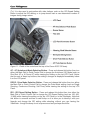
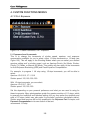
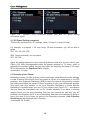
Figure 119 - Custom Functions C.Fn I: Exposure.
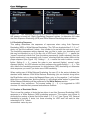
I-1: Exposure Level Increments
This is to change the increments of shutter speed, aperture, and exposure
compensation available for you to select, either 1/3-stop increments or 1/2-stop (see
Figure 120). This will apply to the Shooting Modes where you can select your desired
aperture setting and/ or shutter speed, such as Aperture-Priority (Av) Mode, ShutterPriority (Tv) Mode, or Manual (M) Mode. This setting will also apply to the increments
for Auto Exposure Bracketing (AEB) and Flash Exposure Compensation.
For example, to progress 1 full stop using 1/3-stop increments, you will be able to
select:
Aperture: f/5.6, f/6.3, f/7.1, f/8.0
Shutter speed: 125, 160, 200, 250
With 1/2-stop increments, you can select:
Aperture: f/5.6, f/6.7, f/8.0
Shutter speed: 125, 180, 250
Set this depending on your personal preference and what you are used to using for
these increments. Many photographers prefer the greater precision of 1/3 stops, which
is generally the traditional and standard setting, but you may prefer the simplicity and
ease of 1/2 stops (which may also make “in-your-head” exposure calculations easier).
Shutter speed and aperture will be fully explained in the Exposure Part 1 chapter, and
Exposure Compensation in its own section of the text.
recommend: 1/3-stop
105