1
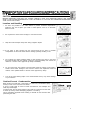
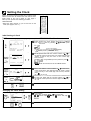
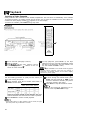
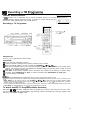
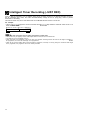
Recording with ttie Timer
I
Etartl
r
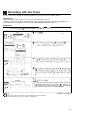
When the clock IS set
to 24H mode, “AM/
PM,5 WIII fl0t aolsear
WOPI
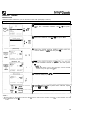
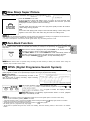
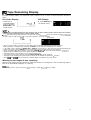
@ Set the start time with the numeric buttons or A/v and
press F.
@ Set the stop time with the numeric buttons or A/Y and
press b.
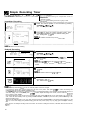
[Tape Speed]
A
1
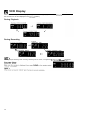
ATE PR START STOP
5,12 47 12:00PH12:30PH~
-,-- -- -:-_ .:--,-- -- _:-_
.:~-,--- ~:-_
.:.-
i
A or V. (See Intelligent
Timer Recording (JUST REC) on page 32.)
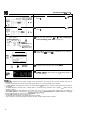
@ Select the tape speed with
INoTE>
l SP: Standard Play
l LP: Long Play
l EP, Extended Play
(only NTSC Tape)
[Timer review]
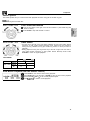
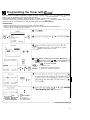
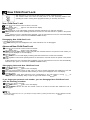
@ Press SET. To programme additional timer settings,
repeat steps @ through 0.
SET
MENU
0
TIMER
ON/OFF
0
’
I)
Normal
Screen
@ To return to the normal screen, press MENU.
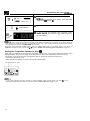
(D To set the VCR for automatic timer recording, press
TIMER ON/OFF and ensure the “a” indicator lights on
the VCR display.
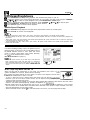
If the video cassette runs out before recording all the programmes, your VCR will stop, eject the cassette, and shut off
automatically.
l If power is interrupted for more than 60 minutes (power failure, etc.), all timer settings will be cancelled.
l If TIMER ON/OFF is pressed when there is no cassette loaded, “I9 flashes for 5 seconds, indicating that timer recording is
not possible.
l
If TIMER ON/OFF is pressed while a cassette with an uncovered erasure protection hole is loaded, “0” flashes and the
cassette is ejected.
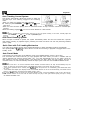
l When “B” is lit, regular VCR operation, clock setting and settrngicancelllngiconfirming
timer positions are not possible. For
regular VCR operation, clock setting and setting/cancelling/confirming timer positions, press TIMER ON/OFF to disengage
the timer (“B” disappears), and then turn on your VCR.
l During timer recording, the timer cannot be set.
l To terminate timer recording, press STOP during timer recording.
l If the same time is input for the start time and the stop time, the timer setting will be cancelled.
l
30