1
Note!
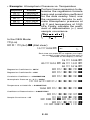
• To return the calculation mode and setup to the initial
defaults shown below, press A B 2(Mode) =.
Calculation Mode:
Angle Unit:
Exponential Display Format:
Fraction Display Format:
Decimal Point Character:
COMP
Deg
Norm 1
a b/c
Dot
• Mode indicators appear in the upper part of the display.
• Be sure to check the current calculation mode (SD, REG,
COMP) and angle unit setting (Deg, Rad, Gra) before
beginning a calculation.
k Input Capacity
• The memory area used for calculation input can hold 79
“steps.” One step is taken up each time you press a
number key or arithmetic operator key ( +, ,, -, \ ).
A A or p key operation does not take up a step, so
inputting A D, for example, takes up only one step.
• You can input up to 79 steps for a single calculation.
Whenever you input the 73rd step of any calculation,
the cursor changes from “_” to “k” to let you know
memory is running low. If you need to input more than
79 steps, you should divide your calculation into two or
more parts.
• Pressing the g key recalls the last result obtained, which
you can use in a subsequent calculation. See “Answer
Memory” for more information about using the g key.
k Making Corrections During Input
• Use e and r to move the cursor to the location you
want.
• Press [ to delete the number or function at the current
cursor position.
• Press A K to change to an insert cursor t. Inputting
something while the insert cursor is on the display inserts the input at the insert cursor position.
• Pressing A K, or = returns to the normal cursor from
the insert cursor.
E-8