1
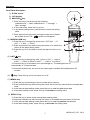
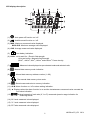
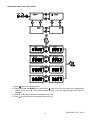
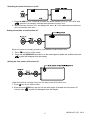
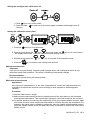
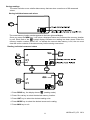
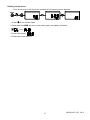
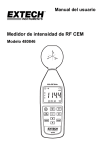
Operation Front Panel Description (1). E-field sensor. (2). LCD display. (3). MAX/AVG/ key : Press this key to scroll through the following: “Instantaneous” “Max. instantaneous” “Average” “Max. average”. In the read mode, press this key to exit. In the alarm setting mode, press this key to store the setting value. Press and hold this key while turning the meter on to disable the audible sound. The “ ” symbol will disappear. (4). MODE/ALARM key : Press this key to change the sensor axis: “XYZ axis” “X axis” “Y axis” “Z axis”. Press and hold this key while turning the meter on to switch the device to the alarm setting mode. Press this key for 2 seconds to switch the alarm function on or off. (5). UNIT/ key: Press this key to change the units: “mV/m or V/m” “A/m or 2 2 2 2 2 mA/m” “W/m or mW/m or W/m “ “W/cm or mW/cm “ Press this key for 2 seconds to turn the backlight on. The backlight turns off automatically in 15 seconds later. Press and hold this key and turn on the meter again to disable the backlight auto off function. (6). key: Press this key to turn the meter on or off. (7). MEM/▲ key: Press this key momentarily to store one data set to memory. Press and hold this key while turning the meter ON to enter the manual clear recorded data mode. In the manual data reading mode, press this key to read the next stored data. In the alarm setting mode, press this key to increase the setting value. (8). READ/▼ key: Press this key to switch to the manual data reading mode. Press and hold this key while turning the meter on to disable the auto power off function. In the manual data reading mode, press this key to read the previous stored data. In the alarm setting mode, press this key to decrease the setting value. 5 480836-en-EU_V5.3 09/14