1
English
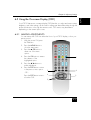
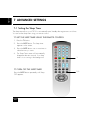
Chapter 3 Your Remote Control At A Glance
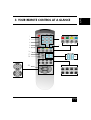
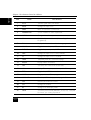
ITEM
12
NAME
DESCRIPTION
1
Power
Turns the system ON / into Power.
2
INPUT
Changes the input source.
3
MUTE
Mutes or restores the sound volume.
4
NUMBER PAD
Selects a channel or enters a password.
5
AUDIO
Changes the audio output.
6
P.P
Recalls the last viewed channel (Previous Page/Previous
Programmed).
7
FAV
Displays the favorites feature for selecting programs from a list.
8
SOUND
Toggles the sound options; RED.
9
PICTURE
Toggles the picture options; GREEN.
10
VGA
Changes the input source to VGA; YELLOW.
11
TV
Changes the input source to TV; BLUE.
12
HOLD
Temporarily holds the current teletext page.
13
REVEAL
Displays hidden information.
14
SIZE
Selects the size of the text in Teletext mode.
15
MIX
Displays Teletext superimposed on top of the TV image.
16
TEXT
Toggles ON/OFF Teletext mode.
17
INDEX
Brings up the initial Teletext page.
18
SUB PAGE
Turns ON/OFF the display of sub pages for Teletext.
19
VOL
Increases/decreases the volume.
20
CH
Changes the channel.
21
PIP
Change to the PIP display Mode.
22
WIDE
Selects the picture format (Panoramic, Zoom, 4:3, 16:9) that
best meets your viewing requirement.