1
Operator’s Manual
Accessing the Programming Mode
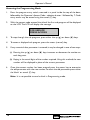
1.
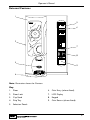
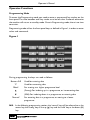
Press the program entry switch, mounted in a panel inside the top of the door,
followed by the Operator’s Access Code - selection button 1 followed by 7. Code
entry errors may be erased using the cancel (C) key.
2.
With the correct code entered the title of the first sub-program will be displayed
on the LCD.The LCD will display the message:
FOR SERVICE
PRESS ACCESS
3.
To step through the sub programs, press either the up (▲) or down (▼) keys.
4.
To access a displayed sub program, press the access (normal) key.
5.
If any numerical data parameter is entered, it may be changed in one of two ways:
(a) Pressing the up (▲) or down (▼) keys increases or decreases the number on
each key press.
(b) Keying in the actual digits of the number required. Using this method, the new
number will be displayed in place of the current parameter.
6.
Once the correct number has been entered, press the access key to overwrite
the old parameter with the new number.To retain the old parameter press either
the ‘blank’ or cancel (C) key.
Note: It is not possible to vend a drink in Programming mode.
20