1
Chapter 3
ASA 5510, ASA 5520, ASA 5540, and ASA 5550
Installing the Chassis
d.
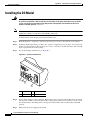
4GE SSM
•
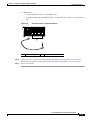
Ethernet port
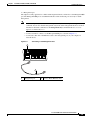
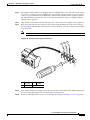
– Connect one RJ-45 connector to the Ethernet port of the 4GE SSM.
– Connect the other end of the Ethernet cable to your network device, such as a router, switch or
hub.
Note
The 4GE SSM is optional, this connection is necessary only if you have installed the 4GE SSM
on the adaptive security appliance.
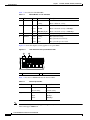
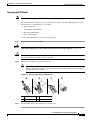
Figure 3-12
Connecting to the RJ-45 port
LNK
3
2
1
POW
ER
STAT
US
GE
USB1
SSM-4
USB2
MGMT USB2
MGMT
0 SPD
Cisco
USB1
1
143147
2
1
Note
Ethernet ports
2
RJ-45 connector
When using the 4GE SSM you can use the same numbered copper ports (RJ-45) and the SFP ports at the
same time.
Cisco ASA 5500 Series Hardware Installation Guide
3-12
78-17374-01