1
Alarm System
www.firstechonline.com | www.compustar.com
CM6300 Install Guide
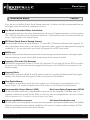
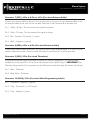
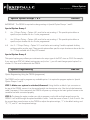
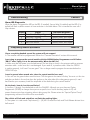
Special Option Group 1
Feature
Setting Value (Seconds)
2
AUX1 output time
1 ~ 100
3
AUX2 output time
1 ~ 100
4
AUX3 output time
1 ~ 100
5
AUX4 output time
1 ~ 100
6
AUX5 output time
1 ~ 100
7
AUX6 output time
1 ~ 100
8
AUX7 output time
1 ~ 100
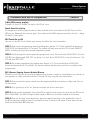
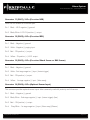
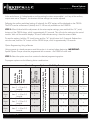
Special Option Group 2
Feature
Setting and OP500 Value
Programmable
Output
Connector
0 - Default Setting
1
POC #1
(-) 2nd Parking Light (Green/White)
2
POC #2
(-) Aux 5 (Red/Black)
3
POC #3
(-) Aux 4 (Green)
4
POC #4
(-) Aux 3 (White/Black)
5
POC #5
(-) Aux 2 (Black)
6
POC #6
(-) Rearm Wire (Orange)
7
POC #7
(-) Disarm Wire (Orange/White)
8
POC #8
(-) Horn (White)
9
POC #9
(-) Aux 1 (Violet)
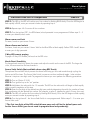
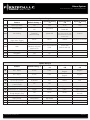
Option Menu Descriptions
1~19 – Optional Settings
2nd Light - [1] 2nd Start - [2]
2nd IG1 - [3]
2nd Acc - [4] Status Out - [5] Rearm Out - [6]
Disarm Out - [7] Horn Out - [8] Dome Light - [9]
Aux 1 Out - [10] Aux 2 Out - [11] Aux 3 - [12]
Aux 4 Out - [13] Aux 5 Out - [14] Aux 6 Out - [15]
Aux 7 Out – [16] N/A - [17] GWA - [18]
N/A - [19]
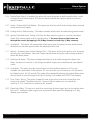
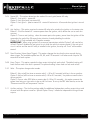
CM6300
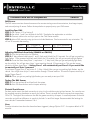
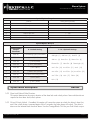
1-02 Door Lock/Unlock Pulse Duration.
This option determines the output duration of the door lock and unlock pulses. Some vehicles do not respond to short door lock/unlock pulses.
1-03 Driver’s Priority Unlock - If enabled, this option will cause the system to unlock the driver’s door first, and if the unlock button is pressed again within 3 seconds, the other doors will unlock. The driver’s door must be isolated from the other doors. Use the Orange/Black CN4 for your 2nd Unlock output.
Copyright 2011 Firstech, LLC.
Page 21