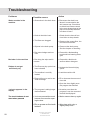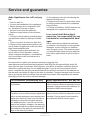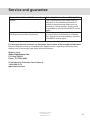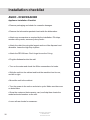
1
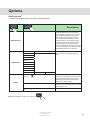
Options
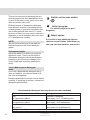
Select options
To select an option, press one of the option buttons.
Description
• If you want the machine to start up later,
press the ‘Delayed start’ option button,
you can delay the start 0.5-24 h. A clock
symbol and the number of hours until
start will appear in the display window.
• Press the Start/Stop button or make a
further selection. The machine will now
count down the time each hour until the
machine starts, and then show the remaining wash time in the display window.
• To cancel Delayed start, press and hold
the Start/Stop button for 3 seconds.
Delayed start
Program
With the temperature option button you
can select the wash temperature yourself.
Daily
Time
Heavy
Temperature
Normal
Pots & Pans
Delicate
Quick
Rinse&Dry
Rinse&Hold
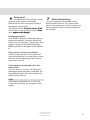
If you desire a maximum drying result,
press the Drying options button (Normal)
and a symbol showing three wavy lines
will light. (in all programs except Time,
Rinse & Dry, Rinse & Hold).
Normal
Drying
Without
If you want a program without Drying
options, press the button again and the
symbol will go out.
To save energy, select Economy dry.
Eco
Note: Press PROG to confirm your selection.
Customer Care Center
1-800-898-1879
www.askousa.com
15