1
7” Touchscreen Tablet
Quick Start Guide
Model: V7TAB16D
Important Information
If you are experiencing a problem with the operation
of this Tablet – Do not return it to the retailer!
Your Touchscreen Tablet includes Free Technical
Support by Phone or Internet and we are glad to help
you with any Problems.
For Technical Support by Internet, simply touch the
Customer Help icon on the lower right–side of the
home screen to immediately be directed to our
Technical Support website.
For Technical Support by Phone, please call 855-8503832, Monday to Saturday 10:00 AM to 7:00PM
For additional help you may view the Complete
Instruction Manual, which is located on the Home
Screen of the device.
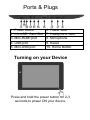
Ports & Plugs
1. Power button
6. Power Jack
®
2. microSD Card Slot 7. Headphone Jack
3. Mini-HDMI port
8. Microphone
4. USB port
5. Mini-USB port
9. Reset
10. Home Button
Turning on your Device
Press and hold the power button for 2-3
seconds to power ON your device.
Charging your Device
When you first receive your device the battery will only
be partially charged. To fully charge the battery, allow it
to charge for 5 hours to ensure it’s fully charged before
using the tablet.
Common Gestures
• Tap - To select or activate something, lightly touch
and release the selection.
• Type - To type something, such as a name,
password or address, just touch the field you want
to type in and a keyboard will pop up to let you
type into the field.
• Touch & hold - Touch an item and do not lift your
finger until an action occurs.
• Drag - Touch & hold an item for a moment and
then, without lifting your finger, move your finger on
the screen until the item reaches the target
position.
• Swipe or slide - Quickly move your finger across
the surface of the screen, without pausing after
touching
• Double-tap – Quickly Tap twice on a webpage,
map, or other screen to zoom.
Setting up your Device
Note: For proper setup, make sure you have access to a
wireless network (Wi-Fi) and your device is fully charged.
Before attempting to setup your device, you will need the
name and password (if used) of your Wi-Fi network.
Please have all of this information handy before setting
up your device.
Step 1 – Turn ON your Device
• Turn ON your device as described in the
previous section.
Step 2 - Language Selection
• Tap the Language list to scroll through the list of
available languages.
• Select the default language for your device by
tapping it.
• Confirm your choice by tapping the Start icon.
Step 3 – Setting the date and time
• Set the Time Zone by scrolling up & down until you
find your correct Time Zone. Release your finger to
confirm your selection.
• Set the Date by scrolling up & down the Month, Day
and Year to set the proper date.
• Set the Time by scrolling up & down the Hour,
Minute, & AM or PM to set the proper time.
• Automatic Date & Time
o Note: To automatically set the date & time, you
must be connected to a Wi-Fi network and have
your proper Time Zone chosen.
• Tap the NEXT icon to continue to the next screen
Step 4 – Got Google?
A Google Account lets you organize and access your
personal information from any computer or mobile
device:
• Never lose your contacts again. When you sign in
to your device with a Google account, all the
contacts you associate with that account in the
People app are automatically backed up. As a
result, they're always accessible through your
Gmail account from any computer.
• Synchronize and back up everything. Whether you
draft an email, add a contact's phone number, add
an event to your calendar, work gets backed up
continuously by Google and synchronized with any
computer where you use the same Google
Account.
• Access from anywhere. Check your latest calendar,
email, text messages, or social stream, wherever
you are, no matter what computer or mobile device
you're using.
• Use other Google services. Your Google Account
also lets you take full advantage of any other
Google apps and services that you may want to
use, such as Gmail, Google Maps, Navigation,
Google Play, YouTube, Google Talk, Messaging,
and many more.
Note: If you currently have an existing Gmail account,
then you already have a Google Account. Your full
Gmail email address and password will be used as the
Sign In information for your Google Account.
If you do not already have a free Google account, it is
strongly recommended you set-up a free Google
account when using the Setup wizard on this device in
order to get the optimum use from this tablet.
• Your device is designed to work with Google Mail
(Gmail). If you don’t have a free Google account it
is recommended you sign up for one.
• If you already have a Google account tap the
“Yes” icon and you will be taken to Step 6 – Setup your Wi-Fi
• If you do not have a Google account tap the “No”
icon and you will be taken to the Make it Google
screen.
Step 5 - Make it Google
• To create a free Google account, tap the “Get an
Account” icon.
• On the next screen you will create a Username for
your Google account.
• Your Google account Username can also be used
as a new email address, which will be
(YourUsername)@gmail.com
Note: If you don’t want to use Google Mail (Gmail) as
your email provider, you can use a different email
account from almost any provider with this tablet. This is
explained fully in the E-mail section of the full manual
found on the tablet.
• If you don’t want to create a Gmail account, tap the
“Not Now” icon.
• After you made your selection you will be taken to
the Wi-Fi setup.
Step 6 – Set-up your Wi-Fi
• A list of wireless networks your tablet is receiving
will appear on the screen.
• Select the name of your Wi-Fi network from the list
by tapping it.
• If your Wi-Fi network is password protected, you
will need to enter a password and a dialog box will
appear for you to enter your password.
• Tap the password line to make the tablet keyboard
appear.
• Check the “Show Password” box if you want to
view your password instead of seeing, ******
• Passwords are case-sensitive and must be typed
exactly as they were created.
• After you type your password, tap the “Connect”
icon
• You will know the connection is good when a blue
check mark appears next to the name of your
wireless network and it displays “Connected” under
your network name.
• After your network is successfully connected, tap
the “NEXT” icon.
Step 7- Sign in
• Type in your Gmail address and your password
• Tap the “NEXT” icon
• Note: a dialog box will appear asking you to agree
to the Google User License Agreement (ULA).
• Tap “Yes” to agree
• Tap “Cancel” to not agree and you will not be able
to access the Google email system, or other related
Google Apps.
Step 8 – Entertainment
You can quickly, easily, and securely purchase items
from the Google Play store by safely storing your credit
card information with 128-bit encryption in the Google
Wallet System.
• Tap the “Setup Credit Card” icon to securely &
safely enter your credit card information.
• Please review Google’s Privacy Information by
tapping the icon before entering your personal
information.
• Tap the “Not Now” icon if you do not wish to use
the Google Wallet feature, and move on to the next
screen.
Note: If you do not use Google Wallet you will need to
enter your complete credit card information every time
you wish to make a purchase from the Google Play
Store.
Step 9 – Backup and restore
You can easily and automatically backup your apps,
settings, music, photos, videos, books, website
bookmarks, and other data to your Google account.
• Check the options you would like to use. You can
change them in your Settings at anytime.
• When finished tap the “Right” arrow at the right
hand bottom of the screen to continue.
Step 10 – Use Google location
You can use the Google location services to use the
location data from your Wi-Fi network to help apps
determine your approximate location when it’s available.
This location data is used to: provide driving directions,
find the nearest shops, restaurants, movie theaters, &
more.
• Check the options you would like to use. You can
change them in your Settings at anytime.
• When finished tap the “Next” icon at the right hand
bottom of the screen to continue.
Step 11 – Setup Complete
Your tablet is now setup and ready to use.
• Tap the “Back” arrow to make additional changes.
• Tap the “Finish” arrow to start using your tablet.
For Additional Help:
For additional help you may view the Full version of
the Instruction Manual, which is located on the Home
Screen of the device.
Important Information
If you are experiencing a problem with the operation
of this Tablet – Do not return it to the retailer!
Your Touchscreen Tablet includes Free Technical
Support by Phone or Internet and we are glad to help
you with any Problems.
Technical Support
For Technical Support by Internet, simply touch the
Customer Help icon on the lower right–side of the
home screen to immediately be directed to our
Technical Support website.
For Technical Support by Phone, please call
855-850-3832, Monday to Saturday 10:00 AM to
7:00PM.
LIMITED ONE-YEAR WARRANTY
We warrant this product to be free from defects in material and
workmanship under normal use for a one-year period from the
original date of purchase from an authorized VIDAO dealer.
We will repair or replace the unit free of charge should it become
defective under this warranty, providing you, the original purchaser,
have your original dated sales receipt.
To obtain warranty service or replacement within the one-year
warranty period, please return the product with all parts and
accessories along with your original dated store receipt to the
original place of purchase and the unit will be exchanged at no
charge. It is not necessary to contact the manufacturer for warranty
replacement.
Our Customer Support Center is available Monday - Saturday
(10:00AM to 7:00PM EST) for technical assistance or
troubleshooting. To contact us, please call 1-855-850-3832.
This warranty applies only under conditions of normal use.
This warranty does not cover any product which has been subject to
damage due to an act of nature, misuse, neglect, accident, abuse,
commercial use, or modification of, or to, any part of the product,
including rooting the operating system and other software. Damage
to any external media such as SD, microSD, USB devices, and/or
other memory devices, or loss of data are not covered nor is the cost
incurred in shipping the unit for warranty repair or exchange. Under
no circumstances shall VIDAO be liable for any loss (direct, indirect,
incidental, foreseen, unforeseen, special or consequential) or for any
damage arising out of, or in connection with, the use of this product.
VIDAO makes no guarantee, express or implied, as to the capability,
performance, or quality of any third-party software or equipment
used with this product.
UNDER NO CIRCUMSTANCES WILL VIDAO BE LIABLE FOR
ANY INCIDENTAL OR CONSEQUENTIAL DAMAGES.
This warranty does not cover re-manufactured, refurbished, or
repaired units, or any products sold 'As Is'.
This warranty is valid only to the original purchaser of the Product in
the United States and Canada and grants specific legal rights.
© Schoenfeld International Inc.
PN V7TAB16D Version 1.1 August 2013