1
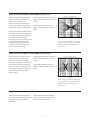
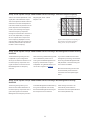
Setup: Sound: Speaker Groups: PRESETNAME: Advanced Settings: Bass Management: Enable Filtering
Selecting this menu brings you to the
menu where you determine whether the
Bass Management filtering is on or off
for individual output channels.
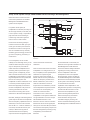
Setup: Sound: Speaker Groups: PRESETNAME: Advanced Settings: Bass Management: Panning
Selecting this menu brings you to the
menu where you adjust the panning of
the Bass Management signal derived
from each output channel into the two
Bass Management low-frequency
channels.
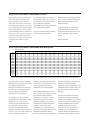
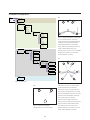
Setup: Sound: Speaker Groups: PRESETNAME: Advanced Settings: Bass Management: Re-Direction
Levels
Selecting this menu brings you to the
menu where you adjust the level of the
two Bass Management low-frequency
channels being added back to the
output channels.
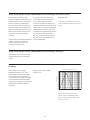
Setup: Sound: Speaker Groups: PRESETNAME: Advanced Settings: Subwoofer: Time Alignment
The Time Alignment setting allows you
This may be useful, for example, when a
to adjust the relative delays of the
wireless subwoofer is used and it is
subwoofer(s) and the main loudspeaker
necessary to delay all main loudspeakers
channels. When this value is positive,
in the Speaker Group to wait for the
then the subwoofer is being delayed
transmission time of the wireless
relative to the main loudspeaker
connection to the subwoofer.
channels. When the value is negative,
then the subwoofer output precedes the
Range: -30 ms to 30 ms.
main loudspeaker channels by the
Step size: 1 ms.
displayed value.
21