1
User's Guide
Loading Paper
Available Paper and Capacities
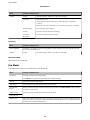
Epson recommends using genuine Epson paper to ensure high-quality printouts.
Genuine Epson Paper
Media Name
Size
Loading
Capacity
(Sheets)
Manual 2Sided Printing
Borderless
Printing
Epson Bright White Ink Jet
Paper
A4
80
✓ *1
–
Epson Ultra Glossy Photo
Paper
A4, 13 × 18 cm (5 × 7 in.), 10
× 15 cm (4 × 6 in.)
20*2
–
✓
Epson Premium Glossy
Photo Paper
A4, 13 × 18 cm (5 × 7 in.),
16:9 wide size (102 × 181
mm), 10 × 15 cm (4 × 6 in.)
20*2
–
✓
Epson Premium Semigloss
Photo Paper
A4, 10 × 15 cm (4 × 6 in.)
20*2
–
✓
Epson Photo Paper Glossy
A4, 13 × 18 cm (5 × 7 in.), 10
× 15 cm (4 × 6 in.)
20*2
–
✓
Epson Matte PaperHeavyweight
A4
20
–
✓
Epson Photo Quality Ink Jet
Paper
A4
80
–
–
*1
You can load up to 30 sheets for paper with one side already printed.
*2
Load one sheet of paper at a time if the paper does not feed correctly or if the printout has uneven colors or smears.
Note:
The availability of paper varies by location. For the latest information on paper available in your area, contact Epson
support.
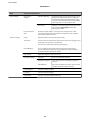
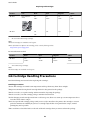
Commercially Available Paper
Media Name
Size
Loading
Capacity
(Sheets or
Envelopes)
Manual 2Sided Printing
Borderless
Printing
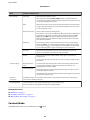
Plain paper
Letter, A4, B5, A5, A6
Up to the line
✓*
–
under the d
symbol inside
the edge guide.
Copy paper
Envelope
*
Legal, User Defined
1
✓
Envelope #10, Envelope DL,
Envelope C6
10
–
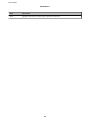
You can load up to 30 sheets for paper with one side already printed.
25
–