1
Device Installation
English
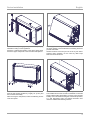
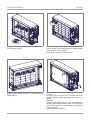
9. Position the second and third rows of bricks. Insert the
second heating element.
11. Position the top row of bricks in the same way.
10. After positioning the fourth row of bricks, insert the upper
heating element. Position the fifth row of bricks under the
heating element.
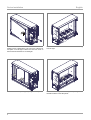
12. Reinsert the core room cover.
Test the mobility of the heating elements. Jammed heating
elements lead to noise generation.
Clean the air outlet area and the switchbox.
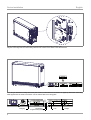
Left side:
The upper edge of the core room cover must rest on the
partition. Slide the lateral edge behind the bevel of the
partition.
Right side:
Insert the lateral edge of the core room cover between the
thermal insulation and the partition. Watch out for the guiding
slots. Firmly press the core room protection into place and
fasten the screws.
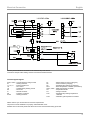
Connect the heating elements.
7