1
TROUBLESHOOTING GE ECM 2.3™ MOTORS
NOTE: Affects Models PA13241, PA13301, PA13361
CAUTION:
Disconnect power from unit before removing or replacing
connectors, or servicing motor. To avoid electric shock from
the motor’s capacitors, disconnect power and wait at least 5
minutes before opening motor.
Symptom
Cause/Procedure
• Noisy blower or cabinet
• Check for loose blower housing, panels, etc.
• High static creating high blower speed?
- Check for air whistling through seams in
ducts, cabinets or panels
- Check for cabinet/duct deformation
Symptom
Cause/Procedure
Motor rocks slightly
when starting
• This is normal start-up for ECM
• “Hunts” or “puffs” at
high CFM (speed)
• Does removing panel or filter reduce
“puffing”?
- Reduce restriction
- Reduce max. airflow
Motor won’t start
• No movement
• Check blower turns by hand
• Check power at motor
• Check low voltage (24 Vac R to C) at motor
• Check low voltage connections
(G, Y, W, R, C) at motor
• Check for unseated pins in connectors on
motor harness
• Test with a temporary jumper between R - G
• Check motor for tight shaft
• Perform motor/control replacement check
• Perform Moisture Check
• Motor rocks,
but won’t start
Motor oscillates up
load & down while being
tested off of blower
Motor starts, but
runs erratically
• Varies up and down
or intermittent
• Check for loose or compliant motor mount
• Make sure blower wheel is tight on shaft
• Perform motor/control replacement check
• It is normal for motor to oscillate with no
on shaft
• Check line voltage for variation or “sag”
• Check low voltage connections
(G, Y, W, R, C) at motor, unseated pins in
motor harness connectors
• Check “Bk” for erratic CFM command (in
variable-speed applications)
• Check out system controls, Thermostat
• Perform Moisture Check
Evidence of Moisture
• Motor failure or
Check
malfunction has occurred
and moisture is present
• Evidence of moisture
present inside air mover
• Perform Moisture Check
Do
Don’t
• Check out motor, controls,
wiring and connections
thoroughly before replacing
motor
• Orient connectors down so
water can’t get in
- Install “drip loops”
• Use authorized motor and
model #’s for replacement
• Keep static pressure to a
minimum:
- Recommend high
efficiency, low static filters
- Recommend keeping filters
clean.
- Design ductwork for min.
static, max. comfort
- Look for and recommend
ductwork improvement,
where necessary
• Automatically assume the motor is bad.
• “Hunts” or “puffs” at
high CFM (speed)
• Does removing panel or filter reduce
“puffing”?
- Reduce restriction
- Reduce max airflow
• Size the equipment wisely
• Stays at low CFM
despite system call
for cool or heat CFM
• Check low voltage (Thermostat) wires and
connections
• Verify fan is not in delay mode; wait until
delay complete
• “R” missing/not connected at motor
• Perform motor/control replacement check
Moisture Check
• Stays at high CFM
• “R” missing/not connected at motor
• Is fan in delay mode? - wait until delay time
complete
• Perform motor/control replacement check
• Blower won’t shut off
• Current leakage from controls into G, Y or W?
Check for Triac switched thermostat or solidstate relay
Excessive noise
• Determine if it’s air noise, cabinet, duct or
motor noise; interview customer, if necessary
• High static creating high blower speed?
- Is airflow set properly?
- Does removing filter cause blower to slow
down? Check filter
- Use low-pressure drop filter
- Check/correct duct restrictions
• Air noise
Manual 2100-467D
Page
22 of 25
• Replace motor and Perform Moisture
• Locate connectors above 7 and 4 o’clock
positions
• Replace one motor or control model # with
another (unless an authorized replacement)
• Use high pressure drop filters some have ½"
H20 drop!
• Use restricted returns
• Oversize system, then compensate with low
airflow
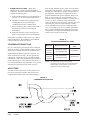
• Check orientation before
• Plug in power connector backwards
inserting motor connectors • Force plugs
• Connectors are oriented “down” (or as recommended by equipment
manufacturer)
• Arrange harness with “drip loop” under motor
• Is condensate drain plugged?
• Check for low airflow (too much latent capacity)
• Check for undercharged condition
• Check and plug leaks in return ducts, cabinet
Comfort Check
• Check proper airflow settings
• Low static pressure for lowest noise
• Set low continuous-fan CFM
• Use humidistat and 2-speed cooling units
• Use zoning controls designed for ECM that regulate CFM
• Thermostat in bad location?