1
 2.3 BEFORE INSTALLATION
•• Put the product in an even and stable location. If the product falls down or drops, it may cause an injury or malfunction.
•• Don’t place the product in too high temperature (over 50°C), too low temperature (under 0°C) or high humidity.
•• Use the DC power adapter with correct specifications. If inappropriate power supply is used then it may cause a fire.
•• Do not twist or pull by force ends of the UTP cable. It can cause malfunction.
2.4Panel Description
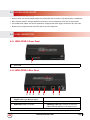
2.4.1 HDM-C5XD-S Front Panel
1
1
Power LED
2.4.2 HDM-C5XD-S Rear Panel
2
3
4
5
6
7
8
2
Input signal format indicator
(Bright: HDMI Single, Dim: DVI Signal)
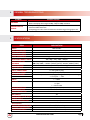
3
DIP Switch (details below)
4
HDMI IN: Connect HDMI source
5
Audio Out: Plug in Local Speaker
6
HDMI OUT: HDMI Local Output
7
HDMI Signal Out: RJ45 connection to connect to
HDM-C5XD-SR, HDM-C5-3-R or HDM-C5-3-M
8
Power Connector: 5V 4A DC
www.avenview.com
Page
5