1
Appendix E: Tektronix TDS 1002B Oscilloscope
Tektronix TDS 1002B Oscilloscope
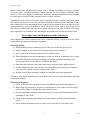
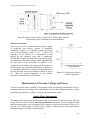
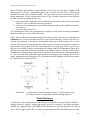
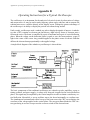
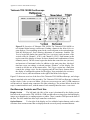
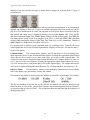
Figure E.2: Overview of Tektronix TDS 1002B. The Tektronix TDS 1002B is a
two-channel digital storage oscilloscope. Pushing a button in the Menu Select region displays a corresponding menu on the screen adjacent to the option buttons,
with the Multipurpose Knob allowing adjustment of continuous variables. The
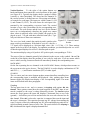
Vertical region has knobs that control the size (VOLTS/DIV) and POSITION of the
vertical scales for Channel 1 (CH 1) and Channel 2 (CH 2). Push buttons in this
region control the display of menus for those channels and combinations of those
channels (MATH). The Horizontal region has knobs that control the size (SEC/DIV)
and POSITION of horizontal scales. In addition to the main time-base, this dualtime-base scope can enlarge a selected portion (“Window”) of the display. The
controls to do this are in the HORIZ MENU. The Trigger region has a knob that
controls the voltage LEVEL for the triggering and the TRIG MENU button allows
the display of configurable options for the trigger. Note particularly the AUTOSET,
DEFAULT SETUP, and HELP buttons to the right of the Menu Select region.
Figure E.2 shows an overview of the face of the Tektronix TDS 1002B oscilloscope, and a larger
image is attached at the end of this appendix. The Tektronix TDS 1002 oscilloscope is identical
except it lacks (1) the AUTORANGE button, (2) the MULTIPURPOSE KNOB, and (3) USB connectors
at front and rear, instead using connectors for older technology. The sections below describe the
scope’s controls and their uses, with the name of each control printed in SMALL CAPS TEXT.
Oscilloscope Controls and Their Use
Display Section
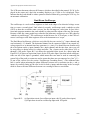
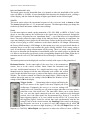
The left hand side (lhs) of the scope is dominated by the display screen.
Just below the screen on the TDS 1002B is a USB port that allows saving scope data and display
images on a thumb drive or sending output to a printer. There is another USB port on the back of
the unit. The 1002 model has older-style connectors on the back.
Option Buttons
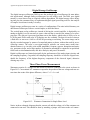
To the right of the display are five unlabeled option buttons used to make
selections from various menus that are displayed on the screen by many command buttons.
57
2010