1
‘peak’) indicators on the system’s power amplifiers. PEAK
should be set so that the amplifiers do not clip at even the
highest signal levels. The idea is that the CX335’s peak limiter
should be active, not the clip protection in the amplifier. The
red LIMIT LED adjacent to the PEAK control shows when
the peak limiter is applying limiting. However, if it illuminates
more than occasionally, the CX335 is not adjusted for
optimum performance and the compressor controls should
be readjusted to give more gain reduction.
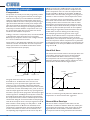
Mode 2 – Soft Knee/Slow Envelope:
This compressor mode will still yield musical results, but will
tend to allow very fast transients through the compressor
section. Therefore, for continued amplifier and loudspeaker
protection, more peak limiting will be required, and you
should be sure that there is sufficient overhead in terms of
speaker power handling.
ENVELOPE
KNEE
THRESHOLD
-10
SOFT
NORMAL
3
-15 1.5
20
1.2
dBu
HARD
-
10
5
-20
GAIN
PEAK
5
10
+10
SLOW
RATIO
2
0
6
15
0
4
+
BYPASS
4
3
0
-2
-4
20
dBu
:1
8
8
26
-6
12
NORMAL
12
LIMIT
dB
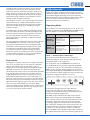
noticeable until very high input levels are used; under these
conditions the CX335 will take control to preserve system
integrity.
NOTE: See also “Intelligent Limiting” below
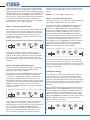
Mode 4 – Hard Knee/Slow Envelope:
This mode is likely to be the most noticeable (especially with
high settings of RATIO and/or fast dance tracks).
For compression only, set THRESHOLD to between 0 and
8 dB below the maximum input signal level and RATIO
to about 5:1 or slightly higher. (Note that the higher the
ratio, the more audible the effects of compression.) For
compression and limiting, set RATIO to 20:1 or higher. A
high ratio setting will allow the THRESHOLD setting to
accurately establish the maximum output level. As the ratio
is decreased, the threshold setting should also be reduced
to compensate. With programme at the normal level,
adjust GAIN while pressing BYPASS several times, until the
output meters indicate roughly the same level when the
compressor is bypassed as when it is in circuit. Adjust the
PEAK control as described for Mode 1 (above).
BYPASS
ENVELOPE
KNEE
THRESHOLD
-10
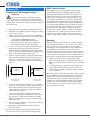
Setting up the CX335 in Mode 2 is exactly the same
procedure as for Mode 1 (above). The main difference in
operation is that some signal peaks may have the potential
for causing problems further along the signal chain; note
the remark above regarding the necessity for ample system
headroom.
Mode 3 – Hard Knee/Normal Envelope:
Hard knee operation, though more “precise”, is generally
slightly more noticeable in terms of audible artefacts
(especially at high settings of RATIO).
For compression only, set THRESHOLD to between 0 and
8 dB below the maximum input signal level and RATIO
to about 5:1 or slightly higher. (Note that the higher the
ratio, the more audible the effects of compression.) For
compression and limiting, set RATIO to 20:1 or higher. With
programme at the normal level, adjust GAIN while pressing
BYPASS several times, until the output meters indicate
roughly the same level when the compressor is bypassed as
when it is in circuit.
ENVELOPE
KNEE
THRESHOLD
-10
NORMAL
SOFT
HARD
3
-15 1.5
dBu
-
10
20
5
-20
GAIN
PEAK
5
10
+10
SLOW
RATIO
2
0
1.2
:1
6
15
0
4
+
BYPASS
4
3
0
-2
-4
20
26
-6
dBu
8
8
12
LIMIT
NORMAL
12
dB
BYPASS
In this mode, quieter signals pass through the compressor
unprocessed, but louder signals (i.e., those above the
threshold) will be compressed (activity of the gain reduction
meter will confirm this). Adjust the PEAK control as
described for Mode 1 (above). The LIMIT LED is likely to
flicker more often than in Mode 1, especially with very
percussive tracks at high level. No artefacts should be
12
CX335 User Manual v1.0
NORMAL
SOFT
SLOW
HARD
RATIO
3
2
0
-15 1.5
20
5
-20
1.2
dBu
-
10
10
+10
GAIN
PEAK
5
6
15
0
4
+
BYPASS
4
3
0
-2
-4
20
8
26
-6
dBu
:1
8
12
NORMAL
12
LIMIT
dB
BYPASS
In this mode, quieter signals pass through the compressor
unprocessed, but louder input signals (i.e., those above the
threshold) will be compressed. However, note that the initial
peaks of transient signals are likely to be passed through the
compressor unprocessed.
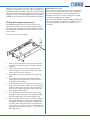
Intelligent Limiting
As the compressor section of the CX335 has a maximum
ratio setting of ∞ to 1, it may be used to provide limiting
rather just compression. Because the compressor makes
programme-dependant adjustments to the attack and release
times, and the split-frequency side chain detects signal levels
in both channels, the limiting action produced is largely
automatic.
Set the CX335 to Mode 3 (Hard Knee/Normal Envelope), as
described above. Set the THRESHOLD control to the level
at which limiting is to be applied. Set the RATIO control to
maximum (infinity). Set the GAIN control as for the other
Modes: with programme at the normal level, adjust GAIN
while pressing BYPASS several times, until the output meters
indicate roughly the same level when the compressor is
bypassed as when it is in circuit.
ENVELOPE
KNEE
THRESHOLD
-10
NORMAL
SOFT
HARD
3
-15 1.5
-20
dBu
1.2
:1
-
10
20
5
GAIN
PEAK
5
10
+10
SLOW
RATIO
2
0
6
15
0
4
+
BYPASS
4
3
0
-2
-4
20
26
-6
dBu
8
8
12
LIMIT
NORMAL
12
dB
BYPASS