1
R24.0459.00 5430 US Fr Can .book Page 1 Wednesday, February 25, 2004 4:43 PM
802.11g Wireless Gaming Adapter and Ethernet Bridge
Thank you for purchasing the U.S. Robotics 802.11g Wireless Gaming Adapter and
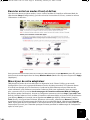
Ethernet Bridge (Model USR5430). You can use your USR5430 to online game through
the Internet so you can play anyone in the world. Or, you can use the USR5430 as an
Ethernet bridge to connect any Ethernet device such as a computer, network printer, or
digital video recorder (DVR) to a wireless router. Finally, your USR5430 may also be
used to play your friend in the same house or building provided you each have a gaming
console of the same brand (Xbox-to-Xbox, Playstation-to-Playstation), or other gaming
console.
LED information
Power LED
Off = No Power
Solid = Power ON
Wireless LED
Off = No physical link
Solid = Physical link established (Wireless)
Flashing = Data Activity (Wireless)
Ethernet LED
Off = No physical link
Solid = Physical link established (Ethernet)
Flashing = Data activity (Ethernet)
Rear Panel information
Ethernet
12VDC
Reset
Item
Description
Antenna
Connect your antenna
connector
Reset
Changes the USR5430 configuration. Refer to the Restoring to Default
Settings for specific reset options
Ethernet
Ethernet port for use with an Ethernet cable
12VDC
Input jack that accepts cable from AC power adapters
1