1
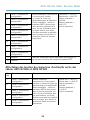
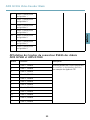
INSTALLATION GUIDE
ENGLISH
FRANÇAIS
AXIS Q7436 Video Encoder Blade
DEUTSCH
ITALIANO
ESPANÕL
ò ¨ ¾
Legal Considerations
Video surveillance can be regulated by laws that vary from
country to country. Check the laws in your local region
before using this product for surveillance purposes.
This product includes one (1) H.264 decoder license. To
purchase further licenses, contact your reseller.
Liability
Every care has been taken in the preparation of this
document. Please inform your local Axis office of any
inaccuracies or omissions. Axis Communications AB cannot
be held responsible for any technical or typographical errors
and reserves the right to make changes to the product and
manuals without prior notice. Axis Communications AB
makes no warranty of any kind with regard to the material
contained within this document, including, but not limited
to, the implied warranties of merchantability and fitness for
a particular purpose. Axis Communications AB shall not
be liable nor responsible for incidental or consequential
damages in connection with the furnishing, performance
or use of this material. This product is only to be used for
its intended purpose.
Intellectual Property Rights
Axis AB has intellectual property rights relating to
technology embodied in the product described in this
document. In particular, and without limitation, these
intellectual property rights may include one or more of the
patents listed at http://www.axis.com/patent.htm and one
or more additional patents or pending patent applications
in the US and other countries.
This product contains licensed third-party software. See
the menu item “About” in the product’s user interface for
more information.
This product contains source code copyright Apple
Computer, Inc., under the terms of Apple Public Source
License 2.0 (see http://www.opensource.apple.com/apsl).
The source code is available from
http://developer.apple.com/darwin/projects/bonjour/
Equipment Modifications
This equipment must be installed and used in
strict accordance with the instructions given in the
user documentation. This equipment contains no
user-serviceable components. Unauthorized equipment
changes or modifications will invalidate all applicable
regulatory certifications and approvals.
Trademark Acknowledgments
AXIS COMMUNICATIONS, AXIS, ETRAX, ARTPEC and VAPIX
are registered trademarks or trademark applications of Axis
AB in various jurisdictions. All other company names and
products are trademarks or registered trademarks of their
respective companies.
Apple, Boa, Apache, Bonjour, Ethernet, Internet Explorer,
Linux, Microsoft, Mozilla, Real, SMPTE, QuickTime, UNIX,
Windows, Windows Vista and WWW are registered
trademarks of the respective holders. Java and all
Java-based trademarks and logos are trademarks or
registered trademarks of Oracle and/or its affiliates.
UPnPTM is a certification mark of the UPnPTM Implementers
Corporation.
Support
Should you require any technical assistance, please contact
your Axis reseller. If your questions cannot be answered
immediately, your reseller will forward your queries through
the appropriate channels to ensure a rapid response. If you
are connected to the Internet, you can:
•
•
•
download user documentation and software updates
find answers to resolved problems in the FAQ database.
Search by product, category, or phrase
report problems to Axis support staff by logging in to
your private support area
chat with Axis support staff (selected countries only)
visit Axis Support at www.axis.com/techsup/
•
•
Learn More!
Visit Axis learning center www.axis.com/academy/ for
useful trainings, webinars, tutorials and guides.
Regulatory Information
Europe
This product complies with the applicable CE marking
directives and harmonized standards:
• Electromagnetic Compatibility (EMC) Directive
2004/108/EC. See Electromagnetic Compatibility
(EMC), on page 2 .
• Low Voltage (LVD) Directive 2006/95/EC. See .
• Restrictions of Hazardous Substances (RoHS) Directive
2011/65/EU. See Disposal and Recycling, on page 3 .
A copy of the original declaration of conformity may be
obtained from Axis Communications AB. See Contact
Information, on page 3 .
Electromagnetic Compatibility (EMC)
This equipment has been designed and tested to fulfill
applicable standards for:
• Radio frequency emission when installed according to
the instructions and used in its intended environment.
• Immunity to electrical and electromagnetic phenomena
when installed according to the instructions and used
in its intended environment.
USA
This equipment has been tested using a shielded network
cable (STP) and found to comply with the limits for a
Class B digital device, pursuant to part 15 of the FCC
Rules. These limits are designed to provide reasonable
protection against harmful interference in a residential
installation. This equipment generates, uses and can
radiate radio frequency energy and, if not installed and
used in accordance with the instructions, may cause
harmful interference to radio communications. However,
there is no guarantee that interference will not occur in
a particular installation. If this equipment does cause
harmful interference to radio or television reception, which
can be determined by turning the equipment off and on,
the user is encouraged to try to correct the interference by
one or more of the following measures:
• Reorient or relocate the receiving antenna.
• Increase the separation between the equipment and
receiver.
• Connect the equipment into an outlet on a circuit
different from that to which the receiver is connected.
• Consult the dealer or an experienced radio/TV
technician for help.
Canada
This Class B digital apparatus complies with Canadian
ICES-003.
Europe
This digital equipment fulfills the requirements for RF
emission according to the Class B limit of EN 55022.
This product fulfills the requirements for immunity
according to EN 61000-6-1 residential, commercial and
light-industrial environments.
This product fulfills the requirements for immunity
according to EN 61000-6-2 industrial environments.
This product fulfills the requirements for immunity
according to EN 55024 office and commercial environments
Australia/New Zealand
This digital equipment fulfills the requirements for RF
emission according to the Class B limit of AS/NZS CISPR 22.
Japan
この装置は、クラスB 情報技術装置です。この装
置は、家庭環境で使用することを目 的としていま
すが、この装置がラジオやテレビジョン受信機に
近接して使用されると、 受信障害を引き起こすこ
とがあります。 取扱説明書に従って正しい取り扱
いをして下さい。
Korea
이 기기는 가정용(B급) 전자파적합기기로서 주로
가정에서 사용하는 것을 목적으로 하며, 모든 지
역에서 사용할 수 있습니다.
Disposal and Recycling
When this product has reached the end of its useful life,
dispose of it according to local raws and regulations. For
information about your nearest designated collection point,
contact your local authority responsible for waste disposal.
In accordance with local legislation, penalties may be
applicable for incorrect disposal of this waste.
Europe
This symbol means that the product shall not be
disposed of together with household or commercial waste.
Directive 2012/19/EU on waste electrical and electronic
equipment (WEEE) is applicable in the European Union
member states. To prevent potential harm to human health
and the environment, the product must be disposed of in
an approved and environmentally safe recycling process.
For information about your nearest designated collection
point, contact your local authority responsible for waste
disposal. Businesses should contact the product supplier for
information about how to dispose of this product correctly.
This product complies with the requirements of
Directive 2011/65/EU on the restriction of the use of
certain hazardous substances in electrical and electronic
equipment (RoHS).
China
This product complies with the requirements of the
legislative act Administration on the Control of Pollution
Caused by Electronic Information Products (ACPEIP).
Contact Information
Axis Communications AB
Emdalavägen 14
223 69 Lund
Sweden
Tel: +46 46 272 18 00
Fax: +46 46 13 61 30
www.axis.com
AXIS Q7436 Video Encoder Blade
Safety Information
Hazard Levels
DANGER
Indicates a hazardous situation which, if not avoided, will result in
death or serious injury.
WARNING
Indicates a hazardous situation which, if not avoided, could result
in death or serious injury.
CAUTION
Indicates a hazardous situation which, if not avoided, could result
in minor or moderate injury.
NOTICE
Indicates a situation which, if not avoided, could result in damage
to property.
Other Message Levels
Important
Indicates significant information which is essential for the product
to function correctly.
Note
Indicates useful information which helps in getting the most out
of the product.
5
ENGLISH
Read through this Installation Guide carefully before installing the product. Keep the Installation
Guide for future reference.
AXIS Q7436 Video Encoder Blade
Safety Instructions
NOTICE
• The Axis product shall be used in compliance with local laws and regulations.
• Store the Axis product in a dry and ventilated environment.
• Avoid exposing the Axis product to shocks or heavy pressure.
• Do not install the product on unstable brackets, surfaces or walls.
• Use only applicable tools when installing the Axis product. Excessive force could cause
damage to the product.
• Do not use chemicals, caustic agents, or aerosol cleaners. Use a clean cloth dampened
with pure water for cleaning.
• Use only accessories that comply with technical specification of the product. These can be
provided by Axis or a third party.
• Use only spare parts provided by or recommended by Axis.
• Do not attempt to repair the product by yourself. Contact Axis support or your Axis
reseller for service matters
Transportation
NOTICE
• When transporting the Axis product, use the original packaging or equivalent to prevent
damage to the product.
Battery
The Axis product uses a 3.0 V BR2032 lithium battery as the power supply for its internal real-time
clock (RTC). Under normal conditions this battery will last for a minimum of five years.
Low battery power affects the operation of the RTC, causing it to reset at every power-up. A log
message will appear when the battery needs replacing.
The battery should not be replaced unless required, but if the battery does need replacing, contact
Axis support at www.axis.com/techsup/ for assistance.
WARNING
• Risk of explosion if the battery is incorrectly replaced.
• Replace only with an identical battery or a battery which is recommended by Axis.
• Dispose of used batteries according to local regulations or the battery manufacturer's
instructions.
6
AXIS Q7436 Video Encoder Blade
Installation Guide
Installation Steps
1. Make sure the package contents, tools and other materials necessary for the installation
are in order. See page 7 .
2. Study the hardware overview. See page 8 .
3. Study the specifications. See page 12.
4. Install the hardware. See page 12.
5. Access the product. See page 12.
Package Contents
•
•
•
AXIS Q7436 Video Encoder Blade
Installation and Management Software CD
Printed materials
Installation Guide (this document)
Extra serial number label (2x)
Recommended Tools
•
PZ1 screwdriver
7
ENGLISH
This Installation Guide provides instructions for installing AXIS Q7436 Video Encoder Blade on your
network. For other aspects of using the product, see the User Manual available at www.axis.com
AXIS Q7436 Video Encoder Blade
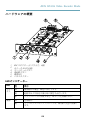
Hardware Overview
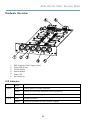
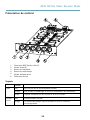
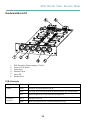
6
1
1.
2.
3.
4.
5.
6.
2 3
6
5
4
BNC connector (Video input, 6 nos.)
Status LED (6 nos.)
Control button
Restart button
Power LED
Bus connector
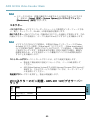
LED Indicators
LED
Color
Indication
Status
Green
Steady green for normal operation.
Amber
Steady during startup and when restoring settings.
Red
Slow flash for failed upgrade.
Green
Normal operation.
Amber
Flashes green/amber during firmware upgrade.
Power
8
AXIS Q7436 Video Encoder Blade
Note
• The Status LED can be configured to flash for identifying the unit. Go to Setup > System
Options > Maintenance .
For specifications and operating conditions, see page 12.
Bus connector - These are the physical interfaces to the video encoder chassis, providing power,
network, RS485 and I/O terminal connections.
BNC connector - Each video input is terminated using a coax/BNC connector. Connect a 75 Ohm
coaxial video cable; the recommended maximum length is 250 meter (800 feet).
Note
75 Ohm video termination can be enabled/disabled for the video input via the product's
web page at Video & Audio > Video Input > Video termination. This termination is
enabled on factory default. In cases where the product is to be connected in parallel
with other equipment, for optimum video quality, it is recommended that termination be
enabled for only the last device in the video signal chain.
Control button - The control button is used for:
•
•
Resetting the product to factory default settings. See page 12.
Connecting to an AXIS Video Hosting System service or AXIS Internet Dynamic
DNS Service. For more information about these services, see the User Manual.
Restart button - Press to restart the product.
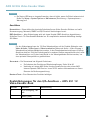
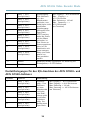
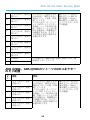
Pin Assignments for I/O Connector - AXIS 291 1U Video Server
Rack
Pin
Function
1
+12 V out, 100mA
2
GND
Description
9
ENGLISH
Connectors
AXIS Q7436 Video Encoder Blade
3
Channel 1, Configurable
I/O 1
4
Channel 2, Configurable
I/O 1
5
Channel 3, Configurable
I/O 1
6
Channel 4, Configurable
I/O 1
7
Channel 5, Configurable
I/O 1
8
Channel 6, Configurable
I/O 1
9
Channel 1, Configurable
I/O 2
10
Channel 2, Configurable
I/O 2
11
RS485A
12
RS485B
Digital input - Connect to GND
to activate, or leave floating (or
unconnected) to deactivate.
Digital output - Uses an open
drain NFET transistor with the
source connected to GND. If used
with an external relay, a diode
must be connected in parallel
with the load, for protection
against voltage transients.
Min input = – 40 V DC
Max input = + 40 V DC
Max load = 100mA
Max voltage = + 40 V DC
(to the transistor)
A half-duplex RS485 interface for controlling auxiliary
equipment such as PTZ devices.
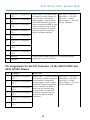
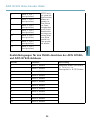
Pin assignments for the I/O Connector of the AXIS Q7900 and
AXIS Q7920 Chassis
Pin
Function
Description
1
Channel 1, Configurable
I/O 1
2
Channel 2, Configurable
I/O 1
3
Channel 3, Configurable
I/O 1
4
Channel 4, Configurable
I/O 1
5
Channel 5, Configurable
I/O 1
Digital input - Connect to GND
to activate, or leave floating (or
unconnected) to deactivate.
Digital output - Uses an open
drain NFET transistor with the
source connected to GND. If
used with an external relay,
a diode must be connected
in parallel with the load, for
protection against voltage
transients.
6
Channel 6, Configurable
I/O 1
10
Min input = – 40 V DC
Max input = + 40 V DC
Max load = 100mA
Max voltage = + 40 V DC
(to the transistor)
AXIS Q7436 Video Encoder Blade
Channel 1, Configurable
I/O 2
8
Channel 2, Configurable
I/O 2
9
Channel 3, Configurable
I/O 2
10
Channel 4, Configurable
I/O 2
11
Channel 5, Configurable
I/O 2
12
Channel 6, Configurable
I/O 2
ENGLISH
7
Pin Assignments for RS485 Connector - AXIS Q7900 and AXIS
Q7920 Chassis
Pin
Function
Description
1
Channel 1, RS485A
2
Channel 1, RS485B
A half-duplex RS485 interface for
controlling auxiliary equipment such as
PTZ devices.
3
Channel 2, RS485A
4
Channel 2, RS485B
5
Channel 3, RS485A
6
Channel 3, RS485B
7
Channel 4, RS485A
8
Channel 4, RS485B
9
Channel 5, RS485A
10
Channel 5, RS485B
11
Channel 6, RS485A
12
Channel 6, RS485B
11
AXIS Q7436 Video Encoder Blade
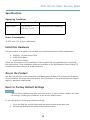
Specifications
Operating Conditions
Product
Temperature
Humidity
AXIS Q7436
0 °C to +45 °C
(32 °F to 113 °F)
10-85% RH (non-condensing)
Power Consumption
12 V DC max 16.3 W from rack/chassis.
Install the Hardware
This Axis product is designed to be installed into the following video encoder racks/chassis:
• AXIS 291 1U Video Server Rack
• AXIS Q7900 Rack
• AXIS Q7920 Chassis
Follow the instructions in the Installation Guide included with the racks/chassis for installing
this Axis product. These installation guides are available on the AXIS Network Video Product CD
included with this product, and at www.axis.com
Access the Product
Use the tools provided on the Installation and Management Software CD to assign an IP address,
set the password and access the video stream. This information is also available from the support
pages on www.axis.com/techsup/
Reset to Factory Default Settings
Important
Reset to factory default should be used with caution. A reset to factory default will reset
all settings, including the IP address, to the factory default values.
To reset the product to the factory default settings:
1. Press and hold the control button and the restart button at the same time.
2. Release the Restart button and hold the Control button.
12
AXIS Q7436 Video Encoder Blade
Note
To reset a single channel to the original factory default settings, use the button provided in
that unit’s web interface.
It is also possible to reset parameters to factory default via the web interface. Go to Setup
> System Options > Maintenance.
Further Information
The User Manual is available at www.axis.com
Visit www.axis.com/techsup to check if there is updated firmware available for your network
product. To see the currently installed firmware version, go to Setup > About.
Visit Axis learning center www.axis.com/academy for useful trainings, webinars, tutorials and
guides.
Warranty Information
For information about Axis’ product warranty and thereto related information, see
www.axis.com/warranty/
13
ENGLISH
3. Keep the Control button pressed until the Power indicator turns green and the 6 Status
indicators turn amber (this may take up to 15 seconds).
4. Release the Control button. When the Status indicators display green (which can take up
to 1 minute) the process is complete and the unit has been reset.
5. Re-assign the IP addresses using one of the methods described in this document.
14
AXIS Q7436 Video Encoder Blade
Informations sur la sécurité
Lisez attentivement ce guide d'installation avant d'installer l'appareil. Conservez le Guide
d'installation pour référence ultérieure.
Niveaux de risques
Indique une situation dangereuse qui, si elle n'est pas évitée,
entraînera le décès ou les blessures graves.
AVERTISSEMENT
Indique une situation dangereuse qui, si elle n'est pas évitée,
pourrait entraîner le décès ou les blessures graves.
ATTENTION
Indique une situation dangereuse qui, si elle n'est pas évitée,
pourrait entraîner les blessures légères ou modérées.
AVIS
Indique une situation qui, si elle n'est pas évitée, pourrait entraîner
des dommages à l'appareil.
Autres niveaux de message
Important
Indique les informations importantes, nécessaires pour assurer le
bon fonctionnement de l'appareil.
Note
Indique les informations utiles qui permettront d'obtenir le plein
potentiel de l'appareil.
15
FRANÇAIS
DANGER
AXIS Q7436 Video Encoder Blade
Consignes de sécurité
AVIS
• Le produit Axis doit être utilisé conformément aux lois et dispositions locales en vigueur.
• Rangez le produit Axis dans un environnement sec et aéré.
• Évitez d'exposer ce produit aux vibrations, au chocs et à une pression élevée.
• N'installez pas l'appareil sur des supports, des surfaces ou des murs instables ou qui
vibrent.
• Utilisez uniquement des outils recommandés pour l'installation de l'appareil Axis. Une
force excessive pourrait endommager l'appareil.
• N'utilisez pas de produits chimiques, d'agents caustiques ou de nettoyants en aérosol.
Utilisez un chiffon humide pour le nettoyage.
• Utilisez uniquement des accessoires conformes aux caractéristiques techniques de
l'appareil. Ils peuvent être achetés auprès d'Axis ou d'un tiers.
• Utilisez uniquement les pièces de rechange fournies ou recommandées par Axis.
• N'essayez pas de réparer l'appareil par vous-même. Contactez l'assistance technique
d'Axis ou votre revendeur Axis pour les problèmes d'entretien
Transport
AVIS
• Lors du transport du produit Axis, utilisez l'emballage d'origine ou l'équivalent pour éviter
d'endommager le produit.
Batterie
Le produit Axis utilise une batterie au lithium BR2032 3,0 V comme alimentation de son horloge
en temps réel interne (RTC). Dans des conditions normales, cette batterie a une durée de vie
minimale de cinq ans.
Une batterie faible affecte sur le fonctionnement du RTC, entraînant sa réinitialisation à chaque
mise sous tension. Un message de journal apparaît lorsque la batterie doit être remplacée.
La batterie doit être remplacée uniquement en cas de besoin, et pour le faire, contactez l'assistance
technique d'Axis à l'adresse www.axis.com/techsup/ pour obtenir de l'aide.
16
AXIS Q7436 Video Encoder Blade
AVERTISSEMENT
• Risque d'explosion si la batterie est remplacée de façon incorrecte.
• Remplacez-la uniquement par une batterie identique ou une batterie recommandée par
Axis.
• Mettez au rébut les piles usagées conformément aux réglementations locales ou aux
instructions du fabricant de la batterie.
FRANÇAIS
17
18
AXIS Q7436 Video Encoder Blade
Guide d'installation
Ce guide d'installation explique comment installer l'encodeur vidéo lame AXIS Q7436 sur votre
réseau. Pour tout autre information relative à l'utilisation du produit, reportez-vous au manuel de
l'utilisateur disponible sur le site www.axis.com
Procédures d’installation
Contenu de l'emballage
•
•
•
Encodeur vidéo lame AXIS Q7436
CD d'installation et de gestion
Documents imprimés
Guide d'installation (ce document)
Étiquette supplémentaire reprenant le numéro de série (2x)
Outils recommandés
•
Tournevis PZ1
19
FRANÇAIS
1. Assurez-vous que le contenu de l'emballage, les outils et autres matériels nécessaires à
l'installation sont dans l'ordre. Reportez-vous à page 19.
2. Étudiez la description du matériel. Reportez-vous à page 20.
3. Étudiez les caractéristiques. Reportez-vous à page 24.
4. Installation du matériel. Reportez-vous à page 24.
5. Accès au produit. Reportez-vous à page 24.
AXIS Q7436 Video Encoder Blade
Présentation du matériel
6
1
1.
2.
3.
4.
5.
6.
2 3
6
5
4
Connecteur BNC (entrée vidéo, 6)
Voyant d’état (6)
Bouton de commande
Bouton de redémarrage
Voyant d'alimentation
Connecteur de bus
Voyants
Voyant
Couleur
Indication
État
Vert
Vert fixe en cas de fonctionnement normal.
Orange
Fixe pendant le démarrage et lors de la restauration des paramètres.
Rouge
Clignote lentement en cas d’échec de la mise à niveau.
Vert
Fonctionnement normal.
Orange
Le voyant vert/orange clignote pendant la mise à niveau du
microprogramme.
Alimentation
20
AXIS Q7436 Video Encoder Blade
Note
• Le voyant d'état peut clignoter pendant l'identification de l'appareil. Rendez-vous
dans Setup > System Options > Maintenance (Configuration > Options système >
Maintenance).
Connecteurs
Connecteur de bus - Interfaces physiques du châssis de l'encodeur vidéo qui fournissent des prises
pour l'alimentation et le réseau, ainsi que des connexions RS-485 et d'E/S.
Note
Vous pouvez activer ou désactiver la terminaison vidéo de 75 ohms via la page Web du
produit sous Video & Audio > Video Input > Video termination (Vidéo et audio > Entrée
vidéo > Terminaison vidéo). Cette terminaison est activée par défaut. Dans les cas où
le produit doit être branché en parallèle avec d’autres équipements, il est recommandé
d'activer la terminaison uniquement pour le dernier appareil de la chaîne de signal vidéo
afin d’obtenir une qualité vidéo optimale.
Bouton de commande - Le bouton de commande permet de réaliser les opérations suivantes :
•
•
Réinitialisation du produit aux paramètres d’usine par défaut. Cf. page 24.
Connexion au service du Système d'hébergement vidéo AXIS ou au service AXIS
Internet Dynamic DNS. Pour plus d'informations sur ces services, reportez-vous
au Manuel de l'utilisateur.
Bouton de redémarrage - Appuyez pour redémarrer l'appareil.
Affectation des broches du connecteur d’entrée/de sortie du rack
du serveur vidéo AXIS 291 1U
Broche
Fonction
1
Sortie +12 V, 100 mA
2
Terre
Description
21
FRANÇAIS
Connecteur BNC - Chaque entrée vidéo se termine par un connecteur coaxial/BNC. Utilisez un
câble vidéo coaxial de 75 ohms ; la longueur maximale recommandée est de 250 mètres (800 pieds).
AXIS Q7436 Video Encoder Blade
3
Canal 1, entrée/sortie
configurable 1
4
Canal 2, entrée/sortie
configurable 1
5
Canal 3, entrée/sortie
configurable 1
6
Canal 4, entrée/sortie
configurable 1
7
Canal 5, entrée/sortie
configurable 1
8
Canal 6, entrée/sortie
configurable 1
9
Canal 1, entrée/sortie
configurable 2
10
Canal 2, entrée/sortie
configurable 2
11
RS485A
12
RS485B
Entrée numérique : connectez-la
à la terre pour l’activer
ou laissez-la flotter (ou
déconnectée) pour la désactiver.
Sortie numérique : utilise un
transistor NFET à drain ouvert
avec la source connectée à la
terre. En cas d’utilisation avec
un relais externe, une diode
doit être connectée en parallèle
avec la charge, pour assurer la
protection contre les tensions
transitoires.
Entrée min. = -40 V CC
Entrée max. = +40 V CC
Charge maximale =
100 mA
Tension maximale =
+40 V CC
(vers le transistor)
Interface RS485 semi-duplex permettant de contrôler un
équipement auxiliaire, par exemple des appareils PTZ.
Affectation des broches du connecteur d’entrée/de sortie des
châssis AXIS Q7900 et AXIS Q7920
Broche
Fonction
Description
1
Canal 1, entrée/sortie
configurable 1
2
Canal 2, entrée/sortie
configurable 1
3
Canal 3, entrée/sortie
configurable 1
4
Canal 4, entrée/sortie
configurable 1
5
Canal 5, entrée/sortie
configurable 1
Entrée numérique :
connectez-la à la terre pour
l’activer ou laissez-la flotter (ou
déconnectée) pour la désactiver.
Sortie numérique : utilise un
transistor NFET à drain ouvert
avec la source connectée à la
terre. En cas d’utilisation avec
un relais externe, une diode
doit être connectée en parallèle
avec la charge, pour assurer la
protection contre les tensions
transitoires.
22
Entrée min. = -40 V CC
Entrée max. = +40 V CC
Charge maximale =
100 mA
Tension maximale =
+40 V CC
(vers le transistor)
AXIS Q7436 Video Encoder Blade
Canal 6, entrée/sortie
configurable 1
7
Canal 1, entrée/sortie
configurable 2
8
Canal 2, entrée/sortie
configurable 2
9
Canal 3, entrée/sortie
configurable 2
10
Canal 4, entrée/sortie
configurable 2
11
Canal 5, entrée/sortie
configurable 2
12
Canal 6, entrée/sortie
configurable 2
FRANÇAIS
6
Affectation des broches du connecteur RS485 des châssis
AXIS Q7900 et AXIS Q7920
Broche
Fonction
Description
1
Canal 1, RS485A
2
Canal 1, RS485B
Interface RS485 semi-duplex permettant
de contrôler un équipement auxiliaire,
par exemple des appareils PTZ.
3
Canal 2, RS485A
4
Canal 2, RS485B
5
Canal 3, RS485A
6
Canal 3, RS485B
7
Canal 4, RS485A
8
Canal 4, RS485B
9
Canal 5, RS485A
10
Canal 5, RS485B
11
Canal 6, RS485A
12
Canal 6, RS485B
23
AXIS Q7436 Video Encoder Blade
Caractéristiques techniques
Conditions d'utilisation
Produit
Température
Humidité
AXIS Q7436
0 °C à +45 °C
(32 °F à 113 °F)
Humidité relative de 10 à
85 % (sans condensation)
Consommation électrique
12 V CC max. 16,3 W par le rack/châssis.
Installation du matériel
Le produit Axis est conçu pour être installé dans les racks/châssis d'encodeur vidéo suivants :
• Rack de serveur vidéo AXIS 291 1U
• Rack AXIS Q7900
• Châssis AXIS Q7920
Suivez les instructions du Guide d’installation fourni avec les racks/châssis pour installer ce produit
Axis. Ces guides d’installation sont disponibles sur le CD du produit de vidéo sur IP AXIS fourni
avec le produit et sur www.axis.com.
Accès au produit
Utilisez les outils fournis sur le CD d'installation et de gestion pour attribuer une adresse IP,
configurer le mot de passe et accéder au flux de données vidéo. Ces informations sont également
disponibles sur les pages d'assistance technique du site www.axis.com/techsup
Réinitialisation aux paramètres d'usine par défaut
Important
La réinitialisation aux paramètres par défaut doit être utilisée avec prudence. Cette
opération reconfigure tous les paramètres, y compris l'adresse IP, aux valeurs d'usine par
défaut.
Pour réinitialiser l'appareil aux paramètres d'usine par défaut :
24
AXIS Q7436 Video Encoder Blade
Note
Pour rétablir les valeurs d’usine par défaut sur un seul canal, utilisez le bouton fourni
dans son interface Web.
Il est également possible de rétablir les paramètres d’usine à partir de l’interface Web. Rendez-vous
dans Setup > System Options > Maintenance (Configuration > Options système > Entretien)
((Configuration > Configuration du contrôleur d'accès > Configuration > Options système >
Maintenance).
Informations complémentaires
Vous trouverez le Manuel d'utilisation sur www.axis.com.
Rendez-vous sur le site www.axis.com/techsup pour vérifier si des mises à jour de microprogramme
sont disponibles pour votre produit réseau. Pour connaître la version du microprogramme
actuellement installée, accédez à Setup > About (Configuration > À propos de).
Visitez le Centre d'apprentissage AXIS sur www.axis.com/academy pour obtenir des formations,
des webinaires, des didacticiels et des guides.
Informations sur la garantie
Pour obtenir plus d'amples informations sur la garantie du produit AXIS et des renseignements
connexes, allez sur le site www.axis.com/warranty/
25
FRANÇAIS
1. Appuyez sur le bouton de commande et le bouton de redémarrage en même temps et
maintenez-les enfoncés.
2. Relâchez le bouton de redémarrage et maintenez le bouton de commande enfoncé.
3. Maintenez le bouton de commande enfoncé jusqu’à ce que le voyant d’alimentation
passe au vert et que les 6 voyants d’état passent à l’orange (cela peut prendre jusqu’à
15 secondes).
4. Relâchez le bouton de commande. Lorsque les voyants d’état passent au vert (ce qui
peut prendre 1 minute), le processus est terminé et les paramètres par défaut de l’unité
ont été rétablis.
5. Réattribuez l’adresse IP à l’aide de l’une des méthodes décrites dans ce document.
26
AXIS Q7436 Video Encoder Blade
Sicherheitsinformation
Lesen Sie das Installationshandbuch sorgfältig durch bevor sie das Produkt installieren. Bewahren
Sie das Installationshandbuch für zukünftige Zwecke auf.
Gefährdungsstufen
GEFAHR
Weist auf eine gefährliche Situation hin, die, falls nicht verhindert,
zu Tod oder schweren Verletzungen führt.
WARNUNG
Weist auf eine gefährliche Situation hin, welche, falls nicht
verhindert, zu Tod oder schweren Verletzungen führen kann.
VORSICHT
Weist auf eine gefährliche Situation hin, welche, falls nicht
verhindert, zu geringfügiger oder mäßiger Verletzung führen kann.
Weist auf eine gefährliche Situation hin, welche, falls nicht
verhindert, zu Eigentumssschaden führen kann.
Weitere Nachrichtenstufen
Wichtig
Weist auf wichtige Informationen hin, die den richtigen Betrieb
des Produkts gewährleisten.
Beachten
Weist auf nützliche Informationen hin, die die beste Anwendung
des Produkts unterstützen.
27
DEUTSCH
HINWEIS
AXIS Q7436 Video Encoder Blade
Sicherheitsanweisungen
HINWEIS
• Die Anwendung des Axis Produkts muss unter Beachtung der örtlich geltenden rechtlichen
Bestimmungen erfolgen.
• Bewahren Sie das Axis Produkt in einer trockenen und belüfteten Umgebung auf.
• Vermeiden Sie das Axis Produkt Vibrationen, Schlägen oder großem Druck auszusetzen.
• Installieren Sie das Produkt nicht auf instabilen oder vibrierenden Halterungen,
Oberflächen oder Wänden.
• Verwenden Sie bei der Installation des Axis Produkts ausschließlich passende Werkzeuge.
Ein zu großer Kraftaufwand kann das Produkt beschädigen.
• Verwenden Sie keine Chemikalien, Ätzmittel oder Aerosolreiniger. Verwenden Sie ein
feuchtes Tuch zum Reinigen.
• Verwenden Sie ausschließlich Zubehör, das die technischen Vorgaben des Produktes
erfüllt. Diese können entweder von Axis oder einem Drittanbieter bereitgestellt werden.
• Verwenden Sie ausschließlich Ersatzteile die von Axis bereitgestellt oder empfohlen
werden.
• Versuchen Sie nicht das Produkt selbstständig zu reparieren. Kontaktieren Sie den Axis
Support oder Ihren Axis Verkäufer im Falle von Service-Fragen.
Transport
HINWEIS
• Bei Bedarf Axis Produkt in der Originalverpackung oder entsprechenden Verpackung
transportieren, so dass Schäden vermieden werden.
Batterie
Das Axis Produkt ist mit einer 3,0 V BR2032 Lithium-Batterie ausgestattet, mit der die interne
Echtzeituhr (RTC) versorgt wird. Unter normalen Konditionen hat die Batterie eine Lebensdauer
von mindestens fünf Jahren.
Bei entladener Batterie ist der Betrieb der Echtzeituhr nicht mehr ausreichend gewährleistet, so
dass die Uhr bei jedem Systemstart zurückgesetzt wird. Sie erhalten eine Protokollnachricht, wenn
ein Batteriewechsel erforderlich ist.
Batterie nur ersetzen wenn erforderlich. In diesem Fall kontaktieren Sie bitte den Axis Support
www.axis.com/techsup/ für Unterstützung.
28
AXIS Q7436 Video Encoder Blade
WARNUNG
• Explosionsgefahr bei fehlerhaftem Batteriewechsel.
• Ersetzen Sie nur durch eine identische Batterie oder einer von Axis empfohlenen Batterie.
• Verbrauchte Batterien sind gemäß örtlicher Bestimmungen oder Herstelleranweisungen
zu entsorgen.
DEUTSCH
29
30
AXIS Q7436 Video Encoder Blade
Installationsanleitung
In dieser Anleitung wird die Installation des AXIS Q7436 Video-Encoders in einem Netzwerk
beschrieben. Andere Aspekte zur Nutzung dieses Produktes finden Sie im Benutzerhandbuch unter
www.axis.com
Installationsschritte
1. Überprüfen Sie, dass die Packungsinhalte, Werkzeuge und andere notwendige Materialien
für die Installation in Ordnung sind. Siehe Seite 31.
2. Machen Sie sich mit der Hardware-Übersicht vertraut. Siehe Seite 32.
3. Machen Sie sich mit den technischen Daten vertraut. Siehe Seite 36.
4. Installieren Sie die Hardware. Siehe Seite 36.
5. Zugriff auf das Produkt. Siehe Seite 36.
•
•
•
AXIS Q7436 Video-Encoder-Blade
Installations- und Management-Software CD-ROM
Dokumente
Installationsanleitung (dieses Dokument)
Zusätzliche Etiketten mit der Seriennummer (2x)
Empfohlene Werkzeuge
•
PZ1-Schraubendreher
31
DEUTSCH
Lieferumfang
AXIS Q7436 Video Encoder Blade
Hardwareübersicht
6
1
1.
2.
3.
4.
5.
6.
2 3
6
5
4
BNC-Anschluss (Videoeingang, 6 Stcük)
Status-LED (6 Stcük)
Steuertaste
Neustart-Taste
Netz-LED
Busanschluss
LED-Anzeigen
LED
Farbe
Bedeutung
Status
Grün
Leuchtet bei Normalbetrieb grün.
Gelb
Leuchtet beim Start und beim Wiederherstellen der Einstellungen.
Rot
Blinkt langsam bei einem Aktualisierungsfehler.
Grün
Normaler Betrieb.
Gelb
Blinkt grün/gelb bei der Firmware-Aktualisierung.
Stromversorgung
32
AXIS Q7436 Video Encoder Blade
Beachten
• Die Status-LED kann so eingestellt werden, dass sie blinkt, wenn die Einheit erkannt wird.
Rufen Sie Setup > System Options > Maintenance (Einrichtung > Systemoptionen >
Wartung) auf.
Anschlüsse
Busanschluss - Dieset bildet die physische Schnittstelle zum Video-Encoder-Gehäuse und stellt
Stromversorgung, Netzwerk, RS485 und E/A-Terminal-Verbindungen bereit.
BNC-Anschluss - Jeder Videoeingang wird mit einem Koaxial-/BNC-Anschluss abgeschlossen.
Schließen Sie ein 75-Ohm-Koaxialvideokabel an. Die empfohlene maximale Kabellänge beträgt
250 Meter.
Steuertaste - Die Steuertaste hat folgende Funktionen:
•
•
Zurücksetzen des Produkts auf Werkseinstellungen. Siehe Seite 36.
Verbinden mit einem AXIS Video Hosting System-Service oder einem AXIS
Internet Dynamic DNS-Service. Lesen Sie für weitere Informationen zu diesen
Diensten die Bedienungsanleitung.
Neustart-Taste - Zum Neustart des Produkts betätigen.
Kontaktbelegungen für den E/A-Anschluss – AXIS 291 1U
Video-Encoder-Rack
Kontakt
Funktion
1
+12-V-Ausgang, 100
mA
2
Masse (GND)
Beschreibung
33
DEUTSCH
Beachten
Für den Videoeingang kann der 75-Ohm-Videoabschluss auf der Produkt-Webseite unter
Video & Audio > Video Input > Video termination (Video und Audio > Video-Eingang >
Videoabschluss) aktiviert/deaktiviert werden. In den Standardwerkseinstellungen ist dieser
Abschluss aktiviert. Falls das Produkt parallel zu anderen Geräten angeschlossen wird, sollte
der Videoabschluss nur für das letzte Gerät in der Videosignalkette aktiviert werden, um
eine optimale Videoqualität zu gewährleisten.
AXIS Q7436 Video Encoder Blade
3
Kanal 1, E/A 1
(konfigurierbar)
4
Kanal 2, E/A 1
(konfigurierbar)
5
Kanal 3, E/A 1
(konfigurierbar)
6
Kanal 4, E/A 1
(konfigurierbar)
7
Kanal 5, E/A 1
(konfigurierbar)
8
Kanal 6, E/A 1
(konfigurierbar)
9
Kanal 1, E/A 2
(konfigurierbar)
10
Kanal 2, E/A 2
(konfigurierbar)
11
RS485A
12
RS485B
Digitaleingang Zum Aktivieren
mit dem
Massekontakt
verbinden; zum
Deaktivieren nicht
anschließen.
Digitalausgang:
Verwendet einen
Open-DrainNFET-Transistor,
wobei die Quelle
mit der Masse
verbunden ist.
Zum Schutz vor
Spannungsspitzen
muss bei der
Kombination mit
einem externen
Relais eine Diode
parallel zur
Last geschaltet
werden.
Min. Eingang = - 40-V-Gleichstrom
Max. Eingang = +
40-V-Gleichstrom
Max. Belastung = 100 mA
Max. Spannung = +
40-V-Gleichstrom
(am Transistor)
Halbduplex-RS485-Schnittstelle zur Steuerung von
Zusatzgeräten, z. B. PTZ-Geräten.
Kontaktbelegungen für den E/A-Anschluss des AXIS Q7900- und
AXIS Q7920-Gehäuses
Kontakt
Funktion
Beschreibung
1
Kanal 1, E/A 1
(konfigurierbar)
2
Kanal 2, E/A 1
(konfigurierbar)
3
Kanal 3, E/A 1
(konfigurierbar)
4
Kanal 4, E/A 1
(konfigurierbar)
5
Kanal 5, E/A 1
(konfigurierbar)
Digitaleingang - Zum
Aktivieren
mit dem
Massekontakt
verbinden;
zum Deaktivieren nicht
anschließen.
Digitalausgang: Verwendet einen
Open-Drain-
34
Min. Eingang = - 40-V-Gleichstrom
Max. Eingang = + 40-V-Gleichstrom
Max. Belastung = 100 mA
Max. Spannung = + 40-V-Gleichstrom
(am Transistor)
AXIS Q7436 Video Encoder Blade
Kanal 6, E/A 1
(konfigurierbar)
7
Kanal 1, E/A 2
(konfigurierbar)
8
Kanal 2, E/A 2
(konfigurierbar)
9
Kanal 3, E/A 2
(konfigurierbar)
10
Kanal 4, E/A 2
(konfigurierbar)
11
Kanal 5, E/A 2
(konfigurierbar)
12
Kanal 6, E/A 2
(konfigurierbar)
NFET-Transistor, wobei die
Quelle mit der
Masse verbunden ist.
Zum Schutz
vor Spannungsspitzen
muss bei der
Kombination
mit einem externen Relais
eine Diode
parallel zur
Last geschaltet werden.
DEUTSCH
6
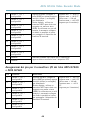
Kontaktbelegungen für den RS485-Anschluss des AXIS Q7900und AXIS Q7920-Gehäuses
Kontakt
Funktion
Beschreibung
1
Kanal 1, RS485A
2
Kanal 1, RS485B
Halbduplex-RS485-Schnittstelle
zur Steuerung von
Zusatzgeräten, z. B. PTZ-Geräten
3
Kanal 2, RS485A
4
Kanal 2, RS485B
5
Kanal 3, RS485A
6
Kanal 3, RS485B
7
Kanal 4, RS485A
8
Kanal 4, RS485B
9
Kanal 5, RS485A
10
Kanal 5, RS485B
11
Kanal 6, RS485A
12
Kanal 6, RS485B
35
AXIS Q7436 Video Encoder Blade
Technische Daten
Betriebsbedingungen
Produkt
Temperatur
Luftfeuchtigkeit
AXIS Q7436
0 °C bis +45 °C
(32 °F bis 113 °F)
10–85 % rF (nicht
kondensierend)
Stromverbrauch
12-V-Gleichtrom, max. 16,3 W vom Rack/Gehäuse.
Installieren der Hardware
Dieses Axis-Produkt ist für den Einbau in folgende Video-Encoder-Racks/-Gehäuse ausgelegt:
• AXIS 291 1U Videoserver-Rack
• AXIS Q7900-Rack
• AXIS Q7920-Gehäuse
Montieren Sie dieses Axis-Produkt gemäß den Anweisungen in der Installationsanleitung zum
jeweiligen Rack/Gehäuse. Die Installationsanleitungen stehen auf der im Lieferumfang des Produkts
enthaltenen CD für Axis-Netzwerkvideoprodukte zur Verfügung oder können unter „www.axis.com“
heruntergeladen werden.
Zugriff auf das Produkt
Verwenden Sie die bereitgestellten Tools der Installations- und Management-Software-CD, um
eine IP-Adresse zuzuordnen, ein Passwort einzurichten und auf den Videostrom zuzugreifen. Diese
Information finden Sie ebenso auf den Support-Seiten unter www.axis.com/techsup/
Zurücksetzen auf werkseitige Standardeinstellungen
Wichtig
Das Zurücksetzen auf die werkseitigen Standardeinstellungen sollte mit Vorsicht verwendet
werden. Beim Zurücksetzen auf die werkseitigen Standardeinstellungen werden alle
Einstellungen, einschließlich der IP-Adresse, auf die werkseitigen Standardeinstellungen
zurückgesetzt.
Zurücksetzten des Produktes auf die werkseitigen Standardeinstellungen:
36
AXIS Q7436 Video Encoder Blade
1. Halten Sie die Steuertaste und die Neustart-Taste gleichzeitig gedrückt.
2. Lassen Sie die Neustart-Taste los und halten Sie die Steuertaste gedrückt.
3. Halten Sie die Steuertaste so lange gedrückt, bis die Betriebsanzeige grün leuchtet und
die sechs Statusanzeigen gelb leuchten (dies kann bis zu 15 Sekunden dauern).
4. Lassen Sie die Steuertaste los. Sobald die Statusanzeigen grün leuchten (was bis zu einer
Minute dauern kann), ist der Vorgang abgeschlossen und das Gerät auf die werkseitigen
Standardeinstellungen zurückgesetzt.
5. Legen Sie die IP-Adressen erneut fest. Wenden Sie dabei eines der in diesem Handbuch
beschriebenen Verfahren an.
Beachten
Um einen einzelnen Kanal auf die ursprünglichen Werkseinstellungen zurückzusetzen,
verwenden Sie die entsprechende Schaltfläche in der Weboberfläche des Geräts.
Weitere Informationen
Das Benutzerhandbuch ist unter www.axis.com erhältlich.
Unter www.axis.com/techsup finden Sie Informationen zu Firmware-Aktualisierungen für Ihr
Netzwerkprodukt. Um die aktuell installierte Firmware-Version einzusehen, siehe Setup > About
(Einrichtung > Über).
Besuchen Sie das Axis-Schulungszentrum www.axis.com/academy für anregende Schulungen,
Webinare, Tutorien und Anleitungen.
Garantieinformationen
Informationen zur Garantie der Axis Produkte und hierzu verbundene Informationen, finden Sie
unter www.axis.com/warranty/
37
DEUTSCH
Die Parameter können auch über die Weboberfläche auf die werksseitigen Einstellungen
zurückgesetzt werden. Rufen Sie Setup > System Options > Maintenance (Setup > Systemoptionen
> Wartung) auf.
38
AXIS Q7436 Video Encoder Blade
Informazioni di Sicurezza
Leggere questa Guida d'Installazione prima di installare il prodotto. Conservare la Guida
d'Installazione per usi futuri.
Livelli di pericolo
PERICOLO
Indica una situazione pericolosa che, se non evitata, provoca morte
o lesioni gravi.
AVVERTENZA
Indica una situazione pericolosa che, se non evitata, può provocare
la morte o lesioni gravi.
ATTENZIONE
Indica una situazione pericolosa che, se non evitata, può provocare
la morte o lesioni gravi.
AVVISO
Indica una situazione pericolosa che, se non evitata, può
danneggiare la proprietà.
Livelli
Indica informazioni importanti, essenziali per il corretto
funzionamento del prodotto.
Nota
Indica informazioni utili che aiutano a ottenere il massimo dal
prodotto.
39
ITALIANO
Importante
AXIS Q7436 Video Encoder Blade
Istruzioni di sicurezza
AVVISO
• Il prodotto Axis deve essere utilizzato in conformità alle leggi e alle disposizioni locali.
• Conservare il prodotto Axis in un ambiente asciutto e ventilato.
• Evitare di esporre il prodotto Axis a vibrazioni, urti o pressioni pesanti.
• Non installare il prodotto su supporti, superfici o pareti instabili o vibranti.
• Utilizzare solo strumenti applicabili quando si installa il prodotto Axis. Una forza eccessiva
può causare danni al prodotto.
• Non utilizzare prodotti chimici, agenti caustici, o spray. Utilizzare un panno umido per
la pulizia.
• Utilizzare solo accessori conformi alle specifiche tecniche del prodotto. Questi possono
essere forniti da Axis o da una terza parte.
• Utilizzare solo parti di ricambio fornite o consigliate da Axis.
• Non tentare di riparare il prodotto da soli. Contattare il supporto Axis o il rivenditore Axis
per questioni relative alla manutenzione
Trasporti
AVVISO
• Durante il trasporto del prodotto Axis, utilizzare l'imballaggio originale o equivalente per
evitare danni al prodotto.
Batteria
Il prodotto Axis utilizza una batteria al litio da 3,0 V BR2032 come alimentazione per il suo real-time
clock (RTC) interno. In condizioni normali questa batteria avrà una durata minima di cinque anni.
Una bassa carica della batteria influisce sul funzionamento del RTC, facendolo resettare ad ogni
accensione. Un messaggio di registro viene visualizzato quando la batteria deve essere sostituita.
La batteria non deve essere sostituita se non richiesto, ma nel caso in cui ci fosse la necessità di
sostituirla, contattare il supporto Axis all'indirizzo www.axis.com/techsup/ per assistenza.
AVVERTENZA
• Rischio di esplosione se la batteria viene sostituita in modo errato.
• Sostituire solo con una batteria identica o una batteria consigliata da Axis.
• Smaltire le batterie usate in base alle normative locali o alle istruzioni del produttore
della batteria.
40
AXIS Q7436 Video Encoder Blade
Guida all’installazione
La presente guida all'installazione fornisce le istruzioni necessarie per installare AXIS Q7436 Video
Encoder Blade nella rete in uso. Per ulteriori informazioni sull’utilizzo del prodotto, consultare la
Guida per l'utente disponibile all'indirizzo www.axis.com
Procedure di installazione
1. Assicurarsi che il contenuto della confezione, gli strumenti e altri materiali necessari per
l'installazione siano in ordine. Consultare pagina 41.
2. Studiare la descrizione dell'hardware. Consultare pagina 42.
3. Studiare le specifiche. Consultare pagina 46.
4. Installazione dell'hardware. Consultare pagina 46.
5. Accedere al prodotto. Consultare pagina 46.
Contenuto della Confezione
AXIS Q7436 Video Encoder Blade
CD d'installazione e gestione
Materiali stampati
Guida all’installazione (questo documento)
Etichetta aggiuntiva con numero di serie (2x)
Strumenti raccomandati
•
Cacciavite PZ1
41
ITALIANO
•
•
•
AXIS Q7436 Video Encoder Blade
Panoramica dell’Hardware
6
1
1.
2.
3.
4.
5.
6.
2 3
6
5
4
Connettore BNC (ingresso video, 6 nos.)
LED di stato (6 nos.)
Pulsante di comando
Pulsante di riavvio
LED di alimentazione
Connettore Bus
Indicatori LED
LED
Colore
Indicazione
LED di
stato
Verde
Luce verde fissa: condizioni di normale utilizzo.
Giallo
Fissa durante l'avvio e quando si ripristinano le impostazioni.
Rosso
Luce lampeggiante lenta: aggiornamento non riuscito.
Verde
Normale utilizzo.
Giallo
Luce lampeggiante verde/gialla: aggiornamento firmware.
Alimentazione
42
AXIS Q7436 Video Encoder Blade
Nota
• Il LED di stato può essere configurato per lampeggiare per identificare l'unità. Andare
su Setup > System Options > Maintenance (Configurazione > Opzioni di sistema
> Manutenzione).
Connettori
Connettore Bus - Queste sono le interfacce fisiche per il telaio del codificatore video, fornendo
alimentazione, rete, RS-485 e connessioni I/O dei terminali.
Connettore BNC - Ciascun ingresso video viene terminato con un connettore coassiale BNC.
Collegare un cavo video coassiale da 75 Ohm; la lunghezza massima consigliata è 250 metri.
Nota
È possibile abilitare/disabilitare la terminazione video da 75 Ohm per l'ingresso video
tramite la pagina Web del prodotto selezionando Video & Audio > Video Input > Video
termination (Video e audio > Ingresso video > Terminazione video). Questa terminazione
è abilitata come impostazioni di fabbrica. Se il prodotto è collegato in parallelo ad altre
apparecchiature, è consigliabile abilitare la terminazione solo per l'ultimo dispositivo della
catena del segnale video in modo da ottenere un video di ottima qualità.
•
•
Ripristino del prodotto alle impostazioni predefinite di fabbrica. Consultare
pagina 46.
Collegamento a un servizio AXIS Video Hosting System o AXIS Internet Dynamic
DNS Service. Per ulteriori informazioni su questi servizi, consultare il Manuale
Utente.
Pulsante di Riavvio - Premere per riavviare il prodotto.
Assegnazioni dei pin per il connettore I/O - AXIS 291 1U Video
Server Rack
Pin
Funzione
1
Uscita +12 V, 100 mA
2
GND
Descrizione
43
ITALIANO
Pulsante di comando - Il pulsante di comando viene utilizzato per:
AXIS Q7436 Video Encoder Blade
3
Canale 1, I/O 1
configurabile
4
Canale 2, I/O 1
configurabile
5
Canale 3, I/O 1
configurabile
6
Canale 4, I/O 1
configurabile
7
Canale 5, I/O 1
configurabile
8
Canale 6, I/O 1
configurabile
9
Canale 1, I/O 2
configurabile
10
Canale 2, I/O 2
configurabile
11
RS485A
12
RS485B
Ingresso digitale: collegare a
terra (GND) per attivarlo oppure
lasciarlo isolato (o scollegato)
per disattivarlo.
Uscita digitale: utilizza un
transistor NFET open-drain con
sorgente con messa a terra
(GND). Se utilizzato con un relè
esterno, è necessario collegare
un diodo in parallelo al carico
per proteggere il dispositivo da
transitori di tensione.
Ingresso min. = – 40 V CC
Ingresso max. = +40 V CC
Carico max. = 100 mA
Tensione max. = + 40 V CC
(ingresso per il transistor)
Interfaccia RS485 half-duplex per il controllo di
apparecchiature ausiliarie come i dispositivi PTZ.
Assegnazioni dei pin per il connettore I/O dei telai AXIS Q7900
e AXIS Q7920
Pin
Funzione
Descrizione
1
Canale 1, I/O 1
configurabile
2
Canale 2, I/O 1
configurabile
3
Canale 3, I/O 1
configurabile
4
Canale 4, I/O 1
configurabile
5
Canale 5, I/O 1
configurabile
Ingresso digitale: collegare a
terra (GND) per attivarlo oppure
lasciarlo isolato (o scollegato)
per disattivarlo.
Uscita digitale: utilizza un
transistor NFET open-drain con
sorgente con messa a terra
(GND). Se utilizzato con un relè
esterno, è necessario collegare
un diodo in parallelo al carico
per proteggere il dispositivo da
transitori di tensione.
6
Canale 6, I/O 1
configurabile
44
Ingresso min. = – 40 V CC
Ingresso max. = +40 V CC
Carico max. = 100 mA
Tensione max. = + 40 V
CC
(ingresso per il transistor)
AXIS Q7436 Video Encoder Blade
7
Canale 1, I/O 2
configurabile
8
Canale 2, I/O 2
configurabile
9
Canale 3, I/O 2
configurabile
10
Canale 4, I/O 2
configurabile
11
Canale 5, I/O 2
configurabile
12
Canale 6, I/O 2
configurabile
Assegnazioni dei pin per il connettore RS485 - Telai AXIS Q7900
e AXIS Q7920
Funzione
Descrizione
1
Canale 1, RS485/A
2
Canale 1, RS485B
Interfaccia RS485 half-duplex per il
controllo di apparecchiature ausiliarie
come i dispositivi PTZ.
3
Canale 2, RS485/A
4
Canale 2, RS485B
5
Canale 3, RS485/A
6
Canale 3, RS485B
7
Canale 4, RS485/A
8
Canale 4, RS485B
9
Canale 5, RS485/A
10
Canale 5, RS485B
11
Canale 6, RS485/A
12
Canale 6, RS485B
45
ITALIANO
Pin
AXIS Q7436 Video Encoder Blade
Dati tecnici
Condizioni di funzionamento
Prodotto
Temperatura
Umidità
AXIS Q7436
Da 0 °C a +45 °C
(da 32 °F a 113 °F)
10-85% (umidità relativa senza
condensa)
Consumo energetico
12 V CC, max. 16,3 W da rack/telaio.
Installazione dell'Hardware
Il presente prodotto Axis è progettato per essere installato nei seguenti telai/rack di codificatori
video:
• AXIS 291 1U Video Server Rack
• AXIS Q7900 Rack
• Telaio AXIS Q7920
Seguire le istruzioni nella Guida all'installazione inclusa con i rack/telai di installazione di questo
prodotto Axis. Le presenti guide all'installazione sono disponibili sul CD AXIS Network Video
Product incluso con questo prodotto e all'indirizzo www.axis.com
Accedere al Prodotto
Utilizzare le utility contenute nel CD del software d'installazione e gestione per assegnare un
indirizzo IP, impostare la password ed accedere al flusso video. Queste informazioni sono disponibili
anche sulle pagine dedicate all'assistenza sul sito www.axis.com/techsup/
Ripristino dei valori predefiniti di fabbrica
Importante
Il ripristino delle impostazioni di fabbrica deve essere usato con cautela. Un ripristino delle
impostazioni di fabbrica consentirà di ripristinare le impostazioni di fabbrica per tutti i
parametri, incluso l'indirizzo IP.
Per ripristinare il prodotto alle impostazioni predefinite di fabbrica:
46
AXIS Q7436 Video Encoder Blade
1. Premere e tenere premuto contemporaneamente sia il pulsante di controllo che il
pulsante di riavvio.
2. Rilasciare il pulsante di riavvio e tenere premuto quello di comando.
3. Tenere premuto il pulsante di comando fino a quando l'indicatore di alimentazione
emette una luce verde e i 6 indicatori di stato si accendono in giallo (l'operazione può
richiedere fino a 15 secondi).
4. Rilasciare il pulsante di comando. Appena l'indicatore di stato diventa verde (l'operazione
può richiedere fino a 1 minuto), significa che la procedura è terminata e che l'unità è
stata reimpostata.
5. Riassegnare gli indirizzi IP utilizzando uno dei metodi descritti in questo documento.
Nota
Per riportare alle impostazioni originali di fabbrica un solo canale, utilizzare il pulsante
corrispondente nell'interfaccia web dell'unità.
È anche possibile reimpostare i parametri alle impostazioni predefinite in fabbrica mediante
l’interfaccia web. Andare a Setup > System Options > Maintenance (Configurazione > Opzioni di
sistema > Manutenzione).
Ulteriori informazioni
Visitare il sito www.axis.com/techsup per verificare se sono disponibili aggiornamenti del firmware
per il prodotto di rete. Per conoscere la versione del firmware attualmente installata, andare su
Setup (Configurazione) > About (Informazioni).
Visitare il Centro di formazione Axis alla pagina www.axis.com/academy per utili webinar,
esercitazioni, formazione e guide.
Informazioni sulla garanzia
Per informazioni sulla garanzia del prodotto Axis e informazioni ad esso relative, consultare
la pagina www.axis.com/warranty/
47
ITALIANO
Il Manuale per l'utente è disponibile all'indirizzo www.axis.com
48
AXIS Q7436 Video Encoder Blade
Información de seguridad
Lea atentamente la Guía de instalación antes de instalar el producto. Guarde la Guía de instalación
para futuras consultas.
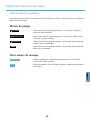
Niveles de peligro
PELIGRO
Indica una situación peligrosa donde, si no se evita, causará la
muerte o graves lesiones
ADVERTENCIA
Indica una situación peligrosa donde, si no se evita, podría causar
la muerte o graves lesiones
ATENCIÓN
Indica una situación peligrosa donde, si no se evita, podría provocar
lesiones leves o moderadas.
AVISO
Indica una situación peligrosa donde, si no se evita, podría provocar
daños en la propiedad.
Otros niveles de mensaje
Importante
Indican información importante esencial para que el producto
funcione de forma correcta.
Nota
Indica información útil que ayuda a obtener el máximo rendimiento
del equipo.
ESPANÕL
49
AXIS Q7436 Video Encoder Blade
Instrucciones de seguridad
AVISO
• El producto Axis se utilizará de conformidad con la legislación y normativas locales.
• Guarde el producto Axis en un entorno seco y ventilado.
• Evite exponer el producto Axis a vibraciones, golpes o presiones excesivas.
• No instale el producto en paredes o superficies con escuadras inestables o que vibren.
• Use solo las herramientas adecuadas al instalar el producto Axis. Fuerza excesiva puede
causar daños al producto.
• No utilice productos químicos, agentes cáusticos ni limpiadores en aerosol. Utilice un
paño húmedo para limpiarlo.
• Utilice solo accesorios que cumplan las especificaciones técnicas del producto. Puede
obtenerlos de Axis o de un tercero.
• Utilice solo piezas de recambio suministradas o recomendadas por Axis.
• No intente reparar el producto usted mismo. Contacte con el servicio técnico de Axis o
con su distribuidor de Axis para asuntos de servicio.
Transporte
AVISO
• A la hora de transportar el producto Axis, utilice el embalaje original o uno equivalente
para no dañar el producto.
Batería
El producto Axis utiliza una batería de litio BR2032 de 3,0 V como fuente de alimentación para
su reloj de tiempo real interno (RTC). En condiciones normales, esta batería durará un mínimo
de cinco años.
Cuando la batería tiene poca carga, el funcionamiento del RTC se puede ver afectado, ya que esto
puede hacer que se reinicie cada vez que se encienda. Aparecerá un mensaje de información
cuando sea necesario sustituir la batería.
La batería no debe ser reemplazada a no ser que sea necesario y, si es necesario, contacte con el
soporte técnico de Axis www.axis.com/techsup/ para obtener ayuda.
ADVERTENCIA
• Riesgo de explosión si la batería se sustituye de forma incorrecta.
• Haga la sustitución únicamente con una batería idéntica o que esté recomendada por Axis.
• Deseche las baterías usadas según las instrucciones del fabricante o las normas locales.
50
AXIS Q7436 Video Encoder Blade
Guía de instalación
Esta Guía de instalación incluye las instrucciones necesarias para instalar el Codificador de vídeo
en tarjeta AXIS Q7436 en su red. Para conocer otros aspectos de uso del producto, consulte el
Manual del usuario disponible en www.axis.com
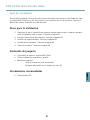
Pasos para la instalación
1. Asegúrese de que el contenido del paquete, herramientas y todo el material necesario
para la instalación está en orden. Consulte la página 51.
2. Estudiar la descripción del hardware. Consulte la página 52.
3. Estudiar las especificaciones. Consulte la página 55.
4. Instalación del hardware. Consulte la página 56.
5. Acceso al producto. Consulte la página 56.
Contenido del paquete
•
•
•
Codificador de vídeo en tarjeta AXIS Q7436
CD del software de instalación y gestión
Materiales impresos
Guía de instalación (este documento)
Etiquetas adicionales con el número de serie (2)
Herramientas recomendadas
ESPANÕL
•
Destornillador PZ1
51
AXIS Q7436 Video Encoder Blade
Presentación del hardware
6
1
1.
2.
3.
4.
5.
6.
2 3
6
5
4
Conector BNC (entrada de vídeo, 6 unidades)
LED de estado (6 unidades)
Botón de control
Botón de reinicio
LED de alimentación
Conector de bus
Indicadores LED
LED
Color
Indicación
Estado
Verde
Verde fijo para indicar un funcionamiento normal.
Ámbar
Fijo durante el inicio y al restaurar valores de configuración.
Rojo
Parpadea despacio si se ha producido un error en una actualización.
Verde
Funcionamiento normal.
Ámbar
Parpadea en verde/ámbar durante la actualización del firmware.
Alimentación
52
AXIS Q7436 Video Encoder Blade
Nota
• Se puede configurar el LED Estado para que parpadee e identifique la unidad. Vaya a
Setup > System Options > Maintenance (Configuración > Opciones del sistema >
Mantenimiento).
Conectores
Conector de bus - Son las interfaces físicas con el chasis del codificador de vídeo, y proporciona
conexiones de alimentación, red, RS-485 y terminal de E/S.
Conector BNC - Todas las entradas de vídeo se terminan con un conector coaxial/BNC. Conecte un
cable de vídeo coaxial de 75 ohmios; la longitud máxima recomendada es de 250 metros.
Nota
Se puede activar o desactivar una terminación de vídeo de 75 ohmios para la entrada de
vídeo a través de la página web del producto en Video & Audio > Video Input > Video
termination (Vídeo y audio > Entrada de vídeo > Terminación de vídeo). Esta terminación se
activa con la configuración predeterminada de fábrica. Para obtener una calidad de vídeo
óptima cuando el producto se vaya a conectar en paralelo con otros equipos, se recomienda
activar la terminación solo para el último dispositivo de la cadena de señales de vídeo.
Botón de control - El botón de control se utiliza para lo siguiente:
•
•
Restablecer el producto a la configuración predeterminada de fábrica. Vea
página 56.
Conectarse a un servicio AXIS Video Hosting System o al Servicio de DNS
dinámico de Internet de AXIS. Para obtener más información sobre estos
servicios, vea el Manual del usuario.
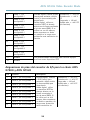
Asignaciones de patillas del conector de E/S del Bastidor de
servidores de vídeo AXIS 291 1U
Pin
Función
1
Salida de +12 V, 100 mA
2
Masa
Descripción
53
ESPANÕL
Botón de reinicio - Se utiliza para reiniciar el producto.
AXIS Q7436 Video Encoder Blade
3
Canal 1, E/S
configurable 1
4
Canal 2, E/S
configurable 1
5
Canal 3, E/S
configurable 1
6
Canal 4, E/S
configurable 1
7
Canal 5, E/S
configurable 1
8
Canal 6, E/S
configurable 1
9
Canal 1, E/S
configurable 2
10
Canal 2, E/S
configurable 2
11
RS485A
12
RS485B
Entrada digital: conecte a GND
(masa) para activarla o déjela
suelta (o desconectada) para
desactivarla.
Salida digital: utiliza un
transistor NFET de drenaje
abierto con la fuente conectada
al pin de masa (GND). Si se
utiliza con un relé externo,
debe conectarse un diodo
en paralelo a la carga como
protección ante transitorios de
tensión.
Entrada mín. = – 40 V CC
Entrada máx. = + 40 V
CC
Carga máx. = 100 mA
Voltaje máx. = + 40 V CC
(al transistor)
Una interfaz RS485 semidúplex para controlar equipos
auxiliares como dispositivos PTZ.
Asignaciones de pines del conector de E/S para los chasis AXIS
Q7900 y AXIS Q7920
Pin
Función
Descripción
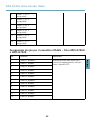
1
Canal 1, E/S configurable 1
2
Canal 2, E/S configurable 1
3
Canal 3, E/S configurable 1
4
Canal 4, E/S configurable 1
5
Canal 5, E/S configurable 1
6
Canal 6, E/S configurable 1
7
Canal 1, E/S configurable 2
8
Canal 2, E/S configurable 2
9
Canal 3, E/S configurable 2
Entrada digital: conecte
a GND (masa) para
activarla o déjela suelta
(o desconectada) para
desactivarla.
Salida digital: utiliza
un transistor NFET de
drenaje abierto con la
fuente conectada al
pin de masa (GND). Si
se utiliza con un relé
externo, debe conectarse
un diodo en paralelo a la
carga como protección
ante transitorios de
54
Entrada mín. = – 40 V CC
Entrada máx. = + 40 V CC
Carga máx. = 100 mA
Voltaje máx. = + 40 V CC
(al transistor)
AXIS Q7436 Video Encoder Blade
10
Canal 4, E/S configurable 2
11
Canal 5, E/S configurable 2
12
Canal 6, E/S configurable 2
tensión.
Asignaciones de patillas del conector RS485 para los chasis AXIS
Q7900 y AXIS Q7920
Función
Descripción
1
Canal 1, RS485A
2
Canal 1, RS485B
Una interfaz RS485 semidúplex para
controlar equipos auxiliares como
dispositivos PTZ.
3
Canal 2, RS485A
4
Canal 2, RS485B
5
Canal 3, RS485A
6
Canal 3, RS485B
7
Canal 4, RS485A
8
Canal 4, RS485B
9
Canal 5, RS485A
10
Canal 5, RS485B
11
Canal 6, RS485A
12
Canal 6, RS485B
ESPANÕL
Pin
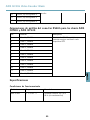
Especificaciones
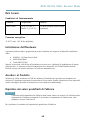
Condiciones de funcionamiento
Producto
Temperatura
Humedad
AXIS Q7436
0 °C a +45 °C
Humedad relativa: del 10 al
85 % (sin condensación)
55
AXIS Q7436 Video Encoder Blade
Consumo
12 V CC máx. 16,3 W del bastidor/chasis.
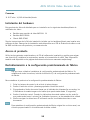
Instalación del hardware
Este producto de Axis está diseñado para su instalación en los siguientes bastidores/chasis de
codificador de vídeo:
• Bastidor para servidor de vídeo AXIS 291 1U
• Bastidor AXIS Q7900
• Chasis AXIS Q7920
Siga las instrucciones de la Guía de instalación incluida con los bastidores/chasis para instalar este
producto de Axis. Estas guías de instalación están disponibles en el CD de Productos de vídeo en red
de AXIS incluido con este producto y en www.axis.com
Acceso al producto
Utilice las herramientas suministradas en el CD del software de instalación y gestión para asignar
una dirección IP, establecer la contraseña y acceder a la transmisión de vídeo. Esta información
también está disponible en las páginas de asistencia técnica en www.axis.com/techsup/
Restablecimiento a la configuración predeterminada de fábrica
Importante
Hay que tener cuidado al restablecer la configuración predeterminada de fábrica. Se
restablecerán todos los valores, incluida la dirección IP, a la configuración predeterminada
de fábrica.
Para restablecer el producto a la configuración predeterminada de fábrica:
1. Pulse los botones de control y de reinicio al mismo tiempo.
2. Suelte el botón de reinicio y mantenga pulsado el botón de control.
3. Siga pulsando el botón de control hasta que el indicador de alimentación sea verde y los
6 indicadores de estado tengan color ámbar (esto puede tardar hasta 15 segundos).
4. Suelte el botón de control. Cuando los indicadores de estado emitan una luz verde (lo
que puede tardar hasta 1 minuto), ha finalizado el proceso y se ha restablecido la unidad.
5. Vuelva a asignar las direcciones IP utilizando uno de los métodos descritos en este
documento.
Nota
Para restablecer la configuración predeterminada de fábrica original de un único canal, use
el botón proporcionado en la interfaz web de dicha unidad.
56
AXIS Q7436 Video Encoder Blade
También es posible restablecer los parámetros a los valores predeterminados de fábrica mediante
la interfaz web. Para ello, vaya a Setup > System Options > Maintenance (Configuración >
Opciones del sistema > Mantenimiento) (Configuración > Configuración del controlador de acceso
> Configuración > Opciones del sistema > Mantenimiento).
Más información
El Manual del usuario está disponible en www.axis.com.
Visite www.axis.com/techsup para comprobar si hay firmware actualizado disponible para su
producto de red. Para consultar la versión firmware instalada actualmente, vaya a Setup > About
(Configuración > Acerca de).
Visite el centro de formación de Axis en www.axis.com/academy para consultar cursos de
formación, seminarios web, tutoriales y guías de gran utilidad.
Información de la garantía
Para obtener más información acerca de la garantía del producto Axis e información relacionada,
visite www.axis.com/warranty/
ESPANÕL
57
58
AXIS Q7436 Video Encoder Blade
安全情報
本製品を設置する前に、本インストールガイドをよくお読みください。インストール
ガイドは今後参照できるように保管しておいてください。
危険レベル
危険
回避しない場合、死亡または重傷につながる危険状態を
示します。
警告
回避しない場合、死亡または重傷につながる可能性のあ
る危険状態を示します。
注意
回避しない場合、軽傷または中程度の怪我につながる
可能性のある危険状態を示します。
注記
回避しない場合、器物の破損につながる可能性のある状
態を示します。
その他のレベルのメッセージ
重要
製品を正しく機能させるための重要な情報を示します。
注意
製品を最大限に活用するために役立つ情報を示します。
ò ¨ ¾
59
AXIS Q7436 Video Encoder Blade
安全の確保
注記
• 本製品は、お使いになる国や地域の法律および条例にしたがって使用して
ください。
• 本製品は、乾燥した通気のよい環境に保管してください。
• 本製品に振動、衝撃または強い圧力を加えないでください。
• 本製品を不安定なブラケット、不安定な場所、振動する場所や壁に設置
しないでください。
• 本製品を設置する際には、適切な工具のみを使用してください。不適切な工
具を使用すると、製品に過剰な力がかかり、損傷することがあります。
• 化学薬品、腐食剤、噴霧式クリーナーは使用しないでください。クリーニン
グを行う場合には、湿った布を使用してください。
• 製品の技術仕様に準拠したアクセサリーのみを使用してください。Axisまた
はサードパーティから入手することができます。
• Axisが提供または推奨する交換部品のみを使用してください。
• 製品を自分で修理しないでください。修理に関しては、AxisまたはAxisの販
売代理店にお問い合わせください。
輸送
注記
• 本製品を運搬する際は、製品が損傷しないよう、元の梱包または同等の
梱包を使用してください。
バッテリー
本製品は、内部リアルタイムクロック (RTC) 用電源として3.0 V BR2032リチウムバッテ
リーを使用しています。このバッテリーは、通常条件下で最低5年間使用できます。
バッテリーが低電力状態になると、RTCの動作に影響し、電源を入れるたびにリセッ
トされます。バッテリーの交換が必要になると、ログメッセージが表示されます。
必要な場合以外はバッテリーを交換しないでください。バッテリーの交換が必要な場
合は、AxisサポートのWebサイト (www.axis.com/techsup) を参照してください。
60
AXIS Q7436 Video Encoder Blade
警告
• バッテリーは、正しく交換しないと爆発する危険があります。
• 交換用のバッテリーには同一品またはAxisが推奨するバッテリーのみを
使用してください。
• 使用済みのバッテリーは地域の規制またはメーカーの指示に従って廃棄
してください。
ò ¨ ¾
61
62
AXIS Q7436 Video Encoder Blade
インストールガイド
このインストールガイドでは、AXIS Q7436 ビデオエンコーダーブレードをお使い
のネットワークにインス トールする手順について説明しています。製品の使用の
詳細については、Axisのホームページ (www.axis.com) でユーザーズマニュアル
を参照してください。
インストール手順
1. パッケージの内容、ツール、インストールに必要なその他の部品がそろっ
ているか確認します。 ページ 63 を参照してください。
2. ハードウェアの概要を確認します。 ページ 64 を参照してください。
3. 仕様を確認します。 ページ 68 を参照してください。
4. ハードウェアを設置します。 ページ 68 を参照してください。
5. 製品にアクセスします。 ページ 68 を参照してください。
パッケージの内容
•
•
•
AXIS Q7436ビデオエンコーダーブレード
インストール・管理ソフトウェアCD
印刷物
‑
インストールガイド (本書)
‑
予備のシリアル番号ラベル×2
推奨ツール
•
PZ1ドライバー
ò ¨ ¾
63
AXIS Q7436 Video Encoder Blade
ハードウェアの概要
6
1
1.
2.
3.
4.
5.
6.
2 3
4
6
5
BNCコネクター (ビデオ入力、6個)
ステータスLED (6個)
コントロールボタン
再起動ボタン
電源LED
バスコネクター
LED イ ン ジ ケ ー タ ー
LED
色
表示
ステー
タス
緑
通常動作の場合、緑色に点灯します。
黄
起動中および設定の復元時に黄色で点灯します。
赤
アップグレードに失敗すると、ゆっくりと点滅します。
緑
正常動作
黄
ファームウェアのアップグレード中、緑/黄に交互に点滅し
ます。
電源
64
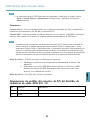
AXIS Q7436 Video Encoder Blade
注意
• ステータスLEDは、装置の識別中に点滅するように設定することもできま
[Setup] ( 設 定 ) ‑ [System Options] ( シ ス テ ム オ プ シ ョ ン ) ‑
す。設定は、[Setup]
[Maintenance] ( 保 守 ) で行います。
コネクター
バ ス コ ネ ク タ ー ‑ ビデオエンコーダーのシャーシとの物理的インターフェースであ
り、電力、ネットワーク、RS‑485、I/O端末接続を提供します。
BNCコ
コネ ク タ ー ‑ 各ビデオ入力は、同軸/BNCコネクターを使用して終端します。75Ω
BNC
同軸ビデオケーブルを使用し、ケーブル長は250 m以下にすることをお勧めします。
注意
ビデオ入力の75Ωビデオ終端は、本製品のWebインターフェースの[Video
& Audio] (ビデオと音声) ‑ [Video Input] (ビデオ入力) ‑ [Video termination]
(ビデオ終端)で有効、無効にすることができます。この終端は、工場出荷時
に有効になっています。本製品を別の装置と並列に接続する場合、最適な
画質を得るため、ビデオ信号チェーンの最後のデバイスのみ終端を有効に
することをお勧めします。
コ ン ト ロ ー ル ボ タ ン ‑ コントロールボタンには、以下の用途で使用します。
•
•
製品を工場出荷時の設定にリセットする。 ページ 68 を参照して
ください。
AXIS Video Hosting SystemまたはAXIS Internet Dynamic DNS Serviceに
接続する。これらのサービスの詳細については、ユーザーマニュア
ルを参照してください。
再 起 動 ボ タ ン ‑ ボタンを押すと、製品が再起動します。
I/Oコ
コ ネ ク タ ー の ピ ン 配 置 ‑ AXIS 291 1U
1Uビ
ビデオサーバー
I/O
ラック
機能
1
+12 V出力、100mA
2
GND
ò ¨ ¾
ピ
ン
説明
65
AXIS Q7436 Video Encoder Blade
3
チャンネル1、設定可
能 I/O 1
4
チャンネル2、設定可
能 I/O 1
5
チャンネル3、設定可
能 I/O 1
6
チャンネル4、設定可
能 I/O 1
7
チャンネル5、設定可
能 I/O 1
8
チャンネル6、設定可
能 I/O 1
9
チャンネル1、設定可
能 I/O 2
10
チャンネル2、設定可
能 I/O 2
11
RS485A
12
RS485B
デジタル入力 ‑ 動作させる
にはGNDに、動作させない
場合はフロート状態(未接
続)にします。
デジタル出力 ‑ オープンド
レインNFETトランジスター
を使用。ソースをGNDに接
続。外部リレーとともに使
用する場合は、過渡電圧か
ら保護するため、ダイオー
ドを負荷と並列に接続する
必要があります。
最小入力 = – 40V DC
最大入力 = + 40V DC
最大負荷 = 100mA
最大電圧 = + 40V DC
(トランジスターに対
する数値)
PTZ装置などの補助装置の制御に使用する半二重
RS485インターフェース。
AXIS Q7900 、 AXIS Q7920 の シ ャ ー シ の I/O コ ネ ク タ ー
のピン配置
ピ
ン
機能
説明
1
チャンネル1、設定
可能 I/O 1
2
チャンネル2、設定
可能 I/O 1
3
チャンネル3、設定
可能 I/O 1
4
チャンネル4、設定
可能 I/O 1
5
チャンネル5、設定
可能 I/O 1
デジタル入力 ‑ 動作させる
にはGNDに、動作させない
場合はフロート状態(未接
続)にします。
デジタル出力 ‑ オープンド
レインNFETトランジスター
を使用。ソースをGNDに接
続。外部リレーとともに使
用する場合は、過渡電圧か
ら保護するため、ダイオー
ドを負荷と並列に接続する
必要があります。
66
最小入力 = – 40 V DC
最大入力 = + 40 V DC
最大負荷 = 100mA
最大電圧 = + 40 V DC
(トランジスターに対
する数値)
AXIS Q7436 Video Encoder Blade
6
チャンネル6、設定
可能 I/O 1
7
チャンネル1、設定
可能 I/O 2
8
チャンネル2、設定
可能 I/O 2
9
チャンネル3、設定
可能 I/O 2
10
チャンネル4、設定
可能 I/O 2
11
チャンネル5、設定
可能 I/O 2
12
チャンネル6、設定
可能 I/O 2
AXIS Q7900 、 AXIS Q7920 の シ ャ ー シ の RS485 コ ネ ク タ ー
のピン配置
機能
説明
1
チャンネル1、RS485A
2
チャンネル1、RS485B
PTZ装置などの補助装置の制御
に使用する半二重RS485インター
フェース。
3
チャンネル2、RS485A
4
チャンネル2、RS485B
5
チャンネル3、RS485A
6
チャンネル3、RS485B
7
チャンネル4、RS485A
8
チャンネル4、RS485B
9
チャンネル5、RS485A
10
チャンネル5、RS485B
11
チャンネル6、RS485A
12
チャンネル6、RS485B
ò ¨ ¾
ピン
67
AXIS Q7436 Video Encoder Blade
仕様
動作条件
製品
温度
湿度
AXIS Q7436
0 °C~45 °C
10~80% RH (結露不可)
消費電力
12V DC、最大16.3W (ラック、シャーシから電力供給)
ハードウェアの設置
本製品は、以下のビデオエンコーダーラック、シャーシに設置するよう設計さ
れています。
• AXIS 291 1Uビデオサーバーラック
• AXIS Q7900ラック
• AXIS Q7920シャーシ
本製品をこれらのラック、シャーシに設置する際は、付属の『インストールガイド』
の指示に従ってください。インストールガイドは本製品に付属のAXISネットワークビ
デオプロダクトCD、またはwww.axis.comから入手できます。
製品へのアクセス
インストール・管理ソフトウェアCDに収録されているツールを使用して、IPアドレ
スの割り当て、パスワードの設定、ビデオストリームへのアクセスを行うことができ
ます。この情報はAxisのWebサイトのサポートページ( www.axis.com/techsup/)に
も掲載されています。
工場出荷時設定へのリセット
重要
工場出荷時の設定へのリセットは慎重に行ってください。工場出荷時の
設定へのリセットを行うと、IPアドレスを含むすべての設定が工場出荷時
の値にリセットされます。
以下の手順を実行します。
68
AXIS Q7436 Video Encoder Blade
1. コントロールボタンと再起動ボタンを同時に押し、そのまま押し続けます。
2. 再起動ボタンは離し、コントロールボタンは押し続けます。
3. 電源インジケータが緑色に変わり、6つのステータスインジケーターが黄色
に変るまで (最大15秒)、コントロールボタンを押し続けます。
4. コントロールボタンを離します。ステータスインジケーターが緑色になる
と (最大1分)、処理は完了し、装置はリセットされます。
5. 本書に記載の手順を参照して、IPアドレスを再度割り当てます。
注意
1つのチャンネルを工場出荷時の設定にリセットするには、製品のWebイン
ターフェース上のボタンを使用します。
Webインターフェースを使用して、パラメーターを工場出荷時の設定に戻すことも
[Setup] ( 設 定 ) ‑ [System Options] ( シ ス テ ム オ プ シ ョ ン ) ‑ [Maintenance]
できます。[Setup]
( 保 守 ) に移動します。
関連情報
ユーザーマニュアルは www.axis.com で入手できます。
www.axis.com/techsup にアクセスして、ネットワーク製品用ファームウェアのアッ
プデート版がリリースされていないかどうか確認してください。現在インストール
Setup ( 設 定 ) > About
されているファームウェアのバージョンを確認するには、Setup
( バ ー ジ ョ ン 情 報 ) へ進みます。
Axisラーニングセンター (www.axis.com/academy) には、役立つトレーニング、ウェ
ビナー、チュートリアル、ガイドなどがあります。
保証
Axisの製品保証と関連情報については、 www.axis.com/warranty をご覧ください。
ò ¨ ¾
69
Installation Guide
AXIS Q7436 Video Encoder Blade
© Axis Communications AB, 2013
Ver. M1.7
Date: July 2013
Part No. 51092