1
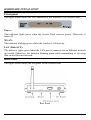
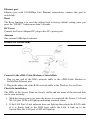
Ethernet port
Ethernet port with 10/100Mbps Fast Ethernet connections, connect this port to
switch/hub.
Reset
The Reset function is to reset the setting back to factory default setting, once you
press the “RESET” button more than 5 seconds.
DC Power
Connect the Power Adapter DC plug to the AP’s power jack.
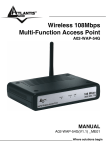
Antenna
One external 2dBi dipole antenna.
Hardware connections
Connect to the xDSL/Cable Modem or Switch/Hub
1. Plug in one end of the RJ45 network cable to the xDSL/Cable Modem or
Switch/Hub Ethernet port.
2. Plug in the other end of the RJ45 network cable to the Wireless Access Point.
Check the installation
The LEDs of the Access Point are clearly visible and the status of the network link
can be seen instantly:
1. With the power source on, once the device is connected, the Power, LAN and
WLAN port LEDs will light up indicating a normal status.
2. If the LAN Port’s Link indicator does not light up then check the RJ-45 cable
if it is firmly feed to the RJ45 port, while the LAN is link up to the
Switch/Hub, the LAN port’s LED will light up.
6