1
Contents
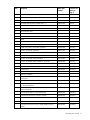
Customer self repair ...................................................................................................................... 5 Parts only warranty service ......................................................................................................................... 5 Illustrated parts catalog ............................................................................................................... 16 Server blade components ......................................................................................................................... 16 Removal and replacement procedures ........................................................................................... 21 Required tools......................................................................................................................................... 21 Safety considerations ............................................................................................................................... 21 Preventing electrostatic discharge .................................................................................................... 21 Server blade warnings and cautions ................................................................................................ 21 Symbols on equipment ................................................................................................................... 22 Server blade preparation ......................................................................................................................... 22 Power down the server blade .......................................................................................................... 23 Remove the server blade ................................................................................................................ 23 Access panel .......................................................................................................................................... 24 Hard drive.............................................................................................................................................. 24 DIMM baffle ........................................................................................................................................... 25 DIMMs................................................................................................................................................... 26 Mezzanine card...................................................................................................................................... 27 Front bezel ............................................................................................................................................. 28 Server blade handle ................................................................................................................................ 29 Release button ........................................................................................................................................ 29 Heatsink................................................................................................................................................. 30 Processor ............................................................................................................................................... 32 Battery tray............................................................................................................................................. 36 System board ......................................................................................................................................... 37 System battery ........................................................................................................................................ 42 Cabling ..................................................................................................................................... 44 Hard drive cabling .................................................................................................................................. 44 Using the HP c-Class Blade SUV Cable ...................................................................................................... 44 Connecting locally to a server blade with video and USB devices.................................................................. 44 Accessing a server blade with local KVM ......................................................................................... 45 Accessing a server blade with local media devices ............................................................................ 45 Diagnostic tools .......................................................................................................................... 47 Troubleshooting resources ........................................................................................................................ 47 HP Insight Diagnostics.............................................................................................................................. 47 HP Insight Diagnostics survey functionality .................................................................................................. 47 Integrated Management Log ..................................................................................................................... 48 Array Diagnostic Utility ............................................................................................................................ 48 HP Systems Insight Manager ..................................................................................................................... 48 Redundant ROM support .......................................................................................................................... 49 USB support and functionality ................................................................................................................... 49 USB support.................................................................................................................................. 49 Internal USB functionality ................................................................................................................ 49 Contents
3