1
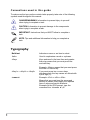
Conventions used in this guide
To make sure that you perform certain tasks properly, take note of the following
symbols used throughout this manual.
DANGER/WARNING: Information to prevent injury to yourself
when trying to complete a task.
CAUTION: Information to prevent damage to the components
when trying to complete a task.
IMPORTANT: Instructions that you MUST follow to complete a
task.
NOTE: Tips and additional information to help you complete a
task.
Typography
Bold text
Indicates a menu or an item to select.
Italics
Used to emphasize a word or a phrase.
<Key>
Keys enclosed in the less-than and greaterthan sign means that you must press the
enclosed key.
Example: <Enter> means that you must press
the Enter or Return key.
<Key1> + <Key2> + <Key3>
If you must press two or more keys
simultaneously, the key names are linked with
a plus sign (+).
Command
Example: <Ctrl> + <Alt> +<Del>
Means that you must type the command
exactly as shown, then supply the required
item or value enclosed in brackets.
Example: At the DOS prompt, type the
command line: format A:/S