1
4. OPERATION
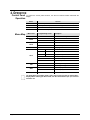
Control Panel
Operation
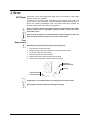
To access the control panel functions, use the four buttons located underneath the
display.
Button
<MENU>
<UP>
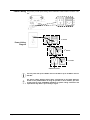
Menu Map
Function
Selects an operation mode or backs out of the current menu option
Scrolls up the list of options or selects a higher value
<DOWN>
Scrolls down the list of options or selects a lower value
<ENTER>
Activates a menu option or a selected value
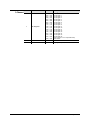
Main Level
Programming Levels
Addr
001–512
CHnd
SLnd
AUto
CoLo
LEd
dISP
VEr
Description
Sets the DMX starting address
3CH
3-channel mode
20CH
20-channel mode
SL-0
Slave mode 0
SL-1
Slave mode 1 (reserved for future use)
rUn
Auto program
rEd
0–255
Red (0–100%)
GrEE
0–255
Green (0–100%
bLUE
0–255
Blue (0–100%)
So1
Strobe, slow speed
So2
Strobe, medium speed
So3
Strobe, fast speed
on
LED background light on
oFF
LED background light off
dISP
Normal display
dSIP
Inverted display
Shows currently installed software version
The programming level Slave mode 1 (SL-1) may or may not show on the product’s
display. When selecting the Slave mode, use SL-0. Slave mode 1 (SL-1) is reserved
for future use.
Page 10 of 19
HIVE™ User Manual