1
Viewing the HISTORY
Use the UP/DOWN button to select the desired function and then press ENTER.
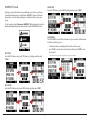
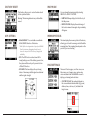
• Select TRACK to view the route of the training/workout:
Your device will save the history for your trainings and workouts. To view the
history data, select Main menu > HISTORY.
1
3
zoom out the map
2
4
zoom in the map
- Press ENTER again to display the diagram of speed/heart rate*/cadence*.
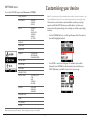
Information in the History data
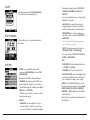
Select LIST ALL to display all of the recorded trainings and workouts.
Note: Select DELETE ALL to delete all data saved on the device.
5
6
* For selected models only.
• Select REPEAT to track back to the start point (BACKWARD) or end point
(FORWARD) of the route.
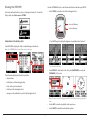
The information displayed in the history includes:
• date and time
• total distance of the training/workout
• total calories you have burned
• total time of the training/workout
• average records and fastest records of the training/workout
Note: The map screen will be displayed as BIRD'S EYE VIEW mode when you repeat the
track.
• Select LAPS to view the lap details on the map screen.
• Select DELETE to delete the selected history data.
11