1
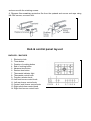
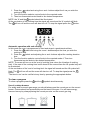
1. Press the
symbol and using the + and - buttons adjust the ti me you wish the
cooking to stop
2. Turn the function selector control knob to the required mode.
3. Then turn thermostat control knob to the desired temperature.
NOTE: the 'A' and the
symbol should be illuminated.
At the conclusion of the cooking time the signal will sound and the 'A' symbol will flash.
The
will turn off and the oven will also turn off. To stop the signal press the
button.
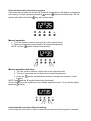
Automatic operation with end cooking
In this mode the oven is programmed to start and stop at a predetermined time.
1. Press the symbol and using the + and - buttons adjust the time you wish the
cooking to stop.
2. Press the
symbol and adjusting the + and - buttons adjust the cooking duration
time.
3. Turn the function selector control knob to the required mode 4. Then turn
thermostat control knob to the desired temperature.
NOTE: The oven will turn on at the 'end of cooking' time minus the 'duration of cooking
time'. If the start of the cooking time is still ahead of the current time the 'A' symbol only will
be illuminated.
At the conclusion of the 'end of cooking time' the signal will sound and the 'A' symbol will
flash. The
will turn off and the oven will also turn off. To stop the signal press the
button.
'The time to run' can be verified at any time by pressing the appropriate button.
To clear a program
To clear a program press the
and the
symbols simultaneously.
Use of cooktop burners
For safety and economie gas usage you should always use the correct pan on the correct
burner. Flames should not protrude beyond the base of the pan. You will save energy,
time and money by always placing the correct pan size on the correct gas ring