1
Appendix B. PCI Adapters Placement Reference
This appendix lists a few important considerations regarding placement of adapters within
your system unit.
See also the Adapters for Multiple Bus Systems manual, order number 86 A1 27HX, for
more information about adapters.
Installing an Adapter in your System
This system is designed for customers to install adapters. Use this guide to determine if
there are specific slot requirements for adapters that you may be installing.
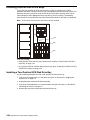
12
11
10
09
08
07
06
05
04
03
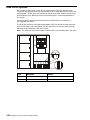
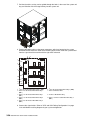
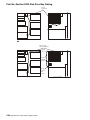
64–bit 5V Slots
at 33MHz
64–bit 3.3V Slots
at 66MHz
64–bit 5V Slots
at 33MHz
64–bit 3.3V Slots
at 66MHz
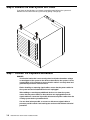
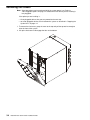
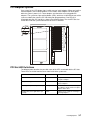
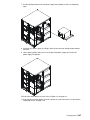
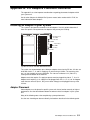
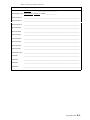
(System Unit Rear View with Numbered Slots)
The system can accommodate up to 10 feature adapters based on the PCI bus. All slots are
64 bit with slots 6, 7, 11 and 12 supplying +5v and running at 33Mhz. The remaining slots
are 3.3v slots capable of running at 66 Mhz. The slots are numbered 3–12 (C03–C12)
starting from the bottom of the machine.
Adapter cards that require +5v supply to operate must be plugged into slots 6, 7, 11 or 12.
Adapter cards requiring +3.3v supply must be plugged into slots 3, 4, 5, 8, 9, or 10. Adapter
cards that are universal (that is, they run on either voltage) can be plugged into any of the
10 slots.
Adapter Placement
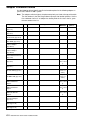
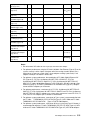
Some adapters must be placed in specific system unit slots to function correctly at highest
performance. Use the table below to determine where to install an adapter in your system
unit.
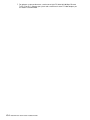
Many of the following notes refer to optimizing system performance.
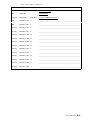
Use the rear–view diagram above to identify slot locations described in the following table.
PCI Adapters Placement Reference
C-1