1
Adding Multiple Entries for the same Item
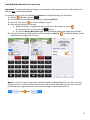
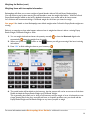
Important: To add partial bottles by Weight, you will need to make separate entries for full bottles and an
entry for each individual partial bottle.
For example, if you have three full bottles of Absolut and one partial bottle, you will need to:
1. Add the
3 Bottles and press
.
2. And then add the individual partial bottle by re-selecting Absolut.
3. Press the “Wt” button
on the Unit Selection control.
4. Place the partial bottle on the scale.
a. Weigh the bottle on a digital scale and manually enter the number of ounces
(For example, 55.12 oz) and press the
button.
b. Or have the Digitag Bluetooth digital scale automatically detect the weight from the scale.
5. Note that the Inventory now includes two Item entries for Absolut.
The three full bottles and the
individual bottle weighing 55.12 ounces.
Note: It is easy to forget to switch back and forth between Full Bottles/Kegs/Cans and Wt on the Unit
Selection control, so we recommend that you first enter all of the full bottles, and then enter all of the
partial bottles by weight afterwards so that you don’t forget to switch back and forth.
12