1
Level Issues
Low Level
This problem can eventually be caused by balanced wiring. If the level becomes low when the
museq is activated, a pin of the XLR connector at the input is probably not connected. To ensure
proper operation, make sure to have both pins connected.
The classic example for this problem is a balanced XLR cable that is connected to an unbalanced
output which only uses ground and pin 2 – connecting pin 3 to ground should solve the trouble.
Level Jump
In some audio processors the output stage is designed in a way that the level will always stay the
same – no matter if it is connected with a balanced or an unbalanced cable. If pin 3 is connected
to ground, for example, the level at pin 2 will automatically become twice as loud as before. This
kind of output stage is usually unproblematic.
But there are also stages which cannot compensate that. Then the level at pin 2 stays as it is, even
if pin 3 is connected to ground. If the museq is placed between a device with this kind of output
stage and a device with unbalanced inputs with pin 3 connected to ground, it is possible that the
level will jump up by 6 dB when the equalizer is activated.
As a general rule, balanced input stages are always the best choice. In case they are not available,
the first attempt to solve this problem should be to disconnect pin 3 at the XLR inputs of the
museq and then connect it to ground. This generates an unbalanced signal that should not shift
levels anymore.
Symbols
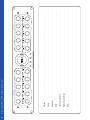
In order to maintain a clearly arranged front panel, the museq uses the following symbols:
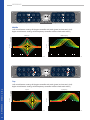
Low Cut
LED on: filter is in Low Cut mode | LED off: filter is in Low Shelf mode
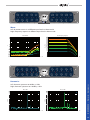
Cut Gain
LED on: frequency band is attenuated | LED off: frequency band is boosted
Narrow Q
LED on: high quality factor (Q) | LED off: low quality factor (Q)
BASICS – Level Issues & Symbols
High Cut
LED on: filter is in High Cut mode | LED off: filter is in High Shelf mode