1
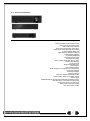
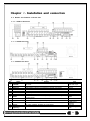
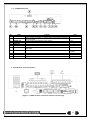
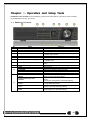
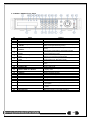
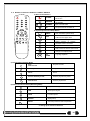
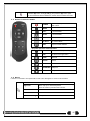
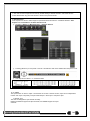
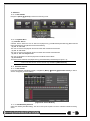
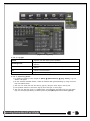
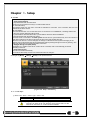
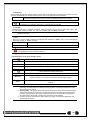
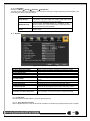
3-2HDRP8 / HDRP16 Front Panel
No
1
2
3
4
5
Name
LABEL
ODD
Eject
Reverse Play / Fast Reverse
RELAY
Reverse Frame by Frame
STATUS
9
Pause
LOCK
Forward Frame by Frame
LOG
Forward Play / Fast Forward
PLAY
ESC
10
USB Ports
11
12
POWER
POWER LED
13
MOVE / DISPLAY / SELECT
14
15
16
17
18
19
20
MENU
SEARCH
BACKUP
CAPTURE
PTZ
SPOT
NUMBERS
21
ERROR LED
22
ALARM LED
23
24
NETWORK LED
RECORD LED
6
7
8
Feature
Brand Name and Model Name
CD-RW and DVD-RW
CD and DVD Media
Backward Playback/Rewind (in Playback mode)
Relay Control (in Monitoring mode)
Backward Playback Frame by Frame (in Playback
mode)
View System Configuration (in Monitoring mode)
Pause (in Playback mode)
Lock (in Monitoring mode)
Playback Frame by Frame (in Playback mode)
System Log View(in Monitoring mode)
Playback/Fast Forward (in Playback mode)
Instant Playback (in Monitoring mode)
Exit the current menu or selects the upper menu
Connection ports for USB mouse and/or USB flash
drive
Turn the system power ON or OFF
Power LED On/Off
Moves from one category to another or changes the
display mode
Various Modes
Search Recorded Images
Save recorded images at other media
Capture a playing image into USB
Change Pan/Tilt/Zoom Mode
SPOT Control
Channel Selection and Number Input
Blue LED turned on upon fan defect or recording
interruption
Blue LED turned on upon the occurrence of event or
motion
Blue LED turned ON during remote access
Blue LED turned on upon HDD operation
14