1
5
Cable management finger assembly removal and replacement
Cable management finger assembly removal and replacement
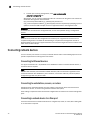
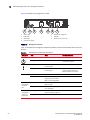
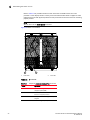
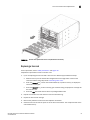
The Brocade VDX 8770-4 comes equipped with two vertical cable management finger assemblies.
It can continue to operate during the replacement of the cable management fingers. Due to the
horizontal orientation of the line cards in the Brocade VDX 8770-4, the cable management finger
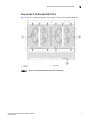
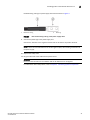
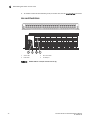
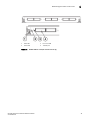
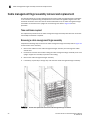
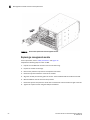
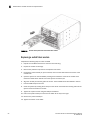
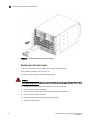
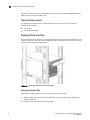
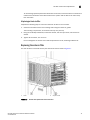
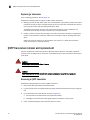
assemblies are attached to the uprights of the mounting rack. Refer to Figure 19 for this
procedure.
Time and items required
The replacement procedure for the cable management finger assembly takes less than 5 minutes.
A #1 Phillips screwdriver is required.
Removing a cable management finger assembly
Complete the following steps to remove the cable management finger assembly. Refer to Figure 19
for the location of the assembly.
1. Remove the cables from the cable management finger assembly and rearrange the cables
around the it.
2. Unscrew and save the three screws holding the cable management finger assembly to the rack
upright. Support the assembly to prevent it from falling.
3. Remove the cable management finger assembly.
4. If necessary, repeat step 1 through step 3 for the other cable management finger assembly.
FIGURE 19
58
Removal and replacement of the vertical cable management finger assemblies
Brocade VDX 8770-4 Hardware Reference Manual
53-1002563-05