1
XTRA
which is undesirable for a large audience.
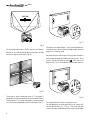
Preferably, use a screen with black, non-reflecting borders,
which will perfectly frame the projected image.
Avoid light shining directly on the screen during projection as
this will reduce contrast and black level detail on the projected
image. For the true cinema experience best results are
achieved with little or no ambient light.
Furniture and other objects with reflecting surfaces, as well as
light coloured walls should be avoided, as they are likely to
interfere with the screen’s characteristics.
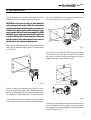
5 SWITCHING ON AND OFF THE PROJECTOR
CAUTION: Connect the projector to a power supply
with a nominal voltage within the following values:
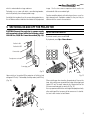
100-240 Vac, 50/60 Hz. It must be earthed (Fig. 13).
SWITCH ON FROM STAND-BY
By remote control: press one of 1...9
By keyboard: press Up or Down Arrow .
Position I : ON
Position O : OFF
Power switch
Fused power socket
20
05
Power plug
F1
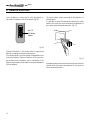
Upon switch on (in position I) the projector will initialise (red
and green LEDs on). Followed by stand-by mode (red LED on)
(Fig. 14).
E
Fig. 13
Fig. 15
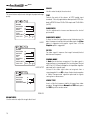
When switching on from stand-by, the projector will turn on the
lamp; after a brief warm up period the image will be displayed
(green LED on).The input automatically selected will be the
last one memorised prior to switch off (Fig. 15).
You may experience difficulties switching on the projector shortly
after switching off: the lamp may fail to come on as it is too hot.
Just wait a few minutes to cool it down.
DVI
NC
C-SY
Fig. 14
9